Leaderboard




Popular Content
Showing content with the highest reputation on 02/01/25 in Posts
-
The linked thread has info you and your friends could have followed, the nobrl mount option specifically for the backup related problems. Other permissions still need to be done right. So as a test try: sudo mount -t cifs //192.168.1.144/data /mnt/data -o nobrl,username=myuseradmin,password=xxxxxxx If that works then consider using /etc/fstab to mount the shares automatically on boot instead of manually or with a script. Also, instead of using un/pw in the mount command you can create a file to use for credentials. Like /etc/ahole.cifs with: username=value password=value Then in the fstab add each share to mount: //192.168.1.144/data /mnt/data cifs credentials=/etc/ahole.cifs,rw,nobrl 0 0 You can try to force permissions on files and directories created on the share from the client (Ubuntu Emby server) side: //192.168.1.144/data /mnt/data cifs credentials=/etc/ahole.cifs,rw,nobrl,file_mode=0664,dir_mode=0775 0 0 And you can try to force ownership of the mount, might prevent access by others on the client side: //192.168.1.144/data /mnt/data cifs credentials=/etc/ahole.cifs,rw,nobrl,uid=1000,gid=1000 0 0 Ownership and permissions are dependent on how you plan to access and manage the media files and directories. If you have multi-user access in mind then ownership and permissions have to be aligned to allow different user access.2 points
-
Thank you for posting this problem & fix. Searches that lead to descriptions of a problem that someone is having with no details regarding the fix can be so frustrating. Thanks to a few people here I am SO happy to have my collections perfectly working. In MY case, I learned that a LIBRARY scan does NOT do anything for newly enabled Automatic Collections - you must do a refresh of all the METADATA for collections to show up at all and be right. I used to manually create collections and have to populate them with the associated movies, manually maintaining / updating them as content came and went. Same thing with manually creating a collection for specific actors instead of just searching for them and finding their movies that way. For me to have all of that working so well is like Christmas, my birthday and the Easter Bunny came all at once!2 points
-
I am 90% done with the new code base. It's small and quick. @TZTZorowill be proud about how his CSS code was used. I hope to post it in about a week. Vic2 points
-
TVnext will surely be here first, otherwise, I guess we'll have the biggest, best and most beautiful trees ever seen. Tremendous forests, folks! This is the MEGA project! Make Emby Greater Again2 points
-
.. for a friend?2 points
-
They are already the same. The only difference is the size of the image.2 points
-
TheTVDB now supports more alternative orders than just Aired/Absolute/DVD. Can Emby query these additional orders and add them as options? Two examples of shows I've seen this used are Re:Zero which has a "Director's Cut" display order and Money Heist which has a "Netflix" order. https://thetvdb.com/series/re-zero-starting-life-in-another-world https://thetvdb.com/series/la-casa-de-papel1 point
-
Hello, Perhaps I am not the first one to ask this question but it will be very cool if this feature could be implemented. I have 2 servers one at home and the other at work. ( and soon a third one...) So I have a movies library called movies on each server. I would like to see all the movies from a single 'virtual server location' when I use the app (ios or android ) where I will see only one movies library containing movies informations from the movie library at work and the movie library at home. It's an aggregation of movies informations from the movie library at work and the movie library at home. In fact when a user have multiple servers it will be perfect if another choice in the server list called "all servers" for example appears automatically with a merge of media informations from librairies with the same name on different servers.1 point
-
As I mention in a related post, I love the additional subfolders for Movie Extras (eg, Shorts, Scenes, Interviews, etc.)! It would be awesome to extend this functionality to TV Series as well. Specifically to add support for many/all of the same folders supported for Movie Extras, eg, extras specials shorts scenes featurettes behind the scenes deleted scenes interviews trailers As well as any additional folders that get added in the future (eg, hopefully Galleries). Support Placement of "Extras" Folders Within Each Season Folder, Plus A Naming Scheme to Link A Particular Extras Folder with a Specific Episode (eg, "\Season 1\E1 - Deleted Scenes\" for episode 1 deleted scenes): I want to clarify that it would be great if these various "extras" folder types could reside within each Season folder. So for example, within a Season 1 folder we could then have an "Extras" folder, a "Deleted Scenes" folder, a "Featurettes" folder, etc. And furthermore, that we could designate a particular folder to refer to a specific episode (eg, "\Season 1\E1 - Deleted Scenes\" for episode 1 deleted scenes). See more below, particularly why I think this would be so useful: https://emby.media/community/index.php?/topic/55915-emby-server-theater-additional-extrasspecial-folder-types-for-tv-series-similar-to-movies/&do=findComment&comment=587195 Thanks for your consideration! PS - If this is something you might like to see implemented, be sure to "Like" this top/first post (as well as any subsequent posts in this thread that highlight particular aspects of what you are interested in) -- "Liking" the top/first post helps the Devs to know how much interest there is in a given Feature Request.1 point
-
My whole family love laughing at the movie suggestion content under the More Like This section when looking at a movie library item. But, while it would nix our long-running gag, you might want to do something about it. After all, it's awfully useless. Examples: Movie: 2001: A Space Odyssey More Like This content: 101 Dalmatians, Dragons, Gift of the Night Fury, and Princess and the Frog. Movie: The Shining More...: Aladdin, Hondo, Watchmen Movie: Aliens More...: Bridge at Remagen, Guardians of the Galaxy, Hercules Movie: Star Wars More...: The Parent Trap, Goldeneye, Mad Max Fury Road, You Only Live Twice Ok, I kinda see Mad Max being linked to Star Wars since they're both sci-fi, but seriously, The Parent Trap? OMG are you guys kidding me? Or linking Disney's Aladdin to The Shining?! And, yeah, 101 Dalmatians or Princess and the Frog being linked to 2001? Oh, that's too rich, really. Still, we'd rather laugh at Billy Crystal than More Like This, so please consider fixing it? PS Beverly Hills Cop is linked to John Wick, ROFLMAO1 point
-
1 point
-
See attached. I've used this Handbrake profile to transform my AAC audio issues into high grade MP3 without losing video quality. I'm sure the profile isn't "perfect", but it's a good place to start for those of us who aren't super focused on this. EMBY - 4k :w MP3.json1 point
-
Install instructions for everyone who uses Ubutnu 24.04 clone keyring : curl -fsSl https://repo.amhosting.de/repo-key.pub | gpg --dearmor -o /usr/share/keyrings/repo-amhosting.gpg then create: /etc/apt/sources.ist.d/emby.list add the following into it: X-Repolib-Name: emby-amhosting Types: deb URIs: https://repo.amhosting.de/ubuntu Suites: beta stable Components: main signed-By: /usr/share/keyrings/repo-amhosting.gpg the rest is standard ubuntu procedure.1 point
-
That is because auto is not what anyone thinks it is and the default for Roku is I believe like 40Mbps. Auto will never mean max rate for the clients. But to many different things going on in this topic as the Roku issue is by design. The iPhone issue would be totally different as you are lower the bitrate. But one may want to look at subtitles possibly. So does the same happen with media without subtitles? Limit to about 1Mbps &VideoBitrate=874194&AudioBitrate=125807 App: Emby for iOS 2.2.33 &TranscodeReasons=ContainerBitrateExceedsLimit 18:47:08.242 Stream mapping: 18:47:08.242 Stream #0:1 -> #0:0 (h264 (native) -> h264 (h264_vaapi)) 18:47:08.242 Stream #0:0 -> #0:1 (copy) 18:47:08.242 Stream #0:2 -> #1:0 (eia_608 (cc_dec) -> webvtt (native)) 18:47:08.242 Stream #0:1 -> #1:1 (copy)1 point
-
Hi. We thank you for participating in beta testing for the server. It should not be unexpected for issues to occur with pre-release versions. [my emphasis] That is not a fair statement. It may be fair to say that you may not have been able to take advantage of some of the upgrades (although I imagine you actually have just not some of the features you want). For everyone that uses Live TV, it is a big deal, but it is true that this is a minority of our users and the things we are working on for 4.9 will impact most Emby users and they have been slated for a long time as well.1 point
-
I’ve tried organizing audiobooks on platforms like Plex and Emby before, and while they’re great for managing movies or music, I found audiobooks slightly tricky to handle there, too. It’s manageable with some tweaks, like tagging authors as album artists, but it doesn’t feel as smooth compared to platforms explicitly designed for audiobooks and ebooks. For audiobooks that require good narration and engaging delivery, I’ve enjoyed experiencing stories like The Lottery - by Shirley Jackson. It’s gripping and works better on a dedicated app where the narrative style stands out.1 point
-
Hi. it already is. You don't need to sideload anymore. You can install right from the store.1 point
-
Fortunately, I recently migrated all my video playlists to Collections, and it is only videos that I was considering moving to different folders. I currently only use playlists for Music, which already has well organized folder tree structure. By "touching" the media, I assume you mean to Edit Metadata, make some small change then Save, so it "forces" Emby to create a new NFO file for that video. As I recall, you said that once I activate NFO Emby will NOT automatically create NFO files for all existing videos. That it will only create them for newly added or edited content. Is this correct?1 point
-
I can't be certain if that was the issue, I will test the plugin again (hopefully tomorrow) to make sure it works as expected with the most recent Emby version.1 point
-
I can't use that in the LG client app. I solved the issue by separating my collections that contained a mix of TV and Film. eg) I now have Star Wars and Star Wars TV. Same for Marvel, Star Trek etc... I think I prefer it this way anyway instead of lumping them all into one collection.1 point
-
Yeah they seem to play fine, they trigger DV mode on my television, they look right to me. They appear to be profile 8.1 files, but mis-tagged or mis-labelled somehow. Strange.1 point
-
This should work for Collections. Playlists on the other hand reference file locations, so will need to be rebuilt. I would get a list of content for each playlist on your system, even if it's screenshots. This way you have the info to rebuild the playlist if needed. Perhaps it would make sense to move files in batches where you "touch" the media metadata to create the NFOs. Start by doing any media in playlists first. This way you can add the media back to the playlist after each batch is processed. That gets hardest done first! Carlo1 point
-
@Carlo Es funktioniert hier in Neuseeland perfekt auf meine Smartphone. Also denke ich mit dem Client auf dem neuen TV solle es dann auch gehen.1 point
-
Hi, a good method of updating/correcting music embedded metadata is to use a third party music tagging program such as Picard or Mp3tag. (I mainly use Mp3tag myself). Then rescan your library (or the relevant parent folder) and Emby will import the changes. If you don't update your embedded Tags, you may lose your Emby changes if you rescan the library and/or update metadata. The programs are relatively easy to learn the basics and then not only Emby, but also other music apps should be able read the same info from your files. (Note: You could have either "ALBUMARTIST" and/or "ALBUM ARTIST" tags embedded into your files. If you try Mp3tag, you need to View>Extended Tags to see all tags, not just rely on the default LHS tag panel.) Oh, I forgot to mention, in Mp3tag you can update a whole Album (or more) at once. No need to update by individual track.1 point
-
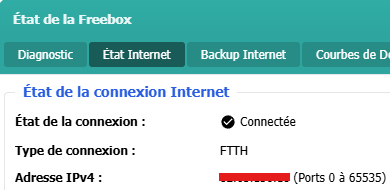
Bonjour, Je voudrais préciser que chez Free (ADSL, Fibre), les IP sont déjà fixes. Le fait d'avoir une IP dite "full-stack" permet en réalité de disposer de l'ensemble des ports pour soi tout seul... donc d'avoir une IP (v4) individuelle au lieu d'avoir une IP partagée entre différents abonnés où chacun a une plage de ports attribuée à sa box. En gros, jusqu'à ce que Hubogoss demande une IP full-stack, le port 53454 (visible sur les captures plus haut) n'arrivait sans doute pas sur sa box mais sur celle d'un autre abonné. Il ne l'aura peut-être pas remarqué mais il a certainement changé d'IP lorsqu'il est passé full-stack. Free, par défaut, partage une même adresse IP (ip v4) entre plusieurs abonnés du fait de la pénurie d'adresse IP v4. Pour la plupart des gens, ça ne pose aucun problème. Les ennuis commencent lorsqu'on héberge des services auxquels on souhaite accéder depuis l'extérieur : soit on les configure pour utiliser les ports attribués à sa box quitte à perdre en souplesse (si on n'a pas tcp/443 pour soi, c'est embêtant si on veut servir une page https sur le port standard), soit on demande à passer en full-stack afin d'être tranquille. C'est pour cela que, dans l'interface web de la Freebox, la plage de ports disponibles est précisée à côté de l'IP (v4) :
 1 point
 -
Interesting, I don't think I've seen profile 8.6 before. Do you have any other 8.6 files that report correctly? Or are they all 7.6/8.1?1 point
-
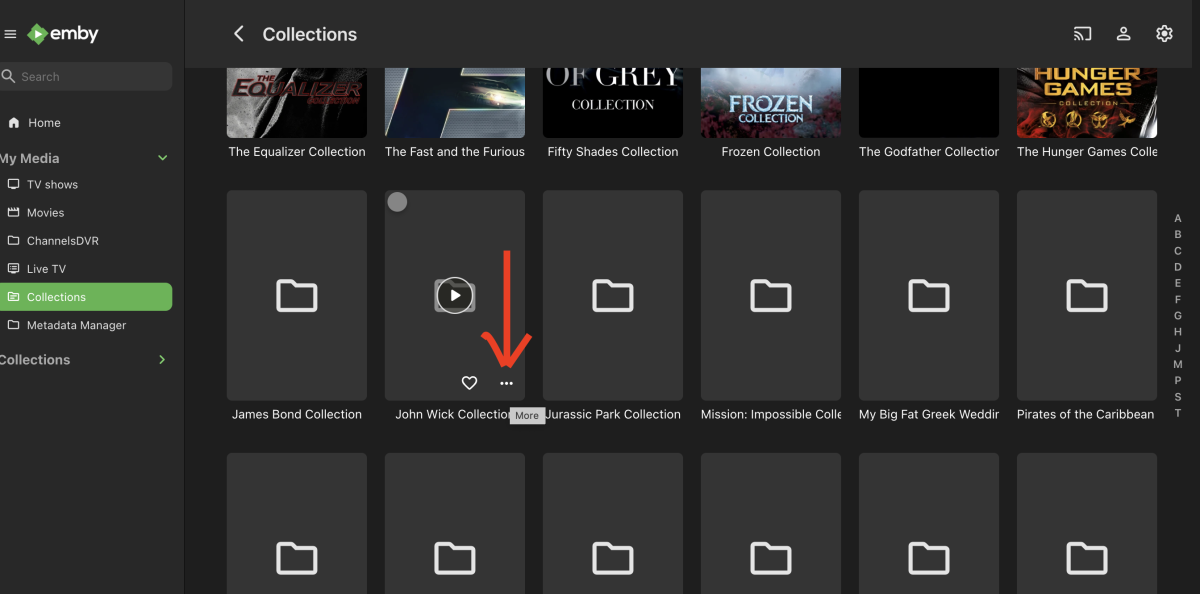
So I finally found the secret that I am sure can be coded into a fix in the app If you refresh metadata for the entire library OR for the entire collection (no matter how many times) - it won't work If you go into the Collections folder and refresh metadata for each folder (one at a time) the images will appear. At first it seemed that I had to refresh metadata for each movie within the collection but just refrashing the folder will work -- see screnshot
 1 point
 -
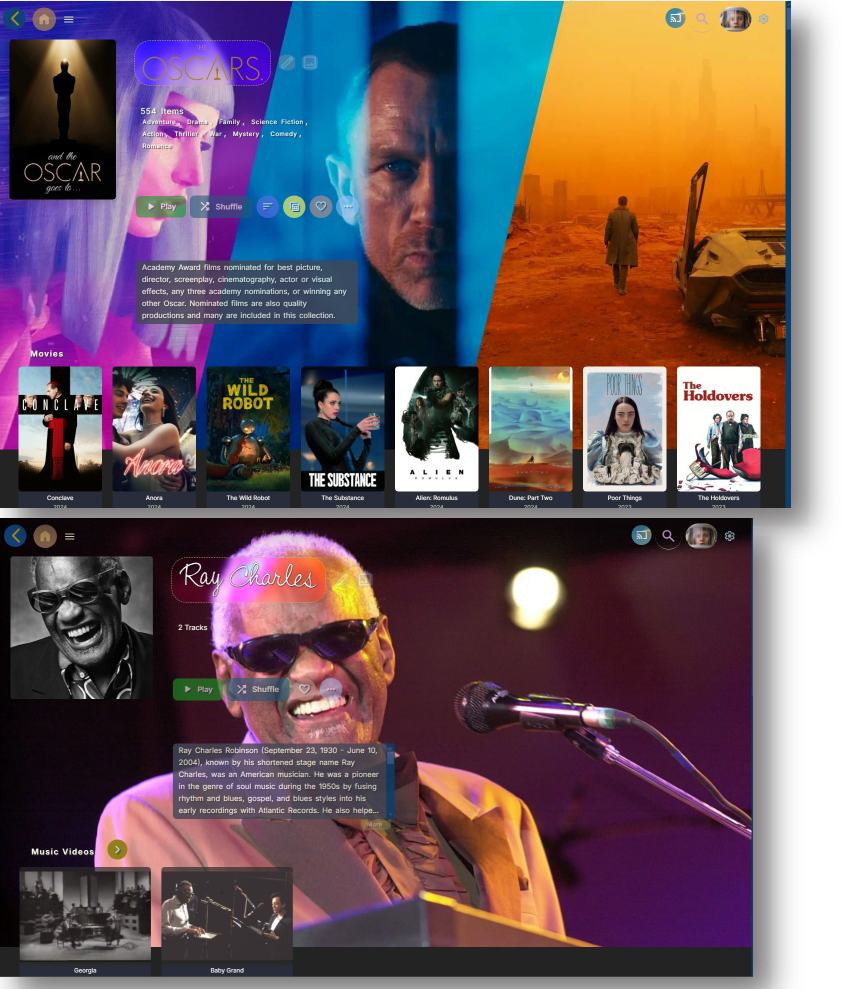
My Custom CSS code changes these pages. The alignment is pretty close. The width of the main poster of the artist or collection, will still push the logo and play buttons automatically. These auto changes make the page work for various browser window sizes to match different hardware or if the user has a smaller floating window. If you lock everything down to precise alignments, the page will break for many users that use mobile, tablets, or smaller notebooks. You don't design a web page to fit a magazine page or print design. Web pages have to be more flexible, or many people will just see broken pages that are cut off or rows that break. Using precise alignment that does not flex with the screen size will just make the entire site look broken and no one visits such web pages. Scroll to the bottom of the custom theme post to get the latest version. The code for changing these pages are probably about 60 style adjustments and 6 different exceptions for smaller browsers, TV, tablets and mobile. The entire custom code is currently at 3333 lines no optimized.
 1 point
 -
That is how the status changed from being unsure whether they wanted to implement it at all to committing to which beta cycle it would come in. Paul1 point
-
Check this post about "Auto"1 point
-
Hi Luke. I ended up creating new folders with different names to resolve the issue but, the next time it happens will try to remember to get screenshots for you. Thanks!1 point
-
Hi, have you checked out the profile pin feature ? You can configure this in the same place you configure your password for the server. This will allow you to get back in quicker.1 point
-
if tvnext ever arrives, will it have the feature to setup backup channels for IPTV? So if one channel won't play, automatically use another channel specified by user? Threadfin and Streammaster have this feature. Thanks1 point
-
Emby Windows & Emby Xbox A new stable version 2.211.0.0 is available now. Please go to the Microsoft Store and check for updates. Changes 2.211.0 [Win] MPV: Fix subtitle font mapping (aka ASS font size issue) [Win] MPV: Indicate AC-4 audio as unsupported [Win] MPV: Fix audio device getting lost on update [Win] MPV: Use default audio device if selected one isn't available [Win] Windows Theme: Improve playback-start UI behavior [Win] Windows Theme: Add theme option for animated scrolling [Win] Windows Theme: Improve appearance of focus indication for keyboard navigation [Win] Windows Theme: Fix various layout glitches and imperfections [Win] Windows Theme: Don't show in list for settings theme selection [Win] Fix occasional launch exceptions [Win] Perform server discovery early [Win] Fix issues with Turkish locale 2.210.0 [Win] Adjust store listings [Xbox] Don't show full-screen button [Xbox] Update Holiday Bonanza 2.209.0 [Win] MPV: Fix passthrough for DTS-HD [Win] MPV: Add option to ignore volume input commands [Win] MPV: Fix audio device selection getting lost [Win] MPV: Show audio passthrough option for digital outputs [Win] MPV: Fix passthrough for DTS-HD [Win] Persist audio playback volumne1 point
-
I was actually able to get it to work on A310 / Kernel 6.8 / Lxc inside Proxmox, by adding these parametres into embyservice service file (location can be taken from "systemctl status embyservice", i'm not at home now so can't check it and don't remember it precisely.) Environment="NEOReadDebugKeys=1" Environment="OverrideGpuAddressSpace=48" Added those two under [Service] in the service file, then "systemctl daemon-reload", then reboot for good measure. Now i have all quicksync options enabled in the transcoding tab, for both decoding and encoding, as well as OpenCL tone mapping for both QSV and VAAPI in the tone mapping tab.1 point
-
Intel Arc cards drivers are bugged with Windows and Unbuntu and won't work with Tone Mapping. Plex and Jellyfin made a workaround somehow. On Linux (none Unbuntu) you can avoid the bug by not using kernel 6.8. On Windows you can fix it by using an old driver (forgot version). I sadly don't think there is much you can do unless Intel fixes their mess or the Emby team makes the same workaround like Plex and Jellyfin. I'm using an Arc card my self and i'm dreading the day Unraid updates their kernel. Who knows if the card will still work.1 point
-
1 point
-
I really wish all "suggestions" could be turned off. Others seem to like them and it seems many use them but the "more like this" is, for me, just an unwelcome intrusion into my viewing experience. I have no desire to force others to view the way I do, I just want Emby to actually provide their promise of: "Emby, your media your way." Right now it often seems closer to: "Emby your media our way" and that is not what I would prefer from my media manager. But it is a lot better than the alternatives. Everything not directly related to finding and showing my media is just "fluff" and I don't want my media to be "fluffy." While I understand that the "fluff" is important to many and that things I don't want are important to others and that "options" increase programming complexity I would like to see much of what Emby provides become optional.1 point
-
Hi folks, I've dug through many places in server and Emby Theater, not to mention the web interface, and haven't yet figured this out. When I open up Emby... usually on Emby Theater but sometimes on the web browser or on Android, I either know what I want to watch, or I want to scroll through what's there. I have no interest in Emby or anyone else suggesting anything to me. But on many views and apps, Suggestions is right there often as the first, and highlighted-by-default, option. I want this off. All the way off. Across all devices. How do I do this? This is of course a quibble in the grand scheme of things, and I love Emby, but I'm chafing a bit with various interface issues and this is the one that's bugging me right now. Please help me put it to rest. Thanks! Marc1 point
-
Hi, You have a few options. First you can store the metadata in a specific location set by the meta-data field found at LIBRARY-ADVANCED, but this is only used if you don't turn on the option in each library to store the info with the media. However, Emby uses a CACHE to hold rendered images which you can set the location in the SETTINGS menu. One of the things you can do is pre-populate the cache and force it to render the images. The manual way for example is load up your movies and then scroll page by page until you've viewed every movie. Same for TV Shows. That will make the main navigational images cached and make viewing your libraries much easier. However when you get to detail screens or TV Show season the particular drive will need to spin up. Personally I don't allow my drives to spin down as I find they die quicker that way especially with multiple drives in a cabinet and the spin up/spin down causes vibrations that don't happen when they constantly run. I don't worry about the cost to run those drives because it's actually not that much and cheaper then the replacement costs overall. So for me it's win/win leaving them running as everything is quicker. But that's just me.1 point
-
This thread is three and a half years old, and yet it looks like you still can't remove "Suggestions" or at least make it not the default view? Please tell me there's a way to do it, because I can't stand it. I just want to see my music!1 point
-
I am most probably in the minority but I would REALLY like to be able to turn off all "suggestions" and other like fluff in Emby. I only really want Emby to present my media for playing, play it correctly and allow a variety of sorting and grouping options. Currently Emby does the first pretty well the second quite well and the third horrendously poorly. The exact problems are, I believe, more suited for a different thread but just simply in the clients being able to reverse the current sort would go quite a ways toward making browsing a large library more friendly. I do NOT want or need software making suggestions as to what I might want to watch. I can make up my own mind about that and, while I am lazy in a lot of ways, I am not so lazy as to want to have software take responsibility away from me for choices. Others may well feel differently so this is another area where choice would be good.1 point
-
And hopefully it'll stay optional. I don't ever want to see Live TV in ET. So, if I don't have Live TV configured in the server it won't show in ET, right?1 point
-
Is this something you'd call user friendly?1 point
-
Or to change the order the tabs appear. At a minimum, allow us to choose the landing page. I will look for the feature requests regrading this and express interest. Unless someone has a link to share. Just lazy today. Sent from my iPhone using Tapatalk1 point
-
@@Happy2Play Why not simply make these sections optional? Have them enabled by default, but if someone wants to turn them they should have the ability Suggestions and Upcoming should be optional, a lot of us don't have cable so the Upcoming is especially annoying1 point
-
Hi @@Happy2Play, Thanks for the response. It's sad there's no way to turn this off, but I hope for such a configuration option in the future. I'm referring to both the "Suggestions" tab which is default in the web view: ...and "Because you watched..." type stuff in ET: And anything else that does anything other than showing my content in the way that I want it displayed. This includes "Upcoming episodes" (which I often don't get because I don't have cable...) and anything else that's not actually on my machine, or in the folder I'm currently looking at. Fundamentally, I want to use Emby to display my media the way I want it displayed. It used to very much be this way on MB for WMC. I had all sorts of views (poster, coverflow...) and a raft of configurations I could make behind the scenes. This is the way I'd like it to be in Emby, whether I use web or ET or whatnot. Thanks for listening guys! Marc1 point
-
I would also like to know how to turn off suggestions preferably globably or at least on a per library basis1 point
-
Movie Theme Videos Downloads Theme Videos for Movies Theme Videos for Movies The Movie Theme Videos Plugin will download Movie Intros where available to your local media library in the correct format and location required by the MediaBrowser 3 Server. Once installed and the movie theme intro videos downloaded,they will appear as backdrops whilst browsing your collections. As Theme Videos are supported by the Media Browser server, any client/theme can make use of them if they choose to. Current supported Clients & Themes Media Browser Theatre Media Browser Classic - All themes (with ThemeVideo Backdrops for MediaBrowser Classic - FREE plugin installed) Due to the nature of this plugin, a trial is offered which only downloads shows beginning with the letter A. Registering will give complete download of all available Support For support, please post HERE Revision History 1.0.2.0 (Release) API Update & Performance enhancements 1.0.0.1 (Release) API Update and delay added to reduce server load 1.0.0.0 (Release) Release1 point
-
Another 283 Theme Videos added! Run your Plugin Now! Obviously you might not have all of the 283 themes added but it should at least add a good chunk more for each user of the plugin! :-D A massive thanks to DigiTM for his contribution to the project!1 point