Leaderboard




Popular Content
Showing content with the highest reputation on 01/15/25 in Posts
-
HI, we're looking into this. Thanks.2 points
-
Will do. I’ll try to get it done tonight.2 points
-
It is really cool that Emby has the ability to support multiple versions of the same movie. It would be nice to have a setting on the client side to allow the user to set which version should be selected by default. This could be as simple a user-entered string, or it could be a list of detected strings to choose from. It could allow multiple entries and it would choose them in the order entered. On the Kodi side, it would also be nice to get the "Choose the Best Version for Me" option that the Emby app has.1 point
-
Any chance we could have this option when browsing the UI? Some of us have wide screens and projectors with lens shift and it would be nice to set the UI to display in a 2:39 format instead of 16:9. I can do that with my zidoo and it's really nice to fill the screen area. But I like the customization ability of emby way better. I have a nvdia shield I use with emby in both my living room and home theater. Once last missing piece lol I know you can buy special anamorphic lens to do this kind of stuff or a madvr, but not everyone wants to spend 6-10 grand on a lens or video processor when zooming out the image, letting the black bars sit outside the screen area is good enough for most of us. But options to adjust the gui ratio would be really really nice, it would be a game changer Many Thanks!1 point
-
All about the new app here:1 point
-
1 point
-
No sorry, its the same1 point
-
@feerlessleadrI will look into this.... Vic1 point
-
What are the permissions? Try switching to emby user and see how far down the path you can navigate. sudo su -s /bin/bash emby1 point
-
As is the case with every single piece of hardware they produce...1 point
-
So I run different VLAN's myself - I simply route it via the firewall - so I allow TCP 8096 from one VLAN to the other. The source network is of course the client network, the destination is the emby server network. Do not allow it the other way, as the emby server should never be pushing (initiating) a request to the client. Note for 'discovery' over different VLAN's - then you also need to forward the UDP port as well, but I never bothered, leaving discovery only working on the emby server vlan - all other vlan's need to enter the IP address directly. From a security point of view, allowing all traffic from one vlan to the other via an ACL is a big no-no, but from a network perspective, the traffic is still segmented so it serves a purpose.1 point
-
The only thing that worked was using NordVPN mesh. Everything else did not make a difference.1 point
-
Hi @Luke Thank you very much! I really appreciate it a lot!1 point
-
Right OK, then yea there's no way to control this right now.1 point
-
But the Kodi Team had build any; i hope the official emby team can build a clone1 point
-
I've pushed an update to the Emby anime plugin. It has an option on the plugin config screen that will allow you to force the usage of Romaji. Thanks.1 point
-
Awesome, thank you!1 point
-
Nope i did not know i could do this. This worked like a charm. I use Emby for Kodi Next Gen and its in version 11.1.15 But additional question, is it not possible to have the program clean it up automatically. I mean i can live with this clean up which is WAY faster than taking one file at the time. Just curious1 point
-
@LukeIt does not work with different title. I've just tried to change their title but it does not work since the search field seems to be limited to 42 characters in length, and the difference in the title happens later. To be crystal clear : They have different file name, which follow the naming convention to be recognized as multi-version movie. The 3rd solution I can think of would be to click on "split version apart" so it would appear as 2 different movies in the search results, but it would lead to more confusion for the users who may click on the extended version by mistake instead of the regular one. I don't think we should be looking for a workaround, I just wanted to grab your attention on this behavior, for the day you have time to work on it, no big deal, and no urgent matter Best regards,1 point
-
1 point
-
Wow! Update: Downloaded Emby Server (BETA) for Synology NAS version 4.9.0.35-724090035 (64-bit) for Manual Installation from your download page and you'll never guess what happened? EXIF/XMP/IPTC embedded metadata is NOW suddenly being READ by Emby again. So weird! Thanks for the ride. I learned a LOT!1 point
-
Hi. Thanks for the reply, which was fleshed out more fully by your colleague. Decided to conduct a complete fresh installation of Emby, so did a ssh rm -rf of all evidence of the first installation, and went to Synology's third-party contrib and devs section and you'll never guess what wasn't there any more ... Emby's Beta version! Where did it go, do you suppose? The only version available for installation is 4.8.8.0-724080800, but you already know that, I am guessing. Is there a specific reason the Beta version was removed? I installed the non-Beta version and it "fixed" my issue with the <set> NFO tag; however, it "broke" the reading of my XMP/EXIF/IPTC photo metadata. Hmmmm. Thanks.1 point
-
+1 for transcoding temp path. If you watch live TV then the DVR playback/rewind buffer can have dedicated storage (transcoding temp) and not run the risk of filling the boot/root drive. If you do conversions you can have yet another separate dedicated path for that as well. Free SSDs for non-critical stuff you can toss when they die. Just keep them trimmed.1 point
-
But that is a lot of money spent for what i find is marginal improvement. The slowness i mentioned is never longer than 20-30 seconds or so at the worst and that is for my 4500+ movie library when I first load the movie library and immanently go to say the Ts, All the media is available right away but the images can take 20-30 seconds to all load. I do not think saving a maximum of 30 seconds every so often matters much, at least for me. If i paid hundreds of dollars to save a few seconds from time to time I would feel my money was wasted.1 point
-
Correct. But it is not failing the the way I would normally expect - like with a bad response from the server because something stripped out the POST data. Instead it is completely unable to reach the server - as if something on the device or network is preventing http POST entirely.1 point
-
I forgot report back .... shortly after i made my post I had a brain fart. a while back i got some new drives and rearranged some files, and drive letter assignments changed. i guess when that happens, the file location in the strm file just tends not to work any more. once i addressed that issue every thing worked fine on all platforms1 point
-
I find that SSDs do little to improve streaming. Although as a boot device the do speed things up a LOT. Video streaming is not either a disk or CPU hog. It is very simple and non-invasive process. It is mostly only transcoding that causes problems and that can be pretty easily avoided. I have toyed with the idea of using SSDs in my drive array but I have rejected that idea as the improvement would be tiny. Most of the time when I see any Emby slowness at all it is for things like image loading during library access and that is not really slow at all. I just have to wait a very few seconds for all the images to catch up. I, currently, use no SSDs anywhere in my Emby setup and I rarely even notice any slowness at all. It, I think, is more a matter of perception than it is actual performance. Of course it probably helps that all my media direct plays and I do not have any need for high resolutions or high bit-rates. See, there is an advantage to having old eyes. I do not see any real advantage to SSDs but my use case is not exactly "usual."1 point
-
Hi, yes we will be adding support for this. Thanks.1 point
-
As additional clues for you, the requests that were succeeding were GETs and the one that failed to connect was a POST. This was why I was thinking something could be interfering.1 point
-
Hi, any update on this? I would like to use Android instead of TV version on my TV since it's more well developed now but neither support this function. I just hope you guys pay more attention on this feature, it's really important for many users whose library contains most sup subs . As a paid user, currently I have to use a modded version which is able to display the sup on black bar. If some random could just fix this issue, you guys should do it much better! @Luke@ebr1 point
-
@rbjtechyep, I have wifi and wired on different vlans but when I ran into this issue I activated an ACL (top of the list) to allow all traffic between these 2 vlans, so it shouldn't have an impact. I think if it did, it wouldn't be able to see the server at all.?. I was wondering if it was Bitdefender, but I couldn't find any evidence that it was blocking anything. Now that I've logged in, I've disconnected the wired LAN and switched back to wifi and Emby worked fine. I tested it by signing out and the issue raised its head when I tried to sign back in. Worth a try. Wired it back up and signed in again. When I have the time, I'll continue to play with it to see if I can figure it out. Cheers Chris1 point
-
Glad to hear it's fixed. Looking at the log above (sorry, didn't look at it before, now I'm intrigued..) - your emby server (wired) is on 192.168.10.x, your wifi appears to be on 192.168.20.x - so, depending on your subnet size, this 'may' be the same network, but it's likely not. If your subnet mask is 255.255.255.0 for each network, (a /24 or a single Class C Network - 255 Hosts) then they are actually seperate networks - and thus need routing between them. If this is all part of the 'out the box' settings on the router - then this makes sense - and there may well be 'something' blocking the routing, there may be a firewall or some sort of ACL inbetween them for starters. If the subnet mask is 255.255.0.0 - (a /16 or 65,534 Hosts..) then they are the 'same' network and do not need routing. By using the USB dongle/wired - you are directly on the 192.168.10.x network - thus no routing issues.1 point
-
That is a nice way to do it! Plugin is going well! The basic functionality is done, but still too rough to start hosting it. Biggest chunk left is making the website presentable. Then I can take on some test users, hopefully not more than a couple of weeks. There will be some features missing to begin with but once it's running they will get added quickly.1 point
-
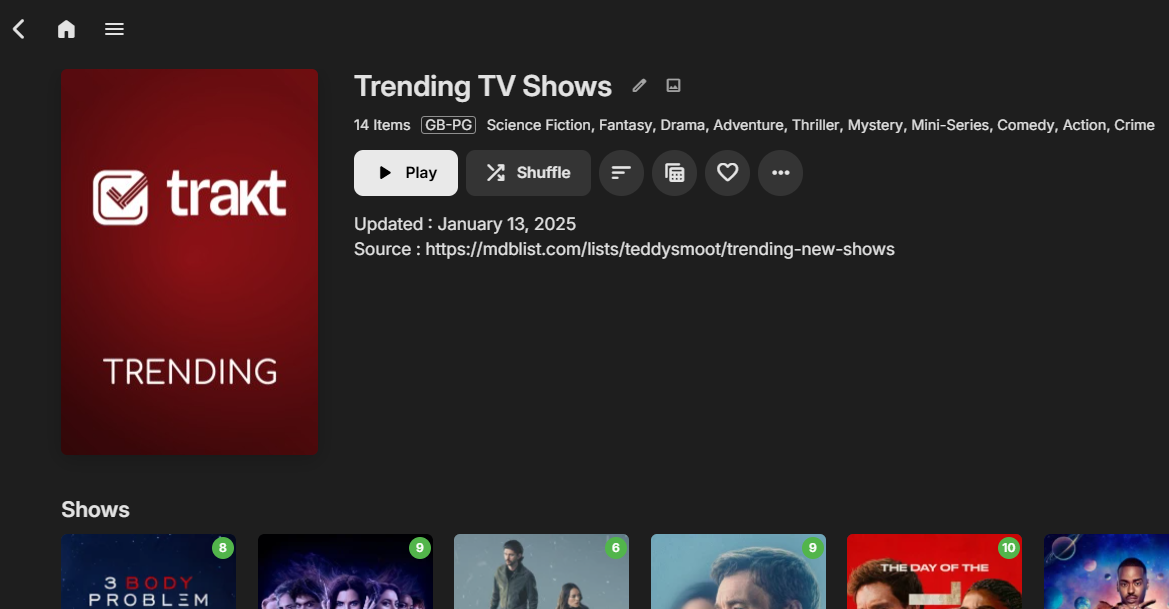
I noticed the description field was almost exclusively empty in mdb - so I've added some other useful info in there now you have kindly added the function to add to the 'Overview' For example in app.py - import datetime # RBJ .. description = "Updated : " + datetime.date.today().strftime("%B %d, %Y") + "<br/>Source : " + mdblist_list.get("source", None) # RBJ .. I'll get around to adding the URL as a proper emby 'link' but that needs more coding to add the functionality - so in the description will do for now ..
 1 point
 -
Tbh I use those icons when editing things. Its 1 click less than having to open 3 dot menu.1 point
-
Good thing we complained about the lack of progress 2 years ago. It really sped them up...1 point
-
This is really just a variation of the below. Please contribute there. Thanks.1 point
-
OK, Fehler gefunden !! Ich habe bei den Rechten an den Ordnern nur die User berechtigt. In der Synology App, muss man noch bei interne Systembenutzer Emby berechtigen. Hatte ich übersehen. Nun scheint es zu laufen. Na toll, das hätte ich mir sparen können. Vielen Dank an alle1 point
-
The log clearly shows it's an access problem.1 point
-
Ok, no problem, and thank you for the response. I have bought an app from the IOS store instead and will stream from my NAS server from there for now.1 point
-
Any update? Can we have an ETA On the fix please?1 point
-
Hi, we're looking into this. Thanks for reporting.1 point
-
ADM is currently offline due to hardware failure. I cannot offer an eta for it to be back online at present because i dont know yet what has died and what needs replacing. Its been online for almost 2 years with only 2 short outages so far.... Please be patient Thank for your understanding Back Online ! Took it apart blew it, put it back together ... workjing again ...1 point
-
I think you both hit on some of the things I thought 4.8 would provide... namely the CoverArt portion. As a visual person seeing my files with DV or HDR, HDR+ means a lot to me. I can see on my TV screen the files clearly say Dolby Vision or HDR+, etc but that is only when i go to a specific movie and it opens on its on to reveal the synopsis of the movie, etc. I would like the case to say something different than just 4K Ultra HD for those (Only one that makes sense at this moment) but to have options on the those like IMAX, HDR10/HDR10+ & Dolby Vision. And allowing the user to pick colors for those cases as well.... My library, my way kinda thing. I can't speak for everyone of course but the more choices we have, the more it differs from Plex which is what I think so many of us really like. That freedom to create our libraries with more options like that. BTW This image is from one of the amazing creators of plugins that made a program to make these titles. I apologize I don't know who but I love it and wish it were a part of Emby CoverArt options.
 1 point
 -
1 ) Disable the following under each user. 1.2)Allow remote connections to this Emby Server. If unchecked, all remote connections will be blocked. 1.3)Hide this user from login screens when connected remotely. Useful for private or hidden administrator accounts. The user will need to sign in manually by entering their username and password. 2) Disable the following under network. 2.1) Allow remote connections to this Emby Server. If unchecked, all remote connections will be blocked. 2.2) Enable automatic port mapping. Attempt to automatically map the public port to the local port via UPnP. This may not work with some router models. 3) Disable port forwarding in you Router. And turn off UPnP in your router for added securety. That should be it.1 point
-
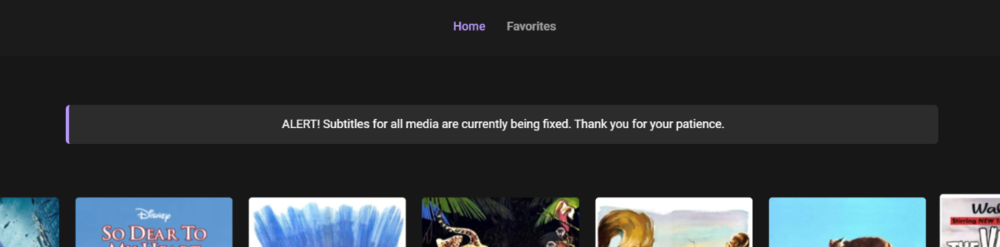
After following along with this and the other thread, I've done a css-only version myself (using @Happy2Play's method - TY!). Just a little clean version if anyone else wants to use it. Keep in mind it only shows on the home screen. Also keep in mind that anyone can see the content of the alert, regardless of being signed in or not. All they have to do is check the css.css file in the emby branding folder. So, if you're the careful type just make sure you don't put anything like, "I hope everyone is enjoying my 62TBs of pirated movies and tv shows produced by nearly every conceivable studio that I myself downloaded, hosted and aggregated for you!!!" div.homeSectionsContainer:before { content:"ALERT! Your message here."; display:block; width:50%; margin:auto; margin-bottom:20px; z-index:999; padding:12px; background-color:#2c2c2c; color:#fff; text-align:center; border-radius:5px; border:solid #b997fc; border-width:0 0 0 4px }
 1 point
 -
Would really like to replace PLEX with this, but I’d really like to see the OSD gain the capability, ESPECIALLY during playback, to be locked into the 2.39:1 aspect ratio space so it is not cut off on my CinemaScope 2.39:1 aspect ratio screen. Sent from my iPhone using Tapatalk1 point
-
HI, yes this is something that we need to look at improving. If they have different titles you may be able to get to a specific one using search.0 points














.thumb.png.f4cb0545e98b51fd9b00e427622ab761.png)