Leaderboard




Popular Content
Showing content with the highest reputation on 01/13/25 in Posts
-
I just noticed that when i click the watch trailer button on a movie, it plays a nice 1080p video, but the videos in cinema intros are all terrible quality. unwatchable. not to mention the languages are all over the place. would be nice to implement a way to filter these trailer selections somewhere. language and exclude any 480p or x quality trailers.2 points
-
Emby Windows & Emby Xbox A new stable version 2.210.0.0 is available now. Please go to the Microsoft Store and check for updates. Changes 2.210.0 [Win] Adjust store listings [Xbox] Don't show full-screen button [Xbox] Update Holiday Bonanza 2.209.0 [Win] MPV: Fix passthrough for DTS-HD [Win] MPV: Add option to ignore volume input commands [Win] MPV: Fix audio device selection getting lost [Win] MPV: Show audio passthrough option for digital outputs [Win] MPV: Fix passthrough for DTS-HD [Win] Persist audio playback volumne2 points
-
Although i agree with you, just do not use an admin user for regular playback and you won't have those icons.2 points
-
Good thing we complained about the lack of progress 2 years ago. It really sped them up...2 points
-
You've grown up with watching live tv but on television only runs garbage? You have a big library but don't know what to watch next? Then this for you: "VirtualTV" - my new live tv plugin that allows you to create custom channels based on conditions of your Emby library content. What's missing: Maybe codec conditions Known problems: Needs Emby Premier to work (Playback) Emby's live tv and playback api is very limited, so i've had to make some detours to get things working. The plugin has two general playback modes: "continous" and "playlist" playback. With "continous" mode you can also choose between "live", which bahaves like real live tv or "archive", which plays the videos from the start. In "Continuous" mode multiple videos are queued and concatenated to one big file with the help of ffmpeg. To make this happen every video in the queue has to have some common features (video and audio codec). That's why it often happens that the video also has to be transcoded by ffmpeg. For transcoding the plugin relies on Emby's internal transcoding engine. If there's a problem, not uncommon with hardware acceleration enabled, the plugin also has a problem. Nothing i can do about it. The availability of subtitle tracks is mostly dependant of the Emby user playback settings. In continous playback mode only one (the default) subtitle track can be used and this one has to be burnded into the video (transcoding takes place). In "Playlist" playback mode the videos are pushed as a playlist to the Emby clients. It's like you would play your videos directly from your libraries. This way you get all the features you are used to. Audio and subtitle selection, pause, skipping around and similar things. "Native" playback method was created by the Emby Devs. Similar to Playlist playback it will play the real library videos, but with the big difference that playback is purely initiated by the client app, without any remote command execution. This is why it also works for Roku devices on a WAN network. And although the real videos are played, the whole thing is treated like live TV. This means that channel zapping is possible and no dialogs for playing the next episode are displayed. Unfortunately, the new playback method does not yet support all features. As the name "Archive" suggests, it will currently always start all videos from the beginning. In addition, only very few Emby apps automatically advance to the next video. If you want it to be improved even further, each of you should raise your voice in this thread. To get things started install the plugin via Emby's plugin catalog and restart Emby. Setup your channels with a name and number and choose your playback mode. In the channel conditions you'll have to select an Emby account. This account is used to get library access, respect parental rating, reading watched states and selecting the stream language. At least one textual input field of the conditions has to be filled to get some program data. Fields with an asterisk are either evaluated with an "AND" or "OR" condition among each other. Finally, if you've chosen "Continous Playback" for one of you channels, take a look at the transcoding settings. Save your channel line up and manually trigger a "Guide Refresh". Now have fun! Version History: After a plugin update, always clear your browser cache. If your settings still don't load in the config screen, you have to move the "VirtualTV.xml" out of ...\plugins\configurations and restart Emby. Start from scratch. 2.0.0.0 Unlimited number of channels; New playback method "Native (Archive)"; New security concept for the Export API 2.0.2.0 Performance improvements to Guide Refresh; Preview for Add/Edit Channels; Option to disable Program indicators 2.0.3.0 Fixed missing Playlist sort order for some Content Types; Added support for Seasons with Content Source Collections 2.1.0.0 Selectively enable channels for specific users; Create copies of existing channels; Ordered unwatched episode playback 2.1.5.0 Added option to (auto)enable channels on a specific date range; Bug fixing1 point
-
I'm a plex life time member, but I have been using Emby for over six years continuously, but there is a feature which I have always thought is missing in Emby which I would like and encourage the developer to consider including especially in this dispensation where families can social or commingle due to COVID 19. Today, I received a notification from Plex about it new feature titled Watch together you can read about it here https://support.plex.tv/articles/watch-together/ The feature allows friends and families at distance to watch same movies together instantly, you simply invite all your buddy, once they signed to the system which can be seeing in the server then play and pause as needed, this I think is cool feature should be added to emby. Let's here your though if Emby developer should consider adding this feature to our beloved Emby Media https://www.bing.com/news/search?q=Plex+Watch+Together&qpvt=plex+watch+together&FORM=EWRE1 point
-
Guys, The ebook side of Emby/MediaBrowser has been long stalled or rather stagnated. I would like to offer up a couple of suggestions. Many people use calibre as an ebook/comic book tool for scraping data and general management of their collection already. This program is absolutely astonishing in its ability to pull metadata from post calibre scans, as well as draw in metadata from the file source and/or directory structure. http://vaemendis.net/ubooquity/ Its a self contained .jar server/reader combination. And honestly I am very impressed by it's small footprint and wide range of abilities. The other option is COPS , which was written specifically with calibre in mind. It is open source, so making it work with emby I would think would be fairly easy. https://blog.slucas.fr/projects/calibre-opds-php-server/ Ever since the original release of MediaBrowser's bookshelf I have always wanted something that would allow me to 'read' my collection, rather than being basically nothing more than a place-set for images of books I own. I am sure that those who mainly have audiobooks are thrilled with bookshelf , but it's nothing more than an extension of the music library IMHO, not new features. We can have both right? Here I give you two suggestions free of charge.. Just because I love you, and Emby Personally I plan on running the Ubooquity Server along side of Emby from now on, just because of it's massive functionality and tiny footprint. But I sure hope that someone decides -- "yeah, ebook support should be in here too" and do something about it - rather than allow this now very very ancient issue to continue to remain an issue. And so I don't have to have 20 different ports open, some with SSL support - some not, because Emby isn't delivering the 'complete package'. (Please take some of this with humor, I know you have your hands full with improvements/bugs/suggestions/requests)1 point
-
Not sure if there are actually many people using emby that also read a lot of books. However with Ebooks being a hot thing right now this idea popped into my head. I have a lot of ebooks which I generally keep on my normal PC. However this way it has no back-ups cause I only back-up my server to an external location. So I was thinking about switching them to my server and then I thought I can also put them in the emby folder. The request may be a bit out of the ordinary since emby is more for playing files and things rather than reading, but could a reader be implemented at some point in the future? A book library and an implemented reader, specially for mobile devices I guess (phone/tablet), but perhaps for browser/theater? Would help me get rid of yet another app and have all my "media" in the same place Edit: If you liked this also take a look here for ebook expansion https://emby.media/community/index.php?/topic/80398-book-serverreader-incorporation-suggestion/1 point
-
I would like to submit the quality of the trailers as well as the mapping of the trailers to the respective national languages as a request in order to increase the priority. Please vote with "Like". Many thanks Seger1 point
-
Some have links to full folders they have made, others are just scattered through the pages. The original maker has a link to many of theirs. You can see all of the ones I have posted here My Attachments - Emby Community1 point
-
1 point
-
Should be no issue, working fine here for years.1 point
-
For Anyone on TrueNas before installing Emby make a dataset for emby and when you install emby point it to that dataset and then this plugin will work.1 point
-
Just a short feedback, i testet the "The option to prefer local content over "plugin" links" over the last days, i seem to work perfect for me. Thank you very much for that1 point
-
Been a long time Emby user/fan, and recommend to all my friends and family. Until the new 2.0 update. (In my comments below when I refer to the "Old Version" I mean the latest update before the 2.0 version that was pushed out before Xmas) I still have 2 consoles that fortunately have NOT taken the new update that work just fine (dispite being asked to update every time I launch). This allows me to compare against the new version which has serious issues. 1. Obviously the start animation takes a long time. I've read the posts on how to disable, but say that it won't start any faster. My question is: Why is it so much slower? The 2.0 version takes 2-4 times longer to start than the old version. If it isn't from the animation, then what is it from? 2. Captions are completely random. Sometimes tiny. Sometimes huge. Sometimes in random locations. Still works great in the version I have prior to 2.0. What changed? I have VOBSUB, SRT, MOVE_TXT, and ASS. All still work fine in the old version. Lately on the new version the captions start out tiny, but if you stop and restart they are fine. If that isn't just a straight up bug, I'm not sure what is. 3. Starting a movie/show or moving to the next show after finishing the current one, takes 2-3 times longer in the new version. Why? Still works great in the old version. 4. Pretty much the only remote buttons that work in the 2.0 version are navigation, Up/down/left/right/OK, and back. All buttons still work fine in the old version including skip forward/back, and prev/next episode. Why do these not work in the new 2.0 version? I see posts on what IR codes/devices you support, but at the end of the day it works in the old version and not the new. Why? 5. In the new 2.0 version, it is now much more difficult to tell where focus is. Was this change based on lots of feedback from users, or just random? 6. Why decide to push the 2.0 version out, just before the holidays when many are home with their loved ones and will ultimately be watching content more than usual? So many were faced with lackluster performance, green screens when trying to play videos, and all the other issues above that are still present today. Seems like more validation would have been a better idea rather than trying to get out before the holidays. I have a hard time believing that these items are because of changes in the OS or restrictions by Microsoft in the cert process (which is now almost entirely controlled by the publisher). Rather it seems that the testing/validation process has been compromised, or perhaps abandoned all together. I only use Xbox for Emby. Perhaps there is less desire to spend resources supporting this platform? If so, that is fine. Just let us know. Opening Emby in the browser is tedious at best, and really not a viable alternative. Not trying to be a Karen here, I just want the reliability/functionality that was present before this update back. I've since had to move to Plex which has it's pros and cons, but it does allow me to use it free on any number of devices, whereas with Emby I have to have a subscription to use more than one console at a time. If you do nothing, perhaps publish the old version for 24 hours so those of us that want the functionality back can update our consoles and turn automatic updates off, and/or create a copy on a usb key that we can fall back to. Sadly I cannot take the version that works on my Series X and install it on my old Xbox One.1 point
-
OK, so, I gave user Emby rights to read to the directory /volume1/homes/Backup/.../'My Photos' with Files Station I connected with ssh on the NAS ln -sr /volume1/homes/Backup/.../'My Photos' /volume1/MyEmby Add the path /volume1/MyEmby/'My Photos' in a new library "Home Video and Photos" And It works well even after a reboot. Thanks anyway1 point
-
Yes, I've deployed the fix. I'll look into updating the geolocation database.1 point
-
F:\PORT_RICHEY https://musicbrainz.org/artist/94e20cc8-17ed-492d-b23a-1904e54aac341 point
-
@cochize1There is a new update. You can again use latest docker tag.... bagul/goemby_exporter:latest @BagulThank you for the fix1 point
-
I would say yes because Windows will periodically restart on its own for updates.1 point
-
I do it manually; stop the server service process, copy the system directory (only) from the github file over the existing (well, I rename the previous one to keep a fallback option), and restart the process. Takes just a couple of low-effort minutes. Updates aren't so often that I feel the need to automate them - and this way I can also check on any active usage (especially recordings) when I want to do it. Paul1 point
-
i've worked it out i just create a folder for that episode then create the sube folders interview, extras etc1 point
-
Tbh I use those icons when editing things. Its 1 click less than having to open 3 dot menu.1 point
-
I'll check that, this could trigger the issue.1 point
-
Awesome. Thanks! Never even thought to check the context menu lol. I have just been going to the series and marking the entire series as watched then unwatched.1 point
-
Videos are the normal library items that build the program. In other words, how many tv programs should be played before the set number of bumpers are played.1 point
-
Let me clear things up a bit: The old Emby Theater had an old MPV version built upon our custom ffmpeg, which in turn has an experimental AC4 decoder. The new Emby for Windows app uses a stock MPV version which doesn't have that. That is because our custom ffmpeg doesn't fit with the latest MPV player versions and the best and latest video playback is a by far higher priority. Once we have updated our ffmpeg,. we'll be able to ship the latest mpv built on our ffmpeg like before. The next after the next update for Emby Windows will indicate that it doesn't support AC4, so the server will transcode without that you'll need to fiddle quality or other settings. It's "next after next" because the version which is still pending publication by the store doesn't have that. But the next one will and it will be pushed shortly after the next release. Thanks1 point
-
For posterity, here is my batch conversion solution which finds all videos with 265 in the title with mp4 extension, remuxes them to mkv & strips the tags, and deletes the original file. Maybe someone will find it useful in the future. ~/Scripts/remux.sh: #!/bin/bash # converts mp4 to mkv without tags and deletes original file # usage: bash remux.sh INPUT.mp4 input="${1}" output="${input%.*}.mkv" mkvmerge -o "${output}" "${input}" mkvpropedit "${output}" --tags all: # can comment this out if you don't want to delete original file rm ${input} find ~/Videos -iname '*265*.mp4' -execdir bash ~/Scripts/remux.sh {} \;1 point
-
Yes, it is enabled, and the server was reinstalled from scratch just 1 week ago so there is no error in it. Tomorrow I will upload the logs after playing them in the LG app.1 point
-
When Emby asks the VLC player to play the file it is no longer streaming. Emby sends an intent/action which starts VLC with a link to the file you have asked to play. It is no longer really using Emby after this point. VLC takes over the playback entirely as a file. When VLC is done playing it must send back the progress/played states to Emby after you play so that Emby can update these. Otherwise using VLC you would have no resume or watched status updates. When transcoding occurs it will create a streaming friendly version using an m3u8. It is no longer using the original file. That is why you notice it is smooth. The issue is your file. Remux your file should be a quick process under a minute. Then test the file inside Emby using an Emby app and if it no longer has the issue this is your solution. Conversely, in the Roku Emby app you can use the cog/gear during playback and select "Attempt Playback Correction" which will then repackage the file using an m3u8 and copy the streams. That will also fix the playback issue but must be done every time.1 point
-
OK, Fehler gefunden !! Ich habe bei den Rechten an den Ordnern nur die User berechtigt. In der Synology App, muss man noch bei interne Systembenutzer Emby berechtigen. Hatte ich übersehen. Nun scheint es zu laufen. Na toll, das hätte ich mir sparen können. Vielen Dank an alle1 point
-
I solved it by restoring the NAS to factory settings and installing Emby from scratch. If I restored the backup, the same thing happened again, so I had to start from scratch. What I don't understand is how that happened since almost everything on the NAS and Emby was with default options. It was a very drastic solution, but since no one knew how to give me a solution, I had no choice but to do this.1 point
-
Having this same issue was wondering if there was any updates regarding it? I'm a new emby user and it won't load my entire list of movies as described. Doesn't always stop loading at the same spot, but it pretty much never lets me scroll my entire movie library.1 point
-
Yes you can do do this with permissions on the synology nas.1 point
-
It would be interesting to know how many people looked at it and did not notice a problem. I'm number 2 and will admit it. And I asked for it. I was just so excited to have the color scheme match. Not one of my family members noticed, so add 8 more.1 point
-
Read here:1 point
-
Hello pals, I'm using short term Emby server to serve my Movie and Music collection and I'm fully satisfied. After installed XMLTV server plugin I can watch and my TVHeadend IPTV received TV programs. Now I've though (just an idea because don't look at server plugins in depth) - if the XMLTV plugin uses ffmpeg or avconv to cast TV channels is it possible to make choose second channel and produce resultant stream from both channels with Picture in Picture. I know with FFMpeg is relatively easily like ffmpeg -i pipInput1.flv -i pipInput2.flv -filter_complex "[1]scale=iw/5:ih/5 [pip]; [0][pip] overlay=main_w-overlay_w-10:main_h-overlay_h-10" -profile:v main -level 3.1 -b:v 440k -ar 44100 -ab 128k -s 720x400 -vcodec h264 -acodec libfaac PIP_output1.mp4 or more simple ffmpeg -i master_video.mp4 -vf "movie=second_video.mp4, scale=800:-1 [inner]; [in][inner] overlay=70:70 [out]" completed.mp4 ffmpeg -i rtsp://serer/mp4:1.mov -i http://serer2/sample-video2.mp4 -filter_complex “[1]scale=iw/4:ih/4 [pip]; [0][pip] overlay=main_w-overlay_w-10:main_h-overlay_h-10″ -ar 44100 -f flv rtmp://localhost:1935/Stream etc more variants. Could be possible to be created such PiP IPTV plugin server side ? Thanks to anyone in advance.1 point
-
Hello, due to a recent bug (already fixed) on the apple tv app, chapters without thumbnails wouldn't show up. So I let emby generate thumbnails for chapters only. But since I use chapters only to skip openings and endings, I find the thumbnails a bit of a nuisance, because it can potentially spoil some parts. I hate spoilers, even something so small like thumbnails. This is a bigger problem, when the media does not have chapters embedded, because emby will generate one every five minutes and since I have mostly hard subbed stuff it will look like this: https://imgur.com/XIq1mn9 Since the bug has been fixed, I removed all thumbnails, but some users might prefer it with the them being available. So why not make it a toggleable option to hide/show thumbnails per user. Maybe some people might like this too.1 point
-
Now that we know the new source isn't of satisfactory quality for a paid service what's being done on Emby's end to correct this? We've been dealing with this for at least close to a year and it appear we only get feedback (We're working on it) when we ask. For a partial paid service we shouold have a fix by now. Some of us have continued paying for this service but we don't seem to be getting any results or any updates as far as a fix or replacement. If your paying customers aren't satisfied with the service you're providing (No one should be offering a 480p trailer service for a cost) why not go out and find a service that satisfying to the customer?1 point
-
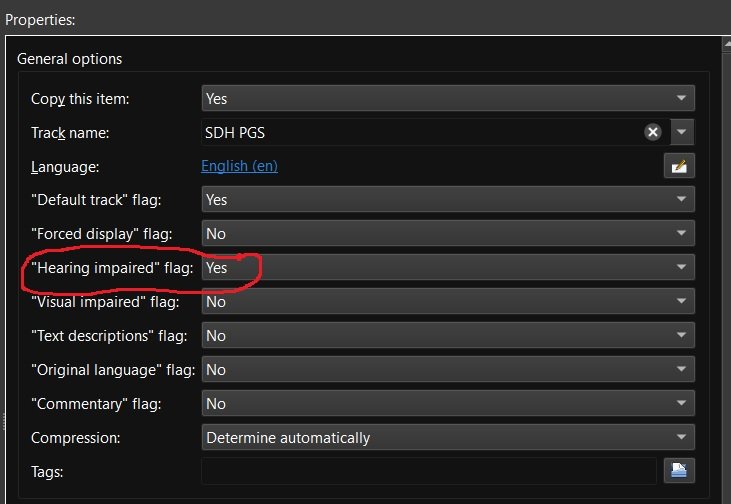
Recently matroska and mkvtoolnix added support for additional subtitle flags including "Hearing impaired" for subtitles for the deaf and hard of hearing (SDH). Request: Emby add some or all of the additional subtitle flags to media info and also as a choice for playback under user user settings. add support for external SDH subtitle naming (ex. moviename.SDH.eng.srt) Reason: my wife and are are getting older and it seems more and more I'm hearing "What did they say" a lot. If I could set certain Emby users to always play the "Hearing impaired" subtitles if available then I wouldn't have to back up and restart playback with SDH subtitles enabled. Other flags like "Commentary" would be nice also as I have several films with those Having this flag would also make it easier to run a script to list which movies have and don't have "Hearing impaired" / SDH subtitles so that I can go out and get the missing ones.
 1 point
 -
Ahhh I'm not an Apple user (it's my partner's device) and I'm not familiar with the security settings. Thanks for your help! For others, on your iOS Device, it's in Settings -> Privacy & Security -> Local Networks, then toggle on Emby.1 point
-
I think Emby is 90% there. We can already browse a library of books (as has been mentioned); we only lack the integrated reader for playback. Any thought to: Option 1. Integrating opensource readers. Bibi EPUB Reader https://github.com/satorumurmur/bibi Kooder (just the reader) https://github.com/troyeguo/koodo-reader Option 2. Integrating a general "play with" feature to allow us to link our own apps/programs to play unrecognized formats. This would remove the management (for Emby developers) to integrate new formats. (If this is already possible, sorry, I missed it.)1 point
-
I support the suggestions to build this feature into EMBY. It would be very valuable. With most music albums offered in a digital format along with digital PDF booklets, it would be nice to have a program that could both play the music and display the booklet about the music right there on the same page (rather than have to download the PDF booklet from a separate EMBY PDF library). And books, of course. Getting a reader function implemented has an additional perk for the developers since it could give EMBY a competitive edge on similar media servers.1 point
-
Any update on this? Given there are a few freebie reading solutions emby could link into. I can visualise a scenario such as.....get up, put the news on the emby tune in plug in, it finishes, so you then put some music on, via emby and read the paper on your tablet, via emby. Then emby would be a complete solution.1 point
-
Today's Windows beta (4.7.0.7) has an experimental AC-4 decoder included. Disclaimer This is provided as-is. It may work or not. It may work well or produce glitches and artifacts. When it doesn't work, there won't be much we can do about it. I'm looking forward to your experience, though! sw1 point
-
Hi, yes in the upcoming 4.6 release you'll be able to remove from next up using the context menu.1 point
-
A flag like this could also be used to automatically increase the centre channel dialogue volume - yes this would mean an audio transcode, but it would certainly be welcomed for those who have hearing difficulties. I believe this could also double as a 'night time' viewing mode where you get to hear clearly what is being said, but without all the background noise waking everybody else up ..1 point
-
Emby definitely needs booker reader functionality, cataloging books without the ability to read them within the app is just pointless. I would like to see this added when possible1 point
-
That is mainly because there have been lots of topics for this... do a quick search and you'll find a whole list... Same goes for Audiobooks...1 point
-
Had added my vote cause I really think ebooks should get some love as well Surprised me it gets so few upvotes though1 point



























.thumb.png.77105f37c63fe61d12fa0339661800fd.png)