Leaderboard




Popular Content
Showing content with the highest reputation on 01/10/25 in Posts
-
Hello, Is it possible that in a version of emby a "ping pong" is performed in websocket to maintain a connection via a reverse proxy? Let me explain. Apart from reverse proxies such as caddy or traefik (for those I know) there is no real timeout for websockets. For reverse proxies like haproxy or nginx, the timeout is defined either by default or by the user. In the case of haproxy or nginx, if someone pauses a video that lasts more than an hour (a movie, for example), the websocket timeout will occur before the end of the movie. Or if, when playing an episode of a series lasting 40 minutes, the viewer pauses the video for 20 minutes, the connection will be closed before the end of the episode. Having the client send a message and the server reply every X seconds/minutes would eliminate the problem and prevent the connection from staying open for 1 hour for no reason, as in the nginx configuration. Also, I saw a message saying that if a connection was closed unexpectedly, for resource reasons, there was no attempt to reconnect. Why not set up a number of reconnection attempts? For example, the client tries to reconnect 3 times, and if none of the attempts work, the connection is aborted. This would, I think, allow better websockets management and avoid connections being open for hours. Or even when changing networks (LTE->wifi or wifi->LTE), this would make it easier to re-establish the connection than quitting the application and reopening it. To avoid sending just a "ping" and a "pong", useful information can be sent through websockets when the client supports them, such as the position of the video playback (which is currently sent via http), because a request via websocket is faster than an http request and sends, with the same information in the body, less data than an http request.2 points
-
Challengers (2024) auto downloads a 32000 pixel wide .png which will crash my server, when opening the media page. I had to delete the file, create a smaller version and restart the server to clear the cache on that media page to fix it. Just deleting fails to work, because automatically the oversize .png is downloaded again. I blame quality perfectionist newbies, with large Apple systems for thinking 32,000 wide is an acceptable size. It looks really good on their monitors, I'm sure. Ha! For logo and other images it would be nice to have a warning or disallow oversize images. Perhaps a setting of the maximum file dimensions or file size preferred.2 points
-
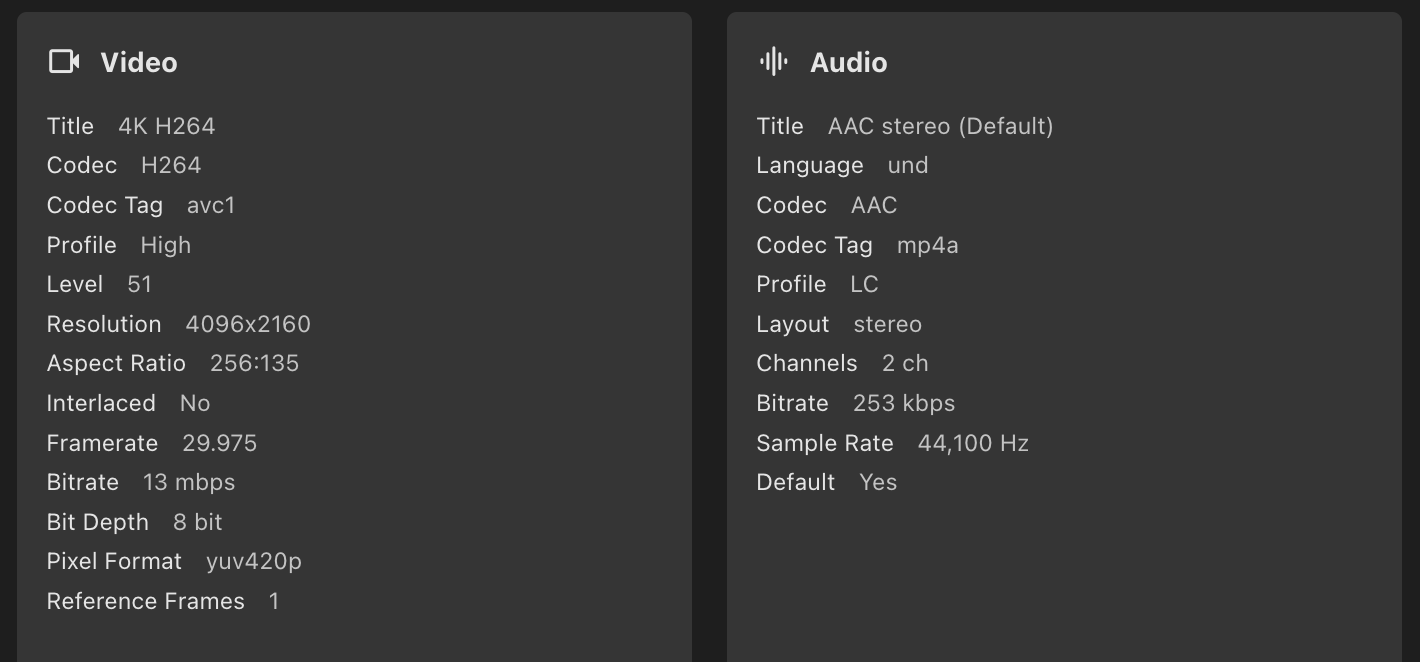
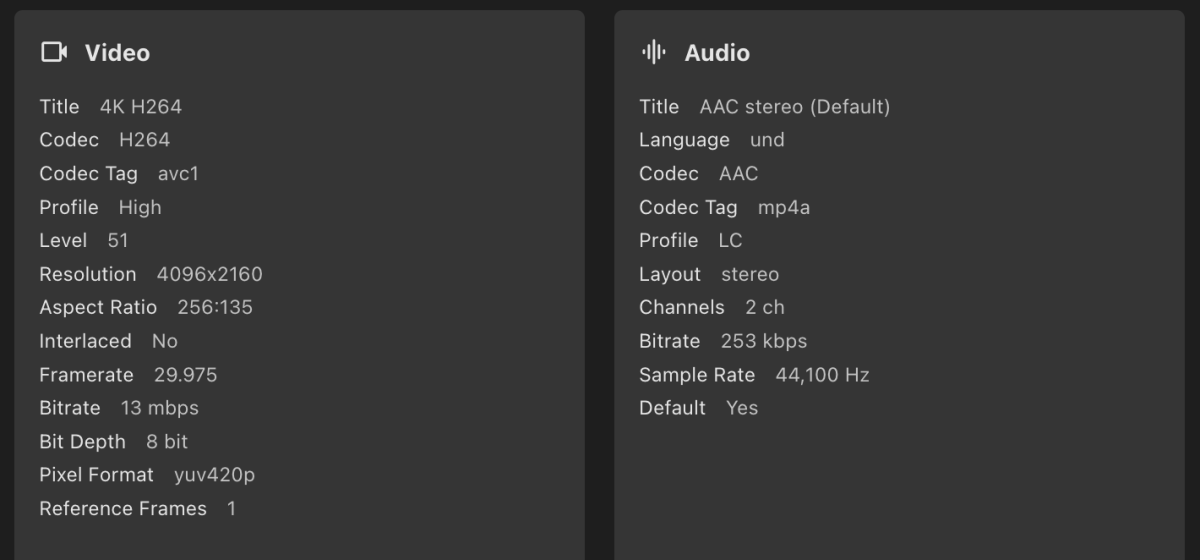
@LukeI'd like to confirm that after updating the TV app to 1.9.6 from USB stick the same 4096x2160 file didn't trigger transcoding and just played on TV. No ffmpeg log was generated, the server log attached, the end of the log is relevant. Now, on a side note, the quality of the image was terrible, it seems that the TV has problems with the file, but this is in no way emby's fault or flaw. It's possible that the file is faulty (I lost my good files I used originally to test the playback). so I hope to create proper 4096x2160 files coded with ffmpeg software and intel's hardware engine and see which one the TV handles better. Thank you for the update of the TV app guys. Good job! I hope Samsung Okays it soon for distribution because I think the sideloaded app disappears after some time, doesn't it? embyserver.txt2 points
-
Hey, the search function on the Emby Android TV app makes it difficult to distinguish between different quality versions (1080p, 4k, etc.) of the same content without clicking into each search result. It would be much better if a single result was returned and then a list of different qualities was presented to the end user. ------------------------------------------------------------------------------------------------------------------------------------------------------------------------------------------------ Reproduction Steps Things Necessary for reproduction Hardware: Nvidia Shield Software: Install Emby for Android TV Storage: Have a movie/series in different qualities, e.g. 1080p, 4k, 4k Dolby Vision Steps to take Open Emby for Android TV Without entering any repository on the server, use the search feature, enter Lord of the rings (for example) Notice that three results are fetched, all with the same box art, with no indication as to the quality of each returned entry ------------------------------------------------------------------------------------------------------------------------------------------------------------------------------------------------ Expected Results: An end user would expect to be able to tell which version each result is that was fetched, without having to click into each entry. ------------------------------------------------------------------------------------------------------------------------------------------------------------------------------------------------ Actual Results: An end user needs to click into each entry returned to determine the quality of each returned entry ------------------------------------------------------------------------------------------------------------------------------------------------------------------------------------------------ Why this is an issue: To avoid transcoding for saving server resources, then when using Emby on multiple different OS/Hardware, sometimes 1080p is only possible, but sometimes 4K would be preferred. ------------------------------------------------------------------------------------------------------------------------------------------------------------------------------------------------ Potential Fixes: Return one result, when the single result is selected show a list of different qualities to choose from Sort returned results by quality (highest to lowest) ------------------------------------------------------------------------------------------------------------------------------------------------------------------------------------------------2 points
-
I hit "play all" on a collection and it doesn't show the next film in "Next Up" after I quit out of it. This is apparently intended behaviour, and the same applies to playlists. This is absurd. Why even have the "play all" option? Who's sitting down to watch a full collection's worth of films, or a full playlist? I have playlists for The Prisoner for its various episode orders, and there's no way I'm getting through them in one sitting. I was going to make that my next show to watch but if I'm going to have to keep track manually of my progress through the playlist it makes the playlist fairly pointless TBH. There's no reason playlists or collections shouldn't show up in Next Up.1 point
-
Hi Me and my family just went on vacation and wanted to download movies and series to our phones for offline usage. But we experienced that some of the requsted downloads never arrived to the phone. Hence it would ne a good improvement to have better control and overview of the downloads, like: - Where it says "Ready to tranfer", then capability to "force" download, because I experienced several items saying that, and never downloading - Improved overview og status. Like if it's saying "Ready to tranfer", then I would like to see why doesn't it download, what is it waiting for. - Ability to see in a movie or a series, IF I already requested it to download once. Because I would forget IF I set a specific movie to download or not, and it would great it what was illustrated on the movie. - And if I already requested a movie to download once, and I do it again, then that Emby pop up and say I already requested that, if I want to cancel the first request. I for example tried downloading whole season 1 -3 of a show, and then it turned out, it hadn't downloaded ep 1+2 in first season., and where also missing ep 8+9+10 in 2nd season, and I could tell why or force it to download. I hope it makes sence and hope an improvement for the Downloads1 point
-
It is really cool that Emby has the ability to support multiple versions of the same movie. It would be nice to have a setting on the client side to allow the user to set which version should be selected by default. This could be as simple a user-entered string, or it could be a list of detected strings to choose from. It could allow multiple entries and it would choose them in the order entered. On the Kodi side, it would also be nice to get the "Choose the Best Version for Me" option that the Emby app has.1 point
-
I've been tinkering a bit and was wondering if it would be a big undertaking to define an additional "Podcast" library type? I understand the metadata problems, etc... I'm not suggesting anything other than copying the "Audio Book" template and changing it to "Podcast". I occasionally come across a podcast that I'd like to save, and can edit the metadata and artwork myself. I add it to an "Audio Books" library and tweak the metadata... It works reasonably well, and allows you to continue listening for long podcast episodes. The reason for the thought is that regardless of this scenario working fine, the labels use the "Audio Books" tag. So you'll see a "Latest Audio Books" rather than "Latest Podcasts", and other interface-related quirks like that. All I'm suggesting is to give us a template named properly for podcasts, with a disclaimer that it is a self-managed library (i.e; no metadata). I'm not looking for URL management and automatic downloads. Just a cleaner way of doing it ourselves. If I want to subscribe to a podcast, there are a million other ways to do that. If I want to SAVE certain ones I deem important, well Emby is where my media is. I think a clean way to browse your own collection would be great, especially if it's using the same basic code the devs already have. /Podcast Name/Season 2023 /Podcast Name/Season 2024/Podcast Name.mp3 ...is how I store them... At least that's a step in the right direction, if it's feasible? Thanks.1 point
-
Roku 4800X * HDHomeRun FLEX DUO HDFX-2US * Emby 4.8.10 on Linux Fedora 41 * VGA compatible controller: Intel Corporation CoffeeLake-S GT2 [UHD Graphics 630] The Roku app for HDHomerun plays directly no problem The Roku Media Player streams TV no problem Obviously neither of those have a way of transcoding before the video stream gets to the Roku. When I play Live TV that's 1080i it transcodes it, when it shouldn't. If both the HDHomerun APP and the Roku Media App can stream directly from the HDHomerun without transcoding Emby should not need to either. embyserver.txt ffmpeg-transcode-d68283c6-bcbc-4fd6-8f4b-b2097a055208_1.txt1 point
-
That would, I believe, be something like this - https://www.ebay.com/itm/133060224439 Plug into you mother board and you gain 8 connectors for 8 hdd's. They'll need power as well of course. They come in different modes, and for it to work the board needs to be in IT mode.1 point
-
Well that might work for me then, but it was crashing my Emby docker whenever I installed the plugin.... I might try again, or wait and see what happens as @Lukesaid might be coming...1 point
-
Not currently. It has nothing to do with naming, version that'll play most efficiently on particular client is selected by default. You can lend your support here:1 point
-
That should just be included in library Fetcher settings, together with other artwork options (like Minimum backdrop width) as Logo max. width.1 point
-
I made a forum proposal down @themoviedb to think about a dimension limit for this kind of images. The only reason for such a big size is the use as car decal lol.1 point
-
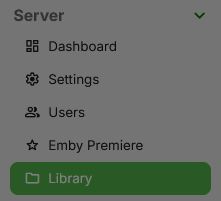
Click the library button and enter one of your libraries to EDIT it. Click the show advanced settings button or you wont see the option below. Checkmark the download images in advance then start a new library scan afterwards. Notice how much longer it now takes to complete your library scans as it is now downloading all these images in advance.

 1 point
 -
I think you missed the part where I mentioned about adb command. After adding permission in manifest, just run below adb command while your phone is connected to pc with USB debugging on. adb shell appops set --uid com.emby.embyserver MANAGE_EXTERNAL_STORAGE allow To check whether Permission is added or not, run - dumpsys package com.emby.embyserver | grep -e "android.permission.MANAGE_EXTERNAL_STORAGE"1 point
-
I've updated the docker image, let me know if you still encounter the problem (or any other problem)1 point
-
This isn't DTS (Digital Theater Systems). Roku can pass-through DTS. DTS does not have issues. Emby works perfectly fine with DTS on all clients that support it on the HDMI device chain for pass-through. https://wiki.multimedia.cx/index.php/ADTS It is ADTS (Audio Data Transport Stream). The ADTS is audio that can only be played back correctly when encapsulated inside a TS container. Usually done by IPTV services to keep sync with video packets. The problem you are having is these TS files cannot be direct played because you will lose the ability to seek within the container. They will play as real time only. Emby will need to transcode these TS files into an m3u8 to properly seek within them. The transcoding will require ffmpeg and it will no longer be able to play the audio since ffmpeg doesn't understand. ADTS is basically raw AAC data inside the ADTS container. @softworkzIs there some way ffmpeg can handle this? This reddit post has the same issue and they have used XTeVe to allow fmpeg to understand how to convert the audio properly.1 point
-
This is on my phone, no VPN, and no firewall. It's really filtering all belgian IPs.
 1 point
 -
Line 1734+1735, just remove the "blur" setting. Use the attached no blur file. Emby-Stable-style-3.5_colorful_v3_no_blur.txt1 point
-
I suspected that might be the case, but wanted to check in anyway in case my assumption was wrong. I'm talking about in the admin settings in the dashboard is where it shows the 10-20 second progress, then back to the start1 point
-
Hello, I had identified the problem, it will be solved in a last update. Just in case for people who detect a problem it would be necessary to open a new issue on GitHub.1 point
-
Hi, duplicate Videos. in the last Yeahrs i collected Videos. unforturnity some same videos have differnt names. So it become duplicates. I sort bei name of the file in extra folder. for example all films beginn with a sort in first folder #A, /Filmcould/#A/All you need ist love (2099)/file so it become in the last years to many duplicates. Also it could be, a better Version com in same folder. so it is nessesary to delete the double.1 point
-
Thank u.1 point
-
That would be amazing.1 point
-
I have figured it out. I recently updated my pc to windows 11 and there were some networking issues. Seems to be all good now. It was the artwork in general. The poster.jpgs1 point
-
Hi, I guess there currently isn't, although it's certainly something to consider.1 point
-
You need to read this TOomaAh/emby_exporter_go I short, he is no longer using Emby, and have discontinued this exporter.1 point
-
I'm unsure how to make the OP anymore clear. But if it needs to be summarized again due to age of the request. The OP is imploring much needed improvements to WebSocket connections in Emby by implementing keepalives to maintain the connection during pauses in video playback, such as when watching movies or TV shows. This would prevent timeouts that cause the connection to close prematurely and prevent playback controls from being displayed or used in event the admin wants kill user session(s) for various reasons. Several examples have been provided in previous discussions to illustrate this need.1 point
-
Yikes. Well, I did say this whole thing would likely require some pretty extreme hacking until the necessary infrastructure is built to do it properly. I would definitely make sure the library options are configured with the real-time monitor disabled, and I would explicitly disable as many other things as you can. Even then, I would still expect some quirks to be causing by having a library pointing to that folder.1 point
-
@mrtj18Please remove your screenshot or the Emvy api key immediately! I'll look into your problem at the weekend.1 point
-
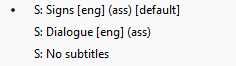
No more downloading user samples from questionable file hosters asking for payment or to wait hours for download completion... Thanks a lot for the sample. It turns out that there was an issue in the new Windows app. Usually videos with ASS subtitles have the fonts embedded, and those cases have been primarily tested. In case of your file, the font that is used (Swiss721 or so) is not included but installed with Windows and the new app didn't pick up that font properly. It's fixed for the next update - actually one after the one which is currently in store certification. Thanks again!1 point
-
I can see that the TV may be down scaling it automatically, but still if the app can be changed to not trigger a transcode that would be best. I would much rather have a downscale done at the TV than a transcode by the server if possible.1 point
-
Sorry, forgot some shadows. Emby-Stable-style-3.5_colorful_v2.txt1 point
-
@softworkzThat's a nice service! I've included the media file as well as extracted .ass files, I've gotten these through mkvtoolnix/MKVcleaver. Track05 should have the proper subtitles, but just to be sure, I've included Track04 as well. Dialogue is the one I've used for testing. If it helps, I'm using a 24 inch monitor, 1080p and 100% dpi scaling.
 1 point
 -
Hi, yes looks normal.1 point
-
@LukeHi! Yes, it still does it. Here are files. This is not tested on the same files as before, can't find them anymore I'm just avoiding 4096 wide files these days, they are just not worth the hassle, but I've found one to test it I'm not sure now if I still have the same Samsung app version, though. It may have expired and I may have had replaced it with the Tizen store one, whatever they have now on the list. For some reason there are two embyserver logs for today. Both attached. embyserver.txt embyserver-63872026794.txt hardware_detection-63872026901.txt ffmpeg-transcode-834a0c0c-fdd5-44e0-b209-25fedd3a7a46_1.txt
 1 point
 -
Update - 4.9.0.35 Beta seems to have resolved this - but hope the logs above are useful to narrow it down, there's a giant list of changes for 4.9.0.35 so perhaps it's covered under one of them.1 point
-
Ok I just tried software encoding and converted a 4k/21mbps file to 1080p/5mbps, so that's a successful conversion.1 point
-
I guess a custom order manually would be the most appropriate at this point.1 point
-
I got it sorted, thanks!1 point
-
Okay I apologize for my last reply. I tested out the standard Emby app on my Fire Stick and there are actually a few things that I like about it. For one, it seems to retain all my configs from the PC and Android mobile app. Also I really like how quick and responsive it is compared to the 'Emby for Fire TV' app and no timeout errors. I can tell that you all put a lot of work into this project. Much appreciated and I apologize again. I wish there was a way to delete that previous reply haha.1 point
-
Hello, is there any update on this? In my case is the need of "edit Image" feature for my key users Thanks!1 point
-
Hi, sorry for the delay in responding, life getting in the way!. I do only have a single guy and after trying multiple different options, I found I had the setting for turn display off after 20 minutes of inactivity set in windows. I am very positive that I had previously set that to never as I had gone through and adjusted the power settings to be for performance with everything always on so I have manual control when i originalky configured the machine. Either way, once I set that to never, it seems to have been the culprit of that audio issue! Thanks as always for the time and responses1 point
-
The problem is not only with HDR10+ but also with DV 7 profile. Black screen with Emby on FireTV is unavoidable. I understand that in both cases there is no support from hardware. But Plex, for example, switches to HDR and plays video normally.1 point
-
hi, this version doesn't have that feature, but stay tuned for our new windows app that is about to launch.1 point
-
For what it's worth, lack of SSO support (SAML or OIDC) is keeping me from using Emby/purchasing Emby Premiere. I've been using Jellyfin for year, and while I appreciate the Jellyfin's community's efforts, Jellyfin is pretty buggy and not worth the time it takes to manage it. However, even with all these issues, I'm not moving if it means giving up SSO support. -- There is an alternative that nobody else in this thread has mentioned yet... why not allow for authentication via HTTP header (as an option, not on by default), so that authentication can be handled by a reverse proxy for users that want it? This would entirely remove the need for SSO support baked into Emby itself (though it'd still be nice), while satisfying this feature request. Here's what setup would look like: 1. An admin would deploy Emby 2. An admin would add user accounts to Emby 3. An admin would configure Emby to look at/parse an HTTP header for the name/email/similar, ideally via a regex expression. Emby would have a configuration text box that would accept regex similar to `X-User-Email: (?<userEmail>)` so that admins can extract what is effectively a "claim" from an arbitrary HTTP header. Ideally, authentication via this header would be IP limited, or maybe use some other form of auth between Emby and the reverse proxy (next step). 4. An admin would deploy a reverse proxy that handles the entire SSO flow. This reverse proxy would pass the "user claim" HTTP header to Emby when a user is authenticated. There's a lot of options for reverse proxies here, and the community could develop an Emby-specific one if needed (removing the burden from Emby developers) Here's what the login flow would look like: 1. A user would go to https://reverse-proxy.domain-name.tld 2. When logged out, the reverse proxy would handle the SSO login flow and not forward traffic to Emby 3. After the login flow is complete, the reverse proxy would forward all future requests to Emby, adding the `X-User-Email` (or similar) "user claim" HTTP header to every request 4. Emby would treat these requests as requests from the authenticated user, without asking for a password/similar As I see it, this would entirely remove the burden of maintaining SSO support from Emby, while supporting the feature for users that want it.1 point
-
1 point
-
While your waiting you can still use your Hauppauge Tuner with emby and have all channels working with an epg guide for all your emby clients. This can be done by using a tvh server with Hauppauge Tuners and using the tvh as an m3u input for emby. Was reading this the other day about raspberry Pi running fine from what I understand.1 point
-
Status: Initiated Blueprint Luke has investigated this, unclear the progress on universal development. App devs have not begun dev for this. Once Luke builds core compatibility it may be 3+ months before app/client SSL adoption. Spread the word! Let's make it known how many Emby users would love to see this feature! I have seen scattered, unorganized requests for this that seemed to die, so this will serve to centralize all support for SSL and to track responses/feedback. This is to request Emby support SSL, both app and web client to server. This would be for Emby Connect setups as well as local user setup. Current Plan: Utilize Lets Encrypt (https://letsencrypt.org/) to allow automated endoint encryption. Luke is currently looking for members that may be able to help automate this at server endpoints. Possible Solutions include subdomains for each client (ex. customer.emby.media) or custom domains for each customer such as DyDNS. Reasons for this: Secure activity/traffic between client and server Allows passwords to be passed plain text from client to server. Would allow development of SSO/LDAP authentication solutions. Please see and support our topic linked below:https://emby.media/community/index.php?/topic/26495-ldap-support/ What is done: Enhanced SSL support on mobile application What is needed: Core universal SSL support App supported SSL Web-app supported SSL Authentication passed over SSL to allow plaintext passwords1 point