Leaderboard




Popular Content
Showing content with the highest reputation on 01/06/25 in Posts
-
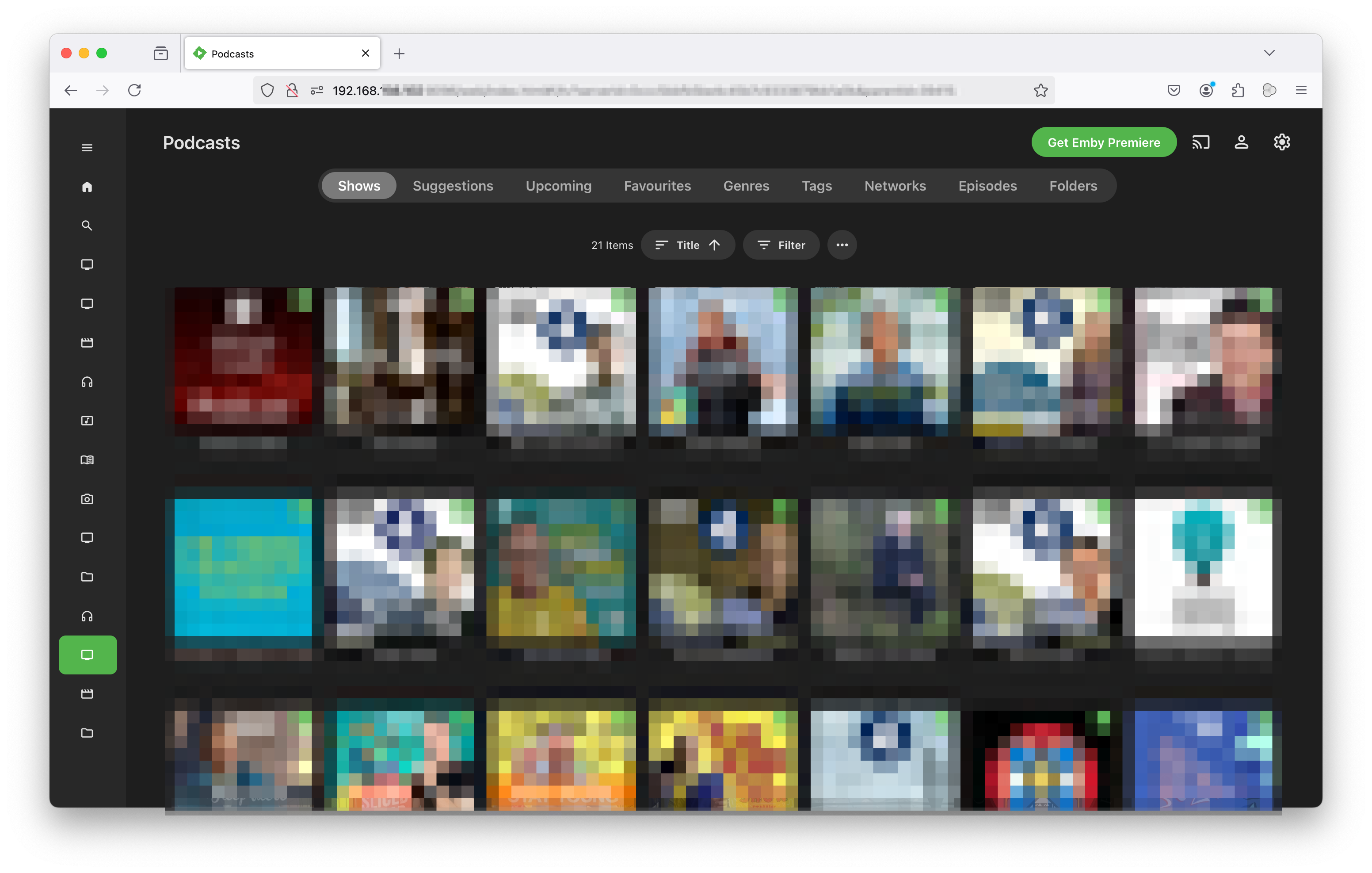
The problem: You have podcasts that are no longer available online, so can't use the podcasts plugin The Music content type has inappropriate nomenclature (albums, songs), doesn't remember the last played location, and isn't able to display podcasts appropriately The Audio books content type has inappropriate nomenclature (books, authors) and isn't able to display podcasts appropriately The TV Shows content type is unable to play (or even display) mp3 or m4a files The solution: Create a folder for Emby called Podcasts For each podcast you have (or intend to download), create a folder with the podcast's name In each podcast's folder add a file called poster.jpg (used like a DVD cover for the podcast). This file should be portrait in orientation (or square) and have a resolution of 500x500 or better In each podcast's folder add a file called fanart.jpg (used as a backdrop for the podcast). This file should be landscape in orientation and have a resolution as close to 1920x1080 as possible In each podcast's folder add season directories (Season 01; Season 02; Season .. or Season 2023; Season 2024; Season ....) Add your files to the appropriate season folder You now have this directory structure: Podcasts/ ├── Fascinating Discussions │ ├── fanart.jpg │ ├── poster.jpg │ ├── Season 01 │ │ ├── S01E01 - The Price of Fish.mp3 │ │ └── S01E02 - The Inside of a Pingpong Ball.mp3 │ └── Season 02 └── Funny Stories ├── fanart.jpg ├── poster.jpg ├── Season 2023 │ └── How to Catch a Dragon.m4a ├── Season 2024 └── Season 2025 Copy every mp3 (or m4a) file (and its metadata) as-is into an mp4 container and add a 1 frame-per-second video created and scaled from the podcast's fanart.jpg for filename in "Podcasts/Fascinating Discussions/Season 01/"*.mp3; do ffmpeg -r 1 -loop 1 -i "Podcasts/Fascinating Discussions/fanart.jpg" -i "${filename}" -vf "fps=1,scale=1920:1080:force_original_aspect_ratio=decrease,pad=1920:1080:-1:-1:color=black,setsar=1,format=yuv420p" -c:a copy -shortest -crf 51 -tune stillimage -preset ultrafast -map_metadata 1 "${filename%.*}.mp4"; done You will now have mp4 files in the season folders with the same name (different extension) as your mp3 and/or m4a files. The original mp3/m4a files are unchanged and can be deleted once you've proved the mp4s work. The 'video' component of the mp4 is just the fanart.jpg refreshing every second, but allows the mp4 to be seen and played with the TV Show content type. The audio is copied into the mp4 unchanged. The mp4 is slightly bigger than the original mp3/m4a In the Emby app/webpage, create a new library with TV Show content type and select your Podcasts directory as its Folder. Leave a tick in Metadata Readers: Nfo, but remove ticks from all the other metadata downloaders (TheTVDB, TheMovieDb, etc.) In the Emby app/webpage, refresh the metadata for your Podcasts. Podcasts should display and play in a sensible fashion (see caveats below) Play a podcast. You will hear the audio as normal and see the picture in fanart.jpg on the screen Caveats: fanart.jpg replaces any artwork (thumbnail) from the original mp3/m4a. So every (mp4) episode will have the same thumbnail. This may not be desirable if, say, the original thumbnail in each episode is a picture of the person interviewed in that episode. If the original podcast files contain 1920x1080 artwork, that can be extracted and used instead of fanart.jpg. Exiftool is your friend: exiftool -b -ThumbnailImage "How to Catch a Dragon.m4a" > thumbnail.jpg Most of my podcast episodes display in the correct order by default. However, a few files downloaded with incorrect filenames. This can usually be solved either by renaming the file with its embedded title or adding the Season/Episode number (SXXEXX - ) to the start of the filename. Renaming with the embedded title can be done with exiftool: exiftool '-filename<title' Dragon_how_to_catch.mp4 The new (mp4) episodes will lose the modification date of the original mp3/m4a file. Most episodes will have a (Content)CreateDate that can be used to re-date the mp4 file. Once re-dated, the modification date can be used to move files into seasons if required: exiftool -d 'Podcasts/Fascinating Discussions/Season %Y/%f' '-filename<fileModifyDate' "Podcasts/Fascinating Discussions/Unseasoned/"*.mp4 I have very little experience of using ffmpeg, so please feel free to comment how the expression in 8. above can be optimised/enhanced
 2 points
 -
I have need of a user account with auto reset ability also. I’m going to test using a custom script to copy/overwrite user config files on a timer. So say every Monday at 2am the guest user files get overwritten by a blank “master” copy stored in a different folder. May or may not work, but I’m trying it soon and figured I’d share the thought with the rest of you. @Luke but I do think an option in each user’s own profile settings to wipe their own activity would be a handy feature. Admins could enable or disable this option per user. That would be easier to implement, and would give admins the ability to give their users the ability to control the retention of their watch history.2 points
-
it would be very nice, if there can be a possibility to get users the access to edit metadata and image so the user can manage a the libraries. I would like to use it as a "content manager"-user which is like a technical engineer caring about the media content and nothing else. btw. emby is very very nice, thanks for all of your work!1 point
-
It is really cool that Emby has the ability to support multiple versions of the same movie. It would be nice to have a setting on the client side to allow the user to set which version should be selected by default. This could be as simple a user-entered string, or it could be a list of detected strings to choose from. It could allow multiple entries and it would choose them in the order entered. On the Kodi side, it would also be nice to get the "Choose the Best Version for Me" option that the Emby app has.1 point
-
Given the vast list of wonderful improvements that have accumulated in the 4.9 beta and the modest tweaks reported in the release notes for the latest 4.9.0.33 beta, here is a fervent plea that the Emby devs push this latest v4.9 as a stable release now, for benefit of the vast majority of Emby users who don't install beta versions.1 point
-
Hi, yes it makes sense. Thanks for the feedback.1 point
-
Yeah what you suggesting is not quite close to what i am requesting Custom CSS can do much but i believe the whole skin need to be built for it if they look and feel will be like Netflix and not everyone is good with coding and computer languages and so i would say think about it if someone made the skin or layout for it more users will sign up with emby and more people will join because it will be a feature no one offers. you will make money that grantee and who ever make it, it will be able to sale the skin as well if they choose too. Unless someone makes a soild how to about custom styles to make emby client looks and feel like Netflix playing around with no knowledge of programing will be wasted time from users side Perhaps a little demo might help, here is Kodi skin for Netflix just to elaborate in my point Thanks in advance1 point
-
I was initially supportive of this switch until I realized that they got rid of the one time payment for extended devices in favour of a monthly payment only. I have never reached the device limit with my usage so far but if I ever do I will likely move things over to Jellyfin. Knowing that there was the option to do a one-time payment for more devices was the reassurance I was banking on if I ever needed to grow my setup. A monthly payment doesn't appeal to me and would be a significant deterrent to me. The value is so poor imo that I would rather buy multiple life time licenses and run multiple servers rather than pay monthly for additional devices. The only way that option makes sense is of you are going against the terms of service and charging users for access. For personal use it doesn't make sense. We are in an age now where every person in a house has their own smart tv, phone, and sometimes tablet. Not to mention smart TVs in the common areas. 30 unique devices in a 1 week windows isn't out of the question for an extended family.1 point
-
Hi, there's already an open request for this or something functionally equivalent. Please join in and contribute to the existing discussion at:1 point
-
Thank you again for your answer. I found the issue - it was because the metadata for the corresponding TV show was updated on the TMDB website, but the data in the TMDB API hadn't been updated yet. After I entered the TMDB ID in the app, it refreshed correctly because, during my debugging process, the data in the TMDB API happened to sync with what was displayed on the website.1 point
-
This is a bug in the hardware that the hardware providers don't care much about because it doesn't affect any media that the masses would ever encounter on these devices. It isn't something that we can just flip a switch on to work around either unfortunately. The standard Android app will have to somehow know which devices are affected and force a transcode in these instances.1 point
-
Appologies for the delayed response. The affected device was in process of being replaced over the holidays. The new device is working as expected, so it's hard to say what exactly the problem was. Pi-hole was recently installed on the network, but the issue was only affecting that one iOS device so I'm not sure that explained the problem. Since the device is gone, I can no longer reproduce the problem.1 point
-
Pretty sure they are referring to this. General | Tvheadend Docs1 point
-
Yes, that's on my list to correct.1 point
-
It would be interesting to know how many people looked at it and did not notice a problem. I'm number 2 and will admit it. And I asked for it. I was just so excited to have the color scheme match. Not one of my family members noticed, so add 8 more.1 point
-
Obrigado Luke, resolvido !!!!1 point
-
I believe you will need the ID in the filename too if you are using the core functionality. From the docs @ https://emby.media/support/articles/Movie-Naming.html#multi-version-movies:1 point
-
Id' rescan the libraries. With so many items, there are sometimes timeouts from TMDB or other issues. If you're using video thumbnails, you could set the genereation to 'scheduled task' instead of 'during library scan' to speed things up. If the library is also set to real time monitoring, there might be missing entries, as manual+real time can sometimes lead to not recognized entries. Not using the SubtitleManager, could be missing entries on OpenSubtitles.org. There are options to rescrape subtitles up to 180 days AFAIK.1 point
-
yes, and i was able to update to the new version thank you1 point
-
Fixed - I uninstalled the app and then reinstalled/redownloaded from the MS Store. The Display Mode Option now shows up in my settings and I'm able to use TV mode. Strange glitch...1 point
-
Also have same request. Moved from Plex to Emby...but really missing this feature. Only video app I have that doesn't support it on Android.1 point
-
@Gilgamesh_48Waiting for merge. Reference: Fix #1649: [MainScene, BasePlayer] *fix* Cache captions mode on start and then apply after every stop1 point
-
Just added next up to the home screen and yes i can see it there but i do feel it would make just as much sense to have the option in the tv libraries, continue watching slider. I'll just have to add next up to the home screen, remove what i want and then remove next up, rather clunky but it will do for now, definitely was in the continue watching menu at one point though, i have never used next up in the home screen in over 10yrs of using emby lol, i used to remove them from continue watching then about a year or so ago it vanished, i just thought it had been removed. Thank you for the fast responses as always guys.1 point
-
We can fast track this one and get it in on the next cycle. It isn't that much to add and doesn't impact any other functionality.1 point
-
Sorry I've been busy trying to catch up from the holidays. At this point I'll wait for 4.9 to come out and retest, report back. Hoping my issued will be solved with the new release. For the missing albums (ie. albums my user is allowed to see but they don't show up in music under albums), I found a crude workaround, I am able add the album to a playlist and share the playlist with the user in questions, user is then able to find the album. It's not ideal but it will work for the time being. So far it worked for one album, I'm planning on trying it for some more later. Apricate all the hard work and you're getting back to me. -HS1 point
-
Thanks, I have one in the signature.1 point
-
I fixed a bug that prevents a channel from being populated when it is first created. The new code is below. Vic PseudoTV.zip PseudoTV.dll1 point
-
Hi, it can be disabled in the Emby android and iOS apps. It can also be restricted from users entirely using user permissions on the server.1 point
-
Erm, the spelling for 'temporaray' is a bit ..... exotic.1 point
-
Understood. You're relying on detection to provide the right IP addresses. If your dashboard looks fine then good. But if a server is multi-homed then there's no guarantee that the interface chosen and advertised via detection will be the desired one. Same for Docker containers running with the bridged network, in that case you'd want to set and advertise the host IP. Keeping it simple is a good approach for most and until it isn't.1 point
-
Hi, this is resolved in the next update to Emby for iOS. Thanks.1 point
-
The transcoding cannot keep up with this file, only around 0.75x. If I'm seeing this right it's 114 Mbps which is really high even for h264 (I guess it's some kind of demo?) and it looks like it's transcoding to 60 Mbps. But is there really a need to do this? The only reason it's transcoding in the first place is because of your bitrate limit. I see you have it set to 60 in the server log. It should be able to direct play this file from the video track perspective but more than likely the audio will still need to be trasncoded for Chrome, I see it's going from ac3 to aac, which is a very minimal operation. Try setting your bitrate to auto or max it out on the device. I am concerned that you will face stuttering because each of these ts segments were taking more than 3 seconds to deliver and that should be how long they are - I think if only transcoding audio it's actually 6 seconds, so in that case it would be okay but the chunks will get larger if not transcoding the video so YMMY. Basically not enough horsepower to transcode the video, not enough network speed to deliver segments fast enough. &TranscodeReasons=ContainerBitrateExceedsLimit1 point
-
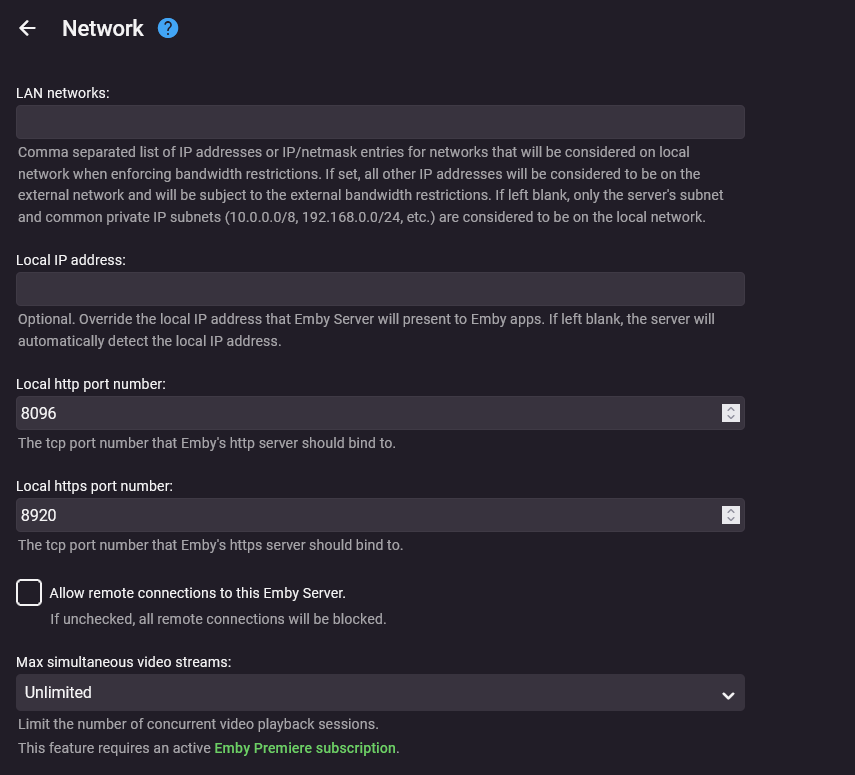
If everything is truly behind Nginx Reverse Proxy, then everything can remain blank. I actually recommend it and don't do unnecessary settings to further confusing things down the road. I am behind Caddy SSL Reverse Proxy.
 1 point
 -
All https traffic will be encrypted incl the actual video transport. If you are using nginx, then configure it to force https only - ie http > https redirect. re Q1 - If using nginx (and it's handling the tls and redirection to the emby host over http), then there is nothing more for you to do - it should work fine. Check the dashboard to see if you have both the http (lan) and https (remote - using your domain) listed.1 point
-
You have to obtain your own domain and certificates then configure them directly in Emby or via a reverse proxy. Disregard the above. My reading comprehension resets for the week every Sunday morning. You might want to change this setting to this option:
 1 point
 -
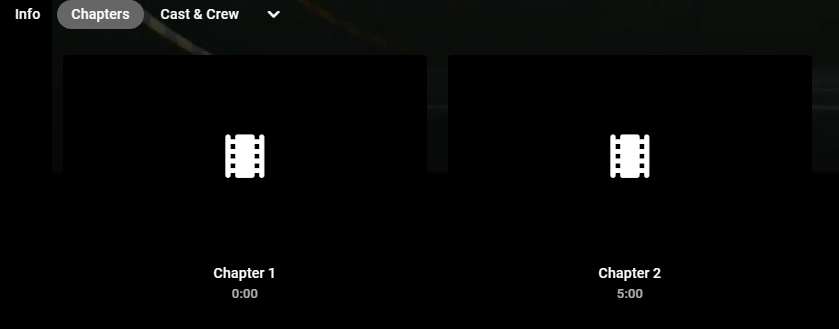
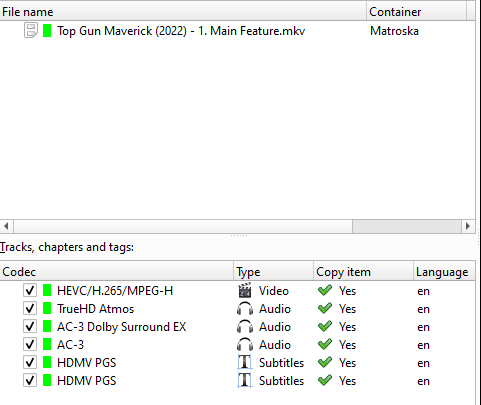
Hi. is there away to stop emby creating chapters for files that have them removed as you can see they are not in the source file i have deleted the metadata and refreshed and they still show up
 1 point
 -
I am using synology reverse proxy. what is interesting I can watch content from the movie library, just can’t watch from the tv library. I have now resolved the issue by removing and re-adding the library.1 point
-
Ok, I went ahead and put it back on Pop_OS.1 point
-
Its the same as before. I think I'll wait until you acctually do something before I try again...1 point
-
HNY Luke, i will try this and reply the result. bkh1 point
-
Thanks for you response Yes, this works. thanks for your help Looking to the future, I think a new function will be a shortcut in the star screen to finish watching an episode from your last playlist, and continue with the next episode Happy new year Luke!!1 point
-
dang, I should have posted an update......thought I did. So, I run Server 4.8.10.0 on Windows and since I have turned off "Auto" on the qualit setting but use the highest available I have had very few problems on my Ultra or my Stick. When I have an issue (rarely) I take @Luke's advice and refresh the guide. On my Roku 2 I do notice more frequent issues that I believe are device related and do have to restart the device to have it work. All in all my initial issues I had when I created this post have dramatically reduced and I can live with the small glitches that I do experience when I actually do experience them. The frequency is probably 1 a week at the most and that is with the TV on it at least of of four devices for 12 hours a day.1 point
-
Hi, yes we are looking into this as part of the 4.9 server release. Thanks.1 point
-
I know this might be controversial and maybe even odd to have a request to remove features but clearly the Photos functionality is not a priority and honestly there are other apps that do a much better job at it. The main reason why I think this feature should be removed is so the team can focus on more important things. There are so many feature request from many years ago that would be a lot more useful but it seems like the team is spread thin with supporting so many things. There are other things I think that should get removed but I know a lot of people use them so I guess is worth keeping but sometimes it helps to trim the fat. Quality over quantity.1 point
-
Immich (https://immich.app) is slowly becoming the best self-hosted photos / home videos solution out there and Emby is light years behind it. Emby, outside of Movies / TV Shows and partially Music, delivers subpar and pretty stale experience for everything else. You can clearly see that some of the library types are there just an afterthought or "ported" from other library types (see audiobooks with library settings clearly ported from the music library type) So, why struggling the efforts on a gazillions subpar features rather than focus on just the "pillars" and made them EXCEPTIONALLY well. We need to understand that different media types require a TOTALLY different UI/UX and user experience, with a complete different features based on each media type. No, Photos / Videos / Music / Audiobooks / Books / Recipes ... or the kitchen sink, they don't go together in the same interface, within the same app. So, I fully agree 1000% with the OP. Let's start the "Make Emby Leaner" movement . In my opinion, Emby should focus on Video (movies / tv shows) and Music and that's it, and provide a TOP NOTCH experience with amazing features for both (dedicated apps included). 1. Let Immich do Photos and Home Videos 2. Let Audiobookshelf do Audibooks and Books 3. Let Mealie do the Recipes (just sayin) 4. .... and so on1 point
-
Just a friendly drop in again to credit your awesome work. This app has become irreplaceable for me, I use it for hours daily, and, every now and then dig into again to find some new settings to experiment with Kudos!1 point
-
I guess I'm Penny...?1 point
-
This is not an urgent request by any means, but it would be cool if there was a new library type for old-time radio shows. It could be structured like the TV sections, but would only play audio.1 point