Leaderboard




Popular Content
Showing content with the highest reputation on 12/20/24 in Posts
-
Xbox One Users: Please wait for the next update. Thanks. (1-2 days from our side plus unpredictable duration for store certification)4 points
-
UPDATE Hello everybody! The release of our new Window & Xbox apps in December 2024 was overshadowed by the unexpected rejection of the HEVC Playback capability by the MS Store for Xbox (only - the Windows app was unaffected). As a temporary remedy for Xbox users, we had established the Emby Xbox Holiday Bonanza. which allowed to register for a private version of the app with HEVC playback enabled: The "Emby Plus" app. Today (March 25, 2025) we are glad to announce the following changes: The Emby Xbox Holiday Bonanza program is closed The Emby Plus app is discontinued Starting from version 2.222.0, HEVC playback is included and enabled in the regular app releases What does this mean for current users of the Emby Plus app? There is no action required Emby Plus users will automatically be updated to 2.222.0 (or later) There is no drawback in any direction Version from 2.222.0 on provide the exact same capabilities like the Emby Plus app had offered before already We apologize for all the inconvenience, questions, support interactions and uncertainties this has caused for our users. The Emby Team This topic is locked now. Please create new topics in case of any questions. --------------------------------------------------------------------- Original Message Xbox Users! Santa Softworkz has worked relentlessly to bring you a happy holiday with Emby and the Xbox. There are rules, though: Don't talk about it Don't speculate Don't ask questions about it If you don't follow, then there's no happy ending for you. Watch out for the "Santa Softworkz Holiday Lottery"3 points
-
This is my experience too. Absolutely nothing in my library plays without stuttering. Sometimes it is a mild stutter that increases and other times the stutter is right there from the start. The green screen happens when I start a file too. Very similar to Kodi when hardware acceleration is turned on. Turning off hardware acceleration on Kodi helps bit I can't find the equivalent with Emby. I'm running a number of Xbox one s consoles over a hardwired cat 6 network. My whole setup is completely broken.3 points
-
Are you all seeing the same king of stuttering like here? VID_20241220_123247.mp4.73a3138d829fede3794dc3eaad16f1e2.mp42 points
-
@visproductionthat would have the same effect a removing the library. With you metode the library would scan changes, and again when flipped back. Adding : The NAS is under reconstruction ie don't mess with it. Renaming shit when that's going on might led to data loss.2 points
-
I tagged 11.1.10 now as stable. Still holding back next beta as I chase a serious http communication bug. It affects http communication in chunked transfer mode (not very common) and only in very special cases (even less common). However this bug affects all versions since 9.X or even earlier and will be fixed in next beta. Special thanks to user @reggifor countless tests and still ongoing.2 points
-
Repeating what I posted in the beta forum before I discovered this thread ... Same video stuttering problem for me on Xbox One X. Since updating the Emby app on my Xbox One, video files are now unwatchable with the app on that device. I've only tried H.264 content and at various files and resolutions. Audio codec and device audio configuration changes make no difference. Same result in all cases which is a flash of green then juddering video rendering. A file with no audio track also exhibits the problem. The same content plays fine using the web client on the same xbox. Everything plays nicely with the new app on the Xbox Series X in another room. Comparing logs on the server doesn't show any significant difference although I do see out of sequence post & response from the One. Threading issue? I'll grab logs from the apps and compare when I get a chance.2 points
-
Thanks for the explanation and the hard work. If I understand it correctly H264 should work but H264 files also stutters like crazy on my Xbox One S. So is that the same issue or seperate problem?2 points
-
All about the new app here:1 point
-
This all started happening when I updated to iOS 18. I'm not sure if this bug is known or not, but I wanted to post this just in case. Whenever I go into the media player on the Emby app and tap the screen to bring up the progress bar, the media always pauses. It is very annoying and it did not used to do that. Also, when you bring up the cast, there is no way to get rid of it without exiting the entire media player, which is extremely annoying. I've provided a screen recording below that can hopefully show the issue. Everytime the media stops is when I tapped the screen. Another thing that would be nice to add is to allow more precise scrolling through media. For example, with the Disney+ app I can drag my finger on the progress bar and it will show me small thumbnails of what would play at that time in the movie. With the Emby app I can't drag my finger to move the progress bar, I can only tap to get to certain places which is not as precise. ScreenRecording_12-18-2024 13-23-44_1.MP41 point
-
Looks like it's available again.1 point
-
Still no reply from the Emby team? wow.1 point
-
I'm afraid this is not yet possible in Emby AFAIK. Paul1 point
-
Yes that is what I'm seeing on my Xbox One S. Added a video I did the other day. 20241219_065435.mp41 point
-
Agreed. I have a house full of Xbox ones that should be more than capable of direct playing 720p and 1080p files, along with my mpeg2 TV streams and they are a stuttering mess. @softworkzWould you like me to open up a new post with logs around this?1 point
-
I am using a dedicated htpc just for emby. Could you please add run at start up please. Agree on the back button situation, prefer for when l look at info etc, i end up out the player. Apart from these two issues am liking the new app..... thanks1 point
-
I think the first thing that should be fixed is the stuttering on Xbox One's which makes them utterly useless with the current Emby App.1 point
-
1) Yes 2) Added together.1 point
-
I'm still unclear why, once Microsoft refused permission for HEVC, that the new version _had_ to be published? The timing is particularly bad just before the holiday season where we normally get more use than normal from Emby.1 point
-
Thank You, 3.4.30 loads perfectly! I look forward to exploring the changes.1 point
-
I've just tested a H264 1080p file on the first updated Xbox and I got the green screen fir a few seconds and then it started playing but stuttering and unwatchable.1 point
-
@Luke @softworkz I know the original intention of these settings were for diagnostic use but while "diagnosing" issue, the ability to turn one or both of these settings off solves a problem for some customers. The problem however is that the settings aren't saved, so any admin needing to use them to fix a problem on their system has to reset the values each time the server is started. Could we make these items save properly like any other options set in the interface? If needed, add a new button to reset diagnostic options to defaults, which should have the same effect as not saving the options, if actually using the plugin for diagnostics. I'd prefer to see some of the options dealing with subs, moved into the normal UI as they really are needed on some systems but until that could get done, being able to save the values in the diagnostic plugin would help solve issues for many admins. Thanks, Carlo1 point
-
LOL, okay. Now am able to see the VOD Movies and not the VOD Shows.I didnt do anything different from the last time.1 point
-
having same issues on Xbox One as everyone else with the stuttering and green screen. Completely unusable. How can I unroll the update? Can you at least release the previous version as a separate app in the Xbox store? Pretty bad QA, not happy at all1 point
-
Thanks for your attention. I have solved this issue. I used Wireshark to capture the traffic from http://192.168.2.42:8096/web/index.html#!/home and upon comparing the HTTP headers, I found that the user-name field was a string of characters 'cefa80922459464484efxxxxxxxx14b8' instead of 'WIZ-LT'. When I used this string of characters as the username, the code worked. I don't understand why. emby_url = "http://192.168.2.42:8096" api_key = "850d6a3a78bc4ec6b584077b34b2a956" user_id = 'cefa80922459464484efxxxxxxxx14b8' # "WIZ-LT" not work item_info_endpoint = f'{emby_url}/users/{user_id}/items/{movie_id}1 point
-
I want to thank you for forcing me to look up a simple word "arsed" as I had never, in my 77+ years, heard that word used the way you use it. For those that do not know but would like to it simply means "concerned" or "bothered." I pride myself on my ability to use words and i always welcome the opportunity to lean a new word or the usage thereof. My typing is pretty bad as I have a tendency to drop first and/or last letters of words as I type. That is not usually a problem but, sometimes, the missing letter(s) change the word into a completely different word when the firs or last letters are dropped. That problem has become worse as I have gotten into my upper 70s so I hope my posts usually at least rise to the level of understandable. Fortunately my ability to perform complex tasks is not compromised by my inability to type well. But "neatness" is a bit compromised so I always look a bit like a slob. But I like me, even if no one else does.1 point
-
You can change the runtime group by adding an override to the emby-server unit. The command opens an editor then you can add the lines below it. Replace value with the existing group name you want to use. Old files will retain their ownership and new files created by emby will have the new group ownership. systemctl edit emby-server.service [Service] Group=value Save and restart the emby-server service.1 point
-
Hi there, what have you tried so far?1 point
-
Oh yes, sorry. I made the mistake of reading too quickly. Thanks a lot.1 point
-
Read here:1 point
-
@LukeI have this same issue with Nvidia Shield Pro 2019 and a Nvidia Shield Pro 2017. Let us know if there is anything we can do to help!1 point
-
No this is 720P and 1080P H264 that stutters while direct playing. My HEVC files that stutters are also only 1080P. This also happens on my recorded files which are H264 720P or 1080I. The same files was working before the app, but now there are stutters. You want a server log, cause that seems to be the only thing there is. Also recorded a video of it with my phone1 point
-
I have solved it by deleting all libraries and adding them in again, its done a rescan and all is now showing, not sure what happened1 point
-
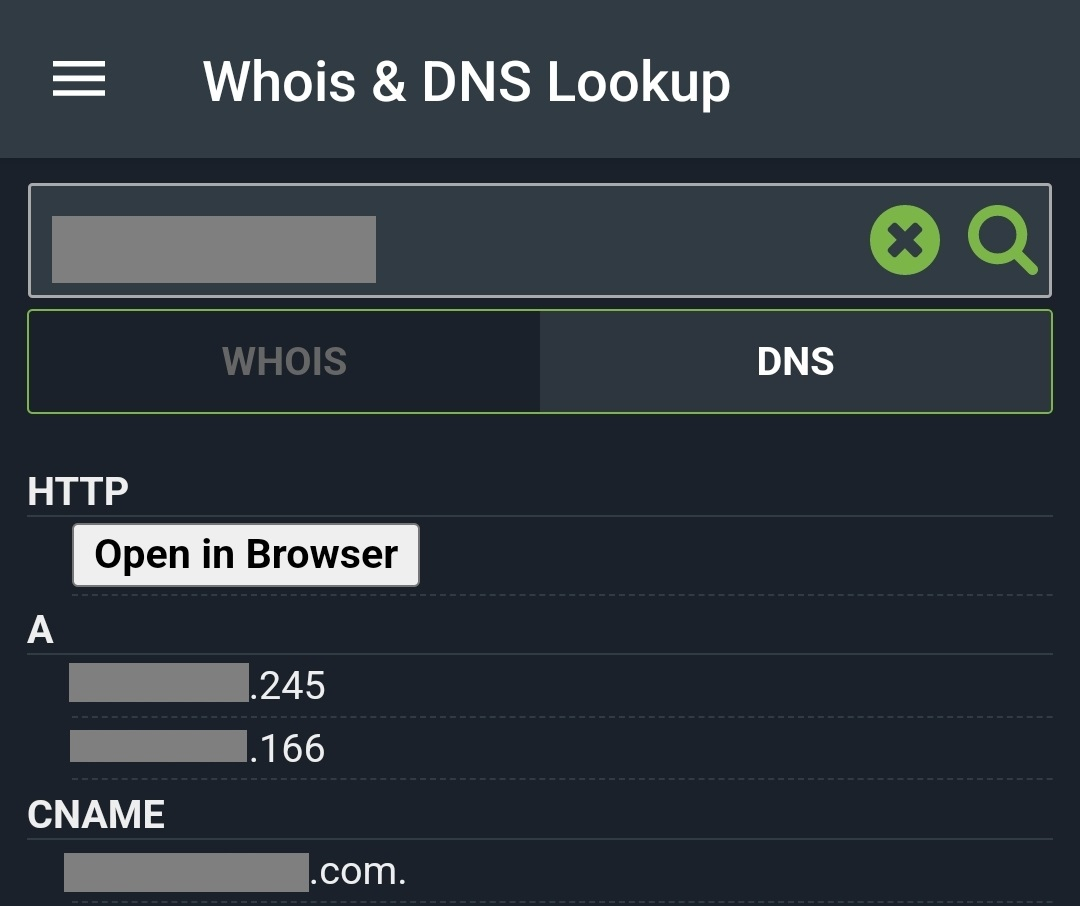
It appears you have your domain pointed at two different IP addresses. You should make sure there is only one 'A' record, with your correct WAN IP.
 1 point
 -
Open Edge browser on the Xbox and load the web app as fallback. This shouild be equal or better than the legacy xbox app.1 point
-
This app could possible fix your MP4 video and it works from command line: https://www.videohelp.com/software/MP4Box1 point
-
Seems like such a strange time of year to have the app released, zero support to be able to address any issues. Now got a media system that is totally useless for the next unknown months and over the holiday season.1 point
-
But why the old app was working? Can you please remove the new with the old app? It really is unusuable now. Or do you have any suggestions get hevc movies working on the xbox? Additionally, its displaying green at startup and while skipping.1 point
-
Worked like a charm Carlos!!1 point
-
Thank you. I'll make that move manually then.1 point
-
So as far as I know h264 is AVC and not HEVC? So why is h264 also stuttering?1 point
-
Hi, we're looking into it. Thanks.1 point
-
Hi, have you tried the emby server convert media feature? Convert Media1 point
-
Going to test Jellyfin over christmas, It now supports hardware encoding, Dolby Vision, Atmos, AND Dolby Vision to SDR Tone mapping, (which Emby still cant do) The Two main issues are apparently the Clients aren't as good, and remote access can be a trickier. But Jellyfin does has far more useful plugins. I am frustrated that Smart Playlists for Emby has taken 10 YEARS, and it's still not ready, and this feature breaking bug has taken 9 Months, which should be fixed in days. I would be more lenient, even happy, if this was free software, but i am not getting any value from my subscription. If Jellyfin ticks all the boxes over the next month, i'm out, and glad i didn't pay for lifetime... Lifetime is how long you have to wait for something to be fixed.1 point
-
@242Moviesyou were right it was in spam XD thanks!1 point
-
Sorry it took me so long to reply. None of what was suggested worked at all. What finally did work was me completely deleting the existing "TV Shows" library and recreating it from the ground up. Now I no longer have the issue. Thanks to all who attempted to assist.1 point
-
Okay, so removing my 4K library allows the series to merge. Thanks guys. I was hoping I'd be able to have a separate 4k television library like I do with 4k movies (just for easier access when using a 4k capable tv), but this is better than nothing1 point
-
If Plex does it then it is probably less than ideal.1 point
-
You should remove root \\10.0.0.7\EmbyMedia\TV from library folders as that one is likely breaking your setup.1 point
-
I always use this naming. Folder : Andromeda (2000) [TvdbId=77544] This will tell Emby what show it is, and take away Embys guess work.1 point