Leaderboard




Popular Content
Showing content with the highest reputation on 11/20/24 in Posts
-
I think he was just trying to add his experience corroborating yours. As you know and mentioned earlier in this thread, there are multiple tens of millions of reasons "why" they get more exposure but that's also exactly why they are moving the direction that they are - they have to provide a return on that investment. IMO we don't really need to step up our game in marketing. Instead, I think we need to step it up in development - and we're working on that.7 points
-
This certificate was specifically created to use Emby through the Microsoft Edge browser over HTTPS on port 8920, eliminating the "connection is not secure" warning. It is important to note that this certificate works properly in Edge but not in Firefox. For the certificate to function correctly, it must be installed both in the Windows Certificate Manager and on the NAS where the Emby server is hosted. Note: The domain names and IPs used here are examples (, ) and must be replaced with those corresponding to your network.example.domain.lansubdomain.local.domain 1. Generate the .crt and .key files Open the Windows terminal: Launch a terminal (Command Prompt or PowerShell) and navigate to the folder where you want to generate the files. Choose the appropriate command based on your needs: For a single domain (single SAN): openssl req -x509 -newkey rsa:2048 -sha256 -days 3650 -nodes -keyout example.domain.lan.key -out example.domain.lan.crt -subj "/CN=example.domain.lan" -addext "subjectAltName=DNS:example.domain.lan" For multiple domains and IPs (multiple SANs): openssl req -x509 -newkey rsa:2048 -sha256 -days 3650 -nodes -keyout example.domain.lan.key -out example.domain.lan.crt -subj "/CN=example.domain.lan" -addext "subjectAltName=DNS:example.domain.lan,DNS:subdomain.local.domain,IP:192.168.1.xx" Verify the results: The files and will be generated in the specified folder. example.domain.lan.crt and example.domain.lan.key 2. Create the .pfx file for Emby Use the following command to merge the and files into a file: .crt + .key = .pfx openssl pkcs12 -export -out example.domain.lan.pfx -inkey example.domain.lan.key -in example.domain.lan.crt -name "example.domain.lan" Set a password for the .pfx file: You’ll be prompted to enter and confirm a password. You can leave it blank or assign one. Note: If you assign a password, remember it, as it will be required in Emby’s settings. The file will be generated in the same folder. example.domain.lan.pfx 3. Upload the .pfx file to the NAS Transfer the file: Copy the file to a folder accessible on your NAS. example.domain.lan.pfx Ensure that Emby can access the path where the file is stored. 4. Install the .crt certificate in Windows Open the .crt file directly: Double-click on the file . example.domain.lan.crt Click the Install Certificate button. Follow the installation wizard: Select Current User as the target location. Choose Place all certificates in the following store. Click Browse and select Trusted Root Certification Authorities. Click OK, then Next, and finally Finish. Confirm the installation: A confirmation message will appear asking if you want to install the certificate. Accept to complete the installation. 5. Configure Emby with the certificate Log in to Emby and navigate to Settings → Network. Locate the section Custom SSL certificate path. Enter the path to the file you uploaded to the NAS..pfx If you set a password for the file, enter it in the corresponding field. If you left it blank, leave the field empty..pfx In Secure connection mode, select: "Preferred, but not required" (this allows connections via both HTTP and HTTPS). Click Save and restart the Emby server to apply the changes. Important Notes The domain names (, ) and IP () are examples. Replace them with the actual domains and IPs of your network.example.domain.lansubdomain.local.domain192.168.1.xx If you need to include more addresses or subdomains, add them to the field when generating the certificate. For example:subjectAltName -addext "subjectAltName=DNS:example.domain.lan,DNS:subdomain.local.domain,DNS:extra.domain.com,IP:192.168.2.xx" Credits This guide was completed with the help and insights provided by @Lessajwhose expertise made this task much easier. Thank you for your support! Final Note If there's anything I missed or ways to improve this guide, I’d greatly appreciate your feedback and insights. Sharing your knowledge or suggesting adjustments would not only help refine this guide but also assist others who might face similar challenges. Feel free to share your thoughts—I'm always open to learning and improving. Thank you in advance!3 points
-
Agreed - another area where Emby have lost focus and are now way behind the competition - it doesn't even have the ability to edit the Intro's without the support of a 3rd party plugin... Emby (with the 3rd party Plugin) used to lead in this area as it had both Intro and Outro detection and all the support tools (editing, stats etc). Now even JF has long passed them and have recently introduced the architecture called 'media segments' which is tagging for for Commercial, Preview, Recap, Outro and Intro. Their clients need to catch up, but the concept is solid. A shame, as the same concept of 'MarkerTypes' is actually in Emby (and was discussed with them), but beyond Intro's, it has have never been developed further ...3 points
-
Definitely the case for LG and Apple TV devices.2 points
-
I'd like to have the option to clear 'alerts' in the dashboard. I realize that they go away on their own, but if I can clear them then it's more obvious IF a new alert comes through.1 point
-
I believe those are saved in the metadata folders, unless you install a specific Emby plugin that allows you to save people photos elsewhere.1 point
-
It looks like what they have done is create new model groups for 2023 models running Tizen 8. This might only be transitional, but they might also leave this ongoing in case users don't update the firmware. It will be a nightmare if every model group can support up to 7 different Tizen releases. Anyway, 2023 and future models should all get Emby app versions at the same time moving forward, so you won't notice the difference. They haven't opened up the option for us to submit updates to the newer model groups yet, but as we submitted 1.9.0 while they were still testing 1.8.0 on your model, that is why it is currently behind. In the future, they should all be updated together. When they open the option for us to submit to this new model group, then we can submit an update.1 point
-
You do not need Synology media servers installed. It has nothing to do with Emby Server.1 point
-
Hi NakedPirate. installed 1.0.45 yesterday on my LG OLED C4 and an older Model (2019) No probs detected so far... but also no new features found so far Maybe we'll get informed about them soon *haha* Greetz nanuk1 point
-
Thanks for documenting that for everyone! Great job.1 point
-
@robschEmby requires them to be in same folder to have automatic naming grouping to happen otherwise you have to use the Plugin or group them manually via multi-select options. Movie Naming | Emby Documentation1 point
-
Unfortunately not. The good news is the bulky metadata editor plugin that was mentioned in here will create NFO files just by doing a 'save' without changing any data. However, the photos seem to be quite problematic. It doesn't seem like anyone has a solution to save those. Only 'newly downloaded' images would be saved.1 point
-
Probably yes, but not sure. According to my tests, emby connect didn't work at all. btw, The chapter issue came from an older Emby server version (at least 4.8.3 or lower). However, I'll fix that in next version too.1 point
-
I guess I was confirming that Exo supports it at least. It is possible that that's the issue in this case since a L5.1 worked fine for the OP.1 point
-
There is a higher level of support which the big guys pay a premium for. Because of this Netflix and others can also update TVs which are 5+ years old. Just a higher level of support overall, at a cost of course1 point
-
fyi, emby connect is broken in 11.X versions and chapter images might crash the library sync. Both will be fixed in next version.1 point
-
i have emby server android v 4.8.3.0 (408030000)1 point
-
My experience is the same as @rbjtechin that the season poster images are created in the root folder regardless of whether or not you have season folders. For the default Emby settings, these images would be created whether or not there are already folder.jpg images in the season folders. There is a workaround to prevent the season images from being created in the root folder. In the system.xml file, there is a an option for Image Saving Convention. If that option is set as <ImageSavingConvention>Legacy</ImageSavingConvention>, the root season images don't get created. Edited to add: Setting this item as legacy instead of the default impacts other image naming conventions for newly added media. I don't recall exactly what images are impacted at this point. But poster.jpg images will be named folder.jpg when acquired for example. Emby still respects poster.jpg images that are already in the library folders. At one time backdrop images would be acquired as background##.jpg instead of fanartxx.jpg. But that is no longer the case.1 point
-
I always tried, but could never get one for my 2012 model, then it eventually died1 point
-
DV mode is being activated via the Shield HDMI connection for L5.1 - so that's working just fine. I think it's simply that L6.1 is not supported on the TV - but other than a hunch, I have no way to confirm this ..1 point
-
@FrostByteI can only chuckle when I read their promise of 7 years of updates and supports. Sounds like the same promise that we got with EVO kits in Orsay models when we first started this saga over 12 years ago! That was a short lived promise1 point
-
See my response in your other topic, looks like Samsung are making changes which might explain what you're seeing.1 point
-
Has your Q80C had a recent firmware update? What version is it? Reading this article, Samsung are preparing for some 2023 models to update to Tizen 8 which will match the 2024 OS version. https://www.sammobile.com/news/2023-samsung-tvs-get-new-firmware-before-big-tizen-8-0-upgrade/ In the last week, Samsung have started pushing releases to new model groups with a _OS80 name suffix, which I suspect are for 2023 models running Tizen 8. For new model groups they typically do a full retest of the app which they start ahead of time. Often this means that by the time they release the new model groups, we have already pushed a new app version. It looks like these new _OS80 models have been tested on version 1.8.0 so at some stage we will need to do another update ether to bring these new model groups up to 1.9.0, or to bring all models up to another newer version. I'm taking a guess here, but I suspect that is why you are still seeing 1.8.0 in the app store as your TV has or soon will update to Tizen 8 @Lukesomething to be aware of1 point
-
It's like talking to a brick wall bro. It's fine tho whatever. I decided it's not worth the time to write anything up, nothing will change in the updates anyways.1 point
-
I have implemented it, and it worked. thank you very much for helping me. @hthgihwaymonk1 point
-
I will get you the model number but my q80c is a higher end model with lower end version of emby???? I know i can use a USB stick but I dont want to do that every month. Maybe posible the updates can be done a bit faster. I understand this is not embys fault but its a PITA.1 point
-
use MKV - it's a much more portable and flexible format. If you have already have the ISO's - then converting them to MKV via a script is just as easy (find them online) - as space is likely an issue, then I'd suggest doing in batches and do spot tests to ensure they are good before you remove the old ISO's and move onto the next batch. If you are ripping them from the original disk, then you have lost nothing anyway - you just chose the correct container that will be fully supported for the forseeable future.1 point
-
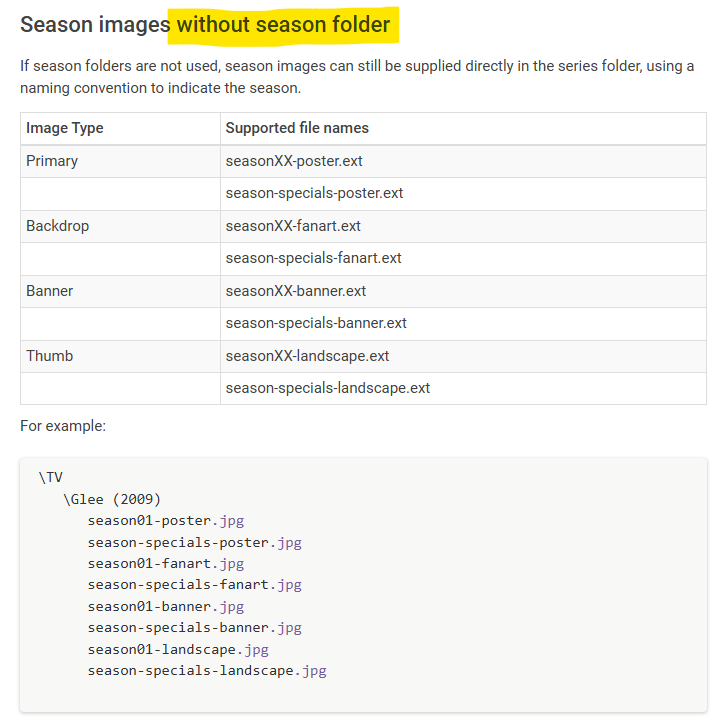
I'm really not sure what's baffling you @Carlo The information given is just plain incorrect - not sure how else you want me to explain. https://emby.media/support/articles/TV-Naming.html#season-images-without-season-folder This is wrong - these are files created if you DO have season folders. So in both cases - with or without folders - these files are created.
 1 point
 -
Please bring back the feature to be able to view the missing episodes directly in the overview of the individual episodes it's annoying to have to open an extra menu every time. that's not even enough, you have to move a slider to show the next episodes... Not everyone knows the complete episode guide of a series and many people only watch series when seasons are complete. so it's a very useful function to be able to see directly whether a season is complete or not I really can't understand why they removed this feature and then added such useless and complicated features1 point
-
That's Great! Thanks for the Quick work.1 point
-
I’ll work on some screen shots to clarify. All I do is switch users, not logout. Seems the Home Screen is reset back to a default view.1 point
-
I started my media server with Plex, I can tell you the bland interface and multiple issues with transcoding and HDR tone mapping were the reason I looked for something better. Google didn't even come up with Emby, it was Synology Apps. I started looking into Emby and noticed that it performs better, can manage my 500tb of files with ease...........and wait for it, doesn't store settings and metadata in the registry. I'm not sure that Plex thought about how difficult it is to move computers with the massive mess around that Plex users have to go to. Emby is so much better with automatic backups for metadata, settings.......which can be reinstated in 1 CLICK. Store your auto backups to your account AND OneDrive and it doesn't even matter if your computer completely dies1 point
-
I figured it out without tech support How you guys don't understand is baffling. Please close the topic to prevent any further confusion to anyone else.1 point
-
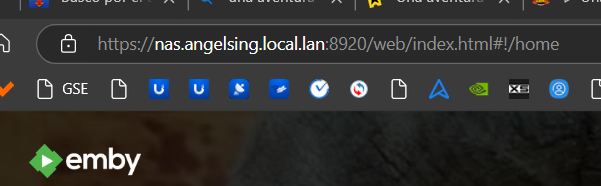
Thank you, brother. Your guide was incredibly helpful, and now I can finally access via HTTPS securely, without any annoying messages. I’ve been trying to solve this since yesterday, and thanks to you, I managed to do it. Once again, thank you so much!
 1 point
 -
Having two users connected right now with Samsung TVs. It's 6Mpbs. Must be horrible on the 75" Oled one of them is watching it on but i have given up trying to explain. We seriously need something done about this, it hurts my brain how i try and ensure everything is in DV/HDR with maximum compatibility for multiple devices and people still can't figure out that auto doesn't work and continue to watch low quality video on their high end TVs. My graphics card is sweating from the transcoding.1 point
-
Actually, the reset password gave me 4 different account name, the current logged on account is read only, I changed user and got full access, now I've been able to change the password, create new user and add my local network nas folder as media folder.. Thanks so very much1 point
-
I fixed several bugs and enhanced the C# TV platform code. You can now add two months of TV data to the TV tuner. The source code and DLL are attached below. I have been testing it for three days. Vic === corrected a small bug === This bug caused the browser to consume to many resources. The corrected code is attached below. PseudoTV.dll PseudoTV.zip1 point
-
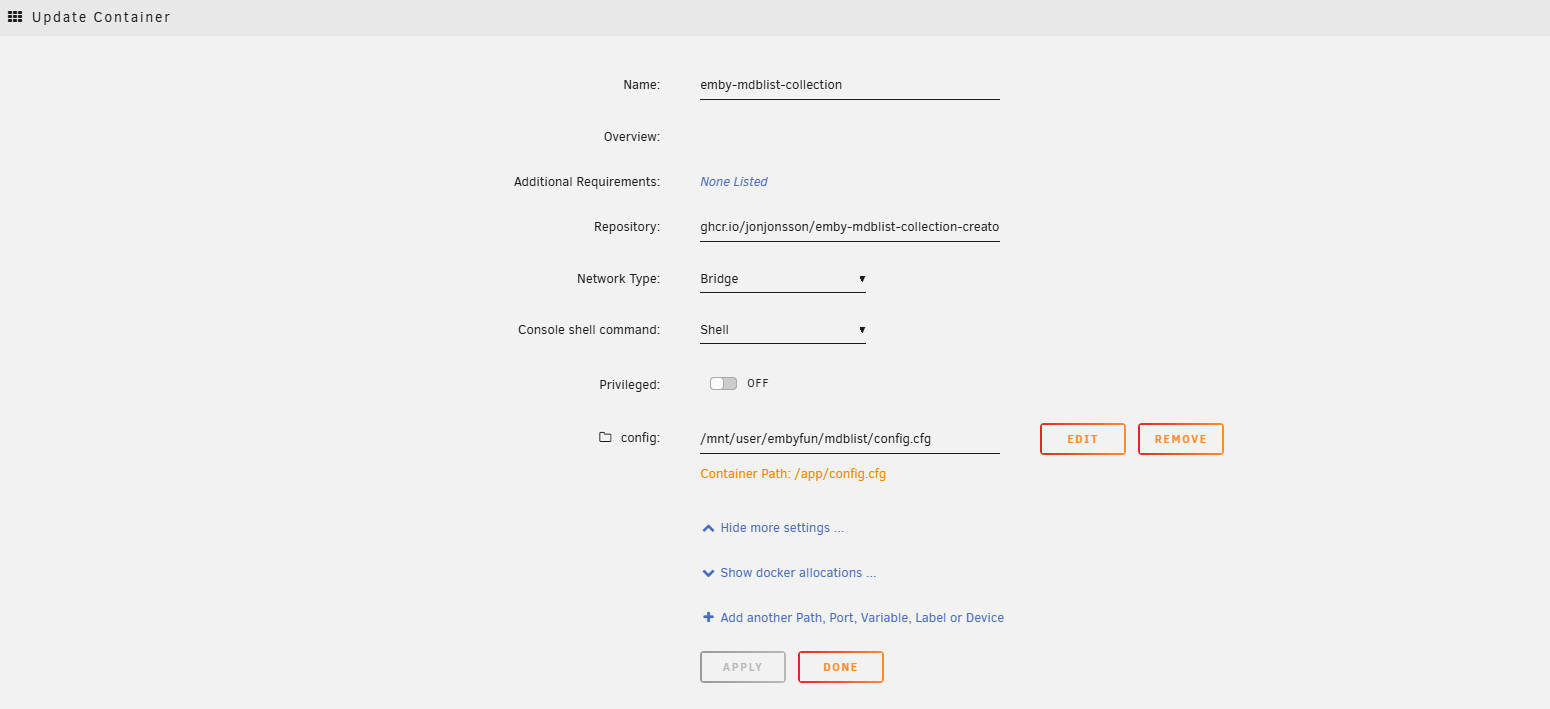
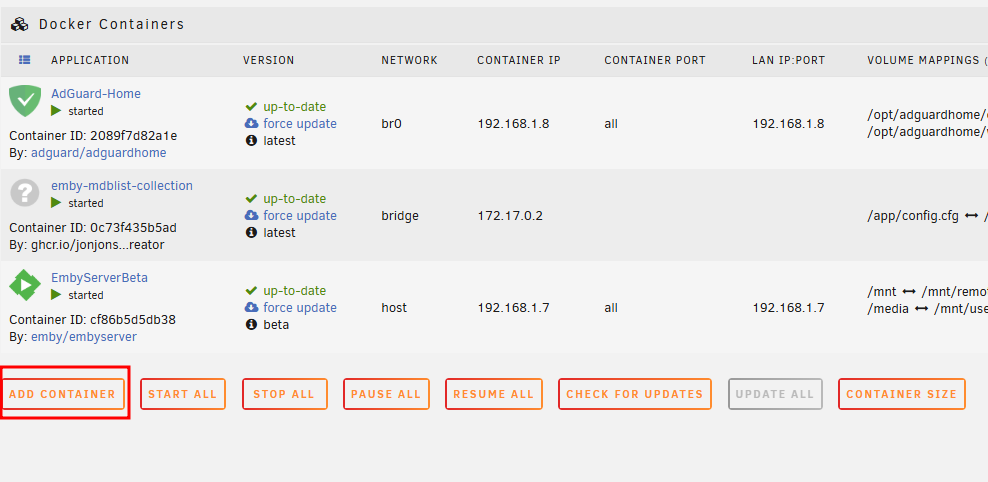
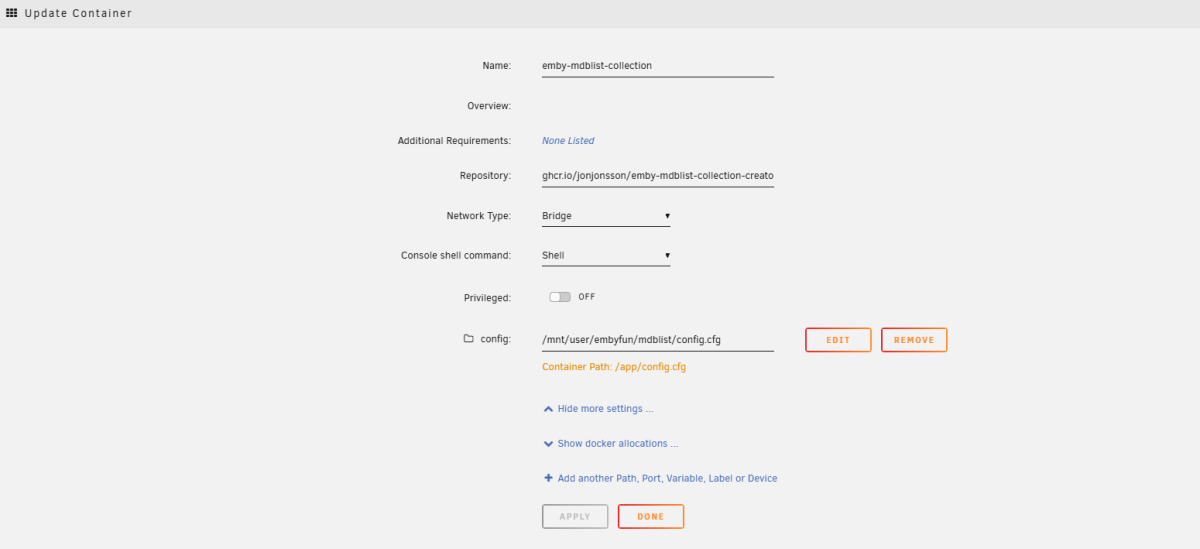
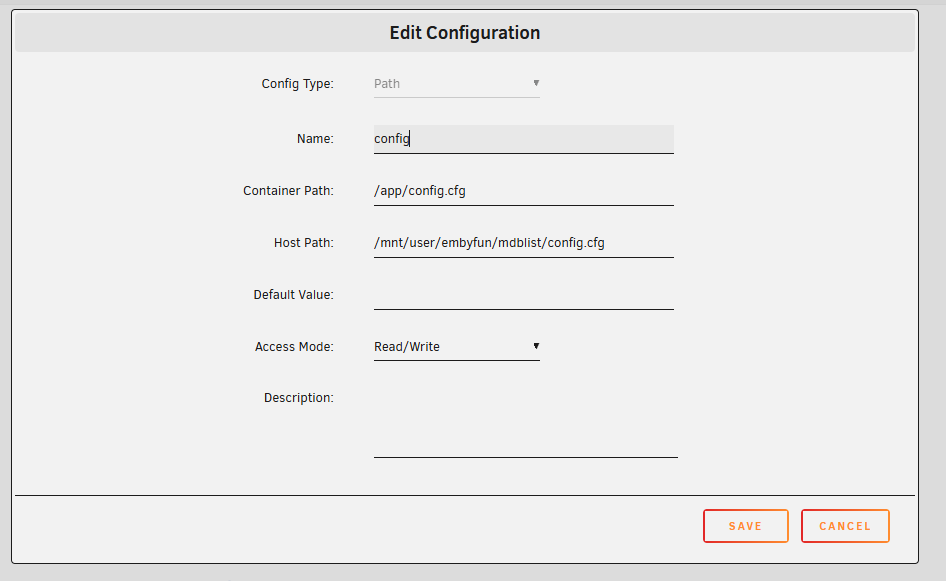
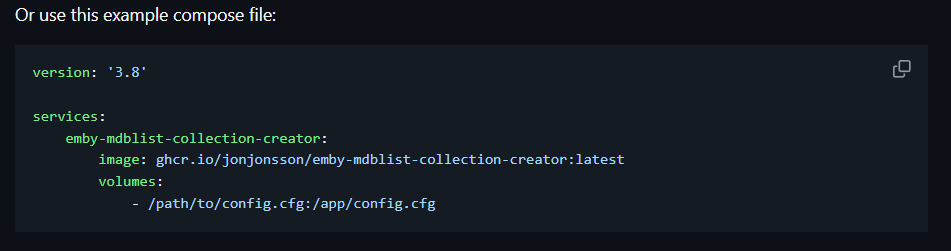
@xbmconnectHere is some pointers for unRaid. Guess you have you connection in order from mdblist api and admin user nr + emby api. And created you config. Create a new share that you expose to emby. Upload you config.cfg to your share. Adding the docker First Second fill in details. jonjonsson/Emby-MDBList-Collection-Creator: A Python script can take MDBList.com lists and create collections from them in Emby. MDBList stores Trakt and IMDB lists (and more) that can be accessed via API. add the path to share you made.

 1 point
 -
I've started work on this. But, there will have to be some guidelines out up so users can create custom. Images that fit. I'll write it up... After I finish getting g then working.1 point
-
Hi, Even if I understand that this seems "old and dirty"... and then not very sexy feature to implement.. it was a parte of the Emby story. The capacity of playing ISO (DVD for my side) was one of the feature supported (or at least partially) by Emby that made me choose Emby. Today the function is functioning far worse that in the past. Ans it is pitiful...1 point
-
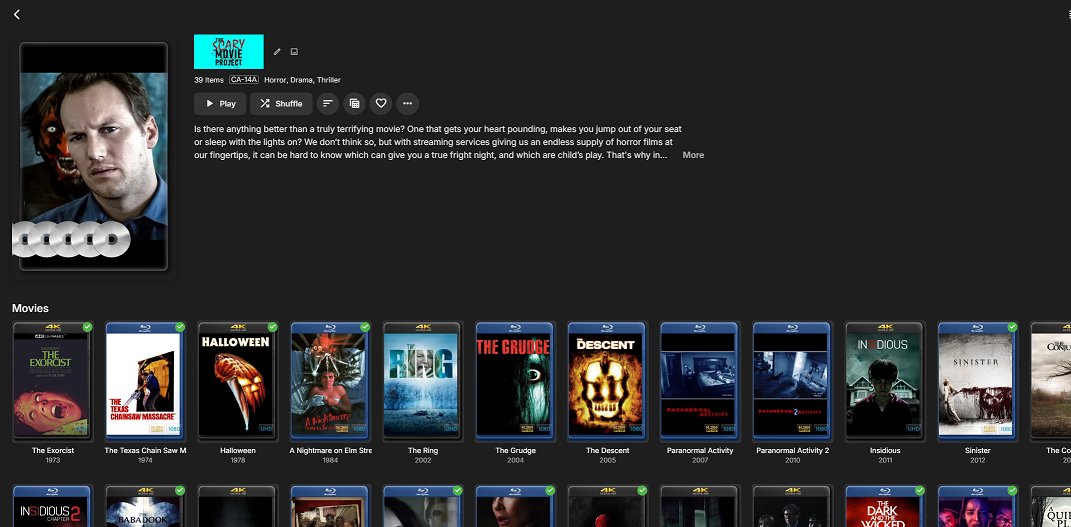
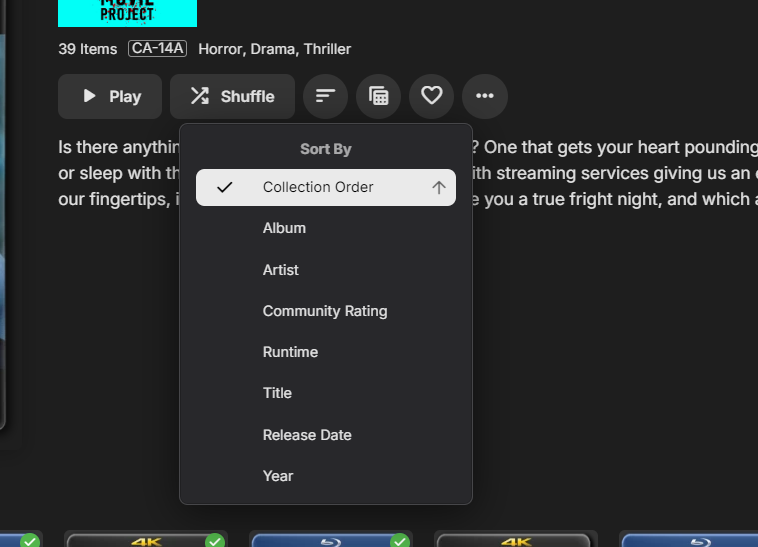
So I had created a new thread, but was pointed to this one as it's pretty much the same issue. Original Post: So, I've been going through the forum and there have been a lot of similar requests but I was hoping to just revisit this as I feel that this still isn't addressed. I know some people want to have a collection which has the best (10, 100 or 500) movies in whatever order so that way they can visually look at their list and see what is the #1 rated movie by whatever list. This was never really an issue with me until I wanted to have a collection of the Top 50 Scariest Movies of all time (as study conducted by an initiative called "The Scare Project" ) I've added all the films that I currently have in my Library to my collection and have zero way to Order, rank or view in the specific order that I would love for these to be displayed. Currently, I would like to see the movies in order by how they would appear in the list (which means Sinister would be #1). I'm aware that we have the collection sort order (Collection order referring to the Collection Metadata > Display Order) and then the other parameters that we can sort on. I thought of using Community Rating, but it has data validation that only allows values <= 10 so a top 50 ++ list isn't any good. Could we add another key in the meta data for Top N List or allow users to create their own metadata (maybe limit it to 1 or 2) per media type that they can add to a sort and/or filter list?
 1 point
 -
I DO NOT want to "chat" with anyone about what I think about movie. If I want that, my wife is sitting next to me. I don't care what my brother or mom think either. How many people do you have on your server? Don't you know them? Give them a call. I want the "opportunity" to rate movies on my server that only I can see, no one else. If I rate a movie a 5 and my brother rates it a 3, I do not want it to aggregate our scores and show it as a 4. I want it to show as a 5 on MY account and a 3 on HIS account. I want to be able to search for all of my TOP RATED (4s and 5s) movies from the 90s or specifically 1994 and it will show Speed and other movies that I found great. I want to see all the 3s from the 2010s, the 5s from 2022, etc. BUT, I want it to be MY rating, not someone else's. IF Emby wants to take my scores and combine them with others within the community or server (and I think that decision should be an opt-in box somewhere), that would be fine but utterly useless to me, as I don't care what other think about movies and shows. I only care about what I like. It's my movie collection, not yours. If I think a movie is crap and give it a 1, that is my opinion. Someone else on my server may give it a 5. That is their prerogative. If someone on my server wants to see my favorites, I can create a list. I won't, but I could. Look, I guarantee that most users will never rate enough movies to move the needle in either way, it's just not what they do. But, it would be helpful for those of us that are a bit obsessive but private. I don't rate movie on IMDb or RT... BUT I'd rate them on my own server. Just saying...1 point
-
Exactly.1 point
-
WTF kind of ignorant statement is this? You realize there are things out there called DVR's where the technology is not perfect (especially when it comes to Emby's own offering)? Get your act together and leave your judgemental BS assumptions at the door next time. Funny how in one thread you guys try to tell people the Android TV app is being deprecated and they need to move onto the universal app, yet here you're telling people just to go back and keep using the old app that's soon to be put out to pasture. Good way to just kick that can down the road rather than actually fix the problem that you've created.1 point
-
There is 2 things that are frustrating about the blog announcements. 1. They rarely happen. 2. You guys repeatedly reply as if you will get right on it and don't. I've brought it up numerous times over the years and get the exact same response above. The last blog for the app was Feb 2023. I love Emby but the lack of the release notes is annoying. Especially when there is precedent for removing features. I'm at the point now where I have to keep ignoring the spam to update the app on the TV because I don't know what it's going to do. I usually wait a week to make sure no obvious issues are brought up on the forums. The worst part is I come across as the prick complaining about it when it's something that should just happen by default. I know I'm wasting my time but I felt like a rant. And I understand the admin replying on here may have no control over it and are just placating the masses but if there is some higher up cracking the whip so hard you don't have time to post an update blog, let them know I hope they step on some lego.1 point
-
Hi, I got the same problem for a while now, the "Now Playing" stuck when close any different way than pressing, clicking back button. Closing with X button, return to home, or tunning of the TV, Laptop are all result being stuck at Now Playing1 point
-
I have users let me know that episode are missing all the time, as an admin i'm just adding a show and let it be, i'm not going through the shows and confirming. previously a user would let me know they see a missing episode on a show , now, sometimes they dont even know they missed and episode until they realize they missing some plot line in the show and are lost on what is going on.1 point
-
In TVnext, there's a detailed modeling of tuners - which can be hardware tuners or M3U sources. For hardware tuners it knows how many streams (muxes) are available. For M3U sources, you must enter the number of simultaneous streams are supported (or guaranteed to be available and not used elsewhere). This way, the engine is always aware which tuner streams are available and which are in use, so there is no trial=>error=>fallback mechanism needed. The same channels from different tuners can be merged into a single channel, for which you can configure how many streams of each tuner may be used for that channel, plus the order of their allocation. On top of that, tuners can require a certain permission level, which means that when the allocation order is TunerA_1, TunerA_2, TunerB_1, TunerB_2 and a user has only permission for tuner B, for that user, tuner B will be used, even when tuner A would have free resources. It's also possible to split a channel in a way that for example, one is using TunerA_1 and the other one is using TunerA_2 only. Then you could for example keep one of the channels hidden from other users and use it for recordings only. There are many possibilites...1 point
-
I think this thread is named wrong! You seem to be upset about not seeing the "upcoming" episodes in the library not "missing" episodes. They are two different things. Upcoming episodes can't be missing they don't exist yet. If your not a server admin then for sure your not interested in missing episodes and getting your library sorted out. You just want to see the fake thumb image for a episode in the latest season that doesn't exist yet?0 points
-
For me this is totally a admin feature, my users get what they get, end of. If I add a new episode it will popup in there continue watching and hopefully they will be excited.. or not..0 points