Leaderboard



Popular Content
Showing content with the highest reputation on 11/13/24 in Posts
-
Problem solved The reason for the error is that the host (NAS) and the external user (client) are at the same ISP and are not further away from each other. Carlo (Emby team) explained it like this: "It depends on the configuration of the ISP, it's subnets, levels of routers and use of CGNAT. This is often a problem in ISP setups where a pool of addresses from group A will never be able to communicate with a group B." Now we change "never" A possible solution that worked for me is the following: - purchase a own domain name (no subdomain) - change the domain nameserver to Cloudflare - set the domain up in Cloudflare free plan - built a tunnel between the host (NAS) and Cloudflare (via Cloudflare Zero Trust Dashboard and NAS Docker Container) - change the default emby ports to supported ports by Cloudflare => Cloudflare is something like a detour in that case Sources & Guides: QNAP >> https://savoir-faire.neocities.org/tutorials/cloudflare_tunnel_on_qnap Synology >> https://www.crosstalksolutions.com/cloudflare-tunnel-easy-setup/ Cloudflare Ports >> https://developers.cloudflare.com/fundamentals/reference/network-ports/2 points
-
As you know, Emby is a powerful media server that lets you stream and manage your personal content across a wide range of devices. With Emby, you can access your favorite movies, shows, music, and photos from nearly anywhere. Here’s a rundown of the devices that support Emby and how you can enjoy a seamless media experience on each. 1. Smart TVs Emby has dedicated apps for several major smart TV brands, including Samsung, LG, and Android TVs. This means you can stream directly on your TV without needing extra hardware: Download the Emby app from the TV's app store. Log in to your Emby server, and you’ll have full access to your media library on the big screen! 2. Streaming Devices (Roku, Apple TV, Fire TV, Chromecast) If you don’t have a smart TV, streaming devices are a great option for using Emby: Roku: Available as a free app in the Roku Channel Store. Apple TV: Download Emby from the App Store, and enjoy a smooth Apple TV interface. Amazon Fire TV: The Emby app is in the Amazon Appstore, letting you easily access content. Android TV: Download either the Android TV or regular Android apps from the Google Play Store to access your Emby server. Chromecast: Use the Emby mobile app to cast content directly to any Chromecast-enabled device. 3. Mobile Devices (iOS and Android) Stay connected to your media library on the go with Emby’s iOS and Android apps: Download the Emby app from the App Store (iOS) or Google Play Store (Android). You can stream media, manage your library, and even download files for offline viewing. 4. Computers (Windows, macOS, Linux) Emby can be accessed on desktop computers and laptops as well: Simply open your preferred web browser and log in to your Emby server at http://yourserverip:8096. Emby also offers desktop apps for Windows and macOS for a native experience. 5. Gaming Consoles (Xbox and PlayStation) Gaming consoles like Xbox One, Xbox Series X/S, and PlayStation 4 offer access to Emby through a web browser as well as through their dedicated stores: On Playstation, open the console’s browser, enter the server address, and log in to access your media. For Xbox, visit the Xbox Store and download the Emby Theater app for a seamless Emby experience. Wrapping Up With support for such a wide variety of devices, Emby provides flexibility to access your media wherever you are, at home or on the go. Whether it’s a smart TV, a mobile device, or even a gaming console, you’re just a few clicks away from streaming your media collection seamlessly. Happy viewing! View the full article2 points
-
Hi @Luke I imagine like many others, I’m considering pulling the pin on ordering a shiny new Mac Mini M4 to upgrade from a NUC homelab. The forums chart the development of Apple Silicon support on Emby quite well, but I wanted to ask what state of play is as of now (Nov 2024): - Is hardware transcoding now fully supported on Apple Silicon? - Is there any benefit from running emby on macOS bare metal vs running dockerised in terms of hardware acceleration support - and if not really, do we just pass through the GPU in docker compose? - Anything else folk migrating over from NUC might need to know? Mark1 point
-
Apologies this is not as intuitive as it should be. Presently, you need to enter a zero to have the Roku understand you do not want to use the port. This can be 0 or 00 or 000 or 0000 or 00000 as the port. Anything that will evaluate to a zero will make the Roku understand you want the server to stop attaching the port to your requests. We will be updating the app which will allow you to leave the port field blank which is how people expect this to work. Thank you for bringing this to our attention. We will get this fixed.1 point
-
It's not available in beta yet. But will be coming soon1 point
-
I think I did but I will try again tonight and report back.1 point
-
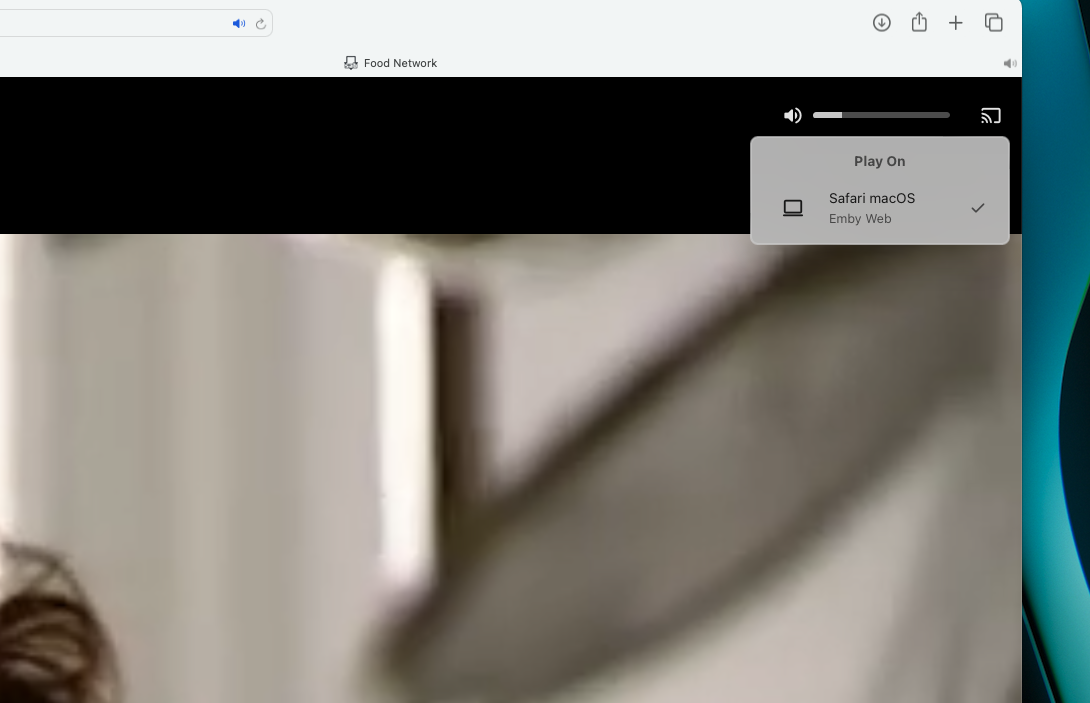
I sure did didnt I! I didnt realize at the time that I didnt even have Emby installed on my Apple TV so there was nothing available to "play on" obviously. My bad.1 point
-
That did the trick. Thanks so much for your help.1 point
-
I had installed via the Synology package manager -- that is version that failed for me. Downloading the package directly from your side and re-installing the package manually solved the problem. Thanks guys.1 point
-
Actually no and I just posted another comment pertaining exactly to this issue. The test i did for you was exactly per the very first post. I can’t get Playlist (Live) to work on my Apple TV at all.1 point
-
Reinstalled VirtualTV to help @pünktchentroubleshoot an issue and noticed if used on an AppleTV with Playlist (Live) mode playback will not start. Screen does a few glitchy flashes like it’s trying (you briefly see playback controls) then it returns to the screen you were on when you tried to start playback. is this a known issue? I haven’t been using Emby very much this past year.1 point
-
my mistake yes i meant 4.9.0.31..worth a try on the beta, but perhaps morely simply in first place a full storage / cache clear on the app? My guess would be by the time the client is playing a song, i dont think the server is much involved...so perhaps less likely to be affected by server version (crashing mid song)...my guess would be more of a client issue. but then you would expect to see the issue in general and not just shuffling the full library...so who knows .1 point
-
Suggest you enable debug logging on the Emby Server and restart the server and then monitor memory usage and when it is excessive, download the server logs and attach here together with indication of the times and memory usage you detected See this article with respect to the debug logging setting https://emby.media/support/articles/Log-Files.html1 point
-
Testing on Emby server version: 4.8.31.0 Android client version: 3.4.20 'old low specification phone' 70,000 Songs I Cant reproduce. Can reproduce. On a purely abstract 'technical' level i guess your right/i agree... the expectation would be to shuffle the objects in view..not the members of the objects in view. The Web Client at least already supports shuffling the queue so shuffling the members after the fact is already possible.....lending weight to your suggestion that in the first instance the objects in view should be shuffled not the members.1 point
-
Reinstalled VirtualTV and recreated the steps in the 1st post and everything worked as expected.1 point
-
this worked fantastic! Thank you so much for the help1 point
-
Thanks, it worked, I had to convert it, I didn't know haha1 point
-
If I understand well, the Emby programs are not able to extract (mkv extract) the "chapters.xml" and parse it when the library is updated ? The chapter info could be one-way only (from the mkv to the DB) https://ffmpeg.org/ffmpeg-formats.html#Metadata-2 doesn't present "ChapterSkipType", but it could be a subject asked to the dev community of ffmpeg ? Am I right ?1 point
-
I've also recently purchased Emby premiere and would have to agree with @Captest that the failure to fix what is essentially a broken download and transcode feature after such a long time is indeed disappointing. Can we please have an ETA on getting this sorted out?1 point
-
The Play To feature in the browser isn't tied to the plugin, but if you could install VirtualTV again and create a single channel with Playlist (Live) playback mode, that would help a lot. You'll have to test channel playback on an AppleTV and some other device, preferable an Android device if you have one.1 point
-
Emby Web only If all the subtitles are in the same, incorrect position, you could do a CSS style to fix them. Use only one CSS style of these choices. This hack would not work if subtitles fail in different ways. Here are examples. You can combine two changes at once, if you wish. padding: 0 15% 10% 0; would move subtitles 15% from the right and 10% up from the bottom, for example. /* Subtitles positioning - add to custom css file. This only changes Emby Web */ .htmlVideoPlayerContainer { padding: 0 0 10% 0; /* raise 10% from bottom */ } .htmlVideoPlayerContainer { padding: 0 0 0 10%; /* push 10% in from left */ } .htmlVideoPlayerContainer { padding: 0 10% 0 0; /* push 10% in from right */ } .htmlVideoPlayerContainer { padding: 10% 0 0 0; /* lower 10% from top */ } Hope that is helpful.1 point
-
Well in Chrome and Firefox everything is fine, so Brave browser is a root cause. I would like to avoid Chrome (it sends many data to outside) and Firefox (slow), but will see.1 point
-
i haven’t read ur entire answer but the fact that u are saying that the second of the same already playing channel doesn’t need as long as the first time around for said channel and that 2 or more of the same channel will only take 1 cxn back to the provider tells me there is some proxying going on. i simply would like an option to turn that off since as am already using a proxy before it hits emby, which would explain why it takes 5 seconds to tune into a channel.1 point
-
Honestly, I have never been able to get the "play on" selection to show anything other than the web browser I am actually using at the time so I cant really help troubleshoot. I use Safari exclusively if that matters
 1 point