
Leaderboard




Popular Content
Showing content with the highest reputation on 11/11/24 in Posts
-
The discussion about searching individual libraries has been going on for some years. These are my views as to why this is still a vital feature to improve: Emby’s strength lies in managing diverse, extensive media collections. However, its current search function retrieves results from all libraries at once, regardless of the content type. This all-encompassing search approach, while useful in some cases, often hinders users who know exactly what they’re looking for. Adding the ability to limit searches to a specific library would vastly improve efficiency and user satisfaction. 1. Streamlined Search in Large, Multi-Type Libraries In collections containing varied media—such as films, music, interviews, and more—it's often impractical to search through irrelevant results. For example, when looking for a particular soundtrack in a large library, the user may also see results from unrelated media types like movies or interviews. This creates unnecessary clutter and requires users to manually filter results, slowing down their process. Searching by library would allow users to target only the media they want to find, drastically improving search relevance. 2. Simplified Media Format Management Many users maintain separate libraries based on media quality or type, such as an older collection of standard-quality audio files and a newer library of high-resolution formats. Without the ability to limit searches to a particular library, users must sift through multiple versions of the same content, even when they know which library contains the desired media. Allowing searches to focus on specific libraries would help users find exactly what they need, without the frustration of comparing file specifications manually. 3. Alignment with Standard Operating Systems On commonly used systems like Windows and macOS, users can limit searches to specific folders or expand them to encompass the whole system. This approach is intuitive and familiar, allowing for efficient file management. Emby should follow suit by enabling users to choose whether to search across all libraries or narrow their search to a single one, mirroring these standard operating system practices. This would provide users with more control over their media management experience while maintaining flexibility. 4. Catering to Diverse User Needs Emby serves users with a wide range of media collections, from audiophiles with meticulously organized music libraries to film buffs with large video collections. Different users have different expectations when it comes to searching for content. An audiobook enthusiast, for instance, might want to search only within their audiobooks library, while a podcast lover may prefer to search exclusively within their podcast collection. Adding library-specific search capabilities would ensure Emby meets the unique needs of its broad user base. 5. Improved Performance and Speed Searching all libraries at once inherently takes longer than narrowing the search to a single library. This is particularly true for users with large collections, where searching across many libraries can slow down the process considerably. By giving users the option to search a specific library, Emby could significantly reduce search times, improving the overall responsiveness of the software and enhancing user satisfaction. --- Implementing search-by-library functionality would elevate Emby’s performance, offering users greater precision, speed, and control in managing their media collections. This feature would benefit both casual users and those with extensive, multi-format libraries, making Emby more efficient and enjoyable to use. Cheers.3 points
-
Ok so my request is to be able to search each library separate as it stands when you search it searches everything, and if like me you have 30k music tracks 10k books/comics 10k episodes and 10k+ movies, searching is slow so is it possible to have a search section for each library individually2 points
-
Just wanted to say thanks for all the additional information! The manual update to DSM 7.2 did the trick and Emby updates showed up immediately through Package Center thereafter as expected. Hopefully my confusion can help others who hit this issue with similar Synology devices because I can say as a user of the device it was in no way obvious via the internal DSM update utility on the NAS that there was a newer version available that could only be installed manually (it just "helpfully" continued to report that no updates were available). Thanks everyone!2 points
-
I upgraded to the beta server and it seems to work now. I tested it more thoroughly then the last time I said it was working. I'm not getting the obvious trailers anymore. Thanks!2 points
-
You just enter /lineup.json to the end of the url for your HDHR.2 points
-
4.8.0.65b2 points
-
In some videos with multiple audio tracks, Emby for WebOS sometimes gets confused and plays a different audio track to the one selected, even though the name of the audio track is correct in the WebOS app view. As for an example. In the attachment, the audio selected is English, but Emby is playing Portuguese (the one above on the audio track list). If I play the same file in VLC, everything works as expected. I've seen this issue on the forum, but I haven't found a definitive solution. I apologise if I haven't been able to find the answer. I tried changing some details directly on the video using mkvtoolnix, but the result was the same. The TV's software version is 03.41.00. @SamES Does anyone know anything about it? IMG_20241110_023338.HEIF1 point
-
The plugins required an active premier licence to be enabled and as an independent developer also require a smaller purchase from me directly. You can buy directly from my website as a bundle for cheaper than the catalog www.ballingtons.com/products You should still be able to download the plugins from the catalog as long as you're using a normal browser rather than a client.1 point
-
Hi, no update yet but this is something we can look at adding in future updates. Thanks.1 point
-
Hi, yes this is planned for an upcoming update to the Emby Apple TV app. Thanks.1 point
-
Emby .. Roadmap ... I thought my eyes were playing tricks on me .. Thanks @softworkz.. you don't need to commit dates .. but simply listing near-term goals vs future plans is great to see.1 point
-
Hi, yes I can see how this would help in a multi language environment.1 point
-
Hi, if you refresh the metadata, does that help detect the language?1 point
-
I think I understand better now what you're asking for. I don't know how much time or effort the team wants to spend on Bluray or disc-based formats as our primary focus is of course formats that are more streaming friendly, but this doesn't seem very difficult and would add some value for those who are using them. @Lukecould you check the message right above mine looking at the hidden content section and the request below it and comment on its feasibility? @AsazenTry something for me using a movie if possible. Turn on writing NFO files for a library that has this type of media in it. Open the movie in Emby and do something like refresh metadata replacing everything including graphics. Check the disk and see if an NFO file was written in the same directory as the content. Copy/paste the file outside your library. Back in Emby modify the metadata for the movie and update the info if possible, for the items you mention in the BDinfo. Check the updated NFO to see if that info was written. If the info is present in the written NFO file, Emby Server should also be able to read from it as well if present when the content is loaded. A program like MediaElk, MediaInfoCLI or similar could possibly be used to create the NFO file or used to download cast, images, trailer, extras as well. Another possibility is using the Emby API to update the metadata. If you can update the info this way a small util could be used made to walk your content folders looking for folders that have a newer update time than our last run time. Any folder found is checked for the disc-based file formats. If it finds a match the meta info is read for each track calling Emby API to update the corresponding track info. The whole app is basically just a recursive loop looking for new disc content, reading info from it, updating Emby for the content using the APIs.. Lastly when finished updating the last run date stored in a config file. It will save the date/time the program was started vs finished so it wouldn't miss any content that might have been added while it was running. So one way or another I think you can accomplish this.1 point
-
Hi Carlo, I got it! As I explained, my Emby-Server is installed on my Synology-NAS. The access with iPhone-Clients runs pretty good. Now I installed an Emby-Client on my Mac, which also works very good with the Emby-Server on my NAS. Now I can do playlist-downloads to my Mac and to the USB-Stick. Thanks for your support Best regards, Jarab£1 point
-
I'll have to get back to you on this, sorry. I swapped out the fire stick for now. I'll revisit later.1 point
-
Interesting how far less used apps have the search function correct and the desktop versions do not. See @Music100's post1 point
-
Brilliant - thanks for adding this ! It's working great - I just tested with the above example. It's a shame mdblist doesn't have metadata for a free image as 'finding an image' per collection is a bit of a pita. edit - ah, no different to kometa, but that has the bonus of image assets as part of the package. Kometa (PMM) But the mechanism to get them and inject them into emby is done - so good job !
 1 point
 -
Hi there. It did indeed. Once Emby could properly see the files it sorted itself out overnight and is now working perfectly again. Many thanks for checking on this.1 point
-
I haven’t had a chance to troubleshoot, I’ll try in a day or two1 point
-
You rock, glad it's on your radar! Thanks again!1 point
-
My guess is that snap sandboxing could be at play here and why it works when media is in the snap path. Chances are that it's not running as emby, might not even have an emby user on the host and I don't know what the runtime user actually is for emby snaps. Sorry, I don't have much to offer on this one.1 point
-
Emby doesn't proxy, however, unless you know to enable Direct Play, it does transcode... and it's heavy... very heavy. There's no reason why it needs to even take 3-5 seconds to load a live TV channel with Direct Play. Hence, I do believe an upgraded version of FFMPEG will help greatly with that.. thus why this thread was initially in the Feature Request. No clue why you all decoded to move it... rediculously... since it is a feature request.1 point
-
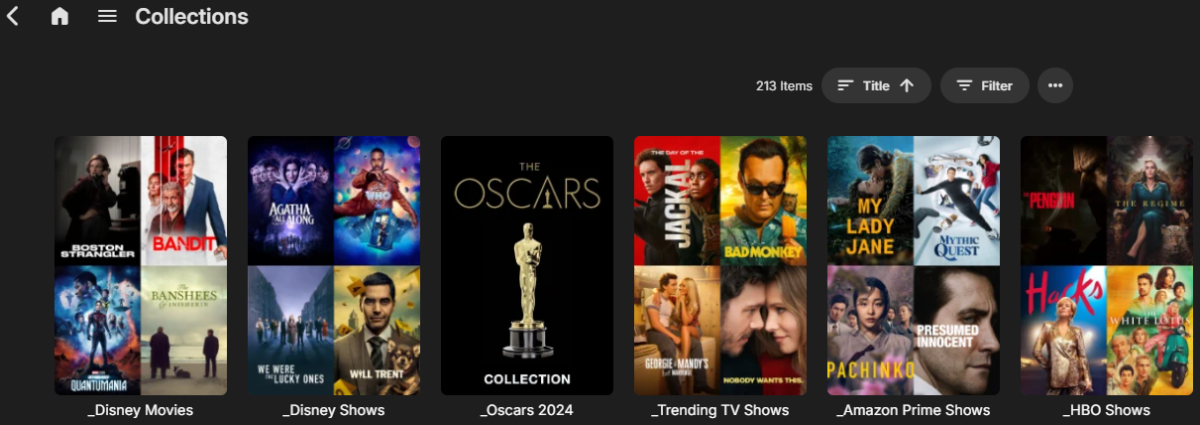
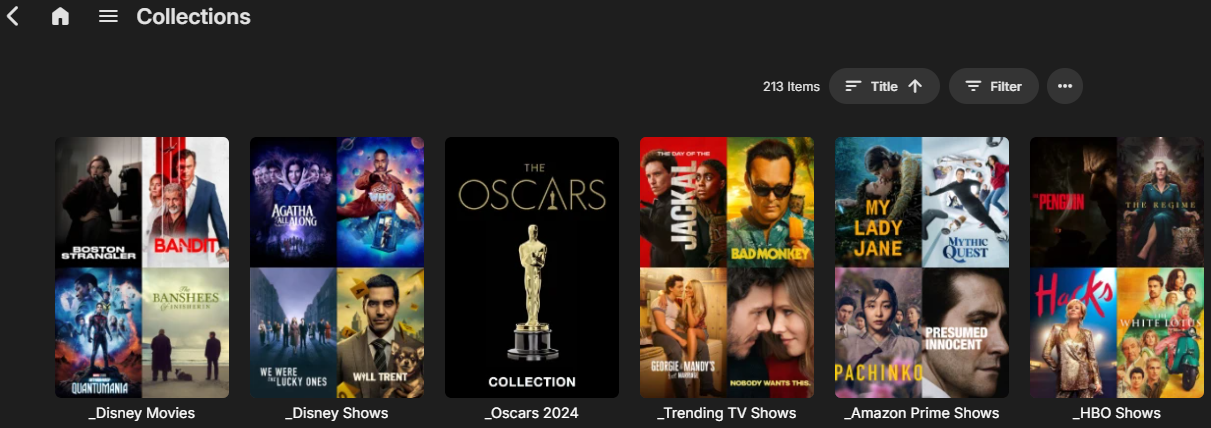
@rbjtech@hthgihwaymonkI added poster support. Let me know what you think. I couldn't figure out a way to get enough information on which poster was currently being used with the API. To prevent uploading the same poster over and over I'm storing which file is used in a local cfg file (stored in a "temp" directory). Example: [Oscars 2024] source = https://mdblist.com/lists/squint/the-96th-academy-awards poster = https://plexcollectionposters.com/images/2019/01/31/oscars9a7c2bc47188f883.png Can use local path or url. https://plexcollectionposters.com/ seems to be a good source. Know any others?1 point
-
Hi, we'll take a look at it. Thanks for reporting.1 point
-
HI, we'll take a look at this. Thanks for reporting.1 point
-
Can you try the plugin update I gave you with the latest beta server? Thanks.1 point
-
Hi, yes I've seen this before, but only in Firefox. Looking into chasing it down. Thanks.1 point
-
That does not look like Emby ffmpeg. As I believe platforms will have a system ffmpeg and a Emby ffmpeg. But what version does that show as you should have something like this. "ProgramVersion": { "Version": "5.1-emby_2023_06_25", "Copyright": "Copyright (c) 2018-2022 softworkz for Emby Llc", "Compiler": "gcc 12.2.0 (Rev10, Built by MSYS2 project)",
 1 point
 -
Once we get past 4.9, we'll start testing a new Live TV infrastructure that should have improvements in this (and many other areas).1 point
-
Some interesting developments... So far, I always had Emby configured to use the m3u file where the French TV channels are defined. Yesterday, I tried "something else".... I've additionally installed a "M3U Proxy" on my server, configuring it to use the same m3u file as the one Emby was using so far, and then configuring Emby to get the channels / streams from the proxy. The same TV channels streams that, so far, refused to last more than 2 sec on the LG TVs now work on the TVs with no issue at all. Additional info: The results depend on how the proxy buffering mechanism is configured. If no buffer is configured, the streams don't work at all (ie: not even 2seconds) on the TVs If the proxy is told to use its own buffers, the streams also don't work at all, the proxy complaining about some stream issue If, finally, the proxy is told to use FFMpeg (with parameters "-hide_banner -loglevel error -i [URL] -c copy -f mpegts pipe:1"), it all works fine on the TVs.1 point
-
it seems emby has is own proxying/cashing stuff. can u allow to turn that off since i already have my own proxy. that will fix the 5 second load time for live channel for as compared to vlc 1 second load?1 point
-
I second this. Nowadays, artists release mostly Singles that are not part of any Album (thx to streaming services). There is a need to differentiate between an "Album" and a "Single" (track released as "single" and not being part of any album) in artist profile at least. So, here comes the "RELEASETYPE" tag. Supporting the "RELEASETYPE" tag and splitting Albums from other releases (EX: Singles) in the Artist profile page will be awesome. This way we can properly organize things. Currently I have all the "Singles" tagged under a regular album named "Singles" ... but this is rather messy and just a workaround: the new releases remain "burried" in the fake "singles" albums, the album date is fixed (even when new singles are added), the cover art is mostly random (picked from one of the songs) ... and so on. Supporting the "RELEASETYPE" and splitting things up by this tag will be great !1 point
-
I wasn't aware of sideloading the Android APK. Have you tried that and how well did it work? Any other downsides? (I don't really care about environments or 3D) I'll take another look at Skybox but as far as DLNA servers go the last time I tried it it was the worst I'd ever used. So far the browser looks like the best Quest option and is how I watch usually watch Emby on my desktop. Using a browser on a Quest is still a bit clunky though. I will say that the support of Plex on Spatial TV seems as good as the actual Plex app itself. I just figured it seems like a great app for watching a variety of streaming services and if it had native Emby built in it would be perfect for my needs.... and who knows, maybe that's easier than developing a full Quest app. I figured it was worth a mention here anyway.1 point
-
found plenty of issues! Failed disk in raid array which didn't appear to be causing perf issues, but has been replaced. somehow the docker Threadfin was reporting it's internal docker IP to emby, which isnt routable. Not sure why this was being intermittent but the emby logs were clear on attempts to connect to that IP! I couldn't find a quick solution for the docker threadfin instance, so ended up moving threadfin into an LXC container with a real LAN IP. Very quick and easy process to move over. also discovered that Nextcloud was causing abnormally high system load (5-20 Linux Load Average, on the quad core N100!!) during file syncs, which i suspect could have an knock on effect to the buffer of any media content that was ran on the same hardware. so far it's been a week without the original problem occurring.1 point
-
Exactly. Personally, I would pay in a heartbeat for a music "module" (lifetime payment) that includes a native app on devices (smarthphone / TV). Even Plex realized that "decoupling" major media types into their own dedicated apps it's way better and provides a future for such cool stuff down the road. They did a cool job with Plexamp, now they are decoupling Photos and provide the Plex Photos app as standalone, while keeping the main Plex app video-centric. They get it ! It's simple: You can't really throw everything and the kitchen sink into an app and provide the same level of focus, cool media-type specific features compared to a dedicated focused experience. The problem is Emby doesn't have the courage (my 2 cents, no offense intended) to just be lean and just throw away excess "baggage" that are done poorly. I get, you try to compete with Plex / Jellyfin but you can be better than both of them, by focusing on just 2 things and doing them AMAZING well. For the things I mention below, yes, some people will throw a tantrum and scream .... until they realize there are better "self-hosted" solutions out there : 1. Throw away Audiobooks - Emby it's light years behind Audiobookshelf and audiobooks needs also a special treatment similar to Music. No, you can't put them in the same bowl again. 2. Throw away Books - Any hardcore books fan out there who needs a server, needs also a book management platform with E-Reader integration / sync supporting all the major e-reader brands out there (Kindle, Kobo etc.). If Emby can't provide a proper book management platform with E-Readers integration ... why support books at all ? 3. Throw away Photos / Home Videos - There is Immich, look at what these guys are doing. Everything from the object / faces recognition with AI to the huge effort invested in the server, dedicated app etc. Emby will be playing catch-up forever and simply can't match their level of features and user experience. What Emby can be the best at ? A. Movies / TV Shows / Live TV - It's your golden expertise that you are doing exceptionally well. Not much to say. B. Music - Server side the potential is there. UI/UX is cool, multi-artists are cool etc. - Music is the next best thing, implemented pretty well server-side I would love to have a "lean" media server with just these 2 areas of expertise done exceptionally well. Let others do the "bloating" poorly. There is so much that can be done with music: - music dedicated Home Screen with music-centric suggestions and immersion pulling you further into personal library: artists, albums, songs, moods ... music played today last year, recommendations ... so much can be done - multi-room: use the dedicated smartphone app to control and play music on various endpoints thru the house. - proper offline sync / download ...... I could continue a lot. Anyway. I hope Emby will become more aware, lean and courageous. Cheers !1 point
-
Hi, stay tuned. Smart playlists will be one of the focal points of the Emby Server 4.9 release, so this feature will ultimately be built in.1 point
-
I'm voicing my support again to implement these handlings. Improving search features would go far to improve the useability of emby and enhance the basic user experience. This is particularly the case when dealing with large libraries. I've asked about this previously and my belief in the necessity of these features has only strengthened after another year. Cheers.1 point
-
+1 for this feature. I create at least 2 versions of a movie from my purchased DVDs, Blurays and UHDs ... DVD = 1 version = SD (480p AAC) Bluray = 2 versions = HD (720p AC3) + FHD (1080p DTS) 4K = 1 version = UHD (2160p Atmos) ... which are named as follows in the movie folder ... Movie Name (YEAR) - SD.mp4 Movie Name (YEAR) - HD.mp4 Movie Name (YEAR) - FHD.mkv Movie Name (YEAR) - UHD.mkv ... and which direct play on all my devices and for friends across the internet ... ... which is why I do it. It would be great, if I could specify the default version of 'HD' (if it exists) otherwise 'the only one version found'. Just thought - even better, would be the ability to specify in which order they are prioritised (based on the correct file naming convention). e.g. HD FHD SD UHD Please give it this idea some consideration and keep up the great work. Regards, Paully1 point
-
For #2, what metadata fetchers are enabled on the library?0 points
-
you can search/filter individual media types AFTER completing the search. But I agree, a library search would be useful.0 points













.thumb.png.f4cb0545e98b51fd9b00e427622ab761.png)





