Leaderboard




Popular Content
Showing content with the highest reputation on 11/10/24 in Posts
-
'Movies - Popular': {'sort': '_a1', 'poster': 'Trends/Movies - Popular.png', 'library_type': 'Movie', 'type': 'mdblist'}, 'Movies - Alien': {'sort': '_f', 'poster': 'Collections/Alien Complete Collection.png', 'library_type': 'Movie', 'type': 'tmdb', 'collection_id': '8091'} and then - # update poster collection_poster = getattr(config, selected_collection)[collection_name]['poster'] with open(f'{collection_poster_pathj}/{collection_poster}', 'rb') as file: image_data = file.read() image_data_base64 = base64.b64encode(image_data) headers = {"X-Emby-Token": emby_api_key, "Content-Type": "image/jpeg"} url = f"{emby_server_url}/Items/{itemID}/Images/Primary" response = requests.post(url, headers=headers, data=image_data_base64) if response.status_code == 204: print(f'Successfully updated Poster for Collection "{collection_name}"') else: print(f'Error updating collection poster for "{collection_name}": {response.text}') That updates the poster2 points
-
Hi, There are a lot of filters available and we can do every possible filtering combinations today with that. Still one missing, the possibility to filter by country. Today there are a lot of local productions and it will be fun to filter for instance all movies coming from China, Russia or France! Think would be great!1 point
-
Please try to add country of origin to movie info as that could give us a quick hint about the cultural background of the movie Thanks alot1 point
-
I can confirm a very similar issue on my Shield TV Pro (mdarcy) running server version 4.8.10.0. Though for me, it often happens even before the file finishes transcoding; playback seems to die whenever the transcoder gets too far ahead of the player. Maybe it's overflowing its own buffer somehow? Almost all of my settings are stock, and I'm pulling the media from a NAS over SMB. Let me know if there's anything I can provide to make this bug easier to track down :)1 point
-
Just noticed in Firefox (132.0.1 (64-bit) in Windows) while scrolling through the Live TV Guide that some rows will be blank. I tried it several times and the channels that are missing are somewhat random. I checked in the Fire TV app and Edge (Version 130.0.2849.80 (Official build) (64-bit)) and those are both fine. I tested Firefox on another PC and it is showing the same issue with random missing rows. I made sure all Firefox plugins that would be relevant were disabled like Dark Reader or uBlock Origin. The plot thickens: If I search for the missing channel, it appears in the search, and when I go back to Guide it's there. If I'm in the Guide and pop open Developer Tools and Inspect the missing row it appears. I'm betting there is something going on with how the rows won't render until they are scrolled down to, maybe Firefox doesn't respect the code correctly?1 point
-
It would be great if there was a way to range filter by IMDb rating. Like only show movies with a rating above 7.01 point
-
We can try. We need to create a bitmap image 1 to 10. It can be in png format. Where the folder image is rendered is blank. I can try to see if I can create it. Perhaps I can change the plugin so it looks somewhere for custom numbers background??? I'll come back to this for sure.1 point
-
I will guess you need to verify the inotify values per the linked topic and my need to enable debug logging to see the complete librarymonitor process. But you still have a library throwing inotify error. 2024-11-10 07:39:54.788 Error LibraryMonitor: Error in Directory watcher for: /volume1/video/Documenteries & Tributes System.IO.IOException: System.IO.IOException: The configured user limit (8192) on the number of inotify watches has been reached, or the operating system failed to allocate a required resource. But appears to still stop the library and refresh item 2024-11-10 07:39:54.788 Info LibraryMonitor: Stopping directory watching for path /volume1/video/Documenteries & Tributes 2024-11-10 07:39:54.819 Info LibraryMonitor: Stopping directory watching for path /volume1/video/Documenteries & Tributes 2024-11-10 07:41:21.789 Info LibraryMonitor: Season 1 - Movies (/volume1/video/Documenteries & Tributes/Behind the Scenes/Season 1 - Movies) will be refreshed. Then it looks like this was seen by RTM 2024-11-10 11:03:58.753 Info LibraryMonitor: Disney (/volume1/video/Disney) will be refreshed. 2024-11-10 11:03:58.999 Info MediaProbeManager: ProcessRun 'ffprobe' Execute: /var/packages/EmbyServer/target/bin/ffprobe -i file:"/volume1/video/Disney/Darby O'Gill and the Little Prople.mp4" -threads 0 -v info -print_format json -show_streams -show_chapters -show_format -show_data 2024-11-10 11:03:59.093 Info MediaProbeManager: ProcessRun 'ffprobe' Process exited with code 0 - Succeeded1 point
-
Hi, we are looking into this. Thanks.1 point
-
I'll take a look at collection posters today. Shouldn't take too much time.1 point
-
Are you running Emby on the NUC using config files and databases on a network share? If so this is not a good practice. SQLite is not reliable on network storage and even more problematic if using CIFS/SMB. You are likely to also run into performance problems as the network storage becomes an I/O bottleneck for operations that should be local and preferably on SSD. DB queries and updates, cache creation and retrieval: operations that in turn affect scanning, seeking and UI response.1 point
-
I appreciate your interest and replies! Note that I have been using beta versions - I forget why, but there was a fix that caught my eye a while back! - Are you using the "full release" version? This also worked reasonably well for me, but something is wrong in the betas, IMHO. I have a large collection too, and navigating through my folder to reach albums and track is fine*, but I have about 250 playlists, some being mixes with up to 100 tracks listed - it's the playlists that have become painfully slow in the beta code. For me, I wanted to be able to access all my music either via PC or NAS, or both. The music data on the NAS is identical to what I have on a 2TB SSD on PC. The idea was really to save electricity by being able turn one off but still being able to stream, also so that I could run extreme tasks (100% CPU) on the PC when necessary, but still listen to music or play videos on my stereo or TV, with the data coming off the NAS (and the NAS is a reasonably fast X64 unit that has more bandwidth on read/write than my LAN, i.e. it can do over 100MB/s) *With Emby betas I have tried, the playlists are still slow to load into my phone app (it's the graphics, IMHO), even when running on a PC (i.e. the NAS not being at all involved, as the music is on a 2TB SSD locally on the PC), but when running Universal Media Server on the same PC (separately, not concurrently), the same playlists load to the phone app almost instantly. The main difference is that with UMS the named playlist files that show on my app (e.g. "Mix.m3u") don't have the "composite graphic" that you see (after 15secs!!) on Emby. Frankly, I don't need a graphic for each playlist - it's a mess - and I wonder if Emby had a means of turning this composite off, it may perform better - I suspect that it's somehow not pre-processing and caching the composite images for playlists, but creating them on the fly. If so, surely this could be improved, but I'd be happy with a tick-box that just turned off graphics for playlists!, As an aside: The NAIM and Cambridge units are pretty similar, both state of the art for all-in-one streamers, and the control apps are similar, but they'd have to be really! ("StreamMagic" in my case). CA are continually improving the UI on the app (on the front panel display on the Evo too) and I find the latest app version (3.0.0 for Android) to be pretty good. CA have implemented some improvements that I sent to them, as I'm one of a few official beta testers for CA - they really do listen! In fact, they also fixed a bug with blurred album cover art when using Emby (only), earlier this year, after I gave them precise details of how to reproduce it... CA are pretty good to deal with...1 point
-
Just to add to this topic I am having the same thing, if more logs are required let me know file.txt1 point
-
Well &*%^ ME!!!! After expanding this is what showed. Law & Order Organized Crime S00E100.disc.txt I removed the .txt and it works now. I appreciate you sticking with me!1 point
-
Hi, https://emby.media/support/articles/Movie-Naming.html About halfway down the page, you'll find info on disc-based media formats. We still try and keep support for these formats, but their use has dropped way off. I should say, their use by people wanting to stream media, just not archive it. A BR disc might look really good quality wise on the TV, so it only makes sense to want to have an archive version in case the disc ever has issues. Instead of storing an ISO you "rip it" to a BDMV format and you'll store it on the home network. And what the heck, after a while you have a nice collection of backup media on the network and find you can play the discs as is with certain players. These players weren't streaming the media but playing back a file(s) from a block device. Ironically, despite the quality, the format was never, ever designed to stream or even be used on a network, unless you count the old "sneaker net" while swapping out discs for anything you want to watch. I bring this up because the disc-based formats are close to the worst format you could pick to stream media, especially outside the home where it will almost always need transcoding. I don't know the reason you want to hold onto this format but here's a couple things to think about. If you have the originals discs, change your thinking to have the electronic version the new main version while the actual disc becomes your backup. This would allow you to further process the BDMV packages to a streaming friendly version great for streaming. Doen correctly you'll end up with a digital copy that is less than 1/2 the size without a noticeable quality loss. That would be the best choice you could make for streaming. If that's not an option at this time I'd suggest processing each disc with MakeMKV https://www.makemkv.com/. This would allow you to repackage the media as an MKV file without doing any encoding or alteration of the actual video, audio or subtitles. If needed, you could always repackage them back to the BDMV format. The repacking is pretty quick as it mostly just disk IO. This wouldn't save you any disk space as there was no re-encoding done, but you now have files in a good format for streaming as well as being able to follow the naming conventions for Movies and TV Showes. This is something you could try on a couple media rips to see what benefits it provides. Hope that helps, Carlo1 point
-
1 point
-
I found my scripts and stuff from before so if you want to revisit this I can break down the high level steps, pretty much just need mkvextract mkvmerge and dovi_tool to convert it. I did look at dovi_scripts a little, didn't try it though since I don't run Windows.1 point
-
You can use multiple guide sources to map from. Check and see if the channels are listed on a cable listing in your area (regardless of channel number). Chances are they won't be as it seems they either are or aren't present on any listings in the same zip (most of the time). Try a zip code 10 miles or less from the broadcast tower. This helps in situations where the signal would reach an area normally, but you have a great antenna, get a reflected signal or similar, receiving a station not accounted for in the EPG. IE station is mapped 35 miles around a tower, but you receive it at 42 miles. Typically, this won't be the case if you get listings for other channels on the same broadcast mux such as 6.1, 6.2, 6.3 are listed but 6.4, 6.5 are not. Try a zip code on the other side of the tower. It might be listed correctly in one area and not in another area. If the station recently shuffled the channels or dropped one or two, replacing them with other channels, the EPG changes likely haven't work themselves through the process yet. Carlo1 point
-
1 point
-
Synology are plug and play but they are super expensive for what you get. It would be well worth your time to build your own system and learn to use UNRAID, TrueNAS or Open Media Vault.1 point
-
Hi, Synology is a great choice, in my opinion.1 point
-
Hi @Luke I used the default settings when installing it on TrueNas Scale.. it was installed in bridge and that was the screenshot of what i seeing in app.. I could not get this to work for me in-home or remote.. drove me nuts lol.. in the end, i saw the option on the emby app in TrueNas Scale settings to select "host network".. I redeployed the container and it changed over to host. Now everything works as it should be.. my emby app now detects the server in-home and i can access it also from outside my network after passing through the remote port on the network..1 point
-
@LukeI've found a workaround, maybe it helps someone, or you with development. The Emby theater uninstaller seems to have missed the following items. Using "Geek uninstaller" I was able to remove these and thus remove Emby Theater from still appearing in the Windows Installed Apps list. Hope this workaround will not be needed with future Emby theater releases.
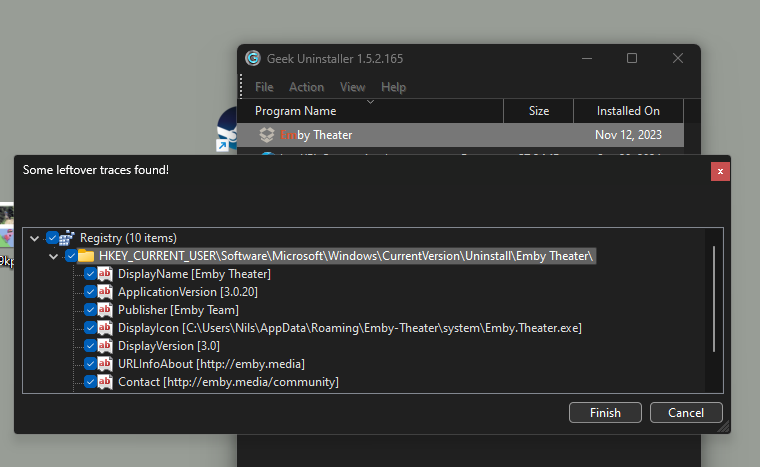 1 point
 -
Checked on 31st. Everything is fine.1 point
-
I don't have a folder in the "C:\Users\Nils\AppData\Roaming\Emby-Theater" location as the error message seems to be looking for. I do have a folder in "C:\Users\Nils\AppData\Roaming\Emby Theater". But that's just an empty folder called Dictionaries. I figure there are are traces of the installation left somewhere in the Windows registry, causing it to still show up in the list of installed programs. It seems like the1 point
-
Hi, @Luke, Looks like the issue is gone on 4.8.10, now everything ok with playback. At least on the Mac server, I haven't tested on my Synology yet. Do you plan to have 4.8.10 on the Synology package center?1 point
-
@Meeko @an333 FYI:1 point
-
I would love to see this feature added, my mother doesn't like seeing anime and cartoon movie cards on the cast screen and separating the libraries per user is a lot of work, plus if i'm casting then it's moot1 point
-
Ok...hier war noch ein falscher Pfad beim Transkodieren gesetzt. Jetzt klappt alles. Hab mir selbst geholfen Closed1 point
-
Hi, we’ll take a look at it. Thanks for reporting.1 point
-
Hat sich erledigt ein zurücksetzen der Bios Einstellungen hat zur gewohnten Performance geführt.1 point
-
I think it's just a minor design choice. Yes, Artists have backgrounds so switching to the Artist page looks good. Essentially, Actor works unless there are backgrounds, which probably no one uses, except me. The gap under the Actor's wide background shot (B&W of Mary in the above posted image). That's a result of my CSS styles. Emby Android version brings up the bottom area to fill the gap. I would dig in to the .js and make an 'if' test to keep Actor's primary for the Actor's media collection page. It's not a bug and I wouldn't expect anyone to spend time to change it. There may be a CSS hack that could work: (Hack: overflow:hidden; height:1%; makes the div height automatic and solves the issue of many genres causing an overlap.) I probably am not going to bother. Thanks Happy for such a quick and detailed response.1 point
-
Thanks for the reply. Hope you can work it out.1 point
-
Hi, thank you very much for the answers. I have played several series and films. Some had the problem, some didn't. I played wildly with the settings on the TV and in the Emby app. Now everything works without any problems.1 point
-
I SOLVED the issue. I connected to the NAS using SSH, I checked the poermissions with "ls -la" and I dont know why but permissions where different for folder /volume1/music than for /volume1/video, so I used this command: sudo synoacltool -copy /volume1/music /volume1/video With this I copied the permissions from folder /volume1/music in to /colume1/video. After that it worked.1 point
-
I posted a similar request and was directed here, so I'm bumping this. It would be really great to be able to add to a playlist, favorite, etc. without having to leave the player (and lose my place in the current playlist).1 point
-
When it comes to media server solutions, we believe that Emby is the number one product for users who value privacy, customization, and reliability. Today, we're going to take a closer look at some of Emby’s key strengths that make it an ideal choice over other media server solutions. 1. Prioritizing Privacy and Security Security is a central part of Emby’s design. Unlike some media server alternatives that have limited security options, Emby gives users control over who can access their media and how they access it. With Emby, you can setup secure HTTPS connections, ensuring data is encrypted as it’s transmitted or easily set up access via a reverse proxy amongst other options. User permissions are also straightforward to manage, giving you full authority to create individual access levels for each user in your household or server network. Your media is yours, and Emby ensures it stays that way by giving you the ability to implement strong encryption options that protect against unauthorized access. 2. Simplified, Intuitive Setup From the moment you install Emby, you’ll notice a streamlined, easy to navigate interface. Whether you’re setting up for the first time or managing your media library, our layout is intuitive and user-friendly. Emby is accessible to both beginners and advanced users, with step-by-step guidance to get you started and powerful customization options available for those who want to tailor their media experience further. Want to hide your remote users from a login screen? You can do that! Want to set up those same users with an easy way to access your server? Emby Connect allows you to do that! There are so many ways in which Emby simplifies user management and access to make it easier and more secure for your users! Other media servers can be clunky and involve multiple steps to perform basic tasks, but Emby simplifies this with a unified interface that makes media organization and management easy. 3. Seamless and Efficient Transcoding As mentioned in our previous blog, transcoding is a key feature for media server users, and Emby’s transcoding engine is optimized to handle media formats and devices with impressive efficiency. Whether you're streaming a 4K movie, using HDR tone mapping, or watching a video on a low-bandwidth connection, Emby has the ability to dynamically adapt to your network and hardware capabilities, delivering smooth playback across devices without unnecessary buffering or interruptions. Emby can also utilize hardware acceleration (Emby Premiere only), ensuring that high-resolution content plays seamlessly without consuming excessive CPU resources. This is particularly helpful if you have multiple users streaming from the server simultaneously, as Emby ensures each session gets the best possible quality. 4. Comprehensive Library Management Emby’s library management capabilities are designed to provide the best possible organization and personalization options. With Emby, you can create custom collections, tag media, and even use rich metadata that automatically pulls in posters, descriptions, and trailers to enhance your experience. The smart playlists and customizable views allow users to organize their media in a way that feels personal and unique. For those who have extensive media libraries, Emby also makes finding and managing content effortless. Search filters and sorting options let you locate titles instantly, and Emby’s advanced metadata scraping ensures your library looks how you want it to. 5. Cross-Platform Compatibility In an age where we use a variety of devices daily, Emby is engineered to be versatile. Emby offers applications for nearly every platform, including Windows, macOS, Linux, Android, iOS, Roku, smart TVs, Android TV, tvOS, web browsers and more, giving users the flexibility to stream and manage their media library from practically any device. The versatility that our server provides doesn’t stop there – it also supports a wide range of formats, ensuring that no matter what file type you prefer or where you choose to watch, Emby is ready to deliver the best experience. 6. Constantly Evolving Features with a Supportive Community Emby is continually updated with new features based on user feedback and technological advancements. Our development team and community via these forums, work hand-in-hand to enhance Emby’s performance, refine its interface, and introduce new options that make media management a more rewarding experience. As an Emby user, you’re part of a passionate community that we believe values innovation, feedback, and the enjoyment of seamless media streaming. View the full article1 point
-
Exactly. Personally, I would pay in a heartbeat for a music "module" (lifetime payment) that includes a native app on devices (smarthphone / TV). Even Plex realized that "decoupling" major media types into their own dedicated apps it's way better and provides a future for such cool stuff down the road. They did a cool job with Plexamp, now they are decoupling Photos and provide the Plex Photos app as standalone, while keeping the main Plex app video-centric. They get it ! It's simple: You can't really throw everything and the kitchen sink into an app and provide the same level of focus, cool media-type specific features compared to a dedicated focused experience. The problem is Emby doesn't have the courage (my 2 cents, no offense intended) to just be lean and just throw away excess "baggage" that are done poorly. I get, you try to compete with Plex / Jellyfin but you can be better than both of them, by focusing on just 2 things and doing them AMAZING well. For the things I mention below, yes, some people will throw a tantrum and scream .... until they realize there are better "self-hosted" solutions out there : 1. Throw away Audiobooks - Emby it's light years behind Audiobookshelf and audiobooks needs also a special treatment similar to Music. No, you can't put them in the same bowl again. 2. Throw away Books - Any hardcore books fan out there who needs a server, needs also a book management platform with E-Reader integration / sync supporting all the major e-reader brands out there (Kindle, Kobo etc.). If Emby can't provide a proper book management platform with E-Readers integration ... why support books at all ? 3. Throw away Photos / Home Videos - There is Immich, look at what these guys are doing. Everything from the object / faces recognition with AI to the huge effort invested in the server, dedicated app etc. Emby will be playing catch-up forever and simply can't match their level of features and user experience. What Emby can be the best at ? A. Movies / TV Shows / Live TV - It's your golden expertise that you are doing exceptionally well. Not much to say. B. Music - Server side the potential is there. UI/UX is cool, multi-artists are cool etc. - Music is the next best thing, implemented pretty well server-side I would love to have a "lean" media server with just these 2 areas of expertise done exceptionally well. Let others do the "bloating" poorly. There is so much that can be done with music: - music dedicated Home Screen with music-centric suggestions and immersion pulling you further into personal library: artists, albums, songs, moods ... music played today last year, recommendations ... so much can be done - multi-room: use the dedicated smartphone app to control and play music on various endpoints thru the house. - proper offline sync / download ...... I could continue a lot. Anyway. I hope Emby will become more aware, lean and courageous. Cheers !1 point
-
Any chance for "Home Videos" ? "Keep those cameras safely rolling"1 point
-
Will get them up, I never made a backup, so all will have to be made all over again which will take some time.1 point
-
Actually I believe that Emby should not even try to handle live TV. There are plenty of other programs that handle live TV and, particularly if it is Emby's largest expense, supporting the extreme complexities just makes little sense.1 point
-
This PDF walks you through it for Windows. If you get stuck just ask questions. It, as well as the plugin binary and source code are here. Commercial Skipper Plugin.pdf1 point







.thumb.png.f4cb0545e98b51fd9b00e427622ab761.png)