Leaderboard




Popular Content
Showing content with the highest reputation on 11/07/24 in Posts
-
I have finished testing the code. I will try and post it tomorrow afternoon. Vic2 points
-
I frequently use the filter of Unwatched for movies and TV shows. And with music, you get recommendations based upon "similar" artist or songs. I would like a flag option to mark media as "Not Interested" or whatever verbiage would be better for the masses. This would have to be at the user level and not stored in a NFO file since I would like to filter out things my family likes, but only on my profile. As my libraries grow, I am having more content for my family. Since I am the only male in the house, my users have tastes that are distinctly different from mine. Whether it be real surgery shows, true murder, sappy romances, or telenovelas; these are things that I will never - and I do mean never - watch. The same thing goes for the music collection. I don't mind classic musical soundtracks, but my daughters collection of Broadway musicals is vast. And annoying. Now I could make them as Watched, but then that would go into the algorithm "Since you watched this, you might like this...", I would like to avoid doing that. I've poked around quite a bit, but I don't see anything like this currently nor did I see anything like this requested. If it has been requested but called something else, I would love to know about it so I can like that post. Thanks in advance.1 point
-
I have a large music library. A title or alphabetical search in carplay would be very helpful. Thanks1 point
-
Hi Me and my family just went on vacation and wanted to download movies and series to our phones for offline usage. But we experienced that some of the requsted downloads never arrived to the phone. Hence it would ne a good improvement to have better control and overview of the downloads, like: - Where it says "Ready to tranfer", then capability to "force" download, because I experienced several items saying that, and never downloading - Improved overview og status. Like if it's saying "Ready to tranfer", then I would like to see why doesn't it download, what is it waiting for. - Ability to see in a movie or a series, IF I already requested it to download once. Because I would forget IF I set a specific movie to download or not, and it would great it what was illustrated on the movie. - And if I already requested a movie to download once, and I do it again, then that Emby pop up and say I already requested that, if I want to cancel the first request. I for example tried downloading whole season 1 -3 of a show, and then it turned out, it hadn't downloaded ep 1+2 in first season., and where also missing ep 8+9+10 in 2nd season, and I could tell why or force it to download. I hope it makes sence and hope an improvement for the Downloads1 point
-
It is really cool that Emby has the ability to support multiple versions of the same movie. It would be nice to have a setting on the client side to allow the user to set which version should be selected by default. This could be as simple a user-entered string, or it could be a list of detected strings to choose from. It could allow multiple entries and it would choose them in the order entered. On the Kodi side, it would also be nice to get the "Choose the Best Version for Me" option that the Emby app has.1 point
-
I am trying to add theme music to my movie collection. Where is the collection folder stored? Is there a collection folder at all all? Is this even possible? I got my movies and tv shows to work by following these steps here Emby Theme Songs & Videos : Emby but I can't seem the find directions for the collections.1 point
-
Okay, I found the entry in the MediaItems table in library.db, so I deleted that row and now it's gone.1 point
-
To finally kill the Geo-blocking topic, I setup my router (fritzbox) tonight to route all traffic of the house via VPN to France. My public IP was confirmed as being in France, and yet, still these streams didn't work for more than 2seconds on the LG TVs, although they worked fine (you guessed it) on all other devices. I'm well aware you have (plenty) other topics to investigate and many other people to support, but please, if you can, have a look at this one. I've got in-laws who can't watch their favorite TV shows when they are visiting Thanks again1 point
-
In my experience, the best way to search for duplicates using the existing tools in the web app is to open the playlist and click the "sort by" button (icon of three lines between shuffle and the heart) and sort by title. Then scroll the playlist and look for dupes or suspected dupes. You could also sort by artist and then visually check each artist block. Once you're done, you can then change the sort back to "Playlist Order." It's not as direct as a search or filter, but you if you are looking to check if a specific title is included multiple times, you can quickly scroll to it alphabetically. Also, you can right click (or click the three dot button) on any song and select "go to item" and you will get a display that show "included in" which will show you all the playlists where that song has been added. Hope that helps.1 point
-
It's trouble ticket #244957 Assigned to: Shaoliyan Swami1 point
-
@JesenyaLoveAre you able to reproduce the problem by following the steps provided in the first post of this thread?1 point
-
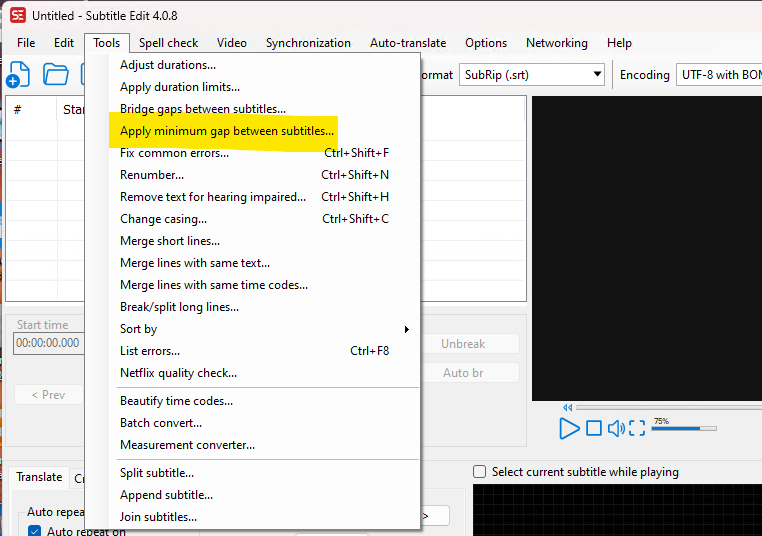
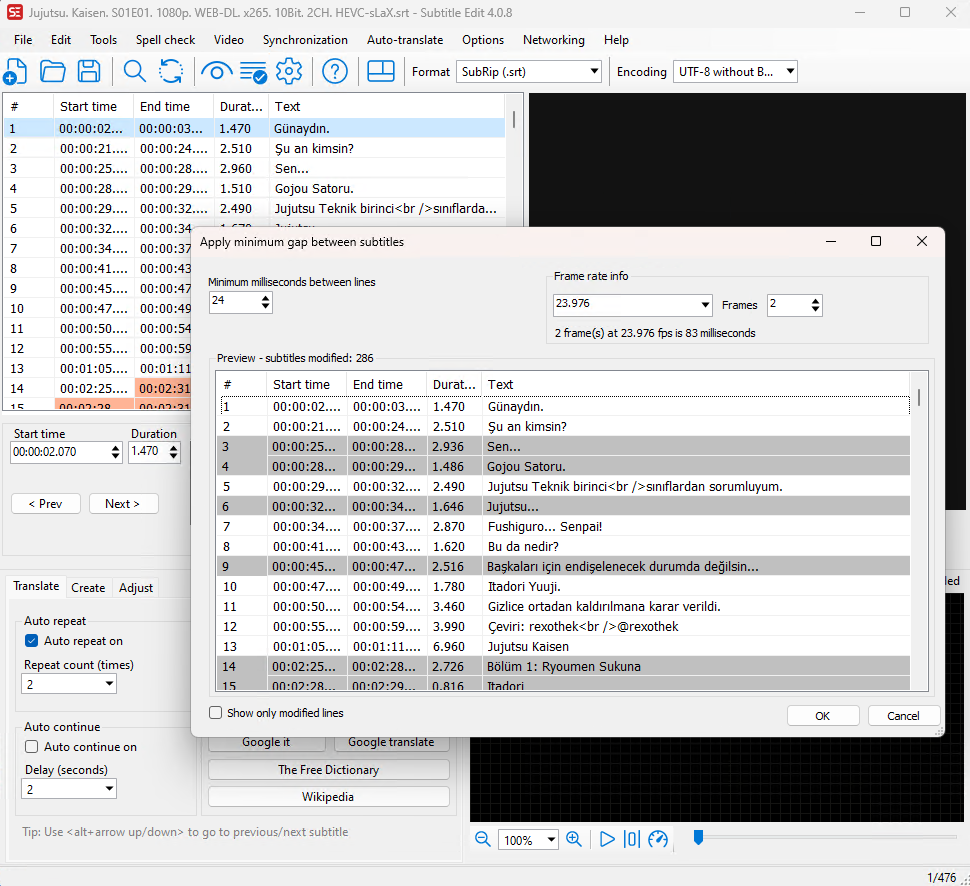
or fix the source of the problem - badly constructed subtitles .. use subtitle edit - it's free...
 1 point
 -
Hi @PIkeoftheLakeare you still having an issue with this?1 point
-
Thank you so much Luke! That’ll make my life tons easier.1 point
-
Yes my bad, but a filter would be great in that section too!1 point
-
HI, home screen settings are supported with this feature now on the 4.9 beta channel. this is not included because the user can configure this differently on each device, therefore it is not saved on the server.1 point
-
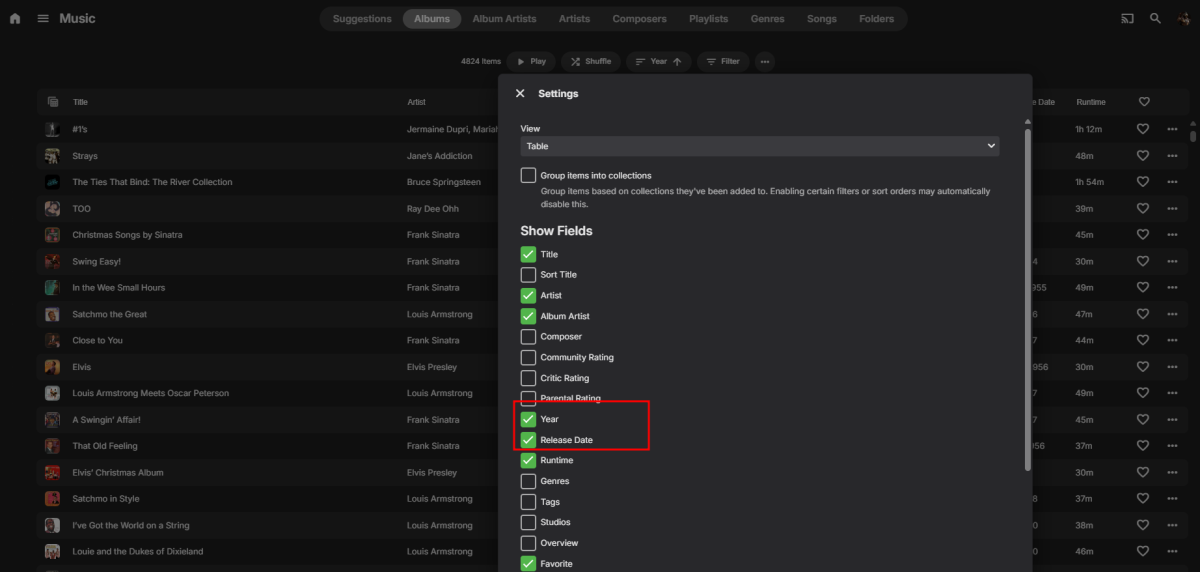
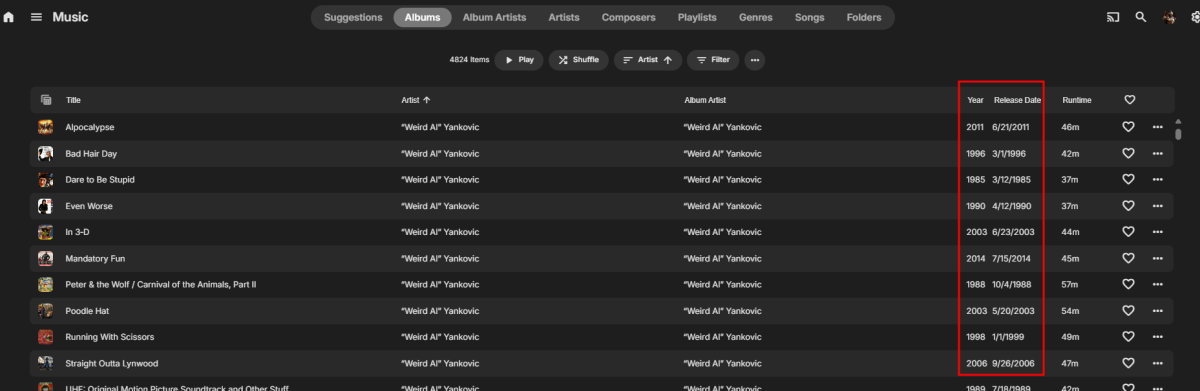
Something like this ?
 1 point
 -
Hi, thanks. The problem was that i had not setup a payment method on Google account.1 point
-
Hi. Your server needs to be able to reach ours over the internet to validate. This may mean you need to configure a firewall or other network settings to allow this. Have you done that?1 point
-
Get on with the fix then1 point
-
Yeah. Just have to look for them and copy them. Should be doable.1 point
-
I think I found the notification issue.1 point
-
Some good ideas here. I'll look into this.1 point
-
I'll have to look at that. Video backdrops may not be implemented for top picks. It's probably doable, I'll have to look for those backdrops and copy them into the top pick folder.1 point
-
It doesn't. Emby binds on all local interfaces and what the "Local IP address" value does is define which one is advertised to apps. One thing you could try (I haven't) is specify the host IP you want to use in the Docker compose. I doubt this would stop the scanning though. https://docs.docker.com/engine/network/#published-ports For example: -p 192.168.1.100:8080:80 Map port 8080 on the Docker host IP 192.168.1.100 to TCP port 80 in the container.1 point
-
Under Media Management, Import Using Script. Using the arr variables, you can do the import manually - see custom-scripts1 point
-
That won't work for Cloudflare as you need to update your own DNS records on their DNS servers which are authoritative for your domain. So any type of update utility has to change this directly at Cloudflare.1 point
-
I try and shop all year long when things go on sale, or I think something is likely to get sold out before Christmas. It spreads the cost of purchasing gifts out and makes it kind of fun vs being under pressure last minute. I loved the Halloween theme. When starting up the app getting the Howl, my dog would get freaked out and run out of the room.1 point
-
i updated software version and fixed it as you said1 point
-
Hi, 1.9.1 is up now. Thanks.1 point
-
I had previously download the arm7 version to my desktop and put it into the download directory of the Firestick 4K Max via a file manager. Now that you mentioned the above, I tried using the Download app that I have on the Firestick 4K Max and was able to install the arm7 version with one click. That is much more direct and easier. Note: It is the arm7 version and not the arm64 version. I had asked ChatGPT which version type goes on a Firestick 4K max and Chat said arm64 with much enthusiasm. Afterd I told him arm64 didn't install he said he'd double check and came back basically said oh... its the arm7 version *memory updated*. Its a backward compatibility thing. I never would have guessed it.1 point
-
HI, yes it makes sense. Thanks for the feedback.1 point
-
@chefI have a question regarding Video Backdrops. I notice that if I view a Top Picks media item, the video backdrop does not play. Should this do so? If not, will you be implementing it? Cheers1 point
-
Just to add ! NEVER use your download folder as an library in Emby. Emby will see every change to those files and try to identify them. That will get you into a never ending circle of library scans.1 point
-
Hello, I don't know what I did wrong but after reinstalling everything works now. Thanks for your help.1 point
-
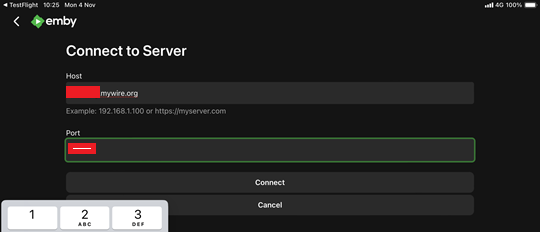
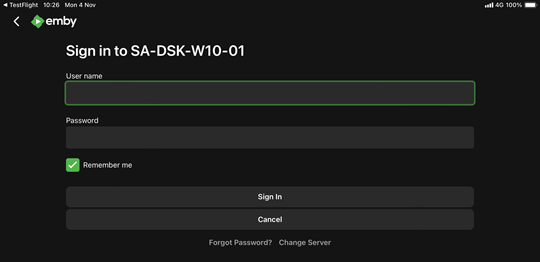
Some late feedback. I was planning to try out the hostname / port method on the Emby for iOS 2.2.31 (1) Testflight beta. Well - i have done it now and it worked ok for me Tried it with WAN - disabling wifi and using the 4G/5G connection I have. Then signed out on the app and selected Change Server and then Add Server Then I entered my mywire.org free host name and my wan port for one of the servers This reached the server OK with the sign-in challenge and I logged in successfully using hostname / port
 1 point
 -
Yes as it will add / subtract from the original stream. Then it will transcode or remux but it will convert the stream. If you do not want that, make sure your media is compatible with your hardware client. Rule of thump. mp4 container video - x264 codec audio - aac 2.0 subtitles - external .srt1 point
-
I advice people to look up Tdarr/Fileflows and Bazarr, should fix most if not all Subtitle problems when set up right. Can be set up to be fully automated and handle everything before a file hits Emby.1 point
-
Hello, Personally, I use cloudflare and I created a custom rule that blocks all requests not coming from my country and when I travel I just add the country I'm going to. It drastically limits attacks1 point
-
Wonderful, thank you! Fingers crossed they stay that way.1 point
-
Yes and No its not added yet. See page 1 with the list of things not added. #96 I think.1 point
-
From a bit of online research across: music documentation websites (e.g Wikipedia, MusicBrainz), media server websites (e.g. Plex, Roon), music streaming websites (e.g. Apple Music, Tidal)... and more... these 6 (+1) Release Type categories tend to be very widely used: Studio Album Live Album Single EP Compilation Soundtrack Other This is also very similar to what has mostly been suggested in this thread and other threads already. Therefore these would be useful fixed Album Release Type values for Emby to incorporate. (Note: whatever categories are potentially chosen, there would always need to be an “Other” category at the end, as a ‘catch-all’ for everything not covered in the main categories.) Anything much greater than the 7 categories mentioned above (irrespective of the actual categories chosen) could potentially be ‘overkill’ for the vast majority. From my perspective (having circa 10k contemporary, non-classical, albums) even a minimal approach of just 4 categories would be extremely useful: Studio Album Live Album Single/EP Other Anything less than these 4 would likely not give enough benefit to myself (and anyone else?) wanting to Group By Release Type. Another very important consideration is being able to import the RELEASETYPE tag from embedded metadata. As mentioned previously by @Vicpa Picard have RELEASETYPE as a standard tag. I expect it could also be added into Mp3tag quite easily? I don’t think I would want to carefully put all the effort into adding Release Type to all my albums just in Emby only, but I would happily do this in Mp3tag and import into Emby (even if still somewhat time consuming). Previously @ginjaninja @Tremas have provided some links to the relevant MusicBrainz Release Group/Type categories. This is also good info. However, even if it is technically possible for Emby to automatically fetch the MusicBrainz two-tier release types (or possibly even allow for custom release types?) this could start to quickly move away from the ‘sweet-spot’ of 4-7 common music Release Type categories, towards ‘overkill’ (for my music library anyway). Emby defined category Release Type values (e.g. Studio Album) could be imported from embedded metadata into the relevant category. Unrecognised and blank Release Types could be imported into the “Other” category. (E.g. my "FM Broadcast" albums would appear under "Other" - but this isn't a common category that everyone would have - and I could easily accept this grouping.) Anyone with all (or most) of their music undefined in “Other” would likely use “Group by None” and may not use/need Release Type grouping? Anyone using “Group by Release Type” with too much blank/unrecognised music in “Other” would quickly organise it! I think Group by Release Type would be a great addition for many, once they find out about it. As Luke has asked the question, anyone else who is (still) interested should also comment with their answer... Let's do it!1 point
-
I completely agree with you been waiting so long for a feature that use to work to be added back in.1 point
-
That is the issue though as it shouldn't be a Feature Request for a feature the was remove/broke from a previous version when Collections were migrated from /data to /metadata.1 point
-
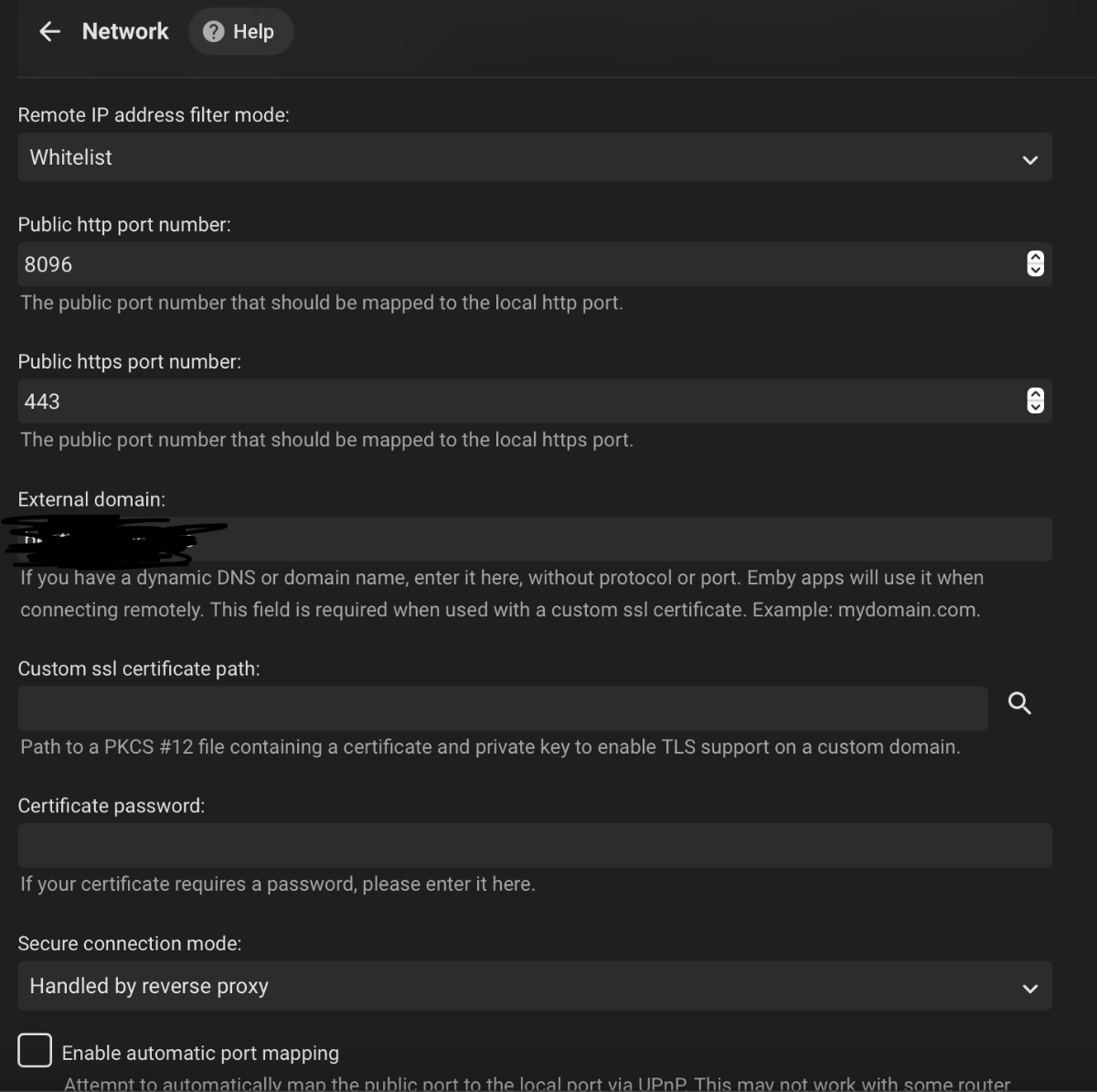
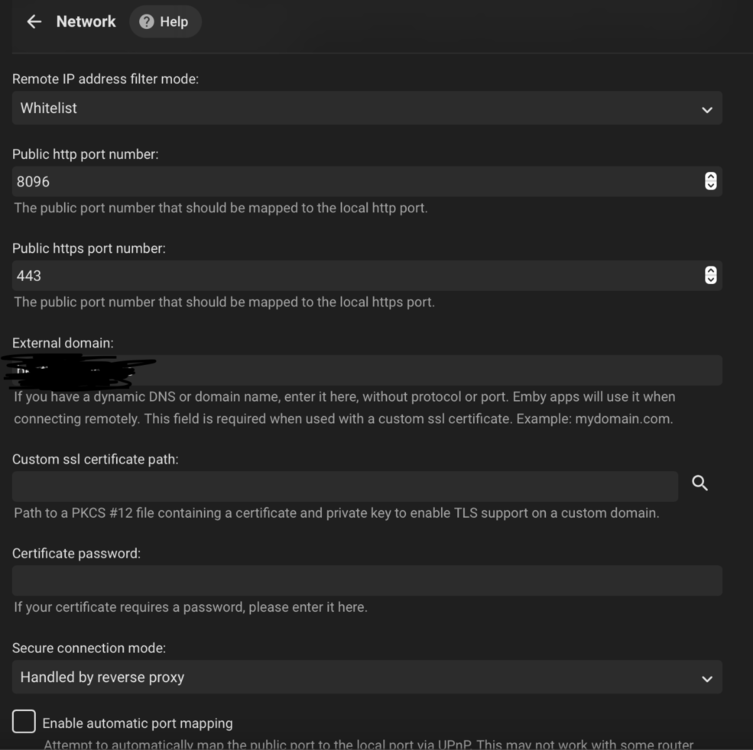
Hey gang, I am very sorry that I am way later than I had planned getting this finished. Life has been crazy the last couple months. README: https://github.com/itjedi42/emby-server-tools/blob/main/README.md SCRIPT: https://github.com/itjedi42/emby-server-tools/blob/main/Manage-EmbyServer.ps1 What it does: Checks if installation path exists, if not, creates it. Checks if 7-Zip is installed (needed to extract .7z archives of Emby Server), if its not present, it will get the latest version and install it. Checks for NSSM in installation path, if not found, fetches it and gets it where it needs to be. Checks if Visual C++ 2015-2022 Redistributable Runtime is installed, if not it gets latest version and installs it. Checks if IIS is installed, if not, installs it and relevant features. Checks if IIS Rewrite2 Module is installed, if not, it downloads and installs it. Checks if IIS AAR3.0 Module is installed, if not, it downloads and installs it. Checks if Certify The Web client is installed, if not it downloads and installs it. Downloads latest .7z x64 version of Emby Server (will download latest beta if `-beta` is specified) and extracts it. Creates a local user to use as a service account to run Emby Server. Configures Emby Server to run as a service via NSSM. Configures Windows Firewall rule to allow TCP port `80` and `443` in and UDP `443` in (For TLS1.3/QUIC support). Stops the default IIS website. Creates a new `Emby Server Reverese Proxy` site. Configures IIS WebServer farm in AAR3.0. Configures IIS server variables. Disables IIS caching (causes weirdness with streaming). Configures IIS request filtering. Configures IIS headers. Configures rewrite/reverse proxy rules. Configures Certify the Web client to create and maintain SSL certificate. Disables OCSP stapling. Disables legacy TLS. Configures QUICK protocol and TLS 1.3 (if Windows Server 2022 or newer). Starts Emby Server as a Service. Launches Emby Server WebUI in the default system browser. Outputs credentials of created service account. The script can also be used to update Emby Server when new versions are available. NOTES: You will still have to configure your router to pass ports through to the machine this is run on. You will still have to configure the internal Emby settings inside the application itself. --- Emby Internal Settings Navigate to your server via the localhost:8096 address Click the gear in the top right corner Click Network from the list of tabs on the right Configure as shown (use your hostname in the external domain box) --- @kernelcutterBy all means! Feel free to provide feedback or even clone the repo and PR changes! I am sure there are bits that can be optimized and added. I hope this helps everyone!
 1 point
 -
good evening. I have all these theme songs in my collection folders as they used to work when i would go into the collection folder of any movie collection. the theme does not play now and hasnt for a few versions. i had read this would be fixed. i tried to look up this topic but it is hard to find unless im not searching properly. is there any way to get music to play in the base of a collection. for example the jurassic park theme playing inside the collection folder where i would select one of the jurassic park movies. i remember this worked but stopped. thank you1 point
-
I personally have all my 2160p HDR HEVC movies in a separate library. I've mapped my i5 3570k CPU and a GTX 760 GPU correctly so that emby makes use of them in the official Docker container but still they don't hardware transcode the 4k HDR content. I suspect I'd at least need a GTX 1050 for that. So what I would wish is that I could prevent transcoding of my HEVC library as my hardware can't keep up if one of my users want to play those movies in the web player. The reason I'm not disabling the library completely for my users is that they still can play them with the Emby iOS/Android apps. Thoughts?1 point
-
Please do everyone loved it, made collections fell personal1 point