Leaderboard




Popular Content
Showing content with the highest reputation on 11/04/24 in Posts
-
@CarloGood write-up, but most of it is hardly applicable here. You're treating the emby server software as if it's a public facing website when it's more of a private media gallery. Caching, bandwidth, and etc is hardly a concern here for the vast majority of users, and I think it's safe to say that the most would be ok with a few extra milliseconds of load time if their content was actually secure.3 points
-
And per other topic a true explanation of AUTO is needs as to me it is not what it appears to be. Or just needs renamed as AUTO has nothing to do with what it is doing.3 points
-
Myself and friends have gigabit/10gigbit that I share my server with. However, EVERY single time somebody connects from a new client or for the first time, it transcodes DESPITE them having 1Gb/s+ speeds when streaming 8-10Mbps due to "lowering bitrate due to quality settings". I don't understand how the clients (or is it the server?) are so bad at detecting internet speeds. It's literally mis-calculating a client's ability to steam a video by orders of magnitude. Like others, I have to give "the talk" to new users where I try to explain that Emby is bad at detecting speed and can be remedied by going into settings > playback settings > and selecting some arbitrarily high video bitrate so that emby doesn't try to transcode unnecessarily again on that device. This talk isn't easy with non-technical people who are hearing the term "bitrate" for the first time. Then it get's more confusing for them when I have to explain that it's a per-device-setting and not a global ("sticky" across all devices) setting. More confusion. - Is it the clients which are all terrible at detecting speed? Is it my server? Is it something else? - Is there no possibility of adding the ability for the admin or user to set a default "playback video bitrate" for users across ALL devices? I'm open to other fixes. Sorry if this is abit "rant-y" Thanks.2 points
-
Seem self-explanatory to me as there is no movie with that providerid. Where it should be So now you have to break it down on library type, will guess Mixed content, folder structure, and naming scheme. But this suggests you have no structure and Emby at a minimum requires a series folder for all episodes. TV Naming | Emby Documentation2 points
-
Because the IDs are coming from the database. They are different for each item but they are just numbers. At this point, I don't see us trying to completely change our IDs again. instead, this will need to be addressed with an API key like other authentication. The issue is, there are apps out there that are either very difficult or even impossible for us to update and this would break them. But, that may just be the way it is.2 points
-
It works perfect now Thanks!2 points
-
Yes but you need to ask the users to do this. It's poor that you have to call the user and say "Emby Auto doesn't work properly, so ignore that and set it to Max... "2 points
-
We used to use GUIDs - which is why the initial design of this was of no real concern. In 4.6 or 4.7 I don't remember which, though, we switched to the actual database IDs which brought about significant performance improvements throughout.2 points
-
Hi Me and my family just went on vacation and wanted to download movies and series to our phones for offline usage. But we experienced that some of the requsted downloads never arrived to the phone. Hence it would ne a good improvement to have better control and overview of the downloads, like: - Where it says "Ready to tranfer", then capability to "force" download, because I experienced several items saying that, and never downloading - Improved overview og status. Like if it's saying "Ready to tranfer", then I would like to see why doesn't it download, what is it waiting for. - Ability to see in a movie or a series, IF I already requested it to download once. Because I would forget IF I set a specific movie to download or not, and it would great it what was illustrated on the movie. - And if I already requested a movie to download once, and I do it again, then that Emby pop up and say I already requested that, if I want to cancel the first request. I for example tried downloading whole season 1 -3 of a show, and then it turned out, it hadn't downloaded ep 1+2 in first season., and where also missing ep 8+9+10 in 2nd season, and I could tell why or force it to download. I hope it makes sence and hope an improvement for the Downloads1 point
-
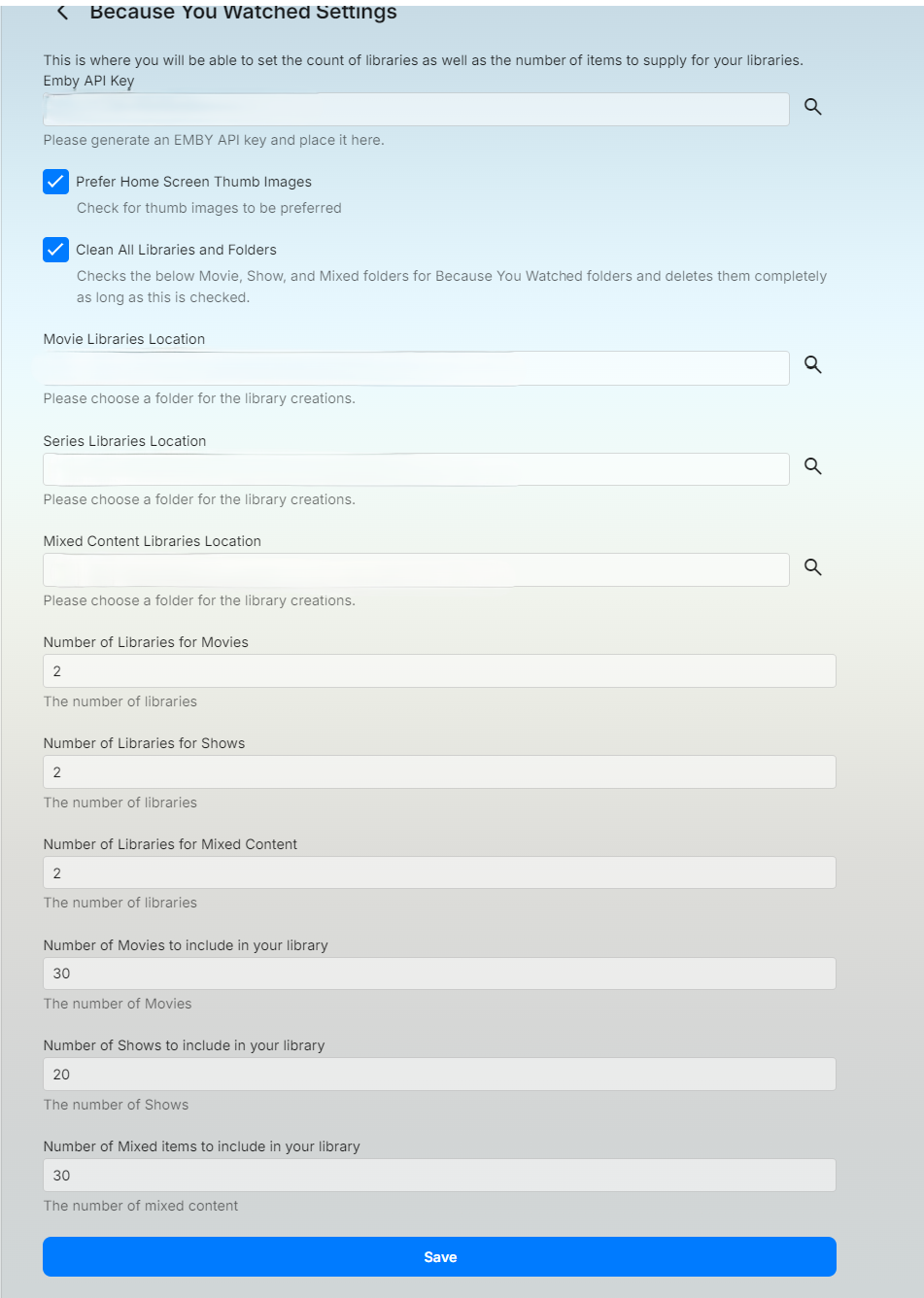
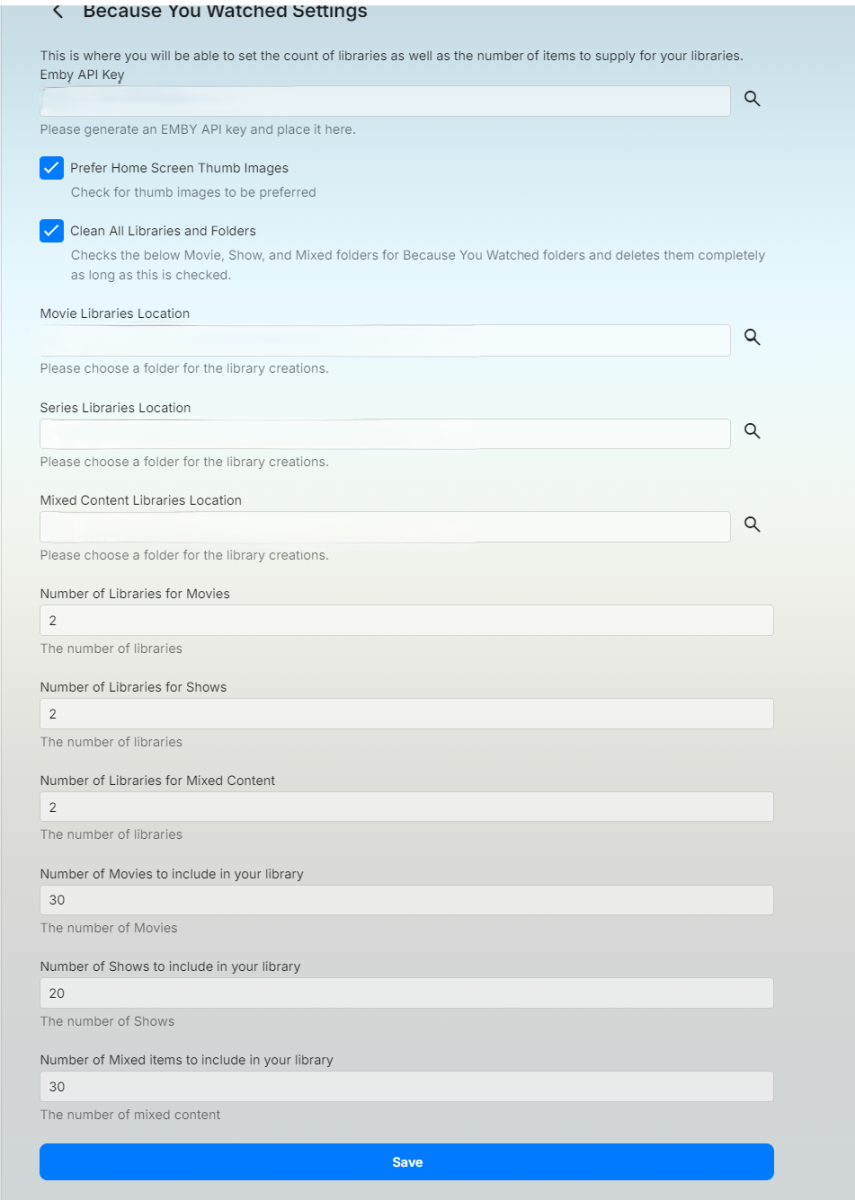
I've put together an plugin that will libraries and stream files for movies or shows that you've watched. What does it do? It builds folders, images, and stream files in the location you choose. If you're libraries contain stream files already it will just make a copy of those in the new location. It will delete the files and folders that roll off the watched list. Things to keep in mind: This will create folders based off all users watched history. So if you have multiple users there could be several folder structures created but it will not duplicate folder structures. This plugin allows you to choose between Movies, TV Shows or a mixture of both. You should do mixed content on it's own not with movies and tv shows also supplied. You will need to generate an emby api key for the application and store it in the settings. The clean All Libraries and Folders will delete all the stream files and folders this application creates in the location supplied in the configurations and recreate. This plugin will update as you watch items on the Emby server. This is not immediate as it takes time to run through and create the libraries and scan them. Emby.WatchedSuggestions.dll
 1 point
 -
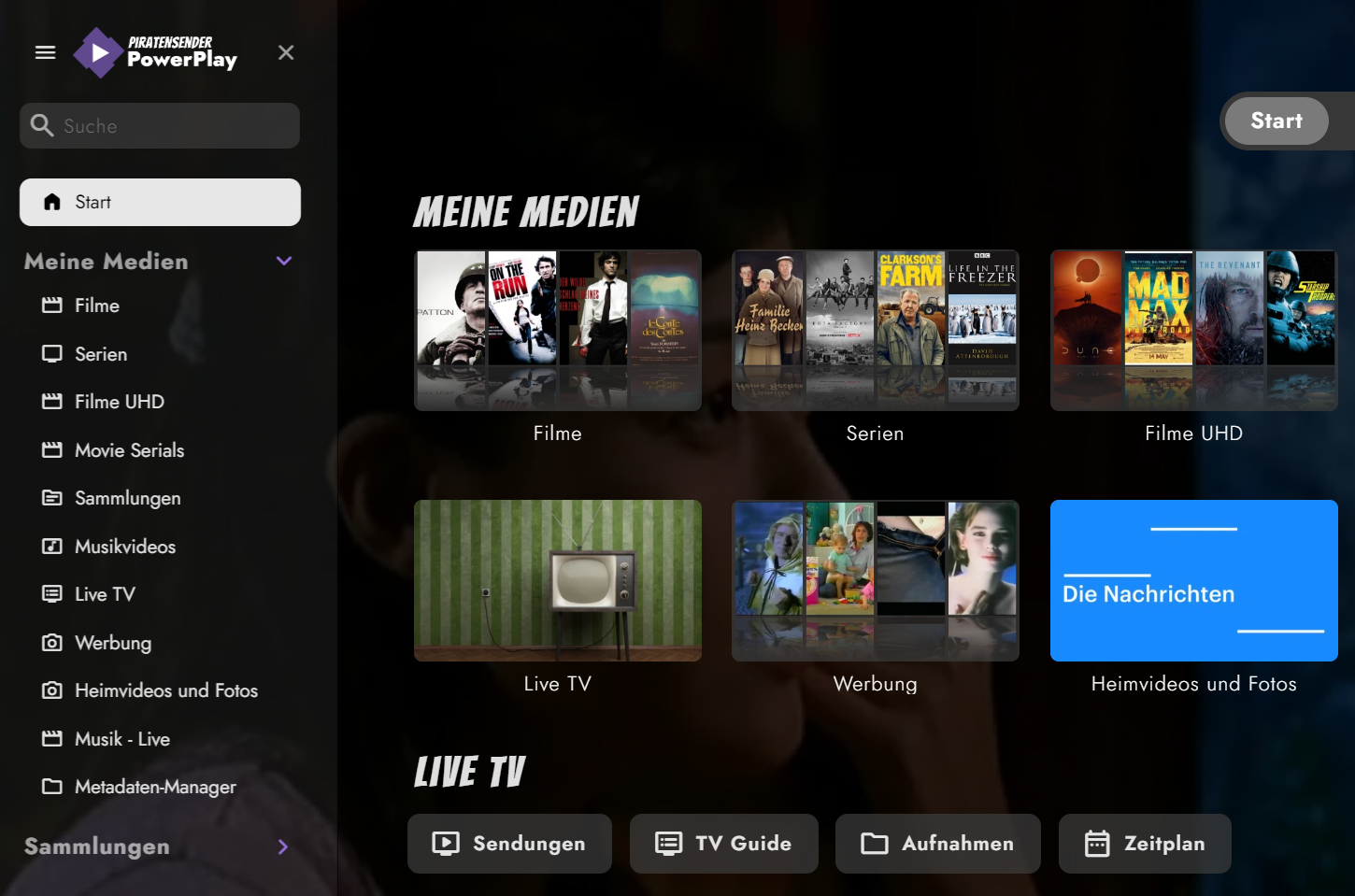
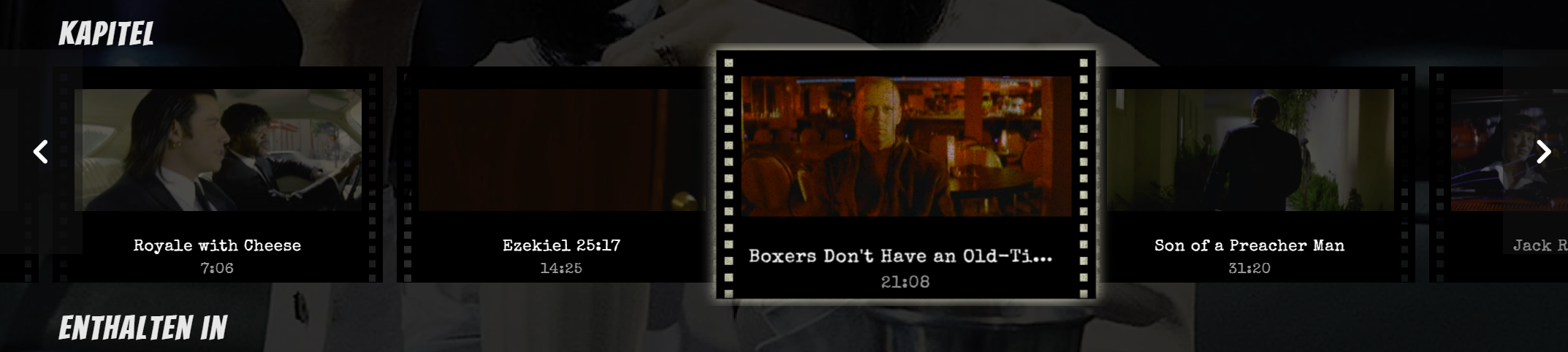
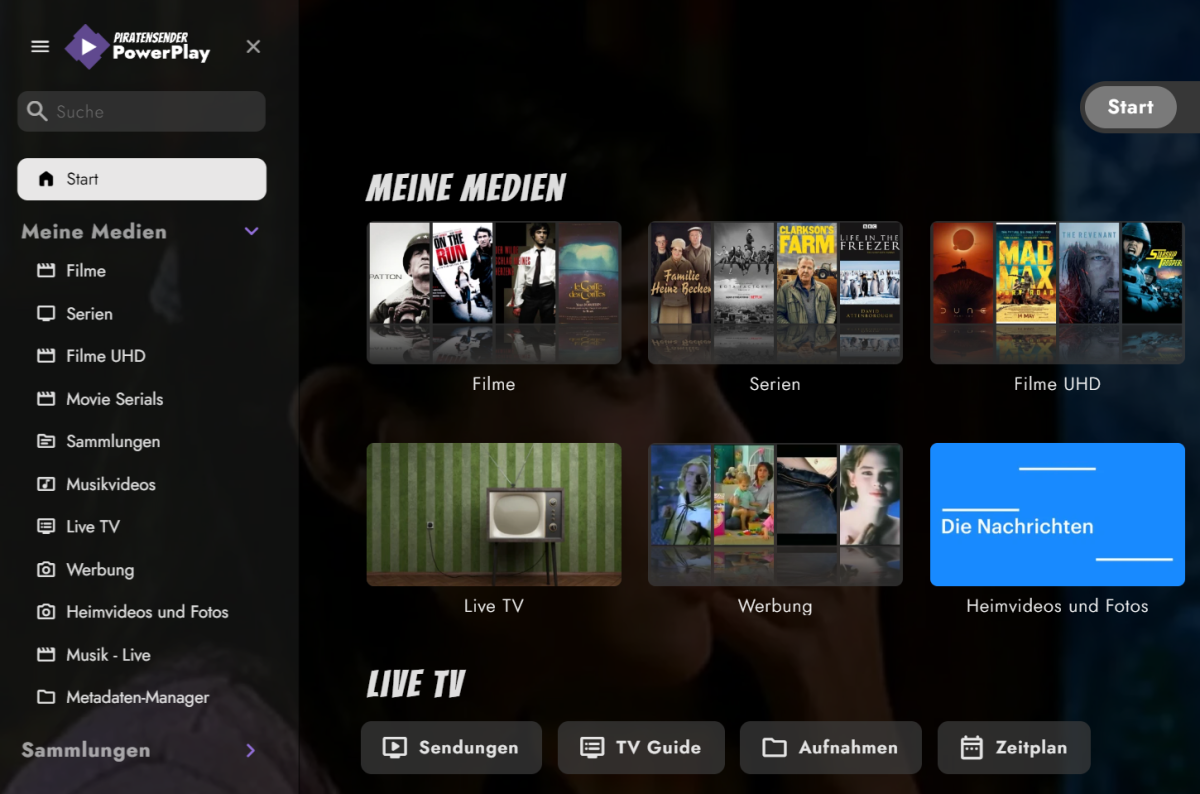
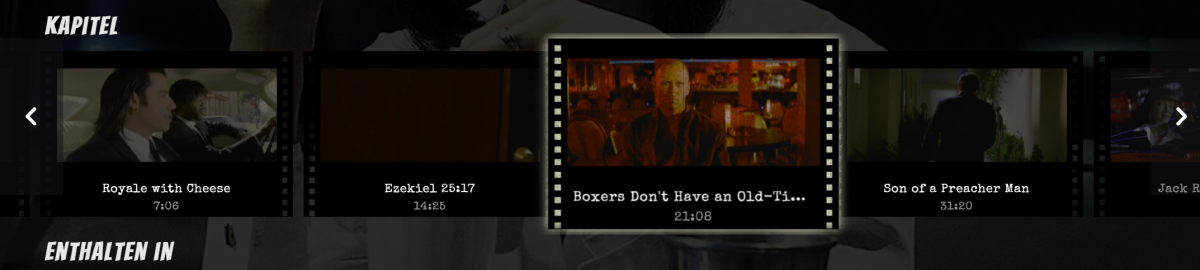
I've created some CSS for the Web App, originally made for Jellyfin and ported over to Emby. Not everything survived, but here's the scavenged stuff. 1. Home Screen I've started working on the fonts to give it a more classic and timeless look, while using fonts which look good and provide my glyph needs. I love cinema, thus these fonts hopefully capture the spirit of classic cinema (designer talk Fonts used in this screenshot: Bangers and Limelight for the headlines, Jost for the rest. Also Special Elite as monotype and Satisfy for handwritings. Custom logo, some paragraphs shortened to 70 characters per line for better readability. 2. Cast & Crew WIP. I wanted it to look like autograph cards. Also works with multi-lines, see Red Mist. 3. Chapter Section Most work was done here. Adds a film strip view with animation. Includes scaling on hover, with flickering and scratches. Known issues: 'Continue watching' also scales and glows Haven't looked at the home video section yet Put both CSS files in the same folder and adjust your paths. Look for YOUR_SERVER_ADDRESS_HERE and adapt it to your likings. The fonts used can be downloaded or imported from Google, see links above. Feedback and new code welcome. embyThemeFonts.css embyTheme.css

 1 point
 -
Hello, When using Emby watching Live TV, I've noticed that the stream will hard stop at the end of a program. Like on the :30's or top of the hour. Basically when show is marked to end in the guide, the tuning stops. So, 3 hour long episode/film will will happily play for all 3 hours no problem, but at the end of that 3 hour block, it cuts off and drops me back to the channel grid. When I open the same video stream in VLC in parallel with Emby, it continues to play with no problems while the Emby stream will hard stop at those specific times. What can I do to troubleshoot this?1 point
-
Hi Is it planned to improve the report in Emby server of current playing sessions ? Since 2 years that I have switched to Emby from Jellyfin, and through successive updates of Emby, I had always the same issue with report of playing sessions. Some sessions stay for ever (well till emby server is restarted) in the Dashboard of Emby server (whatever it's a playing session from a browser or from an Emby app). Sometimes it displays a stop button but it has no effect at all to kill the "ghost" session. Quite often also, users are playing medias but it doesn't display in Dasboard Consequence: user stats are completely messed up. Is there any plans soon to improve that ? Thanks Vincèn1 point
-
It would but smaller problem than having to call all your family and friends you have given access to and explain them to set max quality. Something that's a problem to do to start with anyway. It was also meant more as a joke than any thing else, sorry i didn't communicate that properly. With that said though... I did actually test with that in my settings just for one day, didn't have one single complaint so i at least know now my users can handle what ever the server can trow at them, certainly more than "auto". For any one reading this: Use at your own risk, it will make it so that admin account is accessible from the internet no matter what settings you have,1 point
-
That would mess with these settings.
 1 point
 -
mine fixed itself after the actual time changed in indiana 2 days ago. UK channels EPG is now back on track. if its wrong for a week or 2 every year, not much of a worry. just something to keep an eye on every year, or twice a year.1 point
-
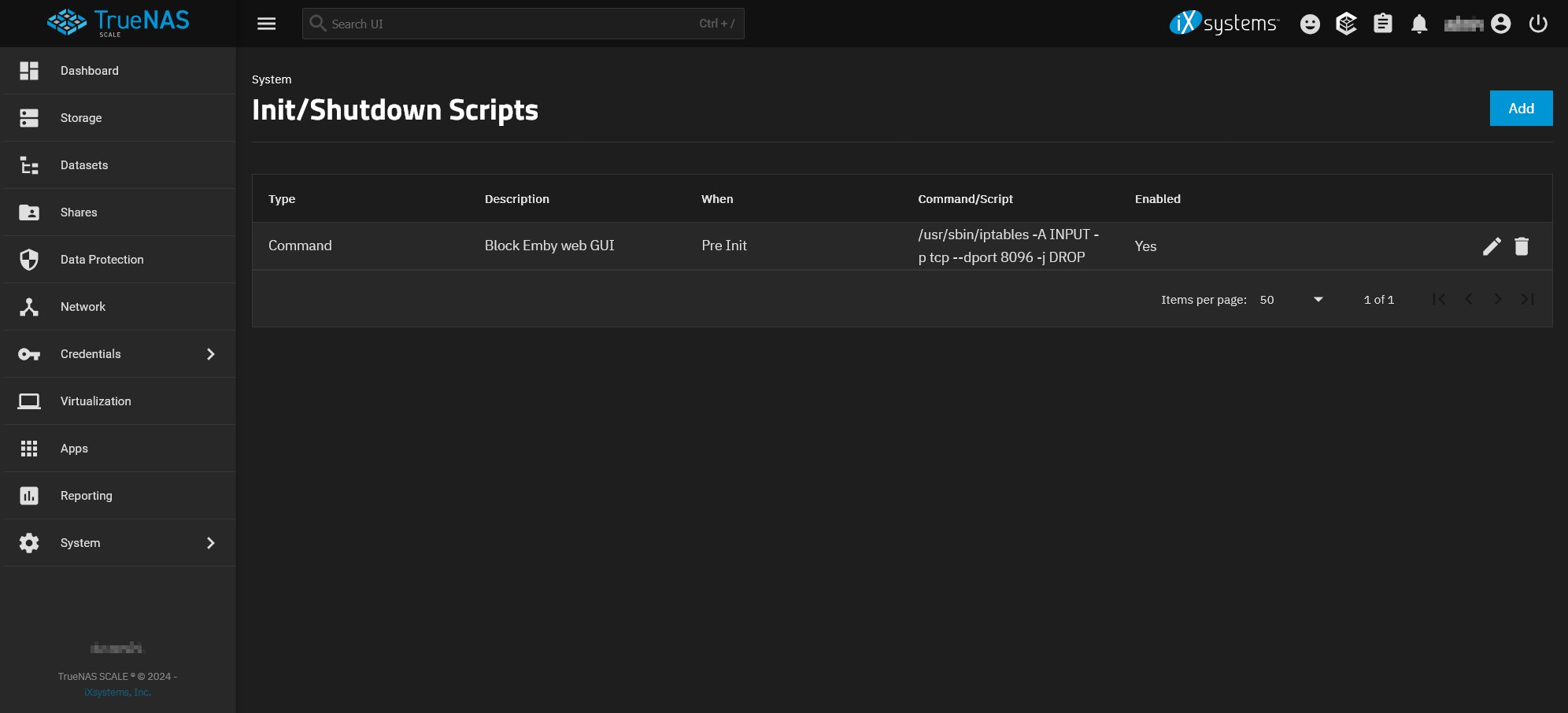
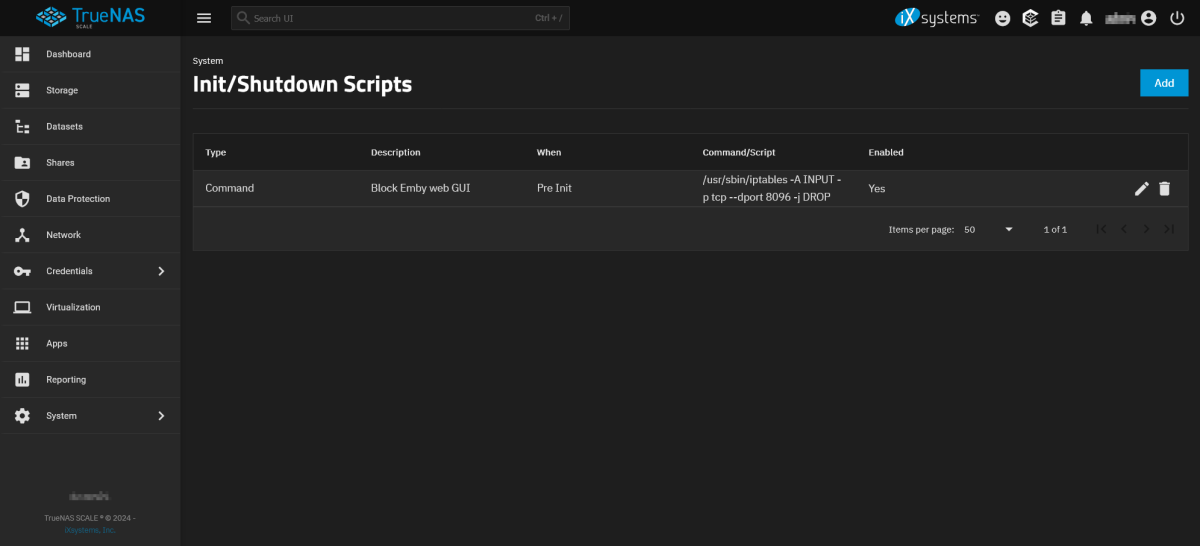
Okay, correction! TrueNAS Scale does use iptables and persistent rules can be added via Init Scripts, in my case: /usr/sbin/iptables -A INPUT -p tcp --dport 8096 -j DROP I'm happy with this solution
 1 point
 -
Hello, I don't know what I did wrong but after reinstalling everything works now. Thanks for your help.1 point
-
Merci beaucoup pour l’aide, je vais voir si j’y arrive et pardon je suis un peu novice. Encore merci1 point
-
Yep - anything to randomise a direct URL would be more than suitable - and this is exactly what others do from my limited testing. As an example - I can re-use a direct URL from my Amazon photo's - but the URL is unique to that image. It has a TTL as if I re-get that image later, the unique URL has changed. I'm not suggesting Emby need to do that, but the fact it is an unguessable URL means it's 'safe' to cache in the first place without needing Auth.1 point
-
@SamESThat sounds great thanks for your input! I could use some help here. After searching I figured out what HLS is. My question here @Lukehow do I go about removing AV1 from the HLS used by Emby? Is that done in the DLNA profile settings?1 point
-
So, 3 attempts was the limit. The first attempt made it wide screen but in the same orientation. I didn't really see any difference in attempts 2 and 3. On attempt 4 it said that there were too many errors that it was giving up.1 point
-
Hi, for basic functionality, you should be able to follow the Remote Setup guide. If you get stuck on something, I'm sure the Community will be happy to help.1 point
-
I have not yet been able to reproduce the freeze/crash when backing out of a playing show on 1.9.2 (1) with tvOS 18.1. Yet. I'll be updating the other AppleTV tomorrow, and letting the kiddo run wild on it so we can verify, as she's the one who's managed to reproduce the error most often.1 point
-
Yep. Removing the forced flag worked. And thanks for letting me know about Jmkvpropedit.1 point
-
Yes, this worked. Thanks!1 point
-
The dll for the new version is the second dll uploded in this thread. It creates a libraries on a per user basis and grant access to just that user. Hopefully you can download this dll here. Emby.WatchedSuggestions.dll1 point
-
It is an older model, connected on my LAN through wifi. The audio is AC-3, mono, constant 192kb bitrate.1 point
-
But you could also say it gives you a nice view of the artwork, no?1 point
-
@Jalilahas this helped?1 point
-
1 point
-
Hi, we have a 1.9.2 release that should be available in the coming days. Please let us know if this resolves it for you. Thanks.1 point
-
Hi, you can't. You can restrict their access to transcoding and the app will do the best it can to try and play the content. This may lead to the subtitles not showing at all, or in some cases a playback error.1 point
-
Yes there are.1 point
-
the plugin i configured, i sent the error in the first post, i'm still waiting for the creator's response.1 point
-
If I remember correctly the graphics used to use a GUID ID. That made it pretty hard to guess so not requiring authentication wasn't as much an issue as it would be difficult to guise it. A couple/few releases back this was changed to IDs vs the GUID ID. I believe the ID was the index in the database making it faster to acquire. Luke or ebr, feel free to correct me if I got that wrong. rbjtech, I also wonder what kind of performance hit the server would take if it checked to see if the connection requesting the image is logged in and has access to that specific content. Even if we skipped a check for specific access to said content and only checked to see if the session was authenticated would stop random people/scripts from being able to get any images. @Luketake a look a couple post above with a method I posted that can be implemented in nginx. Could we not do something very similar? 1. Add a config field to server/settings page for admin to enter a secret_code. When generating the links instead of: http(s)://{public domain}/emby/items/ID/images/primar you generate a md5 hash on ID using the secret_code The url becomes: http(s)://{public domain}/emby/hash/items/ID/images/primar Now when a request comes in you don't need to check if authenticated as they would have needed to have access already to get the URLs All you do is a quick check by generating a md5 on the ID using the system's secret_code to see if it matches the hash passed on the URI. Without a person knowing the secret_code they would not be able to generate a hash to match the ID stopping random URL requests dead. The only way a person would have the proper URL to retrieve the graphics would be if they were logged in and authenticated at the time the links were generated. I'd think this would run extremely fast on the server side, especially compared to any type of database lookup.1 point
-
Here is a new build that should work for linux using mickle026 Path.Combine() suggestion. Thanks for the information. Emby.WatchedSuggestions.dll Let me know if this works for you kjhedges1 point
-
I hope in future add it.1 point
-
After editing/cropping the video, exporting it as 16:9 & uploading to Emby, it now plays with no side bars, but still has bars on top & bottom (therefore, a source issue).1 point
-
This isn't an Emby thing. It's this way all over the Internet. You want images to load fast and be able to get pulled from the browsers cache once they've been downloaded the first time. Static content, be it graphics, html, java script, video segment, etc are meant to be able to re-used for a period of time without having to retrieve them on every use. The internet depends on this working in this fashion. Organizations of all sizes from companies to ISPs make use of proxies or transparent proxies (you won't even know it's there) to hold static information when possible, to save bandwidth and deliver content quicker as the resource will already be local. Mobile operators do this and more. Not only will they cash things like images, but they also likely re-optimize them as well delivering a picture that's been scaled down to look the same on hand-held devices but save bandwidth. Content Delivery Networks (CDN) require this in order to be able to move the content closer to a user with regional edge servers. Many ISP do this as well in a transparent fashion as well so a 1000 users hitting Facebook will have content in common that won't need to be requested. 100 users watching the latest movies just posted on Netflex or Prime can be served up from local ISP cache vs using bandwidth for every user. There are methods that can be used to obfuscate static content by making it look dynamic, but then it can't be cached. Emby could also require an authorized session to delivery anything including images but they share the issue of "busing" the ability to cache the images. Nginx or other local reverse proxy caching is lost, every use of an item requires a delivery from the server. That's a lot more work on the server having to deliver much more data over and over as well as a lot more overhead needed for session/authorization management. In another thread, Luke mentioned the image retrieval code could be changed to require an API. That would stop private images from being exposed but would negatively affect image caching in general. I think a better approach would be to keep the current URL as is http://{public domain}/emby/items/{increment number}/images/primary But never deliver the content with that URL if the content is from "private" content areas such as Camera Upload or Home Video and Photos libraries it would require a different URL that includes a key some kind. The content would be delivered assuming the user has access to that content. For security I'd code it so the current URL only delivers content associated with sections in (list) while everything else would require an authorized key. This way, it's future proofed from a new addition or feature slipping through the cracks. Any new type of content types would have to be explicitly added to the list above in code to deliver content without a key. This approach would allow caching as usual from local nginx (or other reverse proxy) to transparent proxies or CDN deliveries, while protecting private content areas requiring authentication. This would provide the security required while providing the best performance possible. Each client app should be upgraded to directly support this, but the server could provide an interim solution to bridge the gap until each app is upgraded. For example, if the client is a Roku and not version X or higher (with new handling) accessing private content using the existing URL it would determine If the user has access to that content as well as check to see if the device has already been authenticated for the session. I just want to make sure any implementation added, doesn't adversely affect performance or the ability to cache images for the main library as you WANT/NEED them to be non-secured and fully cacheable.1 point
-
Yep, it is TSN now.1 point
-
Is this the only lxc/vm running on your machine or did you passthrough the igpu to a vm? The script should work as long as you didn’t make any changes to the host. The script installs Emby in lxc and makes changes to the host so transcoding works. But if you made any changes to the host yourself it might mess up the igpu being able to be used by the lxc1 point
-
Wonderful, thank you! Fingers crossed they stay that way.1 point
-
@feerlessleadr I have finished the coding. I now need to test it and write a short note on it's capabilities and features. Vic1 point
-
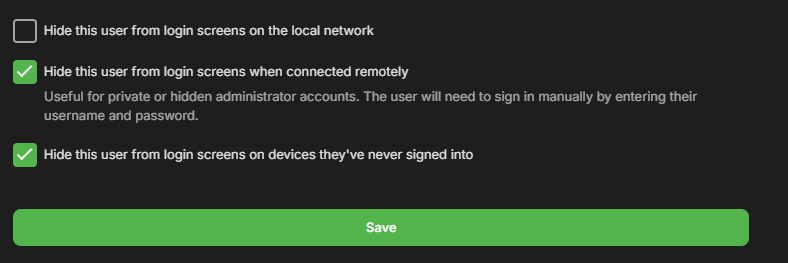
When it comes to media server solutions, we believe that Emby is the number one product for users who value privacy, customization, and reliability. Today, we're going to take a closer look at some of Emby’s key strengths that make it an ideal choice over other media server solutions. 1. Prioritizing Privacy and Security Security is a central part of Emby’s design. Unlike some media server alternatives that have limited security options, Emby gives users control over who can access their media and how they access it. With Emby, you can setup secure HTTPS connections, ensuring data is encrypted as it’s transmitted or easily set up access via a reverse proxy amongst other options. User permissions are also straightforward to manage, giving you full authority to create individual access levels for each user in your household or server network. Your media is yours, and Emby ensures it stays that way by giving you the ability to implement strong encryption options that protect against unauthorized access. 2. Simplified, Intuitive Setup From the moment you install Emby, you’ll notice a streamlined, easy to navigate interface. Whether you’re setting up for the first time or managing your media library, our layout is intuitive and user-friendly. Emby is accessible to both beginners and advanced users, with step-by-step guidance to get you started and powerful customization options available for those who want to tailor their media experience further. Want to hide your remote users from a login screen? You can do that! Want to set up those same users with an easy way to access your server? Emby Connect allows you to do that! There are so many ways in which Emby simplifies user management and access to make it easier and more secure for your users! Other media servers can be clunky and involve multiple steps to perform basic tasks, but Emby simplifies this with a unified interface that makes media organization and management easy. 3. Seamless and Efficient Transcoding As mentioned in our previous blog, transcoding is a key feature for media server users, and Emby’s transcoding engine is optimized to handle media formats and devices with impressive efficiency. Whether you're streaming a 4K movie, using HDR tone mapping, or watching a video on a low-bandwidth connection, Emby has the ability to dynamically adapt to your network and hardware capabilities, delivering smooth playback across devices without unnecessary buffering or interruptions. Emby can also utilize hardware acceleration (Emby Premiere only), ensuring that high-resolution content plays seamlessly without consuming excessive CPU resources. This is particularly helpful if you have multiple users streaming from the server simultaneously, as Emby ensures each session gets the best possible quality. 4. Comprehensive Library Management Emby’s library management capabilities are designed to provide the best possible organization and personalization options. With Emby, you can create custom collections, tag media, and even use rich metadata that automatically pulls in posters, descriptions, and trailers to enhance your experience. The smart playlists and customizable views allow users to organize their media in a way that feels personal and unique. For those who have extensive media libraries, Emby also makes finding and managing content effortless. Search filters and sorting options let you locate titles instantly, and Emby’s advanced metadata scraping ensures your library looks how you want it to. 5. Cross-Platform Compatibility In an age where we use a variety of devices daily, Emby is engineered to be versatile. Emby offers applications for nearly every platform, including Windows, macOS, Linux, Android, iOS, Roku, smart TVs, Android TV, tvOS, web browsers and more, giving users the flexibility to stream and manage their media library from practically any device. The versatility that our server provides doesn’t stop there – it also supports a wide range of formats, ensuring that no matter what file type you prefer or where you choose to watch, Emby is ready to deliver the best experience. 6. Constantly Evolving Features with a Supportive Community Emby is continually updated with new features based on user feedback and technological advancements. Our development team and community via these forums, work hand-in-hand to enhance Emby’s performance, refine its interface, and introduce new options that make media management a more rewarding experience. As an Emby user, you’re part of a passionate community that we believe values innovation, feedback, and the enjoyment of seamless media streaming. View the full article1 point
-
I think this move will convert a few over from the main competitor as this is how their Android TV app works as well. It will soften the barrier for entry to trying Emby on their existing hardware and will likely result in more premiere subscriptions they are settled in. On of the biggest advantages of Emby is that the Premiere features are available to all devices connected to the server versus forcing each users to have their own Premiere license or app unlock to access premium features. The standard device limit is a non-issue for personal use and there are options for people who have advanced needs. People are leaving Plex in in droves only to find Jellyfin's lack of polish and be disappointed. Emby is the logical choice for people who are ok with financially contributing to a polished project but don't want to be force fed sponsored content and advertisements. There is a misunderstanding on what Emby offers over the other services and that is a missed opportunity. There are people out there who just want things for free and they will gaslight themselves by flying the OSS flag, you aren't going to convince them to get Emby Premiere. There is a large group of people who want to leave Plex for multiple reasons, non of which are because it costs money. They continuous overlook Emby as a viable option because they don't understand what it is.1 point
-
Items stay in favorites when watched. Items in a 'to watch' list should automatically be removed when watched. I want this!1 point
-
Yeah. Normal Linux distros allow for saving kernel configuration settings. Syno DSM does its own thing.1 point