Leaderboard




Popular Content
Showing content with the highest reputation on 10/26/24 in Posts
-
So, lots of people get confused or don't understand how to set this up on your own domain. I will try my best to provide "how to" information in here where necessary, but to be fair, a lot of this I adapted from various online posts about nginx and also used ChatGPT for help (you should totally use it for Q&A issues, it's very helpful and can give you a huge leg-up when trying to set this up). I will also assume you understand the basic principals of what is going on. This combination provides you with piece of mind, end-to-end encryption for you and your users, faster load times, etc. Cloudflare’s free tier offers significant benefits. Cloudflare provides DDoS protection, reducing the risk of service outages due to attacks, and includes a Web Application Firewall (WAF) to block malicious traffic. Additionally, it improves site load speeds through caching and content delivery network (CDN) services, which distribute content across global servers, enhancing response times. Using Cloudflare with Nginx also allows for easy SSL/TLS encryption management, adding a critical layer of security without manual certificate renewal. This combo optimizes performance, security, and scalability. Using Nginx together with Cloudflare provides a more robust and secure setup by leveraging the strengths of both. Cloudflare’s CDN and DDoS protection shield your network from malicious traffic and improve loading times, but it doesn’t handle every aspect of server management. Nginx provides fine-grained control over caching, authentication, and local load balancing, allowing you to customize how requests are processed and resources are served. Together, they offer enhanced performance, security, and reliability, with Cloudflare filtering threats and Nginx managing local configurations and fine-tuned responses. Setting up cloudflare is pretty easy and mostly self-explanatory for initial setup. You may want to take the time to go through all of the different settings for your domain within the cloudflare panel, read each one to understand what it does, and ask ChatGPT for anything you're unsure of. The user-interface is very intuitive, and there's even a video on how to use your gmail account with cloudflare to provide a user@yourdomain.com experience completely free, so you can send and receive e-mail from your domain without any extra charges. It's super easy to setup, and only requires that your gmail account has 2FA enabled. Here's the video in question (The guy is a bit wordy, and takes his time, repeating himself several times, so I apologize ahead of time, but, it works like a dream). This is especially handy for services like Ombi where you can communicate with your users through e-mail with password reset links and the like. Cloudflare offers so many options for security that a write-up would take me ages, so I'm going to skip that, the key things you'll need going forward are SSL/TLS certificates from Cloudflare which you can find in the SSL/TLS section of your domain dashboard. Save the certificate as a .crt file, and the key as a .key file (.pem works for both, just make sure you label which is which). Save them to your nginx installation, I have mine in C:\nginx\conf\ssl (you must create the ssl folder). If you've made it this far, I will assume you've setup cloudflare with your domain, enabled the security the way you want it setup, grabbed your certificates, and are now looking for how to integrate that with your nginx/emby setup. The nginx walkthrough in these forums is pretty good, but it was also written 7 years ago, and there are some new technologies and new best practices that you should implement in your .conf files. Go ahead and use that walkthrough to setup nginx and get it up and running (I still use nssm to have it run as a service). Here's an example of a robust and secure nginx.conf file: worker_processes auto; #lets nginx decide how many cores/threads to use on your processor events { worker_connections 2048; #change as needed for your traffic, 2048 us a good starting point for low traffic environments, moving it up will devote more resources } http { include mime.types; default_type application/octet-stream; sendfile on; keepalive_timeout 65; # Extended gzip settings gzip on; gzip_types text/plain text/css application/json application/javascript text/xml application/xml application/xml+rss text/javascript image/svg+xml application/font-woff application/font-woff2 font/ttf font/otf font/eot; gzip_min_length 1000; gzip_vary on; gzip_comp_level 6; gzip_proxied any; gzip_buffers 16 8k; limit_req_zone $binary_remote_addr zone=one:10m rate=1r/s; #enables a request limit, so each IP address accessing your server can only make 1 request per second, it's useful for preventing request floods # Redirect HTTP to HTTPS for Emby subdomain server { listen 80; server_name your.domain.here; #Update with your domain return 301 https://$host$request_uri; } # HTTPS server block for Emby subdomain server { listen 443 ssl; server_name your.domain.here; #Update with your domain ssl_certificate /your/ssl/certificate/file.pem/crt; #Update with your ssl certificate file ssl_certificate_key /your/ssl/key/file.key/pem; #Update with your ssl certificate file ssl_session_timeout 30m; ssl_protocols TLSv1.2 TLSv1.3; #Force TLS v1.2 and higher ssl_session_cache shared:SSL:1m; ssl_ciphers 'TLS13-AES-256-GCM-SHA384:TLS13-CHACHA20-POLY1305-SHA256:TLS13-AES-128-GCM-SHA256:ECDHE-ECDSA-AES256-GCM-SHA384:ECDHE-RSA-AES256-GCM-SHA384:ECDHE-ECDSA-CHACHA20-POLY1305:ECDHE-RSA-CHACHA20-POLY1305:ECDHE-ECDSA-AES128-GCM-SHA256:ECDHE-RSA-AES128-GCM-SHA256:ECDHE-ECDSA-AES256-SHA384:ECDHE-RSA-AES256-SHA384:ECDHE-ECDSA-AES128-SHA256:ECDHE-RSA-AES128-SHA256'; ssl_prefer_server_ciphers on; ssl_stapling on; ssl_stapling_verify on; resolver 8.8.8.8 8.8.4.4; # Security headers for Emby add_header X-Xss-Protection "1; mode=block" always; add_header X-Content-Type-Options "nosniff" always; add_header Strict-Transport-Security "max-age=63072000; includeSubDomains" always; add_header X-Frame-Options "SAMEORIGIN" always; add_header 'Referrer-Policy' 'no-referrer'; add_header Content-Security-Policy "frame-ancestors your-root.domain your.sub.domain;"; #replace with your root domain (ie google.com) and your subdomain (ie emby.google.com) proxy_hide_header X-Powered-By; add_header Content-Security-Policy "upgrade-insecure-requests"; location / { proxy_pass http://192.168.x.x:8096; # Adjust as per your Emby server IP and port proxy_set_header Range $http_range; proxy_set_header If-Range $http_if_range; proxy_set_header X-Real-IP $http_CF_Connecting_IP; proxy_set_header Host $host; proxy_set_header X-Forwarded-For $proxy_add_x_forwarded_for; # WebSocket support proxy_http_version 1.1; proxy_set_header Upgrade $http_upgrade; proxy_set_header Connection "upgrade"; } } } This example nginx.conf is a robust way for your server to communicate with Cloudflare, it also corrects some of the mistakes that Cloudflare makes (like allowing CBC ciphers on the free tier which are insecure). The key features of this .conf are: Performance Optimization: Gzip compression significantly reduces the size of transmitted data, improving loading times for users. Security Enhancements: SSL/TLS support ensures secure data transmission, protecting user information and enhancing trust. Traffic Management: Rate limiting helps prevent abuse by restricting the number of requests from a single IP, reducing the risk of denial-of-service attacks. Automatic Redirects: The HTTP to HTTPS redirect ensures users access the secure version of your site. WebSocket Support: Configuring WebSocket headers enables real-time communication features for applications like Emby. Security Headers: Implementing various security headers helps mitigate common vulnerabilities, such as XSS and clickjacking. Session Management: SSL session caching optimizes performance for returning users by reusing session data. Customizable MIME Types: Inclusion of various MIME types ensures proper content delivery for different file types, including fonts. Error Handling: The configuration supports error logging and management, which aids in troubleshooting and maintaining service quality. Resource Management: The worker_processes and worker_connections directives ensure efficient use of server resources according to the system’s capabilities. Please read the #comments next to the directives so you know what to put where. The ssl_ciphers section forces communication with cloudflare to work on one of those ciphers, as a result, it forces your users to work off one of those ciphers, and they are currently the highest rated ciphers recommended by probely. Emby requires a PKCS #12 formatted Certificate, and nginx doesn't really use that, so here's a python script that will take your certificate and key files and convert them into a single PKCS #12 formatted certificate. You do not need to reference this file in nginx and only need to put the path in your emby server for this to work. import subprocess def convert_pem_to_pfx(cert_file, key_file, output_file, password): # Use OpenSSL to create a PKCS#12 file from the certificate and key command = [ "openssl", "pkcs12", "-export", "-out", output_file, "-inkey", key_file, "-in", cert_file, "-password", f"pass:{password}" ] subprocess.run(command, check=True) # Usage certificate_file = 'certificate.pem' # Path to your certificate key_file = 'key.pem' # Path to your key output_file = 'output.pfx' # Desired output filename password = 'your_password' # Password for the .pfx file convert_pem_to_pfx(certificate_file, key_file, output_file, password) You only need to run this script once, you can set a password, or hit enter twice to bypass the password, the choice is yours. Emby does provide a field for the password, so using a password is probably better than leaving it blank. Please note, that this was all made within the last week, and reflect the current best practices for security and balancing security/optimization/resource management, however, in the near future, things could change again and render some of this obsolete. It's best practice to continually search and seek out new directives and test them out, as well as randomly browse cloudflare for any updated security features they may offer or takeaway from the free service tier. Edited for spelling and clarity3 points
-
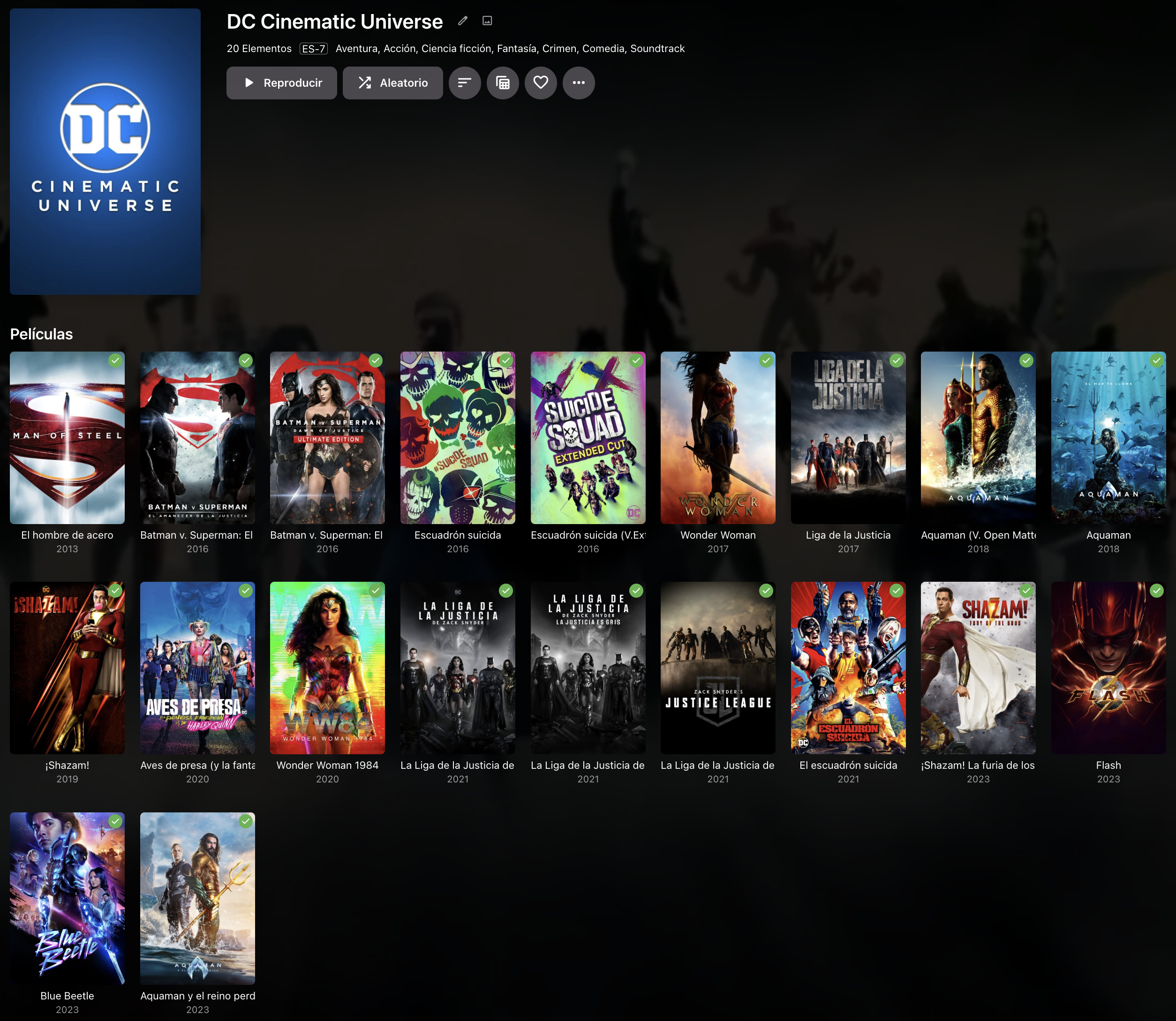
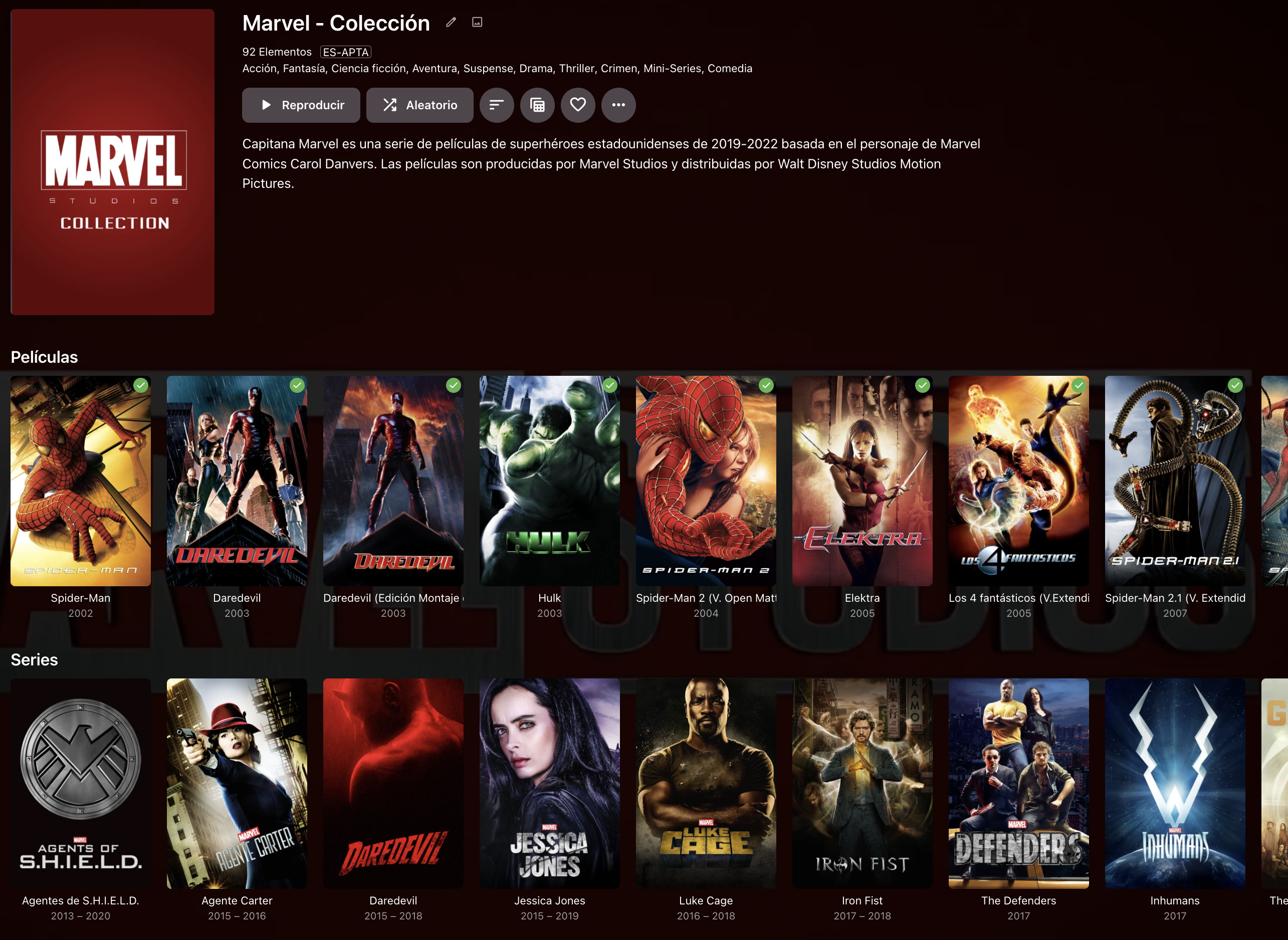
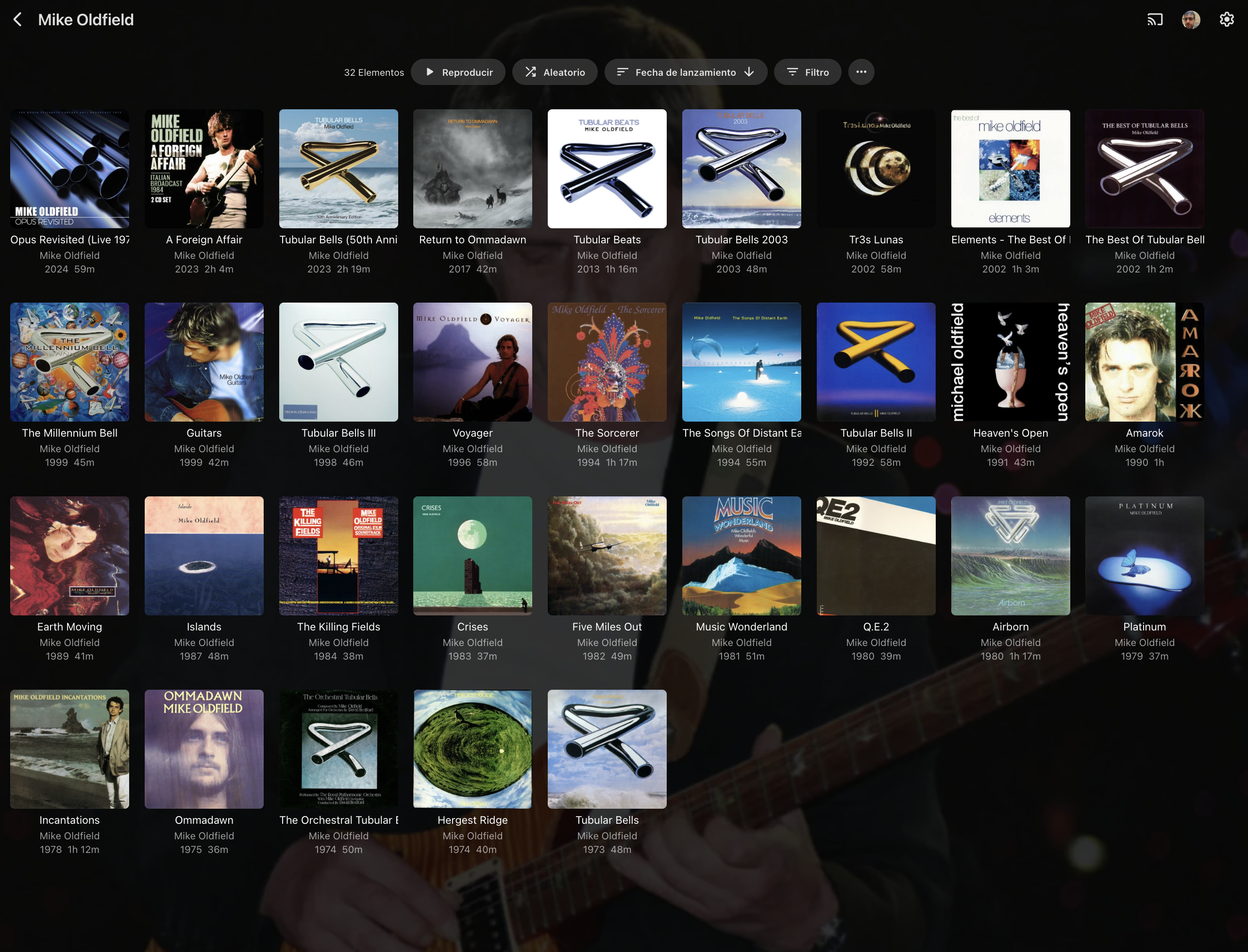
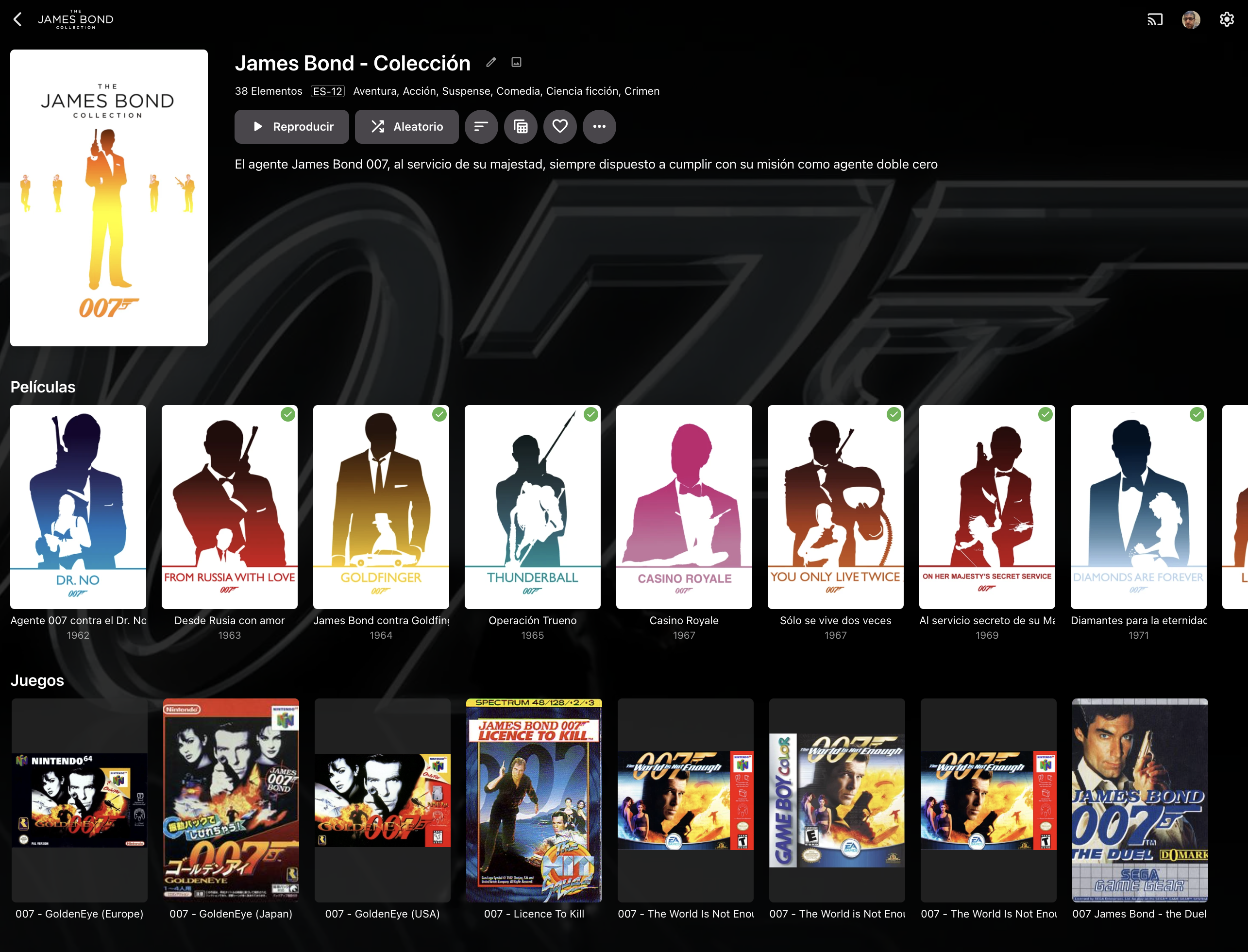
Hi Emby Team. Today when a collection has only one media type (EJ. Movies), is presented in a "multi-line" view: This view is clear, and in most cases is capable to show an entire collection item type in a single screen. When the collection has multiple types of media (EJ. Movies and Shows), the collection is presented showing one line per item type: This forces the user to scroll to the right to navigate the collection, something that feels unnatural and it's not practical, specially if the collection has more than 20 items. I would like to be able to: 1st.- Have "multi-line" on multi-type collections 2nd.- Be able to click the media type (Movies, TVShows, etc) and see a screen that only shows this type of media for this collection, similar to what's done in music with artists when you click on albums: . >>>>>>>> Additionally, and I know probably this is the most tricky thing, some media, specially videogames but not only videogames, does not have always the same type of picture size and now it's presented making all of them same size and adding a semi-transparent square for the ones that are smaller: I understand that it's complex to present different size items on the same row but maybe if instead of presenting a semi-transparent square: If the square is fully-transparent, will solve the issue, this will be desirable to be applied to all type of media, because some Music CD covers are not CD Size: . And Videogames, where usually japanese editions are the oposite boxing than rest of the world editions: . . Japanese Europe USA Finally, would be good that you can order every type of media in collections by it's own criteria. Meanwhile in Movies and TVShows has a lot of sense doing it by release date, other media that's usually not matched with any metadata provider (Videogames, books, comics), and has sense that other ordering a part of release date can be considered inside collections like: - Console System for Videogames - Author for Books and Comics Thanks in advance.
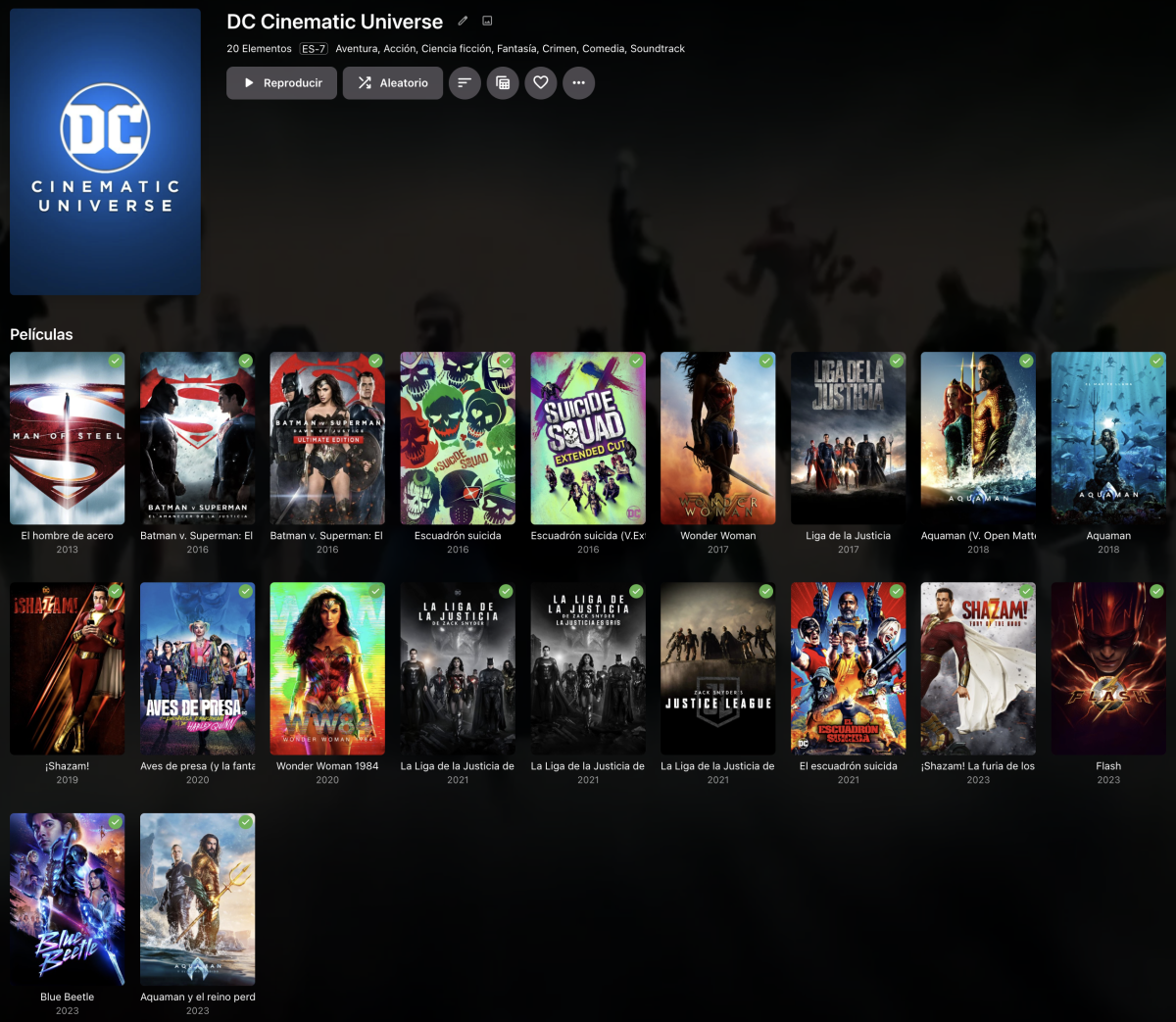
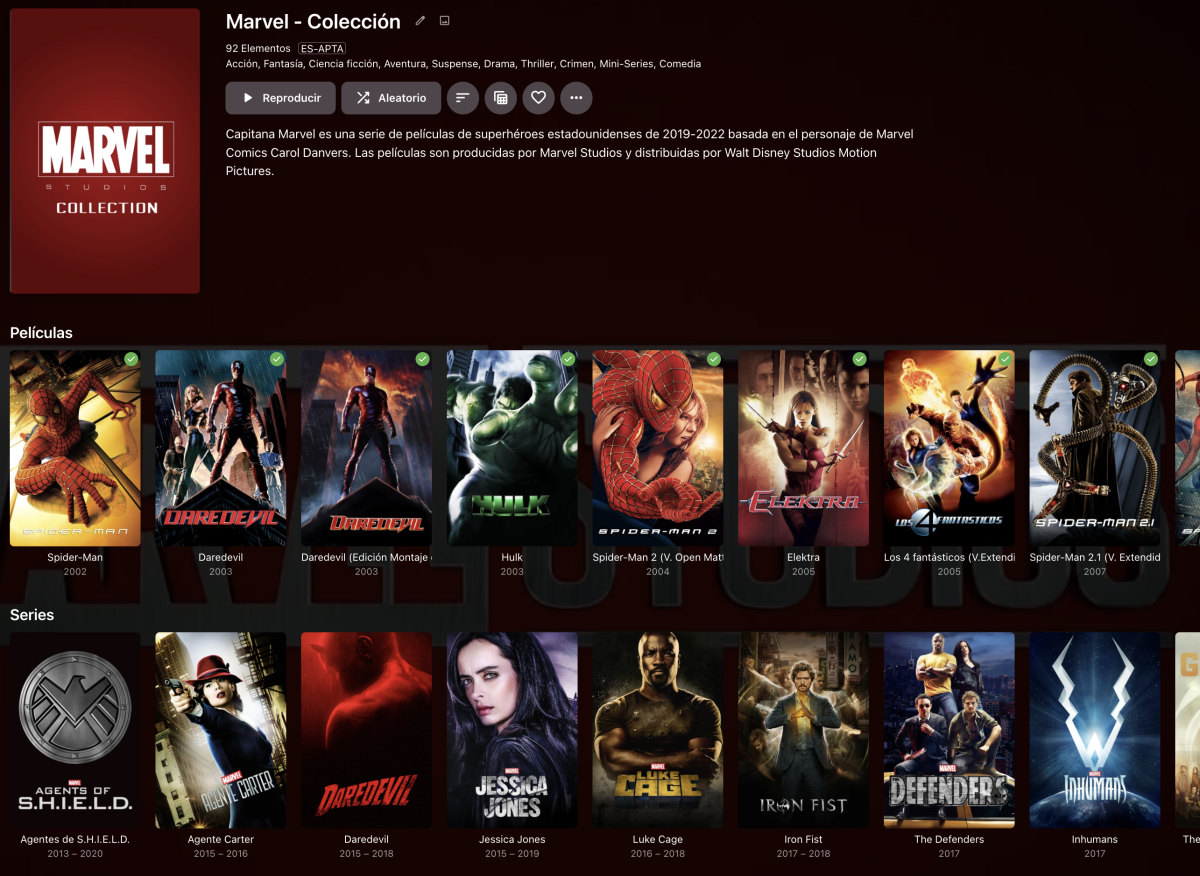

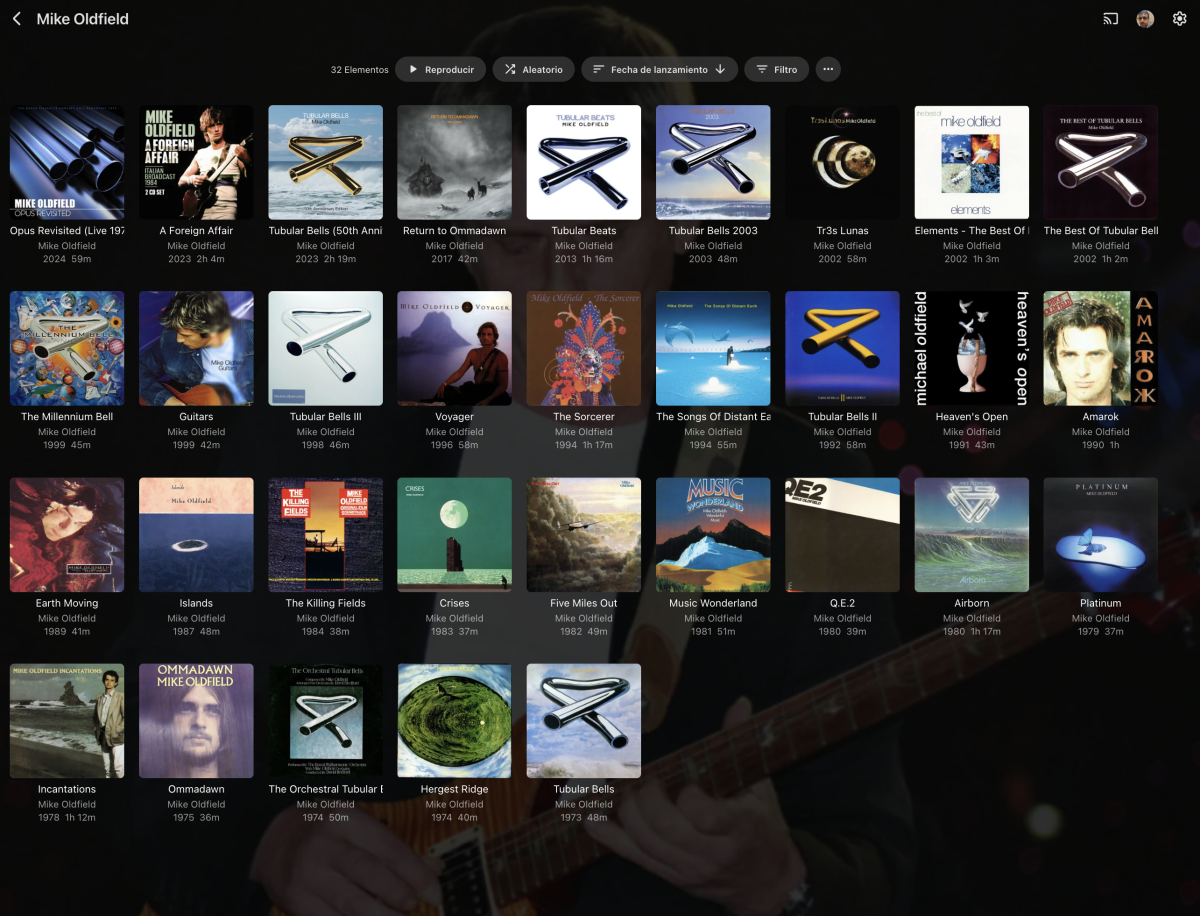
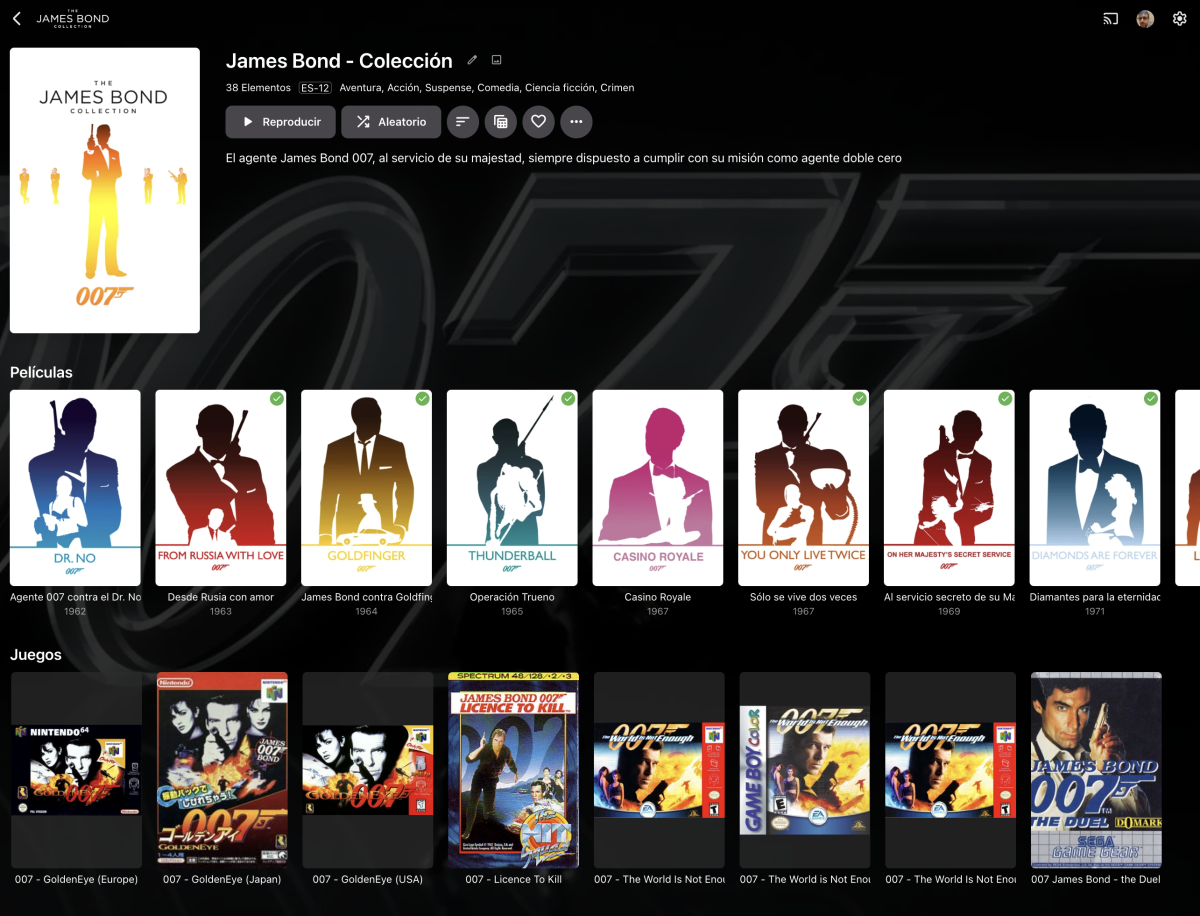







 2 points
 -
These are very good and interesting suggestions... Anyone that has gone to the effort of creating a reasonably large custom Collection and then used "Group By" to separate the different items into vertical sections could possibly become frustrated with horizontal scrolling beyond more than (say?) 20 items. It's a very similar situation with "Appears On" for music. I can imagine the 2nd idea of navigating through to a more detailed page working really well (like Albums) and being consistent with the current Emby UI. (Also likely no negative impact for smaller collections, where the lower-level detail pages/views may not be needed.) Perhaps could also be applied across the UI in other relevant places? The 1st idea could also be good, but may still involve a lot of vertical scrolling for large Collections, to show everything. Being able to expand and collapse the vertical sections would be brilliant, but I'm not sure if there is any Emby UI precedent elsewhere that could be implemented for this??? Maybe someone else knows? (Just thinking...) If the 2nd idea was implemented would the 1st idea be required as well? "Group by None" would still show all items in a grid view. Anyway, a great post and something that Emby could ideally consider!2 points
-
It would be great to have Emby as a music provider for Music Assistant: https://music-assistant.io/ I'm forced to use Jellyfin as a provider for now: https://github.com/orgs/music-assistant/discussions/583 It probably wouldn't take too much effort to adapt the existing Jellyfin provider to the Emby API: https://github.com/music-assistant/server/tree/dev/music_assistant/server/providers/jellyfin1 point
-
I'd like to have the option to clear 'alerts' in the dashboard. I realize that they go away on their own, but if I can clear them then it's more obvious IF a new alert comes through.1 point
-
I just bumped a thread I had made earlier this year to get answers regarding what I would consider a pretty major issue. Tldr is that images and video thumbnails can be viewed without authentication. Until that issue is fixed I personally wouldn't recommend using emby for home photos and videos if your server is exposed publicly.1 point
-
For existing items: yes (or Refresh Metadata). Correct. Honestly have no idea, never had that option enabled, but by same logic that you need to explicitly opt for/tick "Replace existing images" when refreshing metadata manually, I'd guess no on artwork, but a Dev or some fellow user would have to confirm.1 point
-
It is. Not that I know of. No. Any change in library options/settings would apply only for new items going onwards; for existing items Refresh Metadata would be needed (nor recommended in your scenario as existing metadata would potentially be overwritten) or opening Edit Metadata dialog and clicking Save for each individual item (recommended in your usage case). It is.1 point
-
All items with providerIds will retain their played/resume/favorite status; all those without them will lose it. If you don't save NFOs with media - yes, custom edits will be lost. There's no "repointing and realizing that there's data existing", all items will be removed from the db and added as new. You can mitigate that by saving NFOs/artwork in your media folders.1 point
-
Something really wrong here with this item. But per your error dev may have to comment as to me it suggest a issue with metadata for S09E23-E24 - The Finale.1 point
-
To help others, I simply removed folders ans start new install1 point
-
You should consider using Caddy instead of nginx. It's the much easier option and ideal for those starting from zero to intermediate networking skill.1 point
-
Since following @Carloadvice in the slow music thread to optimise database performance...."play the album best of by the artist u2" now works. I thought i had tried that before but maybe not... i set the 'cache to 4096' and 'vacuum the database on startup'. "mo cache mo alexa playback" it seems.1 point
-
@chef I tried as you said, but it still had the items there even though none were in top picks list. I then went /emby/data/top-picks and manually deleted the items in there and done a refresh on the Top-Picks library, then Top-Picks was empty. So I then added some new items to Top-Picks in settings and refreshed again and I now have the correct items in the Top-Picks list. Somewhere, the permissions seemed to have changed, and the items couldn't be removed by Top-Picks I then changed a couple of items in Top-Picks and refreshed and everything seems to be working correctly.1 point
-
That was a deep dive into Synology, and there I could set the checkmark for the "Video-Too" shared folder Thank you for the good links and respose... and getting to use Emby, I find it of gret use for me GreyT1 point
-
*Moved to this forum as requested by OP.1 point
-
Thanks so much for this !1 point
-
ok the default covers are nice to i edit them my self.1 point
-
Thank you, that sorted it.1 point
-
Upgrading to Emby v.4.9 beta solved the problem! Thank you!1 point
-
This is for transcoding only - the whole idea of this thread is to NOT use transcoding in the first place .. ? tbh - I'm a little confused as you are repeating what I said above. All the external progs that do the extraction will NOT name the file using 'default' thus embedded wins every time. IMO this is Emby that is at fault - if nobody else does it that way, then it's Emby that need to change - not enforce an illogical name standard. I'm suggesting you put something like your first paragraph in the wiki, with examples, so at least people will realise they need to name their subs with an extra 'default' in there to superseed the Default flag on the embedded sub... From your sig -
 1 point
 -
Problem solved. Somehow port 8096 had become closed, and after opening it, everything is working.1 point
-
I had thought about the exact same example. For TVnext we don't need to do any probing. Instead we are writing "live" metadata information, i.e. right in the moment when the data passes through. That means we can have precise information for everything that gets recorded or watched - for "free". Scanning files on disk is expensive, but not when the data is passing by anyway and you need to parse it anyway. In the end such format changes can even be useful for determining program start/end and possibly cutting out (or jumping over) commercials.1 point
-
I have two, but I use them as a volume on my DS1821+ and have forced certain files to them. I don't use them as normal cache. I think they have improved performance though. If you want to see something more scientific, look at the thread @Carlodid on ssd disks. He's got some before and after numbers he did while testing.1 point
-
At a guess you have not referenced a data folder in your docker volume code line1 point
-
I’m not sure, I deleted the library and added it again to troubleshoot the other issue and it hasn’t done it since1 point
-
Hi everyone sorry to add to this late but I’ve tried deleting and reinstalling the app many times in my phone and I’m still getting playback errors. I fixed my emby connect log in error by not allowing the app to connect to other devices on my network. Unfortunately when trying to watch videos I get a “no compatible streams” error. I’m on the latest IOS for iPhone and emby 2.2.21. Any insight? Never had any issues with emby on iPhone before but this definitely started with the most recent update.1 point
-
Big Screen DLNA support with Emby Server is resolved in the Emby DLNA plugin version 1.1.4+. Thanks !1 point