Leaderboard




Popular Content
Showing content with the highest reputation on 10/24/24 in Posts
-
I think we should calm down a bit on this topic. We're not talking about something that has been caused or emphasized by a recent change (neither to TV broadcast, nor to Emby software). Such switching of stream formats may be more frequently seen in the US and in the UK, but it's definitely not something new. And on the Emby side, nothing has changed either. When thinking back through all the many past years, I can't even remember any substantial issue with Emby Server and such tv recordings with varying interlaced states. Not in the transcoding area at least. I really don't see a big alarm here. If it was a big thing, it would have frequently come up before. I also have an explanation for that: normally, when you record a TV broadcast, the DVR software records and saves individual programs to disk as separate files. And no TV broadcaster employs a monkey to let them arbitrarily switch back-and-forthe between interlaced or non-interlaced. So, switching during commercial breaks is absolutely plausible, but you'll hardly find any program where it switches video format right in the middle of a show - if at all, then from one show to another show. Normally, the DVR saves recordings like one file per show/broadcast and the result is that the frames being probed at the beginning are the relevant ones for this show. The worst thing that can happen there is that the appearance of commercials could be suboptimal and that's it. There are takeaways for TVnext, for which it was good to have the discussion. For client playback, I would not go that far as to always activate deinterlacing unconditionally as that may have adverse effects and we also have the hardware filtering cases where we need to manage deinterlacing ourselves. So, the most reasonable logic in client players for activation of deinterlacing that I can think of is to enable it.. either when Emby Server has detected it as interlaced or when there's a combination of codec and container where it's known that all or parts could be interlaced (#1 candidates of course H.262/4/5 + MPEGTS) Additional combinations can be added if needed, but otherwise there's not much more to it.3 points
-
Any time the path to/name of a media file changes, Emby interprets it as the previous file has been removed (so is removed from your emby servers database), and the renamed/moved file is a new file, imported/processed as new media. If you've moved all your episode files into season folders; Emby will be reprocessing all your tv shows as if they were new media, and this will take a while. Longer depending on your libraries configuration (extracting thumbnail images, chapter markers, downloading all related images in advance, etc). The percentage progress for library scans is quite misleading, showing the first ~%90 done reasonably quick then seemingly hanging, but it is still working. You can verify this by monitoring Embys log files. Just gonna have to be patient.2 points
-
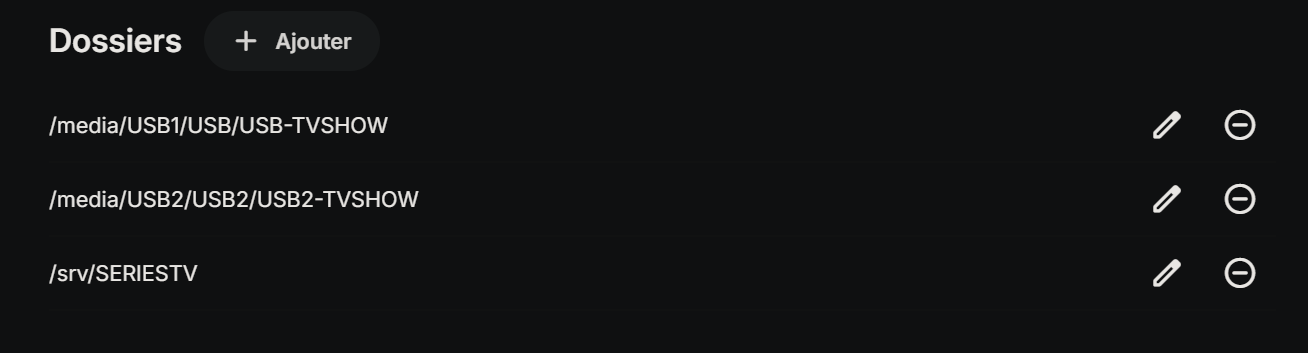
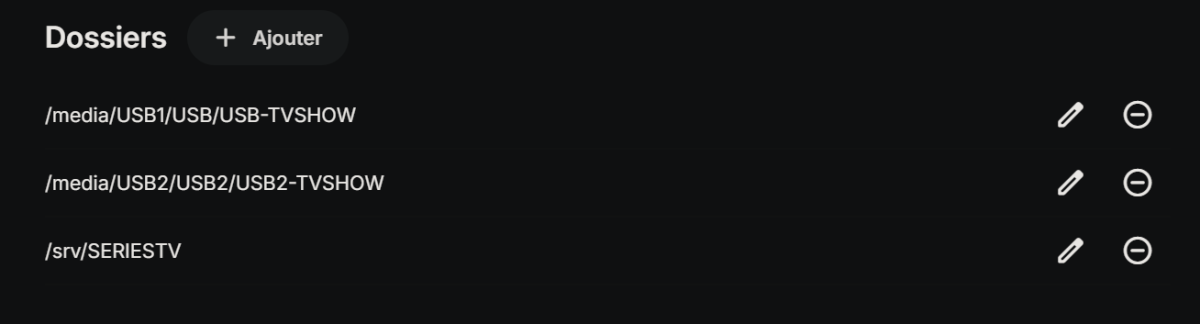
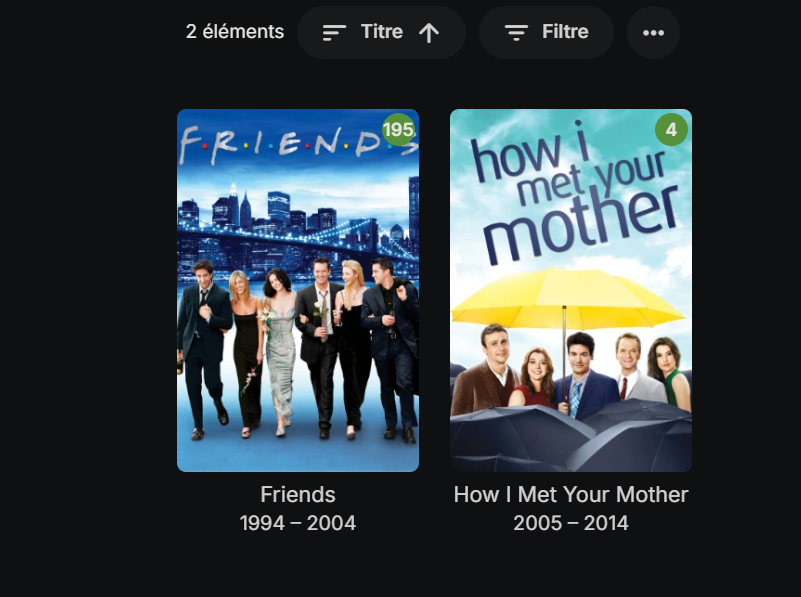
Ok, i find how to resolve this. 1 - I deleted the folder from TV SHOW mediatheque settings "/media/USB1/USB/USB-TVSHOW " 2- I rebooted the emby server 3- I edited the folder settings to add "/media/USB1/USB/USB-TVSHOW" Which makes me have this setting : I forced the mediatheque file update and by magic, it appears now ! I have no idea why it diseapeared from the TV SHOW folder, but this resolved the situation.
 2 points
 -
I’m not sure, I deleted the library and added it again to troubleshoot the other issue and it hasn’t done it since2 points
-
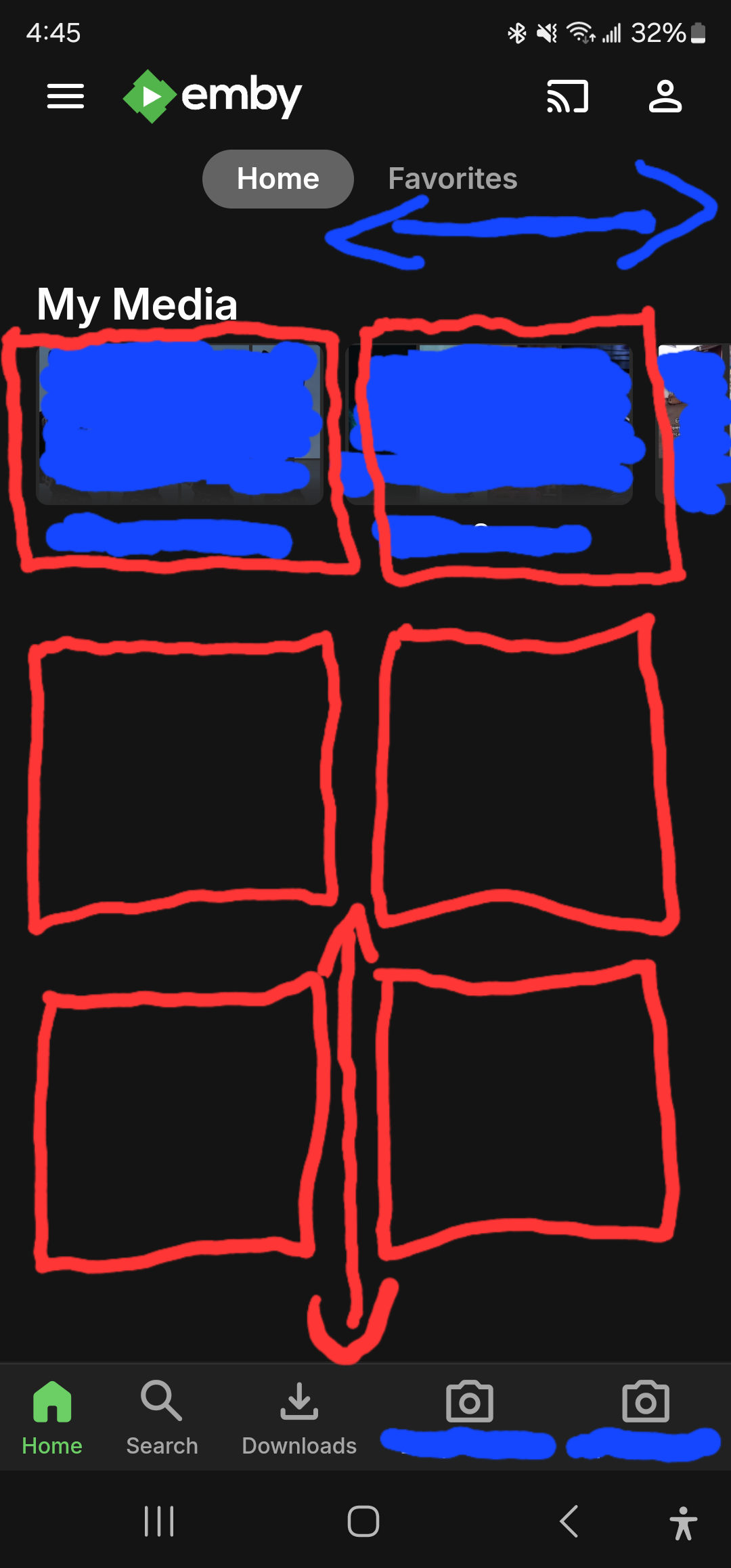
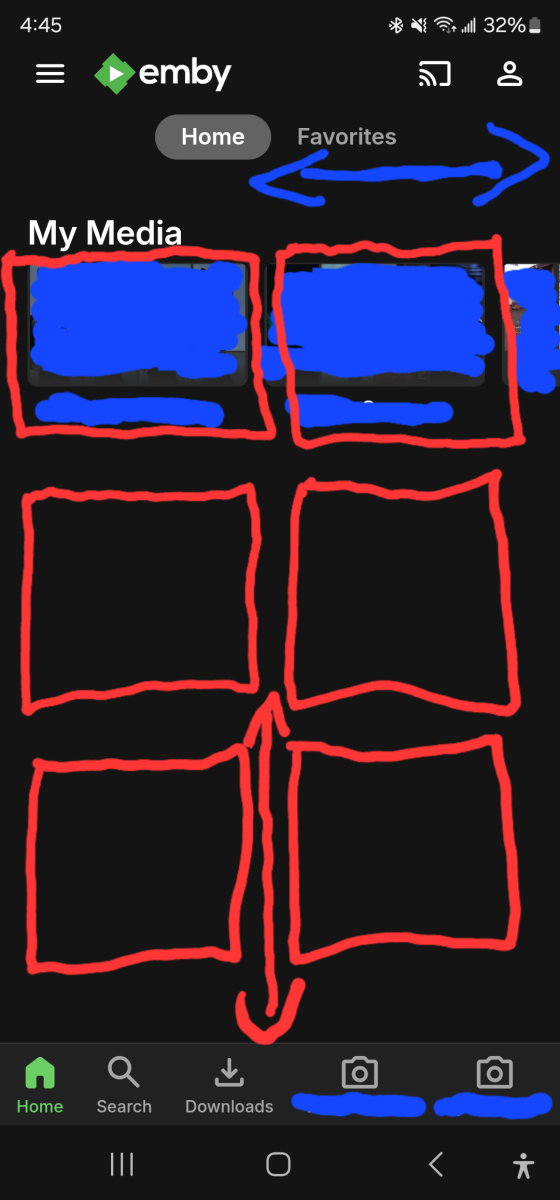
Current Issue: In the current version of the Emby mobile app, media libraries are displayed in a horizontal scroll format. With around 10 media libraries, this requires quite a bit of scrolling to navigate through all of them, which can be cumbersome. Proposed Solution: I propose a redesign of the media library display to a grid tile format. Specifically:Display media libraries in a grid with two tiles wide and three tiles tall.Users with more than six media libraries can scroll vertically to view the additional libraries.
 1 point
 -
Hello again. Had the local internet go down which was annoying, but then I noticed that I could not stream from a few of my devices from my local emby instance due to "not having premiere", which was tenfold more annoying. It is my understanding that there is a period where the license is cached (for at least 3 weeks? Unclear on this part) and devices should not require additional subscriptions or etc. to use Emby from devices so long as it conforms to the device limit. However, certain devices such as my iPad refused to stream from the server despite only losing internet a few hours prior due to no subscription. What I want to understand: - Does emby cache licenses on a per-device basis? Do all of these separate devices need internet beforehand to 'authenticate'? - Why did my device(s) ask me for a subscription when the server clearly had an active key mere hours ago? (less than 3) Possibly indicating the server does not provision premiere from itself to devices. - Why doesn't Emby Server recognize the loss of internet and cache the license on the server proper, removing the need for each device to ask me if I have a subscription or not? I don't have the option of entering a key on the device(s) so I was stuck on some devices unable to use Emby. - How do these "grace periods" work? It should technically only start counting from the time the server detects an extended loss of connection (maybe 30min) no? Need finer understanding. I already skimmed similar threads and understand Emby needs a semi-periodical check to validate the key, which is fine and not the topic of this question - What I want is to have a hassle-free experience in between those checks when someone sticks a shovel into the fiberbox by accident and I have to go over a day without internet. Thats the biggest appeal of this software for me, being able to keep my media local. Not sure if this is the correct location for this post, please move if needed.1 point
-
Another long-time user here requesting this. Seeing the scary red notifications for a week every time someone mistyped their passwords is distracting.1 point
-
Oh yeah, that will work Thank you!1 point
-
OK we'll take a look at this. we have a new Xbox app coming very soon so stay tuned !1 point
-
I'll second this request. I have a very granular library setup, with 60 of them, and the 60 column 1 row TV display is less than satisfactory. When I log in to Emby from my PC I get a splendid 6 column 10 row grid. So the capability is there - it (just??) needs to be ported to the TV screen. Just for info, my setup is Emby server on PC, Emby client on Nvidia Shield TV Pro (but the same problem occurs when Emby client and server are both on an Nvidia Shield TV Pro)1 point
-
That's a good advice. My friend is currently unavailable for longer testing. He had only a few minutes yesterday and said that it's running better now. All I did were these setting: Do you think, that this could be the cause?1 point
-
Thank you for your answer, I understand that Emby streams video to the playback device for hardware decoding, so it does not require a license from Dolby Video for software decoding1 point
-
If you are referring to this... ...then as said I do not know. I mean afaik other apps on her iPad are not affected by this issue and I don't think my sister goes into settings to change things, she is not techy, just a regular user. Regarding the FTVS issue I described above, turns out it was a FireOS issue. For some reason it lost everything (not just Emby but all apps) over night and looked like it was reseted randomly. So, no Emby issue there, remains the iPad though.1 point
-
i'm unable to reproduce on demand and it is rare. never experienced in the web app. ill keep an eye out for it and see if i notice a pattern...probably not enough to go on yet..1 point
-
From a bit of online research across: music documentation websites (e.g Wikipedia, MusicBrainz), media server websites (e.g. Plex, Roon), music streaming websites (e.g. Apple Music, Tidal)... and more... these 6 (+1) Release Type categories tend to be very widely used: Studio Album Live Album Single EP Compilation Soundtrack Other This is also very similar to what has mostly been suggested in this thread and other threads already. Therefore these would be useful fixed Album Release Type values for Emby to incorporate. (Note: whatever categories are potentially chosen, there would always need to be an “Other” category at the end, as a ‘catch-all’ for everything not covered in the main categories.) Anything much greater than the 7 categories mentioned above (irrespective of the actual categories chosen) could potentially be ‘overkill’ for the vast majority. From my perspective (having circa 10k contemporary, non-classical, albums) even a minimal approach of just 4 categories would be extremely useful: Studio Album Live Album Single/EP Other Anything less than these 4 would likely not give enough benefit to myself (and anyone else?) wanting to Group By Release Type. Another very important consideration is being able to import the RELEASETYPE tag from embedded metadata. As mentioned previously by @Vicpa Picard have RELEASETYPE as a standard tag. I expect it could also be added into Mp3tag quite easily? I don’t think I would want to carefully put all the effort into adding Release Type to all my albums just in Emby only, but I would happily do this in Mp3tag and import into Emby (even if still somewhat time consuming). Previously @ginjaninja @Tremas have provided some links to the relevant MusicBrainz Release Group/Type categories. This is also good info. However, even if it is technically possible for Emby to automatically fetch the MusicBrainz two-tier release types (or possibly even allow for custom release types?) this could start to quickly move away from the ‘sweet-spot’ of 4-7 common music Release Type categories, towards ‘overkill’ (for my music library anyway). Emby defined category Release Type values (e.g. Studio Album) could be imported from embedded metadata into the relevant category. Unrecognised and blank Release Types could be imported into the “Other” category. (E.g. my "FM Broadcast" albums would appear under "Other" - but this isn't a common category that everyone would have - and I could easily accept this grouping.) Anyone with all (or most) of their music undefined in “Other” would likely use “Group by None” and may not use/need Release Type grouping? Anyone using “Group by Release Type” with too much blank/unrecognised music in “Other” would quickly organise it! I think Group by Release Type would be a great addition for many, once they find out about it. As Luke has asked the question, anyone else who is (still) interested should also comment with their answer... Let's do it!1 point
-
Windows 10 is not EOL until 14th October 2025, so you have a year still. Windows 11 can be installed on non-compliant hardware, although I believe only a fresh install will work. I have done it already on a few laptops I have. See this link.1 point
-
Yes, currently for server transcoding ffmpeg needs to be started with certain parameters and you'd need to stop and restart in order to make a change. With TVnext, there's more control, since the stream goes through the server which parses the codec data and ffmpeg is used only in a packet-by-packet manner, so it would be possible to stop and reconfigure when there's a change. But the problem is still at the client side. While the RFC doesn't restrict it, the Apple authoring spec demands HLS video to be non-interlaced, and this had led to the situation that not all HLS client support interlaced video (even when they support it in other cases - eg. TVs). The server applies deinterlacing with "send_frame" output (when it applies deinterlacing for transcoding). This makes it resilient to mixed streams, because full frames can't be deinterlaced and when interlaced frames ("fields") appear, they are deinterlaced as frames, which means: the frame rate never changes. And that's the really important part, because a player internally can easily handle framerate changes as a result to its internal processing, but streaming video content with framerate changes will get many players in trouble. (not those like mpv of course, but many others).1 point
-
Keep in mind if this is a live stream, Emby server can only go by what it has received before writing/sending/transcoding the stream. I'd think it only right to have the metadata based on what it encounters during the very first part of the transport stream. IMHO, any de-interlacing should be left to the client to handle if direct streaming. Most TVs purchased in the last 10 to 15 years will handle deinterlacing and scaling on the fly as needed. Same with most dedicated streaming boxes. If a client can't handle the stream or needs transcoding that's where I think the bigger issue is. My bad mentioning PID. I looked at '''mfxVideoParam.mfx.frameInfo.PicStruct = MFX_PICSTRUCT_FIELD_TFF (or BFF)" and read PID not PIC As mentioned above, I think the only logical thing to do is mark it based on what's encountered at the start of the stream. Technically, I guess we could update the metadata at completion to add a comment "Mixed Interlaced and Progressive frames" or similar. Other than having a human readable comment, it does nothing. I agree the player should be responsible for deinterlacing if they are able to direct stream. The client deinterlacing IMHO, shouldn't be based on some upfront or global header, but instead be done dynamically based on the frame it's processing. What I find more important is when transcoding is needed by the server and deinterlacing is needed. If deinterlacing doesn't use a motion-adaptive/compensated method, you can lose temporal resolution, have less fluid motion, get flickering or combing artifacts, etc that make watching something like sports difficult. It's a difficult situation to handle on the backend.1 point
-
Right, I should have mentioned I only updated to the latest stable release. Hopefully it really does work in the newer version though, I look forward to testing it myself.1 point
-
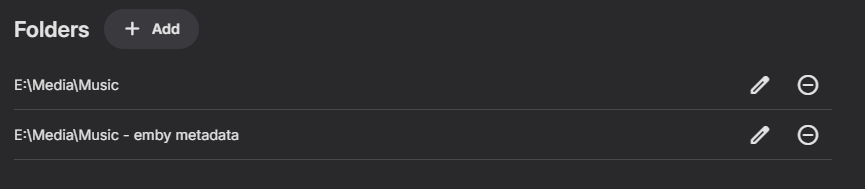
With a quick test I can say it works in 4.9.0.30 but not 4.8.10.0. Tested with music in both folders but the artist/group only existed in one folder for the test. User A saw all and User B did not see the test artist/group/album that was in the library they were restricted from.
 1 point
 -
Hi Luke, sorry I am not able to access that TV at the moment. I can try to update it the next time I'm there. If anybody else has a Samsung tv accessing emby over http it would be great to hear from you.1 point
-
No need. Problem solved. It was a different cause, because all of my movies and tv shows are labeled properly. I just needed to subtract folders and then add them back in each library. Scan now works and everything is restored. I have had to recreate some collections, but beyond that it appears everything is back to normal. Perhaps a Mod would want to move this thread only to provide a solution to a problem.1 point
-
Hi, please email billingsupport@emby.media Thanks.1 point
-
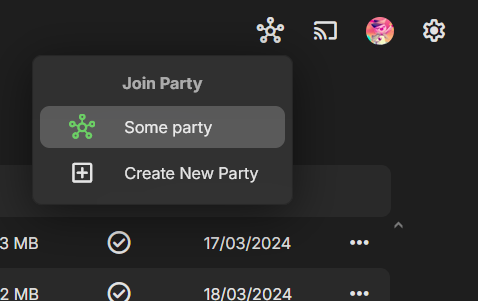
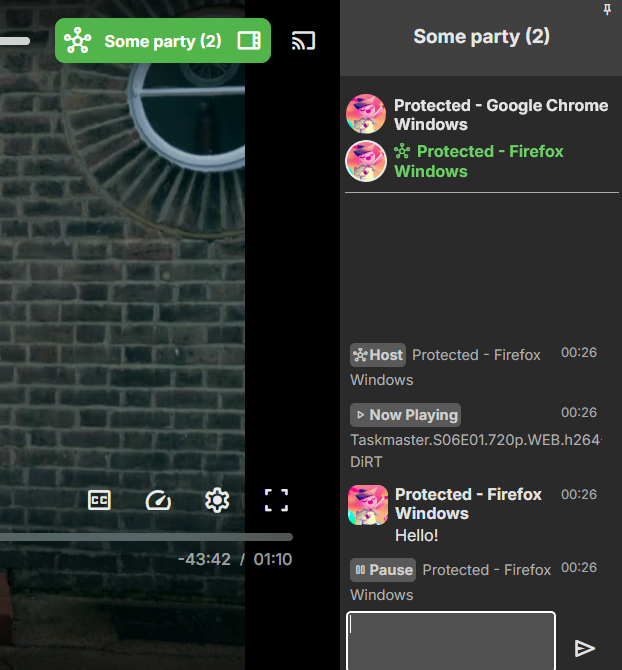
And in response to Drago's earlier question, I used a "room list" UI rather than an invite-based UI. Here are screenshots (spoilers, I guess):
 1 point
 -
After some extensive research it appears a few things are happening here. 1. Intel changed their repositories for Ubuntu GPUs somewhat recently and my list had not been updated. This results in a GPG error for no public key available when trying to run apt update for the Intel GPU repository. This was blocking a LOT of opencl and other related dependencies from updating for some time it seems. This falls on me I suppose for being too reliant on the GUI updater as it does not report these types of issues. 2. As we've already discussed kernel 6.8 broke a growing list of features related to Intel openCL. It appears jumping ahead prematurely to kernel 6.9 allegedly fixes this (this kernel is released on the non LTS variant of Ubuntu already, and is rumored to be released officially for 24.04 LTS later this year). The other choice is to roll back to 6.7. I have not updated to 24.04 yet, but I will try to do both that and forcing in the early update of the 6.9 kernel and report back. As far as the repositories go, the fix is to get into your repository list, delete the entry(or 2 entries for some) for intel-gpu. cd /etc/apt/sources.list.d ls -l *List current repositories in folder sudo rm *Your intel-gpu list name After this follow the instructions here to add the new key and repository back in https://dgpu-docs.intel.com/driver/client/overview.html That includes a few different versions of Ubuntu so follow the appropriate one. After doing this I had 48+ upgrades waiting when running apt upgrade After installing these, transcoding non HDR streams is back to working, however tonemapping still fails with the same OpenCL error and reverts to software transcoding. This is without the NEOReadDebug and OverrideGpuAddress variables in place. I'm currently updating my Veeam server infrastructure to a new version and I don't want to try to make a major jump such as upgrading to 24.04 and kernel 6.9 without having my backups to revert back to. As previously stated I will try these upgrades a bit later and report back.1 point
-
A plugin can't change the layout of Emby apps, so no, it could not add a second title underneath the first. What it could potentially do though is rename media using original title, although I wouldn't necessarily suggest that.1 point
-
two things one - extracting all the SRTs that I previously spent ages embedding is a large task when you have a large library, not one that I wish to do two - you actually do need to remove the subs from the MKV unless you want to manually select the correct sub every time. the embedded sub is what gets selected by default even when an external SRT is there. so if you just select an episode and click "play", like anyone would normally do, and the show contains embedded forced subtitles then 100% that is what gets used, and so you get transcoding, and if it's a 4k HDR media then playback falls to pieces because my system cannot transcode 4k effectively. I have seen many posts that "it doesn't matter as it will select the external sub by default anyway" but this is not my experience, 100% every time if there are both embedded and external subs, the embedded subs are top of the list and selected by default. so the only way I can get smooth direct playback including subtitles every time without having to remember to click across and change the selected sub, is to remove the embedded subs from the media entirely so that only the external sub remains. using "extract subs on the fly", which is also supposed to solve this, means the subs appear 5 seconds ahead of the video, so this is useless as well so the large and apparently necessary task of extracting the subs from every single media file I have, becomes significantly larger thanks to also having to remux the media files with the subs removed, and if I actually do this to my entire library this will also cause my backups to grow enormously as all my media files will change and be re-backed up. in fact it probably means I will have to delete all my original backups as I won't be able to hold two unique backups of my entire library on my available storage. okay it's not the end of the world but you can probably understand why I'm keen for the plain text subs I have to just play without transcoding, right? especially when I'm repeatedly told there are several different ways around this and none of them actually work!1 point
-
Can you attach an emby server log? Now that you have the drives mounted we can go back to earlier posts in this thread. You need to make sure the emby runtime user has access to the path. Meaning able to access each directory along the path to the final destination. Not necessarily w(rite) access, r(ead) is enough, but with directories x(ecute) is also needed to access/enter. Run: namei -lv "/media/driveC/Movies - Live Action" You can trim the list from the command above if it's too long. A sample should be enough. Do the same for the other drives and directories you want Emby to use. The chown and chmod commands you've been running only affect the file or directory given in the path. They're not global or recursive unless you specify that option. This is the part where people go crazy and recursively give all privs or sweep ownership for more than they should. My recommendation: - Pick the directories or base path you want Emby to not only access but also be able to modify. - Change permissions for the directories leading up the base directory. - Change ownership recursively starting from the base directory. Example, for "/media/driveC/Movies - Live Action" - chmod o+rx /media /media/driveC - chown -R emby:admins "/media/driveC/Movies - Live Action" Again, start with a less important drive or media collection and scan the library after you make the changes.1 point
-
Updating this thread with recent findings. My ISP (local company who offers 1G fiber) just upgraded my neighborhood to (up to) 10G fiber. So I signed up immediately. Installed the new ONT and reset all network devices. Did some tests and found I could download (ie. click the download link under movie options) at a very fast rate. With 1G, my DL rate was capped at ~10MB/s. I achieve this loopback by tricking my network with a VPN and then connecting to my remote emby server address. Anyway, now I can hit 200+MB/s on downloads. My remote users finally seem to be good, at least so far. I haven't checked with everyone in my family yet but the few I have, are streaming 4k movies without dreaded buffering. So, it appears that I was being throttled. Badly. I would do speed tests from my network PC, NAS and router and they'd all check out just fine. Nothing showed any hint of being throttled except emby. I even use a high remote port number... Now, at my business, if I try to DL a file, I am able to instantly hit 60-70MB/s and then in seconds, I'm down to 1500kBps (1.5MB/s) which seems to be Communist-Cast's throttling speed. No way around it as I already put their crap into bridged mode with my own router doing the duties. So it's as if this was happening around my home/server network as well but I have no way to know for certain. But if it returns and the server has issues with remote playback, I'll raise hell with my ISP who claims they NEVER throttle being a local and iber optic network provider. Thanks everyone.1 point
-
@burrsg101I've been investigating this a bit, hard since i know little about Ubuntu, i found this: https://github.com/intel/compute-runtime/releases/tag/24.17.29377.6 This should fix the problem according to some. Please remember though, i know little of Ubuntu so.. Use at your own risk and all that!1 point
-
But then what will I use for favorites? The 'favorites' system however is almost identical to what I need. If I could have two of those lists and rename one of them, then I'd be happy.1 point
-
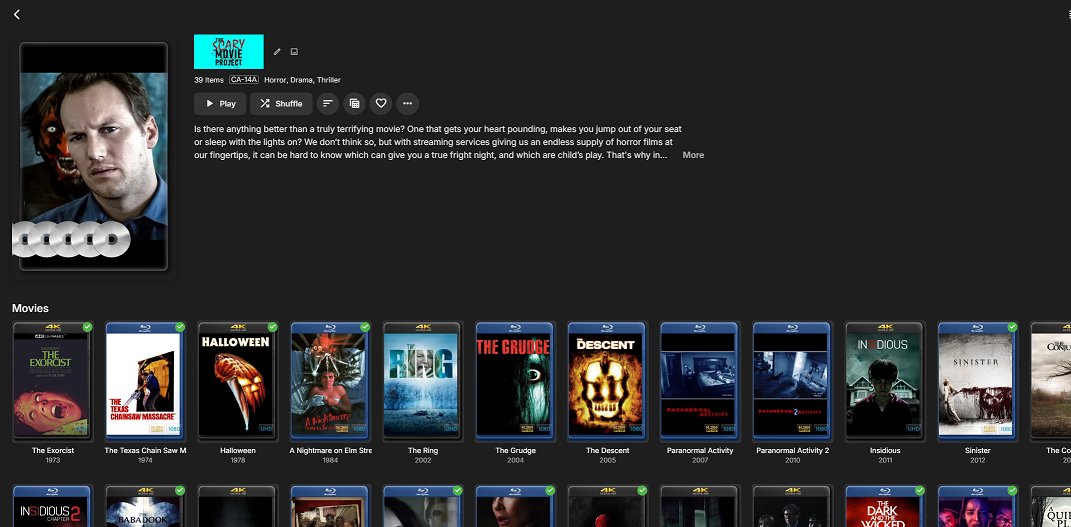
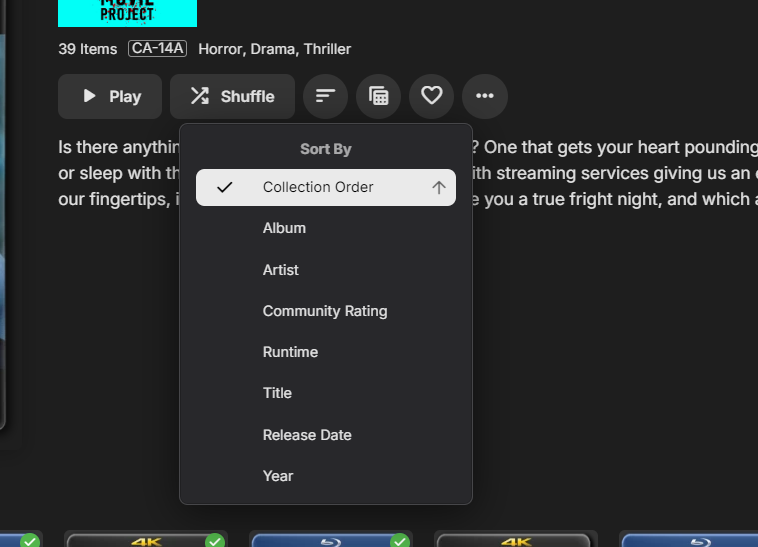
So I had created a new thread, but was pointed to this one as it's pretty much the same issue. Original Post: So, I've been going through the forum and there have been a lot of similar requests but I was hoping to just revisit this as I feel that this still isn't addressed. I know some people want to have a collection which has the best (10, 100 or 500) movies in whatever order so that way they can visually look at their list and see what is the #1 rated movie by whatever list. This was never really an issue with me until I wanted to have a collection of the Top 50 Scariest Movies of all time (as study conducted by an initiative called "The Scare Project" ) I've added all the films that I currently have in my Library to my collection and have zero way to Order, rank or view in the specific order that I would love for these to be displayed. Currently, I would like to see the movies in order by how they would appear in the list (which means Sinister would be #1). I'm aware that we have the collection sort order (Collection order referring to the Collection Metadata > Display Order) and then the other parameters that we can sort on. I thought of using Community Rating, but it has data validation that only allows values <= 10 so a top 50 ++ list isn't any good. Could we add another key in the meta data for Top N List or allow users to create their own metadata (maybe limit it to 1 or 2) per media type that they can add to a sort and/or filter list?
 1 point
 -
HI, yes we need to add multi-select support to this screen. Thanks for reporting.1 point
-
Hi, the activity does eventually get sent to your Emby Server so that the state is reflected just as if you had played it while connected online. It just takes time because it happens during the next background sync.1 point
-
Yup, I also upgraded last week with no issues. Thanks again to the pioneers who took the plunge1 point
-
Won't know for sure for a while, it only happens once every few weeks but it's something that has been happening periodically for several months, if not since the very start of Roku devices accessing my server I just haven't reported the issue until now.1 point
-
I don't really have an issue on my end, it seems to function very similarly to the Fire TV app. The only difference is that even though I unlocked the Fire TV app, the other app doesn't recognize the unlock or allow me to unlock it - it only gives the option subscribe to premier. I went ahead and did that anyway - but I'm not sure if that's a bug or not. Otherwise I'm good on my end.1 point
-
Deletions should be through the Emby App context menu. I am looking into another user's report of deleting seasons and shows not working giving the error you describe. I am thinking it is to do with smb paths which you are also using. I suggest we concentrate on this first and also perhaps move away from smb paths The other forum thread and my advice to the user for specific tests is here1 point
-
Force the wired Apple TV to transcode to the same as it would do via mobile 4/5G - say at 4Mbit/sec. If you then get a smooth playback experience - ramp it up until it starts to stutter. I suspect it's bandwidth related and possibly Cloudflare limiting/throttling your throughput. You don't get the throttling with 4/5G because you never get to the higher bandwidth when Cloudflare activate it.1 point
-
Most of the android players ive used allow some gesture control. slide horizontal for seek, slide vertical on left side for volume and right side for brightness. it would be a good QOL feature on the app. I ve tried external player that can do this, but then the external subtitles are not working for me..1 point
-
Since you said i was still on an older version of Emby i updated it to 4.8.10 and it runs smoothly now! Was able to play 2 full minutes without stutter, since i hadn't gotten that far before i stopped but here are the logs in case you still see something wrong. Wouldn't want to start watching a movie in a bit and then realize it stuttered again and have to make another post. So if you could check and let me know it all looks good i would really appreciate it! ffmpeg-remux-f68351ff-c7b9-4f98-b96e-112d667d2479_1.txt embyserver.txt hardware_detection-63865032430.txt1 point
-
These gestures were actually already implemented in older versions of the app, and were removed due to reports of accidental presses and the above as per @darkassassin07 Agreed, they should always be optional if ever. Always a mixed bag of experience with these things.1 point
-
I have my server running through a VPN and can remotely access it. I think you will need a service that will support port forwarding. I use AirVPN but I'm sure there are others. I have the wireguard VPN connection set up on an opnsense router.1 point
-
HI, it means the new app has more of its resources embedded rather than pulling them from our servers.1 point
-
We have a new windows app coming soon that will handle this better, so stay tuned.1 point
-
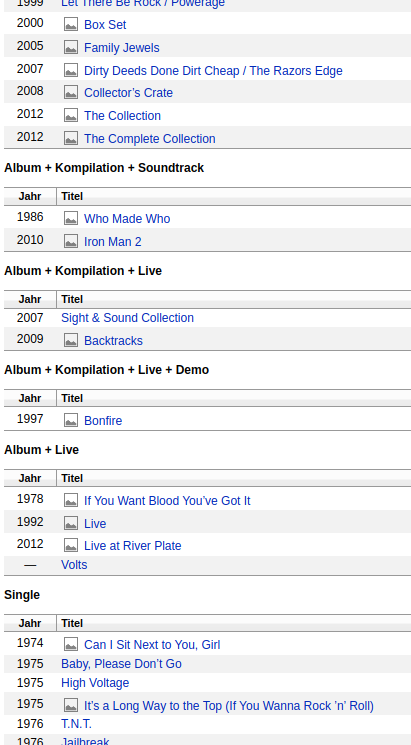
Hey there ebr! Thanks for chiming in. How could I achieve this with tags? Yeah, that's what I'm talking about. To automatically have all media items sorted into their respective group on the artist screen (Album, Single, Live, Compilation, etc.) As an example:
 1 point
 -
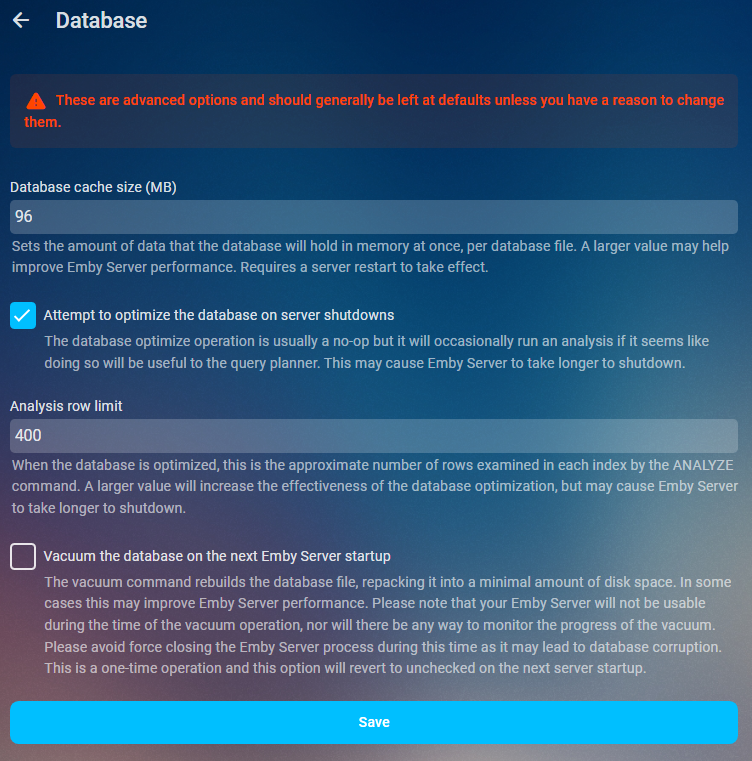
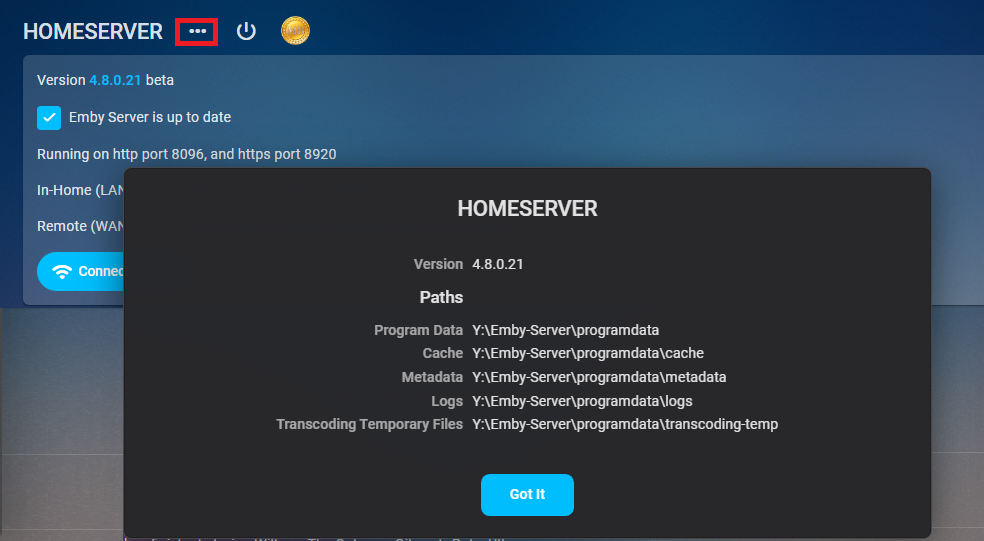
As of 4.9 multiple db connections were added so increasing this value to much could have negative effects on Ram usage. As it could be 5x your value or in some cases from a beta standpoint 20x your value. Will try to update when more info is available. Performace tweaks Database cache size Sets the amount of data that the database will hold in memory at once, per database file. A larger value may help improve Emby Server performance. Requires a server restart to take effect. If you have the available RAM you should set the database cache size to 1.5 to 2 times your library.db size. Navigate to your platform Emby programdata folder and look in the data folder to see its size. You can find your server info on the dashboard three dot menu. App Settings- Database
 1 point
 -
@TaugenX if you have any time available tonight (7pm my time) after 8:30pm EST or want to work on this tomorrow (Thanksgiving) I can do a remote support session and help you get this fixed up in just a couple of minutes. If you want to do this download and install TeamViewer. Send me via PM (hover over my avatar for messaging) the ID and one-time use password you get on TeamViewer launch. Keep TeamViewer running or a new password will be created. Carlo1 point
-
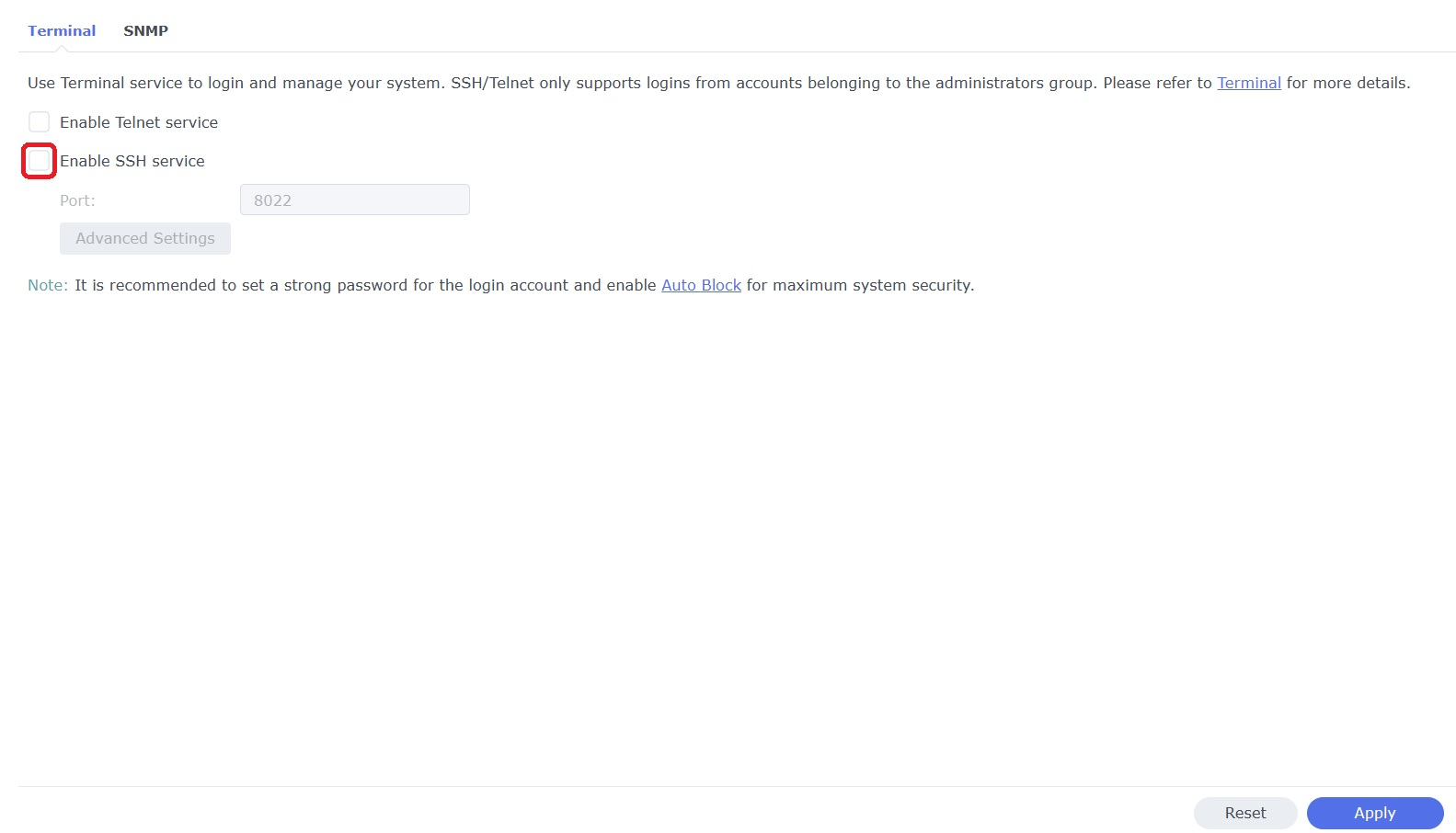
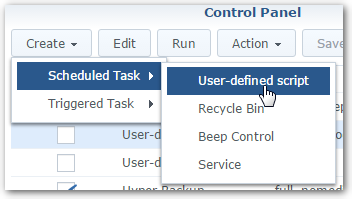
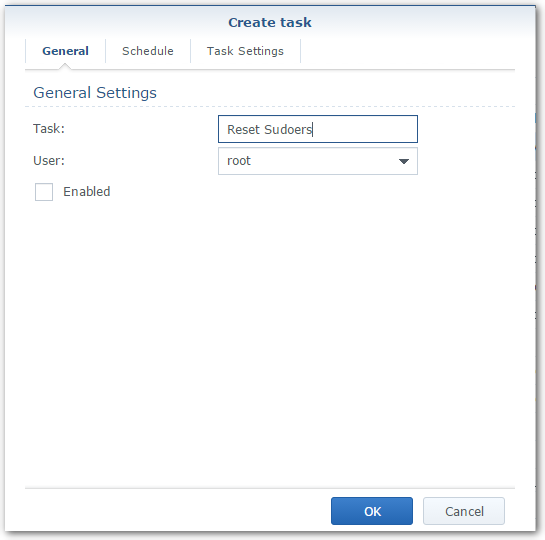
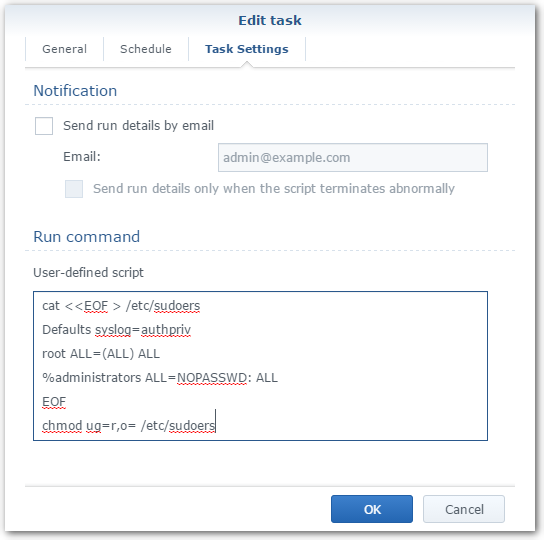
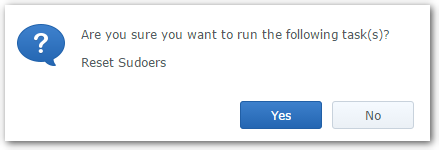
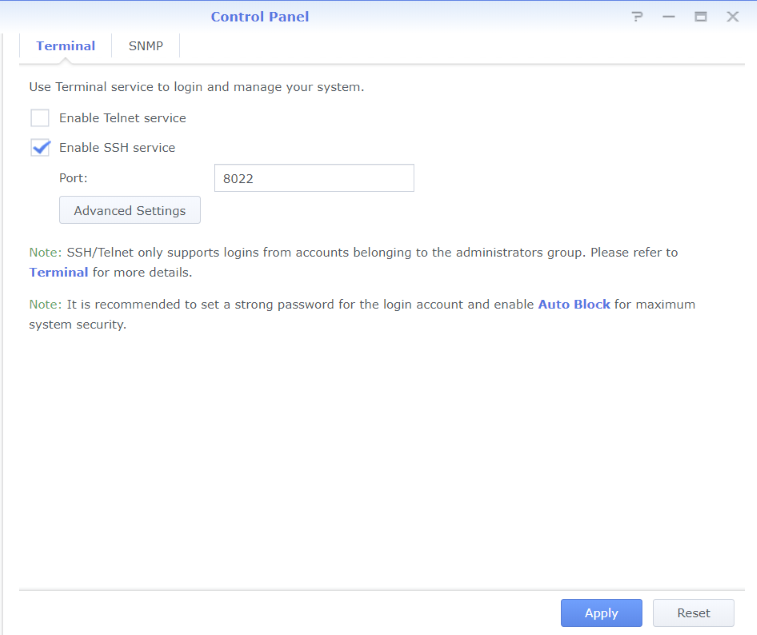
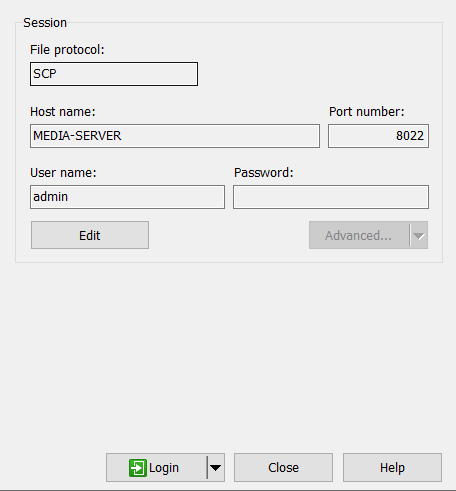
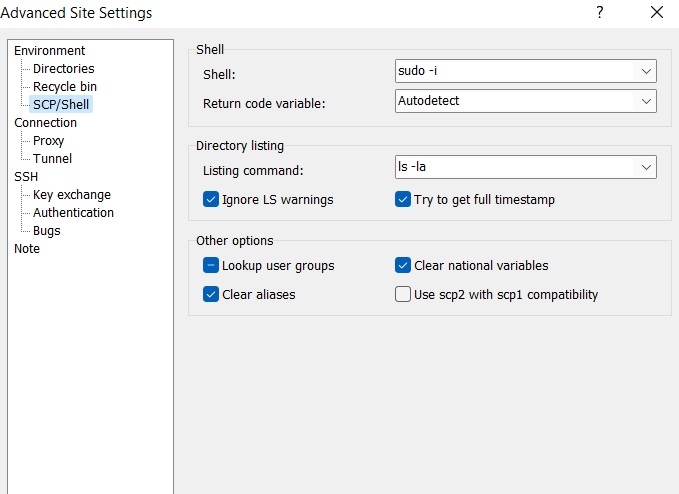
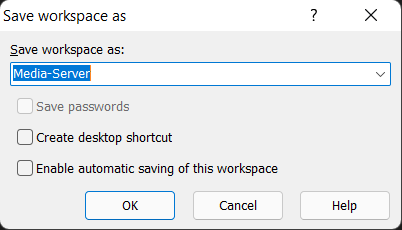
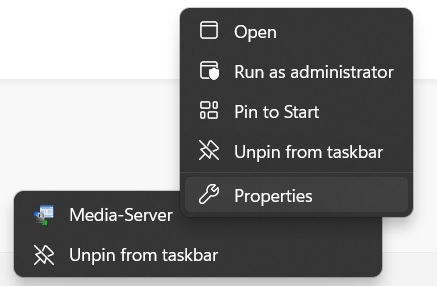
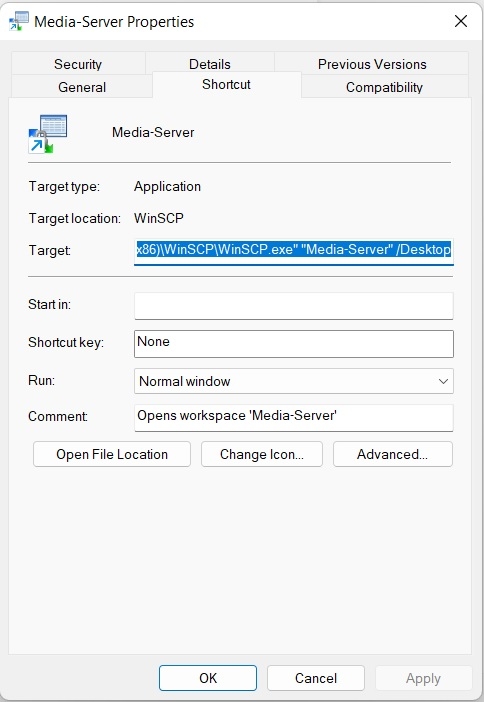
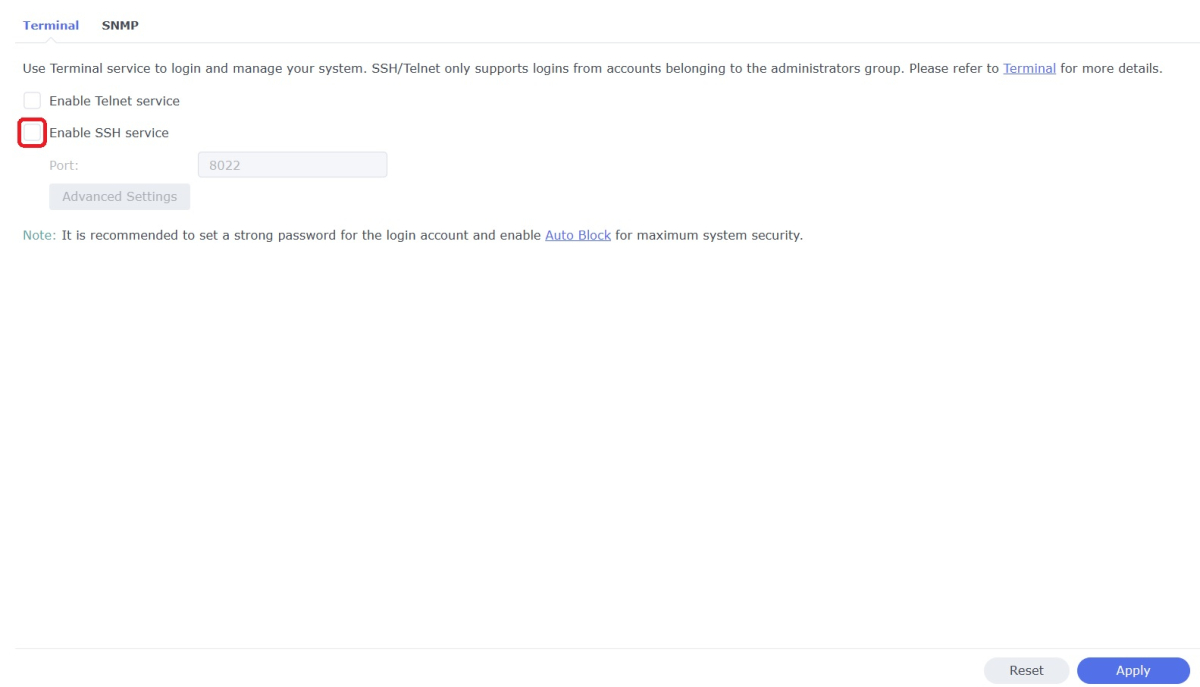
WinSCP is a popular SFTP client and FTP client for Microsoft Windows which can be used as a GUI alternative to Putty or Terminal. The procedures below will allow you to perform tasks as Superuser just like you can with Putty or Terminal. Superuser privileges may be needed for the following: full read/write/ execute privileges creating or installing files or software modifying files and settings deleting users and data If you do not need superuser access with WinSCP and just want to access your NAS using Admin then skip the steps (2, 3, and 6) in blue. 1. Enable SSH on Synology NAS Open DSM Control Panel Click Terminal & SNMP Click Terminal tab Check "Enable SSH service" Click "Apply" 2. Create script to modify sudoers config file on Synology NAS This script modifies the sudoers file which is needed to prevent DSM from prompting administrators only for the Admin password again when switching to superuser during the login process as WinSCP can't handle this prompt. This script is saved to rerun again later because DSM updates tend to overwrite any changes to the sudoers file. Open DSM Control Panel Click Task Scheduler Create a Scheduled Task - User-defined script Click General Tab Set task name "Reset Sudoers" Set user as "root" Uncheck "Enabled" box Click Task Setting tab Copy/paste the following into the Run command box cat <<EOF > /etc/sudoers Defaults syslog=authpriv root ALL=(ALL) ALL %administrators ALL=NOPASSWD: ALL EOF chmod ug=r,o= /etc/sudoers Click OK 3. Run the "Reset Sudoers" script on Synology NAS This step will need to be rerun whenever a DSM update puts your sudoers file back to default Highlight the new script you just created Click Run Click Yes 4. Install WinSCP Download and install WinSCP on Windows machine https://winscp.net/eng/download.php Allow WinSCP to start when done 5. Configure WinSCP to auto logon Create a new session/site: Change Login window using the following File protocol: SCP Host name: enter the NAS host name or IP address Port number: enter the port number you used from step 3 Enter User name: "admin" and password 6. Add switching to super user Click the Advanced... button In the the Advanced Site Settings window do the following: Select SCP/Shell under Environment Shell box: "sudo -i" Click OK to return to the Login window Click Save Click "Login" 7. Create a saved workspace for WinSCP (this step is optional) This will create a Windows shortcut to start WinSCP and automatically login to your session without any prompts Log into your new session you created in Step 5 Click Sessions Click Save Workspace... type a name for your new workspace Click OK 8. Create a shortcut for WinSCP on taskbar (this step is optional) While WinSCP is running Right Click the icon on the taskbar and choose "Pin to taskbar" Right Click on the WinSCP icon on the taskbar again Now Right Click on the WinSCP workspace you used in Step 7 and choose properties Your shortcut should look something like the one below with the exception of the workspace you used above Example Windows shortcut used on target line above "C:\Program Files (x86)\WinSCP\WinSCP.exe" "Media-Server" /Desktop Click OK Click WinSCP icon on taskbar start WinSCP and be logged into your NAS as Superuser without any prompts 9. Disable SSH in DSM (this step is optional) After you're all done using WinSCP it may be a good idea to close this port for security reasons. Additionally, you can also disable your Admin account now if you enabled it to do this. When you need to use WinSCP again just reenable SSH and you're ready. Open DSM Control Panel Click Terminal & SNMP Click Terminal tab Uncheck "Enable SSH service" Click "Apply"
 1 point
 -
It kinda bothered me that the Linux version wouldn't update itself, so I made a script that will check the latest version and installed version of the Emby server, and update it if it's new. It handles the internet going down and such so it doesn't hang. Run it on your own periodically, or set it to run in cron (pipe output to null, though!). Now, my server checks for updates every day at 5:30 am, and installs it if one is available. Run at your own risk. My system is running Ubuntu Server 18.04.1 LTS. Lots of comments are in the script, so edit away as needed. #!/bin/bash # THIS SCRIPT UPDATES EMBY TO THE LATEST STABLE VERSION # IF AN UPDATE IS AVAILABLE. # # Script must be run as root or with root priveleges # (like using sudo) # # !!! USE AT YOUR OWN RISK !!! # # Written by Adam Harbach on Feb 18, 2019 on # a system running Ubuntu Server 18.04.1 LTS on # an x64 system. Modify as necssary. Some edits may be required. # # ==================================================================== # EDIT ME IF NEEDED! # -------------------------------------------------------------------- # Set the fileame from GitHub that matches the one you use # for your system architecture. Replace the version number with VVVV # (four of the letter "V" in UPPERCASE!). # The script will replace VVVV with the current version number. latest_download_filename=emby-server-deb_VVVV_amd64.deb # Set the url of your server. This script is designed to work on # the same machine as the server software, and is not configured # for updating a remote machine, but, if your server is listening # on a port other than the default 8096, you'll need to change it # here. DO NOT ADD A TRAILING SLASH! Stop after the port number. # # Most users won't need to change this. server_url=http://localhost:8096 # END EDITS (Unless the main script quits working...) # ==================================================================== # # Get latest stable version number. # Visit the symlink of the latest version, discard the HTML output, # and print the redirected URL, which will contain the version number, # feed it into AWK, which will strip off all of the URL except # the version number (version is last item after all forward # slashes "/" ). # Give a timeout period (in seconds) in case the internet is down, # the script won't hang (-m option) latest_version=$(curl -Ls -m 30 -o /dev/null -w %{url_effective} \ https://github.com/MediaBrowser/Emby.Releases/releases/latest); # make sure the connection was successful if [ $? -ne 0 ]; then echo "Error checking for latest version. Script exiting." exit 20 fi; # Success, continue filtering data from that variable. latest_version=$(echo "$latest_version" | awk -F "/" '{print $NF}' ) # Set download filename. # Replace the placeholder in the template with the actual current version number. latest_download_filename=$(echo $latest_download_filename | sed 's/VVVV/'$latest_version'/') # Set url of latest version latest_download_url=https://github.com/MediaBrowser/Emby.Releases/releases/download/$(echo $latest_version)/$(echo $latest_download_filename) # Set file download path. This is where the new package will go # and where your package installer (dpkg for debian based linux) # will be set to find the file. latest_download_path=/tmp/$(echo $latest_download_filename) # Get the currently installed version number. # Load the dashboard, and pull the version number from the <head> # element. give timeout to curl agian in case emby doesn't respond. installed_version=$(curl -s -m 10 $(echo $server_url)/web/index.html) # make sure the connection was successful if [ $? -ne 0 ]; then echo "Error checking the currently installed version. Is Emby running?" echo "Script exiting." exit 22 fi # Success, continue getting the version number installed_version=$(echo "$installed_version" \ | sed -n '/data-appversion=\"/p' \ | awk -F "data-appversion=\"" '{print $2}' \ | sed 's/\".*//') # see if the latest version is installed (do the versions match?) if [ $installed_version == $latest_version ] ; then echo "Emby is up to date." echo "Installed: $latest_version" echo echo "Exiting." else echo "Emby update available." echo "Installed: $installed_version" echo "Latesst: $latest_version" echo echo "Attempting to download update." # download with a 5 minute timeout period curl -Ls -o $latest_download_path -m 300 $latest_download_url # see if download was successful if [ $? -ne 0 ]; then #failed echo echo "Download failed, cleaning up parital download and exiting." rm $latest_download_path exit 30 fi # success, install echo echo "Download success. Installing." dpkg -i $latest_download_path # was install successful? if [ $? -eq 0 ]; then # fail. clean up download rm $latest_download_path # notify echo echo echo "Emby failed to install." # exit with error exit 51 fi # success, remove the installer rm $latest_download_path echo echo echo "Emby updated to version $latest_version." fi exit 01 point