
Leaderboard




Popular Content
Showing content with the highest reputation on 10/20/24 in Posts
-
I install a version of android on firetv resolved the problem. Thanks!3 points
-
Yep, if I uninstall the original apk from the play store and I install the new from armv7 it works. Thanks. I will uninstall and wait for the new one Update : I removed those download from your link, uninstall those from the play store. Install it again and it works too.2 points
-
Everything is up and running very well. I deleted the old database and set up a new one.2 points
-
The RatingPosterDB plugin is now officially in the Emby plugins catalog2 points
-
The Emby team is looking at this and trying to do what it can to handle this better for you. With that said: Keep in mind your "Smart TV" isn't really that smart. It just has built in apps to let you connect to external services. These services build multiple streams with different resolutions and bitrates as well as subtitles so that they can pick a stream fitting the device and bandwidth available on the client at the time of playback. All of these streams are created in a format made for streaming. What this does is allow the "Smart TV" to be rather stupid and not have the functionality to handle or adapt to anything other than what these services would typically use. On the flip side, you're running a personal media server that has media and sources of streams on it that were never design for streaming. Emby server does a great job of transcoding completed media (ie disk based) when needed that is playable on a vast number of devices available in the marketplace. Many of these devices handle a wide number of different formats and combination of media packages and codecs including those not designed for strictly streaming. Now enter streams being created in real time from a tune or being fetched in real time from a 3rd party source. These streams lack the metadata available on disk-based formats requiring a client that is built with logic and functionality to play them. This puts you in a situation where you have a powerful media server and lots of media and sources not designed for streaming. You have a client lacking functionality to handle one type of stream you want to use but handles other formats you already have. That creates a predicament for those in this situation. You either need to choose: Play only formats from your media server that the client can handle. Switch the client device used for Interface and stream playback to something with much greater functionality and logic that handles these types of streams as well as nearly anything else you can serve it. The cost of these devices, start at $30 US dollars for much greater functionality! Try and find another vendor solution that satisfies all the requirements you have for your personal media and sources of content that work with your client of choice. Wait for a vendor solution to bridge this situation so you can continue to use the "dumb" client you already have. Solution 1 isn't an option you likely choose to consider. Solution 3 doesn't currently exist. Solution 4 is currently in progress but may never be perfect as there is only so much that can be done when the playback device is lacking on so much functionality. Solution 2 is actually the only option viable if you need a solution usable right now. This comes down to a matter of need vs want. A matter of how much time you have to invest and tinker to try and a solution to satisfy your wants. At the end of the day, factoring in your time and $, you'll find that option 2 really is your best option at present and for future media you might at.2 points
-
5 Minutes was probably chosen as a good all-around value as it helps stop generation for things like trailers. I'd also suspect the usefulness of previews becomes less and less the shorter the duration of the video is. As a work-around, you could script this to happen out-side of Emby Server easily for any folder containing a video file with a bif file present. @LukeCould we make this a configurable option per library with the option of only generating the index on the main video as well as for any video file?2 points
-
I found the root case and it's not Emby related. I've had another service that added the files so it all makes sense now. My bad...2 points
-
Be able to create playlist based on a certain criteria, like genre and or year, in order to create a dynamic playlist that it refreshes automatically when new content is added. This way you can for example, create a tv comedy playlist from the 90's, or a new sci-fi Movies playlist. Some other criteria for rules could be the rating, watched/unwantched, score, tags, language, audio codec, etc The possibilities could be endless1 point
-
Hi, I would like to have an option to choose H265 instead of H264 in the Transcode option. It will be smaller for all bad bandwidth (2~5Mbit ADSL), but will have a great quality. Mobile phone can benefit of it greatly too with the 4G and the limitation of download.1 point
-
Gotify Notifications Plugin Gotify notifications for your Emby server. Current version: 2.0.0.0 Last updated: 2024-02-02 Certified working on Emby Server 4.8.1.0 ## Links Plugin: Download Source: View ## Fresh Installation For Emby Server 4.8.0.0 and above: Download the latest v2 of the DLL file on the release page of this repo Put it in the "plugins" folder of your Emby Server and restart Emby Server The plugin should now show up in your Emby Server management page under Advanced > Plugins Configure the plugin by heading to the new Notification section under User settings Click the "+ Add Notification" button and choose "Gotify" The rest is self-explanatory For Emby Server versions older than 4.8.0.0: Download the v1.0.0.0 of the DLL file on the release page of this repo Put it in the "plugins" folder of your Emby Server and restart Emby Server The plugin should now show up in your Emby Server management page under Advanced > Plugins Select the plugin and it will take you to its configuration page ## Upgrading If you are upgrading Emby Server to 4.8+ from 4.7 or below, after the upgrade: Head to the plugin section in your Emby Server management page Uninstall your current Gotify plugin by right-clicking it and choosing "Uninstall" Stop your Emby Server Go to your Emby server plugin folder and double-check "MediaBrowser.Plugins.GotifyNotifications.dll" is not present, if yes, delete it Inside the plugin folder, go to its "configurations" sub-folder and delete "MediaBrowser.Plugins.GotifyNotifications.xml" Follow instructions under "Fresh Installation" above for Emby Server 4.8.0.0 and above ## Future Updates I'm going to be honest here: I have no idea how to code in C# specifically. So this plugin totally relies on the development of the Pushover plugin (see credits below). In the event of an Emby Server update breaking the plugin, I will do my best to try and fix it and will release an update on the Github repo. ## Credits This is a shameful slight mod of the Pushover plugin for Emby Server written by LukePulverenti [Luke] so all thanks to him and the Emby Server team. I take no credits for this. And of course big thanks to Gotify as well.1 point
-
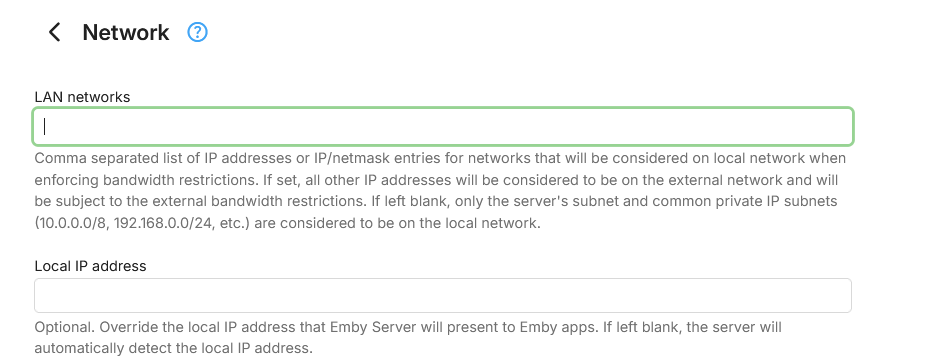
Have you configured anything here: If not, try and configure this to so Emby Server will bind to those interfaces.
 1 point
 -
HI, we are looking into this. Thanks for reporting.1 point
-
One example is it would make something like the process of renaming a video file or upgrading to a newer quality version more difficult because you'd lose watch data.1 point
-
I was asking about Emby for Android TV and the Emby for Android app (universal version). I agree the TV version is much better, but I’ve seen in a lot of posts that whenever users face issues, they're recommended to use the universal Android app. As for my second request, I think there was a misunderstanding. I wasn’t asking for a better hamburger menu, just saying that it works fine for quickly accessing libraries without needing an extra row. But on TV, having that extra row is kinda needed to access libraries faster. The only improvements I really want for the phone app are double-tap to seek (desperately need that!) and removing the downloads row from the second row(optional).1 point
-
I don't think it's possible at all right now. I'll have to adjust the code so you can escape the exclamation mark within a name.1 point
-
Hi, there's already an open request for this or something functionally equivalent. Please join in and contribute to the existing discussion at:1 point
-
I think the http stack in the dotnet runtime is trying to use ipv6 when it thinks it's available, but then you're unable to reach that domain that way.1 point
-
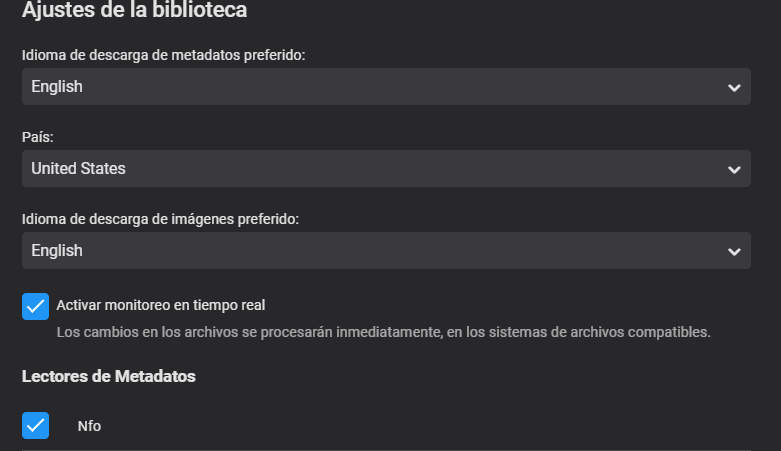
Hello Luke/Team, Tried to find a similar topic but couldn't so here it is. Mostly for Animes I have the language set to English as the prefered laguage to download images but some times the scrapper can't find an image in English but there are some for another languages like Japanese but it will not download it. The request will be to be able to set a secondary search language in case the preferred language can't find an image, or to be able to select a fallback language in case the primary doesn't find an image.
 1 point
 -
Hi, yes being able to set a secondary language is planned for a future release. Thanks !1 point
-
Hi @athinaokyes we are working on improving the downloads layout to have it match the same features as when browsing your server content. We'll take a look at it. Thanks for reporting.1 point
-
Thanks again for the help. EasyEpg is exactly what I was looking for.1 point
-
Just like the other topics, Emby is choking on SMB paths and devs recommend mounting path locally. pretty much the exact same issue over here "FILE_DOES_NOT_EXIST error"1 point
-
I think I have the same behaviour here. Setting 4Mbps in a custom HEVC conversion means an output file of roughly 1mbps or below. The target bitrate is never reached. I don't know why and that's preventing me to use this function at all.1 point
-
Dang, wish you hadn't skipped to that step as getting a debug log would have been useful to see exactly where the issue was.1 point
-
If this is only happening on that one piece of media that would be suspect. In that case you could replace the media or try a 3rd party media repair utility.1 point
-
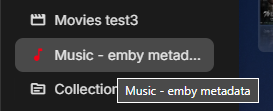
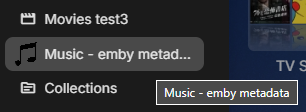
You are better off with google font material icons instead of actual images, but just a matter of if there is a font icon you want exists. Using the same concept from that post "title=xxxxxxxxxxxxxxxx" will be specific to your setup as you have already shown above. div[title="Music - emby metadata"] i.navDrawerListItemIcon.listItemIcon.md-icon.autortl { visibility:hidden; content: ''; } div[title="Music - emby metadata"] i.navDrawerListItemIcon.listItemIcon.md-icon.autortl:before { visibility: visible; position: absolute; content: "music_note"; color: red; } But using your image. Just have to change TITLE to your setup and obviously content path. div[title="Music - emby metadata"] i.navDrawerListItemIcon.listItemIcon.md-icon.autortl { visibility:hidden; content: ''; } div[title="Music - emby metadata"] i.navDrawerListItemIcon.listItemIcon.md-icon.autortl:before { visibility: visible; content: url(/web/Custom_Images/music-note-icon.png); left: 5px; position: relative; } Note I used a custom folder I place in /system/dashboard-ui folder with every update so custom images are contained with the server. But some installs/platforms are a little harder to get to that location. And resizing icon to 20x20 instead of 24x24
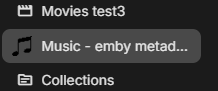 1 point
 -
Okay sorry then, mainly asked because i'm sure more knowledgeable people would ask the same. Only thing i can think of is it might be path problems, i'm sure the Emby team has a much better idea whats wrong.1 point
-
I don't know if I've tried with the / but I'll give it a go cheers1 point
-
Unfortunately no.1 point
-
Legend, I was having this exact problem while using Tailscale. All sorted now1 point
-
Unfortunately none of this was successful it is on to Re-installing Windows but Thank you for your help.1 point
-
HI, what makes you think we did that? There was never a dotnet runtime for linux 32-bit, therefore 32-bit support was always mono-based.1 point
-
Just my opinion, but I have never been impressed by how "smart" TVs work. My recommendation is to get something external, even just a FireStick which has a small footprint will work better.1 point
-
Yep per that image "The Solitary" is the series folder and Gourmet S01 is a Season folder so you may have to look at organization/structure/naming as Emby requires every show to have their own parent folder as a minimum. But trying to look this up you will have a naming issue as it is "Solitary Gourmet". TV Naming | Emby Documentation1 point
-
New version uploaded to https://ballingtons.com/products1 point
-
New version uploaded to https://ballingtons.com/products1 point
-
No hurry, just when you got time. Perfect! PS: I've moved this topic to the server forum.1 point
-
Thanks, I will have a look at the output as you have instructed. Regards JN1 point
-
Yepp, sorry no native speaker here.1 point
-
Hi, we're looking into it. Thanks.1 point
-
I got staff with this help of the log, it was a matter of permission and access to the certificate where only the root had access... I solved it here. Thank you very much!1 point
-
Hey, updated to version 1.7. There are no breaking changes from any older versions. You can have seasonal collections now. Optionally specify a period of the year to show a collection for. For example only show a collection during Christmas every year. You can also specify an end date so a collection does not show again after a specific date, useful for something like this years Oscars collection that you don't want to be hanging about forever. A Halloween example in config.cfg: # Example using a list that should only show during a specific period like Halloween. # Example: active_between = 2024-09-30, 2024-12-01 # Where first number sequence is date from and second is date to. # Usually you want to skip the year so that it shows yearly. # Example: active_between = 09-30, 11-01. [Best of Halloween] Source = https://mdblist.com/lists/hdlists/the-top-100-halloween-movies-of-all-time active_between = 09-30, 11-01 Frequency = 100 update_items_sort_names = False1 point
-
Just to ensure future readers (like me) get the good information: start to select the first row you want, then hold shift key and select the last one you want, all the line between will be selected.1 point
-
HI, not yet, but it's planned for future updates. Thanks.1 point
-
Plugin updated for 4.8. Please read the instructions. Enjoy1 point










3.thumb.png.f03c993b6aa615708d60d6764e31a15c.png)











.thumb.png.f4cb0545e98b51fd9b00e427622ab761.png)
