Leaderboard




Popular Content
Showing content with the highest reputation on 10/12/24 in Posts
-
You should add the option where an admin can check change password on next sign in for a user to force users to change from. The password you gave them.2 points
-
I did this already. Currently I am using Emby for Android that it works very well. Just Emby for Android TV has issues. I would like to use Emby for Android TV as before because the interface is much handier.2 points
-
Hey, I just wanted to see if it would be possible to add a "Back" button on the pop up window after you type the movie name. Like, when I put the movie name and i misspell the name, the next window will be blank and there's no way back except closing everything and then having to do the whole three dots, identify process. Thank you!2 points
-
It's just like fast food chain Arby's. Arby = RB = Roast Beef And (nearly) everything at Arby's is some variation of their sliced roast beef made into different versions of sandwiches.2 points
-
Open the folder you want to "ignore" in File Explorer. (If you are hiding file extensions, you'll need to un-hide them to do this. In Win10, go to the View tab, click on Options on the right of the menu bar, and select Change Folder and Search Options. In the Folder Options window, switch to the View tab, and UNcheck "Hide extensions for known file types." Click Apply.) Right-click in the folder, and select New, then Text Document. You will be prompted to give it a name - it doesn't matter what name you give it as long as you'll know which file it is. It will save the file with a .txt extension. Rename the file (something.txt) to ".ignore" - make sure you remove any file extension, such as ".txt". You will be prompted with a message "if you change the extension, the file might not work, blah blah blah, are you sure?" Click yes. The folder this file is sitting in will now be ignored. To repeat for other folders, you can easily Copy and Paste this ".ignore" file into those other directories rather than create new ones individually, but either method works.2 points
-
Hi I've managed to get this working somewhat. I changed the VPN server and tweaked some settings within wireguard. The issue I have now is the huge amount of data it downloads. For example I streamed a 5 minute episode of a popular children's program in 480p to test and it consumed 7GB. It's like it never stops downloading the data at full speed and doesn't know where the end of the file is. I tried a 720p movie and it was up to 20GB within 15 mins before I stopped it. Anyone seen similar? Cheers2 points
-
I agree that the best approach is embedded metadata, however I did a quick test and found the following... You may need to select structured folders in your respective Library Folder Settings to get Emby to import the correct images from your folders. If you have no embedded images and have "Other or unstructured" selected, then no images will be imported (as per your image example). If you have no embedded images and either of the "Perfectly organised" options selected, then your folder images will be imported. I tested this with a music library: Both the structured options work "folder" and "cover" filenames work If you have no embedded images, then It doesn't matter if "Embedded Images" for Song Image Fetchers is selected or not. Perhaps have a look at this setting and see if it helps? Cheers!
 2 points
 -
When using Emby for audiobooks, playback speed resets to 1x every time you reload the app, both web and android app have this issue. Even worse, accessing playback speed button requires 2 clicks more then ideally needed, making Emby a chore to use with audiobooks.1 point
-
TheTVDB now supports more alternative orders than just Aired/Absolute/DVD. Can Emby query these additional orders and add them as options? Two examples of shows I've seen this used are Re:Zero which has a "Director's Cut" display order and Money Heist which has a "Netflix" order. https://thetvdb.com/series/re-zero-starting-life-in-another-world https://thetvdb.com/series/la-casa-de-papel1 point
-
Hi, I would love to have tautulli or equivalent for emby. Especially for people coming from plex, we would love to see something like tautulli. I know there are a few Statistic plugins but i think we all know there is nothing like tautulli out there. I love the way i see people currently watching movies on my server and the details of what is transcoding etc. i know emby also shows ppl watching movies but it isn't the same. I don't get a notification or even see a icon if someone starts to play while i have the emby page open. There is no icon that shows me someone is watching a movie. Tautulli is also open source so if someone has the skills in python to make it work for emby, this would be amazing. For me this is actually really the only reason I hesitate to switch completely. maybe someone can make this happen1 point
-
Not sure how popular this idea will be but I thought I'd throw it out there for comments. There are a lot of playback clients out there with poor upscaling (Roku, Web client, etc) which can make watching SD content a poor experience. I know that it is typically the players job to upscale the video but sometimes the result just aren't great. What if there was the option to use the server to upscale the video server side on-the-fly before delivering it to the client? I personally like the quality of Lanczos upscaling in Kodi on my SD videos but can not do this on my Roku. My thoughts on how this might work, the ability to enable a rule to upscale anything below a certain resolution to a target resolution. For example, all videos with a height <480 get upscaled to 720, all videos with a height <720 get upscaled to 1080. Or maybe it can be as simple as doubling the resolution, for example, enable the option to double the resolution of all SD content. -vf scale=-1:720:flags=lanczos -vf scale=-1:1080:flags=bicubic There are obviously downsides to this such as needing transcoding, the amount of horsepower required to upscale, and increased file sizes over the original. Would anyone else use something like this?1 point
-
Hi, Would it be possible to have a selector option to choose what playlists are displayed under the main menu playlist selection. Currently the main menu playlists section will display all playlists created, while movie and music playlists can be accessed under the secondary menu sections, leaving the playlists composed of only TV selections to be accessed from the main menu. If there are a number of playlists it starts to become unwieldy to sort/find them with no secondary TV playlist menu options.1 point
-
When one mouseovers the player, the season title is displayed in white text and episode title is smaller and also a white text. Neither have any sort o background. This can make them impossible to see i the video is currently displaying white. The titles should have a simi-transparent background to allow them to be read at any time. I the video is pure white In the below image, I used a scene where the text would still be visible, tho I must zoom in a bit on my pc in order to know what is printed without having to stare at it. Still, on a tv I am not sitting where I can move forward to be able to read that, the whole titles are unreadable while the video is white-ish. https://cdn.discordapp.com/attachments/690691483514175518/1294784141694337105/image.png?ex=670c4533&is=670af3b3&hm=7563dd6ffdce2b7750bc3dc5b8c9d3788294629b5e22d88604c2e6bbc5282b2e&= I suggest the background color and the ability to set transparency in user options. With defaults in server options.1 point
-
@MrAudio and @bardmastermay have some handbrake tips.1 point
-
You can do it in bulk batches using JMkvpropedit. You may need to do different shows separately if there are multiple subtitles, because the position of the forced and other subtitles varies. Paul1 point
-
They are currently mounted as Remote Folders on the NAS.1 point
-
Heads up, I'll be on vacation beginning by next Tuesday for 4 weeks with limited internet access. Current plan is releasing 11.X as beta after I return unless there are showstoppers.1 point
-
Ahh, these are on a shared folder from another machine. I don't think iNotify works on shared folders from another machine.1 point
-
OK, thanks for the answer @Luke On my side, I found new stuff... Just for history, my video box has stop working correctly a few weeks ago with plexmediaserver and for a lot of other reasons I decided to move on emby. At the beginning of the thread, the first error was about an "access token" problem. Solved it (I don't know how) After it was an "upnp error". Solved it by making an intermediate gateway, beetween the video box and the @ box. And now, after digging a lot, I discovered that there has been an update on the video box (without warning) from the manufacturer. This update removed all h26x, avi, mkv (and so on) support ! Now the box only support mpegts container, mpeg2 video codec and pcm audio codec (don't ask me why, everybody complains about it on the french provider support forum...) So, now I'm trying to have a dlna profile working for it, making transcode for ... nearly everything. The profile I made is well loaded and match to the device (saw it in the log). EmbyServer is not complaining, I can see it well in the profile dlna profile manager. But when asking for movies, I still have an error on the box "Impossible to read the movie". There is no error in the log server file, but there is absolutely no transcoding starting. I also verified the rights on the path for transcode and it's ok. I really don't understand what I make wrong... Could you help please ? DecodeurTVUHD.xml1 point
-
Sorry scrolled right past it. As maxrate is configure but -maxrate:v:0 9627124 -bufsize:v:0 19254248 03:53:56.574 Side data: 03:53:56.574 cpb: bitrate max/min/avg: 9627124/0/1000000 buffer size: 19254248 vbv_delay: N/A As you see above there is no minimum bitrate to start from and looks like it never goes higher than 1278.0kbits/s 04:32:57.867 elapsed=00:39:01.35 frame=231491 fps= 99 q=-0.0 size= 1506304kB time=02:40:55.10 bitrate=1278.0kbits/s throttle=off speed=4.12x Now if you tested without HWA you see a minimum bitrate, correct? Pretty sure this has come up before but devs will have to explain the logic here as you do not get your set 4Mbps value in HWA.1 point
-
Once we get through 4.9 we should be able to start moving forward again with the Live TV enhancements Softworkz has made so that should hopefully take care of this stuff.1 point
-
Hi. Yes, it is an issue with the Roku player. What you want to make sure of is that no tracks are set as forced and default and that you don't have more than one track set as default. The Roku player has trouble if there is anything off in the track flags.1 point
-
I'm fine with it. However, I do really like the feel of the Android TV version. It's just unfortunate it has this issue.1 point
-
Yes, I'm currently using the mobile app on my Nvidia Shield for this reason.1 point
-
Hi. Currently no, but this question has come up before, and more options to control this are possible for future updates. Thanks.1 point
-
Hi, it's not been implemented yet, but it's something we can look at. Thanks.1 point
-
YES! It finally worked! Thank you so much @sa2000 You made it all happened. So it's just about giving permission?1 point
-
I DO NOT want to "chat" with anyone about what I think about movie. If I want that, my wife is sitting next to me. I don't care what my brother or mom think either. How many people do you have on your server? Don't you know them? Give them a call. I want the "opportunity" to rate movies on my server that only I can see, no one else. If I rate a movie a 5 and my brother rates it a 3, I do not want it to aggregate our scores and show it as a 4. I want it to show as a 5 on MY account and a 3 on HIS account. I want to be able to search for all of my TOP RATED (4s and 5s) movies from the 90s or specifically 1994 and it will show Speed and other movies that I found great. I want to see all the 3s from the 2010s, the 5s from 2022, etc. BUT, I want it to be MY rating, not someone else's. IF Emby wants to take my scores and combine them with others within the community or server (and I think that decision should be an opt-in box somewhere), that would be fine but utterly useless to me, as I don't care what other think about movies and shows. I only care about what I like. It's my movie collection, not yours. If I think a movie is crap and give it a 1, that is my opinion. Someone else on my server may give it a 5. That is their prerogative. If someone on my server wants to see my favorites, I can create a list. I won't, but I could. Look, I guarantee that most users will never rate enough movies to move the needle in either way, it's just not what they do. But, it would be helpful for those of us that are a bit obsessive but private. I don't rate movie on IMDb or RT... BUT I'd rate them on my own server. Just saying...1 point
-
It's a problem with the clients as discussed in another thread. Only Emby for Android TV and the FireTV clients run a test once in a while and set bitrate accordingly if set to auto. Would be awesome if all TV clients ran a test once in a while to some google server and sat bitrate according to sat and then server admins could set a max bitrate to what their server can handle. Maybe a popup when installing the client like many other programs like "Are you on wired, wireless or mobile connection?", do a test and set accordingly, if on wireless/mobile then set a bit lower. Or do what the big streaming companies used to do back in the time, If stutter is detected then popup a "is the stream stuttering/buffering? Consider lowering your quality". Another thing that could help would be if changing the quality while watching a video would stick and people didn't have to look for the quality settings in a (for people with little technical knowledge) hidden place. Until it's fixed our graphics cards are just going to be working hard and we have to laugh off that people are watching bottom tier streams on their 4K OLED TVs because they don't know any better.1 point
-
Shield TV connected to router via WiFi. EHDD attached to Shield via USB. HDHR Tuner attached directly to Router. FWIW, NextPVR (running on a laptop connected via same WiFi) recorded fine last weekend. There were a few hiccups in the recording that I attributed to antenna signal. Thanks for the renewed interest in this1 point
-
And to complete this thread, I ended up purchasing the Gigabyte RTX 4060 OC Low-Profile 8Gig, no discount/sale.1 point
-
So as a follow-up, I recently discovered that there are two apps for the firestick: one is a TV-centric app which gives just the "television-view" of emby, the other one is based on the web-browser version, this second version allows you to do things like "play from here", this works well for the feature I was looking for with music videos. If I just choose "play from here" everything in that library gets added to the queue which is great. My suggestion would be to give this as a default setting so every time you click play on a video it adds everything to the queue or even just maybe a "add to queue" option for videos, right now this option is only available for audio files.1 point
-
No, I just re-created the ones that got wiped out. I hope this does not happen in the future but I am making more backups as I make changes to my Emby install. I wish I could point to a specfic action that I did to make this occur as then maybe it could be fixed as a bug if it was reproducable.1 point
-
Sorry this is taking a while I could not recreate the issue today but I have just remembered the channel effected was recoding last time and would not play on 2 devices at the same time. I should have some extra time tomorrow to attempt to recreate the exact environment. I will document what I do if I can recreate and also upload the logs.1 point
-
非常感谢!我明天根据这个原因来处理!1 point
-
Hi, this is what you will need. Essentially you need to make the .iso appear as if it were an expanded bluray or dvd folder. once you have that, then we can get it to play identically to how a folder rip would play. My suggestion would be to register an api to extract a file from an iso. It should accept as a param the relative path of what file to extract. Just hardcode the iso path into the method for now. We'll make that more dynamic later. In addition to this, you'll probably also need an api to get a list of files based on a relative path inside the iso. Add the [Unauthenticated] attribute to your routes for now so that you can test it easily in the browser. So that's really the hard part. Once you have that, then the Emby side of it will be much easier and I can help fill that in.1 point
-
Startup crash still happening on ios 12.5.7 with app version 2.3.31. App crashes instantly while opening1 point
-
Can you imagine all that lovely data for Plex to scrape and sell to the highest bidder ...1 point
-
Check the Transcode Menu in the Dashboard. https://emby.media/support/articles/Transcoding.html What client are you using?1 point
-
I really enjoy the remote control feature; using my phone to control the TV for playback is very convenient. I usually use the standard Android app, but some videos play without sound (I guess the TV doesn't support the audio format, and the app doesn't transcode the audio). So, I have to use the TV version of the app. In this case, the remote control can handle play and pause, but as soon as I click fast forward by 10 seconds, it freezes. The video continues to play, but the TV becomes unresponsive. The same TV and the same video work fine with the remote control on the Android version. Why is there such a difference? Can you describe it? I’m really curious. As a result, I constantly have to switch between the two apps to play videos, which is very frustrating. I sincerely hope there will be a stable app for TV use. @luck1 point
-
A simple bandwidth test done just before playback simply works - AndroidTV/FireTV has done it for years - and 100% of my remote clients direct play on those devices. Using any other client, Samsung Client, LG Client etc they get transcoded when I know it should direct play with ease. I'm really not sure why Emby can't implement what AndroidTV does .. OR allow the Emby Admin to set a value in 'devices' to assist with the so called 'auto' calculation .. reducing it to 'something low quality but is likely to work' is really not an acceptable technical solution in 2024 imo.1 point
-
Just so it doesn't get lost in the discussion I want to make it clear that LARGE majority of us aren't asking for adaptive streaming or expect it from an app like Emby. We realize that it would require multiple versions of every media file or transcoding all the time. What we do want is improvements to the initial quality selection and/or more transparency around what "auto" does.1 point
-
Parents just don't listen when the kids talk, even if the kids are correct. It is somehow in the genetic coding for humans at this stage of development. The cycle goes like this: When the kids are under 12 the parents know everything and the kids know nothing but are usually trying to learn. Between 12 and 18-20 the kids just can't hear the parents so the communication is minimal. and the parents get stupid. As the kids get older after that the parents begin to get smarter but they also develop partial deafness when their kids talk. At some point the parents finally acknowledge that the kids just might be smart but by then it is often the case that communication becomes increasingly difficult due to the the problems of interspecies communication. My parents, many years ago, asked me to upgrade their home entertainment system including TV and I did and I made a detailed set of instructions of how to use the system and even get it reset back to the start if needed. But they never used many of the features and they continued, until they passed, to watch exactly three channels and had to call me to play a tape. When I was cleaning out their house I found the instructions I gave them in a drawer under a bunch of magazines. it looked like the never used those instructions after the first few days. Also I never entered their home and saw the clock on the VCR showing anything other than a flashing 12:00.1 point
-
I think calling it Auto is confusing and not representative of what a user expects it is. When I see auto I expect the maximum quality my internet can handle, not the lowest common denominator that will work for the average user without issue. Just show the quality the app defaults to rather than the ambiguous "Auto". If the app is going to default to 1080p 4Mbps just show that. If a user sees a low quality by default they are more inclined to increase it, but if they see auto they assume they are already getting the best quality. The mobile apps already have separate settings for Home Network and Internet quality. A streaming device or TV app shouldn't worry about internet connection quality and consistency.1 point
-
Welp... It helped me a lot, that's for sure. Went from 4x6TB to 4x18TB (one disc at a time, obviously) on my DS918+ in just a few days with just a few clicks.1 point
-
Only thing holding me to Synology right now is SHR.1 point
-
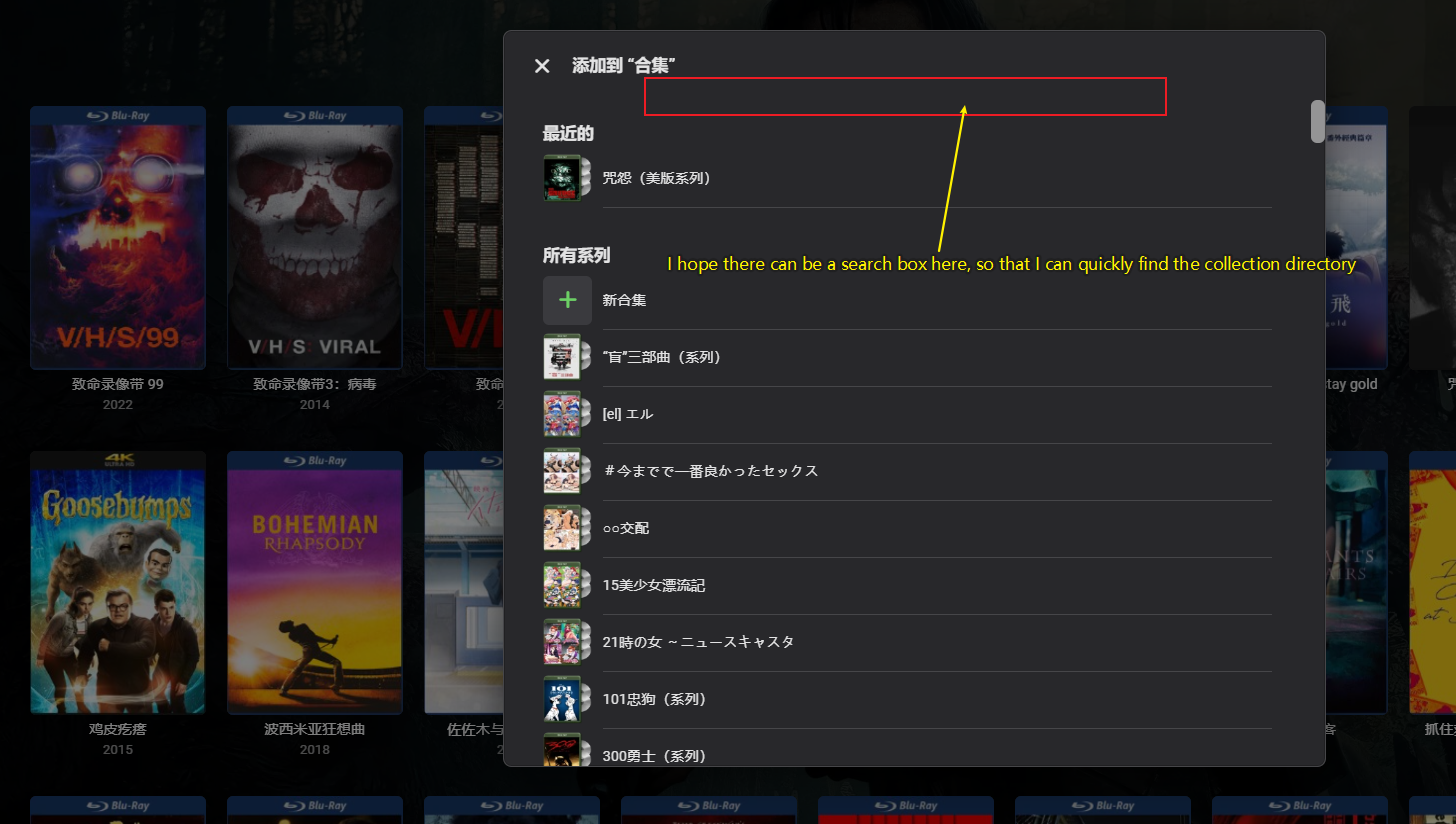
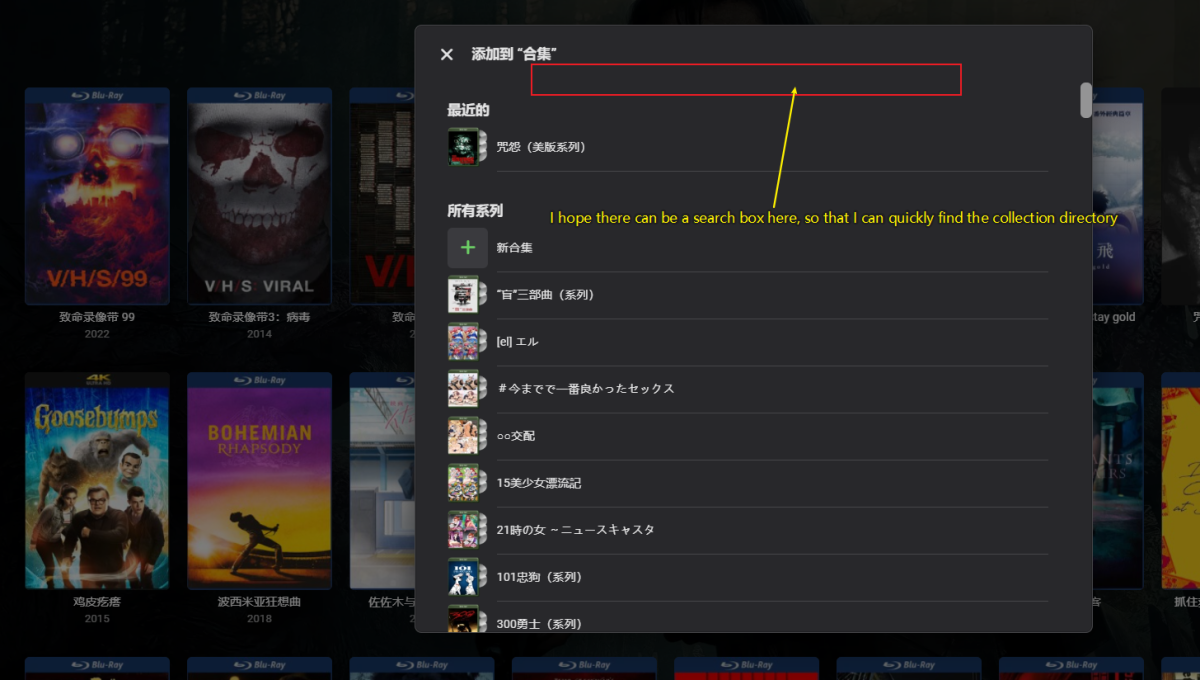
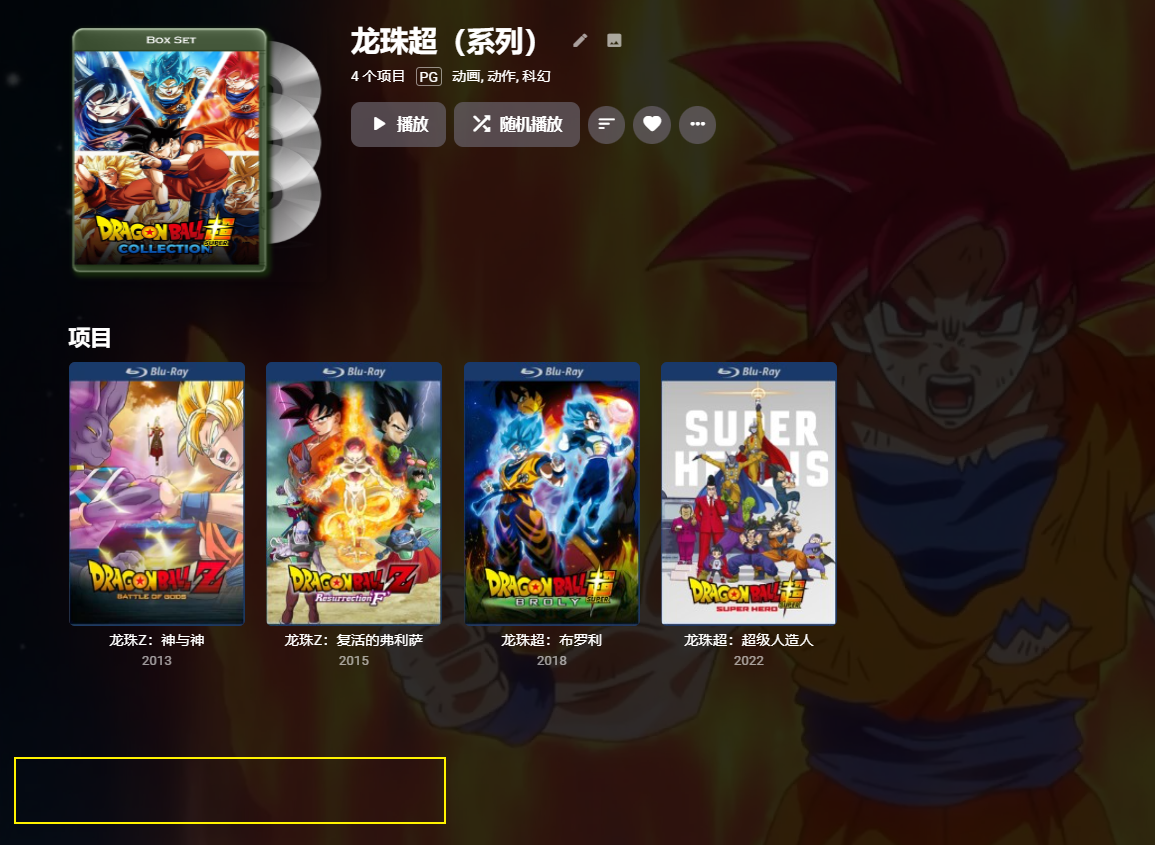
1.I hope that when adding a movie collection, there can be a search box for the collection directory. This way, for people with a large number of collection directories, manually organizing will be much more convenient. Otherwise, I have to use my eyes to search one by one every time 2.I hope to also add metadata link labels for the collection at the bottom
 1 point
 -
I would like to lock a speed level (for example, 1.5x) on each new video. This could be set client side and not persisted on the server. My use case for this is that I use emby to watch training/certification videos, and they are very slow and only last a few minutes per video. One topic might consist of 20-30 videos. Currently, I need to keep speeding them up individually.1 point
-
If this customizable and personalized playlists feature is added, then many useful and/or functional playlists such as the following can be created: "Best Foreign Films to Watch" playlist to be recognized as "Library" so it will show up as a row of titles when I enable it in "Latest media" "Holiday Season Movies" "Must Watch Again" etc Right now, it's a very frustrating and cumbersome experience navigating in Emby. For example, one has to navigate to My Media > Playlists > Select Playlist > Scroll scroll scroll > Oops Wrong Playlist > Navigate Back > Check all playlists titles again > Spend more time looking around for the correct playlist > Go in again > Scroll scroll scroll > Select Movie > Play How is this even acceptable to anyone? If these customizable playlists are listed in "Latest Media" or some kind of newly developed "Playlist Home screen" then multiple groupings (playlists) of specific movies and/or shows will be possible. Posters will be clearly listed in rows for easy identification and selection of the correct movies/show to watch or cue up. Netflix style, except it would be even better because we get to choose the name of customized playlists.1 point
-
Another vote for this feature because it's something that I've been hoping for years, so Emby Homescreen is not limited to just libraries and the few Home screen sections . Users should be able to show custom playlist or ONLY playlists on home screen if we want to, because let's face it, categories like TV, Movies can't simply categorize all the different topics, genres, watch sequence etc.1 point