
Leaderboard




Popular Content
Showing content with the highest reputation on 10/04/24 in Posts
-
Just so it doesn't get lost in the discussion I want to make it clear that LARGE majority of us aren't asking for adaptive streaming or expect it from an app like Emby. We realize that it would require multiple versions of every media file or transcoding all the time. What we do want is improvements to the initial quality selection and/or more transparency around what "auto" does.4 points
-
Np, as I see it - it was done with the best intentions in mind. Thanks for actively assisting in the community.3 points
-
.. but do note the now annoying 'feature' added where it now gets the Season name as part of the Season capture - so now I now have a 'Season 1' and a 'Series 2' ... @LukeCan we please stop making these undocumented/untested updates on the Release fork .. I now have to go in and manually edit the Season name back to Season 2..3 points
-
Great work @ebr. Let's keep this app alive for another few years at the very least3 points
-
Create a complex password for them that they don't know.2 points
-
Need to go over library settings, but if there is existing metadata Emby will always read it even if option is disabled. So we would need to see the nfo file for Jumanji if you write nfo files. But can say I cannot have Emby create any collections with library option disabled and movie metadata not containing the Required <set> node to create a collection in 4.8 or 4.9.2 points
-
It's a known issue on any hardware using that chipset (SoC) - the issue is because of the HDR10+ and DV combo. The way around it is to remove the HDR10+ and just use HDR10/DV or HDR10+ only. Google is your friend on ways to do this - but it's a quick process. I believe Kodi have implemeted a workaround where it dynamically remuxes the file to remove the HDR10+ metadata.. https://forum.kodi.tv/showthread.php?tid=3715572 points
-
Related:2 points
-
Another annoying and unwanted result is some shows are now returning 'Series x' and others 'Season x' as metadata - depending on the provider. Before - all just used the folder name (season) which was consistently auto created by a single provider. I DO want the Season metadata - just not the name - so turning it off is not a solution. Please can these updates be tested first for unforseen consequences - and while I know this is a Plugin (so Release/Beta doesn't mater) - it should not just be thrown out there as a fix for this thread ...2 points
-
Next time check this option in your unraid docker page. It will show what docker is filling up.
 2 points
 -
@ebr ? If not, then I'll add to this Thread as not having a reasonable mechanism on fixed devices to use available bandwidth is imo very wasteful on server resources. Thanks.2 points
-
In case it helps anyone, I had the same problem, Emby on my raspberry pi didn't appear in the "/media/USER" library scanner, and I solved it with the command: sudo chmod -R o+rx /media2 points
-
Not currently. You can lend your support here:2 points
-
This is maintenance release, primarily targeting Linux users. Here are the changes: Fix hardware transcoding regression on some Linux platforms View the full article2 points
-
A new beta of the TV only app has been put up. This beta fixes the issue with frame rate switching on the new GStreamer (actually, related to Android 14) but it also implements our new policy of making playback in this app free for normal single-family use. As of this version, playback is free for up to 5 TVs. No other Premiere features are included of course and any use beyond that limit will require a Premiere subscription. Previous unlock purchases are still honored but the unlock is no longer an option going forward. We feel this strategy brings the most value to our common users and makes it more difficult for illegal streamers to get around the device limit. Thanks for your support.1 point
-
Nein, war es nicht.1 point
-
This should now be fixed in the latest version on EmbyCon 1.11.30 I have released this version to the new Kodi EmbyCon repository https://faush01.github.io/embycon_kodi_repo/ You will need to switch to using this repo and reinstall EmbyCon from this new Repo to get the new version. This is due to a change I made recently to use GitGub pages to host the EmbyCon repo. - Follow the instructions above to install the new Repo - Remove the old Emby Kodi repo - Reinstall EmbCon from the new Repo1 point
-
Hab die möglichen Einstellungen jetzt nicht vor Augen, aber für Kapitelbilder und Intros jedenfalls nur als Aufgabe, nicht beim Hinzufügen von Mediendateien. Und den Startpunkt der Aufgaben solltest du auch für dich anpassen - zu Zeiten wenn der Server nicht benutzt wird. Ohne Online-Metadatendienst gibts keine Schauspieler-Bio's und Bilder! Vergiss das mit dem API_Key. Der wird einfach nur im log unkenntlich gemacht. Bis auf ein paar Ausnahmen haben die Anfragen in deinem log alle funktioniert. Es gab ein paar Timeouts, aber größtenteils bei omdbapi.1 point
-
Nein, wieso?! Du musst die Bibliothekseinstellungen - was soll direkt beim Hinzufügen von neuen Medien - was soll später durch eine separate Aufgabe ausgeführt werden - deinem Nutzungsverhalten anpassen. Fügst du überwiegend einzelne Dateien hinzu, aber dafür öfters oder ziemlich viele Dateien in einem Rutsch, aber vielleicht nicht ganz so häufig? Ist dir wichtig, dass die neuen Medien schnell verfügbar, also abspielbar sind oder müssen sie von Anfang an jeden Schnickschnack haben?1 point
-
you will see a lot of weird aggressive negativity in these forum, its getting worse i think. its one of the reasons i stopped coming here as much.1 point
-
Just did it1 point
-
Niemand will da irgendwas bei dir konvertieren! Das MediaInfo Plugin, welches du selber installiert hast, versucht die ganze Zeit die Audio-Stream-Titel deiner Matroska-Dateien zu ändern. Kann es aber nicht, wahrscheinlich weil die ganze Zeit über Emby versucht Kapitelbilder von den selben Dateien zu extrahieren. Das ist vielleicht auch der Grund warum neue Medien erst so spät auftauchen. Eine Aufgabe (Kapitelbilder) muss erst fertiggestellt werden bevor die nächste Aufgabe (Metadaten holen, Datenbank aktualisieren) starten kann.1 point
-
After that happens, is there a "Send Logs" button on that screen? If so, please press it and then come here and tell me exactly when you did that. Thanks.1 point
-
A simple bandwidth test done just before playback simply works - AndroidTV/FireTV has done it for years - and 100% of my remote clients direct play on those devices. Using any other client, Samsung Client, LG Client etc they get transcoded when I know it should direct play with ease. I'm really not sure why Emby can't implement what AndroidTV does .. OR allow the Emby Admin to set a value in 'devices' to assist with the so called 'auto' calculation .. reducing it to 'something low quality but is likely to work' is really not an acceptable technical solution in 2024 imo.1 point
-
The solution i think is to just pay for a static ip but i will leave topic open over weekend & if any one knows an easier way to bypass cgNAT other than Tailscale as i hear as Tailscale probably isn't going to work with a lot of devices or maybe i am wrong, only been advised by one person. Thanks1 point
-
I think your right because i have been checking all the other ISP'S in my area & it would still be cheaper with the extra £51 point
-
Hi, Save yourself the headaches of trying to make this work as Tailscale isn't going to work with a lot of devices. Pay the £5 FOR A STATIC IP address and be happy that's all they charge. Carlo1 point
-
Sorry about that!1 point
-
Hi @visproduction erstmal danke, dass Du Dir die Mühe machst, und versuchst, was teilweise auch gelingt, Licht ins Dunkle zu bringen. Zum moviedb.org: ich habe nirgends einen Apikey eingetragen, lediglich dieses MovieDB Plugin installiert, wo auch keine weitere Konfiguration möglich ist. Hab es jetzt vorsorglich deinstalliert. Vielleicht liegt hier auch der tote Hase begraben. U:\NeuF\ ist eine festes Verzeichnis und auch als solches in Emby eingetragen. Zu den Audiospuren: warum zum Henker muss Emby das noch konvertieren? Soll es doch gar nicht! Meine Abspielgeräte können damit umgehen, und es soll ALLES per Directplay wiedergegeben werden. Ich habe zwei meiner Nvidia Shields sogar extra wieder auf Experience 8.2.3 zurück gespielt, damit ich über die ATV-App direkte Dateiwiedergabe mit file statt mit http wiedergeben kann. Also warum pfuscht Emby da trotzdem an meiner Audiospur rum? Gerade die High End Audiospuren geben dem ganzen doch den richtigen Touch! Ich werde mit Sicherheit meine mühevoll angelegte Sammlung nicht mit langweiligem AAC-Audiospuren verstümmeln. Verstehe nach wie vor nicht, wieso Emby daran rumpfuscht. Ist es am Ende nur noch für Handys und Tablets gedacht?1 point
-
@guunter @newcity Folks, kindly refrain from referencing/posting links to said software, I understand that in this particular case it might have legit use, but it unfortunately has high potential for misuse by share sellers, directly affecting/negatively impacting Emby, both monetary and legally. You can continue your correspondence in PM. All relevant posts have been removed. Thanks.1 point
-
That was what I was thinking. Thanks @Lukeand @ebr!1 point
-
At this time this is only on the Android platform.1 point
-
Yep requiring human interaction with that page and also state to PM the mod if something is not up to date. But @CBerswill update it when gets a chance.
 1 point
 -
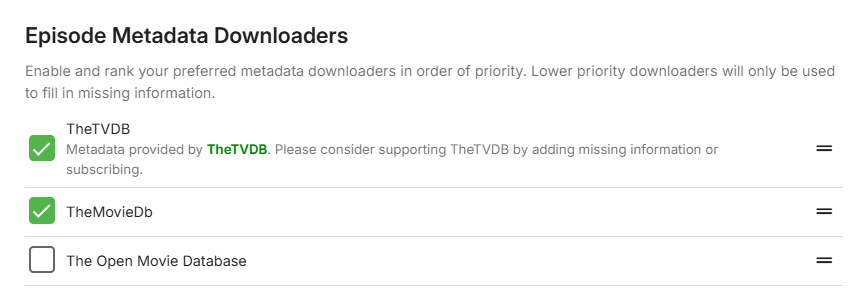
This show is a little broken because TVDB has the show listed as single parts and no metadata. Ensure TMDB is added as part of your Episode downloaders and it will pick up the metadata from that. HOWEVER - the issue is that depending on your provider rankings, it's picking up the Series/Show and posibly Season from one metadata provider (that is wrong) and the Episode from another - that is correct .. They way around it is temporarily disable TVDB as an Episode provider, then refresh the show (using TMDB) - and when done LOCK the metadata - and finally put TVDB back.
 1 point
 -
Hi, I am attaching the log for the same issue. When playing on the web, the SRT subtitles are displayed without any problem. Only on Meta Quest 3 with DLNA, the subtitles are not displayed. Also, subtitles embedded in mkv files work fine, but external .srt subtitles do not work. User-Agent=Dalvik/2.1.0 (Linux; U; Android 12; Quest 3 Build/SQ3A.220605.009.A1) embyserver-3.txt embyserver-63863628025.txt1 point
-
This is the last one with the strange "no media present" in. The box is adressed as 192.168.1.10 embyserver-63863558191.txt1 point
-
¡Listo! Lo solucione con el comando "sudo chmod -R o+rx /media" ---- Done! I fixed it with the command "sudo chmod -R o+rx /media"1 point
-
If you mean the standard android app, yes it will. Note, this is only on TV devices for it though...1 point
-
Hi, this is resolved in the next update to Emby for Apple TV. Thanks.1 point
-
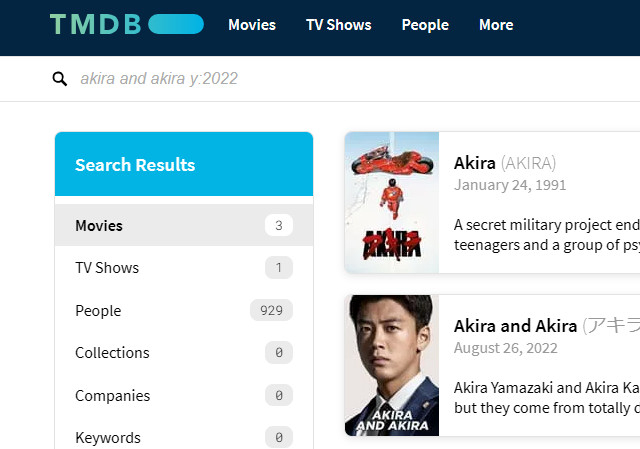
It's happening in the Web GUI as well: Paul
 1 point
 -
Excellent. Thanks for reporting back.1 point
-
Fixed it! The problem was I had just taken Jellyfin's nginx config and used it as a template for Emby. This did not include the necessary Content-Security-Policy header, hence this issue. I just looked up and used the config some other fellow users recommended, and now it works. I still need to research and learn more about this header to make sure I am keeping my server as secure as can be. Here's what the headers section of nginx looks like now, any further advice is always welcome: # Content Security Policy add_header X-Xss-Protection "1; mode=block" always; add_header X-Content-Type-Options "nosniff" always; add_header Strict-Transport-Security "max-age=2592000; includeSubdomains" always; add_header X-Frame-Options "SAMEORIGIN" always; proxy_hide_header X-Powered-By; add_header 'Referrer-Policy' 'no-referrer'; add_header Content-Security-Policy "frame-ancestors mydomain.com emby.mydomain.com;";1 point
-
It worked. My recordings are showing up as expected now. THANKS!1 point
-
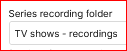
I recently ran into the same thing. You are right, it doesn't make much sense. To fix the display in Live TV > Recordings, go to the server dashboard > Live TV > Advanced, then drop the list for "Series recording folder" and should see something like this: Select it, then Save at the bottom of the page. I don't know how long it takes for the data to show in the recordings page, but certainly by overnight. You will also see a movies folder you can configure.
 1 point
 -
I had the same issue, and was racking my brain trying to figure out the problem. None of the responses above seemed to apply to me. Well... It turns out that I'd left an unused SD card in a USB port, which weirdly reconfigured the names of my drives. Thus, the hard drive containing my movies was temporarily mislabeled. Once I removed the SD, everything went back to normal. Hope this helps someone with a similar issue.1 point
-
Thanks. The problem is fixed. I went and installed the standard 'EMBY' app and login was successful. Still doesn't make sense to me why the EMBY for Fire TV' was unable to successfully login, but I have uninstalled that app and am now using just the standard EMBY app. Appreciate the help.1 point
-
I've confirmed I can fix the refresh rate switching on the new Google box. Fix will be in the next beta/release. Thanks.1 point
-
Hi Luke, I have good news about HEVC direct play in Firefox. The latest nightly 132.0a1 (2024-09-27) is capable to direct play HEVC in Emby. Without having to change the "media.wmf.media-engine.enabled" to 1 (playback enabled for media engine and MFT). They fixed all issues in the default value which uses only the media engine and there is no reason to enable MFT anymore. So... people will be able to enjoy Emby in Firefox without having to transcode when version 132 stable will be released. And it will work without having to change any setting. Finally:)1 point
-
ADM is currently offline due to hardware failure. I cannot offer an eta for it to be back online at present because i dont know yet what has died and what needs replacing. Its been online for almost 2 years with only 2 short outages so far.... Please be patient Thank for your understanding Back Online ! Took it apart blew it, put it back together ... workjing again ...1 point
-
The new Emby Theater beta does this automatically for itself. (I found a loophole for doing it without elevation)1 point

















