Leaderboard




Popular Content
Showing content with the highest reputation on 09/18/24 in Posts
-
https://blog.cloudflare.com/upcoming-lets-encrypt-certificate-chain-change-and-impact-for-cloudflare-customers/ https://blog.cloudflare.com/shortening-lets-encrypt-change-of-trust-no-impact-to-cloudflare-customers/3 points
-
ffmpeg-transcode log above. Line 16 shows about 25 subtitles embedded in this .mkv. I believe that this may be causing your issue. Doesn't the transcode need to look at all subtitles and handle them? When there are so many the transcoding can time out or fail for some reason? It seems like I have seen this a lot. If you remove the excess subtitles and save to a new media file, your playback and transcoding may start working. To remove these subtitles with mkvmerge, or command line ffmpeg. This will take perhaps 20 seconds, on average, for 2 hours of media. Hope that helps2 points
-
This has been done. The changes to https://emby.media/support/articles/Strm-Files.html should be live now.2 points
-
Auto Sync for Subtitles was recently added in Plex: https://support.plex.tv/articles/auto-sync-subtitles/ It uses the voice activity data so doesn't deal with signs etc. like in ASS subtitles, but it is still a significant improvement, especially when downloading subtitles on demand from OpenSubtitles etc.1 point
-
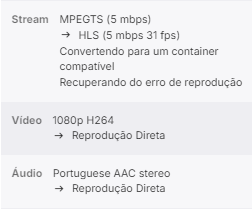
Hi Luke Is it possible to do direct reproduction in MPEGTS on Live TV? Because every time emby converts the stream to HLS
 1 point
 -
Yup, there's a lot of special sauce involved, unfortunately. Here's a way that should allow you to achive what you want: Manually Creating a Shortcut you can manually create a shortcut using the app's URI. Find the App's URI: Open PowerShell as an administrator. Run the following command to list all installed Windows Store apps: Locate the app you're looking for, and copy its AppID (typically in the form of Microsoft.YourAppName). Create the Shortcut: Right-click on your desktop and select New > Shortcut. In the location field, enter the following: Replace YOUR_APP_ID with the actual AppID you found in PowerShell. Name the Shortcut and finish the process.

 1 point
 -
I wanted to circle back to this. I thought this would address the ability to rename Windows Store icons pinned in the Start menu. Just got around to replacing the icon I had pinned. And I'm finding that, tho I created a shortcut named 'Emby (beta)', pinning that to the Start will pin the original that is named 'Emby'. I'd normally go to the target at its location and make a shortcut of that and how I want it named would be maintained. But as this is a Store app that location is unavailable to load, at least from the shortcut. I did determine it from the Task Manager > Details. But making a shortcut of that didn't load; not surprised. Sheesh ... From the "the grass is always greener" memories of the past wearing rose-colored glasses, forgetting about the warts of Windows of old ...can I have Windows XP back please? Or even Win 10, 8, 7 (probably the best) or even Win Server 200x; everything was so much easier back then. lol1 point
-
The plug-in was designed back when tmdb put a ton of trash (tags and keywords) into the genre field and this was a way to limit your genres to just a few that you cared about. tmdb no longer does that so the utility of this plug-in is really quite limited at this point IMO. If you wish to allow a new genre after the initial scan, you must add it with that "+" button I mentioned.1 point
-
Silly me! lol. A big thank you. Been using computers since the time of punch-cards. It reminds me of the 1st time I went to install a Mac app from a package a few years back and it popped up a panel showing two large icons and a swoopy (Amazon logo-like) arc'ed arrow from the left to the right one. It was completely foreign and lost on me that that meant I needed to drag the left icon to the right one to trigger the installation process. very big lol !1 point
-
Start > All Apps > Emby > Emby Now, drag-drop the icon onto the desktop or into an Explorer Window. This creates a shortcut which you can rename and put it anywhere you like.1 point
-
@visproduction Thanks a lot for the suggestion. It looks like this did the trick. I guess it's time to invest in a beefier server then...1 point
-
In addition to that, OP can simply delete Scan media library scheduled task and move required media around, re-add scheduled task once completed. That way server is available for viewing other content throughout the operation.1 point
-
Thanks, I think it'll take over night. Just about to start now so will shut down Emby when we go to bed.1 point
-
You don't have to wait, there is right now1 point
-
In the end I did successfully solve the time out "problem" using a ping timer. I'm aware this has a negative impact on server resource usage. I'll publish the source code for this whole thing when it's done so that all may wince at how inefficient it is.1 point
-
Because it hasn't been added with that "+" button at the top of the page. The first time you bring up Genre Cleaner settings, it will scan your library and bring in all the genres that exist. But it only does this once. If you wish to map a new genre, you just create that genre with the + button and then map (I have to admit I'm working on very old knowledge here but I'm pretty sure that is still the process). @softworkz?1 point
-
This would be my suggestion as well. "Shuffle" means shuffle the list and play it. Perhaps we should rename this button to "Shuffle All"...?1 point
-
All, I ended up deleting both the tuner and the guide and rebuilding. Everything is currently working. Issue resolved.1 point
-
I hope the feature will come too!1 point
-
Right, one time, like the move from v3 to v4 that also had incompatible data from upgrading. I spent weeks migrating and had to rely on an external plugin to succeed. There is no reason the backup functionality(or emby itself for that matter) could not convert the data for those special cases if it knows the version the backup was made in, a special function for those cases should be made. The software upgrade can already do it so I'm failing to understand why a backup import doesn't. Emby itself should be able to recognize an old data format and convert it to the new one whether the plugin is used or not and if it can't, there should be an import function where you can specify the emby version the data is from and it would convert it to the current version.1 point
-
Eventually, plex is now starting to support HEVC encoding. I think it's pretty nice that it doesn't require a separate tone mapping. https://forums.plex.tv/t/hevc-encoding-forum-preview/888127 For external playback of my personal Blu-ray Remix files, transcoding them to H265 has a number of benefits. After reading through this post, it doesn't look like the Emby team will be supporting this in the near future. I understand that, but it's a bit of a bummer. I'll have to wait for the Plex Lifetime Pass sale.1 point
-
I'll add my +1 on this. I'd really like for this to be able to be set persistently per user/show. Sometimes when watching old media I prefer for it to be filled to the screen and it's a bit tedious to set it for each episode while I'm watching.1 point
-
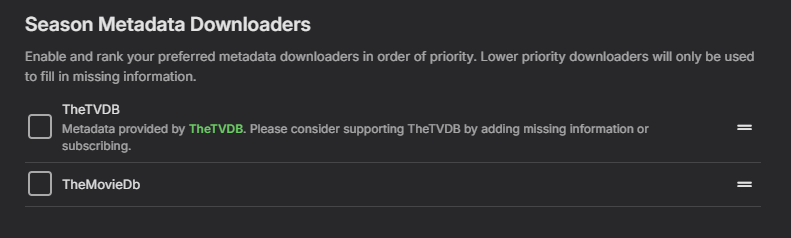
I guess its this I need to disable. It would be nice it there was a explanation of what this does. Right now this is guess work, what it does.
 1 point
 -
+1 on this. I can use css easily on the browser, but I use emby in browser 1% of the time, mobile apps 9% of the time and TV android app 90% of the time, so the css tweak is useless really. If hiding is not possible, is it instead possible to re-order the tabs? I just don't want to have to click through suggestions, trailers etc in order to reach favourites, genres and folders.1 point
-
It will vary significantly from one model year to the next. The older the unit, the older the certificate store that it has and the less likely that Samsung is still updating it. @SamESmay have more insight as he's done extensive research on this. So I think it is able to connect, but the TV is not accepting the certificate. Unfortunately this forces you to make a difficult decision in terms of whether to have your server require https or not.1 point
-
//server/share/Title/season/EpisodeName.ext. lmk if u want more.... not a problem. I think the old log is smoked, but if I can find it I'll PM. I'm special like that, it's a skill... not a curse. Yup, no worries. As the older 10.1.1 had stopped syncing, there was literally nothing to loose. Hope to help. Off to see if I can restore a log.1 point
-
Thanks! Also, just to clarify, it's not just the language. Sometimes there can be multiple sub tracks with the same language. Eg. English - Default (Translated Subs), English - Signs and Songs (Forced), English - SDH (English CC), etc.1 point
-
That wasn't my question, but mabye someone else can share some experience regarding it: "Have you ever seen such latency issues when using Windows Media Player?" Wouldn't you be able to use the TV's audio delay adjustment in this case? My current mission is the new Windows app which is in beta since last week and there are multiple layers of considerarion with regards to audio/video latency: Out-of-the-box functionality Does it play videos with audio in-sync in the best possible way (without any adjustments made)? "best possible way" means the way how Windows Media Player (and other players) are able to do it Means to find out whether there are cases where we don't do it as good as other do it Static Adjustment Feature This is meant to compensate delays due to audio/video hardware paths which cannot be controlled/known by the player Find out whether it works sufficiently well and in a consistent way Find out whether a separate delay setting for 24fps videos is really needed and why Dynamic Adjustment of Audio Delay During Playback Find out whether it can even be done with MPV player 1 and 2 are essential and current focus 3 is a nice-to-have and subject to prioritization/decision making in the future (your feature request) So all my questions here are about 1 and 2 - hope this clarifies things a bit.1 point
-
Tbh, it doesn’t really matter where the lag comes from (whether it's the TV, soundbar, the file itself, and so on). This feature already exists in VLC, MPC, and Kodi. A simple +/- offset that can be added through the OSD should be feasible and would likely be a feature many people would appreciate, making a lot of sense to implement. IMHO.1 point
-
Re: Bluetooth: https://duckduckgo.com/?q=bluetooth+latency Re: other playback, relevant scenario is streaming video from Emby server on a Windows PC to a new Samsung TV (using Chromecast HD dongle running Emby OR the Emby app running on the smart TV) and separate attached Yamaha sound bar, which is connected to the TV either via HDMI or optical cable. (I have no idea how to get WMP into that mix.) And whatever the reason for the lag (even imperfectly timed video source file), the request remains: could Emby devs just add the ability to adjust audio delay? Pretty please?1 point
-
Thanks - great information. I am no tech expert but there are two situations where there is a lag, not from Emby to the player setup but within the player setup and/or from there to the user 1. Bluetooth. Latency is widely known and discussed. Newer Bluetooth systems are better, but still... 2. When using a TV/screen for video playback but a different audio playback system connected by wires of some sort. But whatever the setup or reasons, the precise specifics don't really matter. Feel free to correct my ignorance, and maybe some experts here will enjoy an in-depth conversation about the nuances. But as I noted in the earlier thread, every modern TV has an audio delay/"lip synch" feature. I and other users would like this functionality built in to Emby, too, for when we aren't streaming to our TVs or even when we are, but it would be more intuitive or easier to set it from within Emby's settings than from the playback devices'.1 point
-
Will do, I'll keep an eye on it and report back when I can get a useful log.1 point
-
If you're interested in any improvement, you'll need to help us understand the problem. If we don't understand the core of things, then there's no chance for a feature request to become ever considered for implementation.1 point
-
Had a spare few minutes so .. v1.0.1.43 - Fixed the duplicate edition label (+ Tag) bug & added Unrated and Theatrical Cut - the others are likely one off's/niche as you say - so I didn't include them. Emby.MediaInfo.dll1 point
-
This is ridiculous and about as short sited at the OP. I have been using live TV on Emby since it came out. OTA and Cable card. Yes we took a hit with many providers moving away from cablecards. But I still use OTA often. Would be silly to take away a working feature. I used it long before the .m3u option. But I am not aware of any legitimate uses for the m3u as you said.1 point
-
Just read about it myself feeling a little jelly. I'll have to try it out when it hits the actual beta. I stream a lot of sports from my week home connection and the option to drop the bandwidth a bit at the same quality would be very helpful.1 point
-
Been testing this on Plex this week now that they added it in their latest beta. So far I've been pretty impressed with the difference in quality between 2mbps h264 and 2mbps h265. Biggest benefit to me will be watching videos on my phone while on a mobile connection away from home.1 point
-
I wonder if this would work as an env var for linux docker containers. I don't use VPN but sometimes, at random, metadata will fail to load when it attempts to use ipv6. Disabling ipv6 on the host resolves but would rather find a more granular tune.1 point
-
Ghee nothing that was posted was even legit as GitHub goes back to 3.2.21 will be platform dependent but back then it was limited, but you would only be able to use a browser as all clients require a minimum server version of 4.7.14.0. Only betas versions get deleted. But from a legal standpoint Emby could end of life all Premiere keys with every major release ie v3 to v4 to v5 if they wanted.1 point
-
Hi @NthrnNYker58we'd have to look at a specific example, but most likely something changed (just enough), such that the server was not aware that it was the same channel as before and essentially removed it from your server database and then added it back. Normally your custom channel images would be retained. Or actually, it could also be that the channel has multiple images assigned for different color themes, and so when you supply your own image you need to make sure to replace both or all of them.1 point
-
Probably because some of us have over 100tb of media and it would literally take years and cost thousands of dollars in cooling and electricity bills1 point
-
I agree and have requested this in the past as well. A setting to auto stretch or auto zoom 4.3 content would be nice. And for everyone who would like to watch there show as intended, it is a setting you don't have to use.1 point