
Leaderboard




Popular Content
Showing content with the highest reputation on 09/09/24 in Posts
-
Hi All, I want to highlight how awesome it is that Emby excists and that the forum seems active every time when I drop in once in a year or so. I tend to complain with every little change and the way I consumed my media has changed with Emby.., still miss opening potential movies to watch in a new tab etc but he, different days, different options. The best thing is that Emby is there and there is a place where people can complain if they feel so inclined. Anyway, a big thanks guys! Keep it up4 points
-
I have created some custom integrations between emby and trakt such that my playlists are managed exclusively in trakt and then automatically added to emby, with media added in emby if it exists in my library. Currently it's a one way street, where changes to the playlists in emby are lost, with trakt as the only source of truth. My request is to have two new webhooks added. 1. Media added to playlist 2. Media removed from playlist Ideally the body would include the media and playlist IDs so that I can find the necessary data to then push changes from emby playlists back to trakt. I could grab and parse emby playlists directly, however that's messy without adding a db in the middle, which I very much want to avoid. Fwiw, the existing webhooks for added to / removed from favourites achieve the same goal perfectly for my favourites syncs.1 point
-
I made these simple icons to make the interface easily legible for my parents. I'm posting in case anyone else may have use for them. Basic icons were from the Google fairy. Zip updated Jan 14, 2021. Contains all 255 icons. Flat Icon Set.zip1 point
-
Hi, Since I am using more and more TMDb, (since tvdb is more and more a mess), I am missing a very important feature. tvdb had the feature of grouping stuff into aired, DVD and absolute, which is supported by emby. TMDb had also this feature. See this example for "La casa de papel" (Money Heist, Haus des Geldes): The Original Order is allways the "aired order" of the original country. "La casa de papel" was originaly released by "Antena 3" and was taken over by Netflix, which results in different episodes ordering, which is a mess. They solved it in episode grouping. This feature is missing from emby, but it's integrated in their API and is allready supported in other apps, like kodi. At least, Banana a TMDb Mod claims it, that it's supported by Kodi: https://www.themoviedb.org/tv/71446-la-casa-de-papel/discuss/5e7032d84f9a99001152704f?page=1#5eb76872ca7ec6001f7c53cb Is it possible to add this feature into emby? It is the last scraping feature, I really really miss for TMDb on emby. It adds much flexibility and is overall a much better solution, than on tvdb with their aired, dvd and absolute order. Another great example is Dragonball Super: As you see, it adds much more flexibility for different regions over the world. It's in my own eyes a must have for emby!

 1 point
 -
Can we get the ability to manage and edit actor metadata? Preferably the ability to merge duplicate actor entries in to a single "profile" for the actor. For example, a search for "David Tennant" returns four different david tennants making the feature to see what other shows he has been in useless. https://imgur.com/a/5OcAS0k1 point
-
Proposing to show the backdrop corresponding to the Artist when playing a song from a Various Artists album.1 point
-
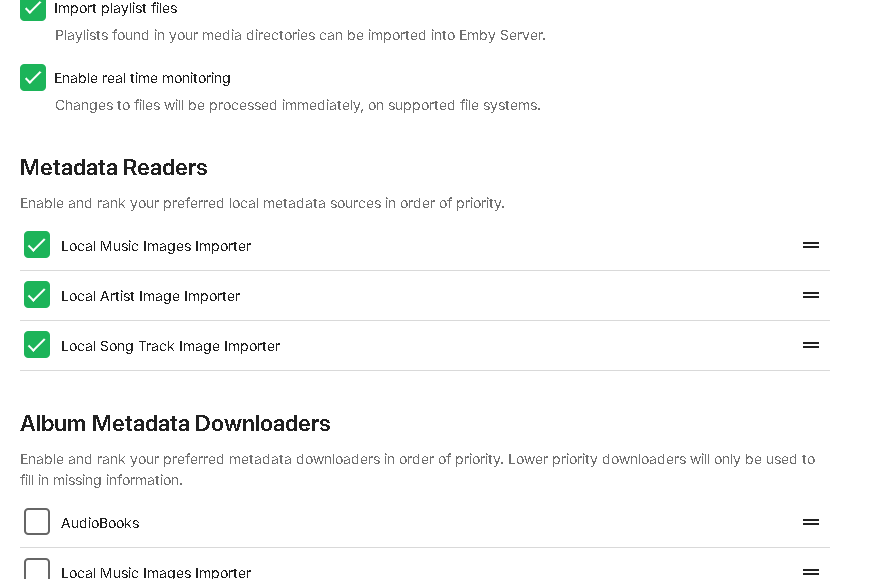
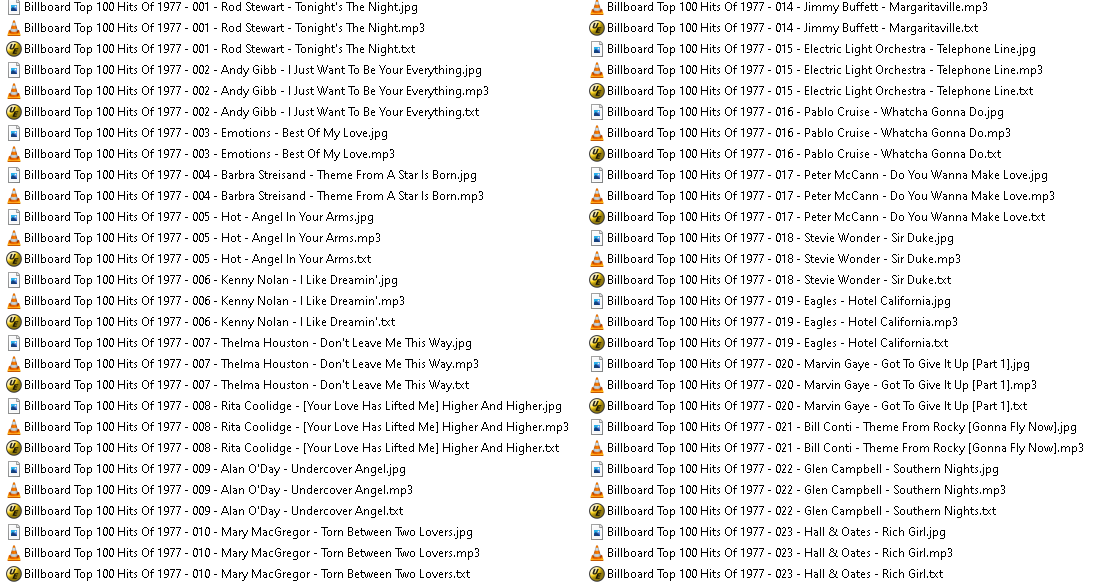
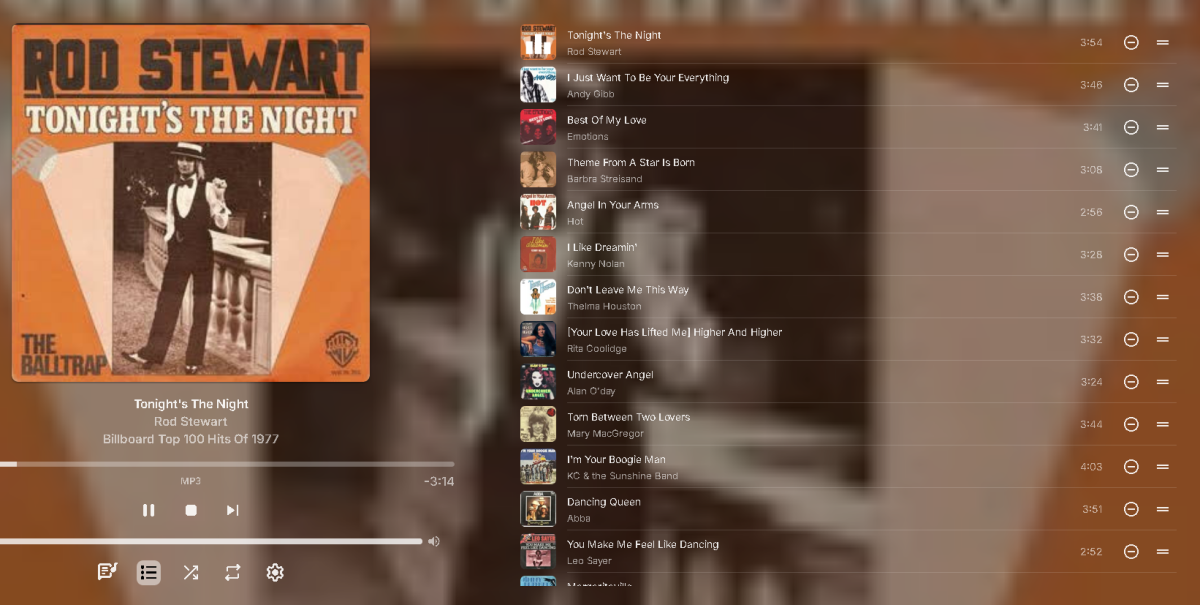
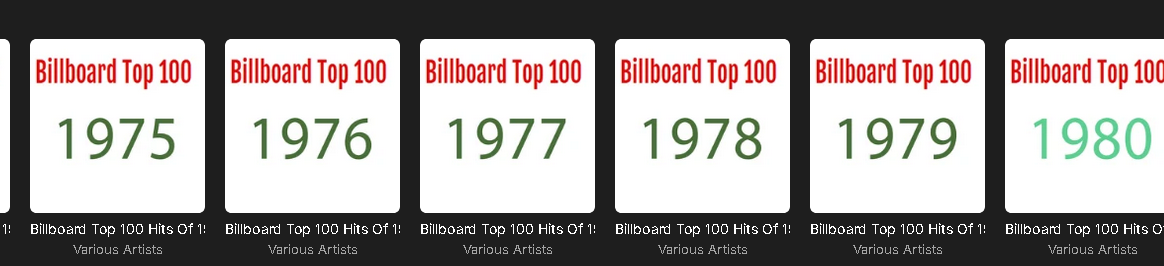
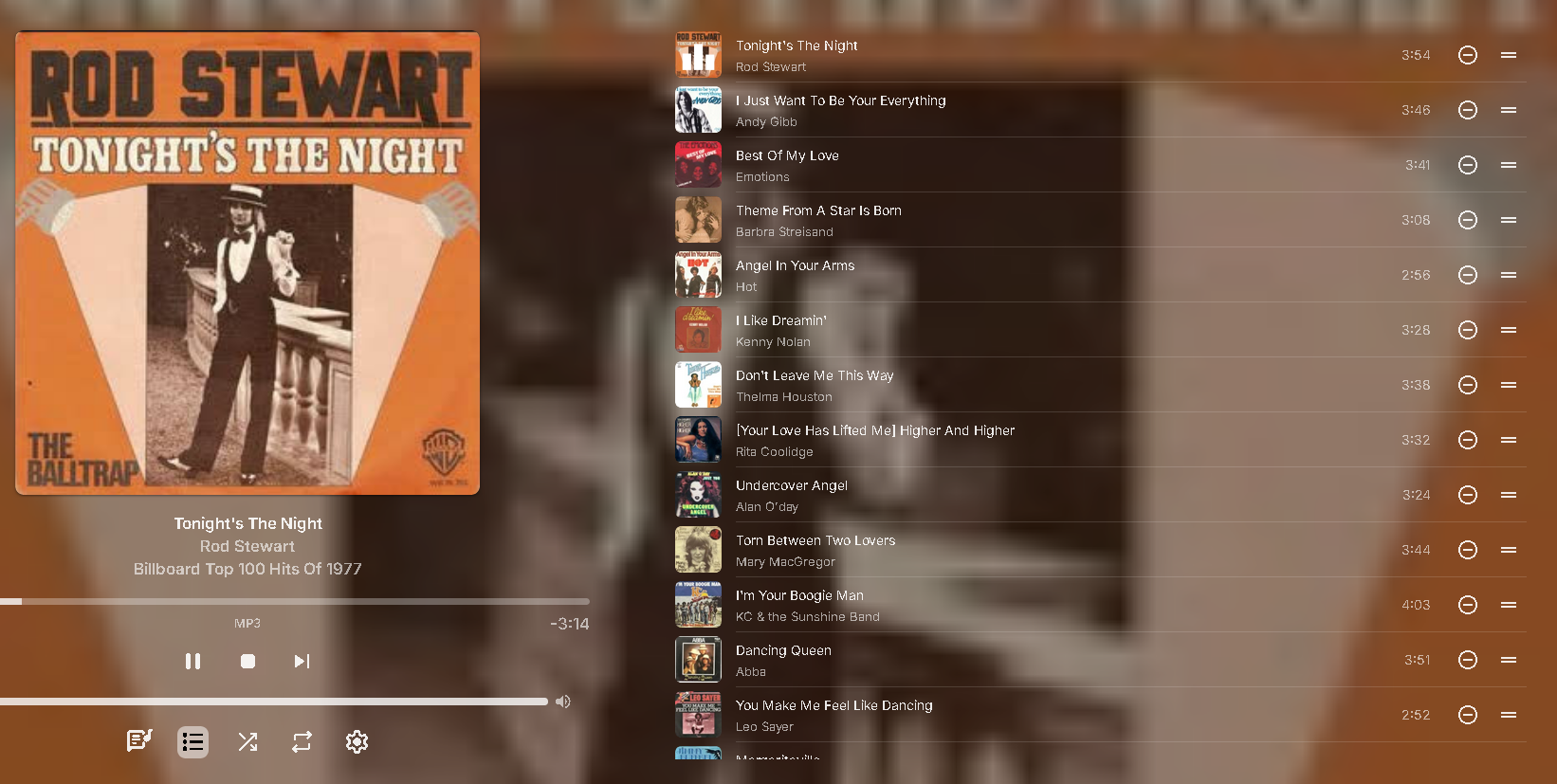
This is currently for testing purposes only - use at your own risk Use on a test library before even attempting to use on your main server. Plugin For Albums in their own folders ! Emby doesnt seem to be able to do this correctly , every track gets the first ones scanned embedded image. Unless i am doing it wrong. ?? But doing it this way it makes absolutely no difference what the embeded images are or what emby does or doesnt do, you are in control. Use it with realtime scanning then you dont have to mess with embys metadata editor, only to loose all the settings if i have to redo anything. You can drop an artist image in the folder or a track Image (I use singles cover images for the tracks- i like them that way) and it just adds it when RTM picks up a change, or a refresh metadata happens. So the EXAMPLE album cover is the 1977 one but the track covers are all different Its a local Metadata Reader , so it scans the local directory when any metadata refresh happens or library scan happens. Set settings in Library Edit screen. It doesnt use embeded images, it looks for an image with the same name as the track name I dont think I ever publically posted it before??? - probably because I never officially finished it! I cannot remember but I think they can be in subfolders too. Anyway it scans the local directories for song track covers, album covers and artist images. - nothing embeded! (supports jpg/gif/png/bmp/webp/tiff) Album covers will be Poster.jpg Cover.jpg Front.jpg folder.jpg 1.jpg 0.jpg f.jpg filename-front.jpg filename-poster.jpg R-xxxxxxxxxxxx.jpg // this one is for directly downloaded discogs R- filename images Artists are the same but name can be hyponated, underscored etc, probably can be in a sub folder. Rod Stewart.jpg Rod-Stewart.jpg Rod_Stewart.jpg Song Tracks Must be the same as the mp3 filename, but with a different extension Album cover backdrops are also supported by the plugin *-backdrop*.jpg *-background*.jpg *-landscape*.jpg *-fanart*.jpg backdrop*.jpg background*.jpg landscape*.jpg fanart*.jpg As it assigns the local image, beware that if you remove the image in emby it will probably remove the image from the drive (I cannot exactly remember if it does or not). I know it just returns a result to emby, so it probably depends on your settings within emby. if you are on windows and want to extract your embeded album art you can create a batch file and use ffmpeg (copy them both to the album directory and run it) Batch file contents - for jpg extract from mp3s for %%f in (*.mp3) do ffmpeg.exe -i "%%f" -an -vcodec copy "%%~nf.jpg" Anyway you are welcome to try it (as always with my plugins - try at your own risk) If you do try it, create a test library first becuase I have not tested the Album backdrops work correctly! - they should... Still to do... whenever I can be bothered. Make a config screen so you can dissable the logging - sorry its just on for now! LocalAlbumCoverImporter.zip Fixed Artist Import Throwing Errors into Emby Main log, and now only scans the current directory (test code was looking in all directories that the artist existed on tracks) LocalAlbumCoverImporter-12.09.2024.zip
 1 point
 -
Hello RafaelC2, ** This is an auto reply ** Please wait for someone from staff support or our members to reply to you. It's recommended to provide more info, as it explain in this thread: Thank you. Emby Team1 point
-
There really is no need to keep mkvtoolnix updated - the only reason the Plugin even has a check on the version is because a certain version broke MKV files (generally, nothing to do with the plugin) and thus we needed to ensure that version was not used. As long as mkvpropedit can update the MKV files, ANY version can be used - so if you have a working version - then just leave it be - there is no need to have the latest and greatest version - the plugin will not care ..1 point
-
You probably won't achieve anything with that. If I were you, I'd take another look at the thread containing the MediaInfo topic. @rbjtech is much more open to such things than others.1 point
-
Unfortunately not, there may be certain skins that can display this, but unfortunately not with this one. I wouldn't know how to implement this either. Adapting this skin to 4K (or even 2K) was enough of a challenge. But everything else is beyond my knowledge. I once asked @rbjtech to somehow integrate this information into the video description with MediaInfo. Unfortunately that got lost.1 point
-
Thanks! In my case, this is just for movies. I'll give it a closer look and test again.1 point
-
Hi, Thanks for updating the skin, @Teddyknuddel I've been setting up an AM6B Plus with CoreELEC (21.1.1 cpm build) for testing. Together with the next gen add-on, this seems to work good with my emby server. One question though. I haven't used Kodi in along time, so this might not actually be a skin question but a Kodi limitation. Is there a way to have options for video version, audio and subtitle selection on the actual video information page (like one can do in emby's clients), before starting playback? Thanks!1 point
-
Both plugin versions (10.X and 11.X) supports multiversion. 10.X will offer the version selection on playback start, while 11.X supports Kodi's "new" multiversion selection (for movies). For episodes and musicvideos is still the classic method used as Kodi does not support it.1 point
-
Not familiar with that particular model, but based on your screenshot it needs to be amended IMHO: External Source IP Address: Blank External port number: 8096-8096 External source port number: Blank See how does that compare.
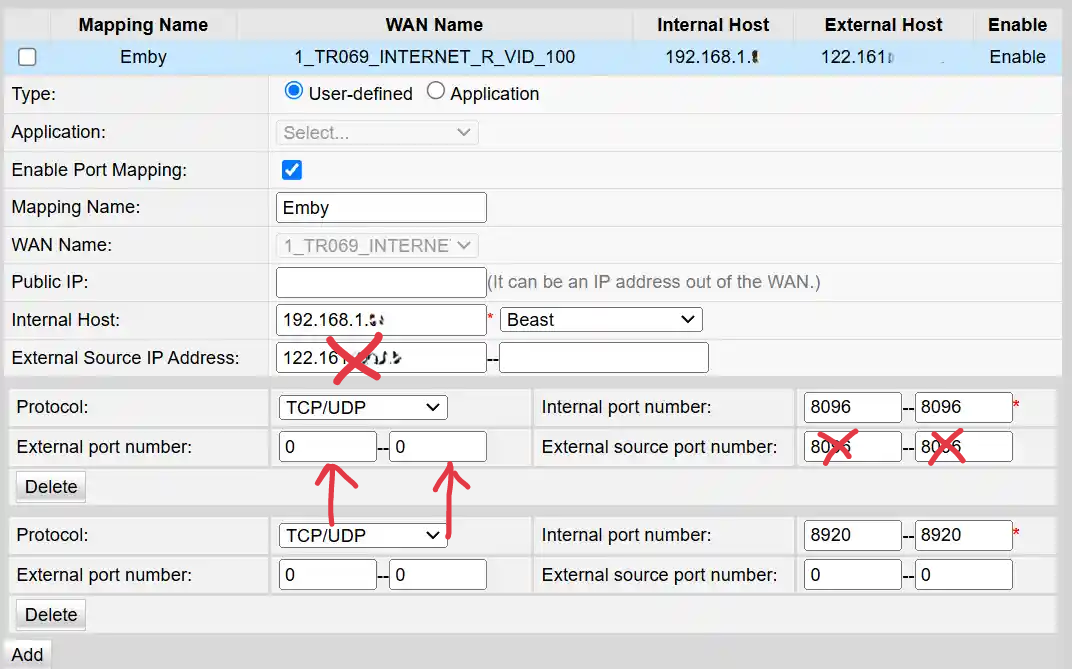 1 point
 -
Is it working now, if so happy to have helped1 point
-
Lolololololol... You are absolutely right. Perhaps the only setting in Emby where that's the case, but you are correct - I didn't read the settings screen closely enough. Thanks!1 point
-
If I remember correct, library select is exclude, Not include.1 point
-
While the online/stream trailers are being worked out, maybe there is some room for improvement on the local trailers using Cinema Intros. Specifically for trailers for new and upcoming Movies. Movies that are not in the library, as the way I understand it the local trailers are for movies in the library and must match the movie title name. For new and upcoming movies, and trailers downloaded locally, maybe add a section similar to Intros but with the option to play x amount of them since intros plays only one random file from the folder.1 point
-
Some apps, such as the new Windows app have Play buttons / icons in certain display modes, such as Auto or Desktop - Please make these optional so as to avoid accidental playing of said items. This should perhaps be extended to the other buttons - tick, heart etc.
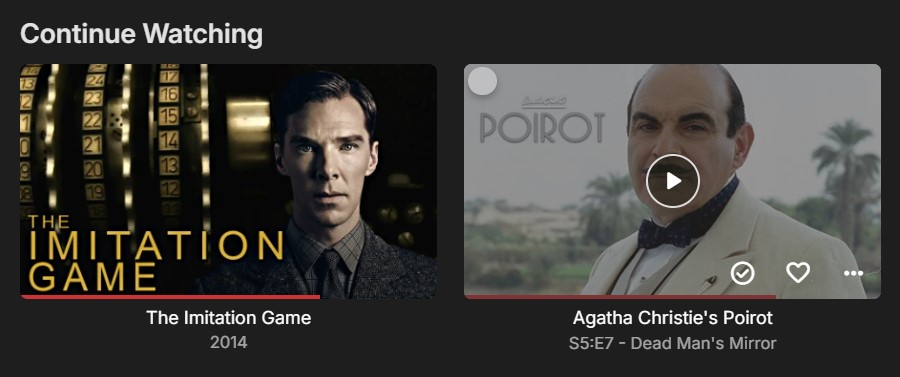 1 point
 -
Done a little testing from remote devices at different locations. Crappy low powered Android box - 1080 20Mbps Android phone - chooses highest Samsung TV - 1080 - 6Mbps Browsers - choose highest no matter what browse, computer or phone. Don't know if it's of any help but thought I might as well post it here when I had tested it anyway.1 point
-
Windows Theme The new Windows app includes a new and exclusive theme: "Windows" WinTheme Overview.mp4 Features Fully adheres to the latest Windows design guidelines: https://learn.microsoft.com/en-us/windows/apps/design/ Uses outlined icons Uses the "Segoe UI Variable" font Precisely resembles Windows UI elements down to the pixel level Precisely resembles Windws UI coloring and dynamically adapts to changes at the OS level Follows Windows theme settings for applications (light/dark) Follows Windows accent color setting Allows overriding the Windows theme (light/dark) for the app specifically Uses original Windows application background materials On Windows 11 and later: Mica Material On Windows 10: Background Acrylic Supports Windows High Contrast Themes Adaptive logo display (left top) Large when sidebar visible Icon-only when sidebar is minimized Small when no sidebar and during video playback to save screen estate Rotating icon while wait cursor (spinner) is shown Dual Color Mode When light theme is active and the app changes to dark background for showing backdrops, the sidebar remains to have a light background Dropdown popups are positioned according to Windows guidelines View options and filters are shown as panel (right aligned) rathern than as dialogs In-app dialogs have the same appearance like Windows dialogs Cards are shown as integral elements (all captions are inside the card borders) Color intensity effect for card hovering Intuiitive control of sidebar appearance (show, hide, mini) Improved keyboard navigation with focus indicators following Windows guidelines Brightness attentuation setting in theme settings Rounded-corner appearance for main layout and video playback in windowed mode (like latest MS Edge browser) How to... ...enable the Windows Theme? Go to Settings (Gear icon), in the left sidebar choose "Display", find setting "Theme" and select "Windows" ...override the Windows (dark/light) theme for this app only? Go to Settings (Gear icon), in the left sidebar choose "Display", find setting "Theme" and make sure that "Windows" is select. Then hit the "Theme Settings" buttons below and use the options to select an override mode Note: Changing this setting requires a restart of the app Applies To Windows App (exclusively)1 point
-
Thought I'd just jump in here, currently running Jellyfin on Ubuntu 22.04 in Docker on a Rock5C Lite (RK3582 converted to RK3588S2 by unlocking the disabled cores & GPU) with HWA using the VPU and I'm transcoding Interstellar from 4K HEVC at 68 FPS with subs on. FFMPEG CPU usage looks to be averaging 20-30% would love to see some more work here on the RK3588 as this thing looks like an absolute powerhouse for the price & power usage. I think I've attached the correct FFMPEG logs however if it's not, just point me in the right direction & I'm happy to get whatever. FFmpeg.Transcode-2024-09-07_16-06-48_65b250eabcbe17a66b42759ae8b8a72f_4fbb6401.log.txt
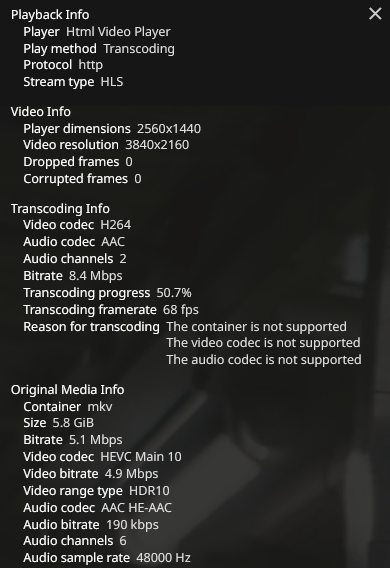
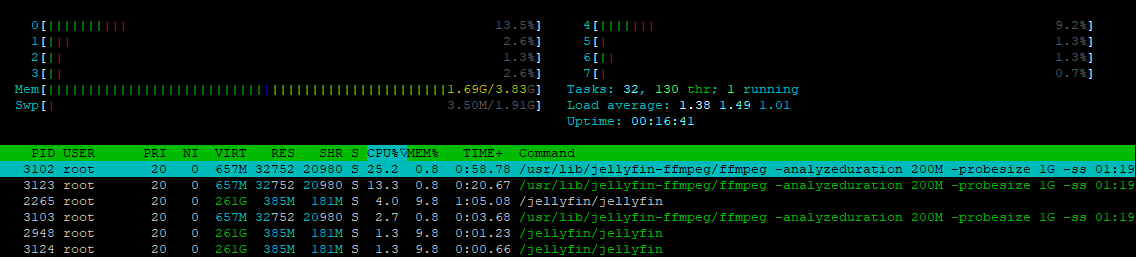 1 point
 -
There is 2 things that are frustrating about the blog announcements. 1. They rarely happen. 2. You guys repeatedly reply as if you will get right on it and don't. I've brought it up numerous times over the years and get the exact same response above. The last blog for the app was Feb 2023. I love Emby but the lack of the release notes is annoying. Especially when there is precedent for removing features. I'm at the point now where I have to keep ignoring the spam to update the app on the TV because I don't know what it's going to do. I usually wait a week to make sure no obvious issues are brought up on the forums. The worst part is I come across as the prick complaining about it when it's something that should just happen by default. I know I'm wasting my time but I felt like a rant. And I understand the admin replying on here may have no control over it and are just placating the masses but if there is some higher up cracking the whip so hard you don't have time to post an update blog, let them know I hope they step on some lego.1 point
-
Please add this feature, I beg you. Original airdate order is such a pain with animated shows.1 point
-
I would love the ability to allow a user to create collections (and edit item metadata and images). I would call those power-user features where a user can be allowed to edit but not delete nor have access to the full admin console. In my use case, I am the admin and I spend a good deal of time making collections or editing metadata for home home movies and video clips for which metadata is not available. For security reasons I would like to create a user who is able to create collections and do those things remotely, but restrict most of sensitive admin tasks to LAN only. Right now it's all or nothing. Either a user has access to the entire admin console, or they can't create collections, update metadata, or replace a poster image on a playlist they just made.1 point
-
i dont think this 2fa is directed towards the end users. example the grandparents or other users with no real admin access. from what i understand only the admin accounts should have 2fa. i personally dont care much if someone hacks one of my users and can watch some shows. my users have no admin rights and cant edit or delete anything. if i notice weird things as admin i can force change passes.1 point
-
@SamES The alphabetical quick search feature was actually my next request to ya, but I see it's already posted here.. I am including an image of what I think this thread is talking about & what I'm talking about anyway from the Emby web version. Its not a show-stopper for me since I push the use of Genres as the default movies tab (TYVM again for fixing btw, I can't wait for that update to go out), but this search method is still a nice feature to have. < Missing on Apple TV The other issue posted here (yeah its hard to follow two issues in one post) where titles don't load isn't that big of an big issue for me (local network anyway, I have not tested with an external connection). I have noticed scrolling down the movies list very fast fast pauses every few letters but only for a fraction of a second to populate more titles (for me / ATV 4&5th gen). I believe that's what is being talked about. But I've seen that on Roku too. I would think its just easier for the system to load a hand-full of titles as you scroll rather than all at once. When I use search prior to scrolling down my whole movies list it still finds movies such as "Zathura" prior to loading the full movies list for me anyway. That's just my experience with this SO-FAR anyway.
 1 point
 -
Under access of that user, untick device - all. And limit the access to what you want.1 point
-
Buenas serían tan amables y me ayudan a crear un usuario y una contraseña que la verdad llevo tiempo tratando y no soy capaz muchas gracias si me colaboran con eso1 point
-
It will definitely be optional. Part of this might also be the ability to keep future segments when you jump back and forward and have transcoding fill the gaps only. We'll have to see how well that works, though.1 point
-
I can add that we are in fact much closer to this than we were when this topic was started.1 point
-
I'd rather learn why it's happening. Where they are pointing to doesn't/shouldn't matter.1 point





















.thumb.png.1ddf135ad99a72646a26d671a28ffe35.png)

