
Leaderboard




Popular Content
Showing content with the highest reputation on 09/02/24 in Posts
-
Everyone, kindly be reminded that there's Forum Rules link at the footer of every forum page. We expect all members to adhere to those. Thanks. Closing this thread as continuing it purely for the sake of an argument serves no purpose at all.2 points
-
Hi, I like manage my games (EMU, VN etc.) in Emby, the look and feel is great, especially I also have lots of Anime, and Games and Anime combine really well in the same server. GameBrowser plugin is great in separating GameSystems, but has no support for using local metadata file. So recently I've already updated NfoMetadata plugin to be able to read from a local game.nfo file, which is also helpful to be able to use external scrappers. But I've noticed that in Emby Games Metadata does not contain person information, such as game director, artists, writers, voice actors etc. Looking through decompiled source, it appears Game.SupportsPeople = false. I'd like a way to modify this to true through an API of some sort in the plugin. If that's not possible then could you please change this in MediaBrowser.Controller.Entities.Game? change it to true. I know Emby is not initially designed to work with games, but at least it works, and works great. So I'd like to contribute to the development of Game features to make it a great Game Management tool. Thanks!1 point
-
-= PLEASE UP VOTE & PROMOTE THIS REQUEST IF YOU WOULD LIKE THIS FEATURE =- DO THIS BY CLICKING THE "LIKE" BUTTON ON THIS POST REQUEST: Properly pool multiple M3u IPTV sources, so when adding more than one with the exact same M3u emby treats them as one source with however many "Concurrent Streams" you set for each. https://emby.media/community/index.php?/topic/63725-multiple-iptv-tuners-double-channels/?p=636718 https://emby.media/community/index.php?/topic/59607-duplicate-channels-one-tuner/?p=607031 https://emby.media/community/index.php?/topic/57420-multiple-identical-m3u-tuners-without-duplicate-channels/?p=560949 Basically once M3u #1 has used all 5 of its tuners, I then need to start using the login info that is within M3u #2... once those 5 tuners are used (now all 10 tuners), then emby issues "no tuners available". This is how emby treats HDhomeruns today, so it can't be to difficult. @@snodrog742 @@manolodf @@robrhedrick @@cayars1 point
-
The default sort order is set to 'Folders'. I would prefer to have all libraries I select to default to release date. I know I can manually set it, but I have to do that for every folder in the library. I would like to see the ability to have it automatically set the default sort order for all new folders I create.1 point
-
Pretty simple suggestion. I have multiple users for my Emby server. If I want to do continuous maintenance on the media, I have to tell everyone. some of them are harder to reach than others ( i.e. no Facebook or Skype chat etc. ) It would be great if say... on the admin panel, I could hit a check box that enables 'maintenance mode', where the server still runs does everything as normal, but instead of the login screen it displays a maintenance page saying the server is unavailable. Even better if I were able to directly put a reason in a text box that would then display on the login screen as well. Not really sure what others would think of this, but for me it would be quite helpful. mostly if I want to make sure no one is trying to access content I know won't work until I've done a full library scan again. Thanks for reading. -Kyle1 point
-
Hi, Since I am using more and more TMDb, (since tvdb is more and more a mess), I am missing a very important feature. tvdb had the feature of grouping stuff into aired, DVD and absolute, which is supported by emby. TMDb had also this feature. See this example for "La casa de papel" (Money Heist, Haus des Geldes): The Original Order is allways the "aired order" of the original country. "La casa de papel" was originaly released by "Antena 3" and was taken over by Netflix, which results in different episodes ordering, which is a mess. They solved it in episode grouping. This feature is missing from emby, but it's integrated in their API and is allready supported in other apps, like kodi. At least, Banana a TMDb Mod claims it, that it's supported by Kodi: https://www.themoviedb.org/tv/71446-la-casa-de-papel/discuss/5e7032d84f9a99001152704f?page=1#5eb76872ca7ec6001f7c53cb Is it possible to add this feature into emby? It is the last scraping feature, I really really miss for TMDb on emby. It adds much flexibility and is overall a much better solution, than on tvdb with their aired, dvd and absolute order. Another great example is Dragonball Super: As you see, it adds much more flexibility for different regions over the world. It's in my own eyes a must have for emby!

 1 point
 -
Hi there, Currently testing Emby and have to say: Good Alternative to Plex. There are two things im missing: 1: Photo Timeline. A View of all photos not sorted by folders. A Scrollable Timeline would to navigate. 2: Show Photos by specific days: In Amazon photos i have a great function, that changed my behaviour for watching photos: Watch photos that were taken exactly 1 year ago or 2 or 3 or.... Both Requests offer the ability to not only browse photos by browsing folders. You get photo recommendations. Whats better than watching photos of your kids 3 years ago? From my understanding it could be done by making a Select Statement each day that dynamically updates the year folders. I think it would be Great!1 point
-
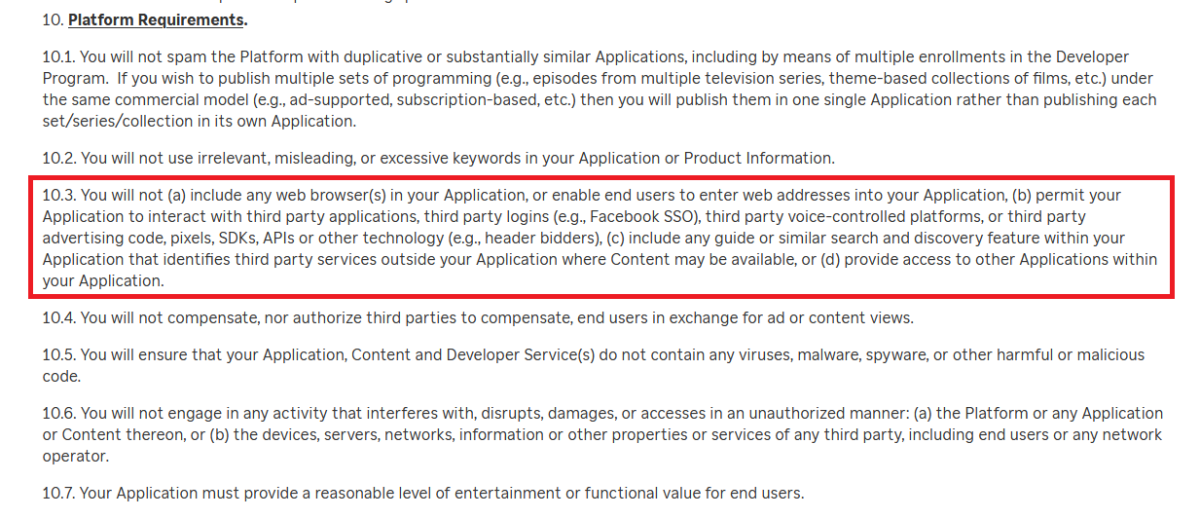
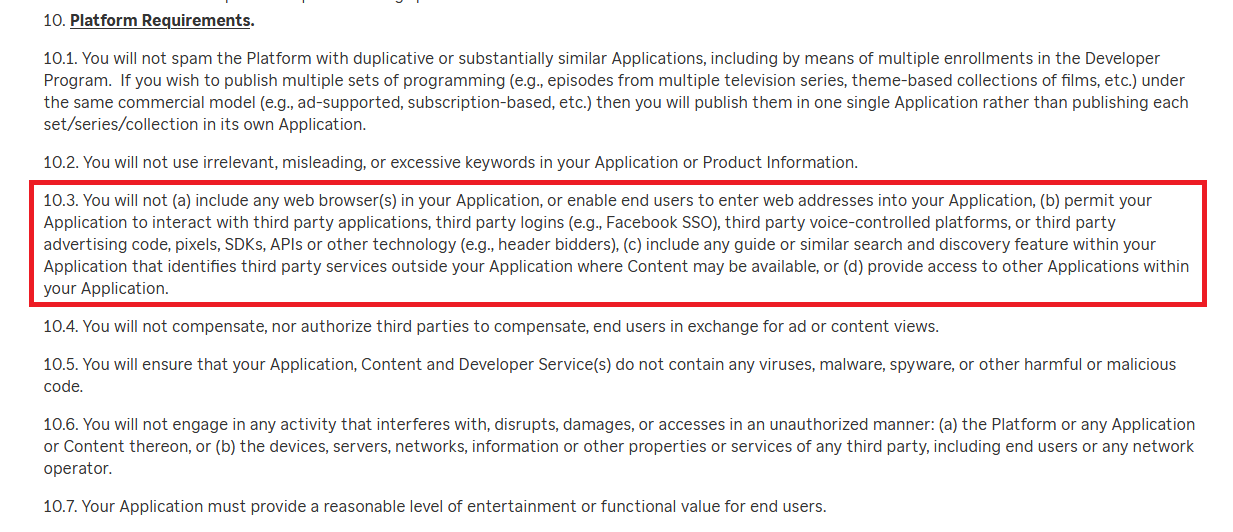
You can still download local trailers on Roku and these will show up. In regards to trailer links there are 2 issues which prevent this happening on the Roku. 1) These are YouTube trailer links. 2) YouTube TOS states you must embed their specific YouTube player and it plays back their trailers. On the Roku you cannot ...embed another video player. ...launch another channel from within a channel. Since we can neither embed their player or launch into their YouTube app on Roku we cannot make use of these types of links in the Roku app therefore it does not show the trailer button when only links are shown. https://developer.roku.com/docs/developer-program/certification/certification.md https://docs.roku.com/published/developerdistribution/en/us

 1 point
 -
This is amazing that on a device I own I can't install persistently an application.... If they disallow external contribution after 5 years and automatically remove side-load after 30 days, that's clearly indirect way to force renew TV I hate rules that clearly force consommation and have no respect to eco-design. Thanks for the information.1 point
-
Depends on the age of the TV as they will not allow support for devices over 5 years old. Then this requires you to side-load every 30 days as Samsung requires the side-loaded install to expire. So to a point it can be easier to just attact an alternate device to the tv.1 point
-
Every app i use on shield to playback your sample shows DTS:X on my denon x4500.1 point
-
I'm more familiar with openssl for this but if it reported the command completed successfully, you likely have a valid certificate. Dumping my own with certutil I can see details under "Begin Nesting Level 1" that mention the common name of my certificate. Can try with openssl like this and I think even with no password it will still ask for one, just press enter. It should dump the certificate and then dump the private key. You can also use openssl to verify if the port is properly listening and providing the certificate when you connect to it. You can do this from a remote machine using the IP or locally with localhost.1 point
-
That might be the problem: the metadata saver was enabled even though no metadata downloaders and fetchers were enabled. Thanks, I'll retest later.1 point
-
Yes, at some point only for Telesync rubbish with a maximum two-channel soundtrack. I have send it over PM1 point
-
Considering the Universal App has even less 'AV Enthusiast' functionality than the old AndroidTV App - I really don't see much of a future for Emby in this space. They are all about a minimal viable product for everyone (hence Universal), not fully functional specialist apps.1 point
-
Hi, thanks for following up !1 point
-
HI, Emby Server looks at the date modified timestamp of the files, as well as nfo files if you have those.1 point
-
For your informati9n im not clueless nor a toddler, and also you are the malicious one calling people names and stuff you honestly think you're better than everyone else so you have to assert dominance like you're a dog or soemthing. Instead of talking down to people like their soemthing on your shoes why don't you try and help people it might work in your favor tbh. Smh1 point
-
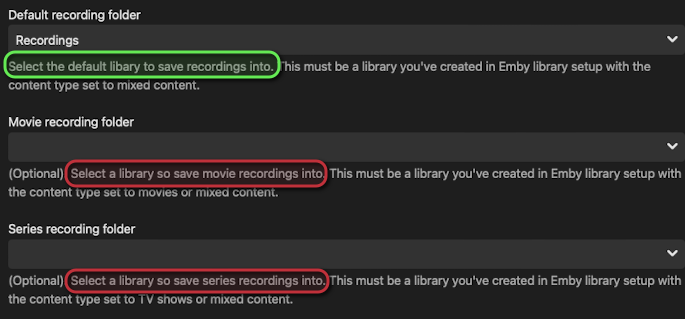
Obviously not a big deal here but I noticed a misspelling on the settings page for Live TV. Select a library so save {movie,series} recordings into. See screenshot. Thanks
 1 point
 -
As small amount of collection covers (currently RT, Oscars, Globes, Metacritic, Palme D'Or, CC) plus a GIMP template to do more by yourself can be found here.1 point
-
Yes, a bit of information would go a long way. At this point, it should be considered a bug and not a missing feature, since it makes a bad user experience.1 point
-
Thanks @GrimReaper. In that case my feature request is for the universal app, viewed on a tv. Apologies all for any confusion.1 point
-
Um, yeah. Future plans since at least 2017. This will never be implemented so just be honest.1 point
-
The Emby database is not an independent component. This means that the database in itself does not guarantee consistency. A part of the logic for this is in the application code and only that code is able to determine and ensure that retrieved data is valid and consistent. The WAL logic alone does not suffice, and that's why multi-process access to the database cannot be allowed. For the case when we would allow this, I have a pretty clear picture of the things that people would start trying to do and all the bad things that would happen as a consequence. And all those bad things would land right on our table - not on the table of those who have caused it. The really bad things would be of course when changes are being made, but even reads at a wrong point in time can cause trouble, so that's some of the reasons why we don't allow concurrent access. You have two options: Create a plugin and access the DB from that plugin (inside the Emby Server process) Create a point-in-time snapshot and work with that (taking the risk of inconsistency) By "snapshot", I mean to simply copy the database file. On Windows, that's possible even while Emby is running. I have never tried on Linux, but it should be working in the same way.1 point
-
You'll find a lot related discussions around the forum, with users advocating for or against same - personally, I'm not inclined towards it and I like the distinction different apps bring; not all features are possible/feasible on all platforms and I believe that no platform should be crippled on account that something is not achievable on some other, i.e. app development should play to platforms' strength, not on finding lowest possible denominator that'll work across all of them. And I hate unified design that Emby is so aggressively pushing into every app, I don't want same experience sitting in front of my PC and consuming my media in front of a TV; I can suffer through Web app UI as I CSS-ed the sh*t out of it, but I detest seeing same web wrapper/quasi-Apple design on my TV. Though I understand there are users with contrary views, and that is fully legit. But, those are all personal stances, I'm just a regular user as you are and have zero input on design language, we'll see what the future brings. Currently, it doesn't look bright as far as I am concerned (or it looks too bright, depends how you look at it).1 point
-
I'll leave Eric @ebrto give the official reason but on the new version SE9 (Android 11) permission is also required from the App to allow access to the os shares. Emby didn't want this as something on the App 'requirements' in the store when the vast majority of users would never use it. Also remember the replacement Android App has no such direct play option at all. All in all, the market for high end playback has diminished with emby and the only client that seems to 'care' about codecs, stats for nerds, passthrough etc is AndroidTv and that is going - mind you, they said that 4 years ago .. and still its the go to Android and FireTv app ... frustrating as I don't want to use Kodi, its just not family friendly and the JF Android App is very weak but at least its open source.1 point
-
Learn more about Emby for Amazon Alexa. Learn more about Emby for Google Home. View the full article1 point
-
As suggested by @ebr I have split my original request to allow better monitoring of interest and progress. The original request is here https://emby.media/c...brary-overhaul/ If you are interested please like the post. I always wanted to have this feature! This is something that was offered by Flickr. It would use the coordinates where the picture was taken stored in the EXIF and display the picture in the world map. I think that this was a bit specific in the past because we needed to have a GPS module tied to the camera but now every smartphone does this out of the box (without even asking your permission). Here is an example from Flickr where each point is a picture that you can display when clicking on the point:1 point
-
Hi Luke, while you are at it, could you please also add support for collections on Games. It seems natural to me, game often comes in collections, Final Fantasy series, COD etc. Right now I have to manually add a tag "Collection: Final Fantasy", in order to see all the games in the same collection. It would be better if Collections have a separate entry in the Game folder, just like movies and TVs. Thank you very much!1 point
-
Certainly possible yes.1 point
-
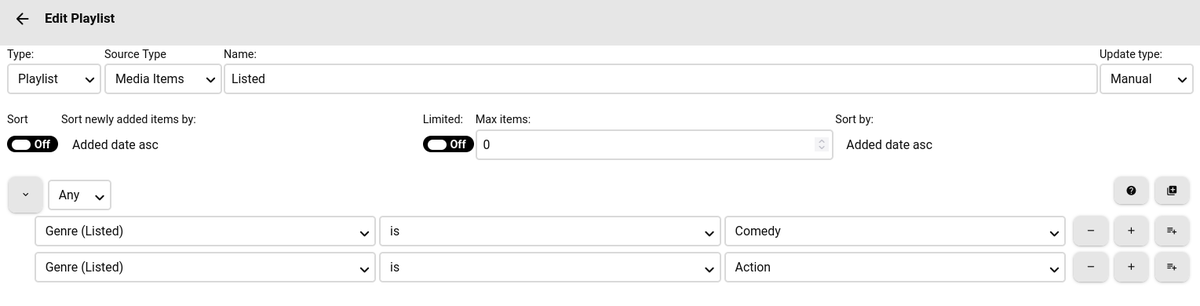
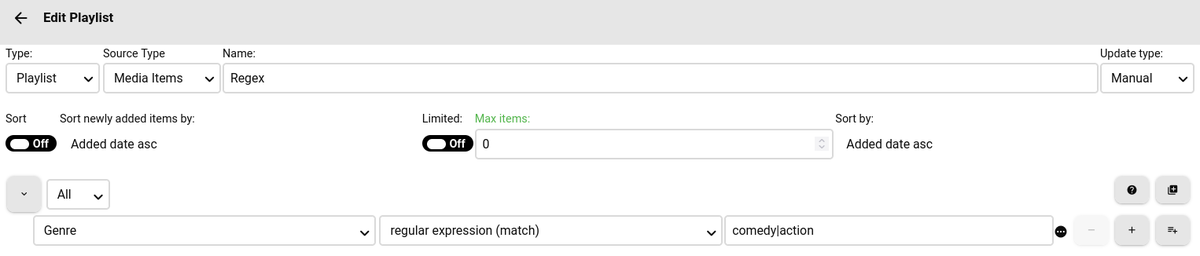
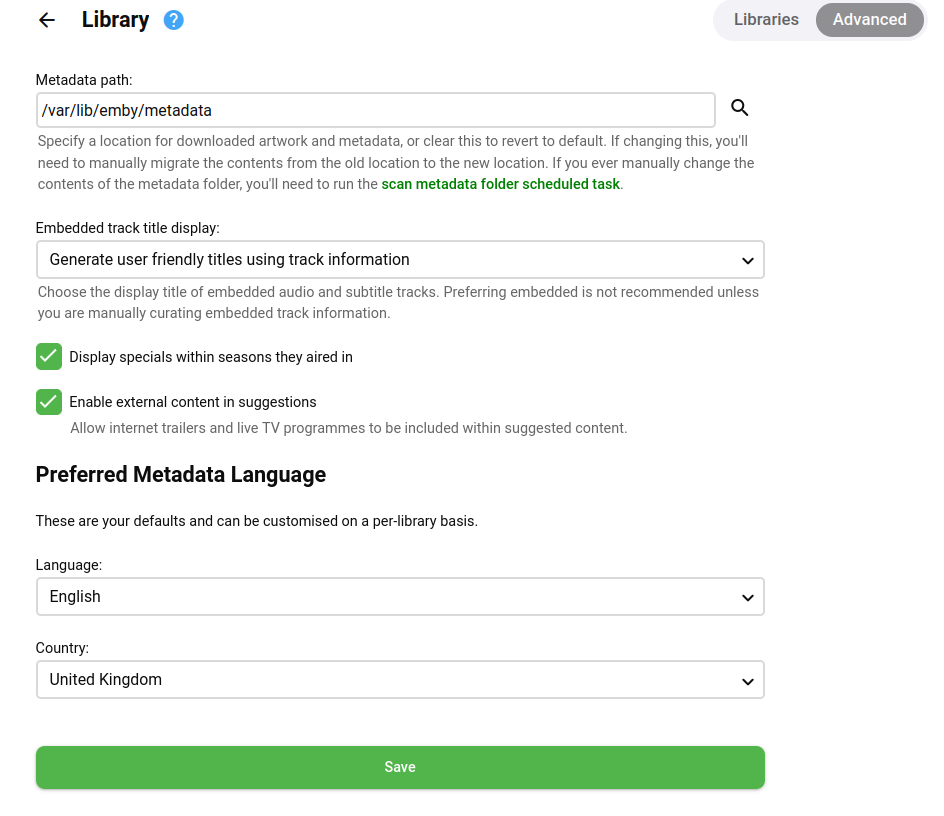
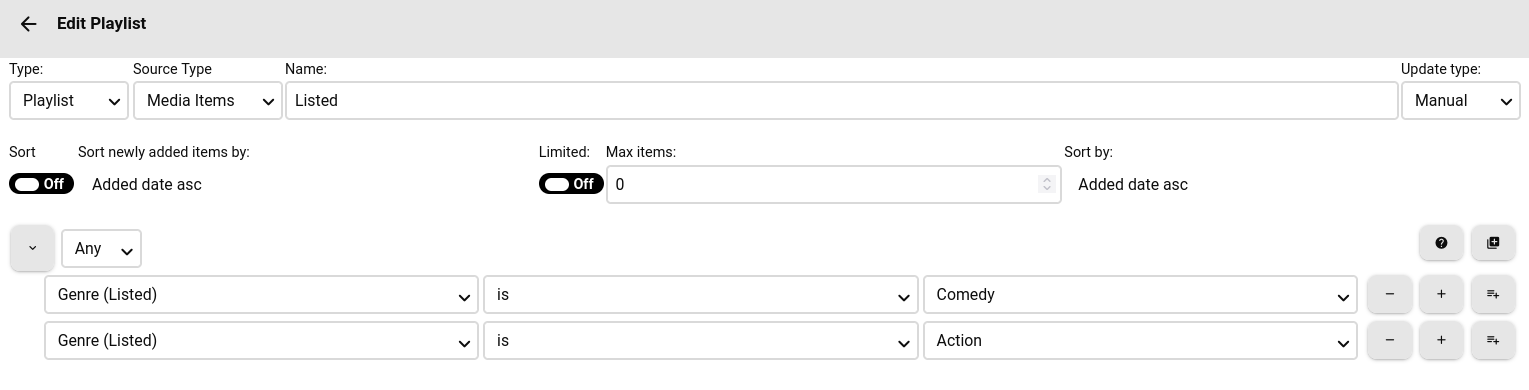
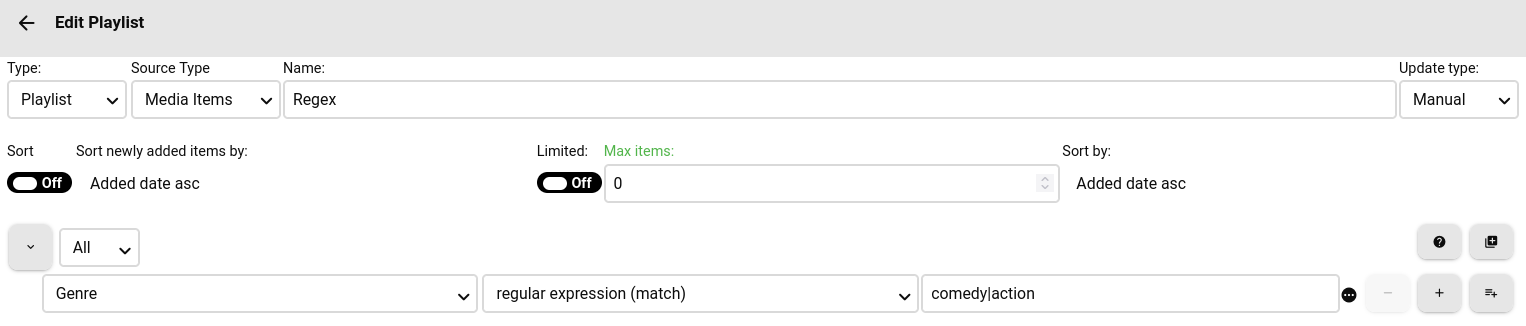
Hey @smernt, So for the genre you have to options.Regex or Listed. Here are the examples. Listed (Could also use text, Listed to reads of a list of Genre that is already in the system). ANY group = OR Or Regex As far as the parental rating is concerned, Smart Playlist uses the underlying Emby system to get the ratings, make sure that you Library is set to the right Country. So Settings -> Library -> Advanced. Can you check that. Is your metadata tagged correctly in Emby if the country code is not UK?
 1 point
 -
So this is where a regular expression comes to the rescue. I don't know exactly how @ShaneP implemented it, but here's some pseudocode: //^G|PG$// the "|" is an "or" pipe. The beginning of line operator "^" and end of line operator "$" aren't strictly necessary, when you're dealing with single-line strings.1 point
-
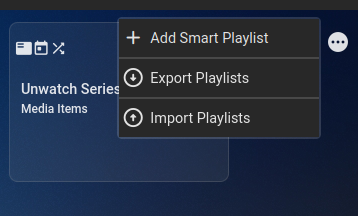
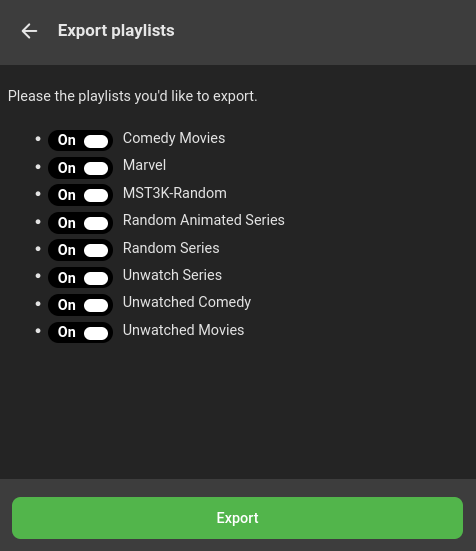
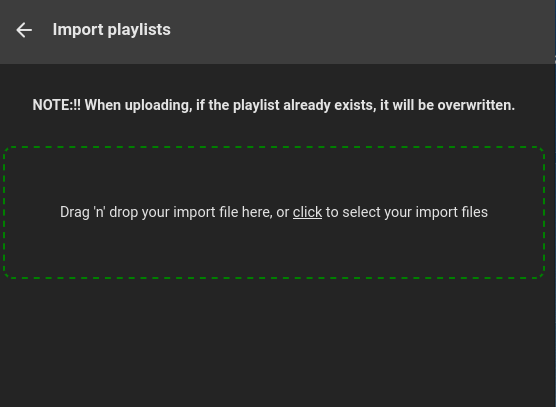
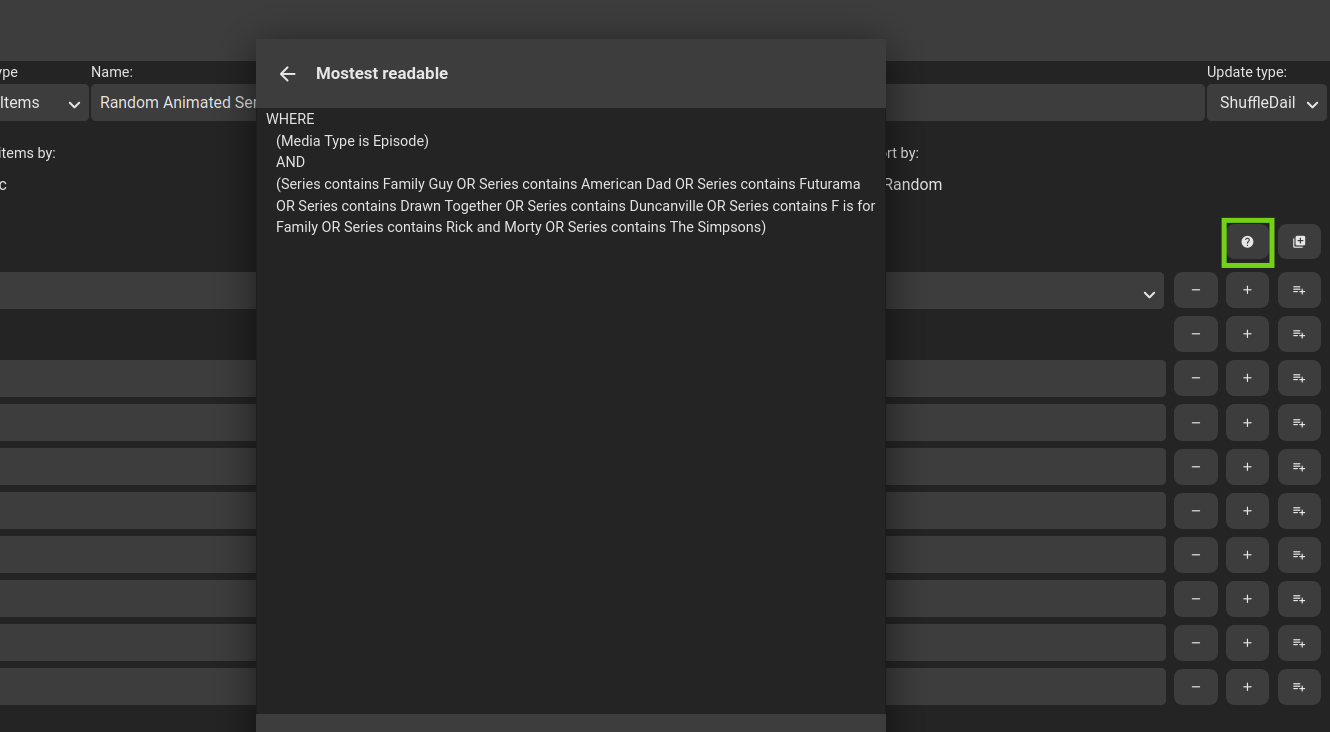
Version 2.4.0.1 Feature Added Import/Export functionality allowing you to backup and restore playlists. Added Regular Expression (Match and No Match) Operators for string values Added 'Overview' Criteria Added Readable to rules tree Added playlist load failure reason to main Emby Log. Added 'Smart Playlist (Execute)' Source item. This will first execute the playlist before reading the items from it. Added More logging around errors and error handling. Bug Changed the way log files are transferred. Thanks for testing! Import/Export. Remove single 'Add' button and created a hover over menu on the right hand side . Regular expressions for string values. Uses underling C# Regex engine, so ensure regex is C# standard. Also popup menu with Regex options. Readable rules tree, gives you a (hopefully) clearer view of your rules tree. Playlist does not need to be saved to view. New "Source Type" Smart Playlist (Execute). This will show a list of smart playlists that are NOT live mode. The idea is that if the 'Source type' is used, that the underlying Smart Playlist will execute before the referencing playlist and then get the items from that source, so they are up-to-date. (This will appear in the logs as triggered by 'LinkedAsSource') SmartPlaylist-2.4.0.1.zip

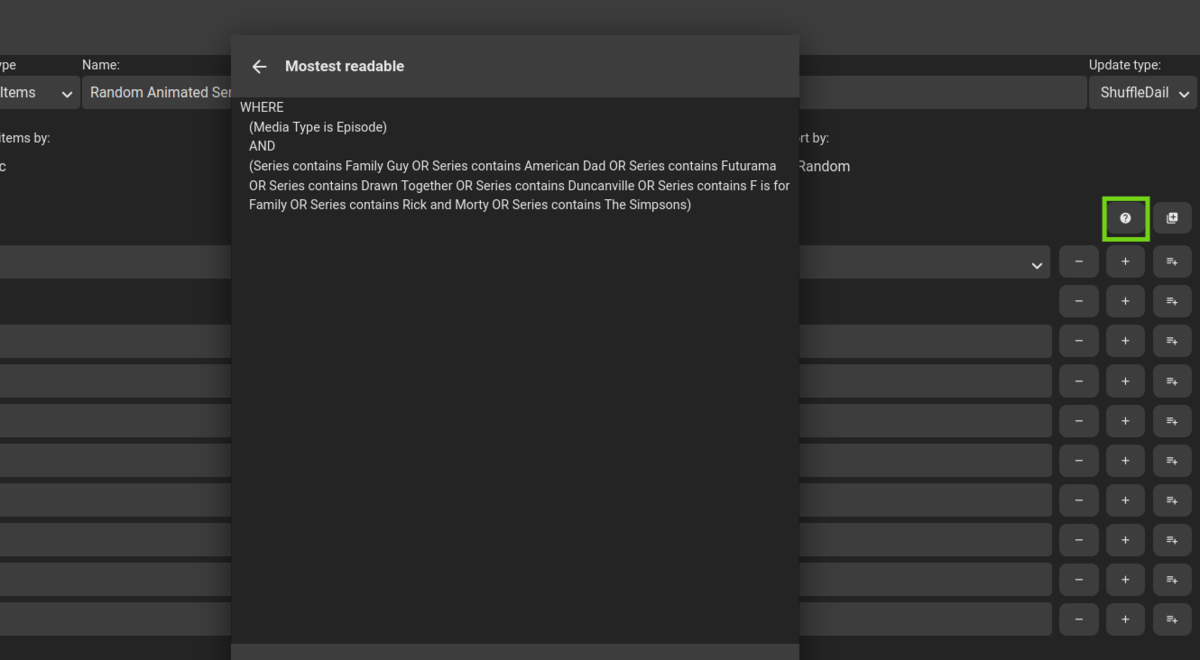 1 point
 -
Ahh this makes sense… let me check the metadata to see if I can access it. If so I’ll add the addition criteria. UPDATE: Was able to get the overview metadata, new criteria field 'Overview' in next version.1 point
-
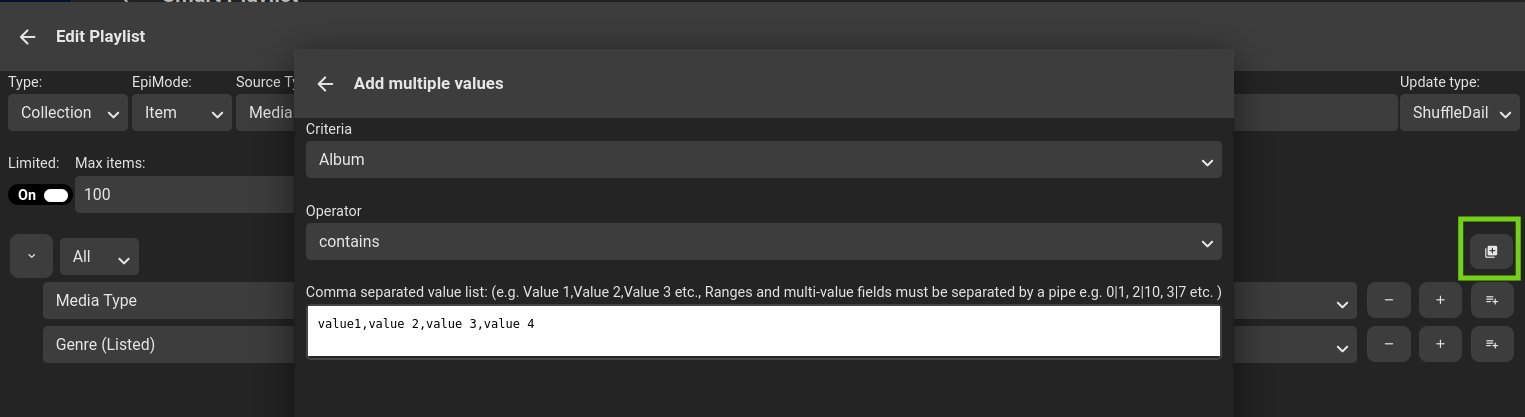
Version 2.4.0.0 Feature Added verbose log to info section. Added link to open up generated playlist. General optimization and clean up. Added Sort (Then Bys) to Sort Jobs. Added Sorting to source list. Added Multiple Add functionality to PlaylistEditor. Added user based criteria for following user metadata fields: Favorite LastPlayed Play Count Played Bug If any playlists backend files are corrupt, skips loading the playlist and moves the file to a *.failed file, and continues to load. Currently just crashes out with no notification. Fixed bug when source was playlist or collection not picking up source items. As always, code is https://github.com/ShanePe/Emby.SmartPlaylist.Plugin/releases Happy Testing Oh and let me know if I have missed anything. Verbose log: Detail -> Log button (Only if a log file exists, log is cleaned on ever playlist run, each playlist has it's own log) Link: Any 'user related' fields will now have a user selector: Sort Then By: Sort Job Multiple Add functionality -> Editor SmartPlaylist-2.4.0.0.zip

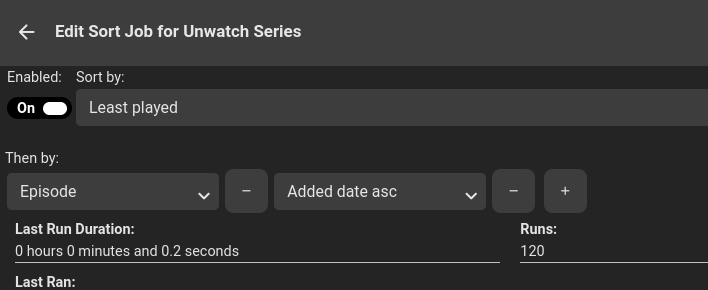
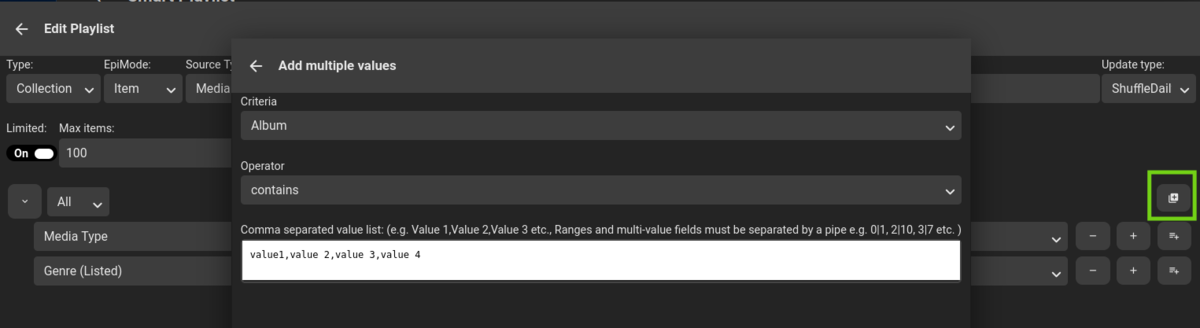
 1 point
 -
Hey @koopa8840, the descriptions are in the changes logs, but a quick recap is: Genre: Free text field where the item (i.e. episode) genre metadata field will be used for a match Genre (Listed): Listed will do the same thing, but instead of a free text field, it will give you a list of genres that are already in the system. Genre (Treecrawl): will walk up the change to find a match and if matched adds the item. So for example, lets say the series has the genre you want, it will look at the episode first, if no match, then it will look one level up at the season element, to see if the genre is tagged there, if not, it will then search on level up at the series, if the genre matches the item will then be added to the collection/playlist. Hey @Mossop, did you get this to work, as it should be as simple as coping the DLL and restarting, can you perhaps attach some logs and a bit more detail about your environment please. @Flintfamily Firstly glad you figured out the treecrawl, secondly, I have not reached out to them, perhaps log a feature request and we can try get votes on it. It's a real bummer and I spent ages trying to get this right. I'm just trying to find the time to finish up the new release, thanks everyone for your patience.1 point
-
Hey @deiniol39, If there is metadata for this, I can add the criteria. But I'll investigate where this data is stored and how it's related and will let you know. @thisismytrial It seems that you need to have multiple sorts here... i.e. sort by series then by episode, I'll see the overhead of adding this in the new sort job functionality. This might take awhile though @Ninko and @Tremas, thanks for finding a solution to this, I will see what I need to do to add this the the Emby official plugin list and that should make deployment allot easier. @Ninko Did you figure out why it's not finding your items? Can you have a look at the metadata for one item you expect to see and see if the 'Last Played' has the correct value? @horstepipe OH NO! This seems to be related to the old caching code which I might need to be revisited. We can get to the bottom of it and will make sure you don't have to start from scratch. Did you change a 'limit' on any of the playlists? I think I should also extend the old error handling to at least spit out a bit more detail of what playlist is failing. We can continue via DM to get to the bottom of this...1 point
-
Hey @gingerninja, I think I know what is happening here, the way "Live" mode works is that when an item is added or changed an event is fired with the new item. the smart playlist will try collect a few of these events (As not to fire every time). So once the time has elapsed or the "queue" is full, it will process the items. So here's my suspicion with this, that the "newly" added items is only 1 item, it can't sort it. To resolve you could change your mode, Shuffle modes rebuild the entire list, or you could try out the new "Sort Job" functionality, where on a schedule the playlist would be sorted in the background. I might remove the "newly sort" option when selecting live mode in the next release, as it really doesn't make sense here. EDIT: Also "Live" mode will only run against items in the current playlist when selecting the "Execute" option in the UI as there are no "New Items" from the event. (Could explain the missing). I might also remove the execute option if live mode to avoid confusion.1 point
-
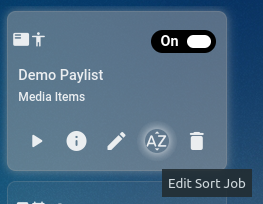
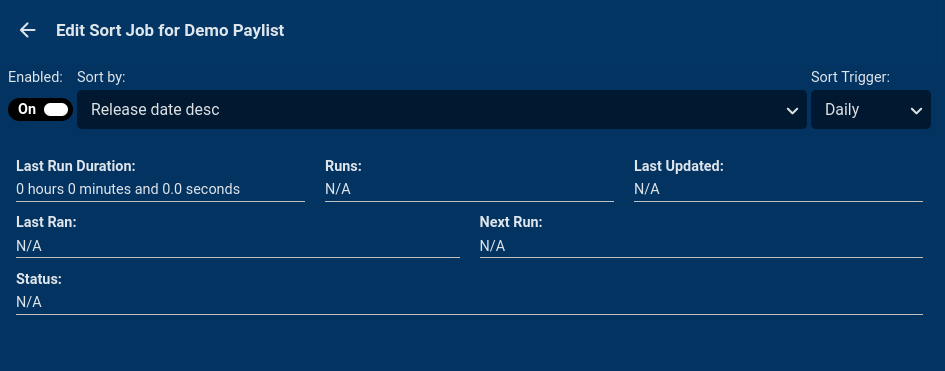
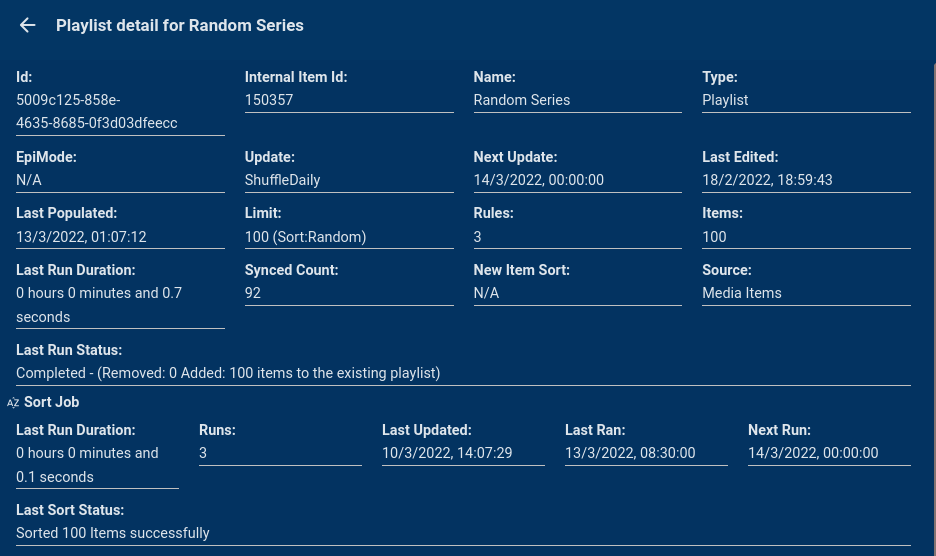
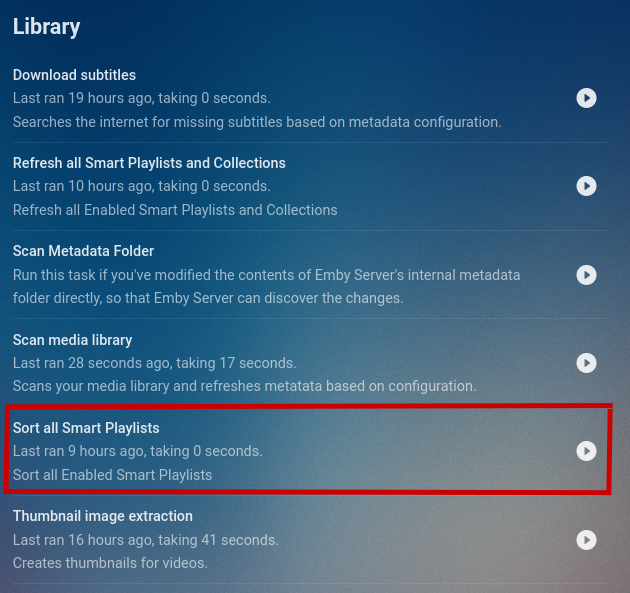
Version 2.3.0.0 is available for testing Version 2.3.0.0 Feature Added an 'Is Empty' operator Added better error handling and server/client communication Added Sort Job and Sort Scheduled Task for Playlists (Collections do not support sorting, even by adding and removing in order) Removed "Sort newly Added Items" for Collections as Collections cannot be sorted. Bug Removed duplicate criteria: Community Rating. (Existing is: Rating (Community)) Moved API calls to use relative paths if URL mapping is a thing. Note on Sort Job, there is a new background process for sorting playlists, unfortunately from my tests it seems like collections are not sortable. SmartPlaylist-2.3.0.0.zip
 1 point
 -
@horstepipe they are stored in individual json files in your data/smartplaylist directory. Also the above scenario is double AND = All (Group), OR = Any (Group). I will add a new operator called is empty for filter on metadata that does not have a value in the next release.1 point
-
@akawoz Thanks for the positive feedback. Firstly, the "Sort newly added" and "limit' act quite differently, hence why one gets disabled. Sort Newly: Will only sort any new items in the particular order, so let's say your emby playlist have 500 items already, and smartplaylist picks up a new 10 items to add, it will only sort the 10 items in the order you selected and add them to the bottom of the playlist. (Unfortunately Emby playlists/collections don't have sort functionality). On that I was thinking of building another "scheduled" process off the plugin that will sort the playlist and collections at a certain time if needed, as the only way to do it, it to basically remove the items and re-add in the order you have selected, this could be very expensive on the fly. Limited, what the code does is let's say 100 new items have been flagged to add to a list, limited would sort the 100 items, then take the top 30 and then clear out the playlist and re-add, I have recently changed a little code here so if you're not seeing that behavior I'd say there's a bug, I will re-test and if I pick something up I will fix it for the next release. Will keep you posted.1 point
-
First of all this is for "New Releases" which is distinct from "Date Added" ie. a 1932 movie downloaded today would show in Date Added but not in New Releases. I'm trying to create an equivalent experience for my users who have come from Plex where I had a number of collections of content for them to choose from (when you have 6,000 movies and 15,000 episodes of TV stored it becomes much harder to decide what to watch ) By way of example here are some of the auto collections I was building under Plex before my move to Emby (which I am VERY happy with): Oscar Nominated Movies 2022 Popular Movies (via IMDB) Popular Kids Movies (via IMDB) Top Rated Movies 2020-2022 Top Rated Documentaries Oscars Best Picture Winners Best of the 80s / 90s / 00s / 10s1 point
-
Hey All, a thousand apologies, I noticed my schedule task did not execute last night, so on closer investigation I introduced a tiny bug when changing how the scheduling works. I tested the change and my test data was passing, where as my live data highlighted the issue. So I've pushed out a new release with the fix and 2 other small items. So let's hope this settles now and I can start looking at the preview build. As always... Version 2.1.0.4 Feature Added "Genre (Tree Crawl)" Criteria. Filters the item on tag or its parents tags (and so on, all the way to to root). Bug Schedule task was not executing scheduled lists correctly. Renaming a playlist. If the Name field is locked the smartplaylist name will be reverted so that the playlist and smartplaylist names stay in sync.(refresh required). SmartPlaylist-2.1.0.4.zip1 point
-
Hey All 2.1.0.3 ready for testing. Version 2.1.0.3 Feature Added "Country" Filter Criteria. Filter item on the "ProductionLocation" metadata. Added "Genre (List)" Filter Criteria. Displays a drop down list of Genres already in the system, if the Genre does not exist the fall back it to use the already existing "Genre" string filter. Added checkbox on delete confirmation to retain the generated playlist/collection Sorted playlists/collections alphabetically Added "Tag (Tree Crawl)" Criteria. Filters the item on tag or its parents tags (and so on, all the way to to root). Added "Studio (Tree Crawl)" Criteria. Filters the item on it's studio value or its parents studio value (and so on, all the way to to root). Updating sourcing to navigate to the lowest item in the path. Added new Update types: Daily, Weekly, Monthly, The main difference between this and the shuffle update types is that the shuffle will remove all items in the playlist/collection prior to adding new items, and then shuffle the playlist randomly, where as the scheduled update types will only add new items to to the playlist/collection or remove items no longer meeting the criteria from the playlist/collection and NOT shuffle the playlist/collection. Scheduled update types are way better when it comes to performance as there are only small updates to the the backend after the initial populate. Added updateType Icons Added tooltips to buttons and icons Bug Fixed a legacy bug where the next shuffle date was calculated based on the last shuffle date isn't of the current run date. Meaning that if the playlist ran twice the shuffle date would be bumped twice. As always code in the repo SmartPlaylist-2.1.0.3.zip1 point
-
Hey @Bagul Great thanks for that, I have figured it out. What happens is when Emby tags the metadata for Series, it does it on the "Series" level and not the actually "Episode" level. SmartPlayList only looks at Episode level. So what I have done is added a new filter called "Studio (Tree Crawl)" that will look "up" the chain for the Studio. (Same with Tag). So ... If you have the following Series: Extreme Mushroom Watering <- (Studio is tagged here) Season 1 Episode 1 <- (SmartPlayList Looks here) If you select "Studio (Tree Crawl)". It will look at "Episode 1" .. if not found, rolls up to "Season 1" if not found there it then rolls up to "Extreme Mushroom Watering". If it is found here, it marks "Episode 1" as a match and added to the playlist/collection. Built into the next version. Then when creating a Collection, You can select the "Epimode" and either add "Extreme Mushroom Watering", "Season 1" or "Episode 1" to the collection.1 point
-
Hey @Brailyn, to support the CSV import would require quite a bit of validation and time to write. BUT what I can suggest is that the data for the playlists are stored in just plain "json" files on the server. (linux: /var/lib/emby/data/smartplaylists, not sure on windows). You could generate the json file from csv or another tool and just copy them across? If you have a look at one of the files it will give you the layout. (You'll need to make 100% sure the field name, operators and selection list values are 100% the same)1 point
-
Hi all, Version 2.1.0.1 is available for testing. Version 2.1.0.1 Feature Added Sync Count to playlist statistics Added more detailed status messages to playlist statistics Added the ability to turn playlist syncing on or off per playlist Added sort for newly added items Added new source type for playlists Media Items: Use all media items as a base to apply filters on. Playlist: Use an existing playlist as a base to apply filters on. Collection: Use an existing Collection as a base to apply filters on. Added the ability to execute a playlist from the editor.(Pop up is not the actual execution time, you need to check the info to see how the playlist updated) Renamed criteria "Path" to "Path/Filename". BREAKING CHANGE, please re-select path/filename, save any playlist that uses the criteria Fixed thumbnail image rendering in plugin list. As always code can be found here SmartPlaylist-2.1.0.1.zip1 point
-
Hey @richardyu301, I haven't branched for 4.7 yet, I have this on the list of 'to dos' I'll post in here when I have a branch and beta out. Hey @Tangsgod So basically what the smart playlist/collection does is build or update Emby playlists and collections based on certain criteria that you set up. For example, you want to create/maintain a collection for all marvel movies, one could just added 'Studio' to the criteria with the value of Marvel. So not sure how Plex works, never used it, but you have multiple different modes you can run the playlist in, Manual -> Updates when saving the playlist. Live -> When new content is added. (But not very optimal) and ShuffleDay/Week/Month -> Would rebuild the playlist/collection daily/weekly/monthly and shuffle the items. (New function coming out in the next version is the ability to sort this shuffle) It can be added to the homescreen via it's parent playlist/collection (Standard Emby functionality), hope this helps.1 point
-
Hey @Kauzig, this makes sense to me now, so I think I'll add an option called source were once can select all media or a collection/playlist then when running, it gets the media items from the source and apply the regular rules. This shouldn't be that hard to do and will add it to the list for the next version. Only issue I foresee is if you are using a generated collection as the source and it runs before the collection is generated. But I guess it just makes sense to run your generated playlists first. I'm currently adding an option to run the playlist generation straight from management side of things, but I'll also look into seeing if I can order the run. Hey @Thorman I had a look into this and path includes the filename when filtering, so let's say the file is '/media/youtube/ExtremeKnitting_KnitKing69-420.mp4' you could create a rule using path with contains 'KnitKing69-420' and any filenames that contains the value will be matched and added to the collection/playlist. this should cover your use case. (It's all string matching at the end of the day), Let me know if this works... I might relabel Path to "Path/Filename" to make it a little clearer.1 point
-
Hey @wordlover(Thanks for the input @luke_70it), This makes sense to me know, I see that you are running the playlist "live", looking at the previous maintainers code, "live" is not very optimal and just continually polls for new items, if there are any new items just adds it to the list/collection. It's not optimal for me to pull all the items (remove them from the list) sort them in memory and then put them back in order (esp. in "live" mode), I'm thinking of a few options here, one being a scheduled task that can run in the background and pick up any newly updated playlists since the last run, look at a "sort" field on the playlist and then pull them and re-add them in order, this will take a bit of work on my side, any other ideas? (I agree it's not feasible to do this manually). At least with the background task it could take a little longer and not put to much strain on the server. (Large lists could be very slow to run, but at least this could be scheduled once a day/week/month in the 'off' hours). Emby creator/framework guys any suggestions, it would be great to have this functionality built into the native collections/playlists.1 point




























.thumb.jpg.d002242e0c7e0c5339181325e5a3b60c.jpg)