Leaderboard




Popular Content
Showing content with the highest reputation on 08/30/24 in Posts
-
Pretty simple suggestion. I have multiple users for my Emby server. If I want to do continuous maintenance on the media, I have to tell everyone. some of them are harder to reach than others ( i.e. no Facebook or Skype chat etc. ) It would be great if say... on the admin panel, I could hit a check box that enables 'maintenance mode', where the server still runs does everything as normal, but instead of the login screen it displays a maintenance page saying the server is unavailable. Even better if I were able to directly put a reason in a text box that would then display on the login screen as well. Not really sure what others would think of this, but for me it would be quite helpful. mostly if I want to make sure no one is trying to access content I know won't work until I've done a full library scan again. Thanks for reading. -Kyle2 points
-
I want to be able to easily explore films by key crew on films (usually director, writer, producers), however always have to scroll through the giant list of cast to find them at the end. They're often not even listed.2 points
-
In reference to this thread2 points
-
I'm in business. A little embarrassed as this seems like a simple fix, but it was due to my misunderstanding of internal vs. external IP addresses. I also forgot that I changed the default Emby Port number from 8096 to another port number. I could not connect to the Emby server because I was not using the proper IP addresses and port numbers. I followed the Emby/Gluetun guides properly, but it was this video (3:09) that properly explained what was happening with DNS which was causing the disconnect for me all this time and reminded me that I changed the local Emby port number in my docker container setup. What I needed to fix: Port forward the Emby server's PORT NUMBER, the IP address was of my NAS. I was confusing myself on which IP address to use (Emby's external/internal from the dashboard, the NAS, my desktop, etc.), ended up being the NAS IP address and the local Emby port number I used when setting up the docker container in DSM. Simple as that. When trying to connect to the Emby app (or via a web browser for that matter, tested successfully as well), using the newly created WireGuard VPN tunnel created via this guide. Once I had finished with the guide, I had created a new DDNS Hostname through DSM, which is the URL I used to connect directly to my Emby server through that tunnel, with a colon and my local Emby port number at the end. I closed and reopened my Emby app, and was able to manually connect to the server by using the exact same URL and port number as well. This setup does not provide a tunnel to my entire NAS, it's a specific tunnel to the Emby server only (I believe). That will be a different problem to solve for a different day (and forum!) but just want to thank anyone who came in and tried to help this noob learn his way through all this.2 points
-
Creating/modifying collections is an administrator function; not for regular users. Regular users should be creating/using playlists. (with the appropriate permissions granted, those can be shared with other users like collections)2 points
-
I'd suggest using a tool like JMkvpropedit to resolve this on the mkv end.2 points
-
Be able to create playlist based on a certain criteria, like genre and or year, in order to create a dynamic playlist that it refreshes automatically when new content is added. This way you can for example, create a tv comedy playlist from the 90's, or a new sci-fi Movies playlist. Some other criteria for rules could be the rating, watched/unwantched, score, tags, language, audio codec, etc The possibilities could be endless1 point
-
As I'm transitioning from Volumio and Plex to Emby to centralize my usage to one app, the one thing I'm missing the most is gapless playback. This is particulary annoying when listening to albums like "Dark Side of the Moon" by Pink Floyd. I'm experiencing a buffer of about 1 second in between songs, which really ruins the immersion. Would be awesome if this would be implemented in both the Chromecast, and web player.1 point
-
This follows the same functionality as the Trakt version expect its for MDBLists (Movies - mdblist.com) If you are using public lists I dont believe you need an api key, if you use private lists, I believe you do, this could use extra testing. Otherwise logic and functionality is the same, I just swapped out the trakt api piece for the mdblist api. @rbjtech@shorty1483@zerodayz 2024.07.07.1 • Refactored code to match trakt version Emby.MDBListCollections.dll1 point
-
Hallo, Ik heb gezien dat je in Emby server bijkomende API sleutels kunt installeren. Nu is mijn vraag: wordt de moviemeter.nl API ook ondersteund in Emby server? Groetjes1 point
-
They should actually be only TCP but it doesn't really matter, however you didn't specify the external port number. Try specifying that as well and see if that works. Your other rules should be like that too, you're telling the router "when you see an incoming connection on this port, send it to this host on this port". But without specifying the external port, I guess it's using all of them, which is really strange.1 point
-
Great news on getting it all working! well done. and thank you for circling back and updating your thread with the solution in your case, always appreciated.1 point
-
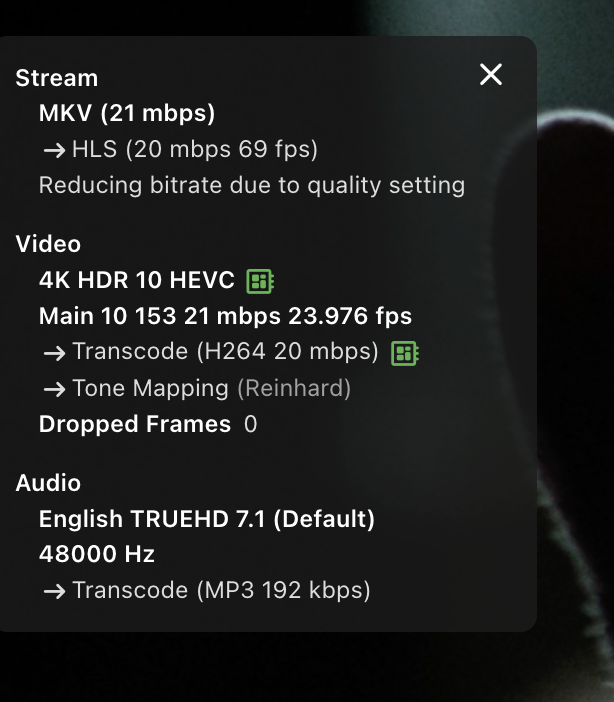
Seems to work fine... using HW transcoding via QuickSync.
 1 point
 -
Because there's no need, desire, or request to make the other headers clickable? You're the one that extrapolated to making them all clickable. That's not what was requested and seems like quite the strawman argument tbh. 'We' asked for one extra item, not 26, and again; most of the info below the 'cast & crew' is very infrequently visited. An additional line to scroll past would be very very inconsequential.1 point
-
Since the OP wrote Kodi was fine, this sounds that setting wont change things. Emby is always slower than Kodi but this sounds more like a direct play issue which is why the logs are needed.1 point
-
I'm not sure why it was doing this because I verified multiple times that I was able to play the channel in vlc. Regardless, it just started working by itself.1 point
-
Hi, yes this is true. We need to break this out into it's own permission, but as of now only admins can do it.1 point
-
Thanks for the help. Not sure why I over complicated it. I just renamed the file to 18. Without the word sample. All fine now1 point
-
After resetting the TV, the option to “uncheck” this worked. Now the audio language is played correctly.1 point
-
I found the problem and also another more serious one. If you played a multicontent version and delete after play, it will always delete the main item of the multicontent no matter which version you actually played. That's why I wrote in the disclaimer, use it at your own risk. In general I'm very unhappy with this function. It should never been integrated in the first place, not sure why Angelblue ever did that. I'll disable the delete after watched function for multicontent subversions played and also in the context menu for multiversion in general.1 point
-
By default Emby Sweeper deletes nothing. When you add the "-d" option it will delete those marked for deletion in the log. If you are on Windows an added bonus is that Embys API deletes to the recycle bin so you can get the files back. I would suggest making up a test library with only a small selection of shows/movies and trying it out on there so that you can get to grips with the syntax.1 point
-
Dear Softworkz, thanks for giving this kind of extra information, as it explains why it takes that long....unusual in the Emby environment..? OK, w'll have to wait patiently ! Grtz. Peter1 point
-
Yes its possible. I dont know how you get your media. But this works for Windows : DDVT Tool Manual demux from MKV to MP4 And if you use apps like SABnzbd, Radarr, Sonarr : arr-scripts It will make a Mp4 from a MKV And then LG will play DolbyVision fine1 point
-
Thanks, checking...1 point
-
*I* don’t need immediate relief, working fine with the fixed quality level. Don’t want to be the one screwing up release schedules!1 point
-
Hi, what did you verify? How are the settings set?1 point
-
Thank you Yes, the name is there on the Shield client, but you can't click through. There's also no ability to see the writer or producers. The writer is to me of particular importance.1 point
-
well.. everyone was able to connect..I didn't do anything, but it started to work...1 point
-
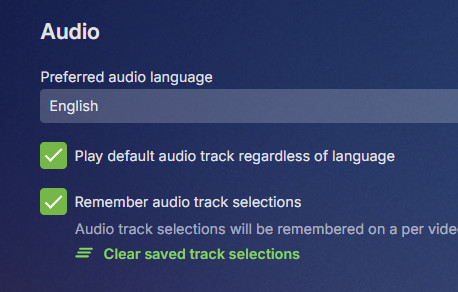
Pretty sure only one can/should be listed as default as subtitles have the same issue and multiple defaults don't work out well. But did you try unchecking "play default regardless of language"?1 point
-
Hi @quickmic. Just reporting back to say that the issue with "Play All" using the Embuary skin is fixed in 11.0.3 (might have been fixed in 11.0.2 but I missed updating to that version). Thanks!!! Another issue I've noticed (v11.0.0 and 11.0.3) is that the option to delete media after playback is no longer offered. I have the appropriate items selected in E4K for deleting TV show episodes after playback. But the option to delete the media is not offered.1 point
-
Because it is marked as default in the video file? What is your audio setting in the user playback settings? If you have "play default" set, then the first track in the file that is marked "default" will be played regardless of the preferred language above. Try changing that setting. Paul
 1 point
 -
@rbjtechI did mdb also it’s easier than trakt to implement until they change the public access private.1 point
-
Ah right, thanks for the info!1 point
-
Thanks for the good news, @Lukeand @Happy2Play!1 point
-
1. As Happy2Play stated, you have to start by looking at the database where Emby is pulling the data from. Most of us are using TMDB (themoviedb.com) as the primary source, for a variety of reasons, but one is that they *tend* to have more complete information - but that's far from being 100% the case. You'll have to check on a title-by-title basis. The good news is that you can create an account there and edit the cast list yourself - just read the rules first and make sure you follow them. If you are using some other Emby-supported database as your primary data source, then you're going to be limited by whatever data they list for any given title, and you may or may not be able to edit those yourself. Obviously it's also worth looking at how you have your fetcher configured for any database you may be using - some may have different options than others. 2. Emby currently only pulls in Directors. It might be nice to have options to pull in other crew, but currently it is limited to Directors.1 point
-
It is working as I described. Your public domain resolves to the tunnel entry point unless you have local DNS to override that and resolve to a LAN IP. If it's doing what I would expect your connection for the public domain name is leaving your network and coming back through the tunnel. Unless your LAN is segmented in a way that Emby sees LAN clients as remote the apps which make use of the feature will switch between your In-home and Remote URLs as you move between networks. If your LAN is segmented (VLAN, subnet, etc.) then you can add those networks to the list of LAN networks in the settings. For in-home devices and browsers you can connect to the LAN URL or hostname if known within your network. Are you trying to do something goofy like forcing HTTPS while on the LAN?1 point
-
Luke: Logs attached using side-loaded 1.8.8 Samsung app. Explanation: Starting at 2024-08-29 14:50:24.996 playback of channel 'hdhr_2.1' was attempted with the Samsung TV app, app playback quality set to '1080-5mbps' - HAVE video, have audio. Starting at 2024-08-29 14:51:54.898 playback of channel 'hdhr_5.1' was attempted with the Samsung TV app, app playback quality set to 'Auto' - NO video, have audio. Thanks! embyserver.txt ffmpeg-transcode-f9dd5054-216f-434a-a368-d017f5253a83_1.txt ffmpeg-directstream-fa5c7b36-e83d-4c97-8570-b7691cc0a89d_1.txt1 point
-
Thanks.... Support added. Didn't see that post in my search of the forums.1 point
-
DV playback on the LG Client needs to be via the MP4 container. MKV will not work with DV and will fallback to HDR10. The LG hardware plays DV/MKV without issue via a Shield, FireTV or suitable DV playback device attached via HDMI.1 point
-
Not all of that would be feasible/possible: Emby relies on ffmpeg to provide media info (and CoverArt subsequently on that); as your files are basically blank files, there's nothing for ffprobe to probe/obtain media details; you might wanna take a look at Iconic plugin for an alternate solution/indication as it has certain filename rules. Not supported (and likely will never be due to potential/likely mess that would create). Emby currently does not provide any means for that distinction (can be somewhat mitigated by using Tags). As above, there are currently no provisions for user added notes in the UI (can be somewhat mitigated by using Tags).1 point
-
Hi Peter, I have this (new WMC UI App for Windows) here. It's done and ready for testing since quite some time already. The problem is that the new WMC Win App is based on the new main Emby Windows App, which is also ready for testing. I do not have control over when this will go into beta. I have a bit more control over the release of the WMC UI App, but it cannot be released before the main new Windows app goes into beta - means: I have no control over this at all. Just waiting...1 point
-
Si tu veux sauvegarder tes séries et films avec les métadonnées la meilleure solution c'est d’utiliser systématiquement les nfo et les mettre en source primaire pour les métadonnées. La sauvegarde tel qu’indiquée dans le guide du message précédent ne sauve que la configuration, les réglages et les utilisateurs. Je sais pas comment ces options s'appellent en français, mais si tu vas dans tes librairies -> click droit -> éditer, les 2 options devraient se trouver là. Ca permet aussi d'avoir des métadonnées customisées et de les conserver en cas de transfert. Très utile pour les anime de type fan kai ou pour le contenu local qui n'est pas listé sur TVDB ou IMDB. Optionnellement le nfo est également verrouillable pour être sur que les métadonnées customisées ne soient pas réécrites durant un scan avec l'option lockdata.

 1 point
 -
to add, i would prefer that it alters the suggestion algorithm even though it is not a high priority my main reason is to mark items as not interested per user by the user for example if someone has not checked the server for a while and there is new content i would like to browse the movies/tv shows page and hide all the items that i am not interested in to declutter it1 point
-
jumping on to report that i am also getting the same report. and i have a majority of ios users complaining to me about the same thing1 point
-
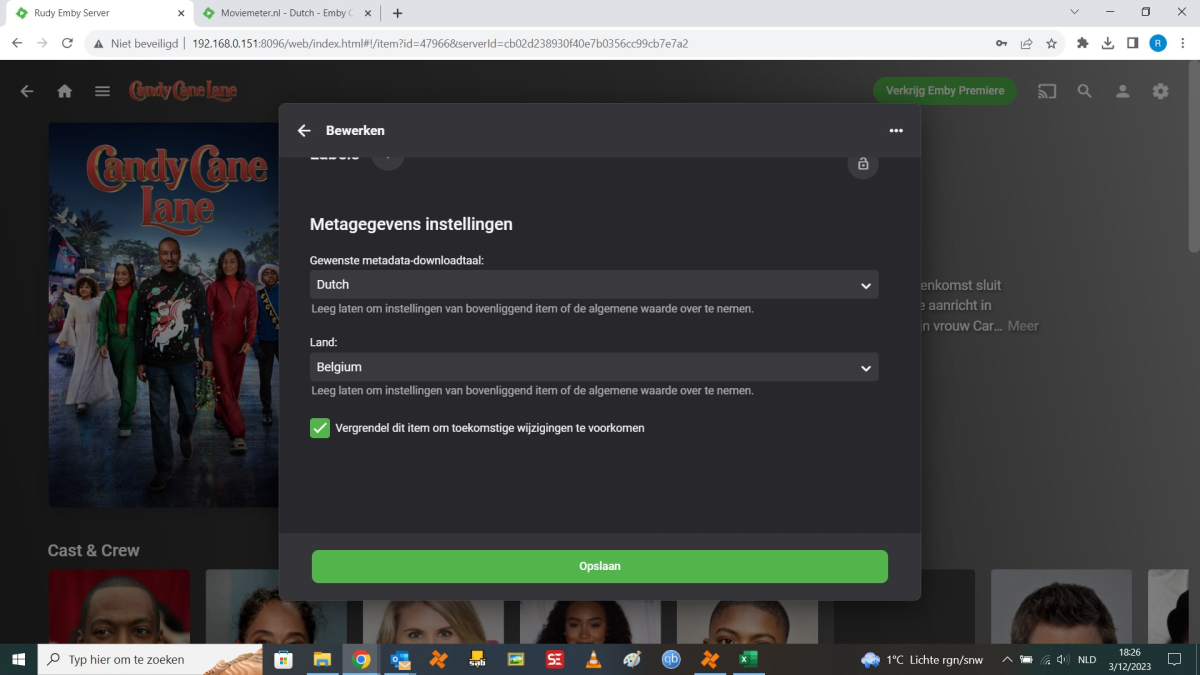
Hallo allemaal, Is er al een oplossing voor Moviemeter.nl ? Na veel gesukkel en server upgrades die niet lukken met Plex (nog steeds problemen na jaren gebruik) en daarna met Kodi geprobeert om deze te configureren ,Kodiis zo omslachtig...! Heb ik besloten om Emby te installeren. Dit valt reuze mee ,alle instellingen zijn gemakkelijk te doen alsook wat betreft de bibliotheken ,deze heb ik vlot kunnen aanmaken en configureren Alles is duidelijk omschreven. Maaar ik kan geen Nederlandstalige omschrijving krijgen ,deze komen steeds in het Engels terug na "Metadata vernieuwen" Is er al een oplossing voor een plugin Moviemeter.nl ? Ondanks dat alles op DUTCH ingesteld staat krijg ik maar geen Nederlandse Info over films. Wat doe ik nu : Bij elke film ga ik naar "mediadata wijzigen " daar wijzig ik in het "overzicht" de Engelse omschrijving naar de Nederlandse omschrijving (gekopieerd van Moviemeter.nl ). Daarna scrol ik volledig naar beneden en vink ik aan " Vergrendel dit item om toekomstige wijzigingen te voorkomen" Dit omdat anders bij het aanklikken van "metadata vernieuwen" terug de Engelse beschrijving krijg in plaats van de Nederlandse omschrijving. Is er (al) een oplossing dat bij bepaalde instellingen automatisch de Nederlandstalige beschrijving komt in het "overzicht" ? De server is geinstalleerd op mijn Nvidea Shield Pro . Ik bedien de server via mijn laptop. Alvast bedankt! Quote
 1 point
 -
I do NOT think it should be playable. From what I have read it should be removed as it serves no purpose. If people want "reminding" of what they have available the there are many many many ways to accomplish that. Emby should just remove that display. Under no circumstances should it be made playable.0 points


















.thumb.png.f4cb0545e98b51fd9b00e427622ab761.png)