Leaderboard




Popular Content
Showing content with the highest reputation on 08/29/24 in Posts
-
Done.2 points
-
thank you, problem solved2 points
-
Sounds like the same bug as @FrostBytereported. Start reading from here: I checked, and seems to be a bug in Emby's servers beta version. Stable seems to be fine. I reported this issue to Luke.2 points
-
Is the other emby server still active ? You cannot use the same WAN address and port more than once - you need to use an alternative port and your router will then use that alongside the current emby server. So if you have used 8096 before (http) then maybe use 8097 for the 2nd instance (http) THEN you can have both servers active at the same time using the same WAN IP address.2 points
-
Waiting. Emby ? Surely not...2 points
-
Yes this needs updated to include this row.
 2 points
 -
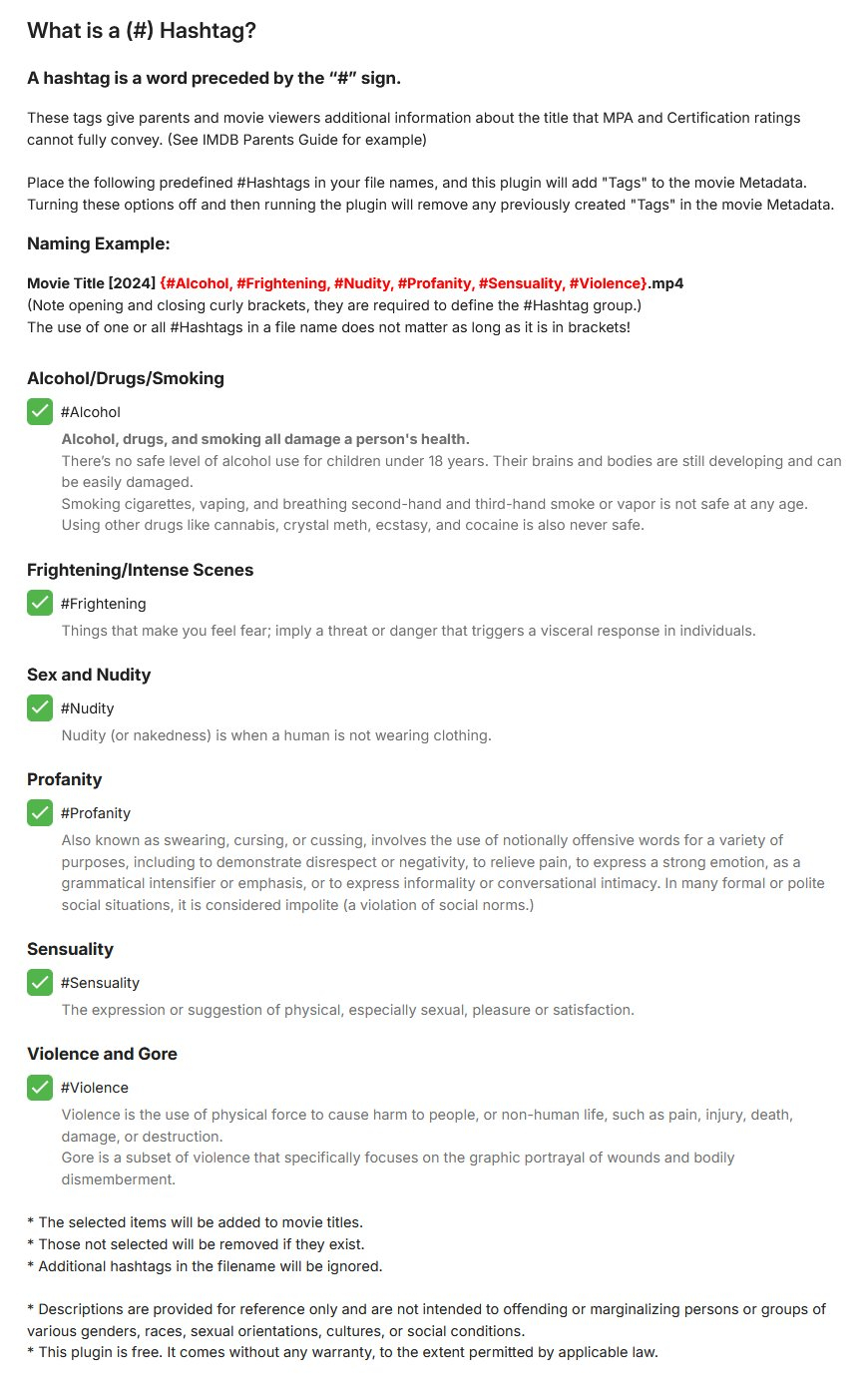
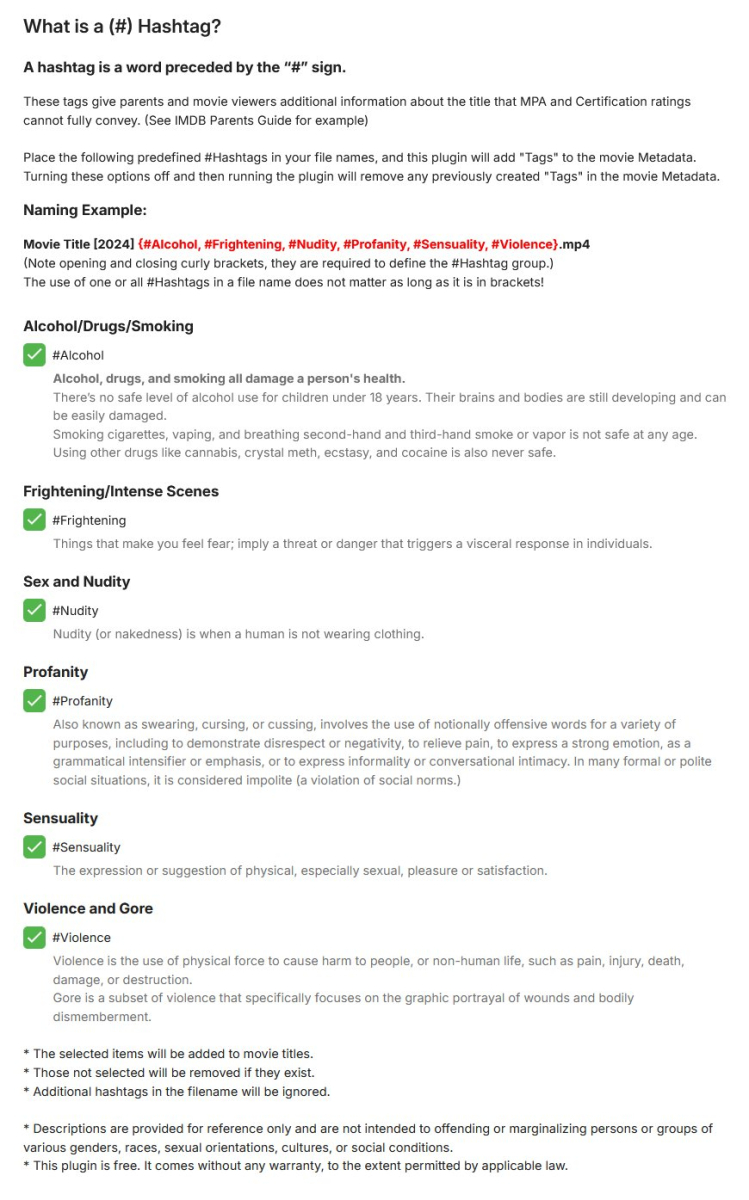
Hello, Emby community. I have created a new plugin based on the new Plugin Development API model. This plugin Tags movies based on #Hashtag in the filename. Please let me know what you think. MovieHashTagger.zip
 1 point
 -
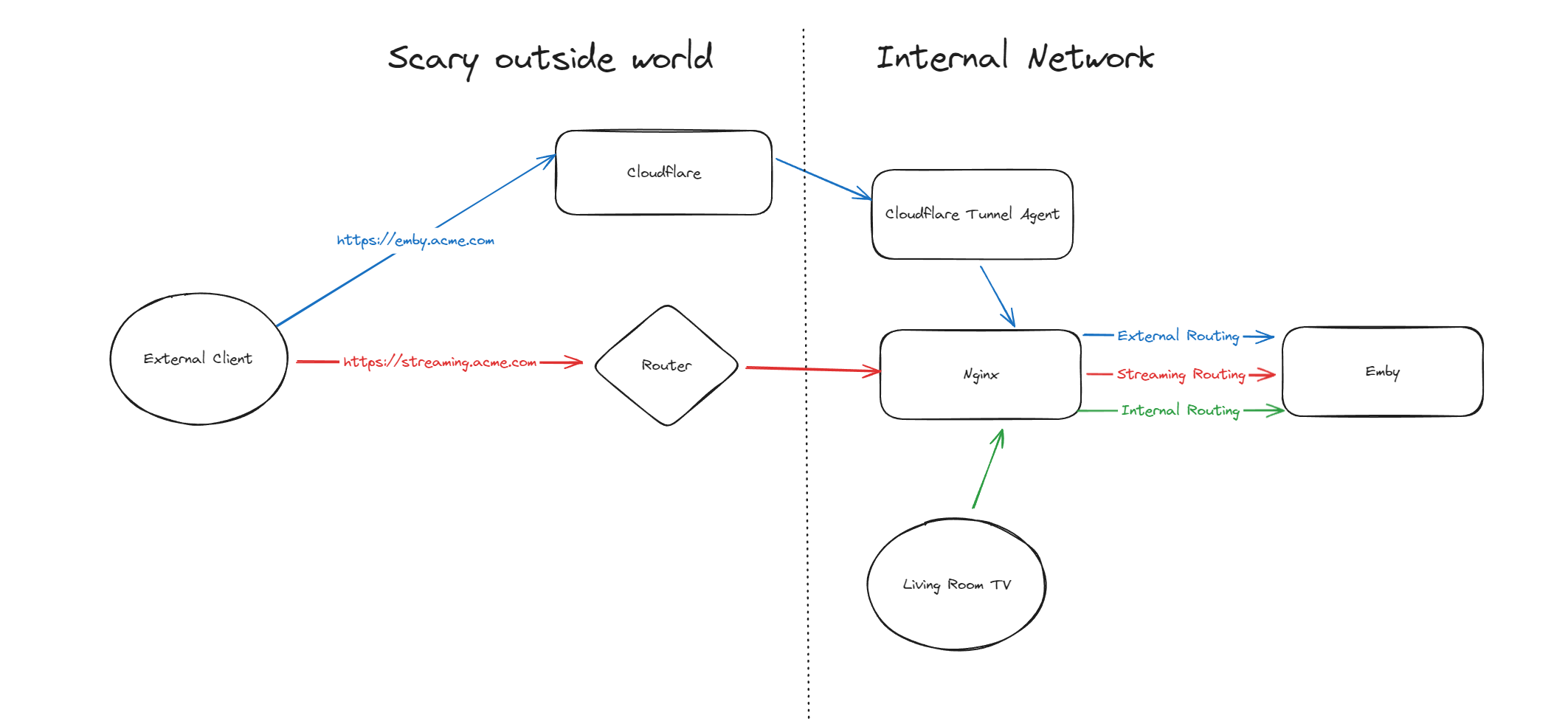
Hello, A few months ago I was in the process of moving away from directly exposing Emby via my home router to using Cloudflare Tunnels, but as it turns out, Cloudflare don't like you paying nothing and yet streaming GB/TB of data through their network. This was frustrating as I really wanted to put Emby away behind something I trust but I also didn't want to get my account banned for streaming media through it. I've read through many posts here about avoiding caching but it seems it's not necessarily the caching that will trigger your account being in trouble, it's the bandwidth usage as well of just piping all that data through their servers. Since I now had some time, I thought I would try to work out a long term stable option using Cloudflare. So what to do? When talking about security with self-hosting anything, I'm not going to go crazy but I like to take away easy wins for bad people. When it comes to running something like Emby, I'll assert that the biggest risk you face is automated attacks at scale. By this I mean that when it comes to hosting Emby at home, I am not really worried about some clever kid that I beat in an online game spending a weekend taking revenge on me or a state-backed hacking groups spending 6 months breaking in - I'm mainly worried about the type of flaws that are easy for people to automatically discover and exploit - e.g. recent examples with Emby and HomeAssistant. Both of these flaws allowed attackers to bypass the authentication layers of the application - no matter how complex your password is or whether you have MFA enabled (in the HA case), it's a trivial exploit once an attacker detects a vulnerable version of your software running. Both of these flaws were exploitable at scale, provided you could find Emby servers online. Given my determination to run things through Cloudflare for several reasons, security included, I wanted to come up with a system that gave me some confidence without being too complicated and without risking my Cloudflare account being banned for streaming through their service. I have not written this for everyone to be able to follow - if you are not familiar with nginx, Cloudflare, HTTP semantics, then this may not be all that helpful. Split Service Where I've landed is a split hosting setup - far from ideal but I think it's better than going all Cloudflare or all direct access. To begin Expose Emby through Cloudflare tunnels as per other guides (I won't go into the details here right now) Expose Emby via reverse proxy for external traffic (and internal too, makes sense to keep things consistent in my view) Setup port forwarding on your router to direct a port from the internet to your nginx service Nginx will have two Emby configurations to start with - one for external and one for internal Once you are able to hit Emby both internally as well as externally, then it's time to split the external. I'm going to imagine that you now have emby.acme.com setup via Cloudflare Tunnels, and you also have streaming.acme.com setup with direct access to your service via your home internet router. What's the difference? emby.acme.com is going to be your main address you use for everything, and that will go via Cloudflare Tunnels. You can use Cloudflare's many, many security options to come up with a setup that is secure but easy for your situation. streaming.acme.com is going to be a DNS only record in Cloudflare, it will point to your home IP and you will port forward this port (can be any random port number) to your nginx server. If we were to leave this setup in place, you would be able to access your Emby service via Cloudflare (with media streaming through Cloudflare), AND you can access Emby via the streaming address, completely outside Cloudflare. So what we can do next is use some clever redirection stuff. Nginx Configuration Now that you have two URLs working with Emby, let's look at Nginx again. In my configuration I have two different `server` blocks in my nginx configuration - one for my internal network and one for external. I don't know if this is strictly necessary but when I started I was an nginx novice and it made sense to be able to apply different rules depending on the origin of the traffic. To complete our nginx configuration, I am actually going to clone my external configuration, giving me a third `server` block. For my third block, I will use the domain streaming.acme.com - this separates it from emby.acme.com which is my tunneled traffic via Cloudflare. Now in my streaming block, I am going to update the rule as follows: This tells nginx to proxy traffic that is destined for streaming.acme.com/something/emby/videos/xxx to your emby server. What it also does (as long as you don't have other `location` sections) is tell nginx to not redirect any other requests that fall outside of this location to your Emby server. Cloudflare Redirect Since we want traffic to go through Cloudflare *except* when it's the actual media stream, we want your main Emby URL to be setup with a DNS address in CF that is proxied through their infrastructure and accesses your local Emby via CF tunnels. To handle the actual stream, we will create a redirect like this Now redirect that traffic to a new location What happens now? Well hopefully it comes together and something like this: if you visit https://streaming.acme.com:port/, then nothing is returned (where previously you could access Emby outside of Cloudflare and directly via your router) - nginx returns a 404 (or if you prefer, set it to return code 444 which drops the connection without explanation). If you visit https://emby.acme.com/ then you will hit the Emby login screen and can log in, and move around the application (this traffic is all via Cloudflare, with caching etc.) If you start to play a video from https://emby.acme.com, Cloudflare will intercept that request and return a redirect to your client, telling it to go and fetch the video chunk/stream from https://streaming.acme.com:port/something/emby/videos/xxx It should hopefully look something like this Why would I go to this trouble? Here is why I think this makes sense 99% of requests will go through Cloudflare, where you can layer on world class security options - you don't need to rely solely on Emby and the development team for security, put a fantastic authentication system & WAF in-front of it. This includes your authentication, requests to delete media and admin operations (These requests benefit from caching) You don't stream the video through Cloudflare - this was our compromise with this design. You are now exposing your nginx service directly to the world, however you may have to do that anyway if you don't want to stream through Cloudflare. Plus you can further protect yourself from autonomous/widespread attacks* You can use all of the Cloudflare security and other features to protect your Emby instance - I am assuming you want to have an easily recognizable URL & use port 443 for ease of use, so now you can do this and then have the Cloudflare firewall and other security features between the client and your service. In my CF redirect, I change the port to a random port number that I then open on my router* In my Nginx service, I drop any request immediately that is not a request to stream an Emby video file (e.g. the login page or any other API/page) If you look in my configuration, I lifted /emby/video off the root location and inserted a `something` - I was exploring injecting a Cloudflare access token as a query string but for now I just added a random base64 encoded string so that streaming.acme.com/emby is not a valid path.* I'm pretty new at Cloudflare, but I'm positive there are a couple of other clever things you cand do, e.g. you could block connections from certain countries, put your friends on an allow-list and block everyone else, or find other creative things to do. * Some people may look at using a random port number or having a random string injected into the path as not that secure, which may be right in some context, however since we don't have complete control over the Emby clients (to setup client certificates or integrate with a real IDP), and since I am focused on being safe from widespread flaws affecting Emby, or the webstack that they build on, or the logging framework they use, or some flaw in some other library, all I need to do for now is make this a pain for anyone to try and exploit. It may not stand up against some state sponsored hackers, but I'd be surprised if you fall victim to a widespread malware dropping activity as part of a critical flaw. Would this have saved me from the two earlier attacks I honestly couldn't answer this right now, it's possible the answer is no, but I am in my infancy with my Cloudflare setup and confident that with a few tweaks (limiting countries, suspicious request blocking) then I will be more confident in the future. Most of all, I would love a way from the Emby client to authenticate securely with a service like Cloudflare - a username and password being sent to the Emby service is nice but as we see flaws that negate this type of authentication, I'd rather try and put Cloudflare or another industry leading provider as my 1st line of defense rather than rely solely on the small teams building the software I enjoy running at home (no offense Emby Team) My goal initially was to move away from hosting Emby directly via my router/home connection, and onto Cloudflare which I believe I have accomplished with a compromise I can live with for now - as I actually get time to spend with Cloudflare I hope to be able to come back and say that I have more confidence that Cloudflare would help avoid attacks in the future.
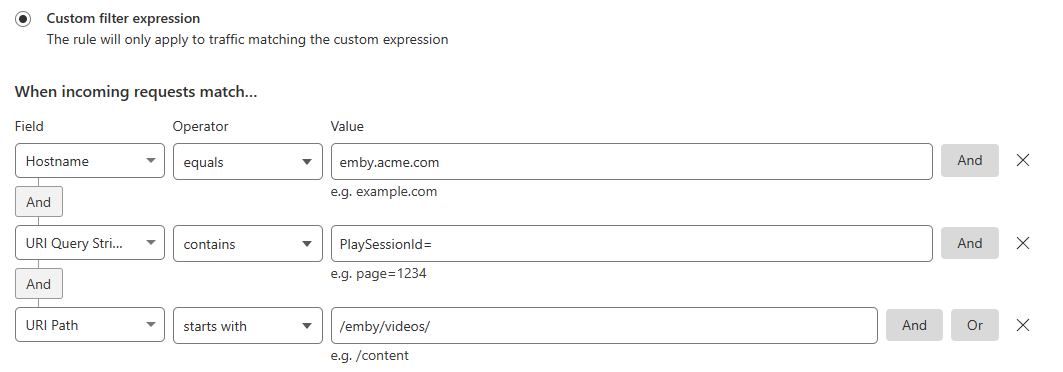
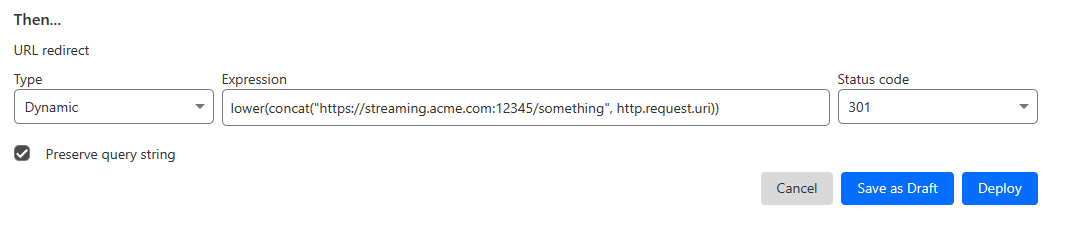

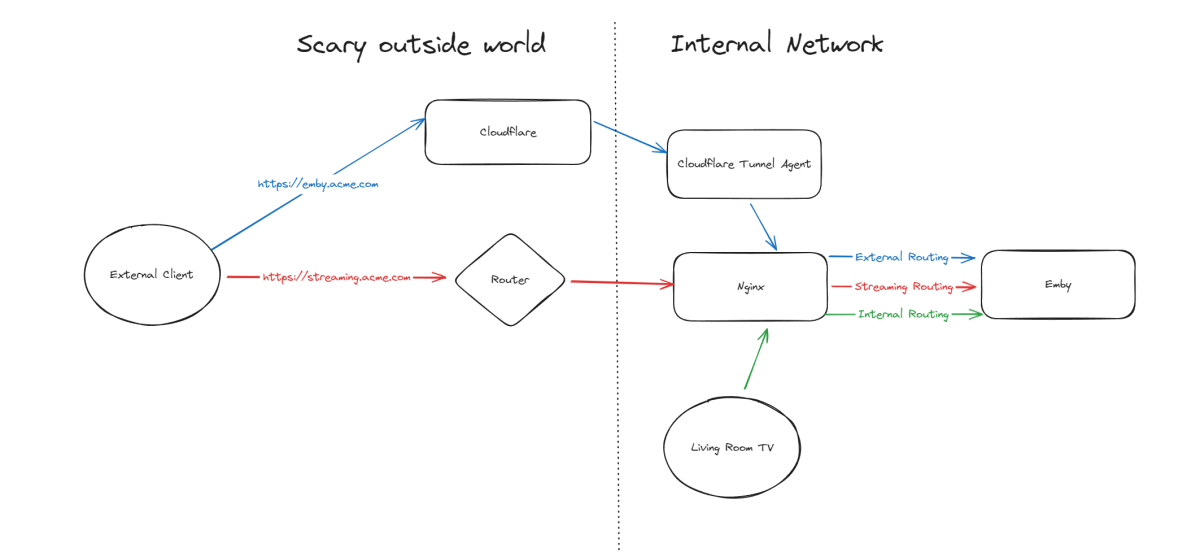 1 point
 -
I updated to 4.8 and noticed that the Hide Played Media From section under the User Display settings doesn't have an option for Recently Released Movies. It would be great if this option was added!1 point
-
I'm loving the beta so far. Just wondering what the final plan is for this project. Will I be able to host Emby server on my linux server and then use this GUI on Android/Roku players?1 point
-
Appreciate the help team. Thanks so much!1 point
-
That may help some but situations like this, User has to know the variables that cause it as they may want multi-version only on correct content. As there are false matching happening on same folder/filename prefixing and requires creative naming hacks to prevent. Guess overall issue multiple videos in item folder with folder name prefix.1 point
-
HI, currently this value does not pass through the api, so that would need to be added.1 point
-
Got tired of exiting serverWMC every few hours to clear and delete the large files streaming on the recording/buffer HDD to make turners available again. Uninstalled serverWMC and the emby app. Removed the WMC programs option, gave me plenty of OS space. Installed WinTV , setup Hauppauge in emby, working as expected. Channel changes are a bit slow. Didn't realise I can use different OTA sources to map all the different cities channels I receive! Thanks for the help!1 point
-
Hi Luke, The Emby error I receive is " The directory '/media/pete/Movies 1/Movies 1/' could not be found." However....I figured out what the problem was....permissions. I gave Emby permissions to access the Drive and Folder, but not the /media/greg folder. I added read/write permissions and now it's working. I am very happy to be off of Windows but I got to say, Windows sure does "work" much easier than Linux. And thank you for responding to my message. Greg1 point
-
I have now been using the beta server for almost a week and I have not seen the freeze even once. (being older and quite mobility limited I use Emby heavily most days) I believe this can be moved into the "fixed" category. When I was using the release I could count on at least one freeze daily and usually it was more like three or four, particularly when viewing older TV shows recorded many years ago. (The nature of what was causing Emby to freeze could be related, as was mentioned earlier, to part of the stream ending before the other part.) Whatever was the cause the change made in the beta to address the problem seems to have fixed the freeze. Thanks to the developers. BTW: the beta seems very stable at this point and I will continue to run it at the stage it is at only updating after a given build shows stability. Right now I am about as pleased with Emby and the Roku app as i have ever been. It could be that the issues i have struggled with in the past are much improved or i have simply gotten used to them. Either way it matters little as i am quite happy with Emby right now. Thanks all.1 point
-
It's odd, as I was troubleshooting it, if I go to app.media.emby and I click on the server I am connecting to, then go to View Server Info, that is where i see the Remote Address as my publicIP:8920, the "last connection to" is my domain, then it will switch back at some point. I don't use app.emby.media to connect, but I used it to see if I could see the server details as it happened. I will grab a .har file next time it occurs and see if that gives me more details, which I haven't done yet.1 point
-
Did the clients maybe have a previous connection via 8920 before you implemented the RP and it's reaching out using those creds ? Either that, or the emby clients have some legacy code somewhere that is still using 8920. I'm presuming that as you are dropping the connection, there is no real way to know the http header etc to find out more Agent info..1 point
-
you'll want to do a GET of the /sessions endpoint and look at (count) playstate SWAGGER will help you sort through what you need from playstate1 point
-
Merci @GrimReaper Le lien que tu as envoyé correspond exactement à ma demande. Je vais donc clôturer la mienne et me tenir au courant des mises à jours1 point
-
Perhaps technically. I would use the example of the plugin that was created by Chef previously. Under that plugin, I set the parameter for what I wanted New Releases to be. I could set the date so that a New Release could be anywhere from 0-12 months, and the row would populate. Additionally, it would add those releases by the date in which it scanned into the library. That facilitated an incredibly easy way to find the newest content of recent movies, and I found that method much more user friendly. I guess not everyone appreciates that some people are elderly or otherwise have limited knowledge/ability capacity. Every other library allows THE OPTION to display content by date added, except this one. It's a simply and understandable request if you have people in your family who need this simplification, but thanks to all for the patronization over something maybe you don't understand.1 point
-
See: Media Stubs You can also use as an alternative method: STRM Files1 point
-
Using this now - it works well and doesn't need trackt which is a bonus, it uses a direct API from MDB. https://emby.media/community/index.php?/topic/125215-python-script-emby-mdblist-collection-creator/#comment-1317692 Maybe a mod can close this thread as I don't believe bakes82 has any intention of continuing this plugin given his latest response above ?1 point
-
It sounds like your emby server network settings might not be correct. Apps should switch automatically between LAN and WAN connections.1 point
-
I think you mean like an iPad. Or iPhone app that could be in two places? Never been an issue. The server and port set for my external when on local or remote for these. Ie https://emby.vaisewilliams.com and port 443. I guess it goes it and back in if on lan, or you can manipulate your ip address if you have lan dns available too. Ie redirect it to local ip of server.1 point
-
Sigue sin arreglarse este bug en la versión 1.8.8. Me parece increíble que no exista este problema en la versión 1.8.0 estable y sin embargo ocurra en varias versiones beta seguidas... Arreglenlo por favor. Muchas gracias...1 point
-
Here is some answers - I am not an expert, but have been using it for ages. 1. I am thinking about ditching my static IPv4 address as I will switch to fiber soon and the static IP is very expansive with the new provider. Does your IP address change regularly or do you all have a static IP? How fast does cloudflare tunnel handle these changes? Do I have to implment other tasks when my Ip changes? **** Should not have any relevance - the tunnel is doing the work between the thing running it and CF. My IP have changed lots in the past, no tunnel issues. 2. Where do you run cloudflared? On a seperate container or on the emby server itself? Or do you run cloudflared on all tunneled services? *** I used unraid, and use the official cloudflared docker container. I run more than just emby through it. 3. I currently have more services then Emby published with my reverse proxy (Homeassistant and Jellyseerr) Do you have any experience if these work too? **** See 2 - I also run home assistant, Jellyseer, immich through mine. 4. How do you handle certificates when on the internal LAN? Currently my nginx / certbot / letsencrypt changes the certificates. I use split brain DNS when I am on the internal LAN **** All my local stuff that access the local servers are http, and the remote stuff is pure https, until it hits the tunnel public hostnames you create on your 'network', which is what replaces your nginx reverse proxy like this : 5. Do the page rules apply when using cloudflare tunnel`? **** Yes, but I no longer tunnel the video's - search my post of @HorsePDFwhere now the videos are via nginX only and the rest is via CF (in my case the tunnel, but Horsepdf does not tunnel). 6. Is there any guide with some screenshots how to set this up best practice? **** Is there a best practice ? Whatever works for you. The tunnel and cloudflared setup is not related to emby at all. Many youtubes on how to setup tunnels using this, its takes minutes to do, is ridiculously easy now and all gui - when I started there were config files to edit, but no more.
 1 point
 -
5.5 GB library DB and 16GB as the cache size. The item count is 2169299 and it is running on an Intel Optane Drive. The average search timings are in the 4-6 seconds range. I understand this is a huge DB compared to the average DB sizes here, which is why I want to try working on a solution myself rather than bugging @Lukerepeatedly for performance improvements. The only thing blocking me is the EXCLUSIVE lock on the DB file, which I don't understand the need for at all when the DB is already opened in WAL mode, which is already safe for concurrent access from multiple processes.1 point
-
ah, mobile horror I will see how to fix this.1 point
-
Still missing in Mobile view.
 1 point
 -
I will guess theaudiodb issue is resolved as I can get to their site again.1 point
-
I don't know what changed but it's working now so I guess case closed?1 point
-
Ah I understand now. Doing this absolutely opened the window to seeing these requests properly, and I'm able to send the command as expected.1 point
-
I would compare to what the web app is sending when you're using the web app to remote control something else.1 point
-
I know how to install a zip file on Kodi but for emby skin on Windows you must copy skin zip in a specific folder not install from a zip file. Is it the same way on Kodi for Android ? Thanks for your support and no thanks for your previous answer... and i'm sorry not to be so smart as you are (i'm joking of course...)1 point
-
I forgot to mention that last week I added the "Emby Schedule Task" functionality to the CS code in the plugin. You can now schedule when you want the TV Guide refreshed. Vic1 point
-
Because the IP /domain where the external USB was connected to has also changed. Moved the drive from a shield to the raspberry directly. However this was a total nightmare for me. I don't know what went wrong. I had many error messages and at the end a corrupt installation. Also the restoring of a local backup did not went well. After the restore emby server did not start. So I had to reinstall emby. Now I have my old status and now re scan and waiting for days. Changing Path of Library for me a valid use case which should be supported by standard @Luke This is not the last time I change my media paths. I have many project with different machines where I test. Next project is to move everting or split Home assistant and emby ?! It would be better if I bought a PI 5 to have more power and have the possibility of transcoding. Maybe now a mini PC with more power then a PI4. Have already one but this one is an oversized with I5 with 16 GB RAM. too much ... 5-10 W in idle. I am looking for a Dell wyse 5070 with a Celeron CPU and passive cooling. 3-5 W in idle.1 point
-
Then use the 'latest media' lists. Sorting 'recently released' by date added would be the exact same thing as 'latest movies/tv shows'....1 point
-
Hi Peter, I have this (new WMC UI App for Windows) here. It's done and ready for testing since quite some time already. The problem is that the new WMC Win App is based on the new main Emby Windows App, which is also ready for testing. I do not have control over when this will go into beta. I have a bit more control over the release of the WMC UI App, but it cannot be released before the main new Windows app goes into beta - means: I have no control over this at all. Just waiting...1 point
-
That's already possible right now of course Android: This is already working Roku: Clearly no and unlikely to happen any time soon. Roku devices have always been providing the least value for money in terms of hardware capabilities and this hasn't changed to date. They are running on their own custom platform which is inkompatible to anything else on the planet and It doesn't support web UI. This platform is too weak, too slow and too limited for running the WMC UI.1 point
-
Would LOVE to have Emby WMCgui live, I'm using it already since approx. 1 year 'in production'...in our living room, near to full satisfaction: Full Remote Control support: we are missing the full support of the Remote Control (Microsoft MCE RC) within Emby WMC, mainly channel up/down, numbers but also some other buttons are simply not (jet) working.....we now have to go to the EPG and chose another TV channel, etc....using Emby WMC also for 'live' tv (combination of DVB-C and IPTV) as we do, the current way of Remote Control use is NOT ideal, give it a full RC support please !....also browsing thue our Phot's is not very easy with the RC, etc. Settings should be saved during an Emby WMC update How can we (or otherz) help to speed-up going live? Lots of success, grtz. Peter1 point
-
I have a library of exercise videos that I don't want to be included in the home screen backdrops or in the "More like this" suggestions. Is there any way to do that?1 point
-
@DarWun I think I know the problem. In 11.X I reused the playersession Id until the playback is not actually stopped (playing a playlist). I'll review that, might confuse Emby server. Actually I did that modification so Emby server reacts faster in remote playback mode.1 point
-
Hi, yes I see the issue. An update to the MovieDb plugin is going out to resolve this. Thanks. Yes this appears resolved in the build you posted in other topic.1 point
-
Hi, yes I see the issue. An update to the MovieDb plugin is going out to resolve this. Thanks.1 point
-
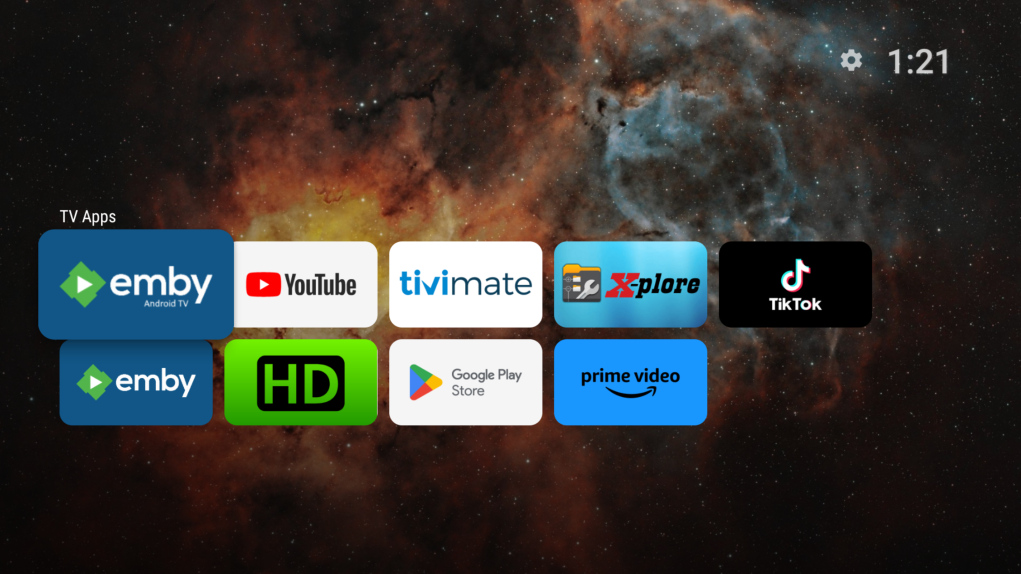
Install a separate launcher, such as ProjectIvy. I have had it running on my Shields for several weeks now and my home screen looks like this. I have reduced it to only the 2 Emby apps, YT, TiviMate, TikTok and X-Plore now.
 1 point
 -
This community is here to help you. Here are some guidelines on what information you should supply when reporting issues. Make sure to check out our Knowledge Base for more useful information. Reporting Emby Issues Please create a topic in the community. Describe the problem in your own words, including what you're trying to accomplish, and where you're getting stuck. Please mention some specific examples. In your description, be very specific about the steps you took and what happened with the system. Describe it like you are talking to a blind person - because you are. We cannot see what you did or what happened so be as specific as possible. If you saw error messages, please tell us what they were. If the problem is difficult to explain, please include screenshots that demonstrate the issue. Please attach the server log from the time frame the activity occurred. See the section below titled Emby Server Logs. Please supply the full and complete log file in txt format. Please don't zip or compress, and avoid attempting to extract relevant sections. Everything is relevant to us. If a server transcoding log (ffmpeg log) was also generated during playback (in the server logs folder), please attach that as well. If you are using the Roku or Android TV specific app, please also follow the instructions below to send a log from the app. Emby Server Logs Logs can be accessed directly within the server's web interface by navigating to Logs under Emby Server sidebar section. If you're having difficulty using the web interface, log files can be found in the logs subfolder of the Emby Server Data Folder . Note: Be aware that these log files would not be sanitized if obtained directly from the logs folder and should not be uploaded in the forums. If there is an error downloading the logs through the Emby Web interface for Settings / Logs, please enable debug logging, repeat the attempt to download the logs and report the problem in the forum indicating the logs download issue. The raw logs can then be forwarded to a member of the Emby Team when requested. Emby for Android TV/Fire TV and Emby for Roku Logs These apps have the option to send an app log to us electronically. You enter the settings page and turn on the "Debug Options". Now there will be a new tile on your home page settings row (or menu option on the user menu at the top) labelled "Send Log". Reproduce your problem and then use this button to send the log. Then add the following information to your report in the forum: Exactly what you were doing and what happened. Include the name of whatever you played if it is a playback problem The time you sent the log (in Eastern Time please - UTC -5) The name of the Emby user on the local server that was logged in at the time How to Post Log Files You can simply drag a file onto your post to attach it. Alternatively, you can upload your log file to Paste2 or a DropBox account and then post the link in your topic. Please avoid linking us to log files that require us to sign into a website. If the problem is occurring in the Emby Web app, please remove any custom CSS you may have created and see if the issue remains after that.1 point