Leaderboard




Popular Content
Showing content with the highest reputation on 08/22/24 in Posts
-
Started making my own thread about this but then found this via search. This thread is about a year old but it appears this hasn't been improved? I just started my Premiere trial and found this 'feature' to be incredibly lacking from what would be considered 'premium' to me. I have only had a few trailers play, and they were unacceptably low quality to the point that I have just disabled this plugin.3 points
-
Insulting the developer of the software is probably not the best way to get help. Aside from that, the first thing that is needed is the server log covering the time you have the problem, which will show information about your system, and may show what specific issues you are having. This can be found in the "Logs" section of the dashboard, downloaded from there, and added to a post here (simply using drag and drop). Paul3 points
-
I see from the other thread it was my user error...so to correct the record You can issue pause resume commands on foreign players with the fuller "Alexa, ask mb home to pause"...I incorrectly concluded it wasnt working because the simpler "Alexa, pause" works with local player but not a foreign player. Perhaps "Alex, pause" is operating on a different mechanism and was a 'false positive'. bottom line you can pause / resume foreign players with the fuller command.2 points
-
I like to be able to see what record label/publisher an album is from, but I cannot figure out if that is an option in Emby. If it is, could someone help me out? If it isn't... Any chance we could get this option down the road? Please?2 points
-
Hi all, As the title suggests It would be a nice addition if a Label tab can be added to music. We have studios and networks for movies and tv, Labels would help round out music functionality. This data is already captured and albums by record label is available currently from an individual album A top level view is the key easily access the info. The art is readily available. and could easily be incorporated with studio art as that is how labels are treated anyway. Better still the art is available through an api already used.... fanart.tv @@softworkz you seem to be a metadata guru maybe this is up you alley? As I understand emby would need to capture the musicbrainz record label id as that is the key for lookup on fanart. I am sure @@Kode can provide further details as needed. the fanart labels look really nice... so vote up this request and perhaps we can get Luke and softworkz to take a look. thanks -vicpa1 point
-
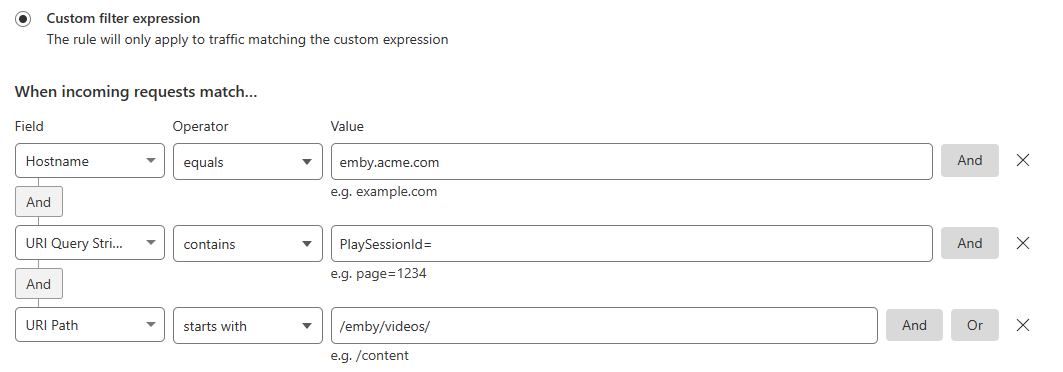
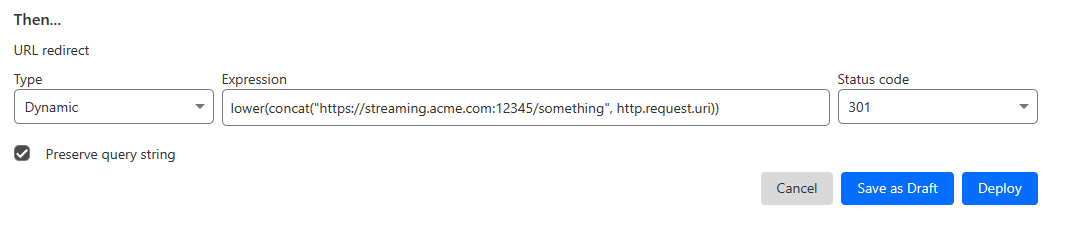
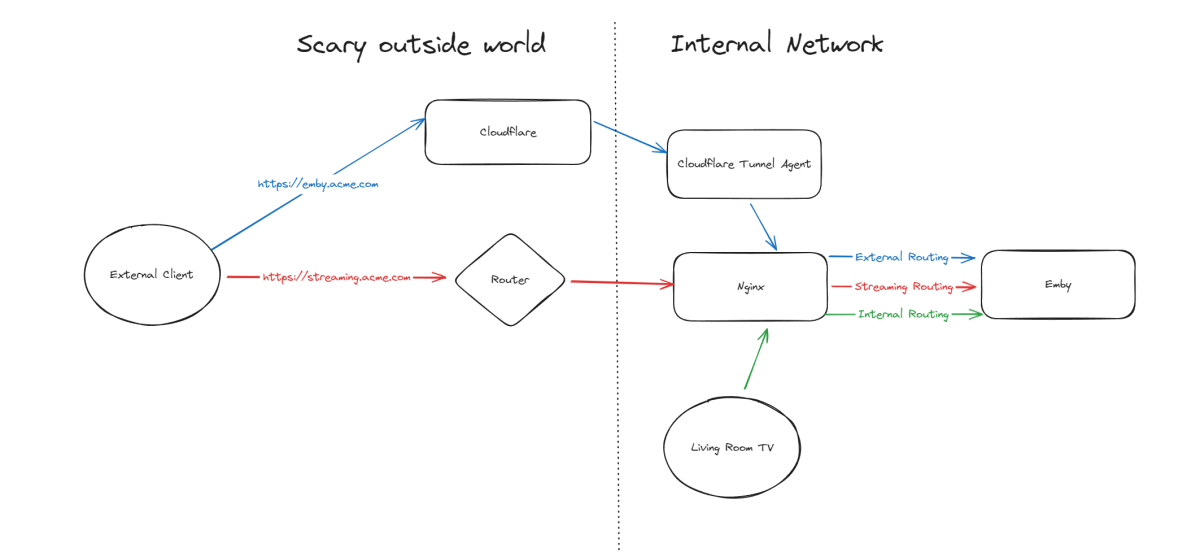
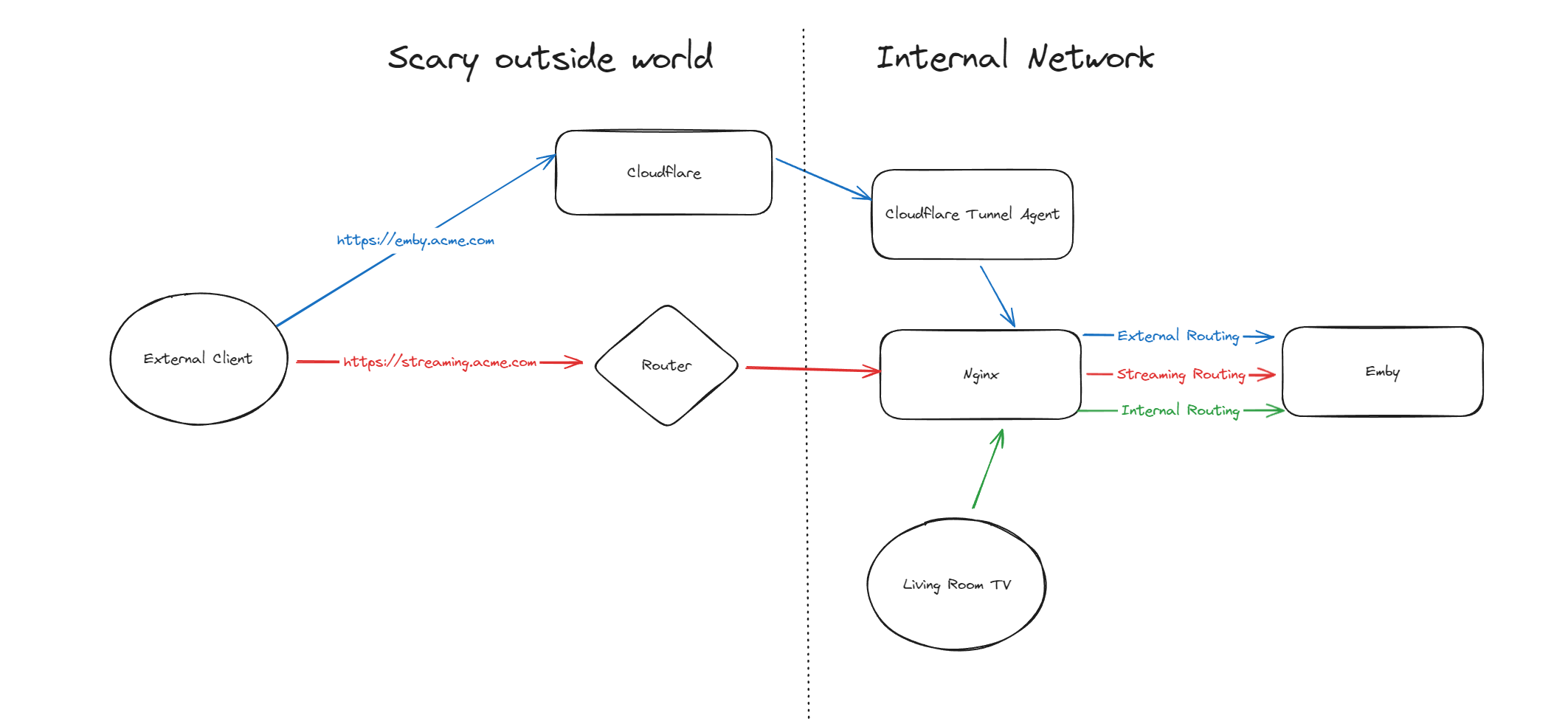
Hello, A few months ago I was in the process of moving away from directly exposing Emby via my home router to using Cloudflare Tunnels, but as it turns out, Cloudflare don't like you paying nothing and yet streaming GB/TB of data through their network. This was frustrating as I really wanted to put Emby away behind something I trust but I also didn't want to get my account banned for streaming media through it. I've read through many posts here about avoiding caching but it seems it's not necessarily the caching that will trigger your account being in trouble, it's the bandwidth usage as well of just piping all that data through their servers. Since I now had some time, I thought I would try to work out a long term stable option using Cloudflare. So what to do? When talking about security with self-hosting anything, I'm not going to go crazy but I like to take away easy wins for bad people. When it comes to running something like Emby, I'll assert that the biggest risk you face is automated attacks at scale. By this I mean that when it comes to hosting Emby at home, I am not really worried about some clever kid that I beat in an online game spending a weekend taking revenge on me or a state-backed hacking groups spending 6 months breaking in - I'm mainly worried about the type of flaws that are easy for people to automatically discover and exploit - e.g. recent examples with Emby and HomeAssistant. Both of these flaws allowed attackers to bypass the authentication layers of the application - no matter how complex your password is or whether you have MFA enabled (in the HA case), it's a trivial exploit once an attacker detects a vulnerable version of your software running. Both of these flaws were exploitable at scale, provided you could find Emby servers online. Given my determination to run things through Cloudflare for several reasons, security included, I wanted to come up with a system that gave me some confidence without being too complicated and without risking my Cloudflare account being banned for streaming through their service. I have not written this for everyone to be able to follow - if you are not familiar with nginx, Cloudflare, HTTP semantics, then this may not be all that helpful. Split Service Where I've landed is a split hosting setup - far from ideal but I think it's better than going all Cloudflare or all direct access. To begin Expose Emby through Cloudflare tunnels as per other guides (I won't go into the details here right now) Expose Emby via reverse proxy for external traffic (and internal too, makes sense to keep things consistent in my view) Setup port forwarding on your router to direct a port from the internet to your nginx service Nginx will have two Emby configurations to start with - one for external and one for internal Once you are able to hit Emby both internally as well as externally, then it's time to split the external. I'm going to imagine that you now have emby.acme.com setup via Cloudflare Tunnels, and you also have streaming.acme.com setup with direct access to your service via your home internet router. What's the difference? emby.acme.com is going to be your main address you use for everything, and that will go via Cloudflare Tunnels. You can use Cloudflare's many, many security options to come up with a setup that is secure but easy for your situation. streaming.acme.com is going to be a DNS only record in Cloudflare, it will point to your home IP and you will port forward this port (can be any random port number) to your nginx server. If we were to leave this setup in place, you would be able to access your Emby service via Cloudflare (with media streaming through Cloudflare), AND you can access Emby via the streaming address, completely outside Cloudflare. So what we can do next is use some clever redirection stuff. Nginx Configuration Now that you have two URLs working with Emby, let's look at Nginx again. In my configuration I have two different `server` blocks in my nginx configuration - one for my internal network and one for external. I don't know if this is strictly necessary but when I started I was an nginx novice and it made sense to be able to apply different rules depending on the origin of the traffic. To complete our nginx configuration, I am actually going to clone my external configuration, giving me a third `server` block. For my third block, I will use the domain streaming.acme.com - this separates it from emby.acme.com which is my tunneled traffic via Cloudflare. Now in my streaming block, I am going to update the rule as follows: This tells nginx to proxy traffic that is destined for streaming.acme.com/something/emby/videos/xxx to your emby server. What it also does (as long as you don't have other `location` sections) is tell nginx to not redirect any other requests that fall outside of this location to your Emby server. Cloudflare Redirect Since we want traffic to go through Cloudflare *except* when it's the actual media stream, we want your main Emby URL to be setup with a DNS address in CF that is proxied through their infrastructure and accesses your local Emby via CF tunnels. To handle the actual stream, we will create a redirect like this Now redirect that traffic to a new location What happens now? Well hopefully it comes together and something like this: if you visit https://streaming.acme.com:port/, then nothing is returned (where previously you could access Emby outside of Cloudflare and directly via your router) - nginx returns a 404 (or if you prefer, set it to return code 444 which drops the connection without explanation). If you visit https://emby.acme.com/ then you will hit the Emby login screen and can log in, and move around the application (this traffic is all via Cloudflare, with caching etc.) If you start to play a video from https://emby.acme.com, Cloudflare will intercept that request and return a redirect to your client, telling it to go and fetch the video chunk/stream from https://streaming.acme.com:port/something/emby/videos/xxx It should hopefully look something like this Why would I go to this trouble? Here is why I think this makes sense 99% of requests will go through Cloudflare, where you can layer on world class security options - you don't need to rely solely on Emby and the development team for security, put a fantastic authentication system & WAF in-front of it. This includes your authentication, requests to delete media and admin operations (These requests benefit from caching) You don't stream the video through Cloudflare - this was our compromise with this design. You are now exposing your nginx service directly to the world, however you may have to do that anyway if you don't want to stream through Cloudflare. Plus you can further protect yourself from autonomous/widespread attacks* You can use all of the Cloudflare security and other features to protect your Emby instance - I am assuming you want to have an easily recognizable URL & use port 443 for ease of use, so now you can do this and then have the Cloudflare firewall and other security features between the client and your service. In my CF redirect, I change the port to a random port number that I then open on my router* In my Nginx service, I drop any request immediately that is not a request to stream an Emby video file (e.g. the login page or any other API/page) If you look in my configuration, I lifted /emby/video off the root location and inserted a `something` - I was exploring injecting a Cloudflare access token as a query string but for now I just added a random base64 encoded string so that streaming.acme.com/emby is not a valid path.* I'm pretty new at Cloudflare, but I'm positive there are a couple of other clever things you cand do, e.g. you could block connections from certain countries, put your friends on an allow-list and block everyone else, or find other creative things to do. * Some people may look at using a random port number or having a random string injected into the path as not that secure, which may be right in some context, however since we don't have complete control over the Emby clients (to setup client certificates or integrate with a real IDP), and since I am focused on being safe from widespread flaws affecting Emby, or the webstack that they build on, or the logging framework they use, or some flaw in some other library, all I need to do for now is make this a pain for anyone to try and exploit. It may not stand up against some state sponsored hackers, but I'd be surprised if you fall victim to a widespread malware dropping activity as part of a critical flaw. Would this have saved me from the two earlier attacks I honestly couldn't answer this right now, it's possible the answer is no, but I am in my infancy with my Cloudflare setup and confident that with a few tweaks (limiting countries, suspicious request blocking) then I will be more confident in the future. Most of all, I would love a way from the Emby client to authenticate securely with a service like Cloudflare - a username and password being sent to the Emby service is nice but as we see flaws that negate this type of authentication, I'd rather try and put Cloudflare or another industry leading provider as my 1st line of defense rather than rely solely on the small teams building the software I enjoy running at home (no offense Emby Team) My goal initially was to move away from hosting Emby directly via my router/home connection, and onto Cloudflare which I believe I have accomplished with a compromise I can live with for now - as I actually get time to spend with Cloudflare I hope to be able to come back and say that I have more confidence that Cloudflare would help avoid attacks in the future.

 1 point
 -
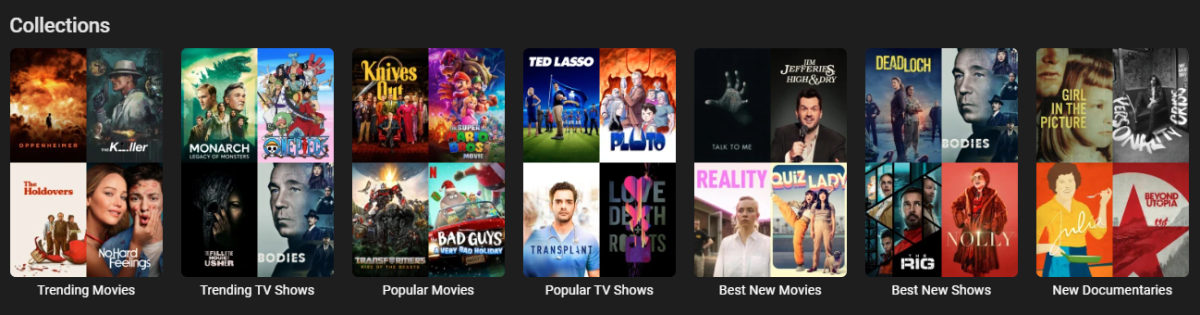
Edit: There is a plugin version available now, please see ACdb thread. Emby MDBList Collection Creator URL: https://github.com/jonjonsson/Emby-MDBList-Collection-Creator This tool allows you to convert lists from MDBList.com into collections within your Emby media server. MDBList aggregates content lists from various platforms including Trakt and IMDB. Features List Conversion: Transform MDBList lists into Emby collections Metadata Refresh: Keep ratings up-to-date for newly released content Collection Images: Upload local or remote images for collections posters Seasonal Collections: Specify when a collections should be visible Collection Ordering: Show your collections in order of which one was update Backup & Restore: Additional utilities to backup and restore watch history and favorites Prerequisites: To use this script, you need: Python installed on your system "Requests" Python package (install with `pip install requests`) Admin privileges on your Emby server A user account on [MDBList](https://mdblist.com/) The script has been tested with Emby Version 4.8.8.0 and later, but other recent versions should also be compatible Please check out the GitHub Link for more detailed information
 1 point
 -
The 3rd is coming later only, as mentioned in the video.1 point
-
Ill get Jeremy to try that and see how it goes, it did not help me previously though. I lowered all the way down to 1mbps and it still had pauses.1 point
-
Erm, am hoping it'll be improved not killed off. It only needs a Play button.1 point
-
Maybe that should be removed. The only purpose for that was to do something more interesting than having nothing show.1 point
-
That would be a very welcome change! I have a couple of videos i can't play unless i use the Android TV app and disable pass through, they become a stuttery mess.1 point
-
I tried to say that mounted the same SMB share twice (NAS), one with permission for Emby (uid=emby,gid=emby) mount point /mnt/Emby, and the other one with permission for the PC user (uid=pcuser,gid=pcuser) mount point /media/NAS The mount point /mnt/Emby is used only for emby to use. Based on your response, I did the correct way, unless security is not an issue and I'm the only user I can try your suggestion. Thank you Q-droid you are awesome, I'm new to using ubuntu and getting to understand and learning how linux handles things. I'm the only user, but seems based on your response it looks like it is better to leave it the way I have it.1 point
-
Oh that's interesting. The notification system has changed. I will also look at that as well. Thanks!1 point
-
Hi, yes if you need to disable pass through then we can certainly get these added. Thanks.1 point
-
On the Roku the issue is sort of the same. The layout we use for that selector is using a single line method where everything must be done with a single font and font size. It is possible on the Roku to change this to fit more and have this work exactly as it does on the web app. I can add this to our issue tracker. Reference: Issue #1636: Selectors need to move from using simple labellist into a custom rowlist for rendering1 point
-
I am not seeing an issue on Windows. @DemonImay need to see server log when you apply custom colors. 2024-08-22 10:13:04.620 Debug Server: http/1.1 GET http://localhost:8095/emby/Plugins/9ECAAC5F-435E-4C21-B1C0-D99423B68984/Configuration?X-Emby-Client=Emby Web&X-Emby-Device-Name=Microsoft Edge Windows&X-Emby-Device-Id=2b8e77e0-2a25-425d-945b-c7d409149566&X-Emby-Client-Version=4.9.0.29&X-Emby-Token=21c38656083e4cdd9ddbfca9bf7f4fb3&X-Emby-Language=en-us. Source Ip: ::1, UserAgent: Mozilla/5.0 (Windows NT 10.0; Win64; x64) AppleWebKit/537.36 (KHTML, like Gecko) Chrome/128.0.0.0 Safari/537.36 Edg/128.0.0.0 2024-08-22 10:13:04.621 Debug Server: http/1.1 Response 200 to ::1. Time: 2ms. GET http://localhost:8095/emby/Plugins/9ECAAC5F-435E-4C21-B1C0-D99423B68984/Configuration?X-Emby-Client=Emby Web&X-Emby-Device-Name=Microsoft Edge Windows&X-Emby-Device-Id=2b8e77e0-2a25-425d-945b-c7d409149566&X-Emby-Client-Version=4.9.0.29&X-Emby-Token=21c38656083e4cdd9ddbfca9bf7f4fb3&X-Emby-Language=en-us 2024-08-22 10:13:04.626 Info Server: http/1.1 POST http://localhost:8095/emby/Plugins/9ECAAC5F-435E-4C21-B1C0-D99423B68984/Configuration?X-Emby-Client=Emby Web&X-Emby-Device-Name=Microsoft Edge Windows&X-Emby-Device-Id=2b8e77e0-2a25-425d-945b-c7d409149566&X-Emby-Client-Version=4.9.0.29&X-Emby-Token=21c38656083e4cdd9ddbfca9bf7f4fb3&X-Emby-Language=en-us&reqformat=json. Source Ip: ::1, UserAgent: Mozilla/5.0 (Windows NT 10.0; Win64; x64) AppleWebKit/537.36 (KHTML, like Gecko) Chrome/128.0.0.0 Safari/537.36 Edg/128.0.0.0 2024-08-22 10:13:04.630 Debug XmlSerializer: Serializing to file C:\Users\Media\AppData\Roaming\Emby-Server\programdata\plugins\configurations\DiskSpace.xml 2024-08-22 10:13:04.631 Info Server: http/1.1 Response 204 to ::1. Time: 5ms. POST http://localhost:8095/emby/Plugins/9ECAAC5F-435E-4C21-B1C0-D99423B68984/Configuration?X-Emby-Client=Emby Web&X-Emby-Device-Name=Microsoft Edge Windows&X-Emby-Device-Id=2b8e77e0-2a25-425d-945b-c7d409149566&X-Emby-Client-Version=4.9.0.29&X-Emby-Token=21c38656083e4cdd9ddbfca9bf7f4fb3&X-Emby-Language=en-us&reqformat=json 2024-08-22 10:13:23.637 Debug Server: http/1.1 GET http://localhost:8095/emby/Plugins/9ECAAC5F-435E-4C21-B1C0-D99423B68984/Configuration?X-Emby-Client=Emby Web&X-Emby-Device-Name=Microsoft Edge Windows&X-Emby-Device-Id=2b8e77e0-2a25-425d-945b-c7d409149566&X-Emby-Client-Version=4.9.0.29&X-Emby-Token=21c38656083e4cdd9ddbfca9bf7f4fb3&X-Emby-Language=en-us. Source Ip: ::1, UserAgent: Mozilla/5.0 (Windows NT 10.0; Win64; x64) AppleWebKit/537.36 (KHTML, like Gecko) Chrome/128.0.0.0 Safari/537.36 Edg/128.0.0.0 2024-08-22 10:13:23.638 Debug Server: http/1.1 Response 200 to ::1. Time: 1ms. GET http://localhost:8095/emby/Plugins/9ECAAC5F-435E-4C21-B1C0-D99423B68984/Configuration?X-Emby-Client=Emby Web&X-Emby-Device-Name=Microsoft Edge Windows&X-Emby-Device-Id=2b8e77e0-2a25-425d-945b-c7d409149566&X-Emby-Client-Version=4.9.0.29&X-Emby-Token=21c38656083e4cdd9ddbfca9bf7f4fb3&X-Emby-Language=en-us1 point
-
Yes, Emby on the Nvidia SHIELD Pro does also support playing back lossless audio formats (such as Dolby TrueHD), as well as Dolby Vision video content.1 point
-
What do you mean with permission for both? Do you mean both emby and the pc user(s) have full access and control of the files on the mounted filesystem? It gets more complicated if you want fewer restrictions for access and at the same time maintain some control and security. If the share you're mounting is not a POSIX filesystem (like NTFS or FAT) you lose features. Aligning access is key. Things like common groups (gid), permission masks, setgid, etc. can help you get there. But, if you're the only person using this storage/share and restricting access is not that important you could try a couple of things: - Keep your current mount command and add the 'noperm' option. - Or mount with uid=0, gid=0 (or without uid,gid) and add the 'noperm' option. Either might work for you though I haven't used it so don't know how new file/directory ownership looks doing it one way or the other. Ideally this entry should be in the /etc/fstab so you don't have to mount it manually after every reboot or logout. https://www.samba.org/~ab/output/htmldocs/manpages-3/mount.cifs.8.html1 point
-
@alaindma Be civil. You got just a mild warning now - next outburst like that will lead to immediate ban.1 point
-
To make matters worse, it would be ideal to prioritize dedicated graphics over integrated graphics. If the computer has 2 graphics cards, with the option “YES” it will prioritize the iGPU over the large GPU. And then you get back to a similar problem with the one at the beginning of the post.1 point
-
thank you will look into tomorrow1 point
-
A. You can speed up the experience by saying "Alexa ask Emby home to play <Movie>" or "Alexa ask Emby home to pause". This will send the request to the default player. You can set the default player by opening the Emby app of the device you want to set as the player e.g. "Emby For Android on your TV" then say "Alexa ask Emby home to change the default player" say "No" to the first Alexa device, then say "Yes" to the device you want to set. B. No there is not an option to change the name of the skill at this current time. C. Yes pausing works. also if you are playing audio directly from your Echo you can just say "Alexa pause" / "Alexa play".1 point
-
I'm not sure although I can see there is a Captions shortcut on android that we're not catching so we can add that.1 point
-
So I disabled the auto scan of TV drive, not had any of the previous issues with scan not detecting folders. Thanks for advice H2P1 point
-
Yea just using the normal Emby Server api. That's what our alexa support is using.1 point
-
Both changes in this version work as expected.1 point
-
This is going to have to be a bug report then. Nothing happens when I click it. I hear the beep, and nothing.1 point
-
Hi, we are working on unifying them into one. Emby for Android is the way forward.1 point
-
Hey, yup I am here I have just been busy and I decided to do a few tests before I took up your time in investigating this. I did a whole new format and install of Debian 12 but this time I tried to install Emby Server as a docker container....that just fkd things up...Emby wouldn't play nice. I am not going to bother getting into that drama because I am not going to bother with docker. The laptop is solely for Emby and that's it. Annnnyway I have the Emby Server up and running again. But this time I am using MediaElch to scrape all media images, actor images etc because I did a test and found it runs so much faster on the CC doing it this way rather than Emby doing the scrapes. For some reason even with Emby saving the images into the media folders it still lagged bad. But now it doesn't doing it this way. But I have encountered other issues I need to bring up so once I have all that together I will fill you in. Hopefully tonight I will have it ready for you. I want to make sure there's no user error involved with this ie my Emby Server settings etc.1 point
-
Thank you for you quick answer. Yes, with Android app it's working! Why is there 2 different apps? What are the differencesW? Which one is the best for Android TV player?1 point
-
Hi. Can you try searching for our standard android app (Just "Emby" on Amazon and "Emby for Android on Google) on the same device's app store and see how that compares? Thanks.1 point
-
It looks like development on the plugin has stopped, but someone has created a fork of it and is making updates. Seems to be working if you want to try it. https://github.com/MoojMidge/service.upnext1 point
-
The problem here isn't the "in-line missing episodes have been removed", but the "replaced with different solution" part. As you can see on my screenshots above, not only are the missing episodes removed in-line, but ALSO the "new" solution doesn't work. Currently, there is NO way to locate missing episodes, neither in the old way nor in the new way, because the old way has been removed and the new way doesn't work as intended.1 point
-
Yea not really sure what emby are doing with this right now. They have taken away an integral part of TV show viewing (both missing and upcoming) and replaced it with a manual check which is all but useless for the average user. Emby for AndroidTV (you know, the client that has been in the process of being 'replaced' for the last 4 years..) now has some of this put back - it has an 'upcoming' row like before (with a 'future' banner across the poster) and if the latest episode is missing - then it shows that as 'missing'. But if mid-season are missing, then it doesn't show those - so it's only useful for current shows. No other client appears to have this. All in all - it's a bit of an inconsistent mess ..1 point
-
Well add one more disappointed user to the list. I also just found this thread due to trying to figure out what happened to the missing episodes and not upcoming upcoming as other users think we are talking about. Although I feel this will fall on deaf ears and be ignored.1 point
-
Yes, this is exactly what users want to see, the missing AND next upcoming episodes, so we know when the air dats for the next episode is and if we are missing an episode, if the library is incomplete, I WOULD SEE IT SAYS MISSING EPISODE. instead of nothing and maybe completely missing an episode because I didnt go and check a burried context menu.1 point
-
Little Rusty, sorry. But John Wick Is Not Rusty! Names got cut off, ill fix and repost corrected version, oops. And I just noticed, 7 years to the day when first started.


 1 point
 -
Hi, Record Label Artwork revisited..... attached is zip that has 100 record labels nicely sorted and named. extract the zip and add them to your studio folder and you should be good to go. You can get to a Record Label "view" from the bottom of album detail screen or by searching for a label. They look a little squished on the search results screen but I like the look on the detail page. File...labels.zip -vicpa1 point




.thumb.png.f4cb0545e98b51fd9b00e427622ab761.png)