Leaderboard




Popular Content
Showing content with the highest reputation on 08/20/24 in Posts
-
WMC Settings view works now. Thank you.2 points
-
What do you mean? LRC files with media are used in Emby or they can be embedded in track. Music Lyrics | Emby Documentation @sa2000can you move the Intro skip from the bottom on Lyrics to correct location?

 2 points
 -
.123 wmc settings doesn't work for me still. v8 version.2 points
-
I hit "play all" on a collection and it doesn't show the next film in "Next Up" after I quit out of it. This is apparently intended behaviour, and the same applies to playlists. This is absurd. Why even have the "play all" option? Who's sitting down to watch a full collection's worth of films, or a full playlist? I have playlists for The Prisoner for its various episode orders, and there's no way I'm getting through them in one sitting. I was going to make that my next show to watch but if I'm going to have to keep track manually of my progress through the playlist it makes the playlist fairly pointless TBH. There's no reason playlists or collections shouldn't show up in Next Up.1 point
-
I love the additional subfolders for Movie Extras (eg, Shorts, Scenes, Interviews, etc.)! I would like to propose an additional folder: "Galleries". Within the Galleries folder the user would place subfolders (only one level of nesting) and each subfolder could contain any images the user chooses. Then, Emby would display the subfolder name as an Extra (in Emby Theater) and opening that extra would launch an image gallery of the containing images. For example: Movies\Disney\The Sword In The Stone (1963)\Galleries\Scrapbook Movies\Disney\The Sword In The Stone (1963)\Galleries\Film Facts "Scrapbook" is what would be listed among other Extras in Emby Theater, and the Scrapbook folder contains various images to be displayed in a slideshow that the user can navigate with their left/right arrows. This feature request is motivated by the following related post: https://emby.media/community/index.php?/topic/55912-video-ts-folder-no-longer-recognized-in-movie-extras-folder/ Basically, sometimes there are extras such as image galleries and text content which are only available via the DVD menu. I have found that I can use FFMPEG to extract all the frames from a video file, and so use that on the appropriate VOB file from the original DVD. Then I can use VisiPics to delete all the duplicates, resulting in content I can then sort into folders (eg, Concept Art, Storyboards, etc.). All I need is for there to be the above support for a Galleries extras folder, which could contain multiple subfolders (only one level deep), each containing images to be displayed as image galleries in Emby Theater, etc. Thanks for your consideration! PS - If this is something you might like to see implemented, be sure to "Like" this top/first post (as well as any subsequent posts in this thread that highlight particular aspects of what you are interested in) -- "Liking" the top/first post helps the Devs to know how much interest there is in a given Feature Request.1 point
-
Hi, the latest Blog post for LG Emby TV App was for "Emby for LG 1.0.37" @Luke you always write "Stay tuned to the blog for the release announcement." on the "Status on official LG app" Topic But for the last 4 LG Versions no Blog Post has been released. I'd really like to get more infos on changes and new features of the Emby LG App Thanks1 point
-
A new Build of the WMC UI is available: https://github.com/EmbySupport/Emby.WMC.UI/releases/tag/0.125.0. Changelog:0.125.0 Unhide window controls (Theater) Disable F4 hotkey 0.124.0 Fix wmc settings view 0.121.0 Added new color theme: MC Deep Added WMC Settings view No more beta timeout in the Android version1 point
-
A new Build of the WMC UI is available: https://github.com/EmbySupport/Emby.WMC.UI/releases/tag/0.124.0. Changelog:0.124.0 Fix wmc settings view 0.121.0 Added new color theme: MC Deep Added WMC Settings view No more beta timeout in the Android version 0.118.0 Added new translations (for WMC-specific streings) Greek Spanish Norwegian Bokmål Turkish Ukrainian1 point
-
In Windows on PC, don't see any windowing controls in top right - should there be ?1 point
-
Thanks for your Answer Luke. In the meantime i did it for the Seasons with mouseclick for my own user.... So i'll try in the next days to clone the machine ant test it over there... The new emby server on the actual release iis just runnig too good to make some experiments... I'll let you know what happened... Thx. Michael1 point
-
All authorisations were/are given. The short path was somehow a flash of inspiration. It certainly didn't seem illogical to me - and it worked.1 point
-
The current STRM URL format for Youtube trailers was deprecated at the beginning of this year and replaced with a new format. Can that please be updated in Emby too? Current: plugin://plugin.video.youtube/?action=play_video&videoid= Present: plugin://plugin.video.youtube/play/?video_id= References: https://kodi.wiki/view/Add-on:YouTube#Integration_with_STRM_files https://github.com/anxdpanic/plugin.video.youtube/commit/1ce49f0e7a80d9c9f1d8e5291c2ccc85f1de138a I believe we should still continue supporting the reading of the older formats that have already been written to the NFO but write only the newer format whenever the NFO gets created/updated.1 point
-
I have my remote users set client to max and throttle them per user streaming limits as Auto usually falls back to hard coded client limits. But most stay on Auto and report issues here.1 point
-
Right, installed 4.8.8.4, updated smartplaylists (why is it still not in the catalogue!!) and all seems okay, schedules look right, just recording a programme to check that that is okay. Watching an episode of Red Dwarf, when it finished I pressed next episode and it still shows a black screen, if I tap the remote it shows the data for the episode that just finished with start 0:00 and end -0:00 so it hasn't helped with the original problem.1 point
-
I have just managed to get every video to show file instead of http. The error was that the network path was too long. I have re-shared every single folder above the videos. Old path: \\SERVER\EXOS18TB\Emby\EXOS18TB-Movies New path: \\SERVER\EXOS18TB-Movies Then disconnected the server on the shield and reconnected it - restarted the shield and everything works as it should.1 point
-
Devs will have to comment on 1) as it is very conservative per many topics. As for 2 no there is no adaptive change once a stream has begun. Yes that was reported in another topic. You have anouncements as they are usually mirrored. As for server you have GitHub Potentetial release note links in Latest Versions topic.1 point
-
Forgive me for the temporary dislexia! I recalled reading something a while back that said macs running High Sierra (the hardware prevents me from installing anything newer) & older would no longer be supported at some point, and I thought I saw the .13 before the "10". Though I think the last time I tried to update, I couldn't run the install package. I'm away from my server at the moment, so I'm working off of memory (and can no longer access it through teamviewer due to similar age issues), but I'll try again when I can get in front of it. Apologies!1 point
-
Hi, there's already an open request for this or something functionally equivalent. Please join in and contribute to the existing discussion at:1 point
-
@pdeliotappears to be only happening on xmltv. Just realized there is no Emby guide for France. I have tried with a UK channel for FBI Most Wanted airing and the episode that I put in the library does not show in the schedule or Live TV Series screen for FBI Most Wanted. I will refer the diagnostics I captured on my xmltv test to the development team1 point
-
Hi, yes! Thank you very much. Kind regards1 point
-
Even then, a VPN connection is itself somewhat throttled, and I'm sure the CCP is going to throttle VPN connections anyway - just because they might not be able to access the data doesn't mean they can't throttle the connection, and in fact, they're MORE likely to throttle a connection they can't inspect. The bottom line is that there are technical issues that the OP can't do anything about that are going to prevent this from working. Downloading content ahead of viewing is certainly an option for some devices (phones and tablets with plenty of storage), but it isn't going to work for something like a Smart TV or Roku that only has 2GB or 4GB of storage, given that a 1080p movie is probably between 4-20 GB in size, depending on bitrate. For it to work at all, Emby is going to have to transcode the content to a much lower resolution and bitrate, and you're going to have all of the problems common with transcoding: difficulty pausing and resuming, nearly impossible to FF or REW, audio sync issues, and so on. Other than perhaps North Korea, China is about the worst-case scenario.1 point
-
No, it's not that. It's happening between TV episodes.1 point
-
Hi, we'll take a look at this. Thanks for reporting.1 point
-
Thanks @Luke i don’t understand, I just went to replay the same movie on the same iPad as last night so I could capture the logs. And low and behold the audio is playing fine. im gonna try fast forwarding a bit and keep testing different parts of the movie to try and reproduce it so I can provide the logs1 point
-
Got it, thank you. I'll let it cook for 24 hours. Appreciate the quick response!1 point
-
Thanks, Luke!1 point
-
Hi There is no any kind of improvement for HDR or DV , we couldn't see any hdr and dv and still the same. Can someone explain me what means of improvement? But the great change I can mention is now we can choose version of movies and episodes . Thanks a lot for this change Subtitles section need to be completely revamp and HDR and DV have to be Supported then we can say we have basic app for apple tv1 point
-
I was just happy to get it into a directory where Emby could find it. I tried CONTAINER:/Emby first but it still didn't see it there. Config/data did the job though.1 point
-
@Lukewhile I appreciate the heads up, can I ask why you copy the same message each time? Last Blog post about the LG app was for 1.0.37 back in 2022, we are still waiting for the 1.0.39, 1.0.41, 1.0.43 changelogs/blog posts1 point
-
Hi, yes we are looking into this. Thanks.1 point
-
Okay, I got it. The thing I didn´t know is that the Emby app on the cube has to be started manually in order for the Android app to find the Cube. So I have started Emby manually on the Cube and then my Android device "found" it and I could play the music without having to keep the TV on. Great!1 point
-
This resolved the extreme artifacting I was getting, as well. This works great in the Emby app on my Apple TV but Infuse seems to still have the same issue. Is this some sort of server side issue I can resolve within the Emby settings? I have no idea if it's a matter of tone mapping or something. My streams are all direct play, so it's not as if transcoding is going on

 1 point
 -
For audio, yes, for video no. As has been said above, people see the playlist as a watch list because frankly thats all emby offers on the limited interface. 'I'd like to watch that show sometime, or let me watch the first few episodes' - clearly i don't intend on watching the entire show in one session, so why would i want to add each individual episode ? Playlist/watchlist mgt has been #1 on the feature list for 8 years Eric, does this not tell emby that the playlist functionality within emby today is a very outdated implementation where you have just bolted on video to something designed for audio ? People want a 'library' with their genre, their 'picks', their favorites, their interests, their generation. Emby offers nothing other than a playlist (useless for tv) or a collection - that can't be pinned as items. Filters are all but useless as you can't use and/or combos. Do you see the problem here ? When you have 1000's of movies/shows to watch, people just want to see a custom subset of that, and emby offers very little in terms of a solution to this problem. (And this isn't just me with this feedback, every one of my friends and family have asked how do I do this, my response is embarassing when i say it can't be done ..)1 point
-
Any data getting through to China needs to go through their great firewall and will be severely throttled. There is nothing you can do short of using a VPN which I'm pretty sure is illegal in China.1 point
-
As I said i do not use the "download" feature but i would think that the main limit is device local storage. I know that on my tablet i can place something like 7 or 8 1080p movies. But, when I am traveling, I simply use a fairly large portable USB drive and copy, outside of Emby, the movies or TV shows to it before I travel. I then use VLC to play what I want. I do not use Emby while traveling as I do not like opening up my server for remote access. It is a little inconvenient but it works and i can watch what i want as long as I pre-planed correctly.1 point
-
I find that, with a little thought, I can have almost everything I want by proper configuration and some creative configurations. I know not every possibility can be handles by my methods but it works for me quite well. BTW: I also use collections, not the predesigned garbage created by "automatic" collections, (I turn that off) but personally created collections that contain exactly what I want. And I use "favorites" too. Combining those basics I can have virtually and configuration of shows and movies I dream up. I know that many/most people want things done automagically but i find that if I control what is in collections I get close to the ideal for me. The only thing missing is that when looking at a collection, no matter how sorted or displayed, there is no alpha picker but that is a minor issue except. I even use a few, very few, playlists to fill things out. The next up (Legacy) and Continue watching rows are really all I use, most of the time, but, sometimes, the fancier and more complex things are handled by one or more of the above things i mentioned. Emby, for me, needs to fix a few minor issues, like the lack of an alpha picker in many places. But, other than that, Emby is such a complex and diverse system that there always seems to be a way to display content so that it is most convenient and efficient.1 point
-
Thanks for the update I was able to update with a static IP, and it seems to be working.1 point
-
It will, it is server option, not user option; all users on all clients will see the same CoverArt treatments/overlays.1 point
-
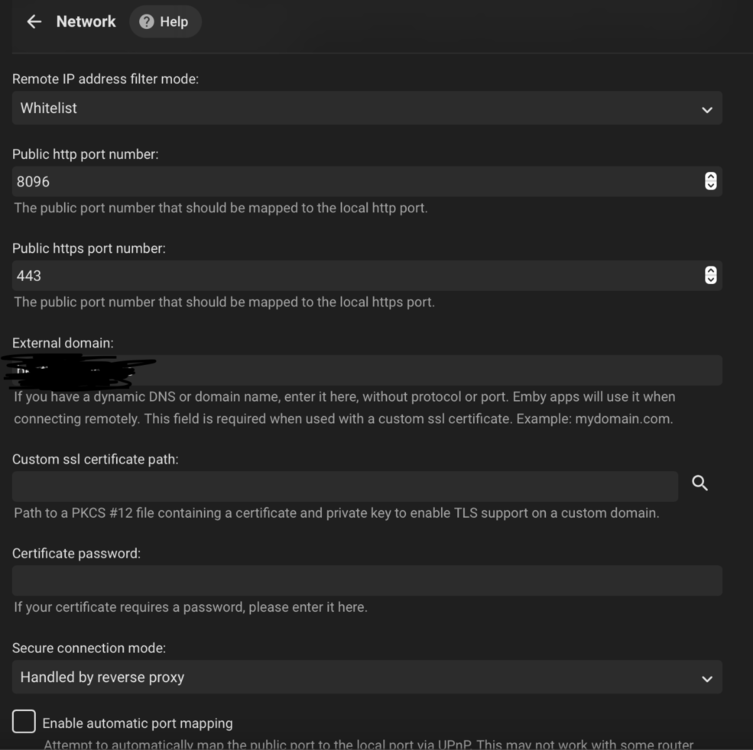
Hey gang, I am very sorry that I am way later than I had planned getting this finished. Life has been crazy the last couple months. README: https://github.com/itjedi42/emby-server-tools/blob/main/README.md SCRIPT: https://github.com/itjedi42/emby-server-tools/blob/main/Manage-EmbyServer.ps1 What it does: Checks if installation path exists, if not, creates it. Checks if 7-Zip is installed (needed to extract .7z archives of Emby Server), if its not present, it will get the latest version and install it. Checks for NSSM in installation path, if not found, fetches it and gets it where it needs to be. Checks if Visual C++ 2015-2022 Redistributable Runtime is installed, if not it gets latest version and installs it. Checks if IIS is installed, if not, installs it and relevant features. Checks if IIS Rewrite2 Module is installed, if not, it downloads and installs it. Checks if IIS AAR3.0 Module is installed, if not, it downloads and installs it. Checks if Certify The Web client is installed, if not it downloads and installs it. Downloads latest .7z x64 version of Emby Server (will download latest beta if `-beta` is specified) and extracts it. Creates a local user to use as a service account to run Emby Server. Configures Emby Server to run as a service via NSSM. Configures Windows Firewall rule to allow TCP port `80` and `443` in and UDP `443` in (For TLS1.3/QUIC support). Stops the default IIS website. Creates a new `Emby Server Reverese Proxy` site. Configures IIS WebServer farm in AAR3.0. Configures IIS server variables. Disables IIS caching (causes weirdness with streaming). Configures IIS request filtering. Configures IIS headers. Configures rewrite/reverse proxy rules. Configures Certify the Web client to create and maintain SSL certificate. Disables OCSP stapling. Disables legacy TLS. Configures QUICK protocol and TLS 1.3 (if Windows Server 2022 or newer). Starts Emby Server as a Service. Launches Emby Server WebUI in the default system browser. Outputs credentials of created service account. The script can also be used to update Emby Server when new versions are available. NOTES: You will still have to configure your router to pass ports through to the machine this is run on. You will still have to configure the internal Emby settings inside the application itself. --- Emby Internal Settings Navigate to your server via the localhost:8096 address Click the gear in the top right corner Click Network from the list of tabs on the right Configure as shown (use your hostname in the external domain box) --- @kernelcutterBy all means! Feel free to provide feedback or even clone the repo and PR changes! I am sure there are bits that can be optimized and added. I hope this helps everyone!
 1 point
 -
My issue with login has been resolved. Have another issue now which I'll describe in a new post. Thanks!1 point
-
I forgot to mention that after making each edit you click: "Replace All in All opened documents" Find what: <episode>1</episode> Replace With: <episode>12</episode> Replace All in All opened documents As for BLOCKING, I meant Locked1 point
-
Not sure on original colors but here
 1 point
 -
Moin, das ist ja klasse. Die erweiterte Ansicht ist mir durch die Lappen gegangen. Dann würde ich ja alle drei Häkchen setzen. Super. Vielen Dank für den Tipp. Was das Raid angeht so glaube ich, du verwechselst Raid 0 und Raid 1. Raid 1 spiegelt die Daten um eine Redundanz zu erhalten. SSD1 kaputt, SSD2 noch komplett nutzbar. SSD1 erneuern. Alles gut. Raid 0 verteilt die Daten auf beide SSDs. Erzeugt keine Redundanz ist aber schneller im Datenzugriff. SSD1 kaputt, SSD2 nicht allein nutzbar. Alle Daten weg. Lieben Gruß und vielen Dank für die Hilfe1 point
-
Sorry für die späte Antwort, ich bin dem Beitrag nicht gefolgt. Ich nutze Emby schon länger, und denke manchmal nicht an alles. Wenn du in den Bibliothekseinstellungen bist, aktiviere rechts oben die "Erweiterten Einstellungen". Daraufhin erscheint weiter unten u.a. das hier (Option 3): Ich habe nur Option 1 und 2 an, #1 führt dazu dass ich die Bilder auch für andere Anwendungen nutzen kann, #2 entlastet meine Film-HDD da die Bilder von der Metadaten-SSD geladen werden. Für dich ist die neue Option 3 interessant, mit den ersten beiden Optionen steuerst du die Ablage. Das müssten die sein, die entweder als Dateien in deinen Medienordnern liegen oder beim Online-Sein in den Metadaten-Ordner wanderten, je nach Einstellung. Ich hoffe ich konnte deine Frage beantworten. Bei RAID-1 wäre ich vorsichtig, fällt eine SSD aus, sind die ganzen Daten/Config weg. Besser RAID-0 für deine Konfigurationen + gelegentlich externes Backup.
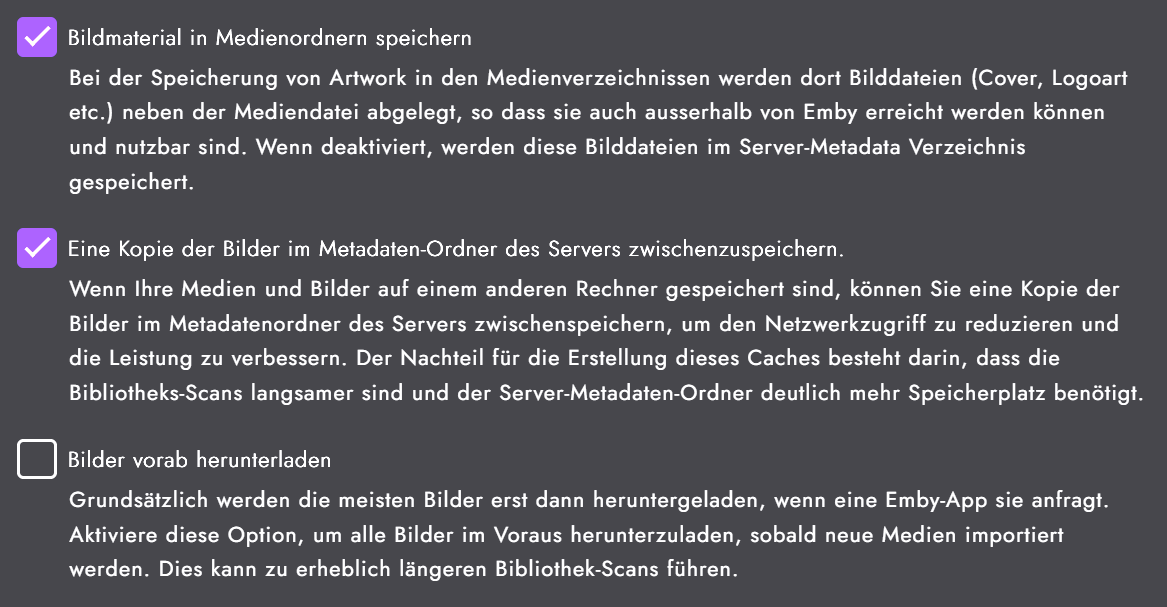 1 point
 -
What if you re-enable the video transcoding permission?1 point
-
Actually this is going to be a focal point of the 4.9 release, so you’re all in luck.1 point
-
I think this is a much-awaited feature: an EPUB / PDF file reader and this possibility of creating a real book database.... why does it take so long to create this feature? no news ? I'm willing to pay if that's the problem.1 point
-
I came across this looking for information on running emby under WSL. I figured I would complete some of these questions. You can write your own init script and get this to work, here are two examples where people did just that: https://emby.media/community/index.php?/topic/61826-debian-init-script-for-sysvinit-users https://emby.media/community/index.php?/topic/78433-failed-emby-install-on-armhf/ As to the problem of no systemd in WSL distributions, this has now been rectified by Microsoft: https://devblogs.microsoft.com/commandline/systemd-support-is-now-available-in-wsl/ However, either way after you have an emby install running under a WSL guest, you cannot communicate with it directly from other hosts on your network by default. You can "port forward" from the host system to the WSL VM using this method: https://learn.microsoft.com/en-us/windows/wsl/networking But, the port forward will only function until the next time WSL is restarted. At that time the virtual switch environment and DHCP address of the WSL VM will change and the port forward will have to be set up again. This can be scripted using this method: https://superuser.com/questions/1582234/make-ip-address-of-wsl2-static Or, there is one option for a static setup further down in the responses. Another possibility for a static setup is here: https://gist.github.com/wllmsash/1636b86eed45e4024fb9b7ecd25378ce Then you need to configure the emby server on the WSL VM to auto-start when the host computer is rebooted: https://superuser.com/questions/1343558/how-to-make-wsl-run-services-at-startup Ultimately, since WSL leverages Hyper-V anyway, and setting up a linux VM under Hyper-V, or just running emby directly on windows is way less complicated, I think most should avoid this implementation. Rob1 point
-
Would definitely like to see a gallery feature added to movies and video sections1 point