Leaderboard




Popular Content
Showing content with the highest reputation on 08/09/24 in Posts
-
I was updating meta data for some of my soundtracks today in Emby and thought it might be interesting if provided a link between the soundtrack and the movie where if you were looking at one you could quickly click to go to the other. I don't know if the current structure would facilitate this seeing as even the metadata for people is separated when it comes to music and movies/series: Its not really a priority item or anything just thought it would be something that could be neat for people that typically keep both the album and the movie (and it might raise the awareness for users of the system that the content is available, say if they just watched interstellar and said "Wow I liked that music quite a bit", oh look the movie soundtrack is already in here).2 points
-
Grundsätzlich nicht, die Browser-Adresse sollte auch die URL für die App sein. Vergiss nicht das https:// am Anfang der URL. Wenn bei der URL am Ende noch :8096 oder eine andere Zahl steht, musst du den Doppelpunkt mit Zahl weglassen. 8096 ist Emby-Standard, kann je nach Freigabe auch ein anderer sein, das ist der Port fürs nächste Feld in der App. Alternativ könntest du Emby Connect einrichten und nutzen, dann musst du AFAIK den Server nicht mehrfach eintragen und kannst deinen Account nutzen.2 points
-
Trailers are part of the Cinema Intro which comes with Emby Premiere. This is why I have an issue with the low level trailers (We're paying for) within the emby Premiere (Paid) features. From my point of view it doesn't appear there is any action on addressing or improving this paid feature which was a higher quality about a year ago. As I've mentioned in the past, Emby should drop the price on Premiere until trailers are improved. For many of us Cinema Intros is one of the primary reasons we're paying the Premiere fees monthly or yearly. Come on guys, do one or the other, address and improve it or drop your Premiere price Cinema Intros gives you the true cinema experience with trailers and custom intros before the feature https://emby.media/premiere.html As I've mentioned before, we appreciate the platform, we understand most of your time on the platform is volunteered and we appreciate that but please address the trailer issue.2 points
-
Requests for original.mkv with long durations are normal, this is a direct play stream, the response for which is only reported after the request has completed, so in that case it would have been playing for about 408 seconds. If you were running a reverse proxy and are monitoring both the request and the access log at the same time you should see original.mkv hit the request log, and then when you stop playing you'll see it show up in the access log. Only transcoded content will have the request for each segment in the logs which you can more easily evaluate the delivery times of each chunk. Edit: You can also try using Emby for Android rather than the Android TV version. That is the focus going forward for Android.2 points
-
I updated to 4.8 and noticed that the Hide Played Media From section under the User Display settings doesn't have an option for Recently Released Movies. It would be great if this option was added!1 point
-
here is the page but unfortunately the flatpack version is only available as TAR archive for the 3.0.21 version https://github.com/MediaBrowser/emby-theater-electron/releases1 point
-
Well done. Just check how long the certificate lasts and make a diary entry to renew it when required. Paul1 point
-
Moin, das ist ja klasse. Die erweiterte Ansicht ist mir durch die Lappen gegangen. Dann würde ich ja alle drei Häkchen setzen. Super. Vielen Dank für den Tipp. Was das Raid angeht so glaube ich, du verwechselst Raid 0 und Raid 1. Raid 1 spiegelt die Daten um eine Redundanz zu erhalten. SSD1 kaputt, SSD2 noch komplett nutzbar. SSD1 erneuern. Alles gut. Raid 0 verteilt die Daten auf beide SSDs. Erzeugt keine Redundanz ist aber schneller im Datenzugriff. SSD1 kaputt, SSD2 nicht allein nutzbar. Alle Daten weg. Lieben Gruß und vielen Dank für die Hilfe1 point
-
Hi, that line is not an error.1 point
-
We said the same thing ..1 point
-
Ohne den Port anzugeben hat es jetzt wirklich funktioniert das hab ich noch nie erlebt aber naja es funktioniert Danke dir1 point
-
It is my understanding that failed login attempts are handled in different ways. If a person tries to login with a non existing user account, Emby just logs it and posts it in the Alert section and also gives a reply. That includes "bad actors" and legitimate users that entered their user name wrong. No distinction needs to be made just handle them the same way, do not send a response or a reply, let the user guess what just happened. If there is no wood the fire will eventually go out. If there are several identical attempt, I let the Devs decide how to handle that. At present when a valid user name was fund and now a brute force to guess the password is under way, only than after 10 attempts will Emby block logins. How long will the blocking last, 24 hours or less? It would be nice to use the blacklist feature in Emby for failed non existing user attempt as well as brute force attacks on guessing legitimate users passwords. Bottom line: I don't want to take the chance that Emby possibly could be the Trojan horse that opens up my QNAP NAS. The bleepingcomputer.com reported that something similar happened in April 2021 in the article they reported that a "Massive Qlocker ransomware attack uses 7zip to encrypt QNAP devices" it was made possible because of QNAP's terrible software and new apps that were installed with the latest QTS update. I read and wept about the agony that 484 comments brought to light.1 point
-
Hi there, have you explored your Emby user display settings by clicking the user icon in the top right?1 point
-
Hi, thanks for reporting. We'll take a look.1 point
-
test your server here https://www.immuniweb.com/ssl/ and fix any non secure items with https://www.nartac.com/Products/IISCrypto if not using proxy1 point
-
Yeah I think you had the wrong idea about what reverse proxy is intended for but that's okay. You got it working. I was just about to recommend you in the other post to just upload the cert to emby since it was your only website.1 point
-
Hi, we are looking into this. Thanks for reporting.1 point
-
Sure. https://youtu.be/dbwFXontzmU Emby for Android 3.4.16 Press and hold >> also "just" displays the preview and seek bar. This app is much nicer, i don't know why the other one was the first that showed up when i first installed it. I have uninstalled the "emby for firetv" app.1 point
-
Hi, yes we're still looking into this and hope to have it resolved for the next app update. Thanks.1 point
-
Yes that's correct. If anything it could be a windows firewall issue? I haven't installed caddyv2 on windows so I don't know if you have to allow it or not. Everyone should just use linux1 point
-
Setting a fixed IP address in the Emby computer is not hard (instructions) except you have to take care of one thing first. You need to try to find out what IP range the router is using for DHCP (e.g. in mine it's 192.168.1.10 to 192.168.1.59) and choose a number in the same subnet but outside that range to prevent any possible conflict (in my case I allocate manually specified addresses from 192.168.1.100 up). Paul1 point
-
Yes No At least not the part where you get trailers delivered to you without having to curate them yourself.1 point
-
That's just the windows build number, it's not necessarily reflective of Windows 11. For example:
 1 point
 -
What can I do to troubleshoot further? Emby is working perfectly well today.1 point
-
Ok, thank you. I'll see what i can do, because Im renting an efficiency and the owners of the house have Spectrum router1 point
-
A way to send events to loggers, monitoring agents or management apps would be a good addition. I'm not convinced when it comes to blocking. Core media dev and support is stretched thin and taking on traffic management is out of scope in my view. I can think of a scenario where VPN exit points are blocked by Emby then valid VPN users get blocked as well. Sophisticated admins would understand the event and have external tools to handle it. Basic blocking in Emby with typical admins would not, needing support and then complain that it's not doing enough.1 point
-
Agreed, but you do need Emby to be able to comminicate to this perimeter defense to block/drop that IP. As no doubt you are well aware, you also don't want your perimeter/dmz devices being able to initiate connection to inner layers (other way is obviously fine), thus you need emby to push the requests. Currently I'm using Emby Scripter-X to write failed Auth to a file and this is then pushed via ssh to the dmz where it's picked up by fail2ban polling it, which then blocks the IP. Messy and certainly not something I expect 'Emby' to accomodate out the box - but it would be nice within their own app framework to block IP's - as it's better than what they have now - especially as they have the functionality available to them (or do via the GUI anyway)..1 point
-
Your Emby server may not be the target, only the entry point because it's the path that's detectable by the intruder. The goal could very well be to enter and discover other paths into your network. Even if this one in particular only wants access to Emby you have to think big picture and protect the whole environment from the best vantage point. Which is why Emby is not the app to handle this as it doesn't control the network interface. For Emby to handle this a connection has to be attempted and established and already too deep inside your network, too late. The barrier ought to be the first line of defense and at or closest to the WAN interface, not a few layers inside.1 point
-
This is a guess, but AAC 7.1 audio. 09:00:25.854 Stream #0:1(eng): Audio: aac (HE-AAC), 48000 Hz, 7.1, fltp, Start-Time 0.031s (default) 09:00:25.854 Metadata: 09:00:25.854 BPS-eng : 243313 09:00:25.854 DURATION-eng : 02:20:06.315000000 09:00:25.855 NUMBER_OF_FRAMES-eng: 197023 09:00:25.855 NUMBER_OF_BYTES-eng: 255670797 09:00:25.862 [aac @ 0x1a50e00] Assuming an incorrectly encoded 7.1 channel layout instead of a spec-compliant 7.1(wide) layout, use -strict 1 to decode according to the specification instead. 09:00:25.867 Stream #0:1 -> #0:1 (aac (native) -> aac (native)) 09:00:28.693 Stream #0:1(eng): Audio: aac (LC), 48000 Hz, stereo, fltp, 192 kb/s (default) I guess that is being converted to AAC 2.0 I have seen that causing problems. Can you try converting AAC 7.1 to AC3 5.1 or make an extra audio stream with AC3 5.1. AC3 5.1 is better accepted by players.1 point
-
Thanks for all the feedback. I've updated my subnet to something more appropriate. After restarting all my devices playback was much better with no real buffering issues. I'll try and put some more media through it this weekend to make sure everything is holding up. One issue I noticed that often times when I first launch Emby on the shield it will prompt with a "could not connect to your configured server" for a second or two and then it quickly loads (within a second or two) the home dashboard. Tonight I had an issue where I started playing the film, the "could not connect" message popped up again and brought me back to the home page shortly after pressing play on the film. I then tried to play again and "couldn't connect" while bringing me back to the home screen again. I tried the third time and alas it played successfully without issue. I'm attaching the latest server log and the attempts took place at these times. 2024-08-09 00:05:46.935 (1st attempt) 2024-08-09 00:06:05.485 (2nd attempt) 2024-08-09 00:06:39.051 (3rd attempt success) Also not sure if it is indicative of anything but I noticed one thing I thought was odd. The fourth line of the server log says Windows 10 but I'm definitely running Win 11. Thanks for the continued support! embyserver (5).txt1 point
-
Thanks for reporting. We’ll take a look.1 point
-
According to the Detecting local network addresses it is. But no sure why there are direct play responses like this. 2024-08-07 18:56:44.899 Info Server: http/1.1 Response 206 to host1. Time: 144829ms. GET http://216.13.1.24:8096/emby/videos/17/original.mkv?DeviceId=77080f474427b642&MediaSourceId=f55649765e0b63291c6cadffc0628562&PlaySessionId=f585878616d54951bd2d75f1ecdba079&api_key=x_secret2_x 2024-08-07 18:58:10.390 Info Server: http/1.1 Response 206 to host1. Time: 90303ms. GET http://216.13.1.24:8096/emby/videos/17/original.mkv?DeviceId=77080f474427b642&MediaSourceId=f55649765e0b63291c6cadffc0628562&PlaySessionId=f585878616d54951bd2d75f1ecdba079&api_key=x_secret2_x1 point
-
Hi, yes it does.1 point
-
AAC is not a name but codec and has nothing to do with localization/language. It is not, as you need to mark your audio track(s) with appropriate laguage(s) or flag preferred track as Default.1 point
-
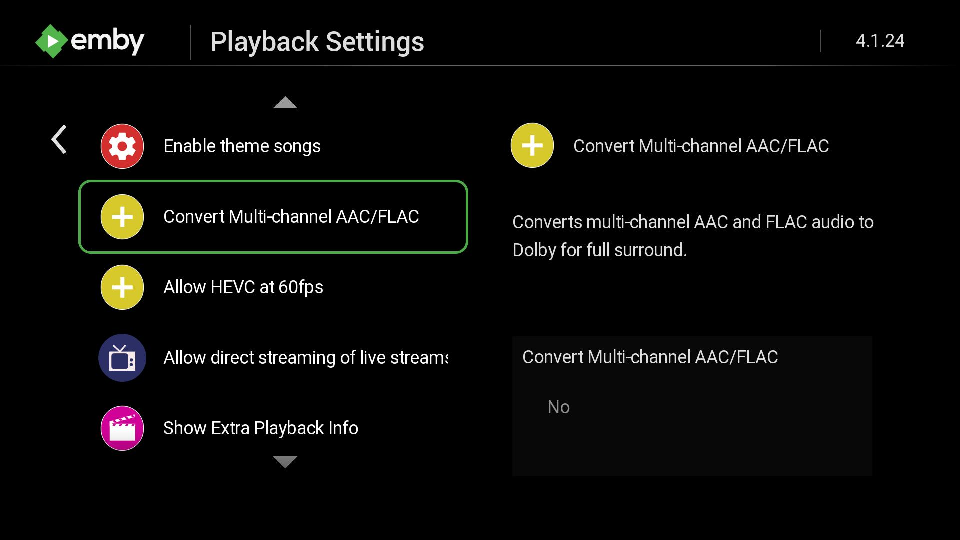
@Blam84How do you have the setting above set? The Roku will convert multi-channel AAC into stereo AAC on the device, no transcoding necessary, but you lose surround sound. You have to decide. Would you would rather: 1) direct play of the audio stream 2) keep surround sound always Because if it direct plays the Roku is going to convert that AAC 5.1 -> AAC 2.0 on the device itself and you will lose all surround. But at the same time if the glitching of the video stream during repackage is the issue, I am sure this is an acceptable loss, and you would rather direct play. Personally I keep the setting shown above always at "NO" because I am not too concerned at the loss of surround as I am versus transcoding. But you may feel differently. The setting allows you to be in control of how this is handled entirely. We default this to NO so if it is set to YES you have changed it at some point. With the setting set to YES your Emby server will realize you don't want the Roku to change AAC 5.1 -> AAC 2.0 and instead want Emby server to transcode into AC3 5.1 if the Roku supports it. This will cause audio stream transcoding and HLS is used. Also.. if you are using "Volume Mode" on your Roku with anything other than "OFF" it will disable all surround codecs. Volume mode will only work with stereo sound so the capabilities of the Roku will change when you change Volume Mode to Night or Leveling. Using OFF will allow surround sound again. Just FYI. The change does not take immediate effect. You must stop and restart what you had playing after changing the volume mode for this to happen. The stream cannot change until the player respawns it is a Roku requirement. https://support.roku.com/article/226802507
 1 point
 -
I believe you answered it earlier .. if half the Emby clients cannot authenticate, then Emby is all but useless in an extended outage or off grid scenerio. This has been raised many times but unfortunately, no solution has been offered as there is a real risk of it being abused - I get that. Therefore an alternative solution working alongside Emby that doesn't need the internet hook to work (both server and all your clients) is probably your best bet.1 point
-
This is a very good tip for anyone using Mp3Tag. I had the exact same hidden "AlbumArtist" issue when I started using Emby a while back. Wish I had seen this post then - it would of saved me a lot of time figuring out the problem on my own! 99% of the duplicate Artist issues (and split Albums) with my library were solved by making the embedded AlbumArtist tag the same as Album Artist. (The other 1% was other obscure hidden tags causing problems.) The only info to possibly add is that under the Mp3tag View Menu there is an Extended Tags section that opens up a window that shows ALL the tags of either an individual track or the whole album, if all tracks are selected. I found I was able to edit all tracks at once to change the AlbumArtist to match Album Artist (or vice versa, if required).1 point
-
Would definitely be nice to have a "clear alerts" link in the upper right of the alerts box.1 point