Leaderboard




Popular Content
Showing content with the highest reputation on 08/06/24 in Posts
-
I think 'keywords' is more descriptive of what's being discussed here. I don't want to tell you what your design philosophy should be, but I would think it would only make sense to develop another feature separately if tags and a proposed 'keywords' served a different functional purpose. What is the intended purpose of tags and how is it different than what what's being discussed here?3 points
-
There will be a loss. They are both "lossy" codecs, and what they lose will be subtly different, so the losses will be cumulative. That said, if the bit rates are decent, you may very well not be able to detect any change; there is an incredible amount of confirmation bias in most reports of how different audio can be. Paul2 points
-
When my kids were younger, they had a ton of shows and movies I didn't want to see so I physically segregated them in the file system and used our Folder Based Access Control so that only they saw those items. This should work in this case as well.2 points
-
Yeah, that would be my question as well. Do we really need another level of categorization?2 points
-
You don't go into particular library setting, but general settings in Settings>Library tab in the sidebar>Click "Advanced" on top of the page, above all your libraries thumbs. "Date added behaviour" dropdown (Date scanned into library/File creation date) will be the first option there.2 points
-
Hi Me and my family just went on vacation and wanted to download movies and series to our phones for offline usage. But we experienced that some of the requsted downloads never arrived to the phone. Hence it would ne a good improvement to have better control and overview of the downloads, like: - Where it says "Ready to tranfer", then capability to "force" download, because I experienced several items saying that, and never downloading - Improved overview og status. Like if it's saying "Ready to tranfer", then I would like to see why doesn't it download, what is it waiting for. - Ability to see in a movie or a series, IF I already requested it to download once. Because I would forget IF I set a specific movie to download or not, and it would great it what was illustrated on the movie. - And if I already requested a movie to download once, and I do it again, then that Emby pop up and say I already requested that, if I want to cancel the first request. I for example tried downloading whole season 1 -3 of a show, and then it turned out, it hadn't downloaded ep 1+2 in first season., and where also missing ep 8+9+10 in 2nd season, and I could tell why or force it to download. I hope it makes sence and hope an improvement for the Downloads1 point
-
Hi, Since I am using more and more TMDb, (since tvdb is more and more a mess), I am missing a very important feature. tvdb had the feature of grouping stuff into aired, DVD and absolute, which is supported by emby. TMDb had also this feature. See this example for "La casa de papel" (Money Heist, Haus des Geldes): The Original Order is allways the "aired order" of the original country. "La casa de papel" was originaly released by "Antena 3" and was taken over by Netflix, which results in different episodes ordering, which is a mess. They solved it in episode grouping. This feature is missing from emby, but it's integrated in their API and is allready supported in other apps, like kodi. At least, Banana a TMDb Mod claims it, that it's supported by Kodi: https://www.themoviedb.org/tv/71446-la-casa-de-papel/discuss/5e7032d84f9a99001152704f?page=1#5eb76872ca7ec6001f7c53cb Is it possible to add this feature into emby? It is the last scraping feature, I really really miss for TMDb on emby. It adds much flexibility and is overall a much better solution, than on tvdb with their aired, dvd and absolute order. Another great example is Dragonball Super: As you see, it adds much more flexibility for different regions over the world. It's in my own eyes a must have for emby!

 1 point
 -
Thanks for pointing me towards that. The image in that location is named "audio_lang_eng". The majority of the movies in my collection have English language audio. So now I need to figure out why it only shows up on images for some movies. I thought it might only be showing up on recent movies added to my library. But I just went through my library, and it is showing up on some movies that were added over a year ago.1 point
-
I don't have it but have you checked the resource folder to see what it is labeled? \cache\coverart\4.1.28.0\resources1 point
-
We got it fixed some how, don't know how, the problem went away as soon as he contacted me about it. We tried to recreated it but nothing did it, i'm not going to say no to an easy fix! Many thanks though!1 point
-
1 point
-
Ahh! Thank you. I have somehow never even noticed there was an "Advanced" settings on that page!1 point
-
thank you so much kanipek, this works1 point
-
I see the same as your example, my preference would be to not show anything at all. I only want real clients in this view and am not concerned about connected apps. IMO it is too congested with all the ARRs, notifications, and other integrations i have setup.1 point
-
If that's an option, yes.1 point
-
Yes, I spotted the hardcoded type map in the repository class. This seems like an unnecessary restriction! For now I'm using Books for non-playable types, since I don't plan on having books in this server. Even if you keep hardcoded types only, you could add a generic type for people to use in custom plugins! I was able to make audio playable in home video type libraries by adding a custom copy of the audio resolver without the library type restriction (other things being equal). I'm looking forward to using a similar strategy to make TV shows function on top of the home video type without filename shenanigans.1 point
-
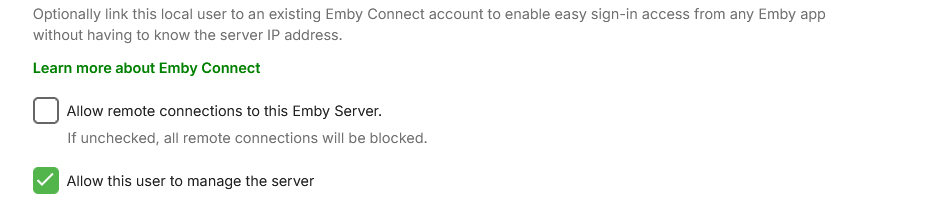
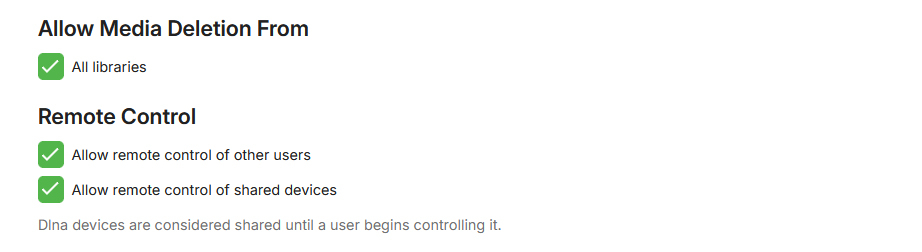
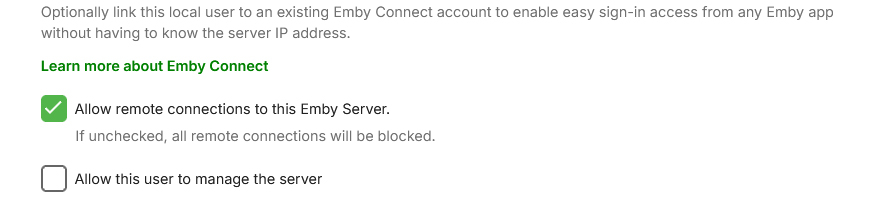
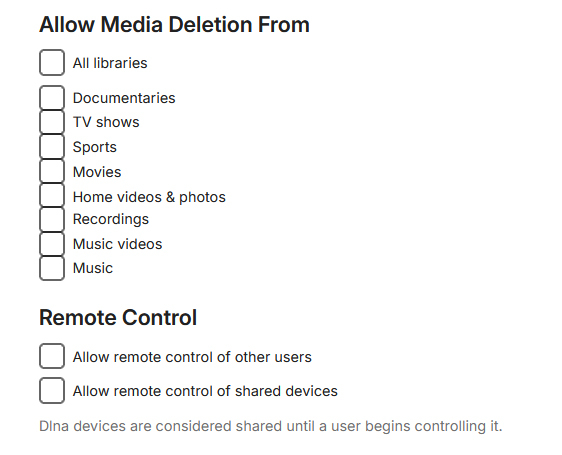
I read this thread and implemented the first 5 of your suggestions. My posting was related to your point 3 "Disable remote 'Admin' access". Your point is very well taken, why would you want to do a remote admin. Therefore my screenshots, one account for accessing Emby when traveling and one account when doing admin tasks when at the local network. All deletions of libraries has been disabled for remote users. The bleeping computer article talks about encrypting files, while I have taken steps to prevent that on the NAS level, these attacks are only at the Emby server not at the NAS. Can they encrypt files if they only have playback permissions on Emby?1 point
-
Ah, good to know. Thank you! I have another question of the cosmetic variety but I'll make a new topic for that.1 point
-
It is, but something like: would make short work of it.1 point
-
Yes as the startup wizard will run again.1 point
-
Oh, one more thing! I am not asking nor do I not want this to change! Muy importante! I don't want my library getting cluttered with other users messing around. This is MY library and I rule it with an iron fist!1 point
-
That is correct (and has been for a long time), regular users don't have the ability/permission to create Collections, they have Playlists and/or Favorites to group items according their preference.1 point
-
I was just coming back to this thread to say I found it. HOWEVER there is a caveat to this option. The user must be an admin. Since we had that security scare several months ago, I am a regular user and I have a dedicated Admin account. I just remembered in the Theater app I am signed in as normal user and on my web browser I am the Admin. There is where I found the ability. @GrimReaperas usual, you are as helpful as can be!1 point
-
Not sure I'm following: three-dot menu on TV show poster (or Detail page)>Add to Collection (New/Existing)?1 point
-
Since I also had yesterday 4 failed login attempts on my QNAP NAS for user Admin, I thought I post here for a "Best Practice" item. I only have 5 remote users plus myself when I go on vacation. To minimize any damage from hacking, I have no user account named "Admin". However I would like some comments on the changes I am about to make to the profile of users. I ONLY manage the server from the local network and if I am away and management of the server is needed, it has to wait until I am on the local network. So here is what I am trying to implement and the User Names are for clarity only. Any comments are welcome. Thanks User for managing the server (Local Admin) Finally the Remote Users with their permissions.
 1 point
 -
Yes, an item can be a part of multiple collections (both auto- and custom ones).1 point
-
It would be unnecessary IMHO, Tags serve intended purpose perfectly (and so much more, they're extremely versatile). As already suggested: It should be added as a library option: who doesn't want them wouldn't enable that option/download them, hence repetition of: could be easily avoided.1 point
-
I may be using a mac but it runs windows 10 via bootcamp and/or parallels. With it i am running WinSCP as well.1 point
-
There's already an open request for this or something functionally equivalent. You can join in and contribute to the existing discussion at:1 point
-
I do have the standard Android app installed and it does show the desired view. Why can't you make the AndroidTV app do the same? I understand your desire to eventually move to one Android app, but as of now the standard Android app is a no go for me and others. It does not play things well (has small pauses in tvseries and livetv, and occasionally on movies), photo viewing is STILL cutting off the bottom of the pic (which I have reported and got the reply that they are aware and have seen the problem), among other things. On a TV, the standard app is just NOT very good. The AndroidTV app is very solid. I have both pointing to the same server locally via ethernet cables. I found out yesterday that on the standard app, I can arrange things in the "my media" section how I want. I can NOT do that on the TV app. Intersestingly enough, if I change the lineup on user "one" in the standard app, it also gets changed for user "one" on the tv app. This is so far the only good thing I have seen in the standard app. I know the standard answer to seemingly any issue here is to try the standard app, but it has too many issues. NO, I will not grab the beta version. Please do not eliminate the TV app until you have a standard app that actually works well!1 point
-
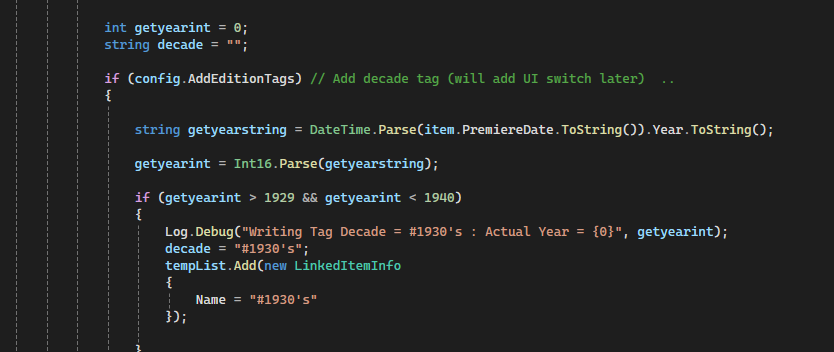
Good call - As I said, I was being lazy and had to look at my own code to remember where I added it lol .. It's hooked into the 'Edition' tag option - so turning that on will also turn on the 'decade' tagging option. I'll add a proper toggle sometime ...
 1 point
 -
also I am using Hetzners default dns, not the Cloudflare ones. But I will try changing dns to google.1 point
-
+1 too. I just need a clean reading page with font size option and auto metadata look up by file name just like movies1 point
-
Appears same as: Number of tips to secure your server mentioned in the thread.1 point
-
Little confused by this statement, the Latest row is controlled by how you have configured this option under 'Library' > 'Advanced' tab I personally use 'file creation date' for this very reason so that I can control what is displayed up front on this row. But there should be no scenario where an item should remain there "forever" -- based up the above option, by default as you add new content, the older stuff moves down the row.
 1 point
 -
I installed the plugin and it appears. I have no idea how to tag by decade. Do I select something under Item Tagging maybe ?1 point
-
Removed and restarted. Will report back.1 point
-
I don't suppose anyone has given a single thought about you, your password, or giving up. Most likely a program has been fed your details (maybe deduced from scanning), along with countless others, and tries for a while on each one before automatically moving on to the next. Another will probably come by some time in the future. Paul1 point
-
Your target ought to be compatibility. Pick the most commonly supported codes for audio and video across your user base. Shoot for at least 80% or more (nice round number). Then pre-convert your media to those codecs. You want: 1. lots of users. 2. save space. 3. reduced load. 4. transcoding. Realistically you can have two of those unless you're prepared to spend lots to build up your hardware and network to support more. All four are a dream. But then you might as well spend the money on storage (cheap) and pre-convert your media. You didn't mention upstream bandwidth. Newish Intel CPUs can do the job better than most other gear. Depending on your OS how new could matter. Linux tends to lag behind in support of the latest Intel generation.1 point
-
I went to the Emby GitHub page and I downloaded the following version and it appears the problem has been resolved with that update. https://github.com/MediaBrowser/Emby.Releases/tree/4.9.0.28/android1 point
-
I guess the question is should we import these as tags or as something new. Like for instance, calling them Keywords.1 point
-
yes 1. Change the name of any 'admin' account to something else that is not admin - if an attacker doesn't even know the account name, then they cannot even attempt to login. 2. Ensure the clients are hiding all the usernames and set it to only show those that have previously logged in. 3. Disable remote 'Admin' access (or whatever you have called it). Do you really need to admin emby remotely ? If yes, then there are secure options to do this. 4. Ensure you use a nonemby admin account for all your 'normal' activity. 5. Ensure all non-admin accounts have the correct permissions setup - and give least priviledge - ie if they don't need delete, then remove it ! 6. Try and ensure you are using https - and ideally a reverse proxy and use default ports. (80 redirect to 443) 7. If not using a reverse proxy, change the default ports to something not commonly in use. 8 ... There are LOADS more but this will get you started .. MFA is actually well down the list - there is zero point having that until your security foundations are solid .. @sa2000Other than - Secure Your Server | Emby Documentation - which just discusses TLS - would it be a good idea to have a Knowledgebase with a list similiar to the above on ALL the 'best practice' items the user should do before they even attempt to click the 'remote access' button for emby ? The 'out the box' security profile for emby is pretty shocking tbh ...1 point
-
I'm voting for this as well, e.g. Futurama has a different streaming order than TV order and renaming the episodes and finding out what goes where is not very fun.1 point
-
Nothing stands out. Have you done a library scan or a scan on the collections? But dev may have to comment as this does not look right. 2024-07-31 16:36:25.051 Info App: Removing item from database, Type: BoxSet, Name: Animated, Path: , Id: 14590 2024-07-31 16:36:25.060 Info App: Deleting path C:\Users\xeemo\AppData\Roaming\Emby-Server\programdata\metadata\collections\Animated 2024-07-31 16:36:25.113 Info Server: http/1.1 Response 204 to ::1. Time: 67ms. POST http://localhost:8096/emby/Items/Delete?Ids=14590&X-Emby-Client=Emby Web&X-Emby-Device-Name=Google Chrome Windows&X-Emby-Device-Id=7516b2a5-30ed-436e-9043-b75170fc1c7b&X-Emby-Client-Version=4.8.8.0&X-Emby-Token=fbd1efc7de7648839c35a259342f800e&X-Emby-Language=en-us 2024-07-31 16:36:25.117 Info App: Sqlite: 284 - automatic index on LastWatchedEpisodes(SeriesPresentationUniqueKey) 2024-07-31 16:36:40.627 Error Server: Error processing request *** Error Report *** Version: 4.8.8.0 Command line: C:\Users\xeemo\AppData\Roaming\Emby-Server\system\EmbyServer.dll Operating system: Microsoft Windows 10.0.19045 Framework: .NET 6.0.30 OS/Process: x64/x64 Runtime: C:/Users/xeemo/AppData/Roaming/Emby-Server/system/System.Private.CoreLib.dll Processor count: 12 Data path: C:\Users\xeemo\AppData\Roaming\Emby-Server\programdata Application path: C:\Users\xeemo\AppData\Roaming\Emby-Server\system MediaBrowser.Common.Extensions.ResourceNotFoundException: MediaBrowser.Common.Extensions.ResourceNotFoundException: Resource not found. Type: LibraryItem, Id: 14590 at Emby.Api.UserLibrary.UserLibraryService.Get(GetItem request) at Emby.Server.Implementations.Services.ServiceController.GetTaskResult(Task task) at Emby.Server.Implementations.Services.ServiceHandler.ProcessRequestAsync(HttpListenerHost httpHost, IServerApplicationHost appHost, IRequest httpReq, IResponse httpRes, IStreamHelper streamHelper, RestPath restPath, String responseContentType, CancellationToken cancellationToken) at Emby.Server.Implementations.HttpServer.HttpListenerHost.RequestHandler(IRequest httpReq, ReadOnlyMemory`1 urlString, ReadOnlyMemory`1 localPath, CancellationToken cancellationToken) Source: Emby.Api TargetSite: Void MoveNext() 2024-07-31 16:36:40.627 Info Server: http/1.1 Response 404 to ::1. Time: 1ms. GET http://localhost:8096/emby/Users/a5476e17f429444b91e63f6f657bc9f3/Items/14590?Fields=ShareLevel&X-Emby-Client=Emby Web&X-Emby-Device-Name=Google Chrome Windows&X-Emby-Device-Id=7516b2a5-30ed-436e-9043-b75170fc1c7b&X-Emby-Client-Version=4.8.8.0&X-Emby-Token=fbd1efc7de7648839c35a259342f800e&X-Emby-Language=en-us 2024-07-31 16:36:47.679 Info Server: http/1.1 POST http://localhost:8096/emby/Collections?Name=Animated&Ids=3188&userId=a5476e17f429444b91e63f6f657bc9f3&X-Emby-Client=Emby Web&X-Emby-Device-Name=Google Chrome Windows&X-Emby-Device-Id=7516b2a5-30ed-436e-9043-b75170fc1c7b&X-Emby-Client-Version=4.8.8.0&X-Emby-Token=fbd1efc7de7648839c35a259342f800e&X-Emby-Language=en-us. UserAgent: Mozilla/5.0 (Windows NT 10.0; Win64; x64) AppleWebKit/537.36 (KHTML, like Gecko) Chrome/127.0.0.0 Safari/537.36 2024-07-31 16:36:47.682 Info Server: http/1.1 Response 200 to ::1. Time: 4ms. POST http://localhost:8096/emby/Collections?Name=Animated&Ids=3188&userId=a5476e17f429444b91e63f6f657bc9f3&X-Emby-Client=Emby Web&X-Emby-Device-Name=Google Chrome Windows&X-Emby-Device-Id=7516b2a5-30ed-436e-9043-b75170fc1c7b&X-Emby-Client-Version=4.8.8.0&X-Emby-Token=fbd1efc7de7648839c35a259342f800e&X-Emby-Language=en-us As the initial delete failed.1 point
-
It seems like Emby only transcodes on file at a time through the downloads feature. Is there a way to have it configurable or automatic based on the number of CPU/GPU cores available?1 point
-
Not with Emby; but there's other tools you can use to transcode your media. I recently setup Tdarr to automatically transcode anything that gets added to my libraries into HEVC/MKV for a ~40% space savings. https://home.tdarr.io/1 point
-
My setup is the following which allow hardware rendering in an LXC container on ProxMox. 1) Get the Group ID On the host, get the render and video group id with getent group render (104) and getent group video (44) On the emby lxc container, get the render and video group id with getent group render (108) and getent group video (44) 2) Append the following in your emby lxc config file by taking care to adapt the group ids accordingly to your setup : # 0 -> 43 (lxc), map groups starting at 100000 (host) lxc.idmap = g 0 100000 44 # 44 (lxc) map to 44 (host) lxc.idmap = g 44 44 1 # 45 -> 107, map groups starting at 100045 (host) lxc.idmap = g 45 100045 63 # 108 (lxc) map to 104 (host) lxc.idmap = g 108 104 1 # 109 -> 65536, map groups starting at 100109 lxc.idmap = g 109 100109 65427 # don't forget to map user as well lxc.idmap: u 0 100000 65536 3) Allow proxmox to map groups On the host, nano /etc/subgid and add the following (video and render HOST ids) root:104:1 root:44:1 Not sure if that's needed but maybe this line in /etc/subuid is also mandatory, my config has it anyway : root:100000:65536 4) On the emby lxc config again, passthrough the /dev/dri to the container : lxc.cgroup2.devices.allow: c 226:* rwm lxc.mount.entry: /dev/dri dev/dri none bind,optional,create=dir lxc.mount.entry: /dev/dri/renderD128 dev/dri/renderD128 none bind,optional,create=file 5) On the container, add the user emby to the video and render groups : usermod -a -G render emby usermod -a -G video emby Everything should now work as expected without messing around with chown, chmod or having a privileged container !1 point
-
I fully agree with this. Coming back to Emby after abandoning my media server ~2 years ago, the download manager on Android (likely iOS as well) is still extremely hit or miss. Sometimes it downloads fine, but it's still extremely touchy... Sometimes stuff never downloads, sometimes the downloads just freeze (especially during any network changes/hiccups), and IF they resume downloading (that's a hard IF, frequently I have to intervene myself to delete the download and re-add it), it usually starts the download again from scratch. I can't even count the number of times Emby has screwed me over before a flight/road trip because the download manager just straight-up sucks, to be honest. I get Emby is a small team, they have to support a ton of platforms (in terms of the server itself and clients), but the download manager just needs some love from the devs.1 point
-
Would be amazing if there was a page in the settings to monitor current and past downloads from users.1 point
-
This only applies to active/scheduled downloads to an installable client (ie; emby theater or emby for android/ios) and only if that client/user hasn't deleted the media/removed the download task afterwards. It does not track downloads to web app clients, and items can be removed from that 'history' by the users that downloaded the items. It would be good to have an actual history/log page that's usable to the admin (not just lines burried in the standard embyserver.log).1 point