Leaderboard




Popular Content
Showing content with the highest reputation on 08/02/24 in Posts
-
Maybe related: https://www.themoviedb.org/talk/626c3b5a2ac499004fdf26202 points
-
New BETA version available 10.0.45: Delta changelog 10.0.44 -> 10.0.45 fix dynamic node "recommended" (double items) -> "recommended" is the node name, not an instruction fix upcoming dynamic node when item name not reported fix soundtrack tagged as compilation add context menu refresh option for seasons and series add config redirect from helper plugin fix boxset/collection updates Comment: Helpers are also updated @scherzekingAs Luke pointed out, dvdsub substitles cannot be fixed due to Emby server limitation.2 points
-
Now I know why... The reason for this problem is that my nginx reverse proxy configuration error. For Nginx Proxy,Must be closed nginx cache,so the example nginx conf like this: ``` #PROXY-START/ location ~* \.(gif|png|jpg|css|js|woff|woff2)$ { proxy_pass http://ip:port; proxy_set_header Host $host; proxy_set_header X-Real-IP $remote_addr; proxy_set_header X-Forwarded-For $proxy_add_x_forwarded_for; proxy_set_header REMOTE-HOST $remote_addr; expires 12h; } client_max_body_size 5000M; proxy_set_header X-Real-IP $remote_addr; proxy_set_header X-Forwarded-For '$proxy_add_x_forwarded_for'; proxy_set_header X-Forwarded-Proto $scheme; proxy_set_header Sec-WebSocket-Extensions $http_sec_websocket_extensions; proxy_set_header Sec-WebSocket-Key $http_sec_websocket_key; proxy_set_header Sec-WebSocket-Version $http_sec_websocket_version; proxy_cache off; proxy_redirect off; proxy_buffering off; location / { proxy_pass http://ip:port; proxy_set_header X-Forwarded-For $remote_addr; proxy_ssl_verify off; proxy_http_version 1.1; proxy_set_header Host $http_host; proxy_set_header Upgrade $http_upgrade; proxy_set_header Connection "upgrade"; proxy_read_timeout 86400; } #PROXY-END/ ```2 points
-
No. Just no. There is no point in going backwards. NONE. Move forward with everyone else. This is so 90's.2 points
-
I recently found a need to look up additional information on a director. I was hoping to look at the director's profile and see not only the movies I had in my collection but also a list of other movies that they have directed. This would be displayed below the library's current movies. ex: My movies: Movie 1, Movie 2 Other movies by this person: Movie 3, Movie4 ================ This could help one expand their library and to discover a missing gem.1 point
-
Hello, Perhaps I am not the first one to ask this question but it will be very cool if this feature could be implemented. I have 2 servers one at home and the other at work. ( and soon a third one...) So I have a movies library called movies on each server. I would like to see all the movies from a single 'virtual server location' when I use the app (ios or android ) where I will see only one movies library containing movies informations from the movie library at work and the movie library at home. It's an aggregation of movies informations from the movie library at work and the movie library at home. In fact when a user have multiple servers it will be perfect if another choice in the server list called "all servers" for example appears automatically with a merge of media informations from librairies with the same name on different servers.1 point
-
Hello. I'm an happy FreeBSD user and I've just configured Emby to have https and the letsencrypt cert bot. I want to offer to every FreeBSD user this little and fresh tutorial to help them to do the same. That's because in the FreeBSD world there are a lot of users who help each other without limits. I get a lot of help everyday from them and I want to give something in return. So : [root@marietto /home/emby/ssl]==> pkg install py311-certbot [root@marietto /home/emby/ssl]==> cd /usr/local/etc/letsencrypt/live/ziomario.ns0.it/ 1) [root@marietto /home/emby/ssl]==> openssl pkcs12 -export -out emby.p12 -inkey privkey.pem -in cert.pem -passout pass:mypass : this line did not work. I don't know why but when I used the emby.p12 file on the emby config,it didn't enable the https connections. 2) [root@marietto /home/emby/ssl]==> openssl pkcs12 -export -in cert.pem -inkey privkey.pem -certfile cert.pem -out emby.pfx : instead,this like worked,so if 1 does not work,use this. [root@marietto /home/emby/ssl]==> chown emby:emby emby.pfx [root@marietto /home/emby/ssl]==> cd .. [root@marietto /home/emby]==> chown emby:emby ssl [root@marietto /home/emby]==> nano /etc/periodic.conf weekly_certbot_enable="YES" That's all...1 point
-
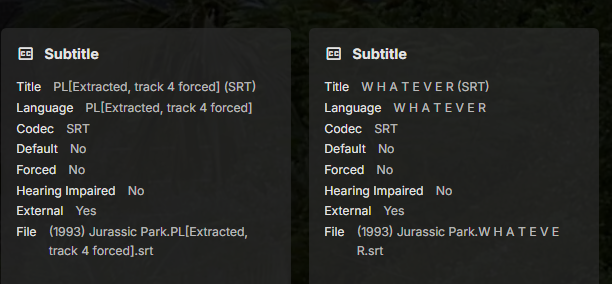
Thanks - that got me to them. There were some titles that had a subdirectory "Subs" in them and something about that was screwing things up. I think maybe "if there's a Subs directory and there's also a subtitle in the main dir". That is just a guess. Anyway - flattened all those out and the problem is gone.1 point
-
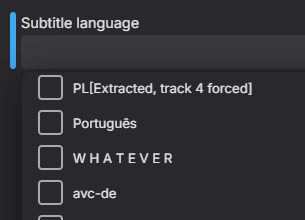
Would need specific examples but will guess improperly named external subtitles?
 1 point
 -
My use case (if it helps) is that I will often be watching the news and will see one particular story that I want to share, so I will record it and send it along. Having the entire newscast recorded for one segment is annoying and requires that I import it into an editor and edit out all the irrelevant bits (time consuming). If there is another way I can accomplish this goal (while still watching the program), such as with an API call let me know.1 point
-
Maybe because I or other users wouldn't want to have them turned on all of the time? Sometimes the audio is fine then someone walks in (the room at home or the show on TV) and can't understand what is said. It works fine when force enabled or when downloading a new one as @ebr posted. Sometimes (or most of the time) when you want to enable after playback is started it takes more navigation than it should for ease-of-use.1 point
-
I doubt they'd even notice... I think Nvidia's focus is elsewhere these days. I'd like to see updates but, honestly, it just works for everything I throw at it right now. Actually not all that new and it hasn't exactly taken over. I'm not sure there is anything really wrong with x265.1 point
-
I would think Language grouping would be best as your preferred language is always first, internal/extremal to a point is irrelevant.1 point
-
Thanks Luke, To save my sanity I may just have to go for it without the location data. I need to find an alternative solution to the current method. Loosing location data is probably a viable solution. Fingers crossed for the additional permission moving up near the top of your list1 point
-
Hi, most, yes. Location data is an exception because android strips that out when we read the file before uploading. To preserve that data we’ll have to request an additional permission from the user which is on our to do list.1 point
-
Yes that is a Musicbrainz for that specific album as the image in on archive.org. mbid-bc8d47aa-7892-44a0-85b2-6e6ce974f40c-6741711367.jpg (1000×1000) (archive.org)1 point
-
CoverArt doesn't source any artwork. This is a request for an album cover. Specifically, an album by "The Ventures". Looks like it is coming from a metadata provider - possibly MusicBrainz...1 point
-
Hi, we are looking into it. Thanks.1 point
-
It can be used for free if you only use 1 node ( server it self ) Its just a remux if you need to remove, its pretty fast.1 point
-
It should be, just keep in mind: Some of your embedded subs might have "forced" flag as well (depending what type they are), so pre-selection will also depend on:1 point
-
List addons by category, don't browse "all". Also I put it on the list.1 point
-
I strongly suspect if that were the case, that's what they would say. It just seems to be a very low priority.1 point
-
Hi. Yes, please email billing support but, if you purchased via PayPal, you would not have that link to cancel your sub. That is only for direct card/Stripe purchases. PayPal subscriptions are managed inside your PayPal account.1 point
-
This will do the job, but ideally you would want to get as powerful for as little money as possible I'd look a little higher to 8th gen or maybe an N100 mini system. it will be capable to do maybe 3 4k transcodes. You can always check eBay as there are European sellers of these machines.1 point
-
The first post still links to the previos audio helper plugin instead of the new one... https://kodi.emby.tv/Public testing/plugin.audio.emby-next-gen-10.1.1.zip1 point
-
Seems to have fixed it for me too. Quite annoying as I need to reset all my sort defaults etc. But thanks @guunter1 point
-
You should try contacting billingsupport@emby.media for further information1 point
-
Glad it worked for you too. It drove me crazy before I decided to try a reinstall .1 point
-
Hi, yes it makes sense. Thanks for the feedback.1 point
-
You can't copy playlist files into userplaylists. Those are user-specific, so although the server will scan it, no user will have access to see it.1 point
-
why should someone have to use another product? when a product like jelly and plex do both . its sad because even if emby added this feature as a 5$ addon people would go for it. but instead no communication. i think people would be happier if emby just came out and said no we arent doing it....1 point
-
I did notice that post resetting my HDHR and releasing the channels, that if I went to load up one of the channels I had loaded (ch90 or ch70), that Emby still thought it had some sort of buffer or that it was still loaded. It wasn’t until I restarted the server after the lock up that I was able to load those ‘locked up’ channels. The cause of specifically the iOS crash? That’s great! Always on the ball mate!1 point
-
So I've been changing settings for my ex2ultra and somewhere along the way it has made the emby server start working again. Library scan completes within 20/30 mins and all new media is detected and metadata is collected as well1 point
-
This used to happen to me but reinstalling the app fixed it for me.1 point
-
@LukePlease implement this. It's annoying to wait for the first timeout to wake the server. The WOL code is there, just needs to be called before an connection attempt. Please1 point
-
I don't think the Shield Pro would be a good solution now in the end of 2022 as The TV and my AVR both use HDMI 2.1 wit eARC and the Shield Pro still uses HDMI 2.0b Which can't use eARC, does not support variable refresh rates and is limited to 50-60 Hz (4K) This would be a downgrade for me1 point
-
Hi there, I know ISO support has come up many, many, many, many, many, many times in the past, but most of the requests seem to focus on ISO playback. However, I would like to ask if it would be possible to get support for ISOs as "folders"? Is there any possibility of adding support for playing back video files from within an ISO? This would be similar to the current DVD and BluRay folder plugins, but instead of having the contents of the disc in a folder, it's all in an ISO. Just as an example, something like DiscUtils is a C# library which allows for reading files from within an ISO without having to extract it first. I'm assuming doing a live remux of the file(s) from within the ISO (by feeding them into ffmpeg) would then allow the video to be played on any client just as any other video would? This would allow for videos to be played back that are stored in an ISO, and not lose any of the benefits of Emby and it's client ecosystem - Emby could still transcode if required, and all clients would be able to play the videos. I know Emby focuses on making things user friendly for all users, but something like this could happily be an "advanced user only" feature - no automatic scanning of files or detection by Emby, but if a STRM file is found (with accompanying NFO file), and the STRM file points to the ISO as a folder, then it would be understood and opened accordingly. E.g., \\EMBYSERVER\Movies\Topgun.iso\VIDEO_TS\VTS_01_0.IFO Is there any chance of something like this being added to the current DVD and BluRay folder plugins? (Also, I know that the default reply is usually "convert to MKV", but there are a lot of discs where it is nice to have access to the whole disc. In those scenarios, I can use Kodi if I ever want the full "disc experience", but for 99.9% of viewing still use Emby without having to store both the ISO and duplicate MKVs. )0 points
-
I mean, it's not really going backwards is it? More sideways.... As I said above, Emby already supports DVD and BluRay folders, all this feature request is for is to effectively extend that support to folders inside an ISO. No need to mount it, no menu support, etc., just playing the video files but straight from within the ISO instead of copying the files into a folder. I know Plex has no ISO or folder support, but Jellyfin has been doing work lately to try and extend ISO support (although they seem to be going even further and doing full disc playback too, which isn't what I'm asking for), and they also have a feature request similar to mine to allow for playback of files from within an ISO - they even discuss using DiscUtils, and then taking the Stream returned from DiscUtils and writing it to stdin for ffmpeg. And so, whilst I appreciate this will probably never be the most popular feature request, there are definitely other users out there who I think would also like to see this as a feature. And as I say, it could be an advanced users only feature, so Emby doesn't automatically scan/index ISO files, but if we manually craft a STRM and NFO file correctly, the ISO will be supported (again, as a "folder"/container, not full playback). (Also, I mention Jellyfin above purely for discussion, and to illustrate that there is some desire for this feature request - I love Emby, and have no desire to switch to any other platform, so please don't misconstrue any references to competing platforms! )0 points
-
Hi there! The distinction is because I wasn’t asking for menu support, etc., just the ability to play vob/m2ts files, but instead of being stored inside a folder, they are stored inside an ISO. I know ISOs aren’t “folders” in the literal sense, but they are just file containers and, as illustrated in the linked DiscUtils project, it is possible to access the files within an ISO without having to mount it, or play it as an ISO, or “extract” the contents of the entire ISO. You can access any file within the ISO, and receive a Stream object which can then be treated like any other Stream object. My understanding is that Emby already has the ability to play vob/m2ts files, and the DVD and BluRay folder plugins allow Emby to “understand” the file structure of a disc if copied into folder, and play the video files contained within (again, only as video files, not full disc/menu support). My request was whether it would be possible to extend these plugins to also be able to treat an ISO as just a folder (not by mounting it or playing it in the traditional sense, but by looking inside the container and accessing the data/files directly), and enable vob/m2ts files to be played directly from within the ISO. This would be equivalent to just playing a video file directly, meaning it should work in all Emby clients, as Emby server would stream the data to the client as it already does, and the server could still remux or transcode the data if needed by a client, as it does with any other video. Effectively, it gives the “best of both worlds”, as rips can be stored as ISOs, but played back as normal video files. As for converting, as I say, I like to keep the ISOs and occasionally play them via Kodi, but if Emby could play a vob/m2ts file directly from within an ISO then I wouldn’t need to also keep MKV files alongside the ISOs, reducing the need to effectively store 2 copies of every video.0 points