Leaderboard




Popular Content
Showing content with the highest reputation on 07/27/24 in Posts
-
As I mention in a related post, I love the additional subfolders for Movie Extras (eg, Shorts, Scenes, Interviews, etc.)! It would be awesome to extend this functionality to TV Series as well. Specifically to add support for many/all of the same folders supported for Movie Extras, eg, extras specials shorts scenes featurettes behind the scenes deleted scenes interviews trailers As well as any additional folders that get added in the future (eg, hopefully Galleries). Support Placement of "Extras" Folders Within Each Season Folder, Plus A Naming Scheme to Link A Particular Extras Folder with a Specific Episode (eg, "\Season 1\E1 - Deleted Scenes\" for episode 1 deleted scenes): I want to clarify that it would be great if these various "extras" folder types could reside within each Season folder. So for example, within a Season 1 folder we could then have an "Extras" folder, a "Deleted Scenes" folder, a "Featurettes" folder, etc. And furthermore, that we could designate a particular folder to refer to a specific episode (eg, "\Season 1\E1 - Deleted Scenes\" for episode 1 deleted scenes). See more below, particularly why I think this would be so useful: https://emby.media/community/index.php?/topic/55915-emby-server-theater-additional-extrasspecial-folder-types-for-tv-series-similar-to-movies/&do=findComment&comment=587195 Thanks for your consideration! PS - If this is something you might like to see implemented, be sure to "Like" this top/first post (as well as any subsequent posts in this thread that highlight particular aspects of what you are interested in) -- "Liking" the top/first post helps the Devs to know how much interest there is in a given Feature Request.1 point
-
I have now bought one on Ebay. Works without any problems.1 point
-
When communications go completely idle with the server for more than 60 seconds, then it is ended. Completely idle means paused and the video player is no longer sending any requests for data. So when you say it was paused but still remained active, the video player must have still been sending requests. Sometimes that takes longer than 60 seconds to stop.1 point
-
In the end, it was the LCD panel. These are not suitable for HDR. I have now bought an OLED. HDR works perfectly with it.1 point
-
I believe that should be fine, yes.1 point
-
I'll amend this a little. There have been Emby client apps, Chromecast was one, that would not allow throttling to work properly. There used to be a way to modify the throttling method which I did change back then. In following releases the Emby dev team decided to remove the option to modify the method and haven't brought it back. Those of us who changed it were able to keep it and others on newer releases are stuck with the default. I have no idea how many Emby client apps are still around with the throttling problem or if under specific conditions it affects users on the default method while those of us on the alternative one never see a problem.1 point
-
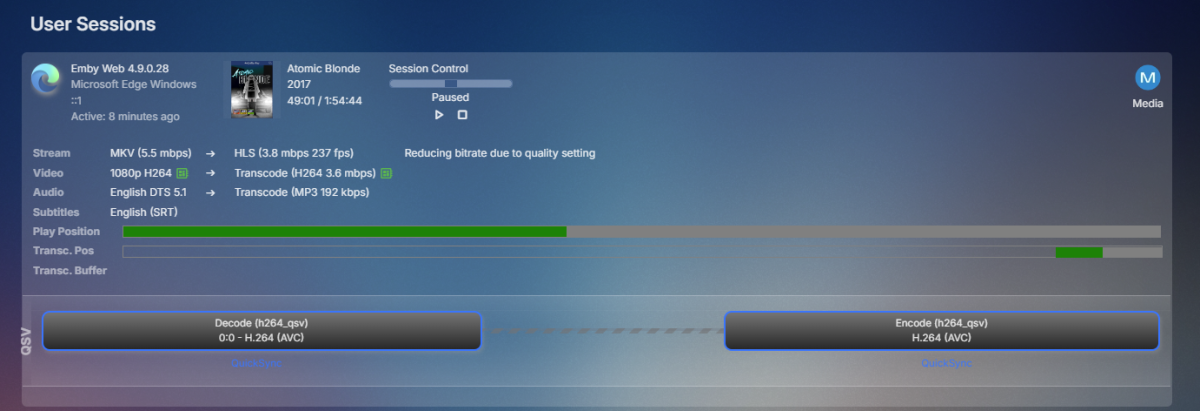
I can pause at any place in a 2+ hr movie and the session drops after being paused for ~60 seconds. Chromium browsers (Edge, Brave). I haven't tried on an app yet. But if this is normal behavior I don't see a problem with it because hitting the play button just continues without any hiccups. Don't have to wait for loading or anything, it just plays.1 point
-
@LukePlease implement this. It's annoying to wait for the first timeout to wake the server. The WOL code is there, just needs to be called before an connection attempt. Please1 point
-
I was able to get the port forwarding and then created limited rules to only allow access to the IP’s of my remote users. Took some figuring out but for now it’s set up in a fairly secure way. Thanks for the tips.1 point
-
@Q-DroidLuke already confirmed it is normal behavior, but really surprised it has not been reported before now unless it is new. There has to be variables here as I showed above in ET. But for it causing issue yes that would have to be troubleshot further as yes it will create playback issues as the session has to be restarted when unpaused the transcode has to be redone. But further testing appears to be playback position related but have no idea of the threshold of killing the session as was only know so far pausing at the beginning under a minute will kill the session per tests and videos provided.
 1 point
 -
Thanks @GrimReaper- I had no idea that 'button' existed - it forced transcoding and things play fine now - thanks!1 point
-
Okay great, thank you - keep me posted.1 point
-
I think I can provide a translation into Chinese Simplified1 point
-
Sry, had to restart and delete the top picks config, then it showed up Hi, i installed the plugin maybe 2 years ago or so. not from the catalog, the download was here in the thread. but now its not working. i deleted the emby.toppicks.ddl but its still there. before and after the deleting there were no plannes tasks to "refresh top picks or so" i thinkthe switch so the catalog plgin does not work. in the catalog i cant fing the plugin...am i missing something? greetings1 point
-
已解决1 point
-
Thank you. I’m really not trying to be a pain in the butt. It’s just really annoying. If there’s anything I can do to assist please let me know.1 point
-
Hi, yes we’re looking into it. Thanks.1 point
-
Is there any chance you could exchange/upgrade the i5-12400F to a i5-12500? It has the UHD 770 GPU. Or even an i5-12400 that would give you a UHD 730 GPU? They both would be much better than the GTX1650 and use way less power. Otherwise, can you cancel the GTX1650 and get a Intel Arc380 or Arc310 for around the same price and way better performance and compatibility with the newer codecs….1 point
-
As much as I appreciate your suggestions. It’s not a network issue. I did further troubleshooting. I installed Emby directly on Windows PC. I put one movie into a media library and played that movie directly from the same local host PC. The audio stream was being transported due to the browser. I paused it and waited 60 seconds. Can you guess what happened? That’s right. The session dropped after 60 seconds being on pause. This is definitely an empty issue. I just wish somebody from the dev community would let me know if they were working on this.1 point
-
OK thanks for reporting. We’ll take a look.1 point
-
The point is that in Japanese there are no word markers, so that policy is bound to fail. Paul1 point
-
HI, currently partial words are not matched, although this may change in future updates. Thanks.1 point
-
I'll probably just roll to the built in method pretty soon as this doesn't look like it'll be fixed anytime soon.1 point
-
..to note you'll lose all the AndroidTV integration... The AndroidTV app is still far superior to the Universal App imo - definately worth trying them both and report back.1 point
-
Are any information about timeline available or a roadmap for this feature?1 point
-
I think this is a much-awaited feature: an EPUB / PDF file reader and this possibility of creating a real book database.... why does it take so long to create this feature? no news ? I'm willing to pay if that's the problem.1 point
-
Any news here? It would really push EMBY over all the other Media Apps.1 point
-
Hello everyone ! Seeing a lot of people want to add Youtube Live channels in their IPTV section, and knowing you can't simply add a Youtube Live stream link in your .m3u because YTLive links change every 3 to 6h (unless you want to edit your playlist and refresh Emby everytime, which would be a nightmare), this is a (quiet long) tutorial to show you how to make Youtube Live (but also Twitch or Dailymotion) streams work like a real TV channel in Emby. I based this how to on my own knwoledge (basically none in Linux, a lot of trial and error), and the tutorial by Carlos Gomes, available here : https://cgomesu.com/blog/Tvhlink/ All the tutorial is setup on a Windows 10 machine. You will need : - a Windows 10 (build 19041 and higher) or Windows 11 machine - Windows subsystem for Linux (can be version 1) - WSL to make short - a Linux distribution of your choice (preferably Debian or Ubuntu) - TVHeadend - Streamink - the TVHeadend plugin from the Emby plugin store 1) Install Windows subsystem for Linux. For Windows 10 below build 19041 : Open Powershell in admin mode, copy/past these commands : dism.exe /online /enable-feature /featurename:Microsoft-Windows-Subsystem-Linux /all /norestart dism.exe /online /enable-feature /featurename:VirtualMachinePlatform /all /norestart The Linux distributions available are : Ubuntu, Debian, kali-linux, Ubuntu-18.04, Ubuntu-20.04, Ubuntu-22.04, OracleLinux_8_5, OracleLinux_7_9, SUSE-Linux-Enterprise-Server-15-SP4, openSUSE-Leap-15.4 , or openSUSE-Tumbleweed. Then, still in the Powershell, download your distribution of your choice : To install Ubuntu 22.04 : curl.exe -L -o ubuntu.appx https://aka.ms/wslubuntu2204 For Debian : curl.exe -L -o debian.appx https://aka.ms/wsl-debian-gnulinux Then restart the computer. Optional : If you want to install WSL 2, check this link by Microsoft : https://learn.microsoft.com/en-us/windows/wsl/install-manual#step-4---download-the-linux-kernel-update-package For Windows 10 build 19041 and higher : In the Command Prompt (or in Windows Terminal, available in the Windows Store) in admin mode, with WSL 2 already installed : (without the < > ) wsl --install -d <Distribution Name> For Ubuntu 22.04 : wsl --install -d Ubuntu-22.04 or, for Debian : wsl --install -d Debian Then restart the computer. 2) Install TVHeadend Go to the download page : https://tvheadend.org/projects/tvheadend/wiki/AptRepositories For Ubuntu, the easy way is to install via PPA : sudo apt-add-repository ppa:mamarley/tvheadend-git sudo apt update sudo apt install tvheadend For Debian, because the distribution can't handle PPA, to have to do this : curl -1sLf \ 'https://dl.cloudsmith.io/public/tvheadend/tvheadend/setup.deb.sh' \ | sudo -E bash Then after, the usual : sudo apt update sudo apt install tvheadend Once TVHeadend, and all its dependancies, donwloaded and installed, the install wizard will automatically be launched. You just have to create an admin ID and a password, leave the rest by default. 3) Install Streamlink ! For Debian, make sure you have backports repositories installed, otherwise you will get an older version of Streamlink and cause Python errors in TVHeadend ! echo "deb http://deb.debian.org/debian bullseye-backports main" | sudo tee "/etc/apt/sources.list.d/streamlink.list" sudo apt update sudo apt -t bullseye-backports install streamlink 4) Start the TVHeadend server : sudo tvheadend Wait a little, untill you see this line in blue (of course, the number version could vary with future update) : [ NOTICE] START: HTS Tvheadend version 4.3-2106~g9e1eb89be started Go to the webserver page of TVHeadend : http://localhost:9981/ Warning ! If after entered your admin ID, the page show you a 403 Forbidden error, type : sudo tvheadend -C It will show you the post install wizard to configure admin ID's (keep the same as the install) and a client ID (you can just keep the same ID as the admin account). Now : a) set up TVHeadend -> https://cgomesu.com/blog/Tvhlink/#basic-configuration b) create an automatically updated .m3u with Youtube Live/Twitch ... -> https://cgomesu.com/blog/Tvhlink/#automatic-network-of-livestream-channels If you create your .m3u from Windows (with Notepad ++ for exemple), I strongly suggest you to save it in your Linux home folder. Once done, you need to modify the permission of your .m3u, otherwise TVHeadend won't have the permission to handle it. To do so : cd path/of/your/playlist/ chmod +rwx yourplaylist.m3u Basically, your .m3u shoud look like this : #EXTM3U #EXTINF:-1 tvg-id="ChannelID.ShortCountryCode" tvg-country="ShortCountryCode",Name of the channel pipe:///usr/bin/env streamlink --stdout --default-stream best --url https://www.youtube.com/user/ChannelName/live 5) Install the TVHeadend plugin You can find it in the Emby plugin store, in the Live TV category. Once installed, restart your Emby server. Then, in the admin pannel, in the Live TV section : Add a new TV source -> select TVHeadend If you installed the TVHeadend server on the same computer of the Emby server, change the Tvheadend Server Web Interface URL with : http://127.0.0.1:9981 instead of http://localhost:9981 If you installed on another computer of your network, enter its local IP adress, and the port number : 9981 Enter admin ID and password -> Save Refresh data guide. Now Emby can play Youtube Live/Twitch/Dailymotion (and many others) livestreams ! (If I have some time, I could edit this post with pictures. if I misspelled or misspoke something, please forgive me, English isn't my mother tongue.)1 point
-
I would like to lock a speed level (for example, 1.5x) on each new video. This could be set client side and not persisted on the server. My use case for this is that I use emby to watch training/certification videos, and they are very slow and only last a few minutes per video. One topic might consist of 20-30 videos. Currently, I need to keep speeding them up individually.1 point
-
Hello! I love Emby, but the limitation of SQLite makes it impossible to scale this across multiple nodes. I think it would be better for anyone if there were an option to use Postgres (or MySQL or Mongo or whatever) so that we could scale it to multiple nodes, as I think this would put less strain the devices when multiple users are streaming and transcoding. I thought about adding this myself (I'm a software engineer), and I think I could, but from what I'm seeing it looks like it would be a relatively big ripping of the `ManagedConnection` by making it use some kind of `IDatabase` or something. I'm not opposed to doing it, but currently the only language I use for work is F#, and while I would be happy to write a Postgres driver in a super-duper-functional style, I don't know that that would be approved upstream, and my OOP experience is a bit out of date. -Thomas Gebert.1 point
-
I asked for information about which machine would be best here, they said they didn't recommend it. So I looked for a well-known technician who sold me what he had on hand. If it's bad for you, think that I live in Brazil and I'm not rich. These parts around here are too expensive. So if it's not going to help, don't come and get in the way!0 points
-
For those using script x for comskip or commercial skip plug in,, I found it much better to uninstall all that from the server. Instead use a program called MceBuddy, paid version.. It comes with comskip, however I use the donater version of comskip for accelerated performance. MCE buddy has everything you need to integrate with emby server. It watches the record folder for new recordings, then it checks the internet corrects any in correction of the file name and season/episode number, corrects the file name, removes the commercials, saves the file back, saves space. On a 6 TB drive I saved almost 1.7 TB if anybody's interested or has trouble with settings, they are found with quick Google search, but feel free to ask question or PM me.:-):-) no more server hangs, no more buffering, no more needs to restart server to keep it running properly.0 points