Leaderboard




Popular Content
Showing content with the highest reputation on 07/26/24 in Posts
-
You are my new favorite person and I hope Santa brings you everything on your list this year. Thank you!!!2 points
-
Wow, it totally worked! That's some masterful dev work right there, thank you sir.2 points
-
As you have highlighted networking is not your strength - may I respecfully suggest that you follow the many guides to get basics setup correctly/safely (forget emby for the moment) - the videos from crosstalk solutions are pretty good. Going from a netgear router to the unifi world is a big jump - so you need to know what you are doing - or you could potentially be opening up your LAN to the Internet .. You also need to try and get the most from the equipment - just setting it up the same as a plain old ISP router means you will be missing out on all it's strengths - LAN isolation as @Sammysuggested is top of the list but again - this all needs 'upfront planning' - deciding you want to do this when you have all your network setup is not good ...2 points
-
You do not need a video card as the 12th gen i5 will handle all your transcoding needs. The 1650 will actually be a massive bottleneck as it can not handle as many encodes as the i5 due to the memory limitiations 4GB imposes on it even with a hacked driver. Try your system as it is now and then try it with the video card, and you will see that the i5 will handle more transcodes better than the 1650 will. The i5 will only be limited by your array's bandwidth in regards to how many transodes it can do.2 points
-
For future reference in case anyone finds themselves in this thread looking for the solution, here is what my /etc/fstab entry looks like now that this is fixed: //xx.xx.xx.xx/share /local/mountpoint/ cifs uid=1337,gid=1337,credentials=/root/.smbcredentials-file2 points
-
I finally figured it out, there were actually two issues: 1) I created two media libraries, and the directory configuration of one included the directory of the other. However, that library was not configured to write images to the media folder, so no matter how I configured the other one, it would not take effect. 2) After I separated the overlapping directories and refreshed the metadata, I still didn't see the images downloaded to the folder. However, once I accessed it through the Emby home page once, the images appeared in the media library. thanks ~~~2 points
-
TheTVDB now supports more alternative orders than just Aired/Absolute/DVD. Can Emby query these additional orders and add them as options? Two examples of shows I've seen this used are Re:Zero which has a "Director's Cut" display order and Money Heist which has a "Netflix" order. https://thetvdb.com/series/re-zero-starting-life-in-another-world https://thetvdb.com/series/la-casa-de-papel1 point
-
Is there plans on the roadmap for OpenID. I have searched but not found any indication this is in development. With many admins taking up SSO through Authelia or Authentik to enhance security it would be great for Emby to support it. One of the easier open standards is OpenID which the aforementioned support. Users could continue to use LDAP if they wish while others can use the arguably better SSO experience.1 point
-
Hi, I have noticed an annoying problem withy Emby 2.2.22 on iOS where after launching the app shortly after just navgating the app the loading icon will appear as if it is restarting itself. Happens every time after initial launch of the app. Using latest iOS 17.5.11 point
-
just installed and will use it.. thank you1 point
-
I would see them used just as much as custom overlays. But personally, don't use overlays and only manipulate treatments. Just need a folder to honor and maintain customization.1 point
-
You must have had a really old version They are off by default now to give the OSD a sleeker minimal look and because as you said most things that were hidden can be done with the remote keys (see the release notes for version 1.3.4). However, you can turn them back on by doing this: Settings Playback Look for "Hide video player transport buttons" change this to "No"1 point
-
The home videos content type is certainly closer to what I'm looking for. It's unfortunate to forcefully lose many of the metadata-related features for movies and shows, but at least it shows everything, and videos can be manually correlated (still takes time!) using collections.1 point
-
Hi, there is currently no way, although this question has come up before and improvements to this are planned for future updates. Thanks.1 point
-
It's me, hi, I'm the client, it's me. So yes, I was the one running the old version and without realizing it, accidentally updated it today. Now the FF, RW, Pause, and most importantly, the Advance (to next episode) controls are gone when I press the down arrow. Color me very sad. Why are they gone? Who took them? Can I have them back? I looked every where (that I know of) and it's not a setting that I can find. If it's not in this release, how can I go back to the previous release that has it. Yes, I know my remote can do most of the things but not the Advance control and I use that one a LOT. TIA1 point
-
If you liked the performance of Sandra Hüller, give The Zone of interest a shot.1 point
-
thank you so much!! thats exactly the setting i needed1 point
-
The point is that in Japanese there are no word markers, so that policy is bound to fail. Paul1 point
-
Did some limited testing with the files now. Seems to play fine. One thing I noticed is that the video would occasionally pause for a few seconds and then resume. However, guess it could be something isolated to the file, kind of a small sample size to say if it means anything.1 point
-
سيتم الرد عليك من 2 الى 3 ايام ولا تنسى ان غدا وبعده هو عطلة اسبوعية فى امريكا1 point
-
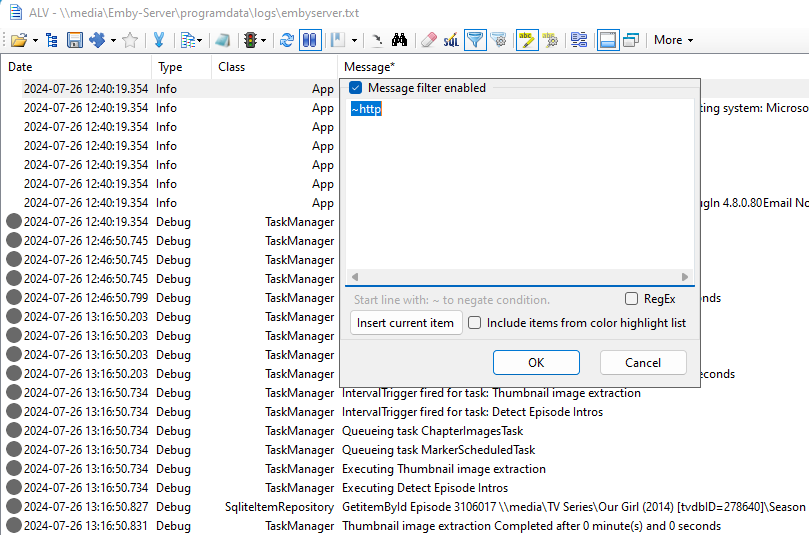
If you use a decent log viewer - then you can simply filter it out - on live logs if you wish. I use Advanced Log Viewer - Free on Github. Then just create an Emby template/parser - Emby uses standard Date, Type, Class, Message - so all very easy. You can then filter on anything you like, Classes, Error only etc etc. To get rid of any web notices - simple negate http .. they all disappear from the list. All new messages are auto scrolled so you can watch things live once you have setup a filter ... Reading ANY log as is (not just Emby) simply cannot be effectively done without these tools .. personally, I think they should be integrated into emby (the basics anyway). But having said all of that - the option to remove 'playback' entries at source is a good idea, especially on a busy server.
 1 point
 -
Yes, try the Security Cams plugin1 point
-
ارسل رسالة واشرح لهم الموضوع مع اعطاء كافة المعلومات عن الاشتراك وعملية الدفع billingsupport@emby.media1 point
-
Hi, my problem is that I don't want the Multimedia Info section to be visible, so I'm asking if the solution proposed by Mavares still works. Because it doesn't let me change the file, for some reason I can't modify the file, I'm operating from Ubuntu which is where we have the server. Thank you very much1 point
-
Its a custom Its a customised version of HT to speak to the Emby api.1 point
-
That works, thanks.1 point
-
Hi, yes it makes sense. Thanks for the feedback.1 point
-
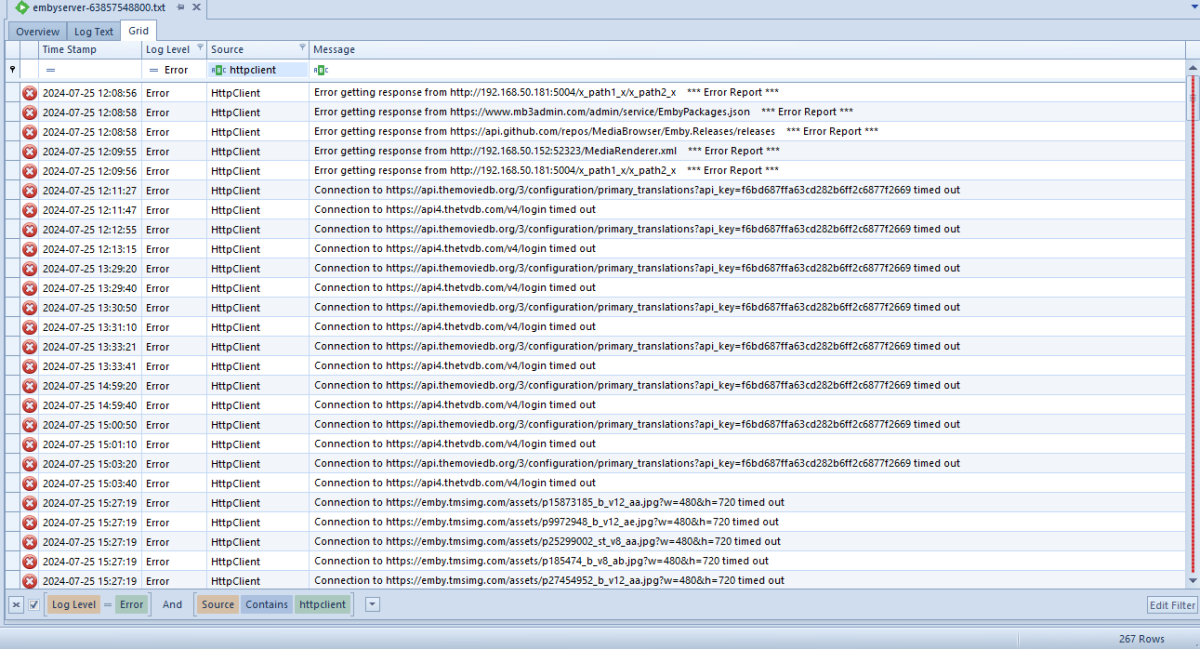
Possible restart this system but all Emby communication is down.
 1 point
 -
aha - you have given me something to go on - I used metadata manager to do a few updates, and in the logs, I can see the same sort of thing - Cannot assign requested address (private.omdbapi.com:443) So...... whats changed - two days ago I changed my DNS on my router to use encrypted DNS targeting cloudflare-family servers....... strangely however - on my PC in the browsers, I can contact these sites fine - and we are all using the same router supplied encrypted dns I really want to keep using the encrypted DNS however so I will work backwards slowly. Will report back1 point
-
For some specifics, heres the Emby Premiere feature matrix: https://emby.media/support/articles/Premiere-Feature-Matrix.html Without internet access for an extended period; you will be limited to features marked as 'free'. (although; you should have at least a 1 week grace period, still allowing you to use premier features in that time.) Ie; you'll only be able to fully play content via the web app, a Roku, Apple TV, or a Samsung/LG smart tv, and only with software transcoding if necessary (no hardware accelerated transcoding). Other clients will limit you to 1min of playback or not play at all. You will also not be able to watch or record livetv, even if that service is still available during your internet outage. Removing your license key, or reinstalling the server will do absolutely nothing but force you into the 'free' tier prematurely.1 point
-
Fair enough. Obviously in the future though, if you ever feel the urge...1 point
-
got it! i personally dont have media so i guess this isnt for me thanks for the help1 point
-
HI, yes this is something we should add. Thanks.1 point
-
Emby isn't like Netflix, Disney etc, it doesn't provide any media for you to watch. You have to provide your own media which you then use Emby to watch, or maybe you have a relative or (close) friend who has Emby who will let you share their media.1 point
-
Hi, please check out our Quick Start Guide to learn how to setup your own Emby Server: Quick Start1 point
-
Sorry only the admins can answer that but will guess it can as I really doubt someone watches it 24/7.1 point
-
Sound like you need to email billingsupport@emby.media Otherwise https://emby.media/support/articles/Quick-Start.html1 point
-
I'll probably just roll to the built in method pretty soon as this doesn't look like it'll be fixed anytime soon.1 point
-
Check out the Emby beta builds from Test Flight. The most recent beta (1.8.9.9) was released only 8 days ago. There have been at last 6 builds in the past 90 days. Clearly, Emby for Apple TV is not dead and the team is working to improve functionality.1 point
-
server 4.9.0.28 android mobile 3.4.12 firefox 128.0.2 1: Music->Genre->Icon Context Menu->Shuffle : (web app) Working. (android) Sort of working. Shuffles but always starts with the same song (alphabetically first album artist, alphabetically first album, numerically first track) 1a: Music->Genre->Icon Context Menu->Play : (web app and android) Working. Plays Album Artists alphabetically by alphabetical album. 2: Music->Genre->Main Page->Shuffle : (web app) Working. (android) Sort of working. Shuffles but always starts with the same song (alphabetically first album artist, alphabetically first album, numerically first track) 2a: Music->Genre->Main Page->Play : (web app and android) Working. Plays Album Artists alphabetically by alphabetical album. 3: Music->Genre->Artists->Shuffle : (web app and android) Working. 3a: Music->Genre->Artists->Play : (web app and android) Just plays tracks in alphabetical order. 4: Music->Genre->Albums->Shuffle : (web app and android) Slow list creation with high server cpu usage. Eventually plays correctly. 4a: Music->Genre->Albums->Play : (web app and android) Slow list creation with high server cpu usage. Doubles up every track but plays does play albums in alphabetical order. 5: Music->Genre->Songs->Shuffle or Play : (web app and android) Working. 6: Music->Albums->Filter->Select a Genre(s)->Shuffle or Play : (web app and android) Slow with high server cpu usage. Eventually plays correctly. 6a: Music->Albums->Shuffle : (web app and android) Working. 6b: Music->Albums->Play : (web app) Just plays all tracks in alphabetical order (android) Plays first alphabetical track and is the only track in the now playing list, also displays "There was an error processing the request. Please try again later." 7: Music->Album Artists->Filter->Select a Genre(s)->Shuffle : (web app and android) Working 7a: Music->Album Artists->Filter->Select a Genre(s)->Play : (web app and android) Just plays all tracks in alphabetical order. 7b: Music->Album Artists->Shuffle : (web app) "There was an error processing the request. Please try again later." (android) Plays random song and is the only track in the now playing list, also displays "There was an error processing the request. Please try again later." 7c: Music->Album Artists->Play: (web app) Just plays all tracks in alphabetical order. (android) Plays first alphabetical track and is the only track in the now playing list, also displays "There was an error processing the request. Please try again later." 8: Music->Artists->Filter->Select a Genre(s)->Shuffle : (web app and android) Working. 8a: Music->Artists->Filter->Select a Genre(s)->Play : (web app and android) Just plays all tracks in alphabetical order. 8b: Music->Artists->Play : (web app) Just plays all tracks in alphabetical order. (android) Plays first alphabetical track and is the only track in the now playing list, also displays "There was an error processing the request. Please try again later." 8c: Music->Artists->Shuffle : (web app) Creates a shuffled list but some tracks have no data. When it gets to this track "Playback Error, There was an error processing the request. Please try again later." occurs and playback stops. Sometimes the error happens immediately after clicking shuffle. (See second pic in my previous post) (android) Plays random song and is the only track in the now playing list, also displays "There was an error processing the request. Please try again later." 9: Music->Songs->Filter->Select a Genre(s)->Shuffle or Play : (web app and android) Working 9a: Music->Songs->Filter->Shuffle or Play : (web app and android) Working I would say this is an improvement over 4.9.0.26.1 point
-
As a side note, the Lg C3 will passthrough full HD audio DTS and Dolby via eARC. I have this connection with my shield and Lg C3 and it is working fine.1 point
-
Any update on a fix, its been a while?1 point
-
Just +1ing this for music. All my music is ReplayGain tagged and it's pretty annoying for the volume to be all over the place since I like to listen to large playlists on shuffle.1 point
-
Thansk for the help all. After trying all of this with no luck I eventually stumbled in to the solution. As always, this was a misunderstanding of Linux stuff on my part. I had thought that authenticating my SMB mount with user "media" that I use for all of my media related apps and containers would mount it as user media but that was not the case, I also needed to specify the UID and GID for that user in fstab.1 point
-
It shows as root because it is root. When you exec into a container shell your session will run as root unless you specify a different user:group. The user running the application inside the container is the same as on the host. At least the UID:GID will be the same. It is possible to have the name look different in the container if there are /etc/passwd and /etc/group entries for the user. Either way it's the UID/GID that matter and dictate what ownership and permissions you need on the filesystem. Make sure the user running the container app has access to all of the directories which make up /media/oplink/drive1/EmbyRecordings/ and write permissions on EmbyRecordings. Then make the permissions on any other media paths used by Emby match this one. The path /media/oplink/drive1/EmbyRecordings/ seems pretty long. Is this the internal container side of the bind mapping?1 point
-
If I had a magic wand I would use it to make Emby focus solely on media presentation and playback and offload all aspects of remote internet access and security to vpns and whatnot.1 point
-
Yet somehow Infuse app in my AppleTV work flawlessly streaming local media.1 point
-
If you post the text file or an example of how the text file is setup, I or someone can create a script for you.1 point
-
I don't see a separate FR for SSO, did that not ever get created?1 point