Leaderboard




Popular Content
Showing content with the highest reputation on 07/18/24 in Posts
-
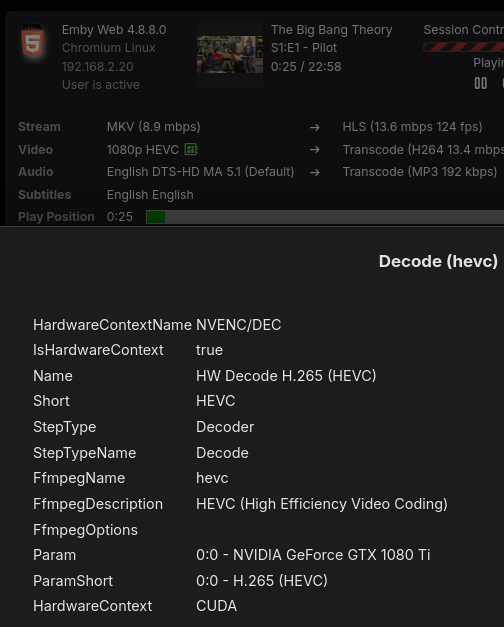
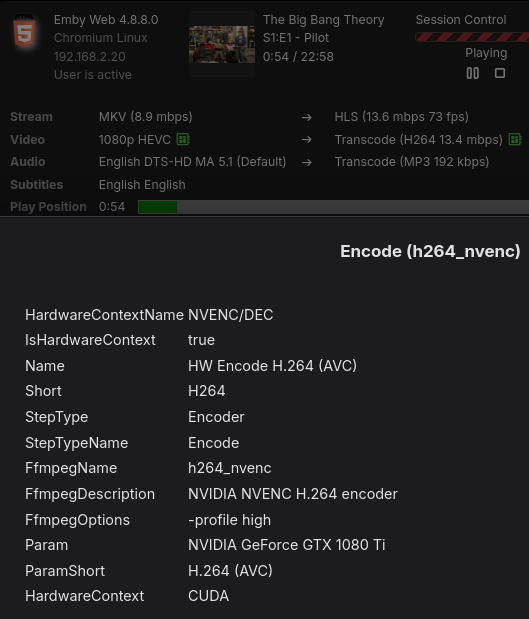
Further to that if you have the Diagnostics Plugin you can see from the User Sessions tab what GPU is being used as well.
 2 points
 -
Hi guys, I am sharing my server with my parents and my sister. My sister and I would like to have the metadata in English our parents on the other hand need to have a different language as they don't speak English. Have been looking in the settings but couldn't find anything that would allow this. So, is it even possible to set two languages for the metadata and then depending on the users language showing the one or the other language?1 point
-
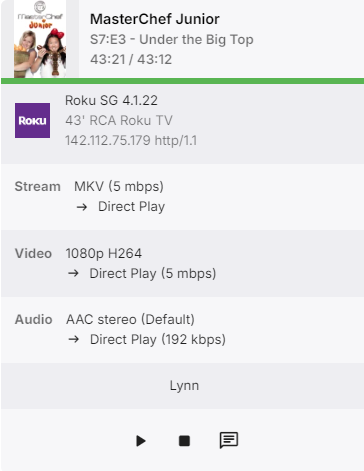
I get these "stuck" sessions now, they do not clear unless i do a restart of the server. The other thing i noticed about this is that the time on this item is 43:21 out of 43:12. Running 4.8.8.0 on ubuntu linux.
 1 point
 -
I think about it earlier but thats not a full solvation (sorry for a bad english) sync tha played items for example1 point
-
Check the ffmpeg-transcode logs, they should include the decode/encode details for those sessions. Edit to add: in the emby server transcoding options you can change the enable hw accel picklist to advanced and it will then list all of the detected graphics devices.1 point
-
It would be helpful to see the exact names of the directory and the files in it. Paul1 point
-
I have yet to have a Roku session get stuck on dashboard but have seen my android tablet have stuck session but nothing ever consistent. But yes that are several topics on stuck sessions on dashboard and all you can currently do is restart your server.1 point
-
I wonder if you set up duplicate users (local and remote) if you could solve this. So... user 1 local user 1 remote ^^ same user, same libraries set local with no password and hide user from remote connections set remote with password and hide user from local connections This way, when connecting locally you would only see local users and no password required. When connecting remotely you would see only remote users and require a password.1 point
-
Yes, you assign 44 and 106 to GIDLIST. This might get more things working. Intel HW accel is easy with Emby, Nvidia might take a little more effort. If the quadro card still doesn't work there are threads/posts with examples to get Nvidia HW working with Emby in docker containers.1 point
-
I have got password, because we use it outside the home network too I only want the passwordless login in my LOCAL network, I want to open the app, the opened on the login screen, I choose one of the users and it logging in without any additional button press Now I use infuse, but I don't want to use it, because I paid for Emby premier with lifetime and don't want to pay for another service for using my paid Emby.... and no, my iPhone don't want password from me if I set up not automatically login (not testing with others)1 point
-
lspci | grep VGA Will show you the VGA controllers detected. Also you can look at /dev/dri/by-path/ and it will have the PCI paths for the devices. In this example it's 0d:00.0 which is my AMD card. crw-rw----+ 1 root video 226, 1 Jul 16 09:36 card1 crw-rw-rw- 1 root render 226, 128 Jul 16 09:36 renderD128 lrwxrwxrwx 1 root root 8 Jul 13 18:09 pci-0000:0d:00.0-card -> ../card1 lrwxrwxrwx 1 root root 13 Jul 13 18:09 pci-0000:0d:00.0-render -> ../renderD128 0d:00.0 VGA compatible controller: Advanced Micro Devices, Inc. [AMD/ATI] Navi 21 [Radeon RX 6800/6800 XT / 6900 XT] (rev c1)1 point
-
if you can connect to emby from other devices on the same lan - then so can your router. so the issue is the WAN traffic is not being passed to the LAN (via the router). Can you provide the isp and the router model ? Unless your isp is blocking the emby wan ports (unlikely) then all that remains is the port forwarding and/or possibly the firewall rules in the router - but these are usually all done for you when you port forward.1 point
-
Hi, yes we are looking into this. Thanks.1 point
-
That's great. I agree, the functionality of it is good and easy to get where you want to go. For me it's more the way the details screens look and scroll and where things are placed. Maybe I was commenting on the wrong thing.1 point
-
I used it earlier today. I don't want to sound like I'm bashing it, I know it's a lot of hard work. There are just small things that I feel would make it look better, but I may be in the minority. I'm not a fan of the gray background. It is kind of an "apple tv" look, but for a media center I think black or dark charcoal color would look better. The layout of the home screen looks good and also the grid of movies/tv series is fine. It's the details screens that seem weird to me. It seems like it's common practice now with media to leave part of the next row (below) showing so the user knows it's there, I guess I don't understand why though. Most users will instictively push down to see if there is anything there. Which leads to why I don't like it. On the movie screen, the top part is absolutely beautiful. But that should be the whole screen imo. Seeing the tops of the heads of the actors is distracting and just looks off. If having that indication for the user to scroll down is something that needs to be there, maybe lower that gray bar so you can only see "Cast & Crew". And then when the user does scroll down have that row (gray bar) come up to just above where it currently is (so the entire images can be seen). That way it isn't covering up the beautiful part at the top. Seems like chapters should be above cast, but maybe that's how all Emby apps are. It's kind of the same in TV shows. I feel like the whole "Next Up" row should be visible when you open a series. Currently it shows the entire thumb, and just a tiny bit of the title. Why not show it all? I think the best look for tv shows though is having a season bar and then the episode thumbs below that all on the main screen with no 1/2 of the next row showing. The user can go down to seasons and episodes without the screen scrolling at all. If the user wanted to see "cast" or "more shows like this", they could scroll down, but it wouldn't be taking up space on the screen. The seasons bar would also eliminate the need for a seasons poster row. Again, this is just my opinion and doesn't really mean much. Everyone has their own idea of what looks good to them. I'm grateful for the hard work that goes in Emby.1 point
-
I actually love the interface. My wife comments on how easy it is to find things and navigate it. Collections on the Home Screen and live tv access is great. Plex is too much searching/fumbling with collapsing side menus and such. With that being said, the inability to easily change users is a dead stop. Everything else functions well enough, or better than plex, in my opinion.1 point
-
I can confirm with Android v3.4.11 and .12. As @MrYuck said just taping repeat in the now playing screen or the bottom playing bar locks up the app when any other button is pressed. Also, if you let the song finish in does not repeat, the next track will start playing for a few seconds then crash the app.1 point
-
Hey Luke, I got a notification to restart to apply updates today and after that it seems that the images are working properly again. Thanks so much.1 point
-
@Nuitarius I can guess a few things. Docker Desktop is a development environment that runs a virtual machine on the host for the containers to reside. It adds a layer that might explain why the GPU is not accessible to an unprivileged user. UID/GID 2 very likely doesn't have access to the library paths. Chances are that it won't have access to the GPU either even if it can access the driver. When running without sudo my guess is that it ignored the UID/GID and ran as your login, nuitarius. Changing runtime user is a privileged operation and why it works with sudo. Going back and forth between sudo and non-sudo is going to create problems with Emby server file ownership. A quick fix might be to continue to run using sudo. Change the UID, GID and GIDLIST to better values. Pick a UID/GID that has access to the media paths and files on the host and GIDLIST should contain the group values listed for the devices in /dev/dri. Long term: - get rid of Docker Desktop and install Docker Engine. - get comfortable with Docker compose files and/or Portainer if you want an UI. - (optional but prudent) create a user and group to use for the Emby server runtime. This new user/group will need to own or have access to the media paths.1 point
-
Yes. I can connect to emby from both wired and wireless devices on the same lan.1 point
-
Your account at Emby is fine - you just posted using it. If the server is not yours (in which case you would be the one to fix it), then you should contact the admin of the server you are using. The Emby organisation is not a streaming provider. Paul1 point
-
This is the Official Support Forum. Locked where? Are you connecting to your own server or someone else's? How to Report a Problem1 point
-
evt_hdr10plus1 point
-
Too much stress at work and in my free time, I no longer felt like programming anything. (I need another Covid pandemic) But i started to work at it again and i'm making good progress, so probably i can send you a test version next week.1 point
-
It isn't a bug, i just have forgotten to handle that situation for "random series/ordered episodes". Will correct it with an update.1 point
-
I'd like to put my +1 on this too. Would be super useful (if not a necessity) for series with split episodes.1 point
-
@LukeKinda love that you said this. My wife has been encouraging me to finally drop it for over a year... but the AppleTV app is the final piece of that puzzle. I got premier the day I started exploring Emby as an option as I knew it would eventually become our media server. Other things about the app I can absolutely deal with, as I know you all are working constantly to improve it... and OMG the product has come such a long way since I started 2 years ago, but the user app switching on AppleTV is where we get lost. We have... some... content... that I don't necessarily want my kids to go exploring in. My Living Room TV is shared and I absolutely cannot for the life of me remember to force close the app when I rarely get the chance to use the TV. The other stuff like alpha pickers and lyric support are like to haves, but not deal breakers in my house. Just the user switching. I think you all have done a great job with mpv and the UX of the Apple TV. Every release I cross my fingers for user switching. On a side note... hiding content from the home screen is a nice to have as well1 point
-
Except plex has it working. Netflix and all the other platforms have it working and infuse. It’s more a development/skill issues than a device. I don’t believe they have dedicated iOS developers like iirc they have a dedicated Roku person. Like I’m not a plumber and not all plumbers can do all jobs sometimes you need to find a specific skill set and job becomes easier. Just like a jr dev probably wouldn’t be figuring out complex code, I wouldn’t expect a non ios, other dev who knows some ios to do complex media apps. Doesnt safari also support hdr and maybe dv in the browser …..1 point
-
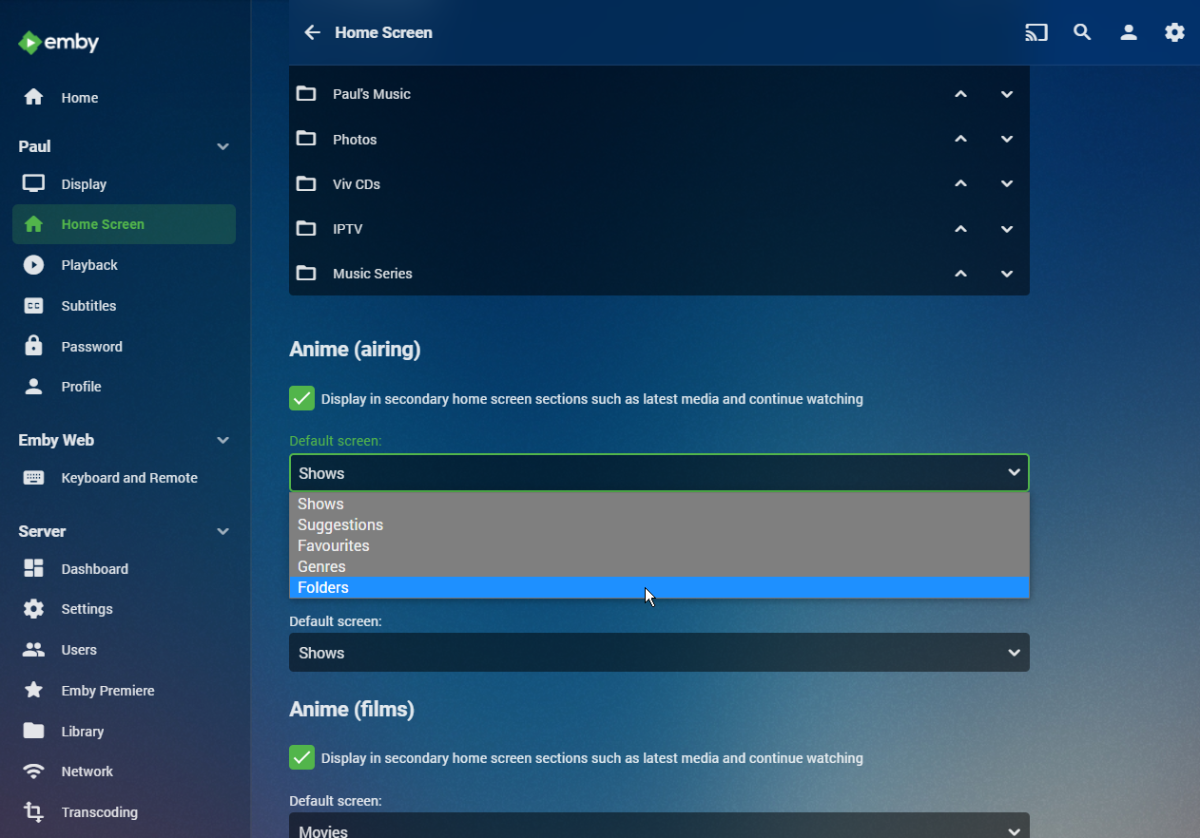
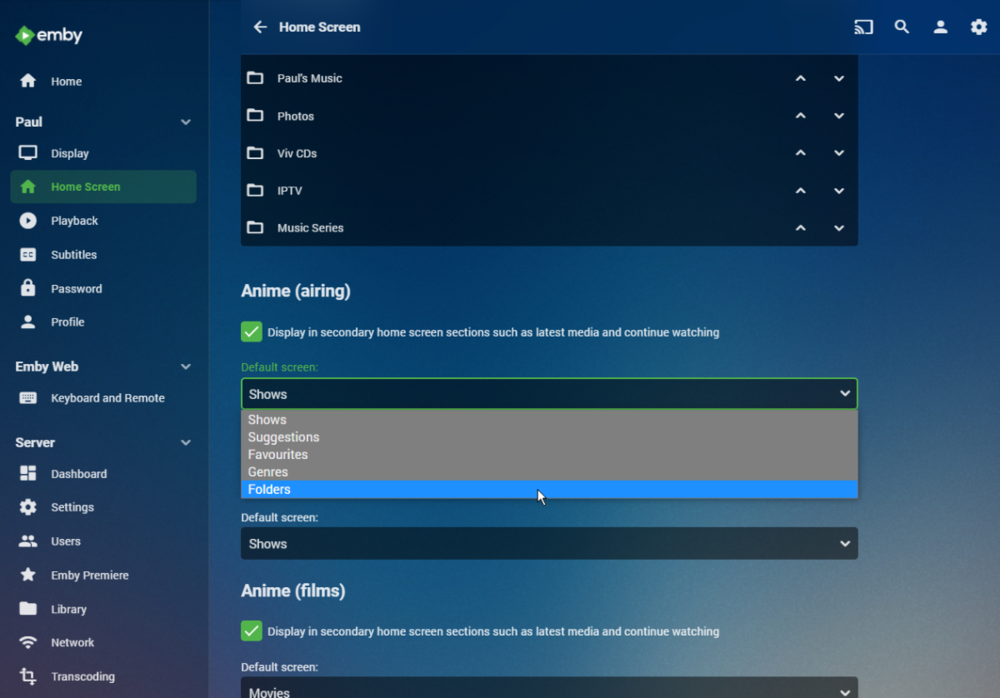
In your user settings for your Home Screen you can select the default tab from a dropdown for each library: Paul
 1 point
 -
Hello, for some reason the Backdrop image of the season is displayed for entries in the 'Next up' and 'Continue watching' categories. If I remove the Backdrop image, it correctly displays the Primary image of the episode. Why is it choosing the Backdrop image over the Primary image of the episode? Doesn't make sense to me. Is it possible to configure this behavior and if not, what is your reasoning behind choosing the season Backdrop image over the Primary image of the episode? Thanks for your hard work on the product!1 point
-
Vote for "episode image" rather than "series backdrop" or "series thumb". "Episode image" is morrrrrrre distinctive for the next episode!0 points
-
Hi, yes this option is certainly possible for future updates. Thanks.0 points