Leaderboard




Popular Content
Showing content with the highest reputation on 07/14/24 in Posts
-
HI, yes this is something that we plan to improve in future updates. Thanks for the feedback.2 points
-
TheTVDB now supports more alternative orders than just Aired/Absolute/DVD. Can Emby query these additional orders and add them as options? Two examples of shows I've seen this used are Re:Zero which has a "Director's Cut" display order and Money Heist which has a "Netflix" order. https://thetvdb.com/series/re-zero-starting-life-in-another-world https://thetvdb.com/series/la-casa-de-papel1 point
-
It would be great to have an option to rewatch tv series. Some times it's hard to tell what was the last episode watched if the entire show has been marked as watched. It occurs to me that this can be done with a counter that can differentiate if the numbers of plays is odd or pair showing a different color marker on each episode accordingly, so if the entire show has been watched again all episode should have the same color.1 point
-
Hey, I just wanted to see if it would be possible to add a "Back" button on the pop up window after you type the movie name. Like, when I put the movie name and i misspell the name, the next window will be blank and there's no way back except closing everything and then having to do the whole three dots, identify process. Thank you!1 point
-
For clients that can use 3rd party remotes (ie Android TV) I'd like the ability to use a remote of my choosing and be able to map my remote to functions in Emby. We should be able to keymap all important functions such as EPG popup in video, stats for nerds, RW, FF, jump back 10, 30, 60 seconds, jump forward 10, 30, 60 seconds, etc. We should be able to use the number keys to enter 3 or 4 digit channels for TV channel changes. Basically any function available in the UI should have a key mapping associated with it so we can use it with advanced remotes. The remote is our gateway to using Emby and the more functionality we have to customize this for our use the better and easier it is for us to use. Being able to map your own remote is a long standing tradition with many other system and is a long overdue addition needed in Emby. If you agree, don't forget to like this post.1 point
-
No. It will time out after about 20 or 30 seconds and you'll be able to access the Downloads on the device from the select server screen.1 point
-
FWIW, this is what Plex uses for their trailers & other metadata (from IMDB, Rotten Tomatoes etc.): https://www.fabricdata.com/origin That said, it's quite pricey and has a very low rate limit 5 requests per second so probably will need to be behind an aggressive cache like Cloudflare. Pricing: https://www.fabricdata.com/corporate/pricing1 point
-
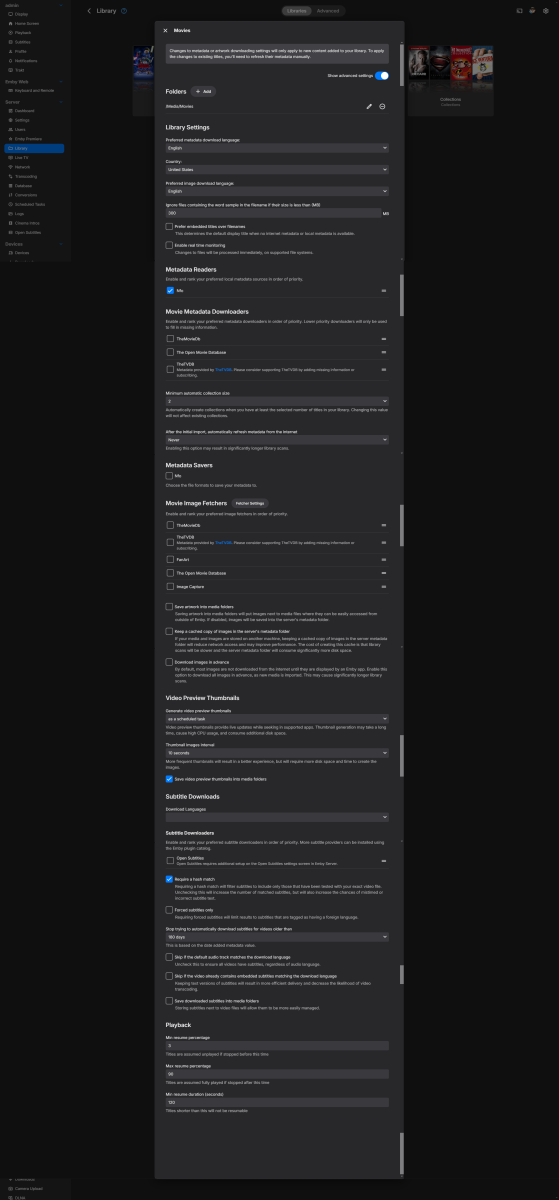
I have most of it disabled as I have my images and data locally. I reimported my entire library with this disabled and it seems to have fixed it at least temporarily. I'm afraid running a full metadata refresh on all the libraries will cause it to stop working again but I will only need to do that if I change my collections.
 1 point
 -
Understood. I appreciate all your assistance in figuring this out. It looks like it’s safe to carry on with the tagging and eventually, it’ll do what I had hoped for.1 point
-
It seems like the system's built in codexs are probably translating the sound wrong on certain TVs. I've got a soundbar at %75 and the tv volume at %50 and can "barely" hear it with my a/c running, yet i can go to Youtube and it's BLASTING at those volumes. Obviously the problem is IN the software and how it's translating the movie's sounds output through the emby player but people seem to want to work "around" the issue rather than just fixing the software by putting a volume adjustment implement into the system. VolumeBoost works great on some systems while totally ineffective on others.1 point
-
Awesome, thanks!1 point
-
Add a simple email address and or any other form of contact info. Basic text if possible or better an input text box that send message to administrator.1 point
-
thanks, i will get some more logging to share on this. the curious thing is it literally only happens on roku clients. there are plenty of other clients that do transcode without issue. i do with my own iphone frequently. samsung, lg, android, fire, ios, tvos all playback with no issue. I definitely there’s something amiss between roku client and transcoding. Once I put a temporary whitelist in for all http traffic from dmz/reverse proxy to emby server. it was able to start playing, but only the audio played and not video…. just got a black screen. It was very strange.1 point
-
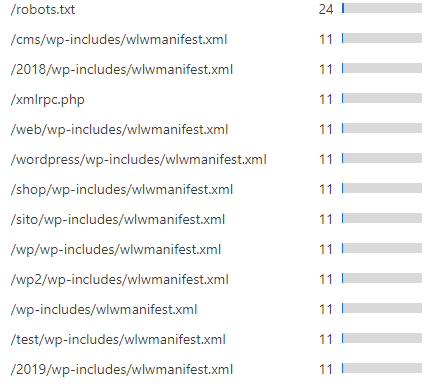
I'm glad you were able to get something from my post @vaise I can answer some of your questions too: I think I had an error in my configuration, so browsing other locations that are not intended to be public would not drop the connection, you are right. I believe if you have your video location rewrite for your media above a simple `return 444;` then you will see the right behavior, but I don't have time to check right now. You're right that my local traffic goes through nginx - this is partly so that I have the same URL for everything. Nginx handles my SSL, so putting traffic through that means my devices will use nginx directly when I am at home, and connection has a valid SSL certificate (split DNS) I don't worry about nginx going down because I use docker swarm and the same nginx container is deployed to multiple hosts, and when updating the config if the new container does not start then it will roll back so there is zero interruption to anyone watching. I host many things on nginx, but I use some port redirecting so that I can keep a separation between external and internal traffic and do clever things like this setup. This lets me use the same hostname but different ports, However all client devices always use 443, and it is Cloudflare or Cloudflare tunnels that will do some changes e.g. Client -> Cloudflare 443 -> Tunnel -> Nginx 12345 -> Emby 8096 Internally this looks like Client -> Nginx 443 -> Emby 8096 I think aside from that, you found some small errors in my work so thank you very much for that I hope our work can help others who are not able to stream via Cloudflare. One thing I am curious about is why you removed the additional random path that I use for the streaming endpoint. I put this here so that if there is a vulnerability in Emby, attackers will not find anything at the expected path. It is definitely not necessary, but I feel it adds an extra barrier for very little cost given you are already writing redirect rules. Basically it is to avoid vulnerable endpoints being scanned like you see below from my CF dashboard.
 1 point
 -
Maybe have it if sorting by 'File Name' (also has no alpha picker) - leaving 'Title' with no alpha picker to avoid potential confusion. In my case - I would just have a letter 'I' as all 34K photo's I have taken over many years are named IMG_xxxxxx for example.1 point
-
From the facts provided - you previously must have used upnp to get remote access. So if you are now using port forwarding rules in your router, then it's possible they are not correct or the upnp is messing with the manual port forward. Maybe turn off upnp and restart the router. To help further, we'll need to see an emby log and ideally also a pic of your router port forward settings (remove the WAN IP, we don't need/want to see that).1 point
-
I'd like to put my +1 on this too. Would be super useful (if not a necessity) for series with split episodes.1 point
-
Here is most of my emby config. I also have more that is not relevant to the external access - these two blocks are the two that are described in my post. I used a standard recommended config I found on the forum a long time ago as my base which is what I have modified. ##This is the main entrance to Emby externally. server { listen 12345 ssl; ## Listens on port XYZ IPv4 with http2 and ssl enabled proxy_buffering off; ## Sends data as fast as it can not buffering large chunks. server_name media.yoursite.com; #access_log logs/emby.log emby; ## Creates a log file with this name and the log info above. ## SSL SETTINGS ## ssl_session_timeout 30m; ssl_protocols TLSv1.2 TLSv1.1 TLSv1; ssl_certificate /run/secrets/FULLCHAIN; ssl_certificate_key /run/secrets/PRIVKEY; ssl_session_cache shared:SSL:10m; ssl_dhparam /etc/letsencrypt/ssl-dhparams.pem; location ^~ /swagger { return 404; } location / { ## Setting the URL of the backend server via a variable like this means nginx will not crash if the backend server is down at startup set $emby_url http://emby:8096; ## Enter the IP and port of the backend emby server here. proxy_pass $emby_url; proxy_hide_header X-Powered-By; proxy_set_header Range $http_range; ## Allows specific chunks of a file to be requested. proxy_set_header If-Range $http_if_range; ## Allows specific chunks of a file to be requested. proxy_set_header X-Real-IP $remote_addr; ## Passes the real client IP to the backend server. #proxy_set_header X-Real-IP $http_CF_Connecting_IP; ## if you use cloudflare un-comment this line and comment out above line. proxy_set_header Host $host; ## Passes the requested domain name to the backend server. proxy_set_header X-Forwarded-For $proxy_add_x_forwarded_for; ## Adds forwarded IP to the list of IPs that were forwarded to the backend server. ## ADDITIONAL SECURITY SETTINGS ## ## Optional settings to improve security ## ## add these after you have completed your testing and ssl setup ## ## NOTICE: For the Strict-Transport-Security setting below, I would recommend ramping up to this value ## ## See https://hstspreload.org/ read through the "Deployment Recommendations" section first! ## add_header 'Referrer-Policy' 'origin-when-cross-origin'; add_header Strict-Transport-Security "max-age=15552000; preload" always; add_header X-Frame-Options "SAMEORIGIN" always; add_header X-Content-Type-Options "nosniff" always; add_header X-XSS-Protection "1; mode=block" always; ## WEBSOCKET SETTINGS ## Used to pass two way real time info to and from emby and the client. proxy_http_version 1.1; proxy_set_header Upgrade $http_upgrade; proxy_set_header Connection $http_connection; } } ## PUBLIC STREAM ENDPOINT ## ## This is the public endpoint that will be used to stream media from the emby server, all other requests will go through the private endpoint. server { listen 23456 ssl; proxy_buffering off; ## Sends data as fast as it can not buffering large chunks. server_name media-stream.yoursite.com; ## SSL SETTINGS ## ssl_session_timeout 30m; ssl_protocols TLSv1.2 TLSv1.1 TLSv1; ssl_certificate /run/secrets/FULLCHAIN; ssl_certificate_key /run/secrets/PRIVKEY; ssl_session_cache shared:SSL:10m; ssl_dhparam /etc/letsencrypt/ssl-dhparams.pem; ## Since this endpoint is accessible without protections from Cloudflare, I shifted the location so that ## it is not in a default location if there is ever a vulnerability with Emby that people scan for ## we will reject any requests to other locations in Emby, so that the login screen and pretty much everything else is not accessible. location ~* ^/RANDOM_LOCATION_HERE/emby/videos/(.*)$ { set $emby_url http://emby:8096; ## Enter the IP and port of the backend emby server here. rewrite ^/RANDOM_LOCATION_HERE/emby/videos/(.*)$ /emby/videos/$1 break; proxy_pass $emby_url; proxy_hide_header X-Powered-By; proxy_set_header Range $http_range; ## Allows specific chunks of a file to be requested. proxy_set_header If-Range $http_if_range; ## Allows specific chunks of a file to be requested. proxy_set_header X-Real-IP $remote_addr; ## Passes the real client IP to the backend server. #proxy_set_header X-Real-IP $http_CF_Connecting_IP; ## if you use cloudflare un-comment this line and comment out above line. proxy_set_header Host emby.buddycloud.net; ## Passes the requested domain name to the backend server. proxy_set_header X-Forwarded-For $proxy_add_x_forwarded_for; ## Adds forwarded IP to the list of IPs that were forwarded to the backend server. ## ADDITIONAL SECURITY SETTINGS ## ## Optional settings to improve security ## ## add these after you have completed your testing and ssl setup ## ## NOTICE: For the Strict-Transport-Security setting below, I would recommend ramping up to this value ## ## See https://hstspreload.org/ read through the "Deployment Recommendations" section first! ## add_header 'Referrer-Policy' 'origin-when-cross-origin'; add_header Strict-Transport-Security "max-age=15552000; preload" always; add_header X-Frame-Options "SAMEORIGIN" always; add_header X-Content-Type-Options "nosniff" always; add_header X-XSS-Protection "1; mode=block" always; # WEBSOCKET SETTINGS ## Used to pass two way real time info to and from emby and the client. proxy_http_version 1.1; proxy_set_header Upgrade $http_upgrade; proxy_set_header Connection $http_connection; } location / { return 444; # Close connection immediately } }1 point
-
I am not entirely sure what you mean by second server block, but perhaps the reason I had it setup like this is because I have two different URLs coming through nginx with different settings, one is for streaming the media, and the other is for delivering everything else (APIs, web traffic, thumbnails etc.). They listen on two different ports, so this may be why I have it configured this way, this is more to do with my internal network setup I think than a requirement. If you know nginx better than I do then see what works for you :)1 point
-
I guess a lot depends on your HDR10+ vs Dolby hardware - I abandoned Samsung for TV's many years ago due to their stubborness/contractual obligations not to adopt Dolby Vision despite the rest of the AV industry rapidly adopting it. Thus all my TV's support DV, thus HDR10+ is not required. I simply convert HDR10+ to DV8 if that is the only option. On PQ - Yes, from what I've heard - the Zidoo's should lead here - but if I'm being honest, I've never had an issue with PQ on the Shield but better is always welcome of course AV1 - Hmm - I don't personally think AV1 is 'going places' and it's 'missed the boat' - 5 years old and the slow adoption of it suggests it will never reach the heights of h264 or h265 as frankly storage and bandwidth are no longer bottlenecks. Would I buy a new 'Shield' just because it supported AV1 in hardware - probably not.. The same as my main emby server CPU/GPU - would I buy the next Gen because it supported AV1 encode in hardware - again, no, as I have no real need to stream AV1 in low bandwidth, as that is where AV1 shines over h264/h265 - in 'normal' streaming usage at a decent bandwidth, it's advantages are minimal. 8K mainstream may change things but that is years off ..1 point
-
Just for reference, I’m using Emby for Samsung, but I also have the same issue on Emby theater and web browsers. I don’t believe it’s app specific. Thank you!1 point
-
My server is up and running on my synology NAS but I can not connect to it on my TV. What username and pssword do I use, because the one I used to sign into Emby website is not working.1 point
-
If you pay someone enough to write a replacement for Emby or Plex to your specification. Or seeing as Jellyfin is open source; pay someone to fork it and write the major changes required to make it possible. In either case, wait a long time... Paul1 point
-
It's not a channel, it creates an actual library. I tried it with a channel but the end result wasn't that great. I think there is a way to only scan that library. I need to refresh my self with API to remember. I'll get back.1 point
-
Voting for stable release. 10.0.36..10.0.40 have been solid on my clients. Great job @quickmic1 point
-
Yes. Pull the trakt api endpoint and then use the tvdb/imdb ids to find items in library.1 point
-
I think you are correct.1 point
-
I am running Emby on ReadyNAS. Here is the new installation guide. Guide Emby for ReadyNAS1 point
-
Agree 100% - I expected the expensive Zidoo boxes to be significantly quicker ... I don;t even think the Zidoo's are 64 bit, they are still running a 32 bit OS ... Tecnically, the latest FireTV sticks and FireTV Cubes also use the 4 x A55 cpu's - so yes, while they noticeably quicker than my Shield Pro in navigation, in general usage and playback, they are no different as you don't need to multitask on a media playback device. On the Zidoo's, you are basically paying a heavy price for it being a premium/high end metal box, with a lot of software tweaks, but fundamentally, they are using the same CPU/GPU's as a FireTV stick max that costs a fraction of the price. I can't see me abandoning the Shield Pro just yet ...1 point
-
You've installed Universal Android app which currently requires active Premiere subscription for full playback on TV devices. Search for AndroidTV app which'll give you two week trial after which you can subscribe to Premiere or purchase one-time App Unlock. Emby Premiere Feature Matrix1 point
-
This isn't really the correct 'Solution'. A lot of modern shows are no longer using the classic 'fixed' intro anymore and thus the Intro detection alogiritm is using what it thinks to be similiar passages of quiet music. Thus all the Intro's listed above are incorrect. It would be nice if there was an option on a TV Series to simply ignore Intro detection - maybe for the entire show, or more granular such as per Season. You could just add it to the metadata as a manually set option - 'Ignore Intro detection'. yes/no - default to no. The Plugin used to have this option... I used it a fair number of times ..1 point
-
HI, yes it is.1 point
-
FWIW, this was just added in the latest Plex beta.1 point
-
I have now also got @HorsePDF's modified cloudflare/nginx split streaming working for my system also. His doco is very good and the only things I can offer to make it better are thus : 1 - put actual text that can be copied into the notes - so easier to see difference between letter 'eye' and 'elle' (see above someone else had) 2 - the nginX rewrite could just remove the /something from the uri like this : rewrite ^/something(.*)$ $1 break; 3 - the nginx log for the streaming.acme.com initially threw me, as it was still showing GET /something/emby/videos/458295/xxxx - and I assumed the rewrite would remove the something in the log...... but it is actually working - I will know when i see the end of the month email from CF - will I have used 400+ GB on their network this time - I hope not - as this will further prove the config. 4 - I used the swag docker (which includes nginx), and this also includes the swag dashboard - the swag dashboard expects to fine the below three variables that are then passed to the proxypass - however I found I had to duplicate horsepdf's set $emby_url http://192.168.1.201:8096; and proxy_pass $emby_url; for some reason - I have no idea why this did not work with the below (see commented proxypass) : location ~* ^/something/emby/videos/(.*)$ { set $emby_url http://192.168.1.201:8096; rewrite ^/something(.*)$ $1 break; include /config/nginx/proxy.conf; include /config/nginx/resolver.conf; # The three lines below are searched by the swag dashboard to show an active instance but this parameter based proxy_pass did not work with redirect settings. set $upstream_app 192.168.1.201; set $upstream_port 8096; set $upstream_proto http; proxy_pass $emby_url; # proxy_pass $upstream_proto://$upstream_app:$upstream_port; proxy_set_header Connection $http_connection; # websockets proxy_set_header Range $http_range; proxy_set_header If-Range $http_if_range; } 5 - The notes state this - if you visit https://streaming.acme.com:port/, then nothing is returned (where previously you could access Emby outside of Cloudflare and directly via your router) - nginx returns a 404 (or if you prefer, set it to return code 444 which drops the connection without explanation). But if you follow the notes as written, this is not the case and while it wont go to emby, if does go to the default 'nginx is configured' screen. I would like to know how @HorsePDF is configuring the location to both allow this rewrite and at the same time block the direct connection. Horse mentions - In my Nginx service, I drop any request immediately that is not a request to stream an Emby video file (e.g. the login page or any other API/page) - I would like to see this section of the proxy. 6 - I do not have a 'local' emby proxy set for nginX like horsePDF does - that config means if horse's nginX goes down, then he cant access emby in the house. My clients on my LAN go direct to the emby server so they are not dependent on nginX. Horse therefore directs his CF rewrite url back to nginX - but mine is direct to the emby server. 7 - From the notes, it sounds like @HorsePDFis ONLY hosting emby on nginX in this way - whereas many selfhosters will also house other systems that are reverse proxied - hence there is only one port forwarded to nginx - and it is 443. 8 - While testing, I have found that a movie played on 5G over my iphone will stop playing after some time - maybe 10-15 mins. This will be tested by the remote users. For further reference, I added my usual nginx hardening things to the streaming.acme.com proxy in my setup such as : # Only requests to our Host are allowed - VW if ($host !~ ^(streaming.acme.com)$ ) { return 444; } #COUNTRY GEO BLOCK - VW #Add this back once configured as it was stopping local access testing as the $lan-ip override was not taking place if ($allowed_country = no) { return 444; } # Disable any unwanted HTTP methods - VW if ($request_method !~ ^(GET|HEAD|POST|DELETE)$ ) { return 444; } # Deny certain Referrers - VW if ( $http_referer ~* (babes|forsale|girl|jewelry|love|nudit|organic|poker|porn|sex|teen) ) { # return 404; return 403; } ################### # Block Bots - VW # ################### include /config/nginx/security/block-blockedbots.conf; # include /config/nginx/security/block-data_collectors.conf; # google TV cant work with this include /config/nginx/security/block-devtools.conf; include /config/nginx/security/block-monitoring.conf; include /config/nginx/security/block-scanners.conf; include /config/nginx/security/block-search.conf; include /config/nginx/security/block-social.conf; ############################################################################################################## # Custom Headers - see securityheaders.com - Repeated here in case ssl.conf is eplaced in a swag update - VW # ############################################################################################################## add_header 'Referrer-Policy' 'origin-when-cross-origin'; add_header Strict-Transport-Security "max-age=31536000; includeSubDomains; preload" always; add_header X-Frame-Options "SAMEORIGIN" always; add_header X-Content-Type-Options "nosniff" always; add_header X-XSS-Protection "1; mode=block" always; add_header Content-Security-Policy "default-src 'none'; child-src 'self'; font-src 'self' data:; connect-src 'self' wss: ws: https://mb3admin.com https://github.com/MediaBrowser/; media-src 'self' blob: data: https://github.com/MediaBrowser/; manifest-src 'self'; base-uri 'none'; form-action 'self'; frame-ancestors 'self'; object-src 'none'; worker-src 'self' blob:; script-src 'self' https://www.gstatic.com; img-src data: https: http: ; style-src 'unsafe-inline' 'self' https://fonts.googleapis.com/css" always; add_header X-Robots-Tag "noindex, nofollow, nosnippet, noarchive";1 point
-
hi I just bought an 65 oled G3 tv, an installed the lastest emby app. Sadly, dolby vision movies are played in HDR1 point
-
I have some Emby Android clients on the same LAN as my Emby server, and some that are external. The Emby server sleeps when it can. The Emby clients on the LAN wake the server quickly and seemlessly, but the remote clients do not wake the server. I think I understand what is happenning, and have a change that can rectify this problem. To wake the server we send a WOL magic packet to the server. If the server has a DHCP allocated IP address, then its IP address is unreliable while it is sleeping. The WOL magic packet contains the NIC MAC sddress which is unique. The magic packet is broadcast to all machines on the subnet and is only accepted by a machine with that MAC address. I presume that this is the method that Emby client uses to wake the server. If the server has a static IP address on the LAN then we do not need to broadcast the magic packet - we can send it directly to the known IP address. The magic packet still needs to contain the correct MAC address. To access the emby sever remotely the router has a static IP address (or DDNS address) and the server has a static IP address on the LAN. My router provides a port redirection for Emby data from external port xxx to server port 8192 I also have a port redirection for WOL from external port yyy to server port 9 (udp) I have an app on my phone that I can use to wake emby remotely, but the users of my external clients are not tech savvy and don't need that complication. So here's my request ... * Emby client setup should allow the user to specify a wake up port (probably 9 by default) * Emby client determines if it is on the same subnet as the server. - if so, do what it currently does (broadcast?) - if not, send the WOL magic packet to Emby server wake up port.1 point