Leaderboard




Popular Content
Showing content with the highest reputation on 06/19/24 in Posts
-
Yup that did it lol. I stopped the scan. Disabled chapter images and started up again. Its now ticking 1% every few minutes.2 points
-
Yes, i did get a quick response from developer. Originally thought it would just fix itself due to it being at youtube server side but that is seeming less likely now. Have been messaging developer with updates but as of today mine still has this issue.2 points
-
The default will always be unlocked - so at one time, you must have locked it for some reason. Anyway - all resolved - thanks for reporting back.2 points
-
I am back. I will continue working tomorrow. Vic2 points
-
Also, It would be cool if we have various m3u lists and have the option to choose/assign each m3u list for each user.. Example. In user settings we can choose which library to give them for VOD so this shouldnt be hard enough to do it for live tv too no? USER 1 - Playlist 1 - Playlist 2 - Playlist 3 USER 2 - Playlist 3 USER 3 - Playlist 1 - Playlist 3 Etc etc.... *** Delete this message from another topic I opened because I posted it by accident there1 point
-
Hello, I was previously using Emby for Android TV but switched a few months ago to using the "main" Emby for Android app on my Chromecast 4K with Google TV. The regular Android version is much smoother but 1 issue I am having is the screensaver only seems to kick in if someone leaves it on a menu screen. If my roommate pauses a show and leaves it there/forgets about it, it will seemingly stay like that forever. I just woke up again to find he left the TV on all night and caused some screen burn in on the TV. Can we please make it so that either the screensaver works if media is open but paused and/or if a show is paused for too long (maybe even a configurable time server side?), have it kick the user back to the menu so that the screensaver would kick in from there. This functionality worked perfectly on the Android TV version of the app but does not on the main Android version. Thanks!1 point
-
I guess that depends on whether or not they make their streams available for other software to utilize. I'm not sure about that yet.1 point
-
Many, many, many years ago, I found it was easier to set my libraries based on IP Address, so instead of \\Emby\Movies or \\Emby\TV, just used the ip address of 192.168.xxx.xx\Movies and \\192.168.xxx.xxx\TV so even if I had to change the server and migrate, the only thing I had do was assign the old ip to the new machine. Save's a lot of trouble, provided you don't have anything else running but working at the IP level was/is way easier than trying to replicate mappings, modifying databases and all that good jazz. Good work though.1 point
-
I generally do, because I thought that was required to use the images from TMDB, which are generally higher quality than those from TVDB.1 point
-
Oh it was just for science. I have 4K and 1080p libraries.1 point
-
Tone mapping should never be done, I don't know why people bother. You won't be able to get close to the original picture quality. But if you insist, I believe Hable was the one that was "closest".1 point
-
I've done some digging and found that server B had some old config leftover from an old install of Emby. I had uninstalled but obviously some bits got left behind. I will wipe it all out and start again, luckily it is a very small server so will be easy. I think this issue could be be down to poor housekeeping on my part1 point
-
@LukeThat's the thing, it is very difficult to estimate when the issue occured. I have upgraded to the latest version now, and check once a day. If it occurs also with the new version I can post the log. Thank you1 point
-
It looks like you might have enabled chapter images, for a first time load yes this will take a while.1 point
-
it can vary on the time on the old monitor because . it checks the logs every 15 seconds and depending on how many logs it has to go threw at the time. i changed this to every 5 seconds to check the log and have it move the un-necessary logs to backup folder prior to searching the logs. also i went threw all the code and adjusted any 1-5 second pause for certain cmds to fully complete. then just left one variable to the user for when its done to delay starting back up emby. mostly because like you pointed out the stream might just be offline on all servers and needs more time before they are adjusted by the provider. im not sure if this will help or not. it might end up as a variable as well. we'll have to test it out. but to answer question, it is about that time maybe quicker now, but you can now extend that time. also i found that when the monitor recreated the timer.json file it was creating extra data. this could have been causing possible issues down the roar. although that is fixed mostly. there is an occasion when the description of a show uses special characters it adds a couple more special characters. but this is contained within the comments section of that show. so it shouldn't effect any functionality. at it resolves its elf each time the guide is refreshed anyway. i fixed when it shuts down emby that it makes sure there is no rogue ffmpeg process as well, that could be left running and when it starts back up recording that show again it seems to mess that show up. the monitor itself uses very little memory, but it does gradually increase over time. i changed it so that when ever it finds something to fix, it reloaded the app and then memory is at its lowest. but if its a long time for you have an error to fix then this could possibly grow. but not sure if it will grow to a point that is noticeable. although it still bothers me, so im still looking for why. maybe pm me when you get failed recordings that are not fixed by the monitor. so i can see if there is other things we can trouble shoot.1 point
-
1 point
-
Success! I have Emby running on Windows with all the file paths correctly set to my Windows drives. I've attached the program I wrote to update the file paths in the library.db database. What the program does is: given a list of one or more volumes containing Emby libraries, look for paths in every column of every table of the database and change the volume designation from Unix-style to Windows-style. It should work for converting from Windows to Unix with some minor code changes. The program is written in PHP, and in a departure from current coding standards it contains copious comments! Suggestion: It would be really, really nice if the Emby developers would provide this function for us! emby_fixer.zip1 point
-
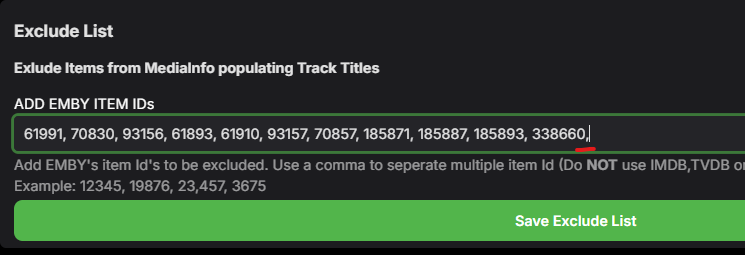
Thanks - that is very useful and no, that is an easy mistake to make. Looking at the code, we do trap for Null or Empty values but I think it's failing when getting the list as it just does a 'split' using a comma - I'll do some testing later and try and reproduce. I'll also add some further help text to not end the line in a comma Nice find !1 point
-
Not sure what changed overnight but now both tuners are working (4..8.8.0 and Beta 4.9.0.24) where last night only the Beta worked. Weird.1 point
-
@rbjtech@CheesegeezerPerhaps you will say "sure everyone knows that", but I found the source of malfunction. When I edited the exclude list last week, I made a comma after the last entry. After i removed it, plugin works again as it should. Didn't know the plugin is so sensitive.
 1 point
 -
It would seem so. Using a better encoder now and getting perfect sync with the native player (my preferred player).1 point
-
And this morning it's working properly again.1 point
-
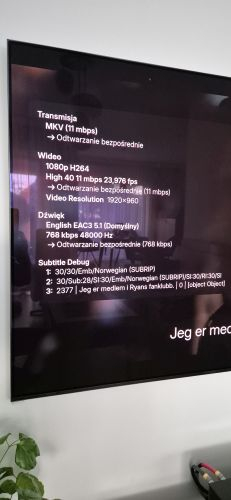
Hi Guys, Please see attached with Norwegian language which is number 30th and works normally. I did some additional test, so to sum up. 1. I checked this video file with Xiaomi TV box and Kodi player. Works fine 2. I installed Plex server on synology and client on my Samsung TV. Subtitles works fine. (but of course I prefer to stick with Emby:) ) 3. I checked once again this file with emby server and client on my android samsung mobile. Works fine. So my conslusion after those test is: *mkv container is fine, emby server on synology is fine, samsung TV is fine (as Plex works). In my opinion there is some bug in Emby Tizen client. Regards Emby for Tizen. I have installed from Samsung shop version 1.7 as it is latest availalble and I had this problem. So I found that forum and installed newest version 1.8.3 hoping that bug is fixed. So both those version do not work with subtitle >30. So......what can we do?
 1 point
 -
Problem solved. I went back to Kodi 20.2 and Emby 9. Everything shows up as it should. Thanks for your help!1 point
-
Thank you, extremely appreciated.1 point
-
OK I did get this to work. I still can't figure out why it had no problems serving any movies or TV shows straight from the network path without mounting and only ever choked on Extras, or why my original attempt to simply map the host-mounted path and use that for my Library paths failed, but in any case, it does seem to be working now. Just in case anyone else has this issue and is running the Docker Raspberry Pi image like I am, here is what I had to do to fix it: In my `docker-compose.yml`, replace: image: emby/embyserver_arm64v8 with: build: . and add: cap_add: - SYS_ADMIN (I also removed my "/mnt/nas/Video:/mnt/Video" volume mapping since I never got that working in the first place) In the same directory, add a `Dockerfile`: FROM emby/embyserver_arm64v8 USER root RUN mkdir -pv /mnt/nas RUN mkdir -pv /usr/local/bin COPY mount-nas.sh /usr/local/bin/mount-nas.sh RUN chmod -v +x /usr/local/bin/mount-nas.sh ENTRYPOINT ["/bin/sh", "/usr/local/bin/mount-nas.sh"] In the same directory, add a file called `mount-nas.sh`: #!/bin/sh # Bail if the mount fails set -e # Check if the current user is root if [ "$(id -u)" -ne 0 ]; then echo "USER $(id -u)" >&2 echo "This script must be run as root" >&2 exit 1 fi # Mount the share mount -t cifs //192.168.86.214/share /mnt/nas -o user,rw,vers=3.0,user=root,pass=root,nofail # (Optional) Display success message cat /mnt/nas/path/to/mount-success.txt # Execute the original Emby entrypoint exec /init Then I followed the steps from this thread (minus the TypeBasedItems part since that table is only in previous Emby versions apparently). Started back up the server and my library is all there, unchanged, but now Extras will play. Thanks for the advice; I would have never guessed this to be the issue.1 point
-
Hint: xx.shell contains #!/bin/bash </path/to/comskip>/comskip --ini="<path>/whatever.ini" --threads=1 "${1}"
 1 point
 -
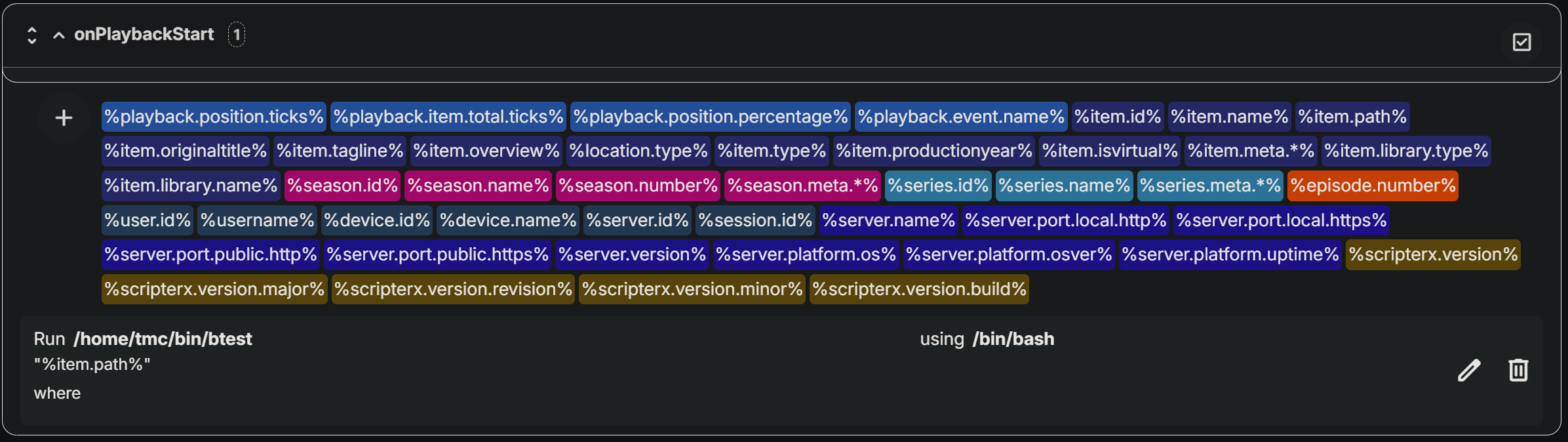
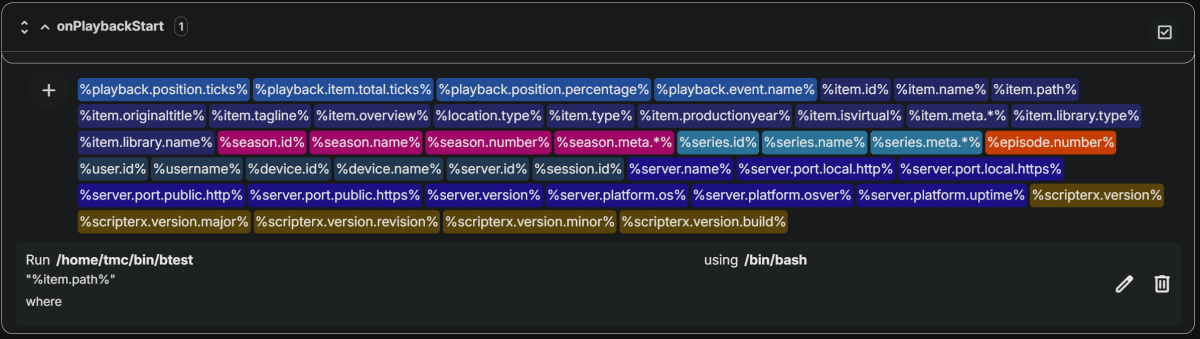
You would think so, but I have found that running command lines in ScripterX to be more trouble then it's worth, instead it's much better to launch a shell script... But first you may not be using the right parameters in scripterX: lets' say the following file is being processed "/mnt/rec/TV Series/SD/Alice (1976)/Season 01/Alice (1976) - S01E01 - Pilot.ts" %item.name% or %recording.name% will simply give you: Pilot while %item.path% or %recording.path% will give you the full file path/name: /mnt/rec/TV Series/SD/Alice (1976)/Season 01/Alice (1976) - S01E01 - Pilot.ts but this can/will cause a problem if you don't put the parameter in quotes ("") (as spaces will make it look like many parameter's instead of just one or some characters like "(" will get interpreted as special directives instead of plain characters) so use "%item.path%" or "%recording.path%" to pass the full path/file to the script so try this (or similar): where: /home/tmc/bin/btest (or similar) contains: #!/bin/bash touch /tmp/"$(basename "${1}")" ## OR (but not both as it will just do the same twice) ## touch /tmp/"${1##*/}" Also NOTE: Linux permissions apply as always! And NOTE: the directory /tmp has a sticky bit too!
 1 point
 -
Thanks. That is a little bit better.
 1 point
 -
No immediately apparent issues after updating. Everything works as expected. I'll post back if I notice anything "weird".1 point
-
This isn't a new problem, but it has recently become very annoying for me. The current process of editing metadata for version-grouped movies only affects the metadata for the primary version. That is, whichever version is displayed first in the Media Info section, and first in the "version" drop down selector. Grouped versions should probably keep their metadata synced to each other. Then if they're split back apart, they would each retain any changes made while grouped. If this isn't feasible, then having separate "edit metadata" buttons for each version would help admins make changes. Currently, if metadata changes are necessary (for example, custom rating for parental-controlled accounts)... we need to split the versions apart, edit both items' metadata separately, then merge them back into one. The "keep synced" approach should also be programmed to handle images, keeping those synced as well. This may or may not cut down slightly on total disk space used for images on grouped items.1 point
-
I can't seem to edit my previous post - I cited an incorrect add-on version. 10.0.25 is the last known working version for me with nominal load on the server (v4.8.8.0) and reverse proxy (traefik v3) working. My previous post/logs are for version 10.0.32 which only works if I bypass the proxy.1 point
-
Theater is dependent on an internet connection iirc.1 point
-
I had a somewhat similar issue with one of my albums, where all the standard Title/Artist/Album Artist/Album/Year/Genre embedded tag info was how I wanted it BUT the 'correct' MusicBrainz Album ID embedded tag was causing an 'incorrect' Album name within Emby. This was because of incorrect info entered by someone into the MusicBrainz database. I deleted the embedded MusicBrainz Album ID tag, resaved the embedded metadata (within Mp3tag) and then just rescanned the relevant folder (not my whole library) within Emby. This fixed the problem for me. So, hypothetically, there should be no need for you to delete your whole library from Emby to fix the problem albums. Perhaps just try updating one problem album and see if individual folder rescanning works for you? It's much faster to update and check results. Just go into the folder/menu tab in the music section, select the required folder and rescan/refresh from there. Good luck!1 point
-
Yes as you don't have to enable providers on the library. Provider data can assist in some situations but is not required. Compilations must have same Album Artist and Album name to be grouped. Music Naming | #tagging-your-tracks1 point
-
Hi, in the next app update. Thanks.1 point
-
ive been fine tuning the app. got rid of few memory leaks. still have a small one that im still working on. i added 2 variables in the config file. 1 for time to recheck logs 2 time to delay before emby starts back up. just so we can tinker with what works best for us. also im removing the msc error portion for now. ive rarely had an example of this, and when i did it never saved a recording. so i figured why have it restart emby and possible interrupt other recordings. but if there is other common errors or warnings that the recording is not going to be very good or most likly fail. then i can add those errors and have it shutdown emby and wait so many seconds then start back up and it will get a different streaming server from what ive witnessed. usually a restart of emby is all it takes for it to get a new server for the recording stream to get better, except for the sts error because it tells emby its completed. but all other issues with streams im hoping can be resolved with a restart of emby. if you have some examples of recordings that got messed up. like skipping allot, replaying same clip over and over, or stopping early, or not starting on time. just group them by topic, and no more than few examples of each for now. ill try to implement so we can test on those issues as well. for example i was getting "maybe the m3u8 list sequence have been wraped." then later "HTTP error 500 Internal Server Error" but after i restarted emby it got a new stream from different server and didnt get those (what i call errors) . although some times with those errors it will continue the record, but not sure of the quality of that recording. but sometimes it just stops. also i found out that the majority of streams are HLS. im not sure if we should be even tring to force ffmpeg to keep the stream any more than what it does. but maybe switch focus to having emby pick up on these failing streams, then stop that ffmpeg stream, then try again. it should be the same as restarting emby and get a new server stream. I'm assuming it will be the same, maybe @luke can correct me?1 point
-
I tried that too and it still really confuses Emby. Sorry @iBossbut that's just not in the cards. It is open source so if you or someone wants to play with it, feel free. Or take a look at the Pottymouth plugin I referenced above.1 point
-
We plan to support plex style editions in future updates. Thanks.1 point
-
I also agree, this is the main reason I'm still using infuse on my Apple TV...1 point
-
We need this feature asap imo.1 point
-
Hi. I did not say it was impossible. I said DV is a proprietary format that we don't have the ability to (legally) manipulate at this time. I didn't get into the fact that this operation would not be practical at the time of playback but I also do believe that is the case at this time.1 point
-
Wealthy people and a petty sense of entitlement, name a more iconic duo.1 point
-
Movie Theme Videos Update Released 1.8.2.0 Fixes the config screens not loading correctly.1 point
-
if i could find some info on how to make plugins for emby i would look into it..1 point
-
me too. and maybe also VIDEO-TS-folder. I have many of them, really of lot made by myself years ago, with DVD-Labs. many movies that aren't shown anymore on TV or the streaming-platforms.1 point
-
would love to see Emby play ISO, especially 3D frame packed ISO files.1 point
-
Ok. I do think its probably a good idea to make your last audio play queue available at any time. I guess basically make it persistent so your last play queue is just always there where you left it.1 point
-
On linux the .NET core runtime uses INotify, so it will come down to whatever that supports: https://www.linuxjournal.com/content/linux-filesystem-events-inotify1 point