
Leaderboard




Popular Content
Showing content with the highest reputation on 06/03/24 in Posts
-
I would love to be able to jump to a year when I have my movie titles sorted by release date. When the movies are sorted by title I can click on a letter or type in the first three letters to jump down the list, however when I sort by release date and I'm in the mood for an 80s movie I have to scroll through 30+ years of movies to get to those releases. If the years (or even decades) were down the right hand side of the screen like the letters are when you sort by title that would be huge. I apologize in advance if there is a way to do this or if its already been requested I've been trying to find a quick way to do this and I can't seem to find one.2 points
-
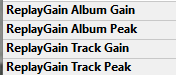
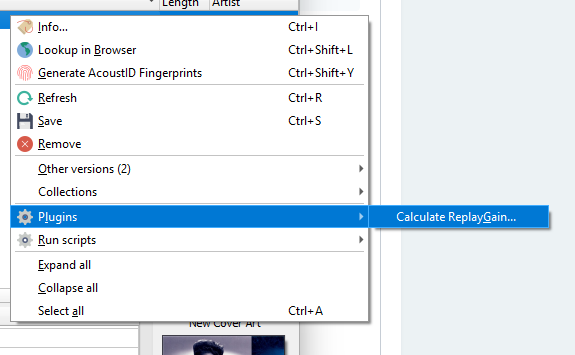
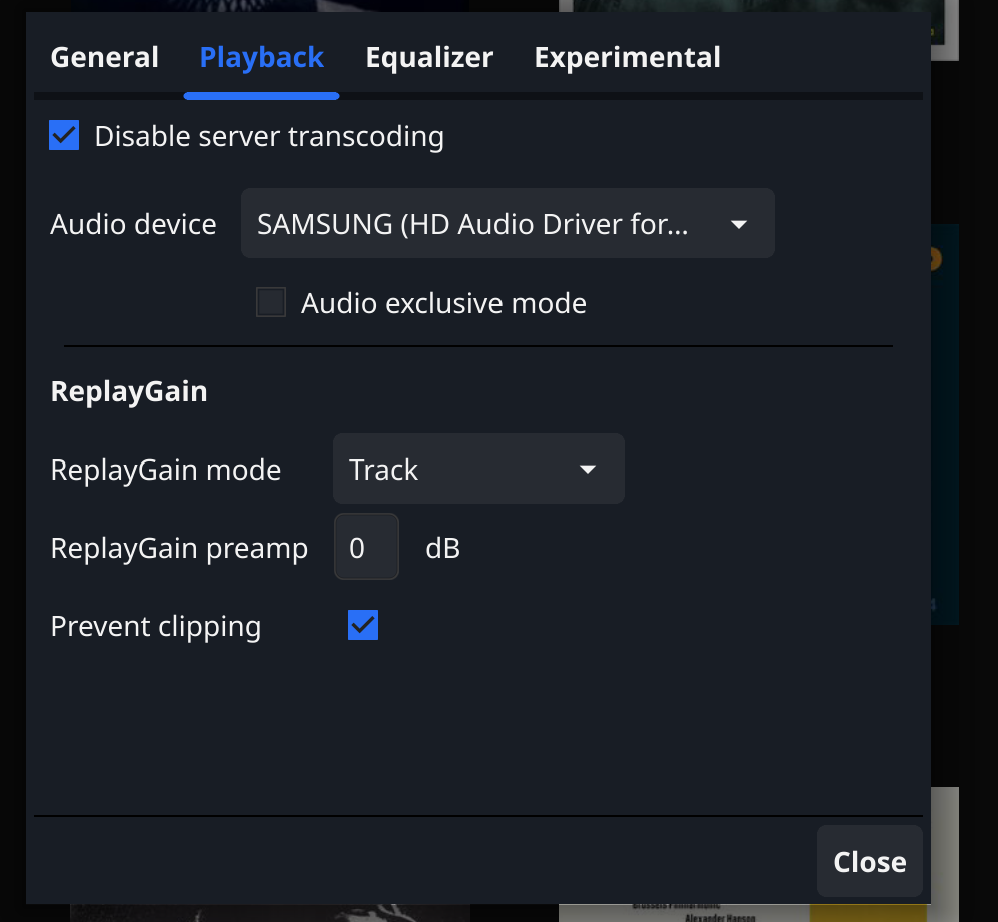
Hi There are pros and cons to any tool or approach. I am not that familiar with MP3gain but am sure the objective is the same normalize audio volume. I tried replay gain first, because it doesn't physically alter the volume of the track. The tools "processes" each track and writes 4 metadata tags. It can then either be turned off or on easily. So it relies on the player to adjust . For the bulk processing of my music library I used rsgain. (I spent alot of time making sure that the tool, did and does not "mess up" my existing tags} See " ReplayGain 2.0 tagging utility (github.com)". Musicbrainz's Picard has a plugin based on the same tool. @PuffyToesToo I have no clue which is a better algorithm and as long as it can be turned off or on, Either would be an improvement. Yo @Lukebelow is a Standard implementation. The drop down list has three mode options None, Album or Track. Works quite well with my music library
 2 points
 -
@@Luke stated in a previous post (https://emby.media/community/index.php?/topic/49933-replaygain-music-support/) adding support for this could easily be done for at least the theater client seeing as the player used already supports replaygain. I'm making this feature request in hopes that this support is added, as I have no dev experience myself1 point
-
I love the additional subfolders for Movie Extras (eg, Shorts, Scenes, Interviews, etc.)! I would like to propose an additional folder: "Galleries". Within the Galleries folder the user would place subfolders (only one level of nesting) and each subfolder could contain any images the user chooses. Then, Emby would display the subfolder name as an Extra (in Emby Theater) and opening that extra would launch an image gallery of the containing images. For example: Movies\Disney\The Sword In The Stone (1963)\Galleries\Scrapbook Movies\Disney\The Sword In The Stone (1963)\Galleries\Film Facts "Scrapbook" is what would be listed among other Extras in Emby Theater, and the Scrapbook folder contains various images to be displayed in a slideshow that the user can navigate with their left/right arrows. This feature request is motivated by the following related post: https://emby.media/community/index.php?/topic/55912-video-ts-folder-no-longer-recognized-in-movie-extras-folder/ Basically, sometimes there are extras such as image galleries and text content which are only available via the DVD menu. I have found that I can use FFMPEG to extract all the frames from a video file, and so use that on the appropriate VOB file from the original DVD. Then I can use VisiPics to delete all the duplicates, resulting in content I can then sort into folders (eg, Concept Art, Storyboards, etc.). All I need is for there to be the above support for a Galleries extras folder, which could contain multiple subfolders (only one level deep), each containing images to be displayed as image galleries in Emby Theater, etc. Thanks for your consideration! PS - If this is something you might like to see implemented, be sure to "Like" this top/first post (as well as any subsequent posts in this thread that highlight particular aspects of what you are interested in) -- "Liking" the top/first post helps the Devs to know how much interest there is in a given Feature Request.1 point
-
Since "Auto" won't help me save Mobile Data, I have to manually switch the quality to 128Kbps when listening to music and 360p when watching a video, but I have to switch it again to "Auto" if I'm connected to an external WiFi because I won't be worry about any data limitation, however, it's annoying going back and forth changing those settings everytime I need it, so there should be another menu for Mobile Data. Besides the current "Internet Quality" menu, my suggestion is to add another menu for both music and video, labeled "Mobile Data Quality", with the same options inside: Music: Internet quality: Auto, 64 Kbps, 96 Kbps, 128 Kbps, 192 Kbps, 256 Kbps, 320 Kbps, 512 Kbps, 1 Mbps, 1.5 Mbps, 2 Mbps Mobile data quality: Auto, 64 Kbps, 96 Kbps, 128 Kbps, 192 Kbps, 256 Kbps, 320 Kbps, 512 Kbps, 1 Mbps, 1.5 Mbps, 2 Mbps Video: Internet quality: Auto, 144p, 240p, 360p, 480p - 420 Kbps, 480p - 720 Kbps, 480p - 1 Mbps, 720p - 1.5 Mbps, 720p - 2 Mbps, 720p - 3 mbps, 720p - 4 Mbps, 1080p - 4 Mbps, 1080p - 5 Mbps, 1080p - 6 Mbps, 1080p - 8 Mbps, 1080p - 10 Mbps, 1080p - 15 Mbps, 1080p - 20 Mbps, 1080p - 25 Mbps, 1080p - 30 Mbps, 1080p - 40 Mbps, 1080p - 50 Mbps, 1080p - 60 Mbps, 4K - 40 Mbps, 4K - 60 Mbps, 4K - 80 Mbps, 4K - 100 Mbps, 4K - 120 Mbps. Mobile data quality: Auto, 144p, 240p, 360p, 480p - 420 Kbps, 480p - 720 Kbps, 480p - 1 Mbps, 720p - 1.5 Mbps, 720p - 2 Mbps, 720p - 3 mbps, 720p - 4 Mbps, 1080p - 4 Mbps, 1080p - 5 Mbps, 1080p - 6 Mbps, 1080p - 8 Mbps, 1080p - 10 Mbps, 1080p - 15 Mbps, 1080p - 20 Mbps, 1080p - 25 Mbps, 1080p - 30 Mbps, 1080p - 40 Mbps, 1080p - 50 Mbps, 1080p - 60 Mbps, 4K - 40 Mbps, 4K - 60 Mbps, 4K - 80 Mbps, 4K - 100 Mbps, 4K - 120 Mbps.1 point
-
Ah, ok, no worries, I thought it worth asking anyway. Thanks for clarifying. I imagine she'll be wanting a 'proper' tablet in a few years so it won't be an issue then!1 point
-
No, but the new Emby Theater Windows will have client-side logs.1 point
-
Yeah, they don't understand our app at all. To them a "Video" app streams videos from a central site and, if we categorize that way they expect a whole bunch of other things that we don't do.1 point
-
Those images are out of order, the first one is at the bottom. It just reset to initial setup screen and when i get to server entry there is no history available. I included an image of the version number (first image).1 point
-
Version 10120 I've deleted the movies. as said, really old and yes, you're right maybe mpeg also ok not sure. all the others like remux are perfect, of course! my reason for the addon only video and visual is really strange but as the movies are gone I dint think they will come back thanks!!1 point
-
I'm coming back to this after some time spent scribbling, playing around with options and a few sleep cycles. Bottom line, and I will concede to @ebr that a solution would take work not only to implement but also additional overhead going forward. Time spent on this would take away from work needed in core and mainstream areas of the project. And even then there are holes left in my limited exercise. The ROI is too low. I will let this sleeping dog lie but will go back to my notes now and then to see if I can work out something new, for my own amusement.1 point
-
I can certainly try, sounds a bit involved so prob an activity for tonight after work. Will play around and see what the story is.1 point
-
Factory reset, in plugin settings. Take a complete Kodi backup before that, even Kodi settings should not be touched. Also I would recommend an upgrade to .26.1 point
-
I was trying to get rid of the notification since my start of the journey. couldn't remember that I changed it. notifications for all addon are off, and I changed the setting in kodi next gen also now. but the notification is not the problem? more that it's syncing courius things a long time. not like usual 20 seconds run through the libs I've asked earlier. pls point me to the correct reset structure, after I have changed my libraries a bit, and the backup size doubled. I think something is not correct reset nodes? or all new with reinstall v24 (pls not! in emby itself all is good1 point
-
Everyone, I added viewing channels one channel at a time, improved how programs and bumpers are interleaved, and increased the overall speed of the code. I have only tested the code for a short while, so I may have broken something. @TZTZorohas also improved the GUI and the HTML code. Please let me know about any bugs or improvement suggestions. Vic ==> Well I did break something - I am fixing it now - I will post the code again this afternoon The sort order is not always being followed. I will fix this ASAP The code below is OK and will give everyone a good feel for the GUI. PseudoTV.dll1 point
-
Until Emby hold missing episodes locally, I don't honestly think this is ever going to work unless the results get cached. I'm pretty sure the providers are not thanking emby for this - hitting them with 1000's of queries for your entire collection each time you run this .. ? Even with a very fast internet connection, I just get a spinning circle and it times out - luckily, I never use it - I was just curious. My honest advice, is to use something else to manage 'missing episodes' - Sonarr will manage missing episodes by clicking a single filter... Just point it to the same file source as emby. It uses tvdb as it's metadata source and holds it all in a database.1 point
-
I have no idea where they are coming from. but they are back every time I run a full media info refresh.. next time I can share a Pic of course! but not so much to see. Just another tag in the list like video or what were the other, visible or something like this.. 10 or 15 movies having them plus one movie with a tag I cannot even write here, very cryptical.1 point
-
Are they maybe held in an nfo file and emby is importing them ? As the mediainfo plugin (if you have that option turned on) will just be creating medianfo codec like tags - 'video' certainly isn't one of them - or shouldn't be anyway .. Maybe show a full example ?1 point
-
hi all Sorry for late response. @Heckzayour solution solved all the problems. Everything is working properly, after updating the jail. Thanks @Luke@Heckza@Happy2Play1 point
-
For music, I always use MP3gain. There is not really an effective equivalent for video that I have found works as well.1 point
-
New PUBLIC TESTING version available 10.0.26: Delta changelog 10.0.25 -> 10.0.26 rewrite http communication with Emby server (remove urllib3 dependency, http comminicaion is now on low level socket-basis) fix context menu rewrite emby login handshakes fix textoverlay position fix minor artwork issues remove song artwork from synced content (let Kodi handle it) fix menu options in content helper plugins fix library Id filters for dynamic nodes fix dynamic node Genre for Audiobooks and Podcasts Comment: http rewrite is a major change (under the hood). All communication timeout issues should be fixed e.g. failed syncs when long running tasks are interrupted (Kodi shutdown) Query (priority) orders are improved as well as image loading. Less overhead and removal of external library urllib3 dependency HTTP Emby server redirects are not supported (yet). Let me know if this causes any problems. Reconnect to Emby server might be required, but no database reset.1 point
-
Is this topic done with? Please tell me it is not so; the new solution is idiotic. Seriously, a running list that never finishes loading, cannot be easily reviewed, cannot be exported or searched... At least you can multi-select!??! Why?!!? To what end?? Is there someone out there that actually thinks this is an improvement? I don't understand; surely there is not a programmer who is proud of the way this implementation turned out. And here is the rub - to make it not offensively stupid, all that needs to be done is to allow the list to be exported to .txt. .csv, .xml... Please don't be done with this, it's just lazy.1 point
-
You can just run 1.0.0.9 on top of it. It will split the movies that are in seperate libraries.1 point
-
Any plan to get this going sooner or later? It unfortunately makes Emby a pain to use when hosting a party or trying to music-nap (yeah that's a thing ), constantely having the phone or remote in hand to adjust the volume when a loud track starts playing.1 point
-
HI, we'll take a look at this. Thanks for reporting.1 point
-
We are not going to arbitrarily choose to end support for the FreeBSD package, so you have nothing to worry about from us. We will continue to produce it for as long as we can and will only stop when something forces us to. For example, I suspect that support from external tools that we depend on will start to drop off, then sooner or later something will break, and that's when it might be the end of it. But hopefully that doesn't happen anytime soon.1 point
-
Sure. Of course I may have cured it with switching to wired but, if it happens again, I will send a server log. I really do not think this was a server problem and it cannot be the Roku (unless it is both) it cannot be the Emby Roku app so it is probably something in/on my network. The wired setup is where i have my hopes now. We'll see.1 point
-
That log is unfortunately not the most useful since it's only the hardware detection. That stream is only transcoding the audio which is a very lightweight operation so this shouldn't be transcoding related. I'm not familiar with Roku if there's any settings related to playback, if it advertises support for HEVC it should be able to handle a 2 Mbps stream...1 point
-
Nevermind, I figured out how to use the Simple IPTV add-on.1 point
-
Hi @luke, attached you can find some logs. I could reproduce the issue with a testfile. You can find this file on https://kuleuven-my.sharepoint.com/:f:/g/personal/bart_plessers_kuleuven_be/EtFt-KYShltNhald4VIYo-EB-TOyauwn-tY9LSC3z5NFcw?e=ZmaeUT in the subfolder Codec - 08. Big Buck Bunny (2008) - AAC 5.1 I create a srt files that displays every second the time playing As mentioned before - iPhone --> open Emby app --> select movie --> cast to Google TV ChromeCast - start playing--> OK - from my iPhone: scroll further in timeline. than - videoframe of selected time is displayed, but is freezed - srt file starts from beginning - sounds seems to be OK When playing on my old ChromeCast, no problems when I scroll futher in time If you want to analyse the logs 192.168.4.61: server 192.168.4.93: ChromeCast 3 192.168.4.94: ChromeCast 4 (with Google TV) 192.168.4.182: iPhone The logs attached - embyserver.txt --> logs after a fresh restart of server - embyserver-CC.txt --> test done while casting to ChromeCast embyserver-CCwGTV.txt --> test done while casting to ChromeCast with GoogleTV Thanx in advance, Kind regards, Bart Plessers embyserver-CCwGTV.txtembyserver-CC.txtembyserver.txt1 point
-
Hi, thanks for reporting. We'll take a look.1 point
-
Is this still not available ?? omg how many thousands of people need to ask before it gets done ? people started asking in 2019 !1 point
-
I just wanted to drop a comment here as this has been requested by a few folks on my server lately. For now they say they get on a discord voice chat then all click the play button at the same time. It works but gets a little out of sync & if one pauses they have to re-sync it again manually. Even if a sync'ed watch party method worked without internal voice (there r plenty of other apps like Discord to do this) we would be happy on our end. Anyway, I just thought I'd add to this request too.1 point
-
I'm not sure exactly what you mean, but I use mkvtoolnix when I want to combine multiple extra videos together into one longer video file. It's free, cross platform and fast. And dvdcompare is a great resource for identifying which file is which extra. http://dvdcompare.net/comparisons/film.php?fid=159851 point
-
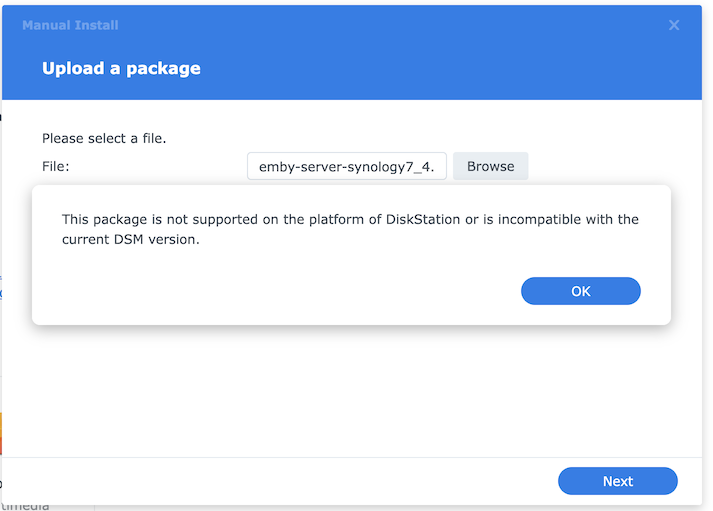
I have tried to update to the latest Emby Server Version 4.7.1.0 on my DS-918. Below is a screenshot of the message I get using the ARMv8 (x18 Series). I have tried downloading all versions (excluding beta versions) on the update page, all with no result. My NAS is a Synology DS918 with DSM 7.0.1-42218 Update 3. My current version of Emby is Version 4.6.7 Can someone please advise what should be done?
 1 point
 -
A decade picker sounds great, preferably together with a decades filter - https://emby.media/community/index.php?/topic/81378-filter-by-decade/1 point
-
An equivalent of the alpha-picker showing year (or even decade) would be great when sorted by release date, but in the interim, have you tried filtering by year? Too many clicks for my taste, but it narrows things down quickly(-ish)..1 point






















.thumb.png.1ddf135ad99a72646a26d671a28ffe35.png)



