Leaderboard




Popular Content
Showing content with the highest reputation on 05/28/24 in Posts
-
Online radio stations and even IRL ones mitigate repetition of music through the use of rules. You can specify that a song/artist/album can only be played once during any given "x hours/days". Can it be integrated into Emby itself? This would be a great solution to the repetitive use of the same handful of episodes/movies in Playlists / Shuffle and VirtualTV, so we get a better mix of content. As a last resort, an optional rule within shuffle/playlists could include "only play an episode/show/movie/music if it hasn't played in "X' amount of time". Thanks!2 points
-
Just dropping the idea here, not a core feature request, but a plugin request. Help me with my binging problem! I'd like to set a overall preference that will not let me play two shows from the same series within...an hour...a day...a week. Just a thought. Thanks2 points
-
No one has fessed up, but I suspect @Lukeis crossing these off without consulting us. Luke, are you crossing these items off? If so, can you please consult with us first when a change is made in beta so we can confirm if it's done or not?2 points
-
Sure thing.. it'll take a bit as I have to wait to get to the TV that's doing it.. (Q900a.. QN65QN900AFXZA) and thank you....2 points
-
The problem was that the Mini was on a different IP subnet than my phone (for security and so I don't have umpteen Minis on my Chromecast list). Chromecast could handle it, Spotify could handle it, but the Emby app couldn't. The Hub Max I tested was on the same subnet as the phone so that's why it worked. Moving the Mini to the same subnet fixed the problem. Thanks @Lessajfor the guidance and the brainstorming. I appreciate it!2 points
-
Hello Devs, hope all is well with you. I have an issue where (most of the time) I have to go to Favorites and then back to the home screen for it to refresh, or I have to hold the back button down while on an episode or movie's page to force it return home and refresh. Is this by design? Can the design be changed so that it refreshes every time we access the home page, or refreshes the homepage in the background every time we stop watching media? IMO, it's not user-friendly to force users to update the home page to see accurate data. Thank you for all the work and attention you put into this product. It will be a very sad for me if it ever goes away!1 point
-
I moved from a Shield Pro to Zidoo Z9X Pro. I am non religious about such things, I just want the best of the best. I can assure the Zidoo is superior, so much so I tick the external player box which stuffs up watched status accuracy but gives the very best video and picture hands down.1 point
-
Hi. The specific example is I watch any movie or any TV episode -- either in part or whole -- and the home screen does not update when I return to the home screen. I have to manually refresh it by going to my Favorites and then back to the home screen. Force closing the app temporarily resolves the problem, but it always comes back within a day. I will try this and report back later. The problem usually resolves temporarily whenever force closing the app or rebooting the Shield, so I'll have to test this out for a couple days to see if the problem persists.1 point
-
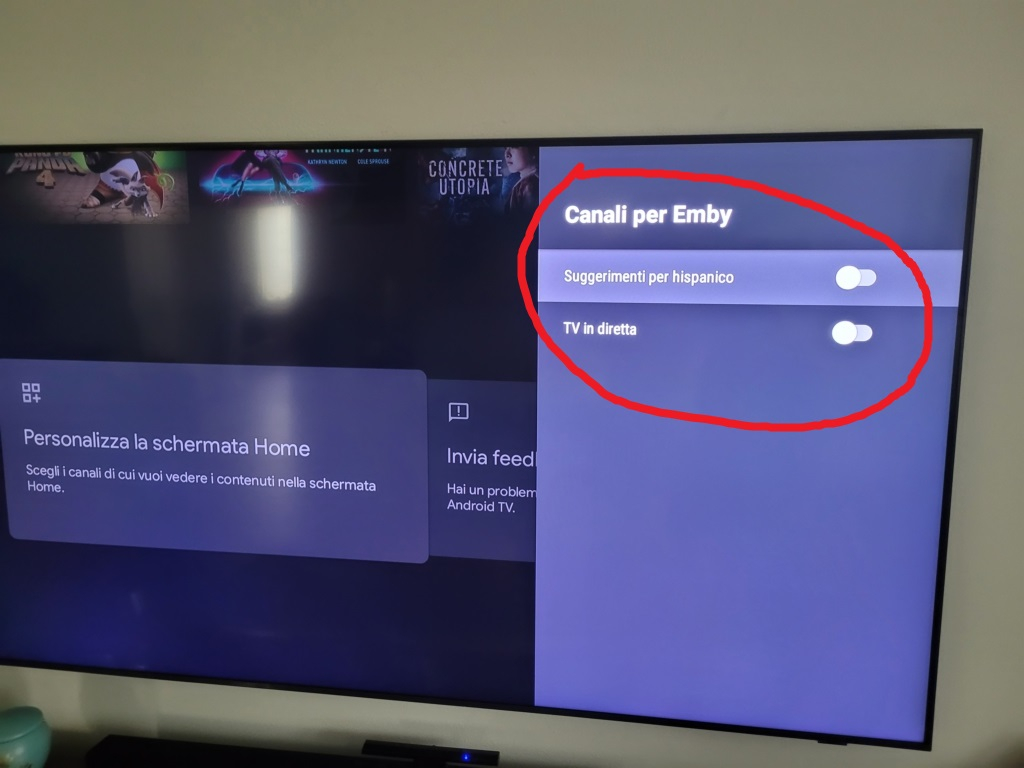
I'm happy to be able to contribute to improving the interface and integration into Android TV. With various user tests (even changing) only live TV and suggested films appear in the choices (see screenshot) and never the "recently added" option which in my opinion would be the most convenient and useful solution for users on Androd TV, as NetFlix and Prime already do Thank Hispa
 1 point
 -
Unless someone actually typed that value into the network settings...1 point
-
Switching users should produce a new list and I'm wondering if maybe that is the only time you're seeing it change content. As I said, this feature hasn't undergone any testing in a while because it is only available on some older versions of Android TV and it is hidden so that most users never even know about it.1 point
-
Do you ever switch users in the app?1 point
-
@TZTZoroand I are finishing the code now. We have a couple of issues to work out and will try to get them done today or tomorrow. Vic1 point
-
Ok, I'll try that shortly, thanks so much for the detailed guide @FrostByte!1 point
-
In a command line utility like Terminal it's "su -i" to elevate your admin account ,but if using WinSCP there is a guide in the tutorial section here: https://emby.media/community/index.php?/topic/103636-how-to-access-synology-nas-as-admin-or-superuser-using-winscp Basically, you will need to do the parts in blue as you've most likely done the rest already.1 point
-
The easiest and most common way is to use Emby Server on your home PC/NAS or other server machine, and use the Emby app on your phone. From there, you can download audio and video files to the device, and you can play them without being connected to your Emby Server. Please let us know if this helps. Thanks.1 point
-
This plugin calls the item.RefreshMetadata() action on items with the options.EnableRemoteContentProbe = true; https://github.com/faush01/StrmExtract/blob/da1ce795093d27a00efa26ec1e37ec7312cc3fbd/StrmExtract/ExtractTask.cs#L84 This forces the server to do a refresh of the metadata and probe the remote data the STRM points to.1 point
-
thanks, its working1 point
-
HI, that is a more typical music layout for a TV application, so that's why it is presented that way. But yes, more options to control this are certainly possible.1 point
-
Thanks Luke, Will review this and post accordingly, might be a couple days due being physically away from the server for a short while, thanks!1 point
-
HI, we are working on improving this. Thanks.1 point
-
Yeah, that's pretty much exactly what I want. I think for episodes of a season, horizontal scrolling works pretty well. I know there's been some contention about horizontal scrolling in collections not being good (and FWIW, I do think vertical scrolling for collections works better) but for episodes horizontal scrolling should be fine. Though I think having the option to choose between horizontal and vertical scrolling makes the most sense, especially if you can choose per show (like maybe you choose what you want the default for TV shows to be, but then you can override the default for each show individually in case there's a show that's listed as one season with a hundred episodes or something). Either way though, having a separate "extras" section after the episode list just looks cleaner in my opinion.1 point
-
We'll incorporate disc number into the determination of uniqueness. Thanks.1 point
-
Hi. Can you try searching for our standard android app (Just "Emby" on Amazon and "Emby for Android on Google) on the same device's app store and see how that compares? Thanks.1 point
-
Sure, in the spirit of not infringing on anyone's copyright (lol) - I'll throw some random .mkv together and throw a subtitle in there and see if I can replicate with that.1 point
-
Ah, I was missing the dash... Renamed to ("Dune Part Two (2024) [tmdbid=693134] - extra details of the file.mkv"), and it worked, thanks and sorry!1 point
-
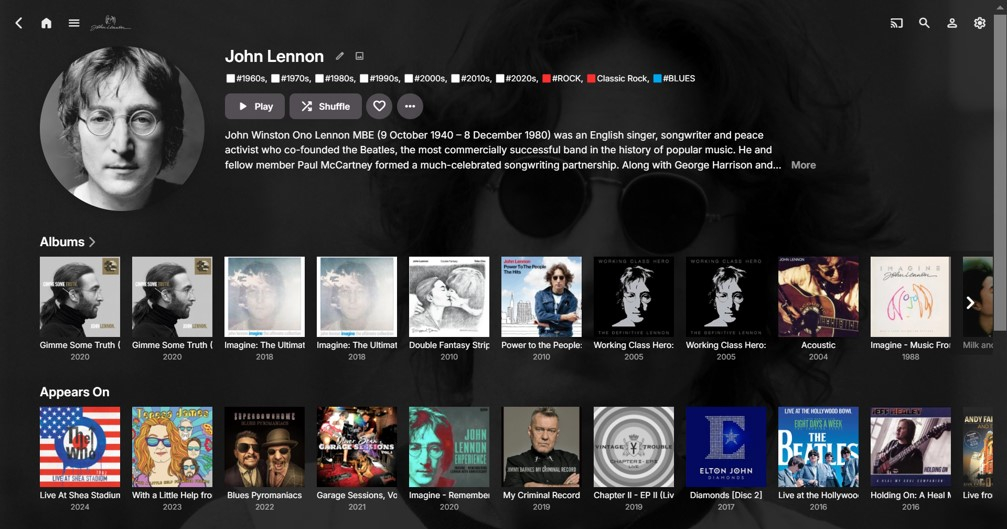
For comparison purposes, below is an image of my Emby John Lennon page: (Note: I have hidden the Emby Songs Vertical Section with CSS, so just considering the albums rows in this post.) The Albums section is all good, where John Lennon is the Album Artist. The Appears On section combines John Lennon albums as a (non Album Artist) Artist performer and a (non Album Artist) Composer. Therefore, of the 11 albums visible in the screenshot, 10 are obvious Composer credits only. It is not until the 9th album (The Beatles Live at the Hollywood Bowl) that a genuine John Lennon “performed on” album appears. (And, even that is from a Composer credit! - but I can likely deal with that type of issue with my embedded tags). It is certainly valid to show the John Lennon Composer info (possibly in a separate row), but not mixed with the Artist (performer) info. Another observation is that the Albums section can be ‘clicked on’ to give an expanded grid view, but the Appears On section cannot. With the (current) Appears On section and (future?) Appears On/Albums Composed sections, it would be helpful to have the expanded grid views as well. For largish music libraries (like the John Lennon example) there could easily be 50+ Albums for each separate Albums/Appears On/Albums Composed category. Any improvements with this would be most appreciated!
 1 point
 -
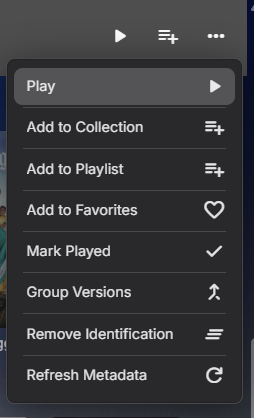
You have three options Multi-select and on the multi-select menu you have group versions. Emby automatic grouping per required structure/naminig scheme. Or the community plugin.
 1 point
 -
That was another thought that I had yes but I would have been surprised that that would have been it if other apps worked to cast, my mini is on the same subnet/wifi and I only have one. Glad you resolved it.1 point
-
So if I simply replaced the source MKV with the new MKV, that also worked (just with a simple refresh). I think what got me in trouble (though I don't know why), was I copied the entire source folder...so new folder name appended with 'copy', then added the tracks and the new MKV file in there (it did have an updated time stamp). Anyways, lessons learned, and I really appreciate your help @jiggityand @Luke1 point
-
Yes, I will put it in my queue of this list I need to catch up on.1 point
-
I believe I resolved this issue. Turned out this was all because I let the jail get way out of date. 12.2-RELEASE went end of life October 27, 2020. Updated the jail: iocage upgrade -r 13.2-RELEASE emby Updated/upgraded packages pkg update pkg upgrade Restarted the jail, scanned library, refreshed metadata just because, seems to be working now. So... keep your jails up to date Thanks everyone1 point
-
Well, drat. I can't repro this now, or, what I mean, I can't remember how I saw it earlier. I do know it was very easy to show it. I've just tried it with several recordings with SRTs and they all played fine with my jumping around. Unless this is something that somebody has actually been working on, I guess you can consider it case closed. FWIW: Version 4.8.5.0 Emby Server 4.8.7.0 is Available for....1 point
-
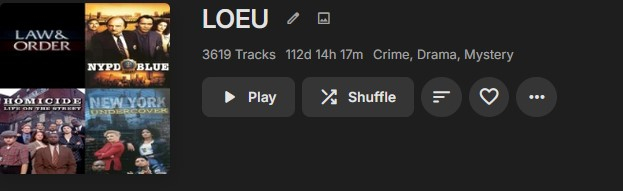
To solve this particular issue I had to use a combo of Collections and Smart playlists For the L&O cross overs i made a collection with all the L&O and associated shows, then made a Series of smart lists, you have to limit the smart lists as they crap out at around 1000 items and get very dumb with maintaining chronological order, then you can merge the lists into one big list; after fixing crossover orders as multi part episodes didn't even air in the right order originally. Then you can get rid of the individual smart lists. I wound up with a playlist for L&O etc that is like this at the end
 1 point
 -
I sloved the embytray-problem like that. CASE: Windows. I need a running EmbyServer after reboot without logging in. After logging in later, I need Embytray working, too. PROBLEM: Starting emby with Task Scheduler is easy. Just add a task Programm Start ...embyserver.exe (with Systemstart) But when logging in, Embytray ist missing, because of different execution sessions. SOLUTION: Add first scheduled task (with systemstart) to start programm C:\Users\xxx\AppData\Roaming\Emby-Server\system\EmbyServer.exe Add second scheduled task (when user logging in) to start PS-Script: C:\Windows\System32\WindowsPowerShell\v1.0\powershell.exe args-field: -command C:\xxx\yourscriptname.ps1 I trigged the start of this script with a delay of 30 sec. # # Script to shutdown EmbyServer with POST-Method and start it again afterwards # $headers = @{ "X-Emby-Client" = "Emby Web" "X-Emby-Device-Name" = "Google Chrome Windows" # "X-Emby-Device-Id" = "xxxxx" Seems to be not necessary # "X-Emby-Client-Version"= "4.8.7.0"Seems to be not necessary "X-Emby-Token" = "YOUR API" # "X-Emby-Language" = "en-us" Seems to be not necessary } # Function to test, if EmbyServer is running. # Delayed 5 seconds, because it takes some time to startup/shutdown function Test-EmbyServerRunning { param ( [string]$ProcessName = "EmbyServer" ) $waitingTime = 3 Write-Host "Waiting $waitingTime seconds..." Start-Sleep -Seconds $waitingTime $processes = Get-Process | Where-Object { $_.Name -eq $ProcessName } if ($processes) { $timeout = 5 Write-Host "EmbyServer is still running... waiting $timeout seconds if it stopps" $endTime = (Get-Date).AddSeconds($timeout) while ((Get-Date) -lt $endTime) { $process = Get-Process -Name $ProcessName -ErrorAction SilentlyContinue if (-not $process) { # Write-Host "EmbyServer stopped." return $false } Start-Sleep -Milliseconds 500 } if ($process) { # Write-Host "Error: EmbyServer did not stop." return $true } } else { # Write-Host "Timeout: EmbyServer is not running." return $false } return $false } # Check, if EmbyServer is allready running before shutdown Write-Host "Check EmbyServer Status" $serverRunning = Test-EmbyServerRunning if ($serverRunning) { # Shutdown EmbyServer try { Write-Host "EmbyServer is running." Write-Host "Invoke Shutdown EmbyServer successfull" Invoke-RestMethod -Uri "http://localhost:8096/emby/System/Shutdown" -Method Post -Headers $headers # Check, if EmbyServer stopped Write-Host "Check EmbyServer Status" $serverRunning = Test-EmbyServerRunning if ($serverRunning) { Write-Host "EmbyServer did not stop." Write-Host "Press Enter to Exit." Read-Host exit } else { Write-Host "EmbyServer is not running. Shutdown successful." } } catch { Write-Host "Error Invoke-RestMethod: $($_.Exception.Message)" Write-Host "Press Enter to Exit." Read-Host exit } } else { Write-Host "EmbyServer is not running. Shutdown not necessary." } # Start EmbyServer try { Start-Process "C:\Users\XXXXX\AppData\Roaming\Emby-Server\system\EmbyServer.exe" # Insert your Path Write-Host "Start-Process EmbyServer successfull" } catch { Write-Host "Error Start-Process: $($_.Exception.Message)" Write-Host "Press Enter to Exit." Read-Host exit } # Check, if EmbyServer started Write-Host "Check EmbyServer Status" $serverRunning = Test-EmbyServerRunning if ($serverRunning) { Write-Host "Successful: EmbyServer is running. Skript Exit in 3 Seconds." Start-Sleep -Seconds 3 exit } else { Write-Host "EmbyServer did not start." Write-Host "Press Enter to Exit." Read-Host exit } Voilá. EmbyServer works after system boot and works with embytray after logging in. No guarantees if it works for you, too. But i hope so.1 point
-
OK, That will be my next step, thank you1 point
-
That's right, the "watchdog" needs some sort of criterion to judge this realistically. But anyhow, the technical solution approach is up to someone else, this was just a suggestion In this case (TrueNAS SCALE, official emby application), for some reason, the process hit the time limit, although the media is "local", i.e. emby has direct host access to the pool, and it itself is running on a separate, all NVMe mirror. So, maybe, there's a resource component after all, contributing to the issue.1 point
-
But how do you know it's 'stuck' vs just being resource contrained ? You need to draw the line somewhere - unless you want to do the calculation per item (seems unrealistic) - 10-15 minutes timeout per item does seem reasonable for 4K remux media. If you are trying to use this type of media over a connection slower than 100Mbit/sec - then you are going to hit normal playback issues anyway - so it's unlikely to be a valid use case.1 point
-
Oh, that's really interesting. Yeah, making it longer, or "flexible" as @rbjtechsuggested, might be good. However, maybe it shouldn't be based on assumed I/O speeds etc. but perhaps the process could monitor itself in terms of whether or not it's actually progressing. Once it gets stuck, then it could be killed off after a configurable amount of time, e.g 1 minute after getting stuck. That way, the process is flexible, yet it won't run forever in case it gets stuck.1 point
-
Something is overwriting the streaming limit ? I would add 3000000 to the user limit as well and try that to reset it ?1 point
-
Ah, so patience I need. Thx for the info. Much appreciated. Cheers!1 point
-
Thanks @Riptide126for the corresponding logs. I can see a difference and in the case of the iPhone test the transcode was started - the media was being transcoded because of the high bit rate. For the iPad for some reason the transcode was not started. Your tests were not exactly like for like - in that you were using a different user account for the iPad test from that for the iPhone. Would prefer comparison tests to be done using the same account I see we have an updated version of the Emby of iOS app out now - with versions 2.2.20 and 2.2.21 addressing video playback issues. Could you update the app on the iPad to the latest available and try again - using same user account you did the test on the iPhone and let me have the server log for that test - as well as any ffmpeg log file generated - please test with the same video as before - and please compare the app playback settings on the iPhone and iPad and make sure they are the same for this test. Thanks1 point
-
I left the server running over nicht and now the collections are part of the library.1 point
-
Hi, please try Emby for iOS 2.2.21+. Thanks !1 point
-
Actually this is going to be a focal point of the 4.9 release, so you’re all in luck.1 point
-
Here is also the updated emby server log, sorry about that, the previously given time stamp should work embyserver.txt1 point
-
Sorry about the wait, electron is giving me some headaches. Here's a test image, based on armbian this time: https://www.dropbox.com/scl/fi/qtuh8hk980mcdsrf4ajq3/emby-theater_3.0.19_rpi4b.img.xz?rlkey=gaw058vsw1re1arn35qsg6h0i&st=op9ztk5m&dl=0. Mpv has been bumped to the latest version, as well as the ffmpeg rpi fork we're using, it comes with improved h264 hardware decoding via v4l2 and drmprime, and this is new, with h265 as well via the v4l2-request api. Leaving hwdec to auto should select the right decoder, and you may experiment with either gpu or gpu-next, both should be working fine. It's also possible to make use of vulkan too now, it's not exposed in theater but you can add `gpu-api=vulkan` in ~/.config/mpv/mpv.conf. Installation instructions are a bit different from the rpi os image, the first boot will let you choose a root password (for ssh), set up networking, and this is important, create a new user. You need to call the user `emby` and not set up any password for autologin to work. By default it will launch an openbox session, but xfce is also available, this can be changed in `/etc/lightdm/lightdm.conf.d/12-autologin.conf`. Note that I might rename this to `99-emby.conf` later though. The image works on both rpi 3 and 4 (and 400) despite the name, it's just how armbian calls this configuration. Rpi 5 images are in the works, but our current electron doesn't run on it, and newer versions are not compatible with our mpv plugin so we're in a bind for now.1 point
-
@TolkienBardI am familiar with that list lol. I’m about 1/3rd of the way done building all the pieces of the script. The big lift is getting the prompts all put together to allow for customization of how it assembles everything. The idea is run the script, it will give you a menu to chose from and let you do the entire setup as a one stop shop.1 point
-
@TolkienBardI am working on an updated guide and tooling to make it easier for those with minimal technical expertise. I hope to have it completed before the end of the month, but as I’m a full time single parent and work full time, I can’t promise it will be done by then.1 point
-
Just here to show my support for this as well. The "Smart Playlists 2.0" Plugin by @ShanePis great and fulfills a lot of the requirements already. But the most important part is missing, and that's including the collections and playlists into the homescreen, so users can discover new and interesting content easily. (As well as the sorting functionality inside the collections/playlists!) "Recently added" on the homescreen just doesn't cut it anymore, and i say this as a big emby fan and premiere user for years. We are slowly approaching 10 years since this feature request was brought up and we still don't have it on the horizon. It's quite disheartening to be honest. Maybe work with @ShanePto refine the plugin and include it into emby? He obviously has a solid base already. Obviously this would be a premiere feature. I know that developing emby is hard and a lot of work, i appreciate Luke and the other devs a lot and i love supporting this project. But i can't stress enough how much this feature would elevate emby to the next level for a lot of users.1 point