Leaderboard




Popular Content
Showing content with the highest reputation on 05/25/24 in Posts
-
Actually this is going to be a focal point of the 4.9 release, so you’re all in luck.5 points
-
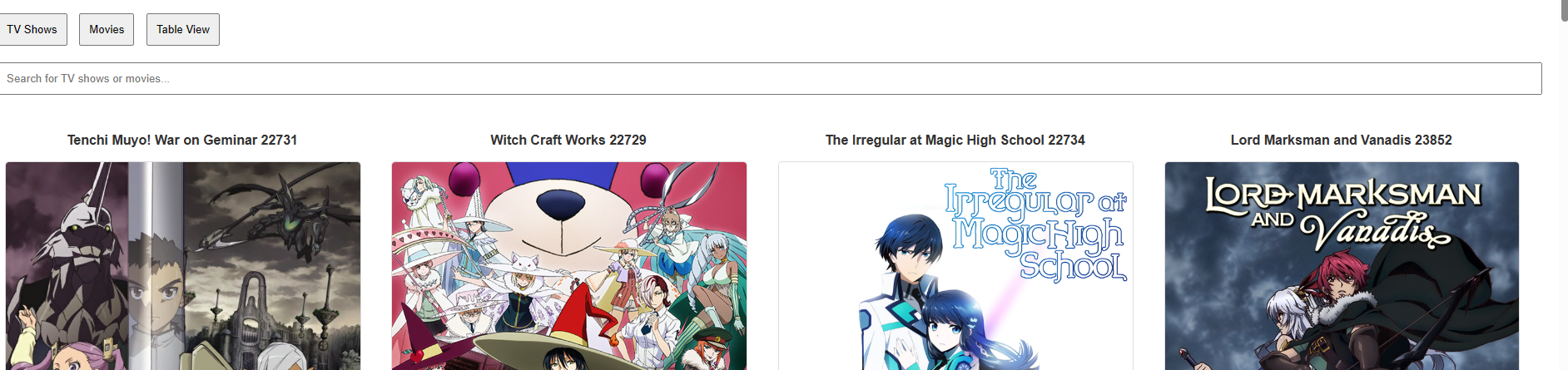
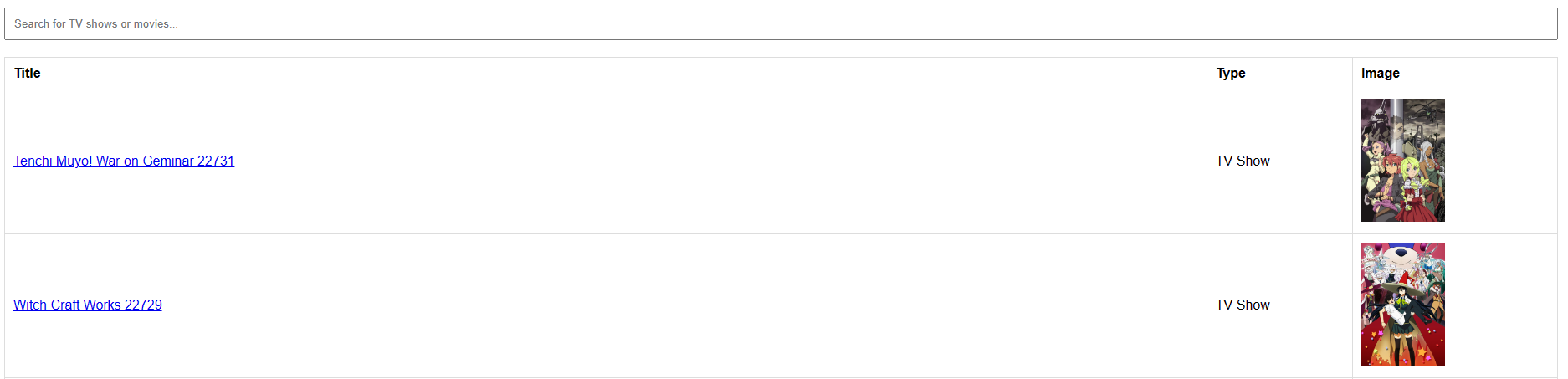
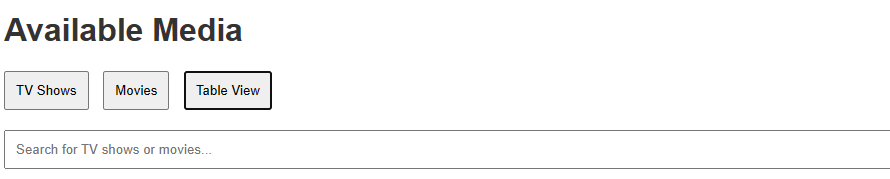
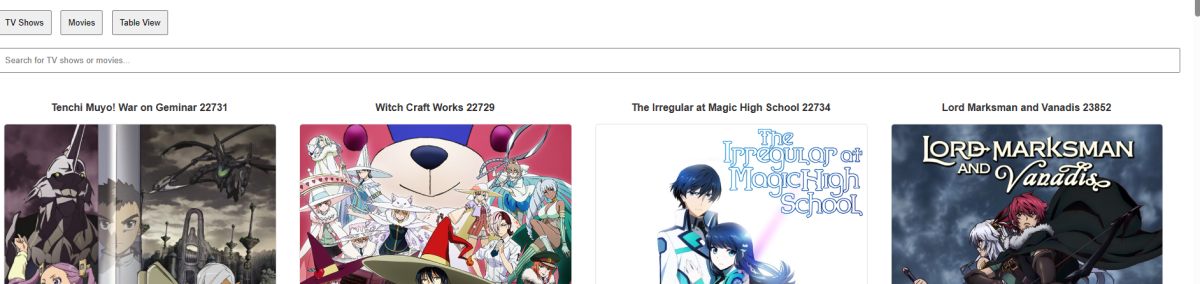
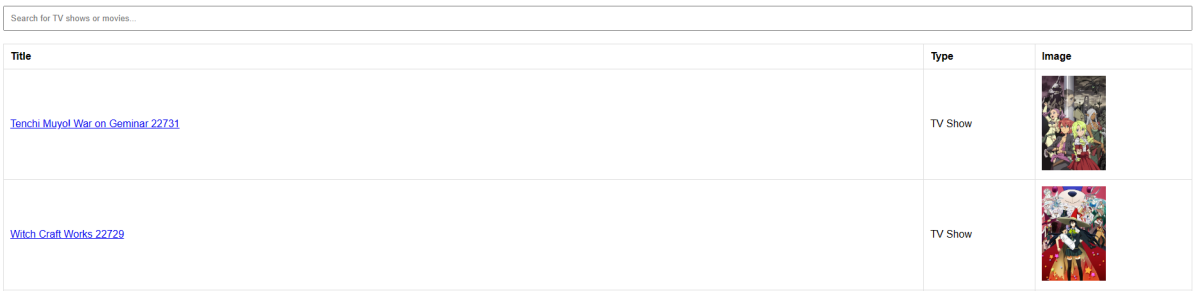
This little script creates an overview of all TV Shows and Movies in your Emby installation. This was a playground script while testing the emby API. It creates a small html file with all shows and movies It includes a search bar and you can switch between Table View (Shows all in an organized table), TV Shows only and Movies only. It also downloads the primary picture of all shows if available into the folder img. Shows can be clicked, and it will redirect you automatically to your emby with the shows overview. Shows Only and Movies only look like this: Table View looks like this: In the header of the script you can define The serverid can be obtained in emby. Visit your emby click any show or movie and look at the URL it looks like this webview.sh
 2 points
 -
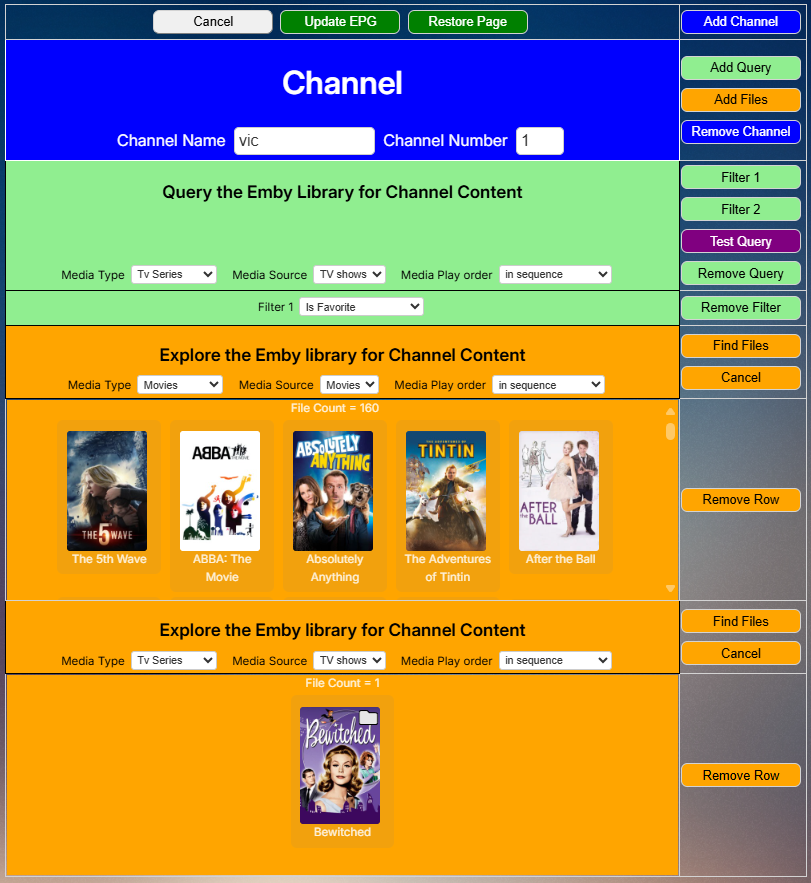
Everyone, the programming for the new GUI is finished. @TZTZoroand I are now debugging it. We will post the code soon. vic
 2 points
 -
Hi, does 2.2.21 resolve it for you?2 points
-
Everyone is waiting for @Lukeand the awesome Emby team to turn on the support for the zidoo properly rather than external player. Once this is done it will be the greatest media player working with the best media system hands down. I am living with the deficiencies of the external player and regularly pray to the almighty for the proper integration to be delivered I would happily pay for it (on top of being a lifetime guy) it’s that important2 points
-
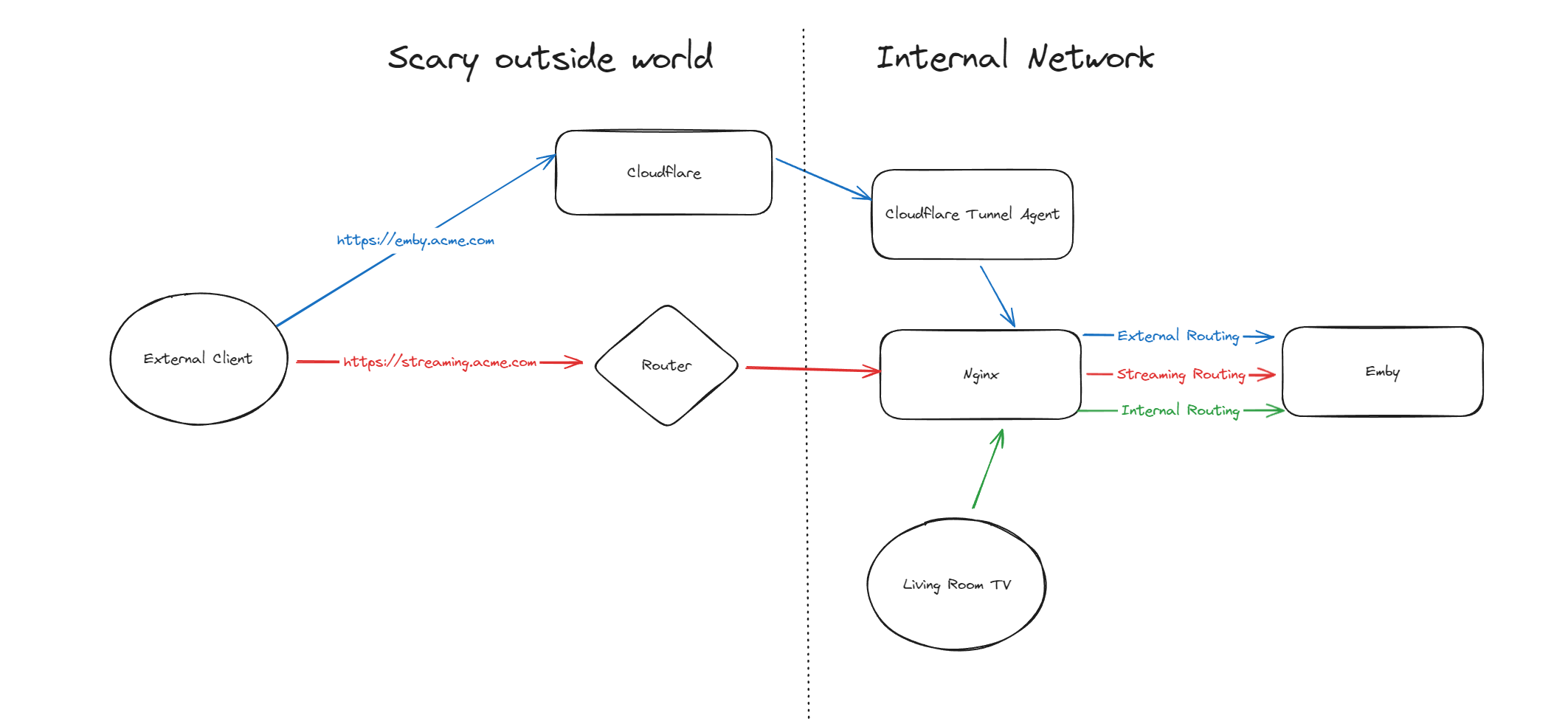
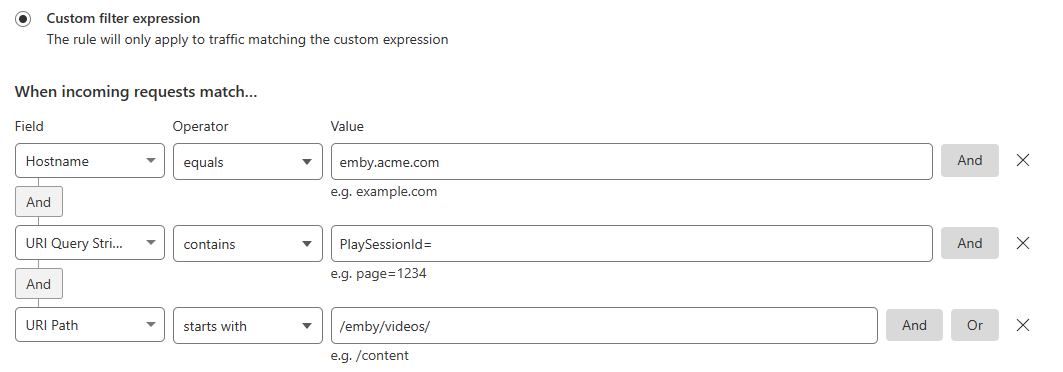
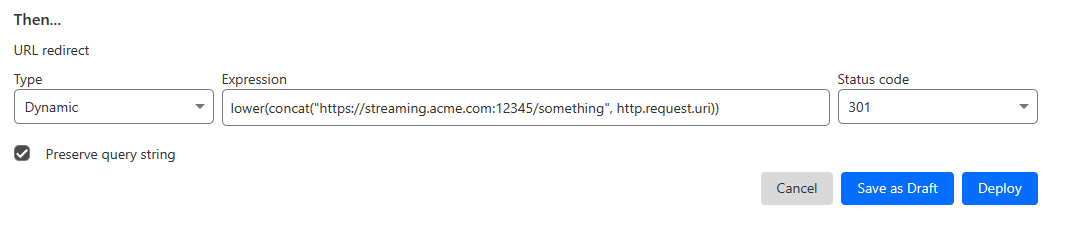
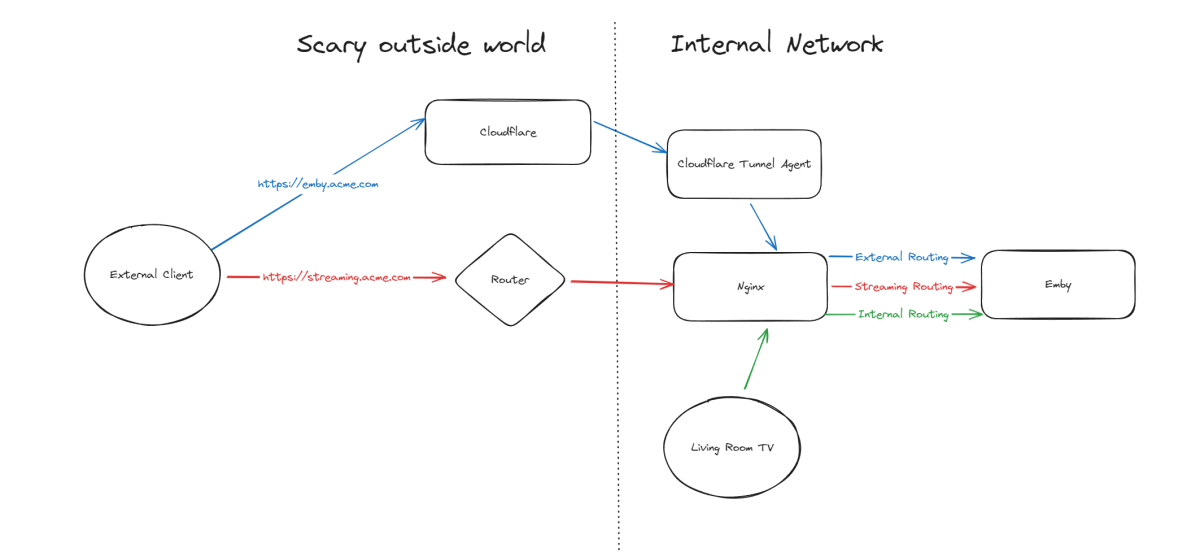
Hello, A few months ago I was in the process of moving away from directly exposing Emby via my home router to using Cloudflare Tunnels, but as it turns out, Cloudflare don't like you paying nothing and yet streaming GB/TB of data through their network. This was frustrating as I really wanted to put Emby away behind something I trust but I also didn't want to get my account banned for streaming media through it. I've read through many posts here about avoiding caching but it seems it's not necessarily the caching that will trigger your account being in trouble, it's the bandwidth usage as well of just piping all that data through their servers. Since I now had some time, I thought I would try to work out a long term stable option using Cloudflare. So what to do? When talking about security with self-hosting anything, I'm not going to go crazy but I like to take away easy wins for bad people. When it comes to running something like Emby, I'll assert that the biggest risk you face is automated attacks at scale. By this I mean that when it comes to hosting Emby at home, I am not really worried about some clever kid that I beat in an online game spending a weekend taking revenge on me or a state-backed hacking groups spending 6 months breaking in - I'm mainly worried about the type of flaws that are easy for people to automatically discover and exploit - e.g. recent examples with Emby and HomeAssistant. Both of these flaws allowed attackers to bypass the authentication layers of the application - no matter how complex your password is or whether you have MFA enabled (in the HA case), it's a trivial exploit once an attacker detects a vulnerable version of your software running. Both of these flaws were exploitable at scale, provided you could find Emby servers online. Given my determination to run things through Cloudflare for several reasons, security included, I wanted to come up with a system that gave me some confidence without being too complicated and without risking my Cloudflare account being banned for streaming through their service. I have not written this for everyone to be able to follow - if you are not familiar with nginx, Cloudflare, HTTP semantics, then this may not be all that helpful. Split Service Where I've landed is a split hosting setup - far from ideal but I think it's better than going all Cloudflare or all direct access. To begin Expose Emby through Cloudflare tunnels as per other guides (I won't go into the details here right now) Expose Emby via reverse proxy for external traffic (and internal too, makes sense to keep things consistent in my view) Setup port forwarding on your router to direct a port from the internet to your nginx service Nginx will have two Emby configurations to start with - one for external and one for internal Once you are able to hit Emby both internally as well as externally, then it's time to split the external. I'm going to imagine that you now have emby.acme.com setup via Cloudflare Tunnels, and you also have streaming.acme.com setup with direct access to your service via your home internet router. What's the difference? emby.acme.com is going to be your main address you use for everything, and that will go via Cloudflare Tunnels. You can use Cloudflare's many, many security options to come up with a setup that is secure but easy for your situation. streaming.acme.com is going to be a DNS only record in Cloudflare, it will point to your home IP and you will port forward this port (can be any random port number) to your nginx server. If we were to leave this setup in place, you would be able to access your Emby service via Cloudflare (with media streaming through Cloudflare), AND you can access Emby via the streaming address, completely outside Cloudflare. So what we can do next is use some clever redirection stuff. Nginx Configuration Now that you have two URLs working with Emby, let's look at Nginx again. In my configuration I have two different `server` blocks in my nginx configuration - one for my internal network and one for external. I don't know if this is strictly necessary but when I started I was an nginx novice and it made sense to be able to apply different rules depending on the origin of the traffic. To complete our nginx configuration, I am actually going to clone my external configuration, giving me a third `server` block. For my third block, I will use the domain streaming.acme.com - this separates it from emby.acme.com which is my tunneled traffic via Cloudflare. Now in my streaming block, I am going to update the rule as follows: This tells nginx to proxy traffic that is destined for streaming.acme.com/something/emby/videos/xxx to your emby server. What it also does (as long as you don't have other `location` sections) is tell nginx to not redirect any other requests that fall outside of this location to your Emby server. Cloudflare Redirect Since we want traffic to go through Cloudflare *except* when it's the actual media stream, we want your main Emby URL to be setup with a DNS address in CF that is proxied through their infrastructure and accesses your local Emby via CF tunnels. To handle the actual stream, we will create a redirect like this Now redirect that traffic to a new location What happens now? Well hopefully it comes together and something like this: if you visit https://streaming.acme.com:port/, then nothing is returned (where previously you could access Emby outside of Cloudflare and directly via your router) - nginx returns a 404 (or if you prefer, set it to return code 444 which drops the connection without explanation). If you visit https://emby.acme.com/ then you will hit the Emby login screen and can log in, and move around the application (this traffic is all via Cloudflare, with caching etc.) If you start to play a video from https://emby.acme.com, Cloudflare will intercept that request and return a redirect to your client, telling it to go and fetch the video chunk/stream from https://streaming.acme.com:port/something/emby/videos/xxx It should hopefully look something like this Why would I go to this trouble? Here is why I think this makes sense 99% of requests will go through Cloudflare, where you can layer on world class security options - you don't need to rely solely on Emby and the development team for security, put a fantastic authentication system & WAF in-front of it. This includes your authentication, requests to delete media and admin operations (These requests benefit from caching) You don't stream the video through Cloudflare - this was our compromise with this design. You are now exposing your nginx service directly to the world, however you may have to do that anyway if you don't want to stream through Cloudflare. Plus you can further protect yourself from autonomous/widespread attacks* You can use all of the Cloudflare security and other features to protect your Emby instance - I am assuming you want to have an easily recognizable URL & use port 443 for ease of use, so now you can do this and then have the Cloudflare firewall and other security features between the client and your service. In my CF redirect, I change the port to a random port number that I then open on my router* In my Nginx service, I drop any request immediately that is not a request to stream an Emby video file (e.g. the login page or any other API/page) If you look in my configuration, I lifted /emby/video off the root location and inserted a `something` - I was exploring injecting a Cloudflare access token as a query string but for now I just added a random base64 encoded string so that streaming.acme.com/emby is not a valid path.* I'm pretty new at Cloudflare, but I'm positive there are a couple of other clever things you cand do, e.g. you could block connections from certain countries, put your friends on an allow-list and block everyone else, or find other creative things to do. * Some people may look at using a random port number or having a random string injected into the path as not that secure, which may be right in some context, however since we don't have complete control over the Emby clients (to setup client certificates or integrate with a real IDP), and since I am focused on being safe from widespread flaws affecting Emby, or the webstack that they build on, or the logging framework they use, or some flaw in some other library, all I need to do for now is make this a pain for anyone to try and exploit. It may not stand up against some state sponsored hackers, but I'd be surprised if you fall victim to a widespread malware dropping activity as part of a critical flaw. Would this have saved me from the two earlier attacks I honestly couldn't answer this right now, it's possible the answer is no, but I am in my infancy with my Cloudflare setup and confident that with a few tweaks (limiting countries, suspicious request blocking) then I will be more confident in the future. Most of all, I would love a way from the Emby client to authenticate securely with a service like Cloudflare - a username and password being sent to the Emby service is nice but as we see flaws that negate this type of authentication, I'd rather try and put Cloudflare or another industry leading provider as my 1st line of defense rather than rely solely on the small teams building the software I enjoy running at home (no offense Emby Team) My goal initially was to move away from hosting Emby directly via my router/home connection, and onto Cloudflare which I believe I have accomplished with a compromise I can live with for now - as I actually get time to spend with Cloudflare I hope to be able to come back and say that I have more confidence that Cloudflare would help avoid attacks in the future.

 1 point
 -
Thanks you too! It works now, I used binhex-emby as far as I can recall and moved to the official emby - at the time I didn't see it. I just changed the owner of the files and it worked directly without loosing any configurations or data.1 point
-
Where have you grabbed it from? GitHub is a bit behind (as is opening post), DL from here:1 point
-
Currently, I'm rewriting the complete http communication on low level basis. Socket only, not more urllib3 or any other dependencies. This will fix all the shutdown issues for future versions. Unfortunately, the update procedure hangs by the "old" versions (when disabled) which are still based urllib3.1 point
-
Looking at your post history, it seems your remote access troubles are due to CGNAT, which you've said you haven't looked into solving yet. Have you had a chance to look at/try tailscale or other alternatives? Plex gets around this issue by routing all of your traffic through their public servers giving them ultimate control over all that data, and the ability to sell your information to advertisers/partners; this is how they subsidized such a service alongside plex pass revenue. Emby rightfully refuses to violate your privacy like this, so setting up network routes falls on the user. Most of us find this to be a fair trade, and tbh is a great starting point to learn about network setup. The need for premium depends on which apps and features you are trying to use, and can be determined here: https://emby.media/support/articles/Premiere-Feature-Matrix.html Most of the installable apps for example (android/fire tvs, xbox/playstation, etc) require premier, but browser playback does not.1 point
-
Looking forward to the back port to 4.8!1 point
-
This is in the server beta channel now.1 point
-
That was easy enough updated and everything works now1 point
-
Good news—thank you for the swift fix! It appears to be running smoothly now. Really appreciate the hard work from @Luke& the development team & everyone who shared their experiences here w/c I'm sure has been helpful in addressing these issues.1 point
-
gracias, quite el css que tenia por lo visto el icono de volumen se movió hacia arriba1 point
-
FYI, On my end, all went well with upgrade to 10.0.25, was on 10.0.23, did upgrade first to 10.0.24. Running latest Kodi on AndroidTV. After a reboot of the TV (to make sure all is clean) I did followed the steps to upgrade to 10.0.25. All good after and no issues yet!1 point
-
It is a current bug in 4.8.7.0 in the web client, can you try a different client. It will be resolved in next release.1 point
-
A l'époque j'étais en version 4.8.6 sous Synology NAS mais depuis je suis passé en 4.8.7.0 et le problème semble avoir disparu...1 point
-
Hi Luke... Still happening all this time also... Running 4.8.1 on Synology (just noticed 4.8.7 is out) and I forgot what, but I just did my Samsung TV's emby updates a week ago... Enjoy the long weekend! Brett1 point
-
sure I only started it on cover because I hadn't anything before. that cover overlay is anyway completely on off as you like... maybe the info from the mediainfo Plugin could be used for icons, I have no clue, and I don't care where they are coming from but then it has to be fully integrated on server level for everyone otherwise it's not fair. not everyone will be able to implement to addon. on my side it was very tight1 point
-
The device group in your /dev/dri listing is 18, not 985.1 point
-
I confirm, moving to the beta version resolve this issue. So I assume that whatever fix is in place in the beta version fill end up in the next stable release. I'll mark this post as resolved. Thank you1 point
-
I would assume there is already existing FR for same/equivalent feature, to which you can lend your support:1 point
-
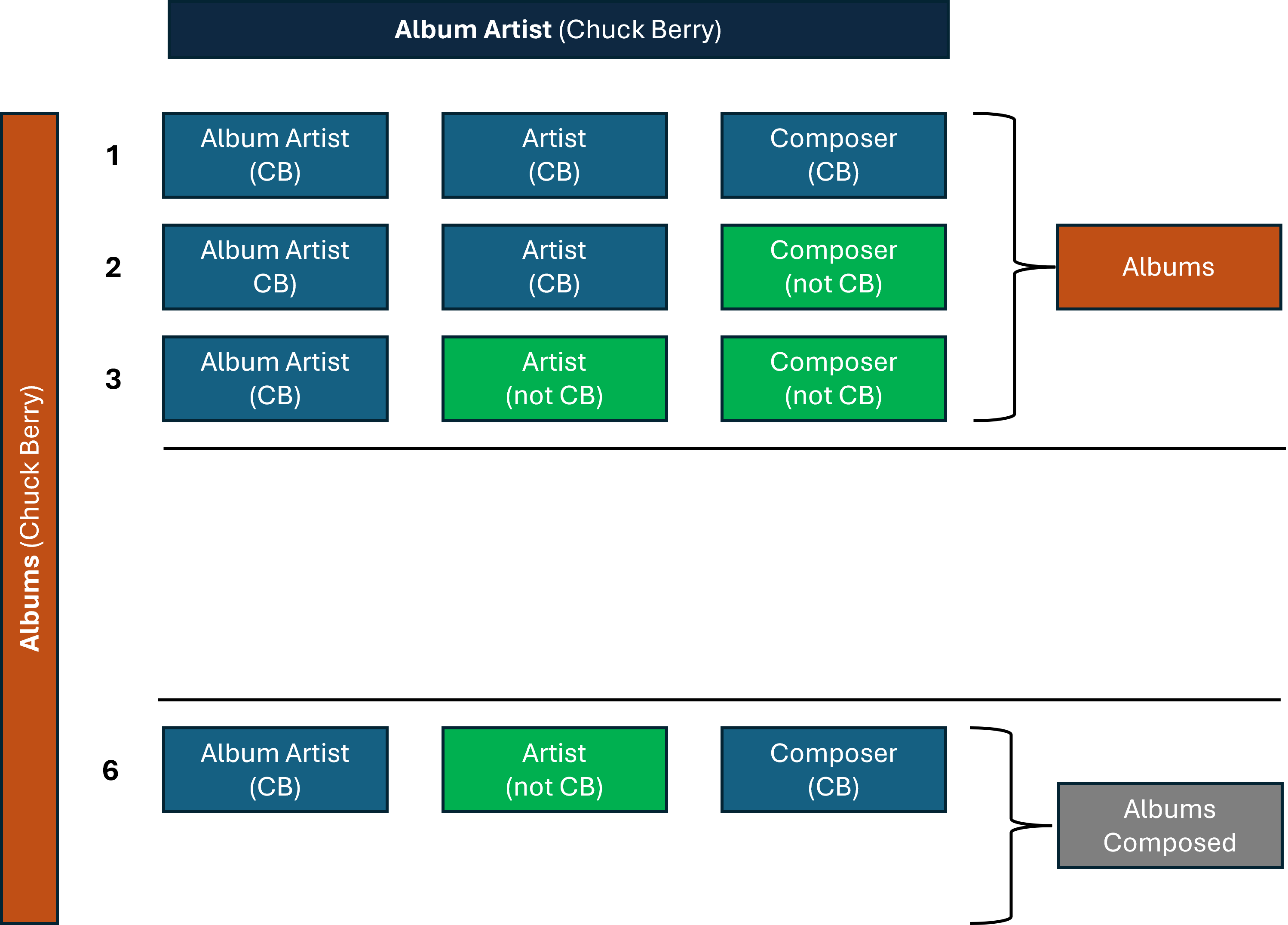
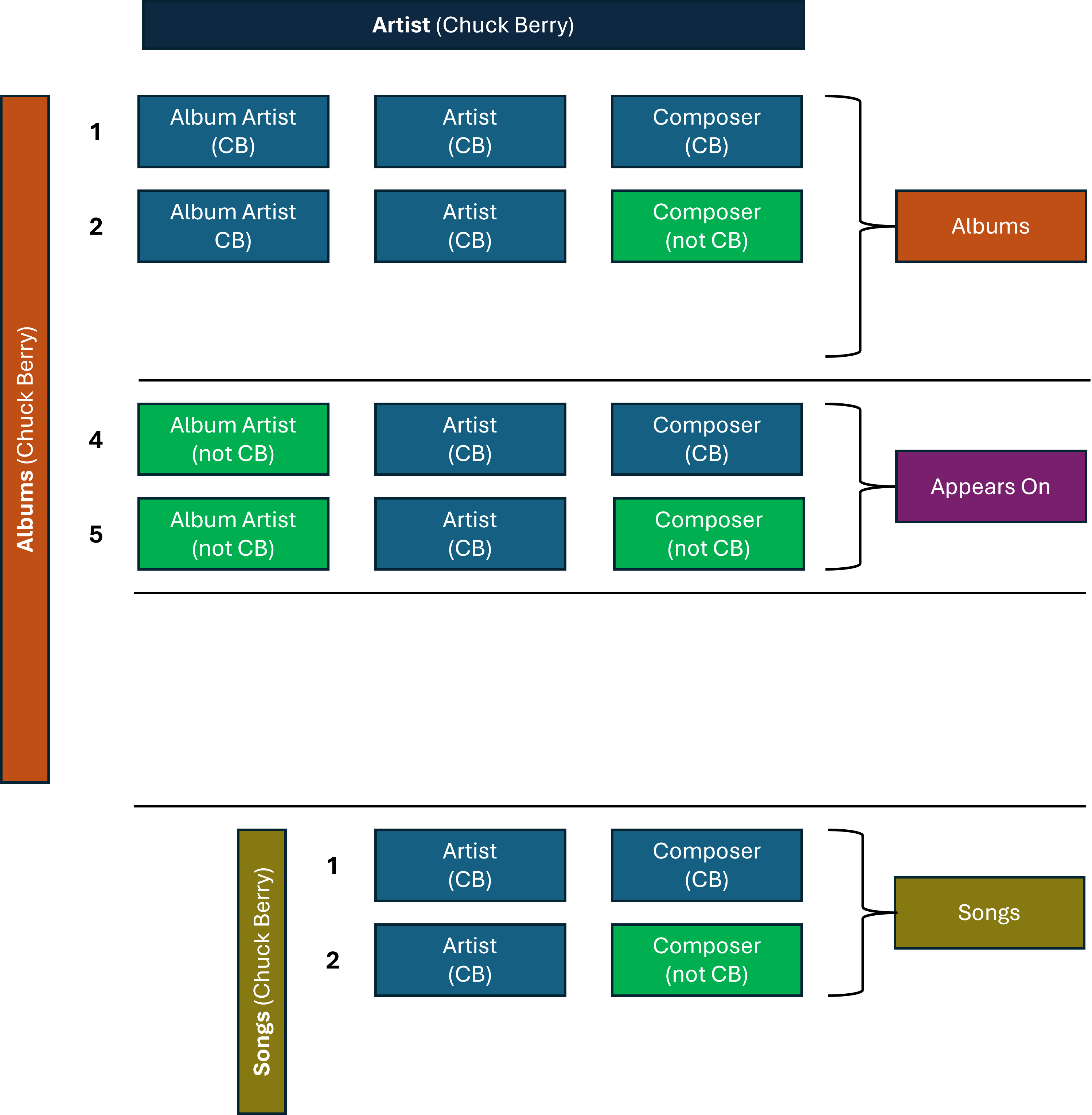
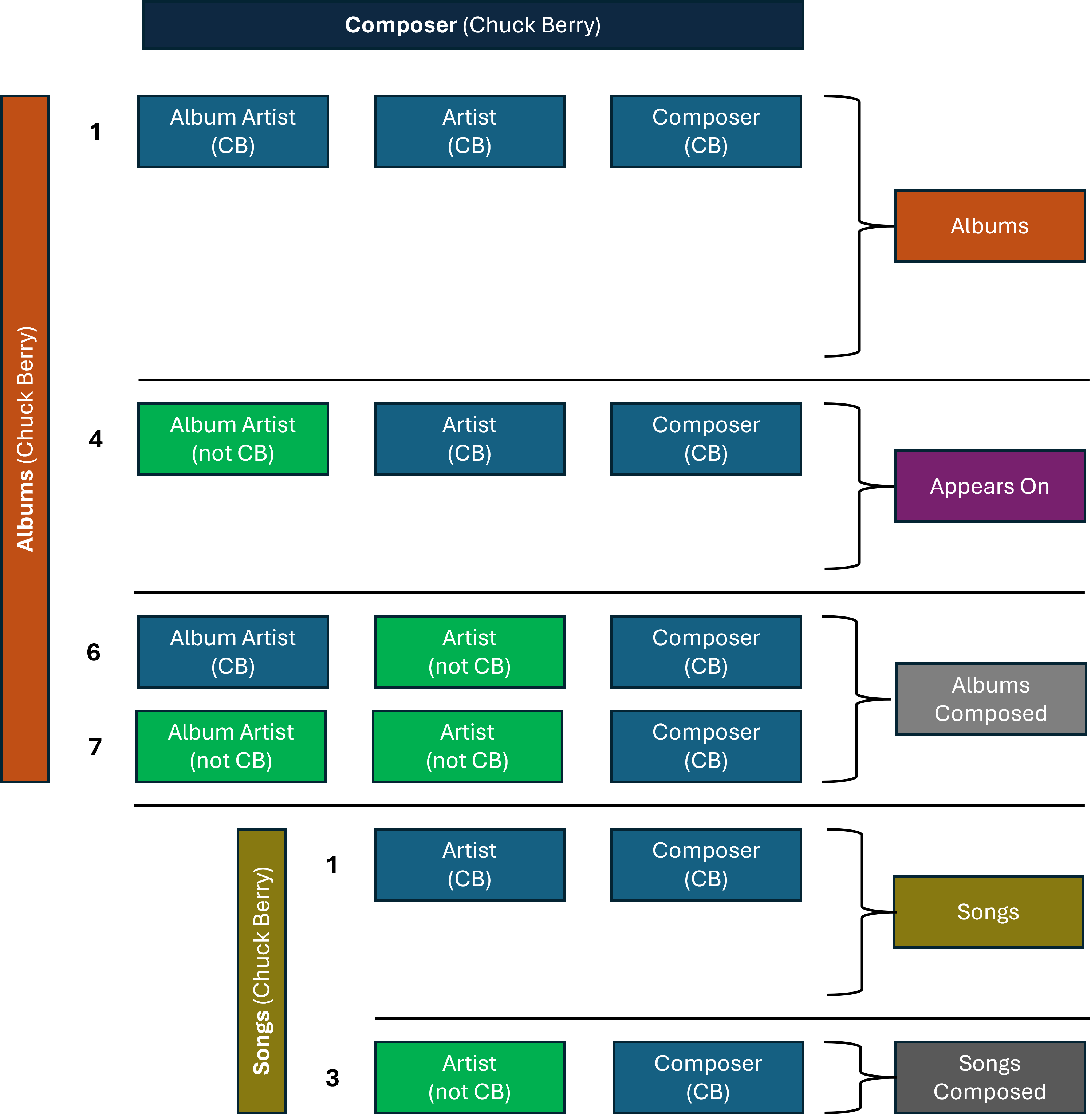
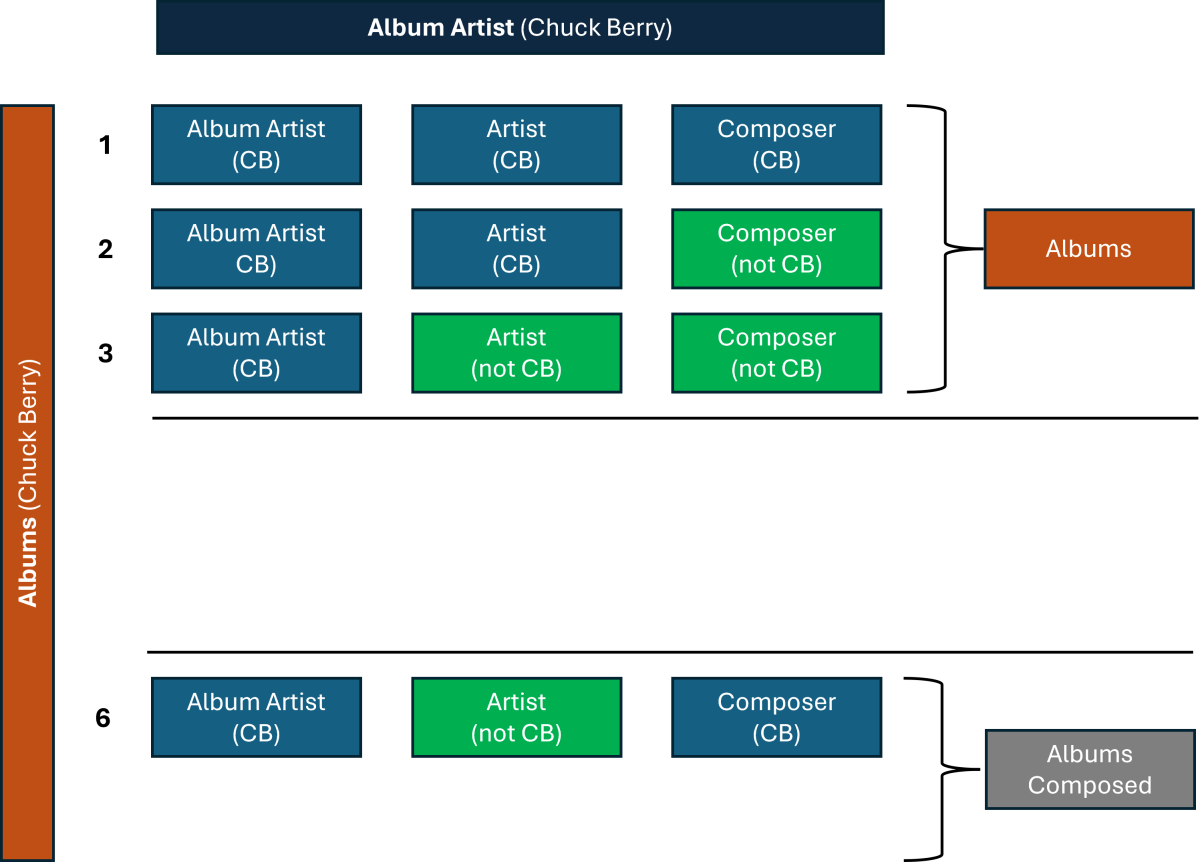
(continuing) ... If the two additional fields (as mentioned previously) were incorporated, the Music pages would then have the following vertical sections: Songs Songs Composed Albums Albums Composed Appears On Included In Music Videos More Like This About A good basic filter (or Smart View) would allow for unwanted vertical sections to be turned off, individually across the Album Artist / Artist / Composer pages. Album Artist pages, focussing on just Albums performed, could just show, e.g.: Albums Appears On More Like This About Whereas the Composer pages, focussed on just composition, could have a different view, e.g.: Songs Composed Albums Composed More Like This About Advanced filters (or Smart Views) could potentially have even more sophisticated settings, where the default views could be based upon “Entity Priority”. That is: Album Artist tab/pages would give priority to the underlying 4 Album Artist combinations Artist tab/pages would give priority to the underlying 6 Artist combinations Composer tab/pages would give priority to the underlying 6 Composer combinations “Entity Priority” would hide likely non-wanted combinations by default, while allowing advanced options to show them, if required: Maybe some of the above is helpful information? Either way, it does show that considering different views/separation/filtering for Album Artists/Artists/Composers is something to think through carefully to get to a good end solution!
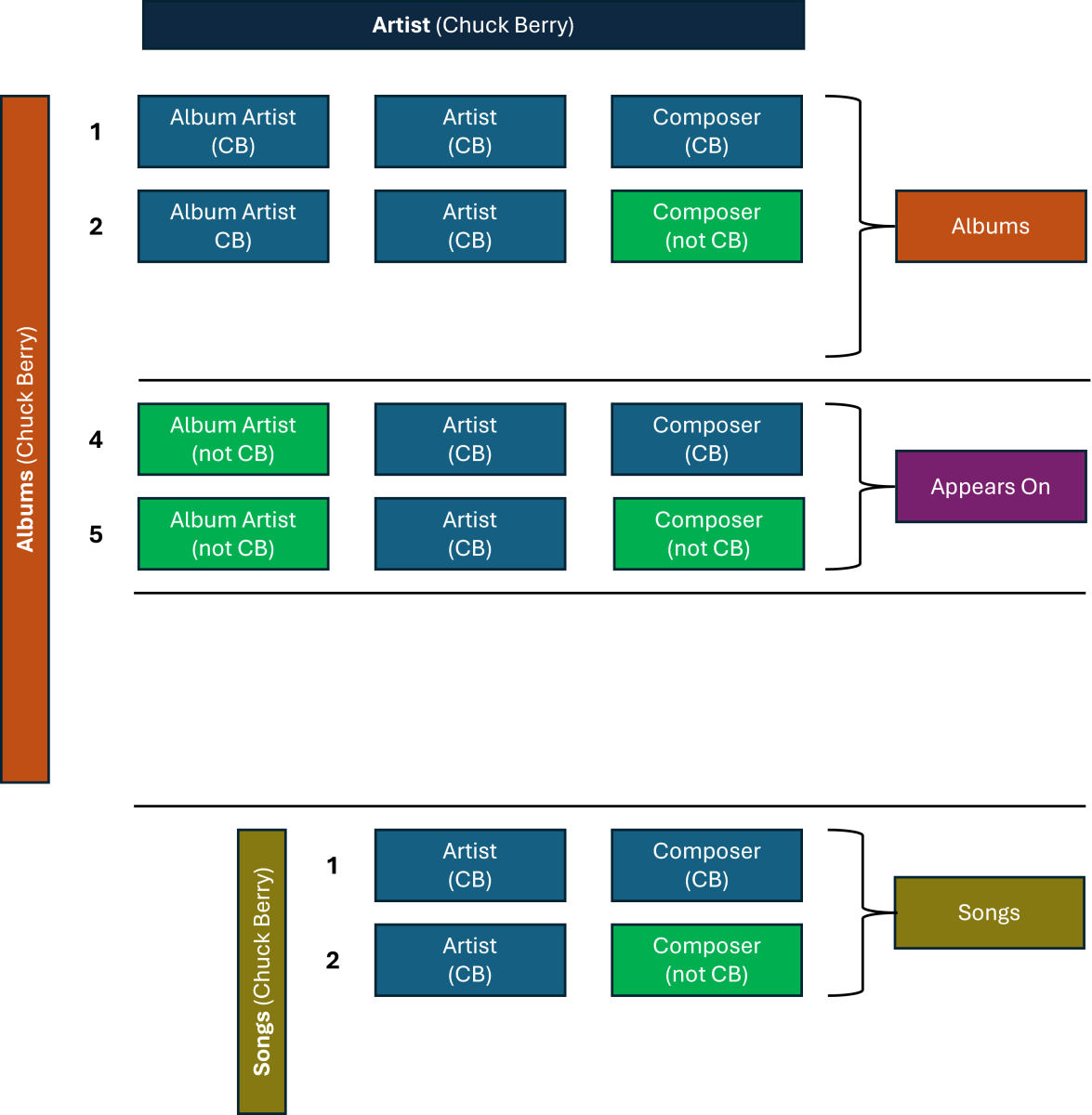
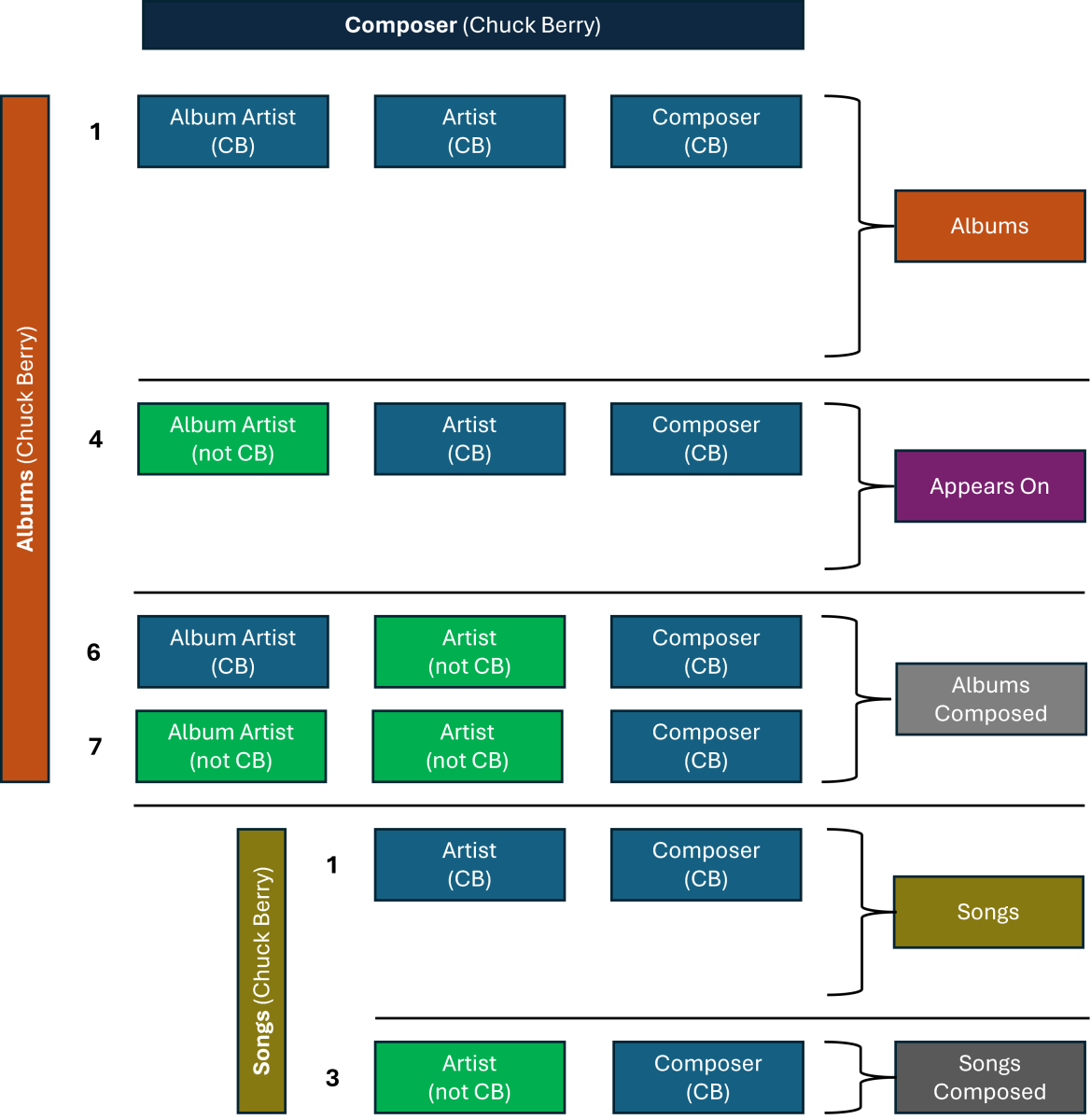 1 point
 -
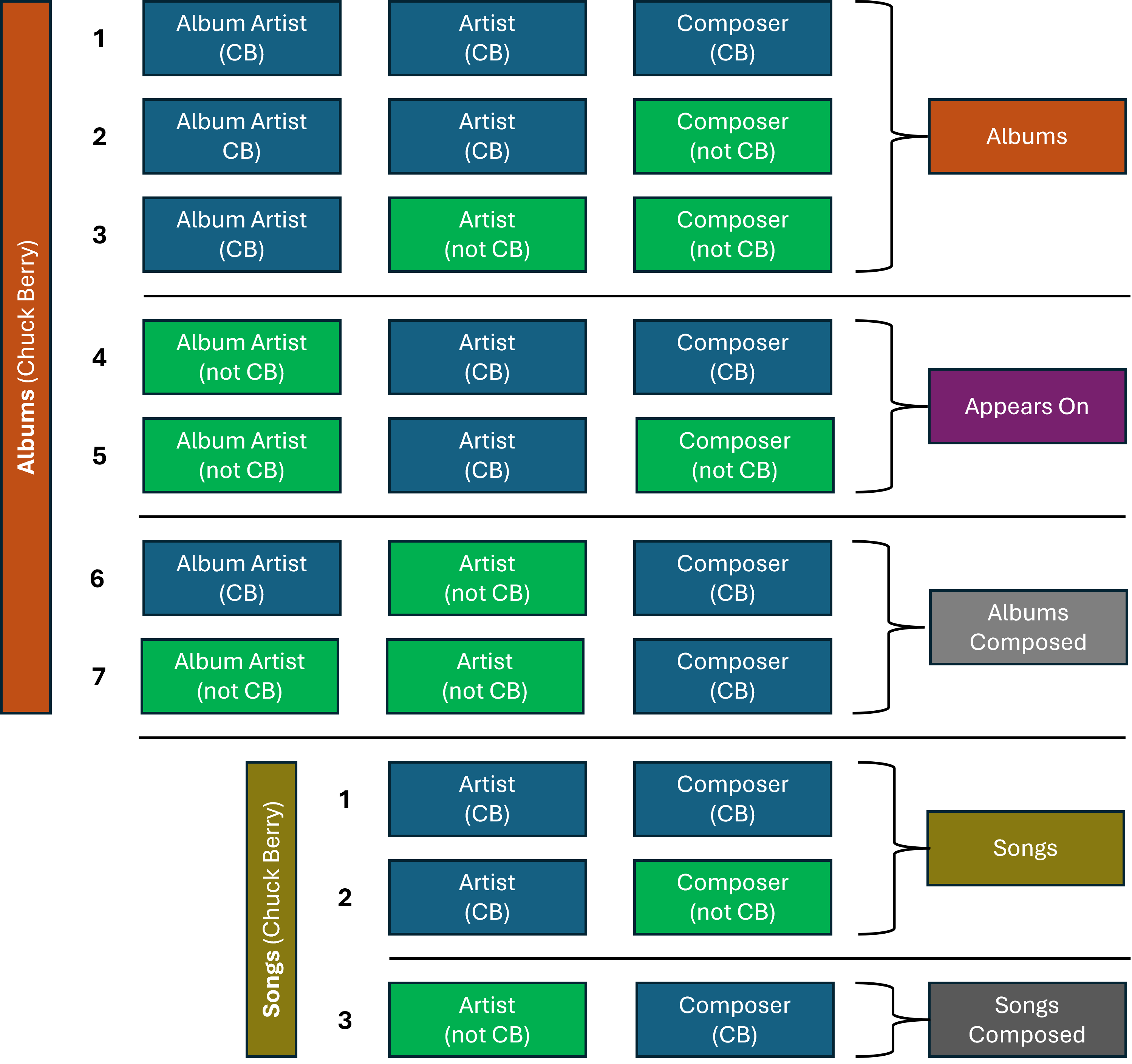
(FWIW) Some more thoughts... For Albums (where Album Artist is a needed field for differentiation) there are 7 possible combinations to consider across the 3 Album Artist/Artist/Composer fields. For Songs (where Album Artist is not required for differentiation) there are 3 possible combinations to consider across the 2 Artist/Composer fields. For these 10 combinations, it is necessary to consider where the person/group concerned (e.g. Chuck Berry again) both has and hasn’t been included in the fields (refer to diagram below): If just considering the “Chuck Berry” example above, one of the combinations (Albums 4) doesn’t quite make sense, but if the example was changed to “Various Artists” then it may make sense? To implement something similar to this diagram would require 2 extra vertical sections (e.g. Albums Composed and Songs Composed). This may likely be too many fields for music-casual Emby users... (to be continued) ...
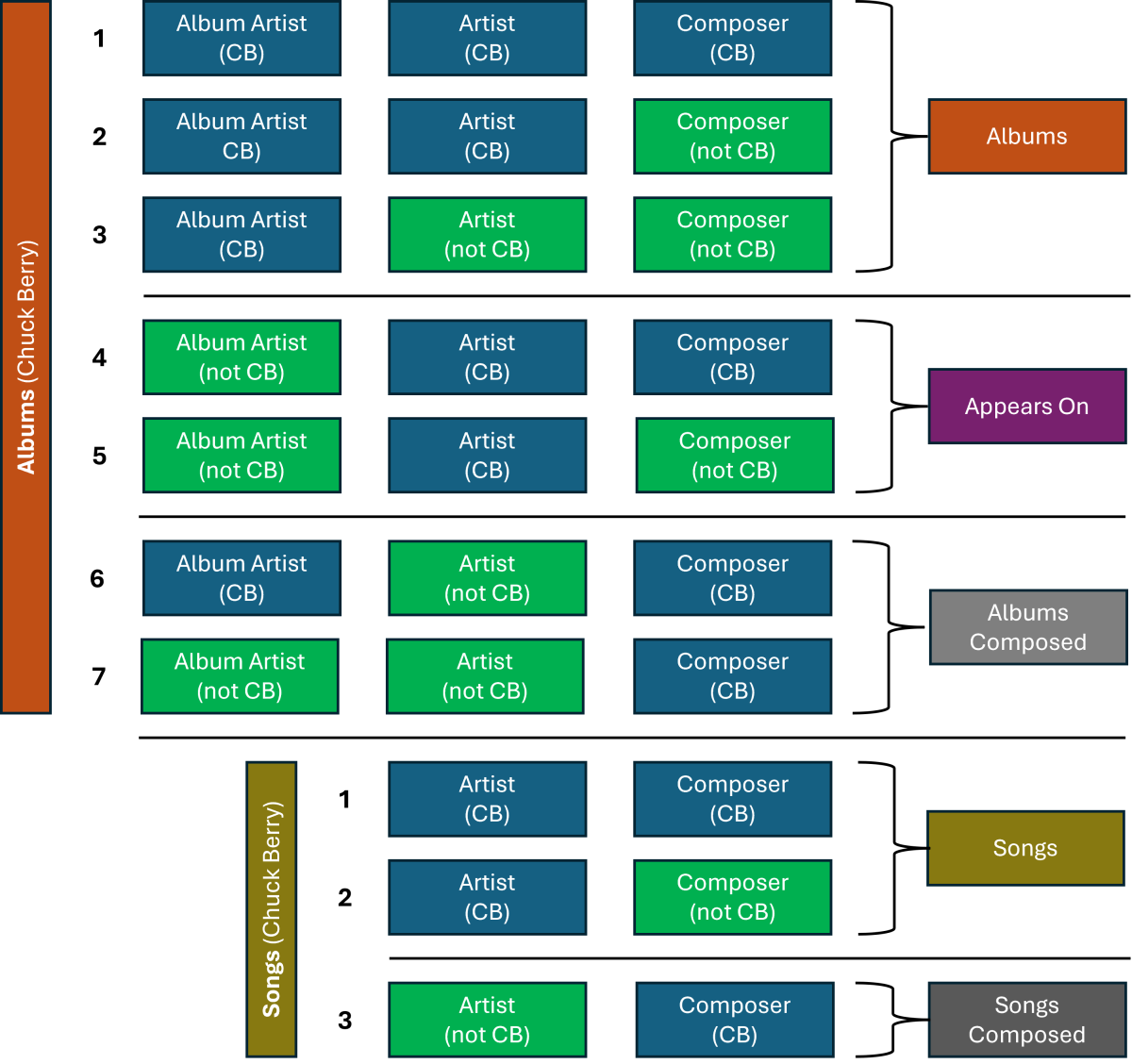 1 point
 -
slowly coming up on a decade from the first request... don't hold your breath for this one..1 point
-
Good news ! It seems to work in my iPhone. Big Thanks Luke and all the team Emby is back ! PS : a Big fan of the new font and icons1 point
-
Thanks for the reply!1 point
-
Second this!1 point
-
on Galaxy Note 9(Qualcomm) with Android 10 (REL) SDK:29 BuildId:QP1A.190711.020 and I uploaded Prettified version of JSON here hardware_detection-63851933362.txt1 point
-
You can also try searching the app store for "Emby for Android" and download from there.1 point
-
Hi, yes more control over these are certainly possible. Thanks.1 point
-
Hi, please attach the main Emby server log as well. Thanks.1 point
-
I did find a complex workaround for a system where I didn't have a windows backup to rollback to... There's probably an easier solution... - Delete all emby plugin directories from "C:\Users\<user name>\AppData\Roaming\Kodi\addons" - Install both 10.0.1 (image/audio) plugins - Install the video 10.0.24 plugin - Reload Kodi - Factory reset Emby - Uninstall all emby plugins - Install 10.0.25 in the order previously mentioned.1 point
-
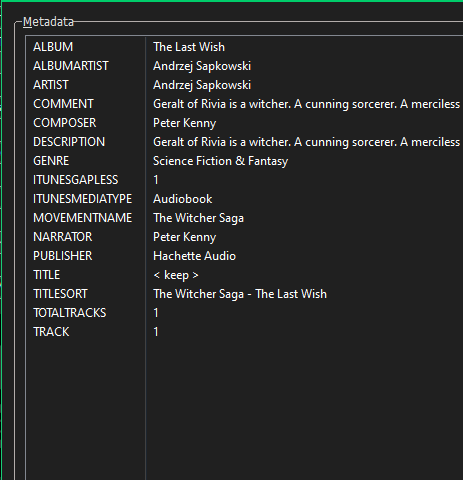
Looking inside the metadate.abs file that is created by ABS. I see its using narrators, in there All my audiobooks are tagged by ABS. But looking at the m4b file with mp3tag I see that composer = narrator So I guess both apply.
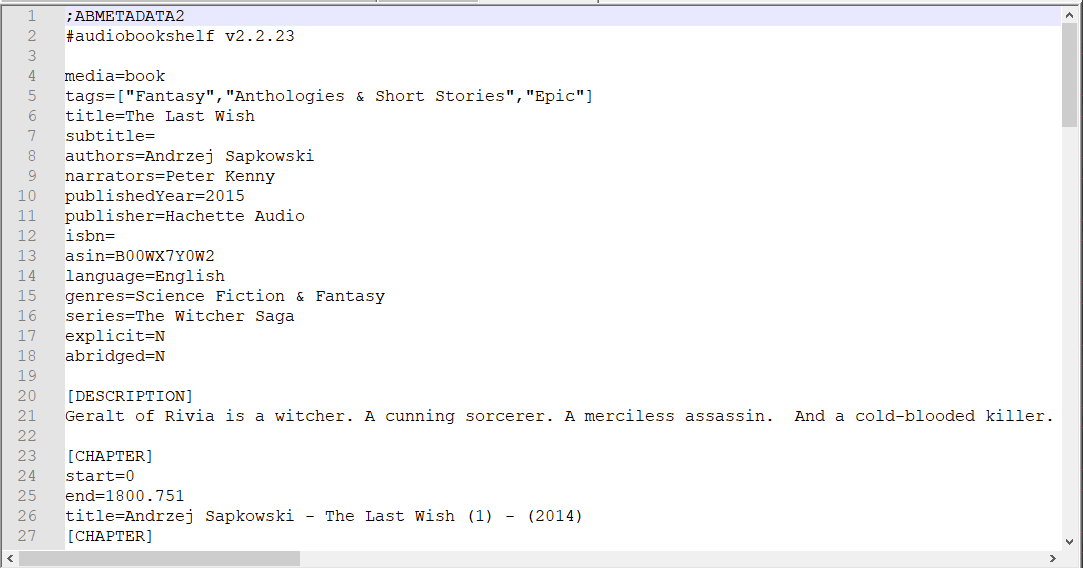
 1 point
 -
I reloaded with image: emby/embyserver:beta in my docker file Emby now makes collections. It took me to Version 4.9.0.21 beta Be nice when 4.8.8 is released. I prefer using stable1 point
-
After a bit more investigation, I think the issue is on the Trakt end. Trakt has removed theTVDb from metadata sources for TV shows that they deem to be represented properly on theMovieDB. The specials I've had issues with are not in theMovieDb at the series level (they are in movie collections). So whatever Emby is reporting to Trakt during scrobbling for those specials shows up as something else. Just guessing though.1 point
-
Hi Luke, while you are at it, could you please also add support for collections on Games. It seems natural to me, game often comes in collections, Final Fantasy series, COD etc. Right now I have to manually add a tag "Collection: Final Fantasy", in order to see all the games in the same collection. It would be better if Collections have a separate entry in the Game folder, just like movies and TVs. Thank you very much!1 point
-
Turned out I just needed to click "bind to host network" to be enabled and it made the correct ports working1 point
-
its working fantastically again thank you luke1 point
-
Hello I use the Zidoo Z9X Pro and have tested the internal player, it can forward 4k, hdr10+ dv and Dolby Atmos but the frame rate is not adjusted to 24p again. The video runs at 60Hz. I would be very happy if this could be fixed. I don't like the zidoo player so much, it doesn't transfer the runtime to emby correctly. Thank you1 point
-
The old view was so user-friendly. The new way of checking this via the 3-dot menu is not very intuitive.1 point
-
I think this issue is resolved in beta channel as I think the only current issue relates to multi-versioning across folders.1 point
-
Noooo we must trust the corrupt paid critics.1 point
-
DSD native/direct playback would be great1 point
-
@GrimmerI sent you a private message re looking into this1 point
-
Nope, still reverts back to the translation from 2019 immediately after saving.1 point
-
@cwills75 The 2nd part of my post above mentions this problem with hanging playback at the end. Rather than wait for a cure we will just change the code in the Roku to act defensively and solve this once and for all. There are two long-standing problems in the Roku app that we must fix ASAP. Please give us a bit of time and these problems will be solved very shortly. Thanks again for keeping us aware this is a still a problem. We will have something soon.1 point
-
Hi, we have some changes in mind, but haven't done the work yet. Until then you can use the external player feature to open videos using the zidoo player.1 point
-
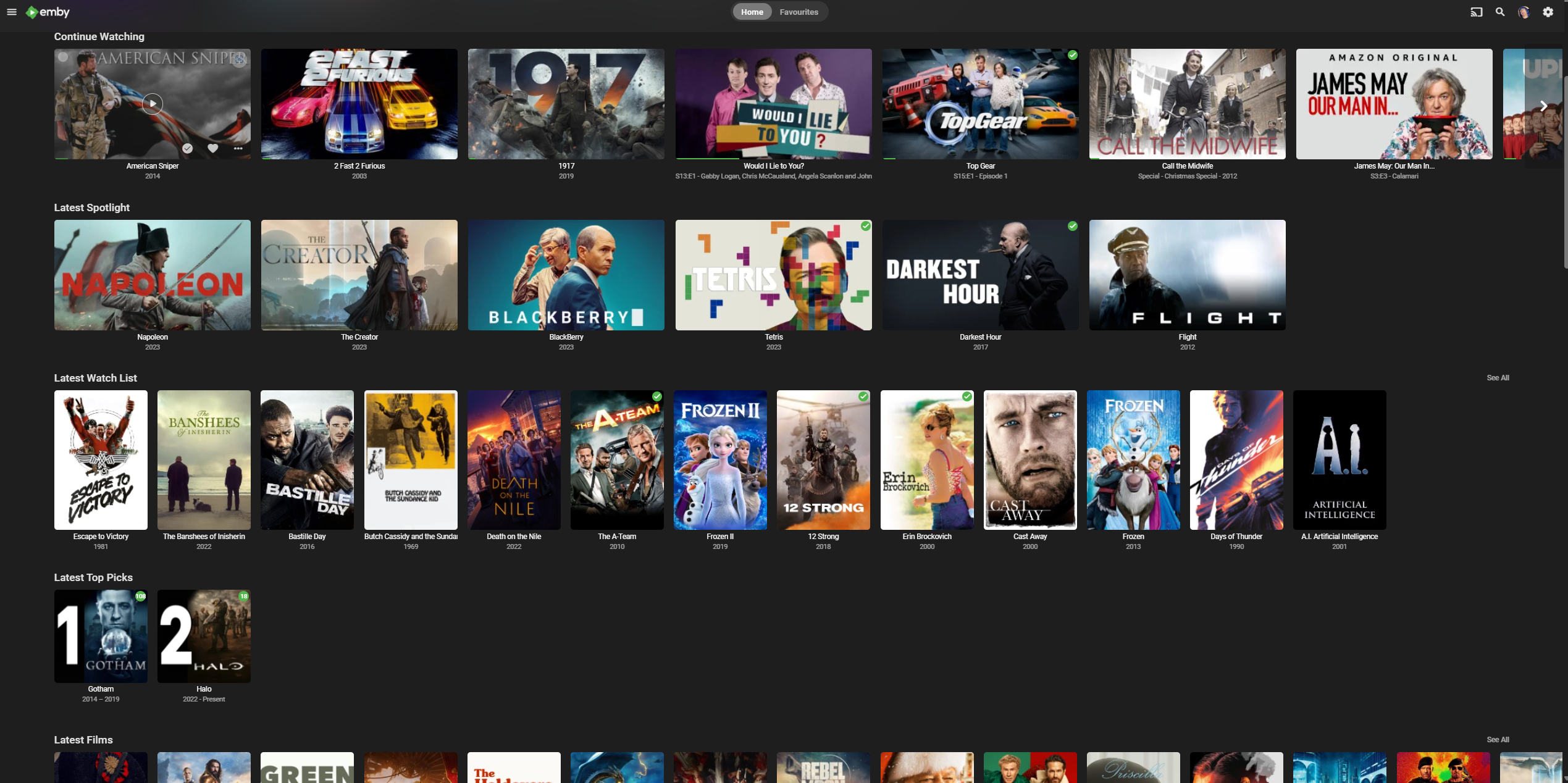
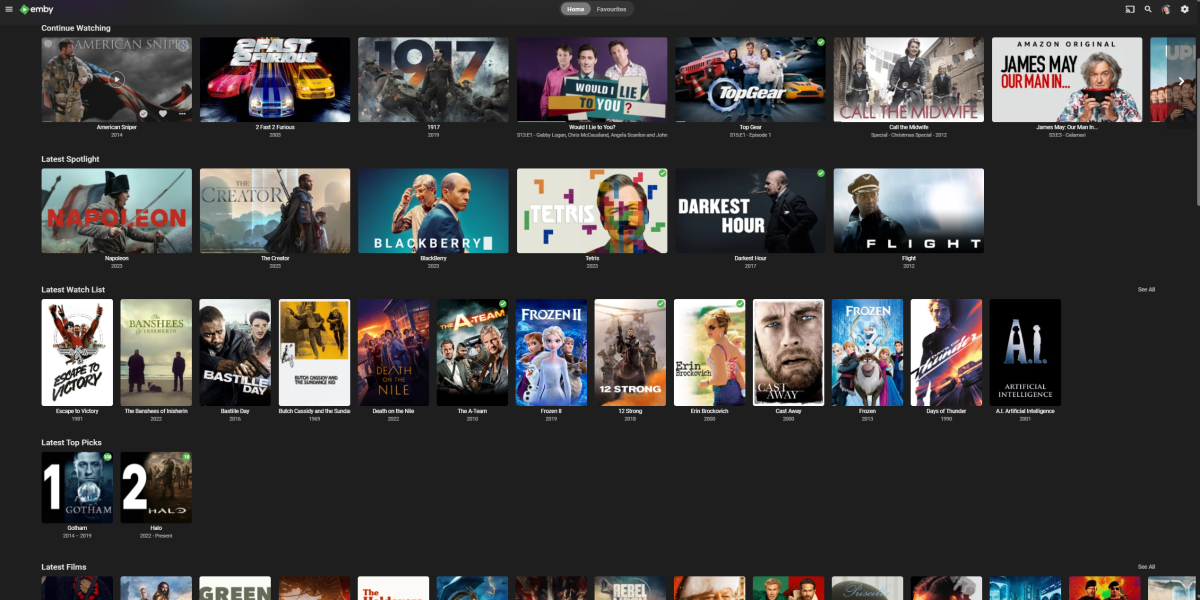
A quick bit of history for this plugin - it's roots were from the 'Recommendations script/concept' that I did and worked with chef to try and get that into a plugin. At the time I had no plugin or c# experience. chef created the admin only portion of added items to a channel in the plugin and display it as a row (which to me is a Spotlight type feature), then came the bells and whistles (the presentation graphics etc). However vs my original script based version - there is a fundamnental difference - The ability for USERS to create content on the channel/row - for themselves or for others - in any emby client. Thus each user gets a personalised 'channel'. My parents have very different viewing habits to myself for example. Also nothing to stop there being more than one channel. Now that playlists are permissioned based, this works even better and I've modified the original script to use this. Playlists also also now m3u files - easier to work with than XML. So in the actual example below - the 'Spotlight' row is those items chosen by the Admin or added (if you have permission) to the 'Spotlight' playlist. The Watch List row is those added to a personal Playlist - but is shared and thus anybody (again, with permission) can add/remove to/from it - as a 'Recommendation'. So while Top Picks is a great plugin - it doesn't offer the flexibility of being able to add/recommend an item in front of your TV with the remote - you need to be 'in' the Plugin to do anything with it .. and it's the same Top Picks for everyone .. With 'Smart Playlists' on the way (it's been 8 years since requested.. ) - then maybe we can make those into channels such as this without a back end script - if so - great - but the question on my lips is WHEN ?
 1 point