Leaderboard




Popular Content
Showing content with the highest reputation on 05/24/24 in Posts
-
Instead of an option that most people will never find, how about just an "All Items" button on that screen that produces one grid. That seems to have worked well in the past...3 points
-
Though, also an option to change which view is default would be nice as well2 points
-
I can see the Missing Episode/Seasons under the 3-dot menu. What I was interested if it's possible to restore the old view for Missing Episode/Seasons per my screenshot.2 points
-
I think it would be nice to have the Audience Rating (icon) / Audience Score for movies along with the Critic Rating (icon) / Critic Score. It looks like the data is available from the Rotten Tomatoes API via the ratings field. 14 "ratings": { 15 "critics_rating": "Certified Fresh", 16 "critics_score": 99, 17 "audience_rating": "Upright", 18 "audience_score": 911 point
-
This issue is pretty much exactly what i reported some time ago. When I reported it @speechlessaid that he was aware of the issue and knew what was happening. I thought a fix was coming but none has happened as of this posting. I wonder if my report just fell through the cracks as I "think" no progress has been made toward a fix. In fact, for me this is very easy to reproduce as if I go into my movie library on my Roku and progress down a few pages and simply go into one movie's pre-play screen and change its watched status to watched and then back to unwatched and the press "back" to get back to the main movie screen the display is screwed and even the currently selected movie is slightly off the top of the screen. As the OP noted it basically makes the current row get bigger and be displayed incorrectly. I have also found that, after I create the bug, if I press "back" which jumps to the first of the movie list it also resets the bug back to normal. Note: The interface is quite useable even after the bug manifests but it is somewhat ugly and some users might really find it irritating and hard to use as many people find an ugly interface very hard to use. I do not but many do. I would like this to be fixed but I am not holding my breath as the Roku app works and making it pretty is most probably very low priority.1 point
-
Interested in this feature also. Something similar to what VLC has where there is a tab for audio delay in ms.1 point
-
@LessajMy OS is on an mdadm array also, so im more familiar with that than BTRFS, just thought id give it a try to see what its like, seems maybe that was a mistake ZFS is pretty badass, I just don't have a need for the overhead. I think if I was more serious about my data id use it. Indeed, whatever you are familiar with and fits your needs, its all good! Ahh yeah, I use raid1 a lot with smaller/cheaper SSD drives, fairly handy!!1 point
-
That explains why I didn't see a download button like you do, I had to go into the 3 dot menu. I don't touch the MS Store even with a 39 1/2 foot pole.1 point
-
Yes as it comes down to new vs old as a new library will have new setting vs old library not changing.1 point
-
Hi, many cases have been resolved but there are still some open ones. We are looking into it. Thanks.1 point
-
Sounds like someone wants to start a paid for server..1 point
-
Thank you @ebr. That's exactly what I asked from Luke. Hopefully he designs it that way in the client.1 point
-
In addition to metadata/tags, there is the UI. It is worth noting is the "tabs" that audiobookshelf (and others) are using. You have Library, Series, Collections, Authors, Narrators. That seems ideal to me. In emby those tabs generally translates to: Library = Books/Albums, Series = NA (in emby), collections = collections, authors = album artists, narrators = composer/narrator. Emby also has Genre and Folders (good). So we need emby to organize Series correctly from the metadata. Then there is the UI once you click on those tabs. Currently in emby (iOS for example), an individual author page has Author Bio, Songs (?), Albums, and More Like This. I would suggest it should Author Bio, Books, Series (if any), collections (if any), and either remove "More Like This" or rename. If you click on the Audiobook Genres tab and then select a specific genre you get Authors, Books, and Episodes (?). It's clear to see why people think the team isn't dogfooding this part of their software. Get rid of episodes and add series and collections. How is an "episode" defined here? A track? Then there is suggestions: Continue Listening, Latest Audio Books, Recently Played (by track), Frequently Played, Favorites Authors, Favorite Books, and Favorite Episodes (?). I would suggest we don't need frequently played for this library type. I know this has all been pointed out before, but it bears repeating. The other tricky bit emby needs to handle is chapters. Chapters could be embedded chapter markers in an M4A or separated into individual audio files if ripped from a CD. Anyone know how audiobookshelf handles that?1 point
-
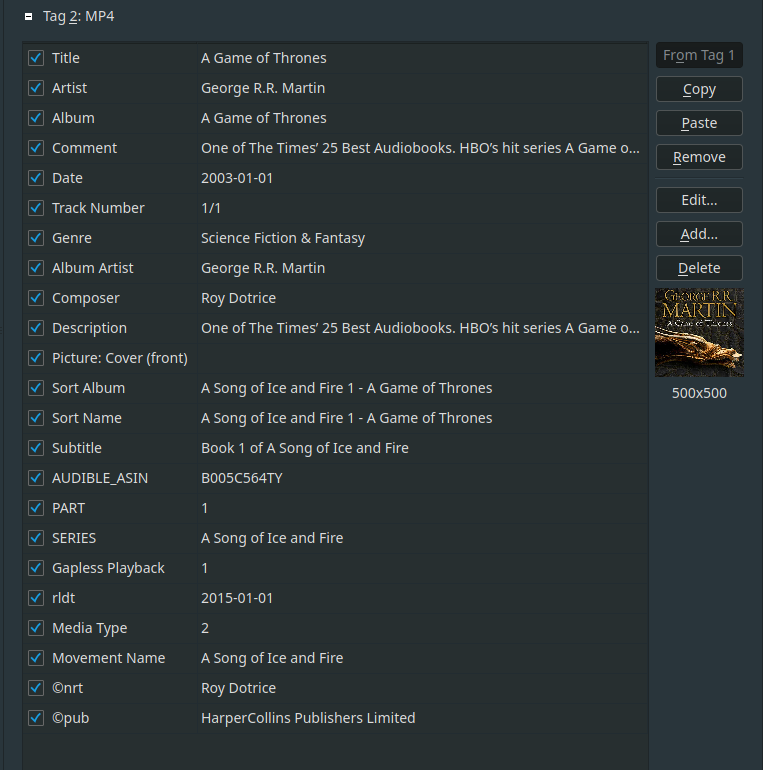
@jaycedk had posted metadata images earlier in this topic that had "Narrator" as a tag. Is that common? This had the same information as "Composer," so I suggest that emby try to import both and display as "Narrator" in UI.1 point
-
The latest update fixed it (for me). Thank you so much.1 point
-
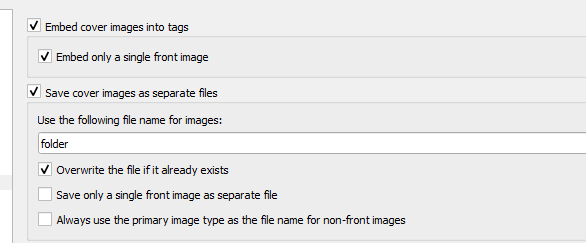
Hi I guess I am an embed image guy. LOL But that being said.. BY the definition of an "Album" I use I would never expect the track images to be different, I use Album cover as the image I embed. So by my definition they should always be the same or they would be "different" albums and probably be need looked at. Luke from a UI perspective they should "just be the same", so if you choose "'not to support" track-specific images that seems to work with my definition of an album. Now where you get the image from should always be from the folder or the track first ....before getting it from one of the providers. These options in Picard seem to work well currently in Emby, They embed the image in the Track but also saves them to an external "folder.jpg" . all automagically Picard and Emby = a new album in my library. -vicpa
 1 point
 -
Hello, thank you for your help, but there are no changes with this update. The application cannot be used, it crashes and restarts after a few seconds.1 point
-
Yeah that would be great if you could support those. I think you have most of the other tags covered..
 1 point
 -
a s9 ultra is def not a phone and as written, nothing is working. it's really annoying. you can't see the mouse so you can't place it correct (where would that be anyway..) so the overlay doesn't hide. you can't use the mouse for anything else then play pause, because you can't see it screen off doesn't work it stays on for years ... thanks!!!1 point
-
Here is a log after a restart and creating a playlist called TestListA1 embyserver(10).txt1 point
-
HI, please try the 2.2.20 update to Emby for iOS that just went out and let us know if this resolves your issue. Thanks.1 point
-
Apologies, please disregard post immediately above. I can not remove it.1 point
-
To re-summarize the results of the previous investigations: when the headers/timing of some video files aren't perfect, they play and control fine 1. from Emby Android app casting to first-generation Chromecast, as well as 2. via the Emby TV app running on either a first-generation or new Chromecast HD device, however, 3) even minor imperfections in headers/timing cause the control & playback problems reported above and in other threads only when casting from Emby Android app to newest Chromecast HD dongle. Why this matters: many of us prefer to cast from our Android device rather than use the Emby TV app, because we get use of full device keyboard, ability to switch to other apps & windows (to check IMDB or Wikipedia or elsewhere on the web, for example), etc. etc. But one of the Emby devs said 'if we make casting from Emby app to new Chromecast HD more fault tolerant, that will just encourage more subpar video files' which is logic I just don't understand as a paid Emby user, given the vast range of files (as reported by many users) that don't work with Emby coded as is.1 point
-
The apps will get it too.1 point
-
Shuffle in the player coming very soon: Look for it in the 4.9 beta channel in the coming days.1 point
-
Shuffle in the player coming very soon: Look for it in the 4.9 beta channel in the coming days.1 point
-
Please read the old threads. This is a known and well-documented issue.1 point
-
Im not "an image embedded track" guy, so not speaking from experience/stake in the game... so personally i wouldnt miss the removal of custom track images (inheriting image from album works for me) presumably its a rare case for someone to have embedded track images but not want them and expect a change of album image in Emby to trickle down/overwrite embedded images....maybe the gold plated solution is to to have a non-default library option "read embedded image metadata" (i think thats in line with the existing option to use embedded title metadata) and establish it the users responsibility to more carefully manage their [embedded / in media folder album and track image] metadata offline ready from Emby to ingest if they wish to use that option. equally could leave as it is and just agree its the users responsibility to sort out their embedded metadata. This presumably affects very few people and there is a solution (sort out embedded metadata)1 point
-
Hi This is subscene website link https://subscene.com/ Plugin has been created from this source As you can see website is down for ever So obviously plugin also is dead with it I assume there is no more update for this Plugin1 point
-
Hi, we are still looking into it. Thanks.1 point
-
OK we'll have to look into what our options are. Thanks.1 point
-
HI, yes, more options can be added to control this. Thanks for the feedback.1 point
-
They do. It's just the UI that needs to be updated to use the chapters applicable to the version being played.1 point
-
OK we'll take a look at it. Thanks.1 point
-
I'm sure if 'you' start that will be very easy very soon. or you post 3 examples to the community here and your forum will explode1 point
-
Hi, yes this idea has come up before and is a good idea for future updates. Thanks.1 point
-
HI, this should be resolved in the next update to the Emby Dlna plugin. Thanks.1 point
-
I just haven't sorted out my whole library yet, so pointed it there, as the movie was named correctly, contained trailer, extras etc. But I will indeed just point it to the main folder in the future.1 point
-
@EricKnaakdid you try deleting the emby server data folder? Emby Server Data Folder To make a fresh start, that's usually all it takes.1 point
-
HI, currently the rhyme or reason is that when a collection has mixed types, you'll get separate categories for each type. When it doesn't, it will scroll vertically like before.1 point
-
Is there a reason you don't just point to "F:\Pulpit\Filmy i seriale\Filmy"? You should never point to the actual media item folder.1 point
-
Technically Emby does not support this and changes in 4.8 have made this sort of possible but I will guess playback via this content type has to be rewritten if it is going to be supported.1 point
-
it would be nice to have server side dynamic range adjustability per user profile. I believe the windows app has it already but ios and android apps do not have this option that I could see. possibly a better option would be to enable that in all your client applications accross all platforms if possible so that one can adjust the dynamic range of the audio as its super hard to hear voices on my system even with treble and center turned to max. Most movies are like this and it would just be nice to have the future available on all platforms.1 point
-
This is a great feature. Looking forward...1 point
-
+1 and 50 bugs I've searched for drc the title is a bit difficult. .... my closed post I would pay 50 bugs extra for a good implementation (with maybe 5 settings but not like the unusable 5 subtitle sizes from screen is full to micro size is there anything ... they should be near. for me, without avr directly on TV, it's difficult to watch a movie / show. not only the new ones and action. maybe also a little equalizer and voice levels up... all possible. but my ask is for a drc. that would rock ps if I watch via avr all good, many settings. So not sure User level would be the right approach, more client based...1 point
-
HI, yes this idea has come up before and is possible for future updates. Thanks.1 point
-
Both would be ideal, imo. I do tend to lean more towards audience scores than critic scores, but then brigading becomes an issue. I'd like to just have both and carry on.1 point
-
Audience score is far more valuable to me than critical rating.1 point
-
Hi, The rotten tomato audience score would be nice as it is closer to the reality. It would also be nice to give our own score (0-100 or 0-10) instead of just a heart (and sync this data with our TMDB/IMDB account). This way everything would be in sync. Thanks1 point