Leaderboard




Popular Content
Showing content with the highest reputation on 05/14/24 in Posts
-
This is the important part of this message - the user has moved from the Shield to the Mini-PC. Their remote access previously worked - not sure why people are confusing things with talk of double nat.. So all that needs to happen is the destination IP needs to change from the shield to the Mini-PC. (Assuming they are on the same network). So to release the upnp bindings - you need to ensure the shield is no longer acting as an emby server, ensure the mini-pc is now the server instead and then restart the router. This should re-create the upnp bindings as before, but this time your mini-pc is the destination. As raised above - ensure the mini-pc has it's network set to private - otherwise the WINDOWS firewall on the mini-pc will be blocking any incoming requests from the router.3 points
-
Just here to show my support for this as well. The "Smart Playlists 2.0" Plugin by @ShanePis great and fulfills a lot of the requirements already. But the most important part is missing, and that's including the collections and playlists into the homescreen, so users can discover new and interesting content easily. (As well as the sorting functionality inside the collections/playlists!) "Recently added" on the homescreen just doesn't cut it anymore, and i say this as a big emby fan and premiere user for years. We are slowly approaching 10 years since this feature request was brought up and we still don't have it on the horizon. It's quite disheartening to be honest. Maybe work with @ShanePto refine the plugin and include it into emby? He obviously has a solid base already. Obviously this would be a premiere feature. I know that developing emby is hard and a lot of work, i appreciate Luke and the other devs a lot and i love supporting this project. But i can't stress enough how much this feature would elevate emby to the next level for a lot of users.3 points
-
So just an update, not sure why I had nfo files that didn't match up to a video file, but I made a script to go through all the movie folders, if a .nfo existed but did not accompany a .mp4 file of the same name, I delete it. A library scan didn't resolve the issue, but I did a refresh of all metadata and it seems to be working now. That is, it's been going at it for about 2 and a half hours now, and it's still going... So hopefully that was issue. Will confirm later once it finishes.2 points
-
Peut être mettre "Ajouts récents dans {0}" ou "Récemment ajouté dans {0}", je trouve ca moins "dur"2 points
-
@rbjtechI restarted my modem and it cleared the old port forwarding (which is odd because I never set it up in the first place). Set up port forwarding as outlined in the documentation and voila! it works. Thanks for the guidance!2 points
-
That'll teach me to use embys local version of ffmpeg/ffprobe in all of my scripts .. ! I was not aware the emby version was so far behind tbh - thanks for the info. I just downloaded ffmpeg directly - and yes, it appears to identify the codec extentions just fine. @Luke @ebr @softworkz Is there any reason why you cannot include these ffmpeg updates in your emby ffmpeg build - add to the detection and start to include all the extra details/extentions in the audio codec filters ? On the clients, adding 'Atmos' etc I guess may take a while, but at least the filters should have this data. The Plugin works great (and I would still use it to name the MKV tracks) - but 'tagging' is a bit of a hack and I would much rather natively filter by Audio Codec if possible. Thanks !2 points
-
Actually, based on my testing, FFmpeg/FFprobe can identify Atmos (in both TrueHD and DDP audio streams), as well as DTS:X. I looked around online, and I believe support for identifying these codecs was added in FFmpeg 6.0, but my testing was done with 7.0 (latest). I have put the output below of an Atmos demo file which contains Atmos in both possible codecs. And also the output of a DTS:X demo file Since FFprobe can now identify these, I don't see any more reasons why it would not be possible for Emby to identify these types of audio codecs.2 points
-
Just wanted to mention that both the alphapicker jumping fix and the hang at end of automatic playback fix are both working wonderfully. We should be able to push something into production very soon. It may not take a week. We may have something much sooner. Stay tuned...2 points
-
Yes, the server doesn't have this option now, and I think this function is very useful. I would like to ask whether this suggestion will be adopted.1 point
-
I have tested this multiple times. And I’m never home when the sever auto updates the guide. Since I have disconnected the vpn it has worked as it should. As soon as I connect the con and run a refresh it fails. Also I noticed that some of the live channels would not work with vpn on but would work fine with it off.1 point
-
That's a really, really important information! What about the other features that are listed on the Emby Premiere Feature Matrix under Server/Apps? It's not clear whether they are a server feature or not. Best example is Intro Skip. Is it a server feature because the server provides the availability/functionality to the clients or does the use of that feature in the client apps count towards the device limit?1 point
-
I can't really argue with this. Premiere features should get premiere attention and effort, they are the money makers. I too wonder why some new obscure feature or "fix" is added within a single beta cycle but other long term and often core foundational ones stay in limbo for years. I've said all I need about this but I'll repeat that I don't think the Emby team's motive is greed. Maybe I'm soft and too easy on them. Yeah, attention to detail matters and this kind of stuff is pretty sloppy. More so when there's a cost and unseen "penalty" that the user can't do anything to correct. I've never been a fan of how the devices are tracked and the info kept hidden. It didn't seem necessary to me but also felt like I understood why the Emby team does it. Maybe poor execution of a needed safeguard? All in all it's a small part of what Emby offers and most users care about. There are many many other things to fix, features to add and people to make unhappy. The corporate world is full of sharks and I don't believe that Emby is one of them. Which is why I posted because it felt like a pile-on for the wrong reasons even when the complaints themselves are legitimate. I get my money's worth from Emby and will stick around until I don't.1 point
-
Pues de momento parece que sí. Muchas gracias1 point
-
Thx. It would be good to know where the fix is on the priority list. BTW, one work around is to convert the JPG's to TIFF format. But, that's impractical.1 point
-
Hi, yes we will be updating our ffmpeg libs in the near future to support this. Thanks for the feedback.1 point
-
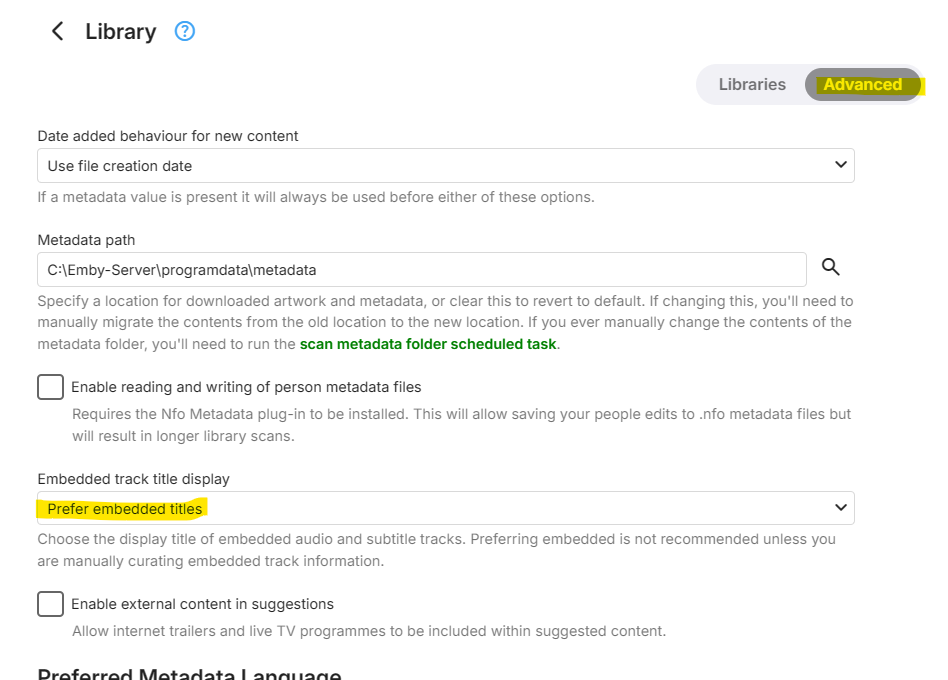
btw - if you haven't set this already, then I also suggest you do so - as this will display all the track names/formatting you specified in the plugin directly from the MKV files.
 1 point
 -
this emby plug for KODI is working so great for me!! many many thanks!! I have to get warm with kodi if I want or not, for the dv quality with ugoos and thanks to your work I can do that. THANK YOU!!!1 point
-
Looks good - you set the tag option - once it's finished, you should see all codecs as searchable/filterable options in the Tag dropdown. You 'may' need to do a library scan afterwards, but this may not be necessary. Enjoy.1 point
-
I guess I can try and help since I have created a ton of angry people here and Emby team please understand, I am not against you at all. I f****ing love Emby and my threats of leaving are not to be taken seriously. There is nothing that compares to this server, no not even PLEX. @xxDeadboltIf a TV/iPad/iPhone uses one of the features listed here, and it is using something in the "Premiere" line, it will count as one device using premiere. This is where I have had gripe and been pissed in the past is because if you turn Intro Skipping on, you would have to manually turn that specific setting off for a user to not count, but what if they are using Theme Songs and Videos, it's just not simple to turn Premiere off for a user so that is what frustrates me. I have users I would love to just give access and that is it, but it's not just as simple as that. Also you have no insight into whom is using and what premiere features they are using so it's not really even up to you. You can also go to your Server, Settings - Emby Premiere and it will tell you the status of your Integration Key and how close you are to the limit (Appears to only have three settings, 1. You are good, 2. You are close to your limit, 3. You are over your limit, upgrade to get more). I do get why this is being enforced, I just wish I had to opportunity to manage it and allow only certain users to have Premiere. Maybe that needs to be an enhancement. Overall, please keep testing, Emby is fan tas tic!1 point
-
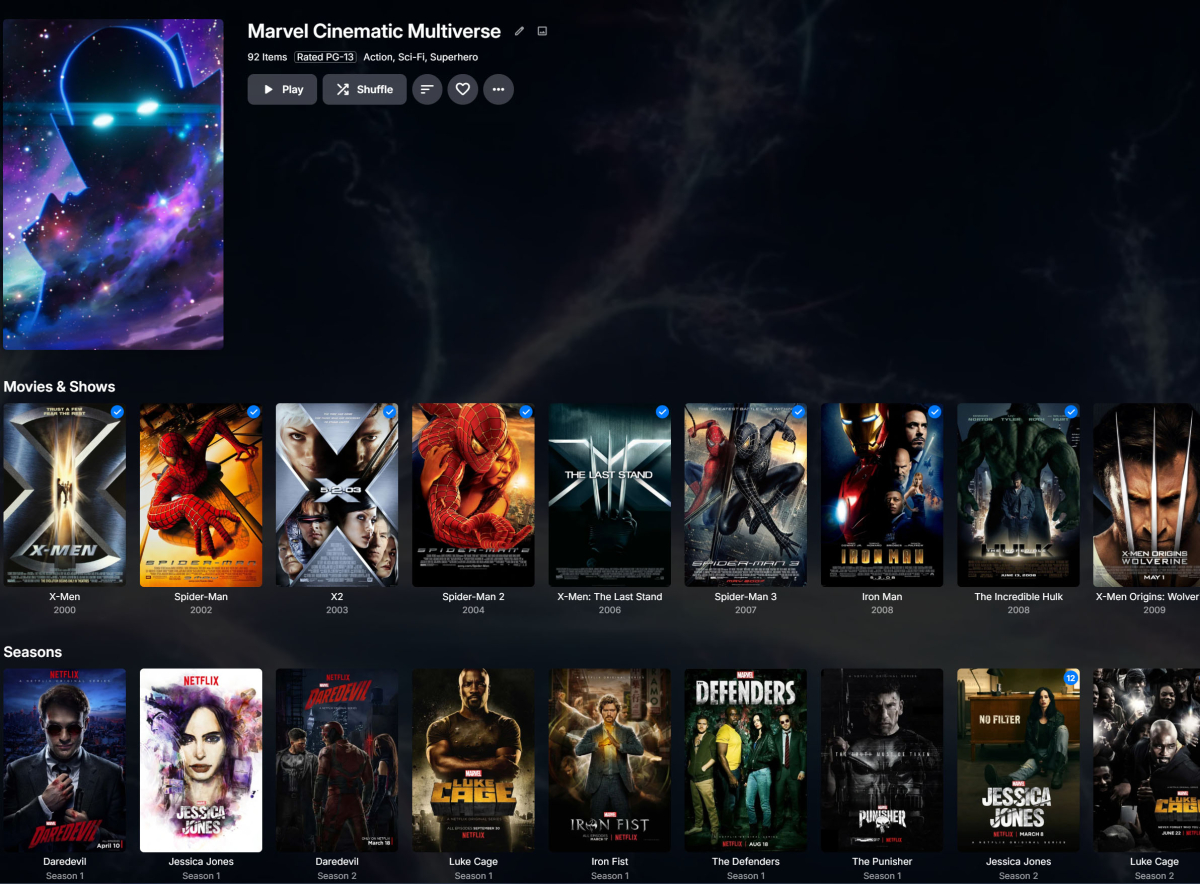
I like repeatedly clicking to get to the end of a 92 item list, myself No longer having my content in chronological order is just a bonus.
 1 point
 -
Yes, I meant 8920. Oops! I think rbjtech is on to something here. I deleted the server app from my Nvidia but didn't really disable it. If it helps, the remote access URL didn't change when I installed the new server on the mini-pc so I think there's additional digging I need to do. I'll post my findings as I come across them. Thanks all! Edit to add: also after further digging, the Technicolor FXA5000 is the Modem with the Arcadyan Boost 2.1 categorized as the wireless access point.1 point
-
Just to update - the CGNAT was the issue. To anyone in the UK who is with Lit Fibre, you can call and ask to be switched to a static IPv4 for £5 a month and you will be able to port forward after this.1 point
-
OpenCL tonemapping was broken for 6.8+ kernels (which is what Proxmox uses for their latest version VE 8.2). It needs an updated compute runtime to get the tonemapping fixed. Related upstream threads: https://github.com/intel/compute-runtime/issues/710 https://gitlab.freedesktop.org/drm/i915/kernel/-/issues/108951 point
-
Bonjour, je pense que le sujet peut être clos car je n'ai toujours pas rencontré le souci depuis que j'ai désactivé l'UPNP Il semble que mon problème venait bien de là1 point
-
Pour le moment les modifications ne sont pas visibles coté client mais il faudra probablement attendre la prochaine mise à jour d'Emby.1 point
-
Just Zabbix.1 point
-
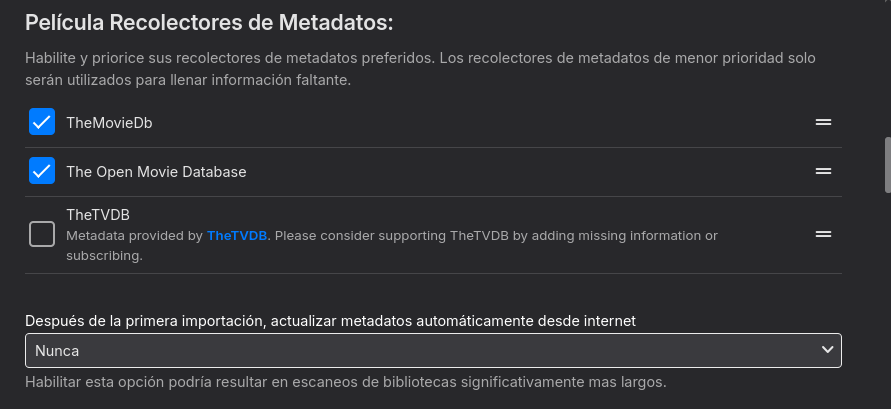
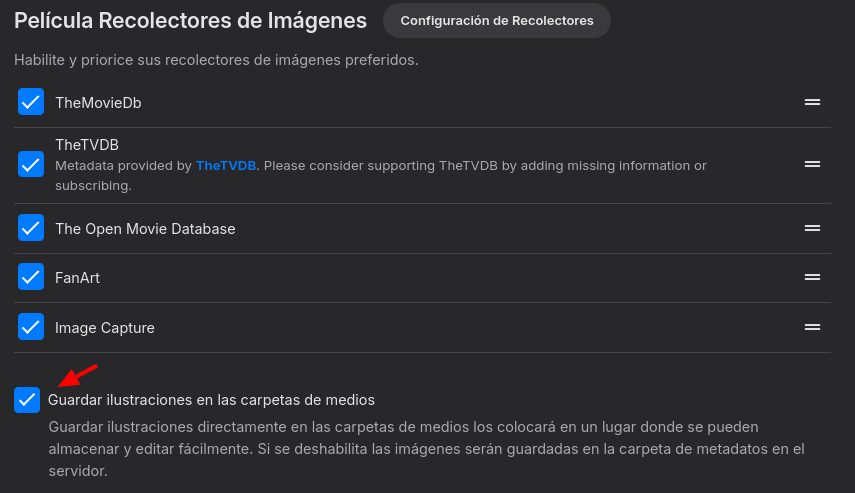
Eso podría ser que tengas la biblioteca configurada para que actualice metadatos periódicamente, esto lo puedes ver en la configuración de cada biblioteca aunque los intervalos marcados ahí son muy grandes (30, 60 y 90 días) como para que ese sea tu problema. Otra cosa que puedes intentar es habilitar si es que no tienes ya habilitada la opción para que se guarden las imágenes dentro de las carpetas de medios, eso también podría ayudar a acelerar un poco el escaneo futuro en la biblioteca si llegaras a reconstruirla desde cero.
 1 point
 -
I have an idea.... Put the way it was just a few weeks ago. Was it such a problem that people were rioting in the streets?1 point
-
Hi. No, the app does not control those things.1 point
-
The Roku does not show detailed media information at this time. We may add this as an option but most Roku users like the clean, simple, uncluttered interface.1 point
-
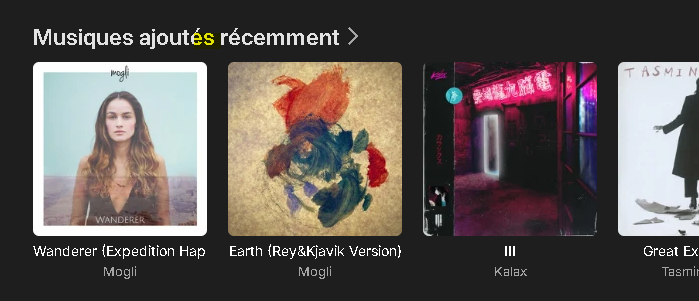
J'ai pu modifier la traduction, néanmoins, le souci est que les Films ajoutés récemment et les Séries ajoutées récemment ne sont pas dans des sections différenciées. Cela inclus également les Musiques, les Emissions TV, etc...De fait, on a donc également une faute de grammaire pour les musiques et les Emissions TV. Pour le moment, j'ai contourné ce problème en traduisant autrement: On aura désormais par exemple --> Séries: Derniers ajouts
 1 point
 -
Upgraded to 4.8.5 and this no longer happens.1 point
-
Hello, I speak French and English. If you want my help, ask me. In the meantime, there is a small mistake in a translation "Séries ajoutés récemment" instead of "Séries ajoutées récemment"1 point
-
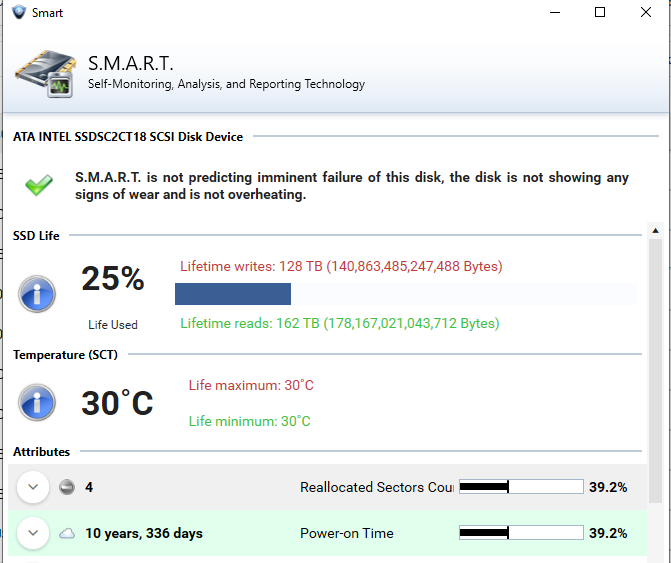
Personally would agree as this SSD has lasted longer then most HDD. Nothing is really shown in the log that I saw but must be a reason on the fly cleanup is not working.
 1 point
 -
Hi, I was previously finding (with music) that both Genres and Tags would always show in alphabetical order in the Edit window (which was good) and mostly in alphabetical order when displayed on the relevant pages, but not always. Therefore, in many instances, they were mixed up and I could never figure out how to correct this manually... The recent addition of the "drag and drop" reordering has been helpful for 'fixing' the order of the previously mixed up ones, but has also resulted in changing the order of many other displays where it was previously 'alphabetically correct'. I think this could be somewhat related to what @kbeck has described? Or maybe not? I like really like the "drag and drop" flexibility to arrange a custom display order on any selected page (including Tags). Default alphabetical, with the ability to reorder, would be excellent, but if this was too difficult to achieve, then I would prefer to at least have the 'drag and drop' reordering than not, so I can control the order. (Yes, short-term, it has messed up the display of some of my carefully sorted Genres and Tags, but long-term, I think it would be most useful to keep.) I don't quite understand why "it's unnecessary" for Tags to have the 'drag and drop' sort? @Luke is that what you mean? (I might be misunderstanding?) If Tags are designed to appear in the order added, then every time I add a new Tag, it will be 'out of order' if it is just displayed last. Would I then need to remove and replace all the Tags to achieve a preferred order? I hope this isn't a case of forward one step and then backwards two? Adding Tags should be easy and sorting them should be too!1 point
-
Disclaimer: This FAQ is valid for emby-next-gen plugin (6.x and higher) It will be constantly updated over the next weeks. Emby server: Kodi companion plugin must be installed! Versioning: X.X.X First X is the major version. It indicates a compatibility with Kodi versions. e.g. 6.X versions are for Kodi 18+ 7.X versions are for Kodi 19+ 4.X and 5.X versions are end of life and no longer supported Second X indicates a mandatory plugin database reset. This will be automatically initiated. Read ahead for further information. Third X indicates regular bugfixes. No further action required. Plugin Installation: First you need to choose which version you wanna install, there are 3 options. stable beta public testing stable is very well tested and no showstoppers are reported. beta is also well tested and no issues are expected. public testing can include bugs and is the current development version. I recommend using public testing versions. Not only it helps me debugging issues, it also includes latest features and improvements. (rolling release) However, you should be an active member in the forum to keep track of the new features and limitations etc. Stable and beta versions are available via Emby's Kodi repositories. You need to sideload and install them from here. http://kodi.emby.tv/ STABLE: repository.emby.kodi-1.0.8.zip http://kodi.emby.tv/repository.emby.kodi-1.0.8.zip BETA: repository.beta.emby.kodi-1.0.11.zip http://kodi.emby.tv/repository.beta.emby.kodi-1.0.11.zip Once installed, you can browse via Kodi's addon menu, select the repository and install the plugin. Addons -> Install from repository -> Kodi Emby (beta) Addons -> Service Addons -> Emby-next-gen Public testing: Those versions are not available via repositories. There are two methods how you can install them. If you have already a Emby-next-gen version installed, it adds a link in Kodi's filebrowser. You can install it directly via Kodi's menu: Addons -> Install from zip file -> kodi.emby.media -> Public testing -> plugin.service.emby-next-gen-X.X.X.zip Also it is possible to download the file manually and push it to Kodi's filesystem (sideload) and load it from there. Under the hood/concept: The plugin uses several techniques to make Kodi compatible with Emby server. Instant communication with Emby server (dynamic content). Syncing to Kodi's internal database (synced content). The plugin has an internal http webserver (webservice) on port 57342 implemented and also opens a websocket connection to Emby server for realtime connection. Supporting synced content a "helper" database for Emby's content is created on Kodi. Here it's called Kodi's Emby database. Don't mix this database with the actual Emby servers database, those are different. The plugin uses Kodi's internal functionalities as much as possible for maximum compatibility. Anyway, not all plugins functions can be realized with Kodi's capabilities (review Kodi limitations for further information. Addon mode vs. native mode: After plugin installation you must choose a (sync) mode. Almost everybody should select addon mode, don't bother with further explanation. If you don't know what to choose, addon mode is the one you want. There are very limited cases you should select native (for experts only). Also it only affects the way how to access synced content. Dynamic content always uses addon mode. Native mode means, the content will be accessed via filesystem instead of the http. Kodi has some minor (feature) limitations accessing content via http. Also some 3rd party plugins could have issues accessing content via http instead of a filesystem base. If you use 3rd party plugins (like Kodi's "Extras" addon), you may choose native mode. btw, "Extras" is not really required, the plugin has almost the same functionality implemented as "Extras". Additionally native mode can be tricky to configure on Kodi/Emby server side, if you use network shares like smb/cifs/nfs. Attention: This selection can only be altered by an emby-next-gen plugin factory reset -> full Kodi database reset Sync content vs dynamic content: Synced content is available via Kodi's internal database. Kodi doesn't even know, that the content is actually coming from Emby server, ergo accessing content is very fast. Dynamic content is build "on the fly" and generates overhead. Use synced content wherever possible. Due to Kodi's limitations (e.g.folder access), this is not always possible. Syncing libraries: Kodi supports only following content types by its internal database: Movies, Musicvideo, TVShows and Music Emby on the other hand has several more. The plugin has functionalities to sync content even it's not directly supported by Kodi. e.g. homevideos, podcasts etc. As Kodi does not have those categories, homevideos are synced as movies, podcasts as audio etc. If you don't use a custom Kodi skin, it will end up in the movie node (section) showing both: movies and homevideos. This can be avoided by using the Emby-next-gen plugin custom nodes (more in the Kodi skinning section) What does Kodi not support by its build in functions (Kodi limitations): Syncing pictures is not supported by Kodi. It just has a "filebrowser" accessing pictures also emby-next-gen plugin is not capable to sync pictures, however. There are performance tweaks available to access pictures very fast by caching them. (review artwork caching section) Cinema mode, skip intro and multi version content support are unique to Emby server and is fully supported by emby-next-gen plugin. (review the subsections for further information) Kodi has no functions supporting musicvideos and music content for multiple libraries (Emby library based content view). Emby-next-gen plugin has solved this problem via workarounds and is fully supported via custom nodes (more in the Kodi skinning section). Path substitution (plugin configuration option for addon mode, default is enabled: The path substitution is workaround for a Kodi limitation extracting images/pictures from video streams. It's addressing the bookmark/chapter images extraction. Kodi extracts bookmarks/chapter images "on the fly". It's not like "regular" artwork which are (usually) located as an image file or comes from a scraper. "Regular" images are stored in Kodi's database as a record. For chapter/bookmark images it's different. They are extracted directly for the video file/stream and not stored in Kodi's video/music database. Therefore I cannot sync them directly into the database. The problem is, Kodi disables image extraction for HTTP streams even technically possible. This is hardcoded in Kodi's sourcecode and cannot be adjusted in the settings. The path substitution tricks Kodi believing it's a local file so the image extraction will be processed. How it works: A video stream from Emby server is a regular http URL (piped through the plugins "webserver"). It looks like http://127.0.0.1:54342/video_stream_info_parameters and is stored in Kodi's database. The internal webserver receives this stream request and redirects it to the actual Emby server's video feed. http://192.168.0.207/emby_video_stream_parameters. This would be detected by Kodi as a HTTP stream and disables image extraction. The path substitution however replaces the "http://127.0.0.1:54342/" with a "fake" folder. The video feed links are now replaced with "/emby_addon_mode/" in Kodi's database. The record looks like that: /emby_addon_mode/video_stream_info_parameters Now it's from Kodi's perspective a local file and the advancedsettings.xml parameter turns it back to the actual link replacing the "fake" folder <substitute> <from>/emby_addon_mode/</from> <to>http://127.0.0.1:57342/|redirect-limit=1000</to> </substitute> There is some extra magic involved but I skipped that to keep it easier to explain. In the end, I'm actually using a Kodi bug in my favor. Kodi should detect the stream type after path substitution if they would do it properly.1 point
-
OK thanks. This should all be good now in the beta channel and the fix will be in 4.8.7. Thanks.1 point
-
Let us know how you get on. Thanks.1 point
-
Thanks - turns out my ISP put us behind a CGNAT, so I'll call them tomorrow to ask for a static IPv4 instead!1 point
-
We will get this to match how the web app is doing it. Apologies it wasn't already doing that. An oversight on our part. We will get this fixed. It has been added to our issue tracker for the Roku. Reference: Issue #1690: Items come out of collections when filtering unwatched1 point
-
Sure as devs have already recommended against it. But no one can stop users from doing what they want. Just can say why the user is having issue of probably their own creation.1 point
-
It is correct that the fixed-function tone mapping was only added in more recent iGPU models, but we support hardware tone mapping via OpenCL, which works with both, QuickSync and VAAPI. QuickSync is generally preferable (faster + better encoding).1 point
-
Hi, we do already detect this from the video information.1 point
-
HI, we'll take a look at this. Thanks for reporting.1 point
-
Even if they added one they most likely would make it only search content like it does under settings instead of only searching in settings. The search function should have been fixed YEARS ago.1 point
-
The Emby team wanted to say thank you again to everyone that took the time to ask various questions during our Q&A session. Here are a few more answers to questions that a lot of our users were asking about. 1) How is beta functionality success measured? Often times people are curious about the process we use internally here at Emby as we go through the Beta process. We do rely heavily on the forum feedback and beta-tester feedback relating to open issues. It is also important that we take into account the overall experience of the beta release compared to the current stable release, especially when we are making large changes as we did from 4.7 to 4.8. We may be perfectionists at heart but we also understand that we can't spend forever chasing perfection on the release so we do our best to balance stability and functionality throughout the whole process. To reiterate what we shared in previous blog posts, we also understand that a tighter release window with smaller goals allows us to hone in on the stability of the beta and get releases out to the public. It is something that we here at Emby are striving to get to. 2) What is the split of time between actual development and forum duties? We get this question asked often so we thought we would give a little run down on this. Some of our developers such as @Lukeand @ebrand others split their time between development and the forums as things demand. Other developers we have on staff actually do not even engage in the forums at all as to solely focus on the development of Emby moving forward. This allows us to offer quick and prompt customer service and also focus on development at the same time. We thought it was important to answer this one at this point in time, because we do want people to know that there is more to the development team than simply what you see here on the forums. 3) What would help the Emby team the most to improve the overall product from the community? This is another question that gets asked often and it's something that a lot of you are already doing. Keep up the feedback! The more the better! Everything that's posted on these forums is invaluable to us. From pain points, feature requests, how you're using the server, what apps you prefer and anything else that people share with us about how they utilize Emby. Everything that you share is heard and taken into account by the developers. That doesn't always mean that things can get implemented right away or worked on immediately, but the value of your feedback is paramount to our work. We know that it doesn't always seem like it to everyone, but we 100% listen to everything people say and value the thoughts and opinions of our user base! 4) What are some of the biggest obstacles that the Emby team faces throughout development? A lot of the challenges we face throughout development are based on resource allocation from the sheer amount of hardware and software options that Emby runs on. Keeping in mind that Emby runs on everything from an old windows laptop, to Linux distros, NAS, server systems and more, we have to make sure that the program works on all of these systems. Also development of the apps falls under that same category. With so many options for our users to choose from dedicated media players such as Roku, Amazon Fire Sticks, Nvidia Shields, Apple TV Smart TV's, mobile devices such as Android and iOS, there are a lot of different platforms that we need to develop on and do our best to make sure everything is up to the standard that our users expect from Emby. View the full article1 point
-
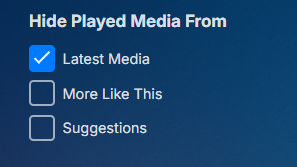
Since it is global one may want to restrict to specific libraries. Guess I missed this one new feature on Home Screen settings. But yes needs added to this setting.
 1 point
 -
HI, I would follow the same convention as iOS, since the two apps share a lot of resources. We just haven't added support for this yet in Apple TV, but we can.1 point
-
Hi, we are currently looking into this. Thanks for reporting.1 point
-
“In our experience over a number of years, this standard license is sufficient for 95%+ of our users. “ funny so many people complaining then, it’s like that entire 5% is here. its all good, its a business. You limiting it is just a power play. If you were serving up or I was using your hardware then I understand. But I’m not, it’s turning into Plex 2.0, so it’s all good.1 point