Leaderboard




Popular Content
Showing content with the highest reputation on 05/11/24 in Posts
-
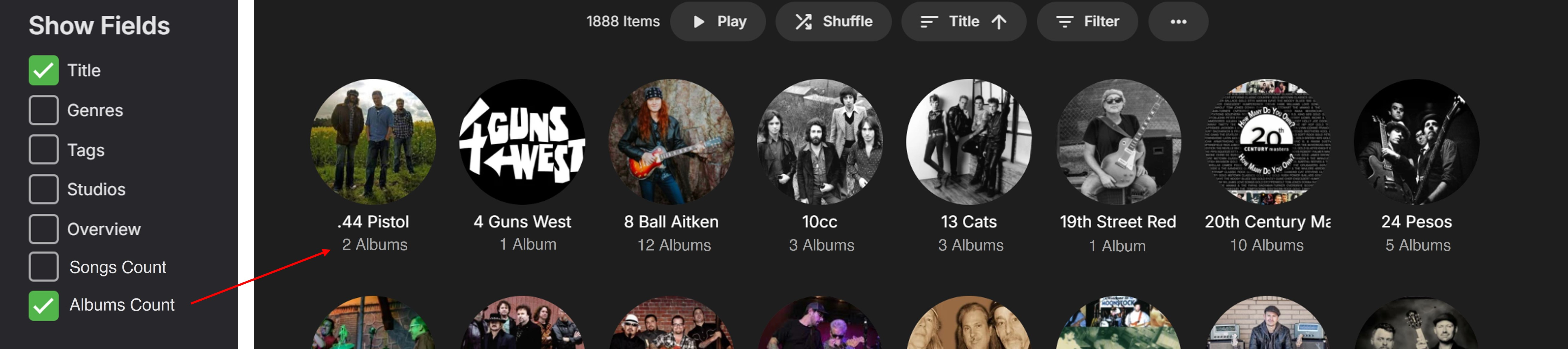
Hi, Presently all the main music Menu Tabs (apart from Suggestions) show a useful Items Count to the LHS of the Play button (1888 Items example shown below): To find the individual counts for the Songs/Albums of a specific Album Artist/Artist/Composer currently takes a couple more ‘clicks’ to get to the relevant page(s). This is quite ok for looking up something specific on a few occasions, but not as nice for continuous top-level browsing through a music library category. If the Songs/Albums item counts were added as options to the “Show Fields” edit settings, for Album Artists/Artists/Composers, then this would show the info nicely for anyone wanting to view it more readily. (I would use an Albums Count as a permanently selected option, but others may like to see the Songs Count?) Anyone not wanting this info displayed below the images would not select the respective option(s), similarly to the current setup. Here is an example showing the Album Artist Title and Albums Count on the main Album Artist summary page: Adding these options would be a great improvement, giving more useful functionality with music viewing. Thanks for considering.

 2 points
 -
If you clicked that image though and it could go to the individual movie shown, wouldn't that be chaos as people would expect to go to a library? Also a number of us use our own customized library tile pictures.2 points
-
New PUBLIC TESTING version available 10.0.22: Delta changelog 10.0.21 -> 10.0.22 fix favorite sync issue fix Boxset realtime updates fix websocket issue rollback multiversion content changes from 10.0.21. The performance issue will be addressed in one of the next versions. -> different approach add option to adjust the max URI length fix delete after watched function fix pillow library issue2 points
-
I don't know if I may be the only one, but I never care about the songs list appearing on top when going into an artist. It would be great if there was a away to either remove the songs section, or change the order so albums can be on the top?1 point
-
I use amazon route 53, you can update any DNS record with their API. There is also a Certbot script specific to route 53 domain to update a certificate. Been working without any issue for many years.1 point
-
@Q-Droid may have some tips.1 point
-
The "Copy from" for creating a "New User" is awesome. I've used it. New problem today - due to some system issues, my DB got corrupted. The repair methods didn't work, so I re-added the libraries, and re-scanned. Guess what??? NONE of the users (not even the admin user) could see the new libraries. The solution for the admin user was to toggle the "access all" and it solved it.... However, EVERY SINGLE USER has access to NONE of the libraries. I also recently added the Trailers plugin, and overall, I would like to update all the users at once... so a COPY PROFILE SETTINGS (allowing me to maybe skip usernames, passwords, and images... lol).... would be PERFECT! But... I cannot do this. I also do not save my users passwords, so deleting them and re-adding them is a bit of a bad approach. Not to mention... wouldn't I lose all of their watch history and everything? Yuck all around yuck. So while there are some things that "I could have done better" there appears to be some things Emby could have done better - but allowing me to copy selected or all settings from one user to another WOULD BE AMAZING. Thanks for considering.1 point
-
Please vote up the below request, as it covers one of your (and my) issues:1 point
-
No, currently there's no such per-TV-show option, it'd be a FR then. For that, you'd have to rearrange preferred library providers and lock TV show/revert provider upon import, basically this:1 point
-
Yes this is a remux, so the video stream is just direct playing essentially but the audio is being transcoded from eac3 to mp3, and subtitles are being delivered as webvtt. This will happen on CPU but is very very little. 18:10:25.728 Stream #0:0 -> #0:0 (copy) 18:10:25.728 Stream #0:1 -> #0:1 (eac3 (native) -> mp3 (libmp3lame)) 18:10:25.728 Stream #0:3 -> #1:0 (subrip (srt) -> webvtt (native)) 18:10:25.728 Stream #0:4 -> #2:0 (subrip (srt) -> webvtt (native)) 18:10:25.728 Stream #0:5 -> #3:0 (subrip (srt) -> webvtt (native)) 18:10:25.728 Stream #0:6 -> #4:0 (subrip (srt) -> webvtt (native))1 point
-
Add Emby's for Kodi beta repository, or download the the dependencies from page 1 of this thread. (listed under beta)1 point
-
There are actual iso limits in regards to streaming bitrates. Any players that go over those limits aren't adhering to standards. 4k UHD for example has a limit of 128mbit for the video. To get any higher, you need a player that supports 8k which has an iso limit of 250mbit.1 point
-
Just go to thetvdb.com and use folder names as titles on thetvdb.com https://thetvdb.com/search?query=Battlestar+Galactica You are naming folders wrong, for example Battlestar Galactica Miniseries (2003) does not exists, it should be Battlestar Galactica (2003)1 point
-
Emby's soon-to-be-announced secret new AI entity (codename: DR NUKEABLE) will handle it easily - think about it!1 point
-
It isn't that it is hard. It is that it is more likely someone will create a problem by selecting such a high bitrate than solve one.1 point
-
back to normal now, only 3 log files atm after removing the plugin1 point
-
The Android TV app I have, doesn't show cover art (folder.jpg) from parent folder, if it doesn't exist in the sub-folder. All other Emby apps do. Here is an example using an Audiobook library type: Audiobooks\Comedy\Dad's Army > Series 1 > S01E01 Dad's Army.m4b In this example, Dad's Army folder has a folder.jpg for main show's cover art. Series 1 does not have folder.jpg for Series 1 (by mistake), but each of the tracks has embedded folder.jpg for cover art. In all Emby apps except Android TV app, if the Series 1 had no cover art assigned, Emby would use the folder.jpg from parent folder "Dad's Army". Not an issue for me, as I just correct the sub-folder and put the missing folder.jpg (i.e. it actually helped me identify one or two non-standard folders), but others may like it defaulting to the show's parent folder cover art. Music and music videos library types are probably the same.1 point
-
Lol. I removed the Emby.TopPicks.dll from the plugin folder and now it fully boots! so problem solved! Maybe helps someone else in the future1 point
-
Not within private talk, but I mention them on the other thread, but seem they are not interesting, as for me I am with this idea and indeed a good one.1 point
-
Watched a film last night on Emby Theatre WMC beta 3.0.20 on Emby Server 4.9.0.17. 30 mins? into the film and ~ every 30 mins there after an "Undefined" message would show in bottom right corner within the player/app. Sometimes the message would be repeated 2-3 times hovering concurrently in corner for a couple of seconds. never seen that before....closest experience was admin sending a message (which wasnt happening). if it happens again i will send log.1 point
-
Yes, but depends what you actually want. Kodi supports profiles as well. Option 1, you could use 1 Kodi profile and link this to 2 Emby profiles (plugin config menu -> Manager servers ->Add user option). In this case Kodi is "merged" with both Emby accounts. Option 2, add a new Kodi profile. In this case it's completely independent. Even the server connection/synced libraries everything is starting from zero. Like a new device.1 point
-
Just tested full resync with version 10.0.22, works perfectly fine ! Quick question about the addon, if i have 2 user profiles on emby server, is it possible to create 2 user profiles on kodi and link them with both profiles on emby ?1 point
-
No further incidents. Looks like a winner1 point
-
Hello, visproduction, it is not media related like i wrote before. In the new beta .17 it happens only 1 time in the movie but it not get stucked anymore. Now i have just dropped frames at some point in the movie mostly at the end of it. All my media is fine and playing very well on every device (no transcoding -> direct stream), my network is 10GB wired and there are no bottlenecks at any point. Just the webplayback (playing back with internal network) is dropping frames at some point. I will deliver logs when i have a time for it. Kind regards, pektoral1 point
-
Yes, I have both Emby for Firestick and Emby standard on one of my Firesticks (have 5 Emby for Firestick). I will run the standard in my Man Cave office for the next while and see if I get the black screen. It is not especially frequent, perhaps once a week, so may be a while.1 point
-
Hi, it’s something that we’ve talked about and is certainly possible.1 point
-
That's what I was expecting, since everything else is under the "3 dots". It's the only button I can think of that's kind of down there living life alone and on its own (when active), but maybe it can live in two places and still dynamically? Another "idea" is to make it visible all the time, so it's more noticeable, but have it grayed out when there isn't an active split. Thanks for the replies btw.1 point
-
Has there every been any success on this? My family and I casting from the app to a Chromecast aren't able to resume or seek. It's been like this for a year or longer. It works as expected when playing to the web client, or to a native app (just not casting to Chromecast). When resuming it initially starts playing from the start then jumps to the moment requested, it then shows a still image and the audio plays. This is my experience for first, second, third and ultra gens of Chromecast including on Android tv. I'm using hardware transcoding, but it also doesn't work with it off. My storage is reasonably fast and and is either stripped array or SSD. There are no restrictions on my account that I can think of. If you can describe how to get the Chromecast logs I would be happy to get them. Thanks1 point
-
Looks resolved in beta 4.9.0.18 <lockedfields>Cast</lockedfields>1 point
-
Something like this div.headerSection [title="Menu"] {display: none;}1 point
-
i set up abs on my server and set up port forwarding and caddy as a reverse proxy to get https remote access. i added about 200 books in mp3 mpa and m4p formats to test with. i travel 35 to 45 min twice a day so this gives me a good chance to test. i used the web client on my google phone to listen to 2 books over the last week or so, i usually listen at x1.5 speed. so far the experience has been very good, the web client has remembered by playback positions and speed settings between play sessions and the display of books on the phone has been easy to use. the playback controls in the web client on the phone could be a little bigger but i manage. the playback experience has been at least as good as the stand alone phone app audio book player i was using in the past. plus the fact i have all my books available and manageable in a central place available on multiple devices now is great. so far its been a positive experience.1 point
-
No, you certainly do not sound like a jerk! I agree with what your saying and want you to keep saying it. Please carry on. You are our best advocate for getting Audio Books to where it should be. I'm just suggesting you don't expand the scope outside of books until we get some progress. Radio Shows/Podcasts needs an entirely different rethink..1 point
-
...and playback should also faster initiate. Transcode would be configured in the plugin settings, but as Luke mentioned. Keep it disabled. It's only required for incompatible media streams or bandwidth limitations1 point
-
If you're going to add a certificate for https, you'll need a domain name anyway (https pretty much requires it). There's very little security in not giving out an IP address; they get scanned all the time in any case. To my mind Connect is just an added complication - but for some people it seems to work. You could, I suppose, ask your family/friends if they want to make a login at Emby just to access your server (there's no technical advantage - unlike Plex, the data never goes through Emby's servers). Paul1 point
-
@user24 your suggestion will work as well. In 2022 above that's what I was getting at. Tags Styles Content (albums) New Category 1 New Category 2 -vicpa1 point
-
Amazon is slowly imploding anyways. With first adding a tier for no ads, to now adding ads to your pause screen, they are nickel and diming customers to death and people will hopefully start voting with their wallets.1 point
-
Hi, wouldn't you rather direct play when possible?1 point
-
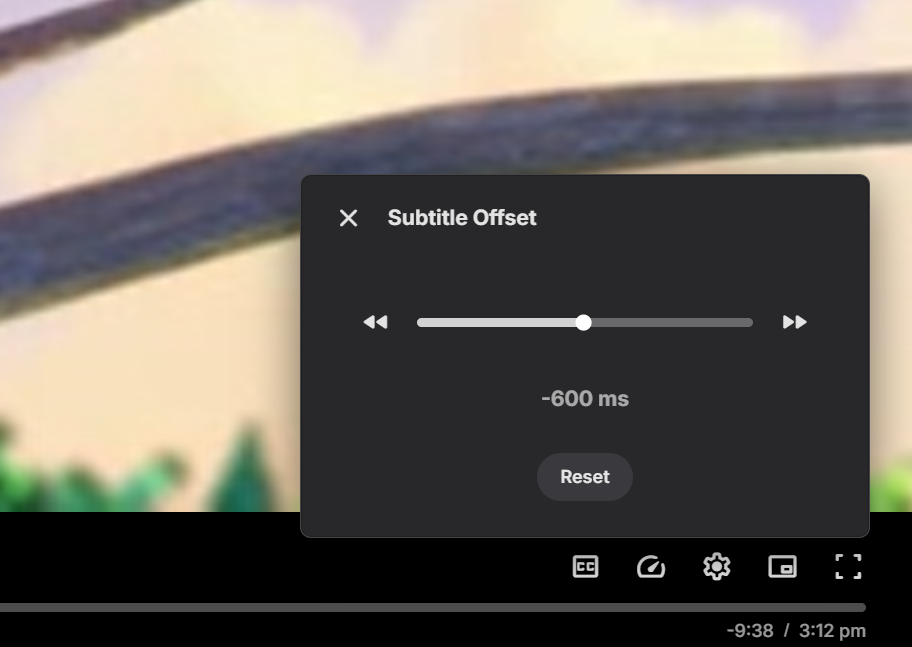
Subtitle offset is being changed to a slider which should make it much easier now, and you still have the buttons to step up/down:
 1 point
 -
Subtitle offset is being changed to a slider which should make it much easier now, and you still have the buttons to step up/down:
1 point
-
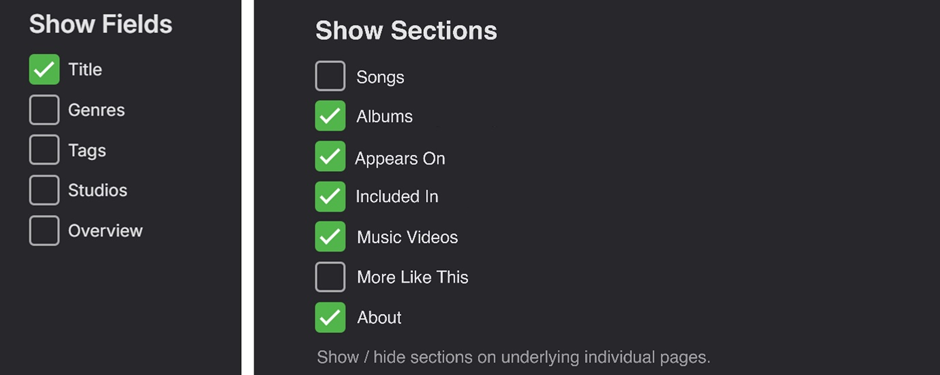
(FWIW) Some more thoughts... There is a “3 dot” settings tab on RHS of the secondary menu of the top-level Album Artist/Artist/Composer pages that allows for changing the view settings of the current top-level page: This edit area could potentially also be a place to make global changes to the view of the underlying individual pages in a similar way. A new “Show Sections” option could work similarly to the “Show Fields” option that exists now: Having this "Show Sections" editing available individually for the respective Album Artist/Artist/Composer categories would give great flexibility by allowing three custom user-defined page views for the three categories. Combining the above show/hide options with the new drag and drop reordering in Emby 4.8.6.0 would be brilliant!

 1 point
 -
Hi, best thing to do is post this in the dedicated bulky topic to ensure that the developer of the plugin sees it. Thanks.1 point
-
I'm all for things like this, even if I don't think a lot of people will use it. Those who like it will have it. But I agree SSL out of the box will do a lot more good for many more people.1 point
-
I'd also like to see this, similar to Screen Time. For example, I provide a 6-hour window during which my kid can use Emby, but I definitely don't want them using it for all six hours. Baseline functionality there would be a new field on the user Parental Control screen where one could define a maximum minutes of usage per day. Any device used by that user would count against the time quota, and playback would stop when the quota is reached. The suggestion to do this at the router is interesting, but not practical to implement. A router doesn't have any knowledge of how many minutes of playback have occurred.1 point
-
Same here, I'd love to set a daily limit for our kids. Any way to do this?1 point