Leaderboard




Popular Content
Showing content with the highest reputation on 03/29/24 in Posts
-
Make sure your "Album" and "Album Artist" embedded metadata is the same for all tracks of a compilation album, as stated by Emby here: https://emby.media/support/articles/Music-Naming.html You can use a tool such as MP3Tag (or similar) to do this. Tip: Remember to check all Extended Tags if you use MP3Tag, as sometimes "Album Artist" and "AlbumArtist" tags can cause problems if both are present and both are different from each other.3 points
-
Using 4.8.3 server upcoming TV episodes take forever to load on android client, to the point where I just give up waiting, for the web client about a full minute before they load. Server 4.7 is instant in either. embyserver.txt
 2 points
 -
I guess you could disable the option and restart at your convivence manually.
 2 points
 -
Personally I as one who is using the emby supplied guide data (for a long time now) I believe I have gotten more value from that than what I paid for my lifetime Premier key... Going forward I would be okay paying for the guide data separately from other emby Premier features. I would hope emby will negotiate with the appropriate regional guide data providers (bulk quantities usually gets a better price) and then charge us regionally (those that want it) at a cost neutral price to emby, for the service (that way emby would not profit from being a reseller (in other words not look greedy)) but would stop absorbing this large expense that would be better spent on coders (and maybe a little better documentation) ! This way people that don’t use the guide data (along with guide users) would get the benefit of improved software while NOT subsidizing us (current) guide leaches...2 points
-
I'm a plex life time member, but I have been using Emby for over six years continuously, but there is a feature which I have always thought is missing in Emby which I would like and encourage the developer to consider including especially in this dispensation where families can social or commingle due to COVID 19. Today, I received a notification from Plex about it new feature titled Watch together you can read about it here https://support.plex.tv/articles/watch-together/ The feature allows friends and families at distance to watch same movies together instantly, you simply invite all your buddy, once they signed to the system which can be seeing in the server then play and pause as needed, this I think is cool feature should be added to emby. Let's here your though if Emby developer should consider adding this feature to our beloved Emby Media https://www.bing.com/news/search?q=Plex+Watch+Together&qpvt=plex+watch+together&FORM=EWRE1 point
-
Pretty simple suggestion. I have multiple users for my Emby server. If I want to do continuous maintenance on the media, I have to tell everyone. some of them are harder to reach than others ( i.e. no Facebook or Skype chat etc. ) It would be great if say... on the admin panel, I could hit a check box that enables 'maintenance mode', where the server still runs does everything as normal, but instead of the login screen it displays a maintenance page saying the server is unavailable. Even better if I were able to directly put a reason in a text box that would then display on the login screen as well. Not really sure what others would think of this, but for me it would be quite helpful. mostly if I want to make sure no one is trying to access content I know won't work until I've done a full library scan again. Thanks for reading. -Kyle1 point
-
Feature Request: Have User Groups and all settings applied at the Group Level That way you can just assign users to the appropriate Group and all settings will be inheritated.1 point
-
Right, so basically yet another design decision that is totally unworkable then. So glad I kept 4.7 as my main server.1 point
-
Thanks @TMCswwill do read a lot of posts and kept working through the gaps. when I get some time I'll get it working and publish any instructions and scripts required.1 point
-
Thanks Bill will have a crack at it, and share instructions if I can.1 point
-
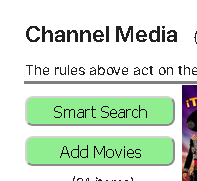
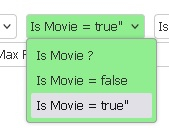
I find the order of the buttons a little confusing (ok I understand it, but not intuitively) This is just my opinion so please dont take it a critisism, I also do this whilst getting my plugins up and running. You have probably done that for ease of debugging which i totally understand. So for me I would put things in order that you would do them, so that its intuative. Let me show an example of what i mean. Add Channel would be first thing I need to do, so that would be first, so Prev Channel and Next Channel would not be shown until there was at least one channel. So I would only show Add Channel and Help to begin with HEADER> Pseudo TV Configuration Add New Channel | Help ? <hr> Then when a channel was added I would put on a row below the buttons for that page, then all the add channel items would be separate from the header and you would know instictively that the buttons above the <hr> would change below it etc HEADER> Pseudo TV Configuration Add New Channel | Help ? <hr> CONTENT> < Prev Channel | Delete Channel | Update EPG | Next Channel > Setup Channel 1 of 1 Channels If I click Smart Search on Movies, then the filter for movie = true should already be set ,( typo here Is Movie = true" and after Require Audio Codec" - the double quotes ) Codecs should be able to be ignored - for any codec as a choice When you get the Poster images are you getting the full size or the thumbs? - it seems pretty slow Anyway for me the search for content button is weirdly at the top - I would have thought it was the last thing to do/click so it should be at the bottom ?? followed by the cancel search FOOTER > <hr> Test The Rules | Search For Content | Cancel Search Like I said this is how I would find it more intuative, but thats only my thoughts - what do you think?
 1 point
 -
Eventually in android world vendors stop updating the OS and developers stop supporting old versions. This cycle is much shorter than the same for Windows, linux and Mac where backward compatibility is high on the list.1 point
-
Hi, Yes I am using the Android App, and, it appears that this question has since been resolved, and was directly related to my media. I will mark the topic as solved.1 point
-
more recent ones are significantly more snappy in menus and app loading1 point
-
Smalville returns only those 4 Actors/Cast at show level, the rest is Crew. Smallville - TMDB Ditto for Heartland, only 3 Actors/Cast listed. Heartland - TMDb If you want more actors shown at series level, put TVDB as top-preferred meta-fetcher and Refresh Metadata.1 point
-
Hi. Click the little circle top left of the first item. Then scroll to the last item, hold down shift and click the same circle on it.1 point
-
If you are using 1.0.0.9, there is a "merge across libraries toggle" in the plugin settings. Deactivate it and versions should no longer show up outside their own library.1 point
-
another live tv user that makes no use of the "free" emby gide data. my reasoning is different to the above. i agree that WMC was far more functional than emby has yet achieved wrt scheduling and recording, but i mostly managed that by throwing enough tuners at it that conflicts are impossible. my reason is ease of config and reliability. emby has come a decent way in the last couple of years but nothing has been introduced that brings it up to a par with the external options, certainly nothing thats been worth risking disruption to my rock solid setup. i prefer to manage my m3us and match my epg data from schedules direct via epg123 in iptvboss. then emby just gets 2 curated outputs that need no matching in emby. my other concern was that live tv config was not backed up by emby, so having it handled externally gave me that resilience. however, when tvnext finally sees the light in full then i would likely abandon the third party stuff and use emby guide data. I also make no use of the tvdbv4 data through emby. i prefer to use TMM to give me extra control over metadata and fetch additional info that emby does support but does not fetch. seems like some better engagement by emby with users on how they actually use their software may lead to better strategic decisions being made - whoever would have thought?1 point
-
Thanks, the nobrl option worked.1 point
-
Yes that's all related to the same issue. As you maybe know, Kodi messes the bookmarks for widgets, even with stock Kodi. Setting a bookmark played via "regular" movie selection is "correct" (also in Kodi's database) however, if you check the bookmark (same movie) played via widget bookmark is not there. Also works the other way around, so the bookmarks are not "synced". Actually bookmarks set via widgets are (from my perspective) totally wrong in Kodi's database. I'm sure Kodi devs have a good excuse for that (historic reasons ). For me, that's a major design flaw and this is all stock Kodi (no plugin used at all). Therefore I used workarounds to keep the bookmarks in sync, but in some of the RCs of Kodi 21, it's now completely broken for movies. As soon as you set a bookmark in Kodi (again, no plugin involved at all) resume points are not respected, movie information no longer available and so on. Only option at the moment, I'll remove the bookmark "sync" for widgets in the plugin and it will work. However, if you set a bookmark manually (via Kodi options), it will break again the widget playback.1 point
-
This is only thing that keeps me still checking Emby to see when I can start testing and offer feedback.I am now using Channels and it’s dream to use.1 point
-
Thanks for answering. For clarification: I have Kodi with Emby for kodi next Gen. I open emby app on my Android smartphone and click in the top right corner onto the cast symbol and select the emby for kodi next Gen player in the menu which appears from the bottom of the screen. After that, the playback is starting on my TV, to which the kodi box with the plugin is connected. I can pause, resume and fast forward the playback. But I cannot control the playback volume anymore from my Android phone. But this was working a few weeks ago. I tried downgrading the emby app on my phone, but with no success.1 point
-
Thank you very much for looking into this!1 point
-
I think I found the issue and yes, it's Kodi 21 bug. Even stock Kodi should have this issue under special circumstances. -> Related to Kodi database design flaws. I try to fix it in next version, by removing (widget) bookmarks sync from Kodi.1 point
-
OK there is currently no option to do this but it is possible for future updates. Thanks.1 point
-
Hi, yes there are multiple routes to consider to make it easier to handle for multiple playlists.1 point
-
OK I'm not sure yet what the issue is with musicbrainz, but we'll increase the throttle between requests to Discogs and that should resolve the too many requests error.1 point
-
Hey guys, @markpainterThanks for submitting the information, you saved me some time! I have the same symptoms happening with my Synology. @LukeIf there is any additional information I could provide which could be helpful, please let me know.1 point
-
So I fixed it, but it's bizarre what ended up working. Due to me not being able to ping api.themoviedb.org from my Synology server, it felt like a routing issue so I started poking around on my router. I disabled IPv6 and low and behold, I was then able to hit api.themoviedb.org from the server. No idea why it changed out of no where, I've had this configuration for years without any trouble. Hoping if someone has this same issue in the future, this can be a bread crumb. Thanks again Happy for all the help. The Emby community is great.1 point
-
But the api and www are usually not the same servers. You can find the api code in orginal log and try the url manually but you currently time out to Admin, TMDB and OMDB. 2024-03-28 20:35:23.027 Error App: Error in TheMovieDb *** Error Report *** Version: 4.7.14.0 Command line: /volume1/@appstore/EmbyServer/system/EmbyServer.dll -programdata /var/packages/EmbyServer/var -ffdetect /var/packages/EmbyServer/target/bin/ffdetect -ffmpeg /var/packages/EmbyServer/target/bin/ffmpeg -ffprobe /var/packages/EmbyServer/target/bin/ffprobe -nolocalportconfig -ignore_vaapi_enabled_flag -pidfile /var/packages/EmbyServer/var/EmbyServer.pid -defaultdirectory /volume1/Public -updatepackage emby-server-synology7_{version}_x86_64.spk Operating system: Linux version 4.4.180+ (root@build17) (gcc version 7.5.0 (GCC) ) #42218 SMP Mon Oct 18 19:15:51 CST 2021 Framework: .NET 6.0.20 OS/Process: x64/x64 Runtime: volume1/@appstore/EmbyServer/system/System.Private.CoreLib.dll Processor count: 8 Data path: /var/packages/EmbyServer/var Application path: /volume1/@appstore/EmbyServer/system MediaBrowser.Model.Net.HttpException: MediaBrowser.Model.Net.HttpException: Cancelling connection to https://api.themoviedb.org/3/movie/2043?api_key=x_secret1_x&append_to_response=alternative_titles,reviews,casts,releases,images,keywords,trailers&language=en&include_image_language=en,null due to a previous timeout. at Emby.Server.Implementations.HttpClientManager.CoreHttpClientManager.SendAsyncInternal(HttpRequestOptions options, String httpMethod) at Emby.Server.Implementations.HttpClientManager.CoreHttpClientManager.SendAsync(HttpRequestOptions options, String httpMethod) at MovieDb.MovieDbProvider.GetMovieDbResponse(HttpRequestOptions options) at MovieDb.MovieDbProvider.FetchMainResult(String id, Boolean isTmdbId, String language, String country, CancellationToken cancellationToken) at MovieDb.MovieDbProvider.DownloadMovieInfo(String id, String preferredMetadataLanguage, String preferredMetadataCountry, CancellationToken cancellationToken) at MovieDb.GenericMovieDbInfo`1.FetchMovieData(String tmdbId, String imdbId, String language, String preferredCountryCode, CancellationToken cancellationToken) at MovieDb.GenericMovieDbInfo`1.GetMetadata(ItemLookupInfo itemId, CancellationToken cancellationToken) at Emby.Providers.Manager.MetadataService`2.ExecuteRemoteProviders(MetadataResult`1 temp, LibraryOptions libraryOptions, String logName, TIdType id, IEnumerable`1 providers, MetadataRefreshOptions options, CancellationToken cancellationToken) Source: Emby.Server.Implementations TargetSite: Void MoveNext() 2024-03-28 20:35:23.027 Debug App: Running OmdbItemProvider for /volume1/EmbyMedia/Movies/Along Came a Spider (2001) [tmdbid=2043]/Along Came a Spider (2001) [tmdbid=2043] - 1080p.mkv1 point
-
Not sure unless it is linked to failed communication to providers as the providers on your Movie library are failing. Do you use a VPN?1 point
-
That is a different database and has no issues crossing server version. But will say I believe this does create issues in 4.8 with parental controls as the userlinking will not be the same across databases. @Luke But you can copy the users.db if that is you need. And you may have to toggle parental controls on each user to make them play/show media to try and integrate them into the database.1 point
-
Hi, yes you currently can't pin the app although this will be rectified in the near future. Thanks.1 point
-
Thanks for the update. If you disable ARC and just use the TV speakers, do you have the same problem?1 point
-
Alright, I've gotten it working and it turns out the culprit was Cuda. I've spent an ungodly amount of time on this trying to determine what was the issue, but it seems that anything after Cuda v12.1.0 will cause Transcoding to fail. Everything else on my system is back up to date, running Emby-Server-Beta v4.9.0.12 and utilizing the AUR provided ffmpeg 2023.06.25 version. Hopefully this helps someone else out, I appreciate all the assistance from the community.1 point
-
Hi @SrUalinyes these are all planned for future updates. Thanks for the feedback.1 point
-
I've notified GN.1 point
-
Correct. Also, we have no plans to eliminate Live TV from Emby.1 point
-
HI, you don't need an android phone. You can install a file browser such as Xplore onto the Shield. Then you can use that to browse to the downloaded apk somewhere on your network, and then install that.1 point
-
Yes you can, using that URL he mentioned.1 point
-
Wired ethernet does what it says on the tin; wifi can be flaky - distance, obstruction, and interference can all play a part in degrading the signal. That said, a perfect wi-fi may be faster than a typical wired ethernet, and this is even more apparent with some devices in the TV and streaming stick sphere which have only 100Mbps ethernet ports, even today - with such devices it can even turn out that the full performance of the system can only be gained through the wi-fi. So, as said above, it's all down to your specific system and circumstances. Paul1 point
-
I agree. I hate Wi-Fi except in limited usage. Mesh systems are great for increasing range but they do not increase bandwidth. There are fancy routers these days with high bandwidth but they are expensive and doing 1Gb internet with nothing but wireless and mesh will be very expensive and you will be replacing the routers at certain intervals as they just don't last forever. Running the wires in the house may seem like a pain but it's a one time endeavor if you use good wire and Cat 6 or higher rated wire. I have 8 TVs and all but one are wired. Each room that has TVs (pretty much all except the kitchen nook and dining room) has at least 3 separate Cat 6 outlets for futureproofing. I went to great lengths to run the wire too since several of my downstairs rooms don't have walls that line up with those upstairs. For this office I had to pull up the carpet in a closet and cut a hole in the floor to jog over 17 inches from one wall to another. But it was worth it as now both my emby server machines are wired and file transfers are reliable and fast between them. I also run enterprise grade equipment that I actually got free from an IT buddy. It is a 24 port switch that came out of the Saudi Aramco office in Houston. It was old when I got it and it has run flawlessly for 4 years. My wireless routers usually last 2-5 years before they die....although the ASUS one I bought with this house lasted 8. It still died. I will eventually replace the switch because it is only a 10/100 unit but it is more than fast enough for my content since it is all HEVC. A new switch is about $100 with a lifetime warranty, a decent Wi-Fi 6 router will be 4X or more that price and you will need multiple for a mesh system and they WILL die at some point. Not only that, most TVs are not Wi-Fi 6 so you will have to use something like a new FIrestick or comparable equipment to add it which adds extra costs and steps to get to your content. I will never go back to wireless, which is all I had for several years until I undertook the wiring project. It is worth the effort. For a small investment in tools from Amazon you can not only run your own wire but put the connectors on also saving a bunch of money from hiring a contractor. I have 4 children so the added plus is when they are being punished I can simply unplug the devices in their rooms. The only reason the wife's new TV in the kitchen proper is wireless is because it is a very difficult room to get the Cat 6 into but when I do the remodel and add the surround system to the den I will run an ethernet cable to it also. Wi-Fi is easy but decent setups these days are very expensive and then you also have the security issue and if you plan to run security cameras (a necessity in most areas since governments have forgotten why they exist) you should never run wireless and battery operated ones....but that is a whole other discussion. Take the plunge, wire your house and enjoy. You won't be sorry.1 point
-
Yea we'll keep an eye on that. Thanks guys.1 point
-
Hi. Buy the TV that gives you the best picture. If the internal OS isn't what you want, just get a streaming stick of your choice.1 point
-
Android TV 11.1 point