Leaderboard




Popular Content
Showing content with the highest reputation on 03/23/24 in Posts
-
If you go to an individual Movie or show, and click on Edit subtitles, there is an option to return only Forced subtitles. This option is not available in subtitle configuration in the Library section. Would be great if this could be added there, so only download forced subtitles for shows/movies. Or better would be to add it as an option of "Forced subtitles for language matching audio language". Seems most of this functionality is already in place, just needs to be linked up. If it helps, I would like to offer a bounty on this option. I can personally add $100 to bounty for it.2 points
-
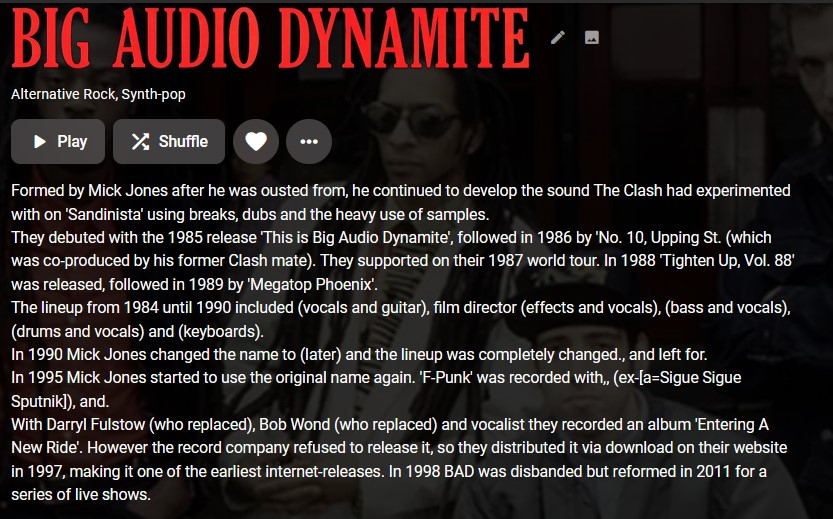
This is still a major issue. According to the discogs API docs, it is limited to 60 requests per minute. My logs are filled with hours upon hours of discogs errors and Musicbrainz errors. So many that it affects the ability to do any other scans. Can we get a timeout when processes begin to endlessly error out and a good API call timing. I know there have been requests to revamp the order in which music files are scanned for info; preferably so that the embedded info is first before going to the online meta. The online info being stripped out of Discogs is a bit too aggressive now. Previously there were the html/markup tags remaining, now the actual info is being removed if it is a a hyperlink. Still creating a situation where the meta that is imported requires manual editing. Except that instead of just having a few errant markup tags, now there are entire words and parts missing. Compare attached pic with the description here
 2 points
 -
Why do you think Emby do not have costs ? Emby is not 'just a piece of software'. Hosting, Development Licenses, LiveTV programe data provider, Metadata Providers, Developers (they don't do it for free) not to mention corporation tax etc .. After 6 years of no price increases, I don't think it's unreasonable to review this imo.2 points
-
I am switching over from a Win7 box running MBC to Chromecast dongles. With the Win7 box I had a HDMI to Cat6 setup that allowed me to stream to up to 4 displays/TVs simultaneously. It was great while it lasted, but involved stapling cables to the ceiling to run it from room to room - plus it has borked Can there be an option to multi-cast to several receivers at once? i.e. simultaneously play to Chromecast dongles in my office and living room and kitchen simultaneously so i can walk from room to room without stopping and restarting the movie or show all the time? I realize that bandwidth could POTENTIALLY be an issue, but i have a fill gigabit network and a multi-port NAS so that really is the least of my worries... Thank you!1 point
-
This is all probably user error on my end. I was running Emby next gen no problems forever. Lately it seems that when Kodi starts and Emby syncs to do the updates, it takes forever. I mean it can take hours to sync any updates with Kodi. I have Kodi Sync installed. I've tried both the beta version and the regular version of Emby next gen. I've even reinstalled Kodi and the initial scan is super quick as always. Probably done in less than 2-3 minutes. Then a day or so later, bam.... it's back to taking forever to sync. Any thoughts?1 point
-
At the beginning of the year, I noticed that filtering Audiobooks (and Music) was no longer possible by played status. So I used the website to filter my Audiobooks to decide what to hear next. Recently I did an update and now this filter option is gone on the website as well. I would like to have an option to only show books which are unplayed.1 point
-
Is there any way to revert to the previous behavior of missing episodes being listed among all the present episodes in the Season view? Or allowing use to choose the behavior we want. Having to go to the 3 dot menu is really counterintuitive. This really is only useful if you already know there are missing episodes. If someone is watching a series they have no way of knowing if an episode is missing and just continue on with the "Next Episode"1 point
-
Those old tables are not used, when the schema changes the plugin renames the current table and creates a new one with the new schema, I never got around to writing auto migration code so the old tables are just backups that are never touched. The Plugins back up does not back up the old tables unless you migrate the data to the current working table.1 point
-
Yes there is, i have been through this with Luke. Emby identifies based on three things, The ALBUMARTIST, The ALBUM and the MUSICBRAINZ_ALBUMID tags The downside to this is the ID process is it is not very smart. Emby can have 2 albums with the same ALBUMARTIST, and ALBUM tags, but one will have MUSICBRAINZ_ALBUMID and still stack them. There needs to be one of 2 things to tell Emby they are 2 separate albums The ALBUM tag must be different, or the MUSICBRAINZ_ALBUMID tag must be different when the ALBUM_ARTIST tag is the same. You can spoof fake MUSICBRAINZ_ALBUMID tags, but be aware that will generate errors in library scans OR, you can add additional info to the ALBUM tag to tell the versions apart; for example Rock LP [FLAC]1 point
-
Probably possible when the plugin fully supports Kodi 21s new multiversion. Currently I cannot dev that, cause Kodi's repository is abandoned and the flatpak beta versions are not updated since month.1 point
-
Thanks for your reply. I seen those release notes but i dismissed them as it says for the J series and mine is the QN. Where can i download the file from for my QN94A? I changed the hdmi cable and it has fixed the problem. Im using the ARC feature for audio, the port on the back of my receiver is a bit loose.1 point
-
+1 This would be usefull.1 point
-
Hi, it’s what all Emby apps use. I would suggest comparing your query to what the web app is sending.1 point
-
Perhaps there is yes. But it might take some looking into.1 point
-
Release notes are pinned https://emby.media/community/index.php?/topic/31461-emby-for-samsung-smarttv-release-notes-tizen-orsay/1 point
-
The latest usb release is 1.7.71 point
-
hi, for now you can update to 4.7.14 by downloading the rpm from here: https://github.com/MediaBrowser/Emby.Releases/releases/tag/4.7.14.0 This will get you past the update dialogs. Are you going to update CentOS in the near future?1 point
-
Some of us prefer to utilize embedded metadata. There are many benefits to this. All metadata isn't lost if the emby database gets corrupted. The metadata can be used by other apps, all utilizing the same metadata. Currently it's a mystery when/if/how emby uses embedded metadata (see related below). I am requesting that someone with access to the closed-source code document what metadata tags can be used for each file type. Support more embedded tags would also be greatly appreciated. Ideally, each emby metadata field could be populated via embedded metadata. Related:1 point
-
Sure, I suppose that can't be ruled out.1 point
-
Hi, Yeah that's understood but a shame nonetheless. I do see most devices can run WebAssembly so that may always be an option?1 point
-
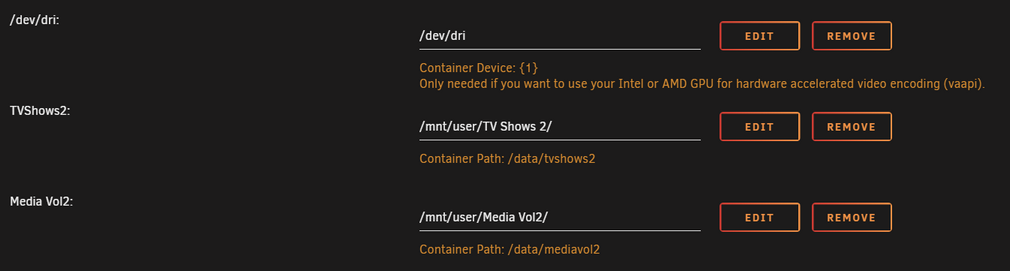
Typical causes of this are due to the mappings on your docker template, if the application, Emby in this case is configured to write to a path that has not been mapped on your docker container configuration then that this will cause it to be written to the docker.img itself causing the blow out. Have your configured your docker container to map this path to something that Emby can access? Something like this: Emby will see /data/mediavol2 and not /mnt/user/Media Vol2/
 1 point
 -
As a follow up, I noticed that when using the Windows web Emby Theater, there is a setting for "Speed". I played the same FLAC files that play slow on the Windows app, and they play fine. Speed is set to "Normal". I cannot find this setting on the Roku app. It says to adjust Audio go to web app User settings. Anyhow, it only happens to FLAC files, so it is weird indeed. Not sure how the setting could have been changed if I can't even find it.1 point
-
That's so weird. A valid info in database means an invalid icon and a blank record in database is valid for the skin. Sometimes I really love Kodi.1 point
-
I guess so, seems strange these aren't in parity with codec playbacks.1 point
-
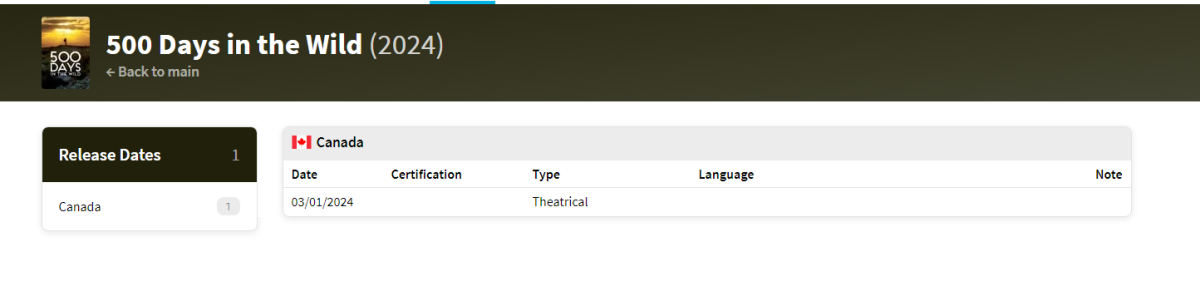
But testing this "500.Days.In.The.Wild.2023.mp4" will not identify automatically as year is not 2023 on provider so it returns no results. Searching TMDB webpage by year provides same results. { "page": 1, "results": [], "total_pages": 1, "total_results": 0 } But changing the year to what the provider has works. 500 Days In The Wild&language=en-US&year=2024 { "page": 1, "results": [ { "adult": false, "backdrop_path": "/syCYrqg6CsM038Et7uYcqQHXKbI.jpg", "genre_ids": [ 99 ], "id": 1221071, "original_language": "en", "original_title": "500 Days in the Wild", "overview": "Follows Dianne Whelan, a filmmaker disappointed with the state of the world, as she takes a solo self-recorded journey across the longest hiking trail in the world.", "popularity": 7.714, "poster_path": "/zcOTtSjpdSaMldbBTiGCVUIcsk4.jpg", "release_date": "2024-03-01", "title": "500 Days in the Wild", "video": false, "vote_average": 0, "vote_count": 0 } ], "total_pages": 1, "total_results": 1 } So you have two options. 1. Manual identification by providerid 2. Change the Year in filename. As there is a year difference between IMDB and TMDB as they only currently have release date by country.
 1 point
 -
yes i have 2 working now as stated in my previous message thanka for help everyone1 point
-
That's our look and feel. All apps are going to look the same. Please feel free to create feature request topics for new things you'd like to see.1 point
-
Thanks for adding DV/HDR. I tried it again, but I don't actually like overlays as while it may look reasonable on the above example from H2P, on most covers/posters, the icons look pretty horrendeous and out of place. Have you thought about adding a restricted set of the icons on the top '4K/Blu-Ray/DVD' bar ? Say a max of 4 icons ? (maybe make the 4K/Blu-Ray/DVD an icon as well - so 5 in total). That way, you don't cover any of the artwork, and have a consistent background so you can use transparent icons. (+ option of Mono - it looks so much more modern than coloured icons imo ..) If I could do this, I'd 100% use it and I think it would modernise this really nice feature - but currently, sadly it's been uninstalled again for me.1 point
-
I want this feature1 point
-
I also need this feature. Proxy is a must for those who use Emby on mainland.1 point
-
I support this idea because I desperately need this feature 我支持这个想法,因为我迫切需要这个功能1 point
-
Hi, yes it is.1 point
-
Luke, is this feature on the roadmap or not yet. You made the same reply in June of 2021. Please let me know. Thanks1 point
-
i am running on a synology with dsm 7.2 and emby 4.7.11.0 and when a recording is deleted it just goes away and does not show up in the recycle bin. I have confirmed that the folders recycle bin is setup correctly. Has this feature been implemented ?1 point
-
For those who haven't seen: https://www.theregister.com/2024/03/18/truenas_abandons_freebsd/ They're going all-in on TrueNAS Scale.0 points
-
Check the value of inotify.max_user_watches and increase it if necessary: https://gist.github.com/ntamvl/7c41acee650d376863fd940b99da836f0 points