Leaderboard




Popular Content
Showing content with the highest reputation on 03/16/24 in Posts
-
New PUBLIC TESTING version available 10.0.9: Delta changelog 10.0.8 -> 10.0.9 fix player crash fix date created not updated add additional debug log information3 points
-
Ok, thanks for the response. I'll just keep an eye out for the future.2 points
-
Hi, I would like to have an option to choose H265 instead of H264 in the Transcode option. It will be smaller for all bad bandwidth (2~5Mbit ADSL), but will have a great quality. Mobile phone can benefit of it greatly too with the 4G and the limitation of download.1 point
-
I've implemented SSL on Emby, my server runs Ubuntu, but it should be similar for Windows, and automated the generation of the PFX file. I must hasten, I had a lot of help from the Let Encrypt community, MikeMcQ in particular, but here's how to do it. Use the snap install, you have more options, which, as you'll see is important. Watch out for typos, I typed a - instead of a _ Once it was pointed out it all worked perfectly. You can cheat, which is what I did, I installed certbot using the script from the post "SSL made Easy", which got me working with SSL, I then removed the installed certbot and installed the snap version, as that has the "post_hook" option we need. See here https://certbot.eff.org/instructions?ws=other&os=ubuntufocal The problem is certbot will auto-renew, but it won't create the .PFX file, you need it to do that afterwards for emby The command in ubuntu to to this is openssl pkcs12 -export -out pkcs12.pfx -inkey privkey.pem -in cert.pem -certfile chain.pem -passin pass:******* -passout pass:****** Check the file names, mine are the default for Ubuntu. I don't know what they are for Windows This generates the pkcs12.pfx file But Emby can't see it in Ubuntu, so you need to change the owner using chown emby:root pkcs12.pfx I created a script file, remember to flag it as executable, called convert-to-pfs.sh literally just this openssl pkcs12 -export -out pkcs12.pfx -inkey privkey.pem -in cert.pem -certfile chain.pem -passin pass:***** -passout pass:***** chown emby:root pkcs12.pfx I put it in the /etc/letsencrypt/live/Yourdomain I should move it, it's not good practice, but I didn't want any path problems Once certbot is installed, it creates a conf file in /etc/letsencrypt/live/Yourdomain, called yourdomain.conf in the renewals section it will say something like # Options used in the renewal process [renewalparams] account = ********* authenticator = standalone server = https://acme-v02.api.letsencrypt.org/directory You need to add the line post_hook = /etc/letsencrypt/live/your domain/convert-to-pfs.sh You can do this with the reconfigure command, but you can cut and paste from this post. Remember to change the path. That will then call the conversion AFTER the certificate has been renewed. Hey presto you have the pfx file updated To test use certbot renew --dry-run --run-deploy-hooks This will not renew the certificates, but will call the script. Just make sure you've renamed the original pfx file so you can see the date and time changes. If you get "certbot: error: unrecognized arguments: --run-deploy-hooks", you're not using the snap version of certbot. Apart from that, that's it Have fun juju1 point
-
Dear Developers I have now decided that I willing to pay to get this bug/feature prioritized. Because my alternative is to pay for Infuse, and I'd rather give you the money. How can I take this forward? Is there anyone else who would be willing to donate to get this issue prioritized and fixed? Many Thanks Stephen1 point
-
Hello, I just switched over from plex to emby because I got fed up with photo libraries. I thought to give emby a shot for photos only. I'm just performing an initial scan of my library (4500 videos, 72k photos). I noticed that emby is rather slow on this initial scan and it's mostly performing sequential video scan via ffmpeg. Is there any reason why this is not done in multiple parallel threads to speed up things? My server has 6 cores but is rather bored CPU-wise and also not exhausted I/O-wise. I believe it could handle 2-4 more parallel ffmpeg calls. kr1 point
-
Request that Emby server store Dolby Vision (including profile), Dolby Atmos, DTS:X, HDR10+ (smpte2094) and HLG for appropriate video in the db and use it for display in the media info and track selection sections of movie/episode details screen. This information once in the db can then also be used in numerous other areas like: Mediainfo Cover Art, Stats for Nerds, Distinguishing different DV profiles for hardware support and tone mapping Example Mediainfo app display of HDR10+ ffmpeg patch for HDR10+ https://patchwork.ffmpeg.org/patch/11491/ Related requested that may require DV profile information in order to prevent unneeded TM1 point
-
As suggested by @ebr I have split my original request to allow better monitoring of interest and progress. The original request is here https://emby.media/c...brary-overhaul/ If you are interested please like the post. I always wanted to have this feature! This is something that was offered by Flickr. It would use the coordinates where the picture was taken stored in the EXIF and display the picture in the world map. I think that this was a bit specific in the past because we needed to have a GPS module tied to the camera but now every smartphone does this out of the box (without even asking your permission). Here is an example from Flickr where each point is a picture that you can display when clicking on the point:1 point
-
Awesome. Thank you for the insight. Worked great and easy.
 1 point
 -
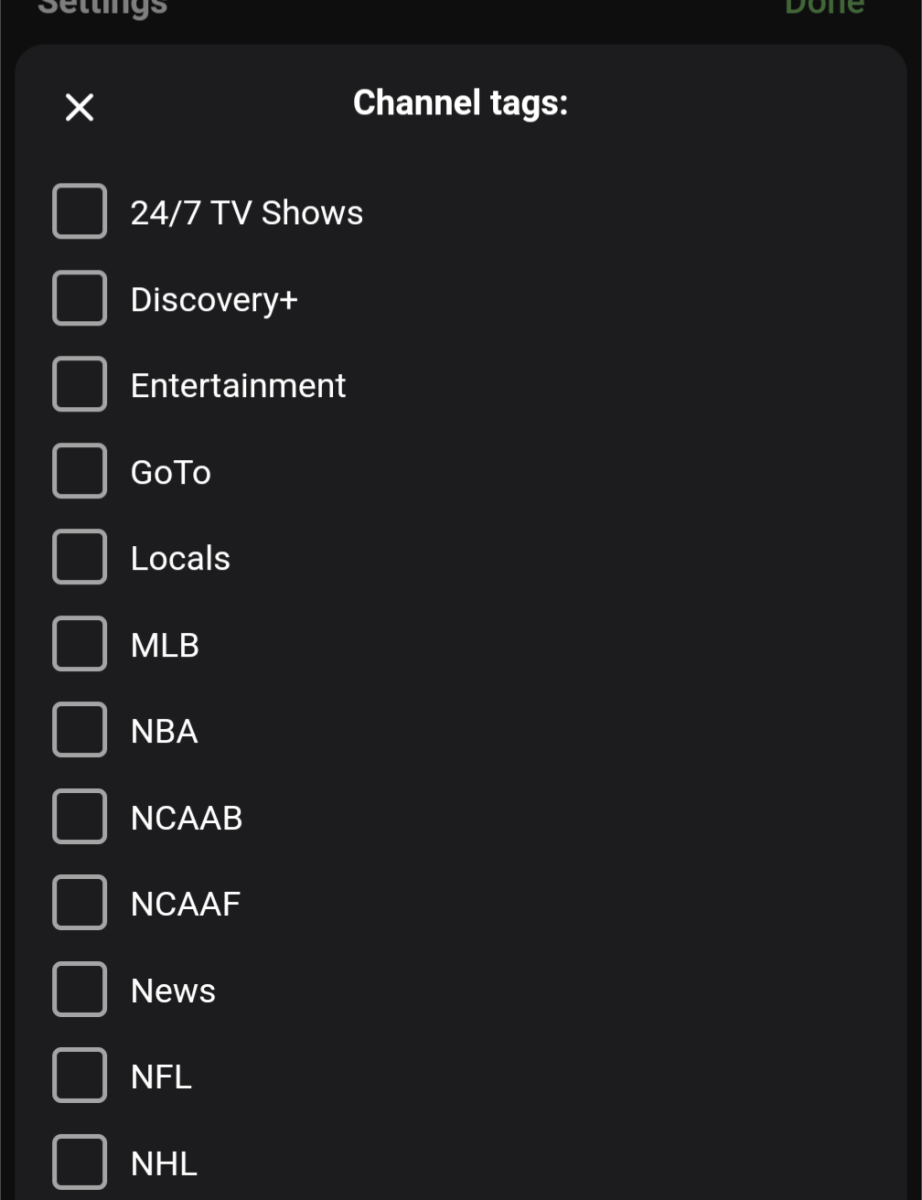
More of a Database issue as case changes usually are ignored. Probably have to shutdown Emby and ensure you make a backup copy of the library.db and use any database viewer and go to the Mediaitems table then the Name column and filter to Discovery+ and edit the field.1 point
-
Oh man gifs having their own naming system would be great.1 point
-
I'll say this one more freaking time: YOU are providing your own media. Emby is a software for viewing YOUR OWN MEDIA. If you did the correct thing and ripped your media with subtitles in the first place, then you'd have no issues viewing those subtitles in Emby. Emby IS designed so that deaf people can use captioning. The option to enable subtitles is right there during playback. Your issue really comes down to the fact that YOU didn't provide subtitles with your files. The only reason you believe you're "forced" to pay for Emby Premiere is because YOU are providing your Emby server with bad media and expecting a paid feature (paid for EVERYONE) to be made available to you for free because of your disability. There really is no discrimination going on here. As a free user of Emby, you can still provide subtitles and view them upon playback. You're given equal opportunity to enjoy the media YOU PROVIDE, which is the primary purpose of Emby. Emby is a personal media server for viewing your own content, not a tool primarily designed to scrape OpenSubtitles because you chose not to provide subtitles with your media.1 point
-
sqlite browser -> open MyVideosXX.db -> table streamdetails1 point
-
I ended up figuring this out for myself. The problem was one of the MiBox's audio setting was turned to 0 out of the box, vs the other one which started at 70%. That's what I get for buying cheap lil media boxes. I have since moved on from these, and if anyone else is considering them I would recommend against them. Still, I appreciate the attempt at the help and I apologize for never coming back to see your reply @ebr.1 point
-
You don't need to know the root password, you should be able to run this as your own user. sudo su - Or to get to the emby user directly (which should have been created as part of the installation process): sudo su -s /bin/bash emby You have to specify -s /bin/bash because the emby user should be created with /usr/sbin/nologin as the shell so you can't sudo su - emby as there is no shell defined. emby:x:996:993:Emby Server:/var/lib/emby:/usr/sbin/nologin1 point
-
You are given equal access. If it's a premiere feature, then it's a premiere feature for the hearing privileged as well. Please point out how it's discrimination when EVERYONE is treated the same. It's not like you selected you were deaf during the installation of Emby and then the software decided to block that feature just for you. Plus, if the media you are trying to watch is really your own, then just rip them with subtitles in the first place. The only person denying you subtitles in this case is yourself because you opted to not include subtitles when you ripped your media.1 point
-
hlg is the missing one1 point
-
Wondering what the solution was ? What did you find ?1 point
-
The i5-11500 will be more than enough.1 point
-
Why do you think there is a problem? Most likely your item is transcoding and your server's having hard time keeping with it (in particular if no HWA), server and/or ffmpeg logs would show more. How to Report a Problem1 point
-
I see the profile pin is available in beta, But the issue still is, if you want to switch users you have to enter the full username and password every time. Is this going to change to save the logins, allow you to choose one, and then enter password? As it stands today, with the new pin stuff, switching users is not something that’s even useful if you have to type the password each time.1 point
-
SSL is tied to domain names, not ports. You can have 1 or 10 ports behind the name and it doesn't matter. If you get the network configured right then SSL should fall into place. If you want just one port, like 443 then you have to get into more complex setup behind the scenes.1 point
-
sorry, but unless you have seeing problems, this just is not true. you may be happy with the trade off of size for quality but, even with compression done by the scene, it is 100% clear that a video has been compressed. the blacks look blocky every single time1 point
-
it's playing around with the FFmpeg settings, really... I've been doing it for years and I don't notice any difference on my devices, which range from Samsung Galaxy phones to iPads to 65" 4k TVs... I've put together a PowerShell script with various options for it, based on something Penkethboy wrote years ago: https://blacktree.nl/2024/01/29/re-encode-h264-x264-to-h265/1 point
-
I'll start a PM with our forum admin and he can look that up for you.1 point
-
So what I would say regarding playlists is move your files, and then when you're done you'll need to manually fix up the media paths in the playlist m3u's.1 point
-
Thanks, I can see a player crash but it was a movie. What else did you play? Also I see you played LiveTV. Was it synced from Emby or "external/Kodi only" livetv? The issue will be fixed in next version.1 point
-
Emby is a personal media server for your own media. If you don't have subtitles, then that simply means you unchecked that option when you were ripping the movies from your own DVDs and BluRays1 point
-
@LukeThanks for checking, for the most part, yes. Everything is working well. I don't understand every aspect of the settings, but it's more of a Linux learning curve issue, than it is Emby. I"ve learned how to permanently auto-mount an external drive with the permissions working. So, all is good for now, no specific questions. Thx.1 point
-
Thanks man, I got the POC working today. I'll post and make it open source when its done.1 point
-
Thank you! arm V7 works perfectly! Even supports the Zidoos player as external player, so Dolby Vision and VS10 play like a charm now1 point
-
Thank you very much, the tip about renaming, for example S01E364 title (year), helped. So all episodes were displayed completely in the library with the corresponding correct metadata.1 point
-
If I wait for the recordings to finish and THEN restart the emby server from the main settings panel and then SCAN RECORDINGS. emby will then place any past recordings into LATEST RECORDINGS. This is also the only way that I can add any new files to emby. I have to reboot emby and then choose a FOLDER to SCAN in order for it to complete. This option to SCAN then stops working for any other FOLDERS. I just works for a single FOLDER each time. Log file attached - embyserver (1).txt1 point
-
I guess for me is that I don't trust the re-encoding part and the potential it may actually degrade quality or how it works with emby when it replaces the files but its something I will look into eventually.1 point
-
Been 15+ days running the beta with no crashes. I am going to switch to running the ARM version of the beta and see how it goes.1 point
-
Woulds have shown the current installed version at the top of a Emby server log. But it can be difficult to find correct version for all these different modes.1 point
-
Sorry! I was running an older version of Emby (the default version that is offered in Synology Package Center). After updating Emby, I now have the option to "Remove Identification". Thanks!1 point
-
I don't know where to find this information ! But i tried this and it work now. The server is updated ! Thanks for all your posts and your contributions !1 point
-
Looking at the other guys chart. Synology DS423 ARMv8 (RTD1619B) 1.1 Ghz1 point
-
It's /config/system.xml from under the server data folder: Emby Server Data Folder1 point
-
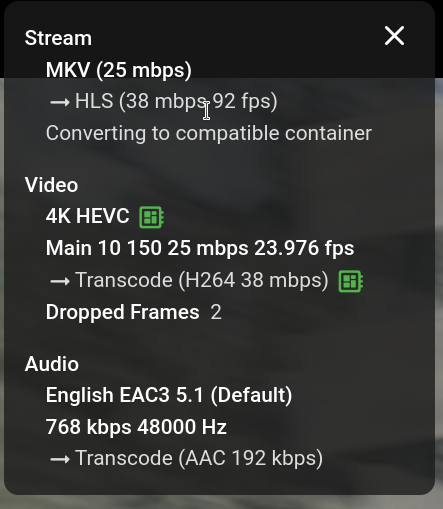
Thanks for replies, I wasn't aware of "stats for nerds" when playing a movie, and there I can see the little motherboard icon along with information about transcoding so I guess acceleration is used, please check this screenshot. Anyways, it's funny that this Gigabyte page is saying I have Intel® Iris® Xe Graphics, but then again Intel says it's Intel® UHD Graphics 630, so I guess Gigabyte is wrong Was reading about what is better QuickSync or VAAPI, so it seems that for Intel CPU's QuickSync is a bit better.
 1 point
 -
Me revoici. Ayant des soucis récurrents de wifi et pour ce service rendu un abonnement adsl prohibitif, j'ai résilié mon abonnement bouygues bbox en espérant que cela allait me résoudre mon pb de connexion à mon serveur emby à distance. J'ai opté pour un autre fournisseur en l'occurrence sfr et là miracle les mêmes réglages de redirection de port m'ont permis de me connecter avec mon adresse IP public et la redirection de port 8096 vers mon IP du serveur local emby. Je vous remercie tous pour votre aide et m'excuse de ne pas avoir tjrs été clair peut être, mais vos réponses l'étaient et m'ont permis d'avancer. Il me reste à passer en https sécurisé. Je vais m'y atteler et au besoin reviendrai vers vous si pb. I changed my provider and now it work fine. Thank you.1 point
-
I turned off frame rate matching and it seemed to fix the audio issue. Thanks for the help, I don't know what I am missing out on without that option, but I think I rather have the audio in sync, it was very annoying.1 point
-
Libvips and HEIC works after today version 4.9.0.9 update. Skia not found anyway but I don't now where it used. So Skia library is present in emby's libs folder. Thanks!1 point
-
@cochize1I'm using linuxserver docker container and I've added a custom script (/custom-cont-init.d) that patches the file and sets minimum bitrate to 10mbps when container is started: #!/usr/bin/with-contenv bash set -e manager_path="/app/emby/system/dashboard-ui/modules/common/playback/playbackmanager.js" # Wait for manager file to exist while [ ! -f "$manager_path" ]; do echo "Waiting for playbackmanager.js to exist..." sleep 5 done # Patch the file error=$(sed -i 's/function playAfterBitrateDetect(maxBitrate,item,playOptions,onPlaybackStartedFn,signal){/&maxBitrate=Math.max(maxBitrate, 10000001);/' "$manager_path" 2>&1) # Check if sed command was successful if [ $? -ne 0 ]; then echo "Failed to apply streaming patch. Error: $error" exit 1 fi echo "Streaming patch applied successfully." One odd thing that I noticed is that emby predefined bitrates end with either 1 or 2, which I'm guessing is some sort of special value that is used for some other reasons (maybe resolution?), hence the 10000001 usage in this patch.1 point
-
Since the default is `https://musicbrainz.emby.tv` with SSL it could get quite tricky. Emby would likely not honor any redirect since the SSL handshake would fail before it got to that step. In theory you could make your own CA and then generate a SSL cert by virtue of the fact you can install the CA on the Emby host cert store but a lot has to go right for this to all work. A lot of work.1 point
-
HI, probably armv7, right? https://emby.media/emby-for-android.html Thanks.1 point
-
I've been running my emby server like this for a number of years without any issues. Before updating I take a snapshot of the jail (/mnt/pool/iocage/jails/emby) AND the emby user dataset (/mnt/pool/embydb). If there is a problem and I need to rollback, I make sure to rollback both. You are right though, rolling back one and not the other can lead to problems.1 point
-
I came here looking for exactly this. Additionally, it would be great to have a "subscribe" type option. For example, I want all the notifications as admin, however, it would drive my girlfriend nuts (she has bad taste and is missing out on so much haha). She could mark "subscribe" or something to certain shows, and get alerts when new episodes get added, but she won't get bombarded with notifications about the new What We Do in the Shadows episode, or blasted with 11 notifications about each new ep of Solar Opposites I just added.1 point
-
playback, Emby for android TV with Shield with a poor connexion could use it. If you put an option on Client side "Use H265" Server side "Allow users to use H265" like that you don't care if devices are compatible or not, User have the choice.1 point
.thumb.jpg.e4b3f560d4d2fdb208641063c1ac46f0.jpg)