Leaderboard




Popular Content
Showing content with the highest reputation on 02/28/24 in Posts
-
3 points
-
Hi, this will be resolved in the upcoming 4.8.2 maintenance release. Thanks.3 points
-
Thanks very much. If there are any other things I can check or test for you please let me know in the meantime. Happy to help if it's possible to do so.2 points
-
Thank you both, I can confirm that I'm now able to see the community ratings for individual episodes.2 points
-
I just wanted to thank everyone that took the time to post questions and those who enjoyed the spirit behind this post. I’m going to lock this thread at the end of the day, but I’ve gone ahead and submitted the questions to @Lukeand @ebrfor answering. We will be sharing some blog posts that dive into these answers as they get answered. I for one am excited to see what they come share with us! Thank you again for taking the time to respond.2 points
-
Any library settings change you make applies to items added after the change/going onwards. For existing items, Refresh Metadata is required (as stipulated on top of your Edit library dialog).
 2 points
 -
It was a User - but by the looks of it Luke has identified the issue2 points
-
Now Version 4.8.1.0 Haven't been able to reproduce the issue just yet. Will test over the week and report back if I do. Finger's crossed that solved it. Worth noting that I run Emby on a Synology NAS and that update was a manual package update - I was up to date at Version 4.7.14.0 from the Community Packages so I had thought it was the latest version available to me. Looking at the package info it still says the "Newest online version" is 4.7.14.0, even though the installed version is 4.8.1.0.2 points
-
I went ahead with tailscale. Got it all set up, went on my phone logged in and it worked!! It was so easy and also with this there are so mamy other benefits to it. Definably have to do some more research with it. So thank you for your help.2 points
-
@darkassassin07 Yes, the problem here what we used as a modify, do not work well with latest build we did some months ago. Please give me time to solve this, and indeed it sucks as it is now, sorry buddy.2 points
-
I think you are missing the whole point of us that are complaining about the change here. I and others i know do not use emby to manage any of the content, only to watch and view and see whats up next as a user experience. I would be pretty surprised to find out many or any people use emby to manage their content once they have a decent collection. Emby is not really for managing content except for the meta data and maybe grabbing artwork. There are other apps that are free that are great for that. I have Movies, TV Shows, Audio books, Home photos and videos, music, live TV and recordings. Now it does manage recordings and does a pretty good job there. But all the rest are managed by other software, including subtitles. If someone does not like the feature or you feel like its a performance issue, then turn it off for your environment, or if you see it for a admin feature then fine, use it that way. The big deal was it was a feature several people like and we had for a long time and it was "taken away", yes you can dig for it and yes its going to be in the meta data browser but its not the same. As i mentioned earlier, i have users that will never find that and obviously those users will not have access to the statistics plugin or the metadata browser. So for us all we can do is voice our opinion on why we want it and think it needs to come back, and if we cant convince emby to revert then i guess we will have to make a plugin if possible to bring it back, or go to another platform.2 points
-
EMBY SERVER 4.8.1 IS NOW LIVE WITH LOTS OF NEW FEATURES AND IMPROVEMENTS Emby Server 4.8 has been rolling out to various platforms over the past week or so. This upgrade in particular is packed with a lot of new features, improvements and fixes. Over the next few weeks, we will be sharing multiple blog posts to share some of the exciting new functionality that 4.8 brings to Emby and give you a more in-depth look into the features. Today’s blog will focus on two new features: PROFILE PINS With Emby 4.8 you now have the ability to set individual profile PINs. This new PIN replaces the old local network only PIN that existed prior to this release. It is more flexible (works both locally and remotely) and more secure. This new PIN is very useful if you have devices in your home that are shared by multiple users. As an example you may want to put a PIN on your profile so kids in your home can’t just click on your profile and view all of the same media but still allow your kids to freely switch between their profiles on the same device. NOTE: All users (local and remote) must authenticate ONCE per device. Once this initial authentication is done, that user will be remembered on that device and won't require password entry again unless signed out. PLAYLIST SHARING CONTROL Another great feature of 4.8 is the ability to designate exactly what other Emby users you share playlists with. Prior to 4.8, any playlist that was created was available to everyone on your Emby server. Now they’re set up for individual users. When you first create a playlist, that playlist is private to just you. If you wish you can then share it with any user that you would like via the "Modify Collaboration" option. You are able to set it up so that different users have read only access or have view and edit access to the playlist. Please keep in mind that this is only for playlists that were created after the upgrade to 4.8. Playlists created prior to this release will not have this functionality. They would have to be re-created to gain it. NOTE: In order to utilize this feature, you must first grant each user that you want to be able to create shared playlists the ability to share content from the user settings on the dashboard. You can see from the image below that it is simply a checkmark on the settings page. Once that is checked, it is as simple as creating a new playlist and then either right clicking on the playlist or clicking on the “...” menu and clicking on manage collaboration. From there you can easily choose which user you want to share the playlist with and what level of access they have. Stay tuned for a new blog post in the coming days that highlights some of the other awesome and new features of Emby 4.8! For now, we have listed below all the improvements and fixes that were included in 4.8. We as a team are excited to share all of these great new additions with you and hope you’re enjoying the update to Emby just as much as we are! ADDITIONS AND IMPROVEMENTS Add new profile pin feature. Useful for devices shared by multiple users. Add new table view option Add more fields for selection in poster views Add new theme options Various database performance improvements Merge webhooks into notifications Support keyword-based recordings Display all episodes directly under series without using season layer (with user display option to control behavior) Update Intel Media Driver Minor database performance improvements Support extras for seasons and episodes Revamp backup plugin to be a more complete backup Support saving images locally for extras Add FR-TP content rating Import hearing impaired attribute for both internal and external subtitles Add hidden config switch to disable ssl renegotiation Add library option to cache images in server data folder to reduce disk access to original media folder Remember audio and subtitles across a tv series Improve support for audio-only live streams Add View Missing Episodes context menu option for series and seasons Add option when creating a user to copy data from an existing user Support random sorting on list screens Improve country and language list sorting Improve program dialog in live tv guide to show complete information Add subtitle position settings Improve user interface of Play On menu Add sample file ignore size to library options Added New Episodes section under Live TV suggestions Add new indicator on Live TV program posters Add options to hide played media from More Like This and Suggestions Add user locked out notification to Notifications and Webhooks Support more conventions with provider id values in folder names (moviedb, imdb, etc) Improve series name detection by getting the series name from episode file names, in some cases Support multiple languages with user audio and subtitle preferences Improve performance of server activity viewer Improve support for folders being used in multiple libraries of same content types Clear external ids for episodes when using Identify feature on Series Improve search for single title movies Add camera upload user permission Add new configurable home screen sections - Playlists, Collections, and Recently Released Movies Add more fields for display in User and Device management Add HDR filters to video list screens Add sorting controls to user and device management screens Add additional subtitle color options Support swipe down to close all dialogs that slide up Add Remove Identification feature to reset metadata Improve searching titles containing quotes and periods (e.g. Agents of S.h.i.e.l.d or Shield) Anonymize manifest.json Add warning for duplicates when adding items to playlists Support both nb and no Norwegian language options Add automatic metadata refresh option for episodes with placeholder titles such as TBA Rework Trakt plugin to be an option that each user can configure, rather than server settings Rework Notifications to be an option that each user can configure, rather than server settings Add guide display options to control visibility of channel names, images and numbers Improve automatic reconnection for live streams Display preview of matched items when setting up a keyword recording Reduce database queries in audio fingerprint process Add HK ratings Add user option to hide media info from detail screens Improve support for "subs" and "subtitles" folders Don't allow local network addresses to be specified in x-forwarded-for and x-real-ip Add media deleted notification and webhook event Support multi-select drag and drop add to playlist Support multi-select operations on downloads and conversions lists Update default subtitle font Add option to limit the number of genres displayed at the top of detail screens Rework playlists to be saved as m3u and deprecate the previous xml format Support extras in Collections Improve episode number parsing when episode file name is gibberish and parent folder name is readable Support sorting for playlists and collections Revamp webhooks plugin, supporting new events and configuration options Include activity log database file when vacuuming databases Rework scanning of extras, allowing more flexible usage of video extras Improve the use of internet metadata with recordings Support shift to multi-select Use tone mapping for image extraction Allow separate images for audio book tracks Stop scanning at the top of a library when it's unreachable Add image size display option Add lock screen function to video player on mobile devices Add three way toggle nav menu to web app Add option to control display of rating information at the start of video playback Change wording of transcoding reasons to be more user friendly Improve filter menu indicator Add Select None to multi-select lists Initial RTL support in web interface Make tagline field lockable Make overview field lockable Rework Live TV recording options to be based on selected folders, rather than raw paths Support .actors folder for people images Nfo plugin: Stop saving nfo files for additional parts Improve photo loading performance Remember subtitle selections even when user option is set to None Improve support for musicbrainz illegal character replacement Improve drag and drop scrolling Sanitize new playlist and collection names Add intro detection library options Improve automatic channel mapping with xml tv Support sort by composer FIXES Fix songs not being grouped into album when the album title contains an emoji Fix empty genre filters on playlists Fix anamorphic image extraction Various fixes for iOS 17 Various image processing fixes Fix transcode temp path in startup logging Fix 172.X addresses always being considered private Fix swagger docs with reverse proxies Fix restricting by tag hiding the tag itself Fix multi-episode file titles not using series display order Fix hide from Continue Listening only hiding a single track and not the entire album Fix live tv recordings being stopped in rare cases when the limit to keep is set to 1 Resolve issue of multi-part and multi-version not being able to be used together Fix green bottom line with QSV+OpenCL tone mapping Fix single image extraction with MPEGTS Fix support for simultaneous music and photo playback Fix sort by sort title being case sensitive in some views Fixes for multi-part and multi-version videos being used together Fixes for movies having file names starting with years Fix Intro Detection scheduled task not being visible Fix a/v sync regressions with live tv and recordings Resolve long-standing metadata quirks when removing data from nfo files and having it not get cleared in Emby Fix changes to url-only nfo files not being recognized Fixes for downloads automatically redownloading Fix graphic subtitle position when burning in subtitles with transcoding Fix unnecessary ffmpeg dependency on Windows Media Foundation Fix sporadic cases of errors when reordering live tv channels View the full article2 points
-
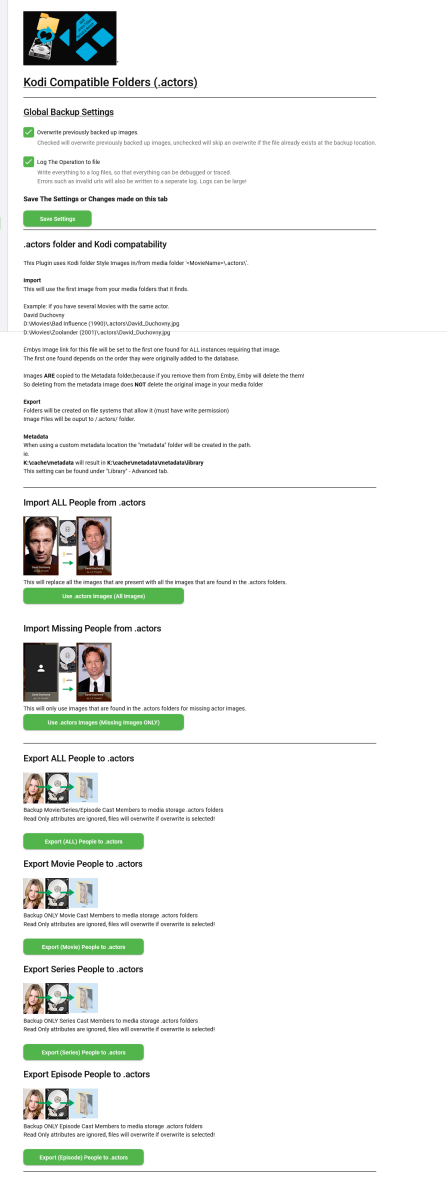
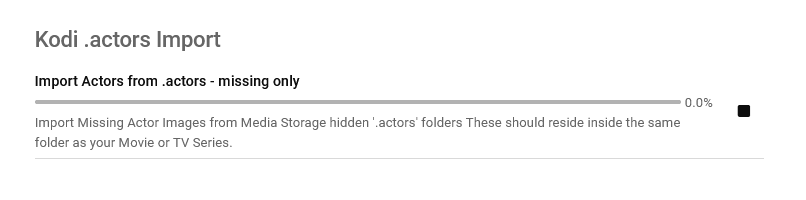
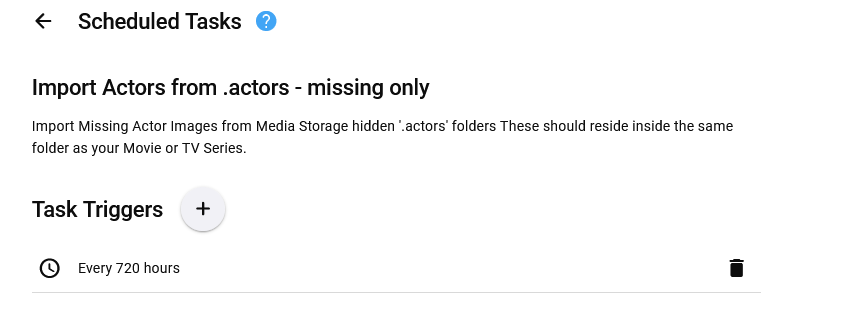
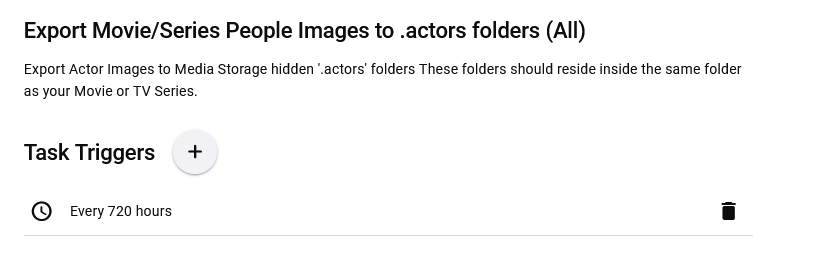
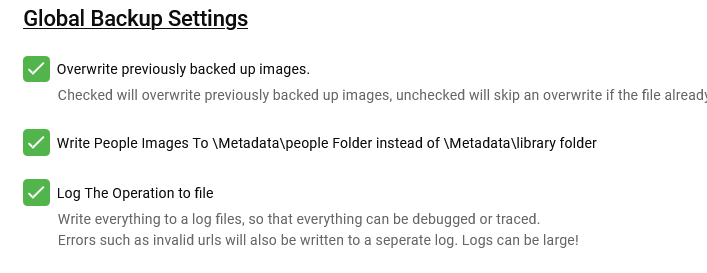
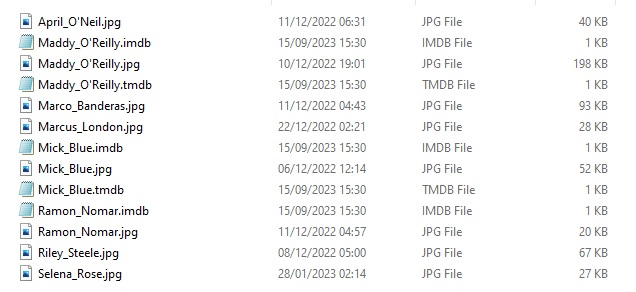
Updated 15 Sept 2023 - description at bottom of this post Updated 06 August 2023 - description at bottom of this post Updated 05 August 2023 - description at bottom of this post As requested, import and export .actors folders people as a seperate plugin. I have done this fairly quickly so have not extensively tested it/checked it all works falwlessly! Everything should log to its own files and keep out of Emby's main logs now If you don't know what it is or does then you don't need it! Use at your own risk, this plugin creates files (export) and changes Emby database (import) Create files writes to media folders and / or writes to metadata cache library Scheduled task * Updated 24/03/23 ===================== I have left the old version here incase the newer one doesn't work properly. I have NOT tested it! There is now an option to select the import metadata directory preference for \Metadata\library or \Metadata\people directories. Code has been added to change the path that the image is put to when the option is selected. Other than this change, both versions are the same (one with this change and one without) - no need to upgrade if you do not want to. Kodi_actors_Folders.zip Kodi_actors_Folders_(MetadataPeopleFolder).zip Updated 20 June 2023 Fixed Null Reference Exception when Actor image path is not null but an empty string - this shouldn't happen but seemingly can happen! When it occures the plugin simply exits, and doesnt finish its task. The Fix Now logs this as a path error and skips over it to continue so the plugin doesn't just quit and exit. Also a code edit for getting Images from http paths [ERROR - Debug Below] messages in your logs. Code to wait for the filesystem to actually save the temporary file to disk before trying to copy it & Exception Trace logging if it still fails. Logging made better for overwrite / do not overwrite destination instead of a error Logs should all go into the log directory on all systems now. If anyone still gets this null reference error, please let me know Kodi_actors_Folders(20-07-2023).zip * Updated & Reuploaded with Import changes to metadata path & option to write to a-z folders Kodi_actors_Folders(21-07-2023).zip Kodi_actors_Folders(21-07-2023) (2nd Release).zip 05 August 2023 * Fix for sporadic null reference error (caused by http.listener) - which stopped export. * Improved Invalid name handling * Added MovieList Export on activation * Added Timeframe option of people to export Kodi_actors_Folders (05-08-2023).zip 06 August 2023 * Added Error Traps for random export errors, recovers fully now,continues and logs (if selected). Kodi_actors_Folders (06-08-2023).zip 15 September 2023 * Added Import / Export of Provider ID stub files * Corrected settings that didn't save properly. This was done primarily for my own use, so it might not be ideal for everyone. Basically it allows you to export imdb,tmdb,tvmaze ids (currently just these three, I will add more provider ids later) with the poster images I have not tested the import yet but the code is there to do it... This is solely to help prevent duplicate people in my database and eventually make my db more and more correct over time, and also to work with my other plugins.... They are just plain text files with the provider id inside. Kodi_actors_Folders.zip

 1 point
 -
I have a very strange issue. When I play a particular episode of a TV series I get the following 'No compatible streams are currently available. Please try again later or contact your system admi'. This only for one episode and it is stroed with all the other episodes. This has happened for two different shows i.e. a single episode for each and in both cases, I have two versions of the file - a remux version and recoded version. This is playing on a FireTV 4K max via the standard Android App with the server installed on Synology NAS. If I use the Fire TV app, it plays fine. The same happens with a Shield TV Pro i.e. shield TV app is fine, but standard Android app not. I can also repeat the issue trying to play it via a Windows PC via Firefox. I couldn't any logs from the standard android app, even though I turned on in the settings, restarted the app - no logs shown. I've attached the server log after playing the same file in both apps. embyserver(12).txt1 point
-
I took my wife and 4 step kids to the light show at the zoo. Normally I go do something for a couple hours and then pick them up. Last night we got there early so there was easy parking so I decided to just sit there. Made a phone call then had nothing to do and then I realized I had emby on my phone. Next thing you know my phone was cradled hands free in the bottom of my truck's steering wheel and I was watching movies on emby. The time passed quickly and I enjoyed the movie. I realize this is one of the things emby is for but it is not something I thought I would never use as I'd rather cuddle up on the couch, lay in bed, or sit in my comfy chair in my office and watch a movie, and it was definietely cool sitting there realizing all the technology we have at our disposal. Being old it still amazed me. I used to carry multiple large boxes of cassette tapes in my car for my personal music and now I can either stream over 100K songs from my emby server or use the 20K+ that reside on my phone.....but to watch a movie from home that I recorded off TCM while sitting in a parking lot downtown was quite the leap from those old days. Kids don't realize how spoiled they are LOL.....but they are having their creativity stolen and their brains turned to oatmeal, but that is a different topic. I just wanted to thank and wish a Merry Christmas and Happy Holidays to all those that work hard at emby to give us all this great product that has totally transformed my life and how I think about and use my huge media collection.1 point
-
Glad to hear it. It seems the call to check an item's parent library got more expensive at some point. For that beta build, I'm skipping the library check when the item is a music related or user type, since Iconic isn't going to process those anyway. This allows me to tell Emby sooner that Iconic won't be processing that item's images. I'll need to do some more testing before a final release, but it's fine for you to keep using that beta until then. Thanks for finding this.1 point
-
So many resources and requests freely available to the Emby team and they just turn a blind eye to it. Dissapointing to a PAYING user.1 point
-
https://www.chicagotribune.com/1993/05/31/nom-de-tune/1 point
-
What’s important to one is not necessarily important to someone else. However, the fact that anything requested gets slapped with a label of “future release” and then forgotten by the team is the point of my post. This thread is nearly 2 years old and it’s been said at least 3 times that it could be done. Yet, nothing. “We’re working on it”, or any form of that, pretty much means “go shit in your hat”.1 point
-
Emby Server Version 4.7.14.0. I noticed there is an update so I'll try that. TV is a Samsung UA85BU8000WXXY1 point
-
Glad you got it going as you want! Paul1 point
-
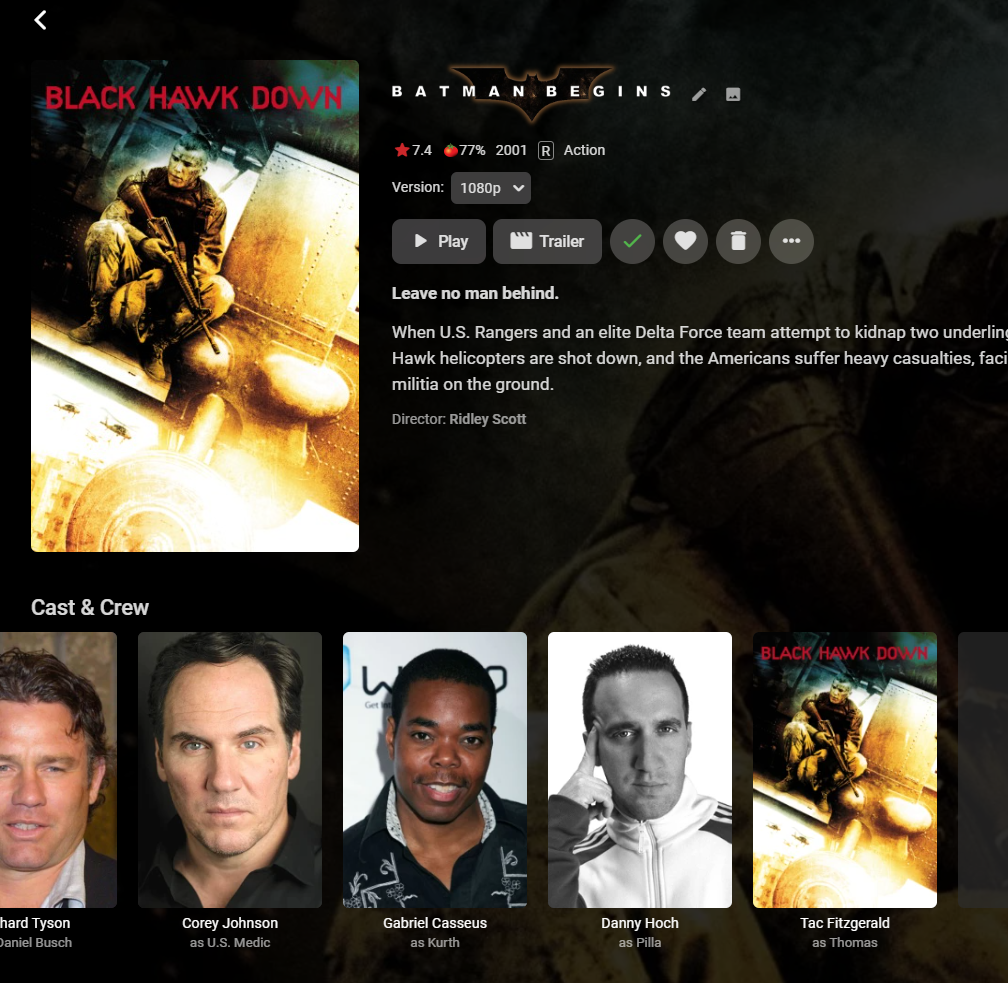
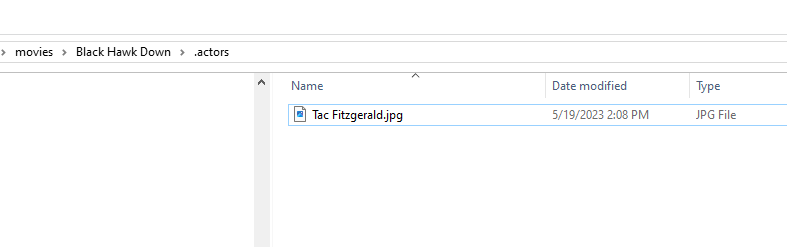
Tested, no problem found: Yes, I gave Tac Fitzgerald the same image as the movie for testing. You don't need any plugin for basic .actors support. Remember that existing movies will require refreshing metadata.
 1 point
 -
Thanks. My initial conclusion that this plug in didn't work, may be incorrect. A second server restart seemed to make a difference. Yes, this plug in seems to work, at least on a single test. I'll test further later. Sent log files directly1 point
-
I know this isn't directly related to the OP but figured I would put it here as this thread comes up on a google. I just started playing around with Live TV (awesome by the way) and was getting incompatible streams through the web (firefox) and LG api's even though the streams worked fine through VLC. I had all transcoding settings disabled for the current user. To fix the problem I just had to enable - Allow changing of container formats, if necessary, during media playback. I still have allow audio transcoding and allow video transcoding disabled. Just changing the container solves this particular issue.1 point
-
indeed it did, thanks !!!!!!! my 400gb programdata folder with countless days of manually renaming and locking metadata1 point
-
Thanks for your answer, I have uninstalled the viewing history plugin.1 point
-
Because of the previous manual identification, some of the episode series folders on my disk now have year information, and some episodes have no year information. Now I can't figure out what's going on. I'll keep an eye out again when I add episodes in the future.1 point
-
Both sonarr and radarr let you highly customize exactly how they format series folders, season folders, movie folders, and the file names themselves. In both apps: Settings > Media Management > Show Advanced Under the top sections 'Movie Naming' and 'Episode Naming' In Radarr I have my 'Movie Folder Format' set to: '{Movie Title} ({Release Year})' /edit: note, click the '?' icon next to each field to see what variables you can use in the names. Sonarr has {Series Year} and for episodes {Air-Date} They also will not rename folders, only set them on creation. To rename folders you must remove the series/movie, manually rename, then re-import to somarr/radarr. They will rename movie/episode files.1 point
-
Hi, actually it will, on the next library scan or via the real-time monitor. date added is just one exception though. that is only read on import only.1 point
-
1 point
-
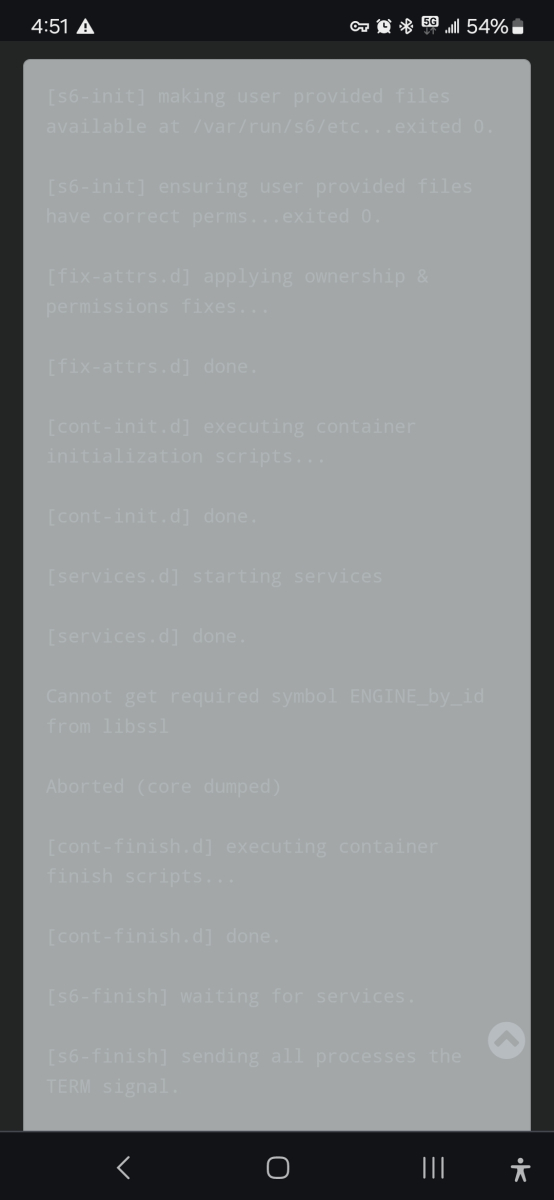
@Abobaderare you still looking to solve the issue with copy+paste text formatting? Trying to read stuff like this all over this forum really really sucks... Chrome android, dark theme.
 1 point
 -
No, it has been fine running the x86 version. I will let it run for another week and report back.1 point
-
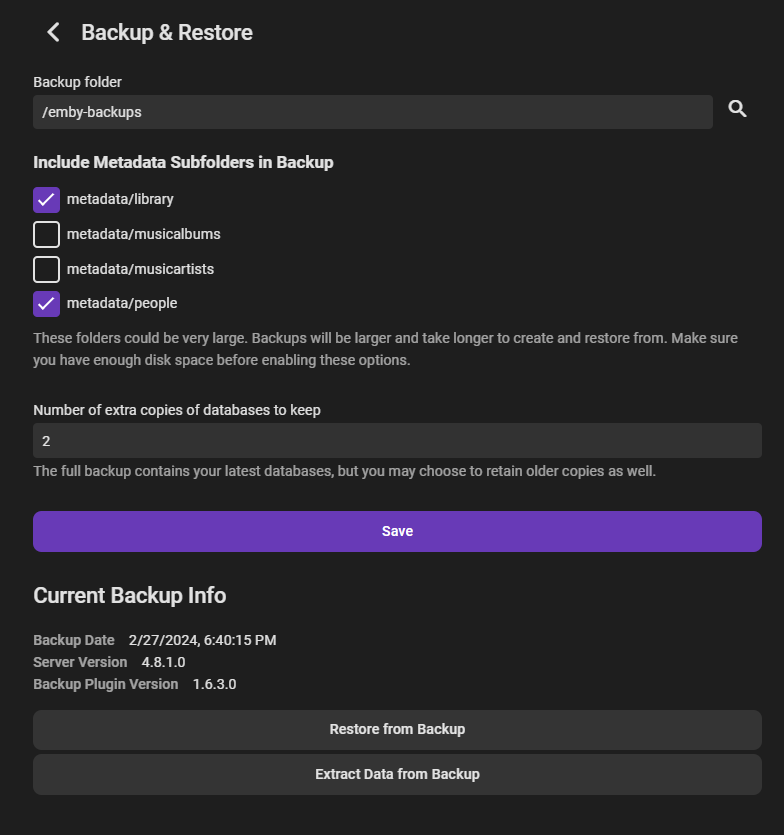
So I figured out there has to be a backup in the backup folder for the restore button to show up. Might want to add that to the guide just to clarify. Thank you!
 1 point
 -
Let us know how you get on. Thanks.1 point
-
@JoBagOfDonuts Hi there, let's look at an example. Please attach the information requested in how to report a media playback issue. Thanks!1 point
-
@ebrdid implement a fix in the beta version, so maybe worth sideloading the beta on your Shield. Latest beta is v2.1.07.1 point
-
Emby Connect and direct server login are two different login methods. It sounds like your proxy is blocking direct server login, which is what you're trying to use in the Emby Apple TV app. The Emby Apple TV app does support Emby Connect login. You need to click Sign in with Emby Connect. So again, two login methods, and so you do kind of need to know which one you're using so that you can enter the right credentials for it. Having said all of that, if your proxy is in fact blocking direct server login, then it sounds like you are making things more difficult for yourself by doing that. Just my opinion. For example, what would you do if we didn't even have Emby Connect?1 point
-
Hi, CGNat's are tough and may require a VPN or TailScale to get around it. But you're not alone as a lot of ISP's are using them now. Please let us know what comes of this. Thanks !1 point
-
Server discovery operates differently to the main client/server communication. It uses UDP broadcasts on the local network and looks for a response from the server. I suspect what is happening is that the serverdiscovery broadcast is reaching the server, and receiving a response so it is automatically connecting to this server and wants your server username and password. However, as you have blocked 'most' server communication with the proxy, the attempt to login to the server fails. So I go back to my earlier statement, I don't think your proxy is setup correctly as it appears to be passing the server discovery UDP broadcasts, but not the traffic between server/client on other ports (or any TCP?) which then causes the login failures1 point
-
Thanks for the reply, I've solved the problem of my daughter's server because she uses an Emby Client, I use 2 Dune HD players and they don't have a problem with MKV, M2TS or TS containers. Regards1 point
-
The only thing I can think of is that it has automatically found your server and wants a username and password for an account on your server. Can you make a test account on your Emby server with a very basic username and password - just letters, no special characters and see if that allows you to login. If it does, then we can work on why you can't login with your regular account.1 point
-
I picked up a new Firestick 4K Max. A few things. TrueHD audio does not get passed through on the "Dolby Digital". The Firestick must be set to "Best Available." TrueHD sound does work now with no picture freezing. So, that's a plus. DTS audio stopped working. Picture does not freeze as it did with TrueHD, but have to switch to some other audio in Emby for any sound to be heard. Disappointing that it doesn't all "just work" unless I'm missing something now for DTS.1 point
-
Let us know what you find. Thanks.1 point
-
Thanks for the reply. I do have the ethernet adapter for my Fire Stick and I have verified it's working so that we can be sure it's not a bandwidth issue. Does your sound bar or receiver actually say it's playing Atmos with the new Fire Stick 4K Max (2023)? I ask because for mine (2021), if I set my Fire Stick to Dolby Digital, it will play the TrueHD movies fine with the TrueHD sound selected. However, my sound bar reports that it's Dolby Digital sound and not Atmos. If I switch the Fire Stick to Dolby Digital Plus, it will freeze playing TrueHD sound, as well as when it's set to Best Available (which is the only option that says it supports Atmos). EDIT: I'll also add that I don't have any issues playing DTS:X 7.1 content.1 point
-
I have a the second generation 4K Max (2023) and it will bitstream 7.1 TrueHD Atmos to my AVR. The Fire OS audio setting of "Best Available" doesn't seem to work, you need to set it to "Dolby Digital" and then it will do passthrough. It plays fine in Plex, Emby, and Kodi. DTS:X has issues in Plex and Emby but Kodi v20 or better has it working. I'd also recommend quality USB 2.0 ethernet adapter. The fire sticks seem to struggle with even modest bitrate 4K video + high definition audio over a local network on WiFi. SMB read speed performance is particularly bad. I got a Cable Matters OTG adapter on Amazon for like $18. It has made for a very solid playback device after that.1 point
-
Thank you all for the input and assistance. Especially the way to just restore the user's watchlist.1 point
-
Hi. In the app "Startup" settings, select "Show logon screen".1 point
-
Hi, we are working on getting this into the new incarnation of the backup plugin. For now, this feature has been extracted into a separate plugin that you can use temporarily:1 point
-
I've been having some issues with both the theme song and theme movie grabbing the wrong movie. Is there a better way to specify or choose the search parameters?1 point
-
Updated 15th sept, see first post1 point