
Leaderboard




Popular Content
Showing content with the highest reputation on 02/19/24 in Posts
-
I think I figured out the problem. I tried clearing the top picks data folder and selecting just TV shows by itself, just Movies by itself, and Both Movies and TV shows. When just Movies is selected, to get the Top Picks to sort in order, I had to select to sort by Date (descending). To get the TV shows to sort in order, however, I had to select sort by Date (ascending). With both TV shows and Movies selected, the different sort orders are conflicting. You can see this in my original screenshot, I have sort by Date (ascending) selected and the movies are descending in order while the TV shows are ascending in order.3 points
-
I searched but couldn't find a similar request. If one exists with or without all of the options below then please lock this one and point me in that direction. Now that all users are required to login with username and password at least once on each app/device it would be nice to have the option to use a one time password (OTP) for the initial login on any device but mainly TV apps and streaming devices where it's difficult to enter long strings. It doesn't need to be limited to initial login but should at least allow that. 1. Allow any user who is already logged in to an app or browser to generate a one time 4-6 character OTP for themselves to enter on a new app/device in order to login on said app. This would only log them into their account using the single OTP. 2. Allow an admin account to generate an OTP for any specified user to login. This would be useful for Emby admins to help remote users, particularly those who have difficulty with apps and on screen keyboard-remote combinations. Or to help household users while away from home... 3. The generated OTP would be associated with the corresponding user, either self or assigned by admin. No need to enter or select name on the app login screen, the OTP would suffice. 4. The OTP should be created with a short time to live, either fixed or configurable. I don't know enough about Emby Connect to suggest how it should/could work for those users. EDIT: Evidently Jellyfin has a similar feature called Quick Connect but I don't know if it also has the ability for admins to generate codes.2 points
-
EMBY SERVER 4.8.1 IS NOW LIVE WITH LOTS OF NEW FEATURES AND IMPROVEMENTS Emby Server 4.8 has been rolling out to various platforms over the past week or so. This upgrade in particular is packed with a lot of new features, improvements and fixes. Over the next few weeks, we will be sharing multiple blog posts to share some of the exciting new functionality that 4.8 brings to Emby and give you a more in-depth look into the features. Today’s blog will focus on two new features: PROFILE PINS With Emby 4.8 you now have the ability to set individual profile PINs. This new PIN replaces the old local network only PIN that existed prior to this release. It is more flexible (works both locally and remotely) and more secure. This new PIN is very useful if you have devices in your home that are shared by multiple users. As an example you may want to put a PIN on your profile so kids in your home can’t just click on your profile and view all of the same media but still allow your kids to freely switch between their profiles on the same device. NOTE: All users (local and remote) must authenticate ONCE per device. Once this initial authentication is done, that user will be remembered on that device and won't require password entry again unless signed out. PLAYLIST SHARING CONTROL Another great feature of 4.8 is the ability to designate exactly what other Emby users you share playlists with. Prior to 4.8, any playlist that was created was available to everyone on your Emby server. Now they’re set up for individual users. When you first create a playlist, that playlist is private to just you. If you wish you can then share it with any user that you would like via the "Modify Collaboration" option. You are able to set it up so that different users have read only access or have view and edit access to the playlist. Please keep in mind that this is only for playlists that were created after the upgrade to 4.8. Playlists created prior to this release will not have this functionality. They would have to be re-created to gain it. NOTE: In order to utilize this feature, you must first grant each user that you want to be able to create shared playlists the ability to share content from the user settings on the dashboard. You can see from the image below that it is simply a checkmark on the settings page. Once that is checked, it is as simple as creating a new playlist and then either right clicking on the playlist or clicking on the “...” menu and clicking on manage collaboration. From there you can easily choose which user you want to share the playlist with and what level of access they have. Stay tuned for a new blog post in the coming days that highlights some of the other awesome and new features of Emby 4.8! For now, we have listed below all the improvements and fixes that were included in 4.8. We as a team are excited to share all of these great new additions with you and hope you’re enjoying the update to Emby just as much as we are! ADDITIONS AND IMPROVEMENTS Add new profile pin feature. Useful for devices shared by multiple users. Add new table view option Add more fields for selection in poster views Add new theme options Various database performance improvements Merge webhooks into notifications Support keyword-based recordings Display all episodes directly under series without using season layer (with user display option to control behavior) Update Intel Media Driver Minor database performance improvements Support extras for seasons and episodes Revamp backup plugin to be a more complete backup Support saving images locally for extras Add FR-TP content rating Import hearing impaired attribute for both internal and external subtitles Add hidden config switch to disable ssl renegotiation Add library option to cache images in server data folder to reduce disk access to original media folder Remember audio and subtitles across a tv series Improve support for audio-only live streams Add View Missing Episodes context menu option for series and seasons Add option when creating a user to copy data from an existing user Support random sorting on list screens Improve country and language list sorting Improve program dialog in live tv guide to show complete information Add subtitle position settings Improve user interface of Play On menu Add sample file ignore size to library options Added New Episodes section under Live TV suggestions Add new indicator on Live TV program posters Add options to hide played media from More Like This and Suggestions Add user locked out notification to Notifications and Webhooks Support more conventions with provider id values in folder names (moviedb, imdb, etc) Improve series name detection by getting the series name from episode file names, in some cases Support multiple languages with user audio and subtitle preferences Improve performance of server activity viewer Improve support for folders being used in multiple libraries of same content types Clear external ids for episodes when using Identify feature on Series Improve search for single title movies Add camera upload user permission Add new configurable home screen sections - Playlists, Collections, and Recently Released Movies Add more fields for display in User and Device management Add HDR filters to video list screens Add sorting controls to user and device management screens Add additional subtitle color options Support swipe down to close all dialogs that slide up Add Remove Identification feature to reset metadata Improve searching titles containing quotes and periods (e.g. Agents of S.h.i.e.l.d or Shield) Anonymize manifest.json Add warning for duplicates when adding items to playlists Support both nb and no Norwegian language options Add automatic metadata refresh option for episodes with placeholder titles such as TBA Rework Trakt plugin to be an option that each user can configure, rather than server settings Rework Notifications to be an option that each user can configure, rather than server settings Add guide display options to control visibility of channel names, images and numbers Improve automatic reconnection for live streams Display preview of matched items when setting up a keyword recording Reduce database queries in audio fingerprint process Add HK ratings Add user option to hide media info from detail screens Improve support for "subs" and "subtitles" folders Don't allow local network addresses to be specified in x-forwarded-for and x-real-ip Add media deleted notification and webhook event Support multi-select drag and drop add to playlist Support multi-select operations on downloads and conversions lists Update default subtitle font Add option to limit the number of genres displayed at the top of detail screens Rework playlists to be saved as m3u and deprecate the previous xml format Support extras in Collections Improve episode number parsing when episode file name is gibberish and parent folder name is readable Support sorting for playlists and collections Revamp webhooks plugin, supporting new events and configuration options Include activity log database file when vacuuming databases Rework scanning of extras, allowing more flexible usage of video extras Improve the use of internet metadata with recordings Support shift to multi-select Use tone mapping for image extraction Allow separate images for audio book tracks Stop scanning at the top of a library when it's unreachable Add image size display option Add lock screen function to video player on mobile devices Add three way toggle nav menu to web app Add option to control display of rating information at the start of video playback Change wording of transcoding reasons to be more user friendly Improve filter menu indicator Add Select None to multi-select lists Initial RTL support in web interface Make tagline field lockable Make overview field lockable Rework Live TV recording options to be based on selected folders, rather than raw paths Support .actors folder for people images Nfo plugin: Stop saving nfo files for additional parts Improve photo loading performance Remember subtitle selections even when user option is set to None Improve support for musicbrainz illegal character replacement Improve drag and drop scrolling Sanitize new playlist and collection names Add intro detection library options Improve automatic channel mapping with xml tv Support sort by composer FIXES Fix songs not being grouped into album when the album title contains an emoji Fix empty genre filters on playlists Fix anamorphic image extraction Various fixes for iOS 17 Various image processing fixes Fix transcode temp path in startup logging Fix 172.X addresses always being considered private Fix swagger docs with reverse proxies Fix restricting by tag hiding the tag itself Fix multi-episode file titles not using series display order Fix hide from Continue Listening only hiding a single track and not the entire album Fix live tv recordings being stopped in rare cases when the limit to keep is set to 1 Resolve issue of multi-part and multi-version not being able to be used together Fix green bottom line with QSV+OpenCL tone mapping Fix single image extraction with MPEGTS Fix support for simultaneous music and photo playback Fix sort by sort title being case sensitive in some views Fixes for multi-part and multi-version videos being used together Fixes for movies having file names starting with years Fix Intro Detection scheduled task not being visible Fix a/v sync regressions with live tv and recordings Resolve long-standing metadata quirks when removing data from nfo files and having it not get cleared in Emby Fix changes to url-only nfo files not being recognized Fixes for downloads automatically redownloading Fix graphic subtitle position when burning in subtitles with transcoding Fix unnecessary ffmpeg dependency on Windows Media Foundation Fix sporadic cases of errors when reordering live tv channels View the full article2 points
-
Hello, Is it possible that in a version of emby a "ping pong" is performed in websocket to maintain a connection via a reverse proxy? Let me explain. Apart from reverse proxies such as caddy or traefik (for those I know) there is no real timeout for websockets. For reverse proxies like haproxy or nginx, the timeout is defined either by default or by the user. In the case of haproxy or nginx, if someone pauses a video that lasts more than an hour (a movie, for example), the websocket timeout will occur before the end of the movie. Or if, when playing an episode of a series lasting 40 minutes, the viewer pauses the video for 20 minutes, the connection will be closed before the end of the episode. Having the client send a message and the server reply every X seconds/minutes would eliminate the problem and prevent the connection from staying open for 1 hour for no reason, as in the nginx configuration. Also, I saw a message saying that if a connection was closed unexpectedly, for resource reasons, there was no attempt to reconnect. Why not set up a number of reconnection attempts? For example, the client tries to reconnect 3 times, and if none of the attempts work, the connection is aborted. This would, I think, allow better websockets management and avoid connections being open for hours. Or even when changing networks (LTE->wifi or wifi->LTE), this would make it easier to re-establish the connection than quitting the application and reopening it. To avoid sending just a "ping" and a "pong", useful information can be sent through websockets when the client supports them, such as the position of the video playback (which is currently sent via http), because a request via websocket is faster than an http request and sends, with the same information in the body, less data than an http request.1 point
-
Hey Everyone, My journey from Plex to Emby has been pretty smooth with the exception of setting up SSL encryption. There are lots of great posts on this forum and elsewhere on how to do this, and I consider myself pretty computer literate. But I'll be honest, this was a bit overwhelming for me as I have no experience at all in hosting web servers, DNS, or encryption certificates. After many hours, I've got it all working, so I thought I'd share what I've learned. I'm going to try to write this for the newbie, so don't be offended if it seems like I'm explaining lots of simple stuff. That's really what I needed a week ago, so maybe it'll help someone else in my shoes. Also, this is for Windows, although most of it applies to any OS. There's lots of text, but it's really very easy. Let me also say, I understand that a reverse proxy gives you lots of benefits and flexibility for securing your server. But that was a step too far for me. If you want a reverse proxy this post is not for you, but there are many posts in this forum to help you. If you want to access your Emby server from outside your home network you will want to require secure connection mode for all remote connections (see "Network" tab in Emby server configuration). To do this you need an SSL certificate. To get an SSL certificate you must have your own registered domain name. Here's a step-by-step. Domain Name Registration A domain name is the readable text part of a web address. So emby.media, or google.com, or media.yourdomain.net. Most home users don't have one, but you need one to get an encryption certificate. While (Edit:)There are many options for purchasing a domain (godaddy.com being very popular), I chose to buy my domain from domains.google. It cost me $12/year, and this is the only cost to getting your Emby server working with encryption. Go to https://domains.google, pick a domain, pay your money, and you're ready to go. For the rest of this discussion let's say you registered the domain name yourdomain.net. Now you need to associate your new domain with your home IP address. Most home users get their IP address assigned to them by their internet provider and it is "dynamic," meaning it can change. So you need to be able to tell your domain provider what your address is and update it when it changes. This can be done automatically, and is called dynamic DNS (DDNS). (Edit:) Before obtaining a domain, ensure the provider supports Dynamic DNS. Google domains supports this easily, here is the help page explaining how to set it up. Fortunately, my ASUS router has this capability built in so it was easy, but it's easy even if your router doesn't (follow google's directions). (Edit:) In case you have a static IP (obtained from your ISP), DDNS support is not mandatory. That's it for domain name registration. Now yourdomain.net points to your home network IP address. SSL Certificate Now you need to get an SSL certificate. This has the encryption keys you need, and must be issued by a recognized certificate authority or it gets blocked by your browser. Lets Encrypt will give you a free SSL certificate but it has to be renewed every 90 days. This was the part I was most confused by, but it's actually really easy. The part to understand is that Lets Encrypt must have some way of proving you own your domain name before they can issue you a certificate. There are two options, 1) they give you a little text file to place on your web server in a certain location. I don't have a web server so this is a no-go. 2) They give you a text string to add to your DNS registration in what is called a "TXT Record." You do this with google domains, it's very easy. To get a certificate you need an ACME client program that knows how to talk to the lets encrypt server. They recommend certbot, but it doesn't work in windows. Dig enough and you'll find ZeroSSL, they have a nice downloadable program that does it all and is really easy. Download here. Make a directory on your computer (I used c:\ZeroSSL). Put the le64 (or 32) exe in this directory. A single command will create your certificate. I think the easiest way to do this is create a text file in the same folder as the program, call it "get_cert.bat" and put the following three lines of text in the file. Edit the second line to have your actual domain name (instead of "yourdomain.net"), and to have your actual password for your PFX file (whatever you want it to be, just replace "yourpasswordhere" in the code below. @[member="Echo"] off le64 --key account.key --csr domain.csr --csr-key domain.key --crt certificate.csr --domains "yourdomain.net" --generate-missing --handle-as dns --export-pfx “yourpasswordhere” --live pause Save the text file as get_cert.BAT and then double click it to run. This runs the le64 program, creates the public/private key pair, asks lets encrypt to generate a certificate, saves that certificate, and converts it to a PFX file format that Emby requires. All in one command! When you run this, a command window will appear and you can see what it's doing. After a few seconds it'll pause and ask you to place the TXT record in your domain. It gives you a name and value, the name will be something like _acme-challenge.yourdomain.net, and the value will be a bunch of random letters and numbers. The program pauses here for you to put this into your domain. So now you just log in to your google domain again, go to "DNS" on the left menu, scroll all the way down and enter a "Custom Resource Record." The type is TXT, the name and value are what le64 gave you. Put them in, wait a few minutes for the change to take effect (took just a couple of minutes for me). Then go back to the command window where le64 is running and press enter to continue. It'll then verify your TXT record is there and issue your certificate. You'll find a file certificate.pfx in the le64 directory, that's it! Emby Setup Now log in to your Emby server setup. Go to "Network," in the field "External Domain" you put your domain name, so yourdomain.net or whatever you chose. For "Custom SSL certificate path," browse to the .pfx file that was created by the le64 program. In the "Certificate Password" field put whatever password you used in the .BAT file above when you created your certificate. Then for "Secure Connection Mode" I recommend you choose "Required for all remote connections." You also have to log in to your home router and forward port 8920 to the computer running your Emby server. I'm not going to give directions on how to do this, it depends on your router, but it's super easy. That's it. You need to restart your Emby Server, and then you're done! You can now access your server remotely and securely at https://yourdomain.net:8920. Certificate Renewal Now, I mentioned before that the Lets Encrypt certificates are only good for 90 days. So every 90 days you have to renew the certificate. Take that "get_cert.bat" file you made earlier and make a copy of it called renew_cert.bat. At the end of the second line, just add the text "--renew 20" (without the double quotes). When you are within 20 days of your expiration date run this file, it'll renew your certificate. I believe it'll ask you to place a new TXT record in your domain, so certificate renewal cannot be made fully automatic. You'll have to run it manually and add this TXT record into your google domain just like when you created the certificate in the first place. But it takes just a few minutes and then your certificate is renewed. You'll have to restart your Emby server for it to take. The file locations all stay the same, so you don't have to update anything in the Emby setup, just restart Emby. That's it! Well, I hope this helps someone. Sorry for the long post. I would have benefited from this level of detail a week ago, so maybe it'll be good for someone. If anyone sees something wrong here, feel free to correct me.1 point
-
It is really cool that Emby has the ability to support multiple versions of the same movie. It would be nice to have a setting on the client side to allow the user to set which version should be selected by default. This could be as simple a user-entered string, or it could be a list of detected strings to choose from. It could allow multiple entries and it would choose them in the order entered. On the Kodi side, it would also be nice to get the "Choose the Best Version for Me" option that the Emby app has.1 point
-
Hi, I’d love that audio and subtitles choice would be saved per show, according to what you select on the last episode you watched. The main audio/subtitles parameters is a good point but there are many cases it is not enough and you need to adjust audio and subtitles at the beginning of every episodes. For example i like to watch Casa de Pale in Spanish with french subtitles, The Big Bang Theory in English with french subtitles, French TV shows in french without subtitles, ....1 point
-
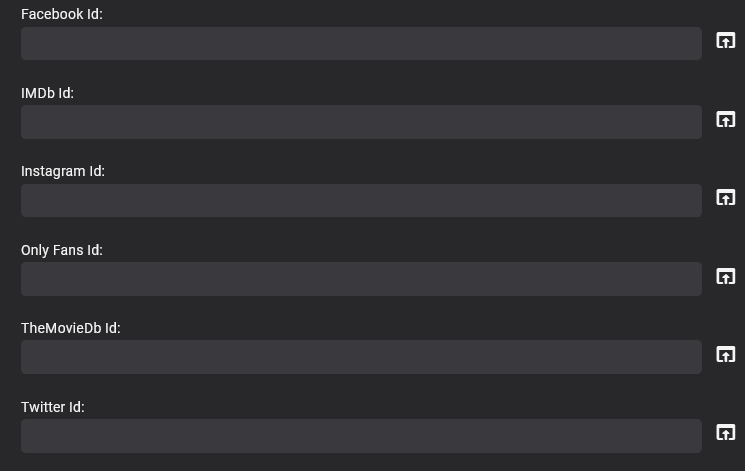
This is an Alpha version so far. - Check the last posts for the latest version What it does is allow you to add external links like this, to people, movies, tv shows, episodes, albums (including audiobooks) , artists and games It has not been extensively tested!!! and is still a bit rough round the edges with no real instructions I have not documented anything yet However you can use shortened urls / redirectors etc !!! For security reasns please bear in mind that external links can be hijacked, malicious code injected etc so please verify your sources before adding them to your server !!!! It has some custom fields too so you can create your own links Its is no where near finished, there is still a lot to do, its jsut posted here for testing for now. Provider_Ids_Extender(12Aug2023).zip 18-02-2024 Update Added a few more Ids and a section for tracks - see thread for details (page 3) Provider_Ids_Extender(18-02-2024).zip 19-02-2024 Update Fixed typo is Custom Id 3 of Artists Added Generic Youtube url to artists (so now can either add channel or generic youtube url - youtube.com/{0}) Added Amazon to Albums and Artists Provider_Ids_Extender(19-02-2024).zip
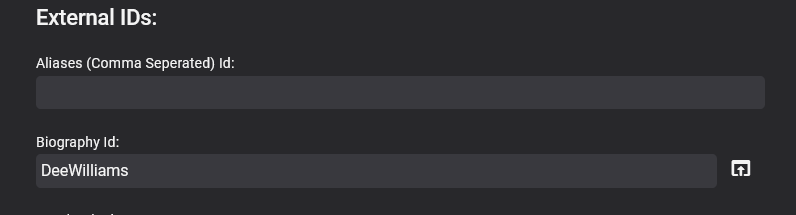
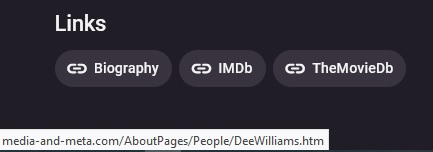
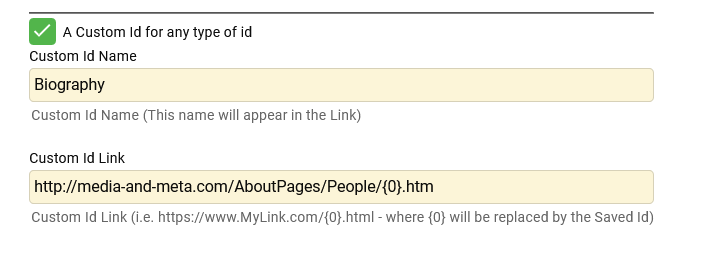
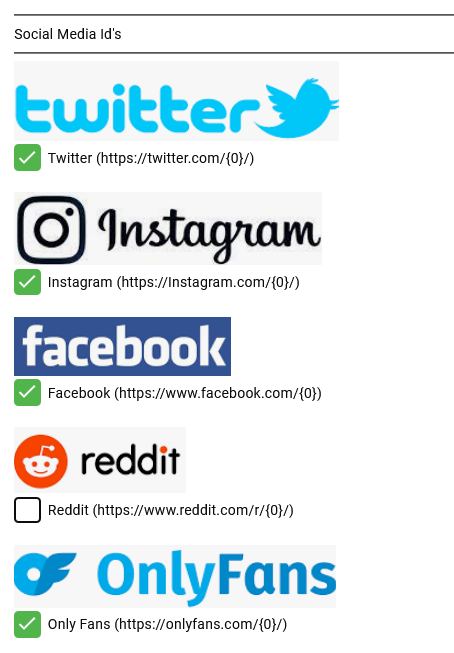
 1 point
 -
Is it possible to have a QR code to scan with your phone when needing to add the PIN for Emby Connect? That way, when you need to login to your Emby Connect, you can just scan that with your phone. Then it takes you to the login page so you can add the PIN it gives you? That would be awesome to do instead of having to type out/copy the entire URL. Thanks for reading. ( I did search if this request already existed and nothing came up).1 point
-
Greetings. I found the answer to this, but figured I'd share just in case someone else runs into this... PROBLEM: I tried 4.8.0 and had this issue a couple weeks ago but didn't report it and just reverted to 4.7. But today I upgraded to 4.8.1 and it is the same as I experienced with 4.8.0. (same with 4.9 betas as well). Once the upgrade is complete and I start the server up, it just dies. I don't touch the server for 10 minutes and when I check, the emby app has died. Restarting app or server has no change to the issue. Log attached for the first boot after upgrade. I tried again after removing the EmbyScripterX plugin (only thing I noticed as an error in the log) and the same result. Server starts and just stops. So I tried a few more times but noticed something on my last attempt that I missed during the unpacking and upgrade of Emby previously: emby-server depends on libc6 (>= 2.27); however: Version of libc6:amd64 on system is 2.23-0ubuntu11.3 This warning/error did not prevent Emby from upgrading. It would install and then allow me to start Emby server and then would die as I stated - the log attached shows no issues I could see really. FIX: I was on Ubuntu 16 server (yes, I know, old), so I couldn't easily upgrade libc so I decided to do a full distro upgrade to 18 server and then Emby installed and worked normally. Just figured I would share. cheers! j embyserver.zip1 point
-
Perfect, thanks! Time to rework some stuff.1 point
-
Maybe try the Items (not Users/Items) endpoint with the 'AnyProviderIdEquals' parameter? https://dev.emby.media/reference/RestAPI/ItemsService/getItems.html1 point
-
Not sure what you mean. Probably your issue is unrelated to mine? Just tested again Plex out of curiosity. Result is as expected. It is not possible to set to display subtitles at a fixed height in bottom of the screen, regardless of video frame. So when black bars are not part of video, you cannot display subtitles there..1 point
-
So if I set the App Display settings to Image size Small, and the TV Channels tab settings to Primary, default - then I get 5 across in the web app If I set the App Display settings to Image size Default, and the TV Channels tab settings to Primary, default - then I get 4 across in the web app Can you reproduce this? The main app setting changes what 'Default' means on the Channels tab In the ATV app, we don't currently support the sizing options, so it is set to Default/Default sizing, which is why you are seeing 4 across.1 point
-
So does .59 seem to fix a lot of the over all issues people were facing, along with the top picks library removal and the restart of the server? I found the reason why the library type was removed. Changes to the object that was in charge of creating libraries changed. This caused an error, and the libraries parameters were only half recreated.1 point
-
With grouped multiversioning, each item still gets its own metadata. There just isn't a metadata editor available for each version (yet?). So, you can separate the versions and edit their metadata separately, then rejoin. Or, if you have nfo writing/reading enabled, you can go to the folder for that movie and edit each nfo file with your updates and refresh metadata.1 point
-
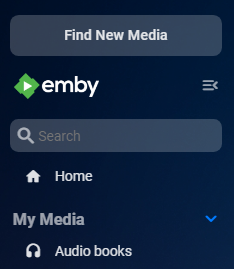
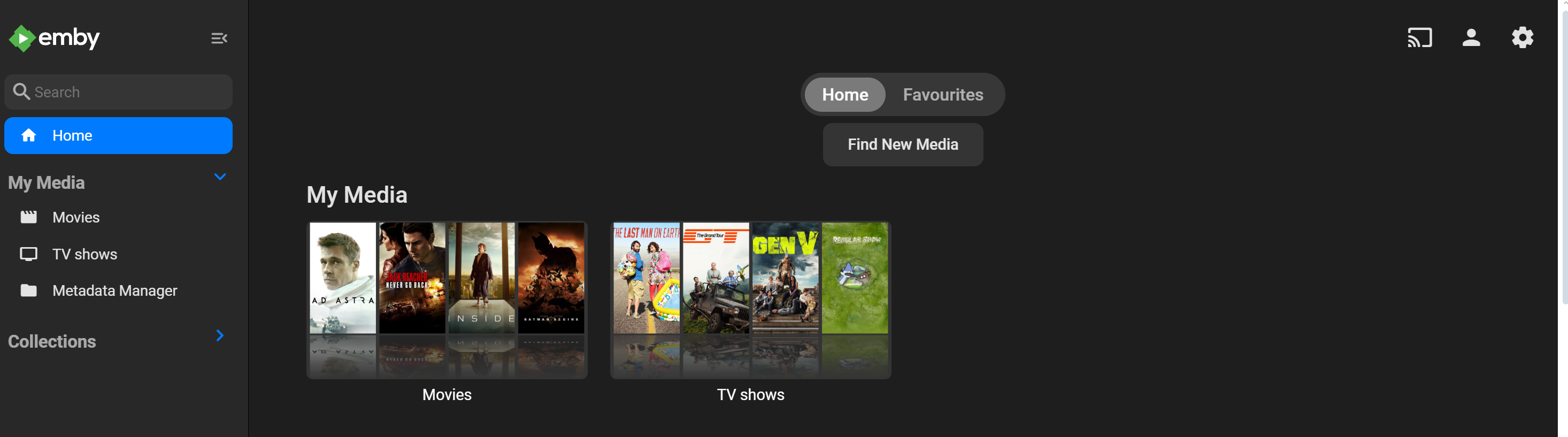
Won't be where you want it but you can do the same in the index.html to put it in the drawer. Didn't test to much. Code snippet removed previous style. <body class="mainAnimatedPages skinBody"> <div class="backdropContainer"></div> <div class="backgroundContainer"></div> <div class="mainDrawer hide focuscontainer padded-bottom-page" is="emby-scroller" data-miniscrollbar="true" data-horizontal="false" data-focusscroll="true" data-navcommands="card" data-bindheader="false"> <div class="Personal-Links"> <a is="emby-linkbutton" href="placeholder" target="_blank" type="button" class="raised block btnSelectServer"> <span style="display: inline-block;">Find New Media</span> </a> </div> <div class="scrollSlider mainDrawerScrollSlider"></div> </div> <div class="skinHeader focuscontainer-x focuscontainer-up headroom flex align-items-center flex-grow headerTop"> But needs more work for docked mini-drawer.
 1 point
 -
So 2 out of the 3 times this occurred over the weekend, my entire server had to be rebooted. This last event (last night, in the graph above), I was able to get into my server and open Emby after a few attempts, it dropped to 15GB usage and things came back up, the only task I saw running in the dashboard was Download Subtitles. There was no library scan or anything else. I had suspected before when this first occurred it was an issue downloading subtitles, but I can't prove it. That .nfo file was modified around 8:57 (20:57), at least that's the date modified on the file. In my server log file I attached, there are 1255 hits for Error Reports over that 4 hour period, which is a lot. They seem to vary between: Error SubtitleManager: Error searching for subtitles on Open Subtitles Error App: Error sending web socket message Sessions Error App: Error reading existng nfo Error Trakt: Exception handled sending status update Error Notifications: Error sending notification I am going to kick off the download subtitles task and see if I can replicate the behavior and see1 point
-
You don't add the exception in the server, it's all done from the client browser. If you want a certificate that's trusted already by devices you could get one using certbot or acme.sh. You'd likely want to do this in order for client apps to work (like on android, iOS, etc) because browsers can bypass it but client apps might not be able to.1 point
-
Do you have 'Image Capture' enabled for that library ? For TV series, extras, if named correctly, will get the images from the metadata providers, but film extra will not have this - thus they will depend on image captures or self uploaded images.1 point
-
same problem, in version 4.7.x as well. you can see my thread in this. the tmdb plugin is broken for some time now. I have even taken this issue with TMDB admin team (there if they had issue in their API), they confirmed to me all good from their end. IN the meantime, i have figured out a trick, after adding new media do a scan library, then go to tmdb copy the movie/TV code, and edit the metadata manually and paste movie/tv code in tmdb section. Now go again scan library . all metadata/images will be grab as expected. Its a manual-work until the plugin is fixed. If you are facing issue with just images, grab images from fanart - that is the best.1 point
-
Ok, merci je vais vérifier tout ça avec lui, au pire il a Emby Theater qui fonctionne très bien. Merci pour ton aide.1 point
-
Good grief! Here is what has happened.At some point over the past couple weeks the Top Pick Folder content type was removed from embys library meta data. Don't know why. If you are having issues with the top picks library on the home screen showing inconsistent items, you need to do the following. 1. Open Dashboard > Library tsb 2. Remove Top Picks library 3. Restart the server. This will recreate the Top Picks library folder with the appropriate metadata attached. Next re-run the top picks scheduled task.1 point
-
I just went to the Play Store and updated to 0.05 which was released yesterday. Seems fine now. I'll monitor and report back any issues.1 point
-
Okay, got the bug. I will be updating the catalog today. If you find that the DisplayTitle bug is still there, let me know. It is because that piece of metadata doesn't always exist for a media file. Therefore, it may rear its head again. I believe I've got it figured... but you never really know... I will be posting .59.1 point
-
Any chance this regression will be fixed or are we stuck with this. I can not tell you how much i hate it and other people are complaining to me about it.1 point
-
Are you sure it is not .05? .04 has a bug in it if you try to select a user who does not have a PIN set from the login screen. Perhaps your re-install just reset your settings so that you are no longer doing that..?1 point
-
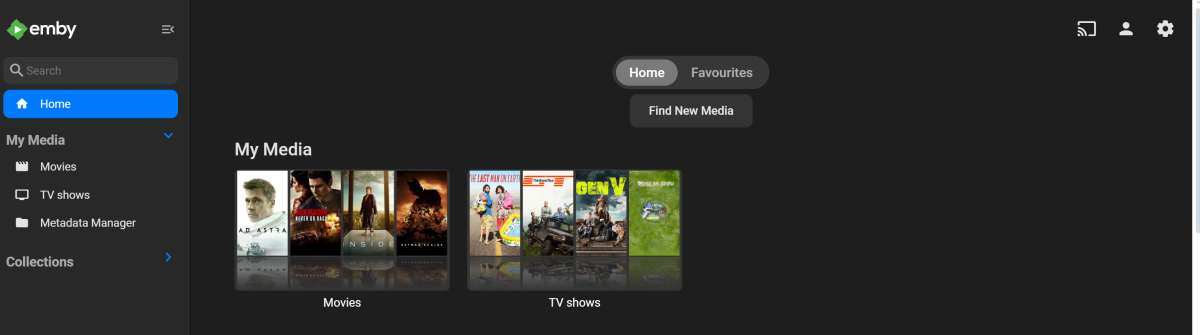
Dont worry, couple prompts to chat gpt fixed it: <div class="view flex flex-direction-column withTabs"> <div class="tabContent tabContent-positioned flex flex-grow" data-index="0"> <div is="emby-scroller" data-horizontal="false" data-centerfocus="true" data-navcommands="card" data-forcescrollbar="true" class="scrollFrameY flex flex-direction-column flex-grow focuscontainer-down" data-bindheader="true"> <div class="Personal-Links" style="top:120px;bottom:0px;text-align:center;position:relative;"> <a is="emby-linkbutton" href="placeholder" target="_blank" type="button" class="raised block btnSelectServer" style="width: 150px; margin: 0 auto;"> <span style="display: inline-block;">Find New Media</span> </a> </div> <div class="scrollSlider flex-grow padded-top-page"> <div class="sections"></div> <div class="padded-bottom-page"></div> </div> </div> </div> <div class="tabContent flex flex-grow" data-index="1"> <div is="emby-scroller" data-horizontal="false" data-centerfocus="true" data-navcommands="card" data-forcescrollbar="true" class="scrollFrameY flex flex-grow focuscontainer-down" data-bindheader="true"> <div class="scrollSlider flex-grow padded-top-page"> <div class="sections"></div> <div class="padded-bottom-page"></div> </div> </div> </div> <div class="tabContent flex flex-direction-column flex-grow" data-index="2"> </div> </div>
 1 point
 -
May I summ up the findings? Please modify and validate if it is necessary. Emby does not tolerate well the different namings. It works sometimes that pretends everything is fine but if user's system deviates from the standard anomalies could happen. (Recommendation: Use standard naming to avoid anomailies.) The Movie DB (tmdb) needs time to publish changes on its database. Time is various it can be up to 24 hours until changes are available and can be seen in e.g. emby. Did I miss something as conclusion ?1 point
-
Please open a new thread for this topic, how to get logs from Kodi depends on your device. There are tons of info in the net how to get logs.1 point
-
What I have found (and I may be completely off track) is that when the source video from the broadcaster is of a lower resolution (i.e. 480, old video tv shows) it shows up with the green box. If the video is higher resolution (720) it seems to work with no issue. I have forced the rate down as low as I can and have the video remain viewable (480 1 mbps) and the green box will remain. If I set the rate to AUTO, it also remains. This same problem has happened in the past. I am not sure what was done to correct the problem, but it was handled on your end in some way.1 point
-
I am not on the Emby team but having following this for years, this is my take. - No there is no current implementation for external DB available. - No there is no work being done on this currently. - No there is no plan in place to do this work or add this. Until the Emby team state otherwise, this is the current status.1 point
-
IPTVBoss can be started with a -nogui parameter that creates the m3u and epg files for all of your defined projects like a console app. I created a bat file that gets run by the Windows task scheduler as often as I need. cd c:\iptvboss3 "java" -jar iptvboss.exe -noGui START "" "C:\EmbyRefresh\EmbyRefresh.exe" "emby key" EmbyRefresh is something I wrote that causes Emby to refresh its Live TV component, in this case right after IPTVBoss generates its files. So the net result is fully automated update of Emby Live TV. If interested I also wrote HdHomerunM3U that will interrogate your HDHomerun(s) and create m3u file(s) for them. I run it every time I have the homerun rescan (if it changes).1 point
-
@Lukewhat is the proper way to replace/update genre images? Tested removing current image and no library scans regenerated it. Library images worked fine but not genres. Did a Refresh Search for missing on genre to regenerate as there is no way to rescan genre.1 point
-
@reggieratBut signing in just once and then having the app remember isn't so bad, right?1 point
-
Update: Bulk Refresh of People and Musicartits pictures worked using "Scan Metadata Folder" within Scheduled Tasks. Thx, Luke. Refresh Metadata from Library 3-Dot menu was not enough.1 point
-
Hi, yes it's certainly possible for future updates. Thanks.1 point
-
We need the missing and upcoming episodes old features back The new ones are terrible1 point
-
@NitroNine@Jägs I've been researching and experimenting with this a bit more (on and off) over the last couple months. If you are using the web app you can use custom CSS to likely achieve a Music view that suits your needs.. It is possible to hide any sections that you don't want to see and also swap the order of those that you do want to see. Check out this thread for hiding Sections (thanks to @beckfield ) Check out this thread for changing the order of Sections: The various bits of CSS code should work for the latest stable Emby Version 4.8.1.0.1 point
-
Every time you make a copy the quality degrades so copying twice TS->MKV->MP4 would reduce quality more than TS->MP4. There is some consideration that Handbrake (or any other converter) might be much better at producing an MP4 from an MKV and the Emby conversion to TS might also be a lot better than Handbrake's job. But I very much doubt that and I think it would be better to go directly from TS to MP4.1 point
-
Nope - Emby as a whole will never get bad enough to drive me to Plex. If somehow Emby went away tomorrow, I'd go back to using Kodi and SMB shares before I would support Plex. They are the antithesis to who I want to support. Emby developers - so far in my experience - are real people and not greedy sellouts. Is there a roadmap or changelog where users can see what progress is being made on the Apple app? No offence, but I've seen forum posts that are 4+ years old asking for these things.1 point
-
It is appalling. Especially since Plex and Infuse both demonstrate that it can be done well so long as someone actually cares about it. I regularly have days where I regret going with Emby instead of Plex. I wonder what the response would be if Emby offered a black-friday style "day of refund" for Apple TV customers who bought an Emby Premiere subscription and now regret it ...1 point
-
HI, yes, reset and drag and drop ordering would be nice here.1 point
-
Just arrived at Emby from Plex, and would love to know if this project is progressing? An audio player for the Emby server would be certainly appreciated.1 point
-
Wow, you really solved my problem. Thank you very much!1 point
-
I resolved this by running "pkg install ca_root_nss" in my Truenas jail. I was able to reinstall the Emby Guide plugin and get my guide data back!1 point
-
I understand, and I very much appreciate this. This means that I can also use addon mode without having to worry about unnecessary transcoding in my LAN. My point is a somehow general one. If I can prefectly stream my content with a player that can handle the content in the LAN, there is no reason to use http (which I call "overhead" in this case). Even if it is mostly a matter of principle, and addon-mode does a great job. The beauty, and my favorite feature of the kodi-addon in native mode is the fact that you can make use of the emby-server, but at the same time you can still stream directly from the share. This combination is great becuase it gives me the best from both worlds. Let's be honest, if the only topic at hand would be streaming content in a LAN, nobody would suggest using http for this. (At least I hope so) On the other hand I also understand that the SW is evolving, features are being added, and the situation is a little bit more complicated sometines. Also I have to admit, if ET on rpi would be ready, I would probably give it a try, becuase it is "pure" Emby and looks just great on the TV. In the many years that I have used kodi and emby I have concluded that emby is very good at it's main task, which is being a library, and that kodi is the best player. Maybe my "not wanting to use http" also comes from my experience with emby players, where I have had countless problems on many different setup's when it comes to fast and reliable content playback. Even today, where emby has become "grown up", I still have many playback issues. I am not blaming emby for this, emby is a great product, but it tries to do too many things IMHO, and the world of different operating systems and HW is very difficult to handle, especially apple devices. On the other hand in all these years I have never had any problems with SMB-streaming, even with very limited HW resources and quite high bitrate content. Up to some months ago I actually was using a rpi2 with kodi/emby-addon to stream 1080p content, which is a very good example for the importantce of efficient handling of a task. Sometimes I could not belive that the rpi2 actually can playback all this content. Today I use 2 rpi400's. This is why I find it important to not forget what technology is the best for a specific task But maybe I did not consider all the aspects, and it is not my intention to hold on to something from the past. I just wanted to share my view on the topic. The most important thing for me is to control transcoding, which should work fine in both addon-modes. Thanks a lot for all your efforts - CHEERS .1 point
-
This is not the right place for entering PIN. Are you facing some issues?1 point
-
I'm going to add my support for this feature as well. While Extras may be able to go into Specials for most series, cracks start to show with a series like Doctor Who (1963). This series has multiple DVD releases per season each with a handful of features, and each with a multitude of Extras relating specifically to those episodes. One four-episode story may have ten or more extras, with sometimes close to ten stories in a season. It just becomes completely unmanageable. This is compounded with a DVD release like the TV Movie - a special which is listed as S00E60 on the TV database. As it is already a special, there is no way to associate the extras with the episode in Emby. The solution seems obvious to me. Have each episode in its own folder that acts like a Movie folder: Doctor Who (1963)\Season 00\Doctor Who (1963) S00E60\Doctor Who (1963) S00E60.mkv Doctor Who (1963)\Season 00\Doctor Who (1963) S00E60\Extras\Paul McGann Interview.mkv Now on the episodes information page, the extras will be displayed just as they would be in movies. Additionally, you need to be able to be able to add extras to Seasons: Doctor Who (1963)\Season 01\Extras\Theme Music Video.mkv These could be displayed at the bottom of the season. Something like the mockup attached.
.thumb.png.d6b8bc6ce8e3a6d910fd04ba5b5a5a25.png) 1 point
1 point -
This community is here to help you. Here are some guidelines on what information you should supply when reporting issues. Make sure to check out our Emby Documentation for more useful information. Android App Issues Please create a topic in the Emby Community Forums. Describe the problem in your own words, including what you're trying to accomplish, and where you're getting stuck. If you saw error messages, please tell us what they were. If the problem is difficult to explain, please include screenshots that demonstrate the issue. Please capture the Emby for Android app log. Please note that if the app is running on the NVIDIA Shield, then there may not be an email app running for sending the log file through the share log feature. See text relating to the NVIDIA Shield below. Also note that the app logs are currently not sanitized. Do not upload the raw logs to the forum but indicate that they have been captured and the logs can be made available in a private message. See the section below titled "Android Logs". Include the version of the Emby for Android app and also the version of Emby Server that you're using. The server information can be found on the front page of the server's web dashboard. if the app crashed, and you're prompted to submit a crash report, please make sure to do so. In most cases, the Emby Server log is also helpful. Please see the section below "Emby Server Logs". Android Logs To obtain an app log, you'll need to do the following: Enable app logging in the app's settings Force close the app and restart it Recreate the issue that you're experiencing Obtain the app log from inside the app, in the Logs section Use the Share option to send the log(s) to yourself. For NVIDIA Shield, there may not be an email program to use. Instead you will need to get the app logs through the NVIDIA Shield local network access feature documented by NVIDIA here: How do I share SHIELD TV folders with a PC. The Emby for Android logs would be in this path: `/storage/emulated/0/Android/data/com.mb.android/files/logs` accessible through a mapped network drive to the `Internal` disk NVIDIA share. The `Internal` share takes you to the `/storage/emulated/0/` directory. Make sure to disable app logging after you're done as it can impact the performance of the app Emby Server Logs You can learn how to obtain server logs here:1 point
































.png.f2500dbaa32d2b8415f7be138d6bfadd.png)
