
Leaderboard




Popular Content
Showing content with the highest reputation on 02/17/24 in Posts
-
EMBY SERVER 4.8.1 IS NOW LIVE WITH LOTS OF NEW FEATURES AND IMPROVEMENTS Emby Server 4.8 has been rolling out to various platforms over the past week or so. This upgrade in particular is packed with a lot of new features, improvements and fixes. Over the next few weeks, we will be sharing multiple blog posts to share some of the exciting new functionality that 4.8 brings to Emby and give you a more in-depth look into the features. Today’s blog will focus on two new features: PROFILE PINS With Emby 4.8 you now have the ability to set individual profile PINs. This new PIN replaces the old local network only PIN that existed prior to this release. It is more flexible (works both locally and remotely) and more secure. This new PIN is very useful if you have devices in your home that are shared by multiple users. As an example you may want to put a PIN on your profile so kids in your home can’t just click on your profile and view all of the same media but still allow your kids to freely switch between their profiles on the same device. NOTE: All users (local and remote) must authenticate ONCE per device. Once this initial authentication is done, that user will be remembered on that device and won't require password entry again unless signed out. PLAYLIST SHARING CONTROL Another great feature of 4.8 is the ability to designate exactly what other Emby users you share playlists with. Prior to 4.8, any playlist that was created was available to everyone on your Emby server. Now they’re set up for individual users. When you first create a playlist, that playlist is private to just you. If you wish you can then share it with any user that you would like via the "Modify Collaboration" option. You are able to set it up so that different users have read only access or have view and edit access to the playlist. Please keep in mind that this is only for playlists that were created after the upgrade to 4.8. Playlists created prior to this release will not have this functionality. They would have to be re-created to gain it. NOTE: In order to utilize this feature, you must first grant each user that you want to be able to create shared playlists the ability to share content from the user settings on the dashboard. You can see from the image below that it is simply a checkmark on the settings page. Once that is checked, it is as simple as creating a new playlist and then either right clicking on the playlist or clicking on the “...” menu and clicking on manage collaboration. From there you can easily choose which user you want to share the playlist with and what level of access they have. Stay tuned for a new blog post in the coming days that highlights some of the other awesome and new features of Emby 4.8! For now, we have listed below all the improvements and fixes that were included in 4.8. We as a team are excited to share all of these great new additions with you and hope you’re enjoying the update to Emby just as much as we are! ADDITIONS AND IMPROVEMENTS Add new profile pin feature. Useful for devices shared by multiple users. Add new table view option Add more fields for selection in poster views Add new theme options Various database performance improvements Merge webhooks into notifications Support keyword-based recordings Display all episodes directly under series without using season layer (with user display option to control behavior) Update Intel Media Driver Minor database performance improvements Support extras for seasons and episodes Revamp backup plugin to be a more complete backup Support saving images locally for extras Add FR-TP content rating Import hearing impaired attribute for both internal and external subtitles Add hidden config switch to disable ssl renegotiation Add library option to cache images in server data folder to reduce disk access to original media folder Remember audio and subtitles across a tv series Improve support for audio-only live streams Add View Missing Episodes context menu option for series and seasons Add option when creating a user to copy data from an existing user Support random sorting on list screens Improve country and language list sorting Improve program dialog in live tv guide to show complete information Add subtitle position settings Improve user interface of Play On menu Add sample file ignore size to library options Added New Episodes section under Live TV suggestions Add new indicator on Live TV program posters Add options to hide played media from More Like This and Suggestions Add user locked out notification to Notifications and Webhooks Support more conventions with provider id values in folder names (moviedb, imdb, etc) Improve series name detection by getting the series name from episode file names, in some cases Support multiple languages with user audio and subtitle preferences Improve performance of server activity viewer Improve support for folders being used in multiple libraries of same content types Clear external ids for episodes when using Identify feature on Series Improve search for single title movies Add camera upload user permission Add new configurable home screen sections - Playlists, Collections, and Recently Released Movies Add more fields for display in User and Device management Add HDR filters to video list screens Add sorting controls to user and device management screens Add additional subtitle color options Support swipe down to close all dialogs that slide up Add Remove Identification feature to reset metadata Improve searching titles containing quotes and periods (e.g. Agents of S.h.i.e.l.d or Shield) Anonymize manifest.json Add warning for duplicates when adding items to playlists Support both nb and no Norwegian language options Add automatic metadata refresh option for episodes with placeholder titles such as TBA Rework Trakt plugin to be an option that each user can configure, rather than server settings Rework Notifications to be an option that each user can configure, rather than server settings Add guide display options to control visibility of channel names, images and numbers Improve automatic reconnection for live streams Display preview of matched items when setting up a keyword recording Reduce database queries in audio fingerprint process Add HK ratings Add user option to hide media info from detail screens Improve support for "subs" and "subtitles" folders Don't allow local network addresses to be specified in x-forwarded-for and x-real-ip Add media deleted notification and webhook event Support multi-select drag and drop add to playlist Support multi-select operations on downloads and conversions lists Update default subtitle font Add option to limit the number of genres displayed at the top of detail screens Rework playlists to be saved as m3u and deprecate the previous xml format Support extras in Collections Improve episode number parsing when episode file name is gibberish and parent folder name is readable Support sorting for playlists and collections Revamp webhooks plugin, supporting new events and configuration options Include activity log database file when vacuuming databases Rework scanning of extras, allowing more flexible usage of video extras Improve the use of internet metadata with recordings Support shift to multi-select Use tone mapping for image extraction Allow separate images for audio book tracks Stop scanning at the top of a library when it's unreachable Add image size display option Add lock screen function to video player on mobile devices Add three way toggle nav menu to web app Add option to control display of rating information at the start of video playback Change wording of transcoding reasons to be more user friendly Improve filter menu indicator Add Select None to multi-select lists Initial RTL support in web interface Make tagline field lockable Make overview field lockable Rework Live TV recording options to be based on selected folders, rather than raw paths Support .actors folder for people images Nfo plugin: Stop saving nfo files for additional parts Improve photo loading performance Remember subtitle selections even when user option is set to None Improve support for musicbrainz illegal character replacement Improve drag and drop scrolling Sanitize new playlist and collection names Add intro detection library options Improve automatic channel mapping with xml tv Support sort by composer FIXES Fix songs not being grouped into album when the album title contains an emoji Fix empty genre filters on playlists Fix anamorphic image extraction Various fixes for iOS 17 Various image processing fixes Fix transcode temp path in startup logging Fix 172.X addresses always being considered private Fix swagger docs with reverse proxies Fix restricting by tag hiding the tag itself Fix multi-episode file titles not using series display order Fix hide from Continue Listening only hiding a single track and not the entire album Fix live tv recordings being stopped in rare cases when the limit to keep is set to 1 Resolve issue of multi-part and multi-version not being able to be used together Fix green bottom line with QSV+OpenCL tone mapping Fix single image extraction with MPEGTS Fix support for simultaneous music and photo playback Fix sort by sort title being case sensitive in some views Fixes for multi-part and multi-version videos being used together Fixes for movies having file names starting with years Fix Intro Detection scheduled task not being visible Fix a/v sync regressions with live tv and recordings Resolve long-standing metadata quirks when removing data from nfo files and having it not get cleared in Emby Fix changes to url-only nfo files not being recognized Fixes for downloads automatically redownloading Fix graphic subtitle position when burning in subtitles with transcoding Fix unnecessary ffmpeg dependency on Windows Media Foundation Fix sporadic cases of errors when reordering live tv channels View the full article5 points
-
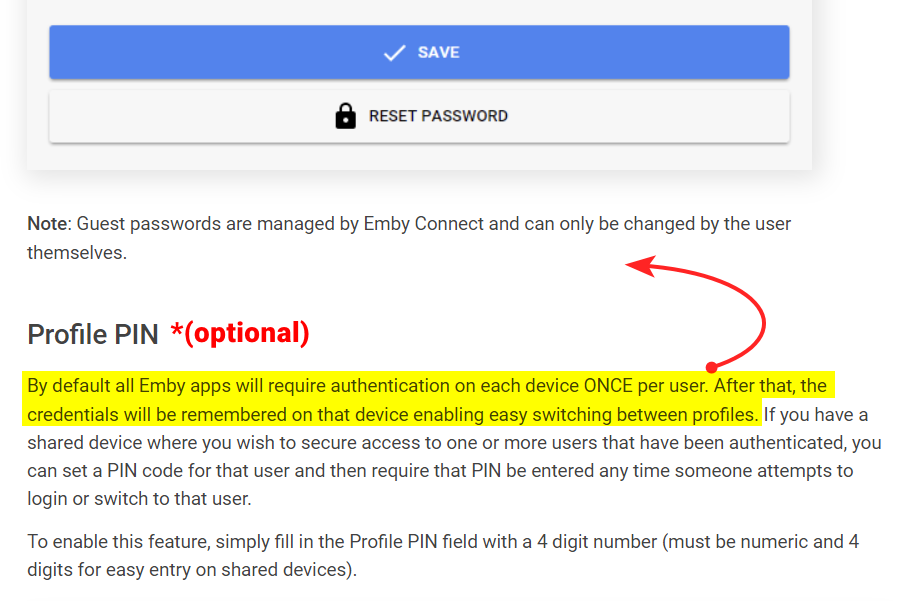
Yes, but to make it really clear, as this isn't the first time this has come up Perhaps you could move the highlighted portion to the above "Password" section, and then add (optional) to the "Profile PIN" section to make it super clear that it's not a requirement.
 4 points
 -
Sure thing. I'll make it public. No issues here.2 points
-
I prefer to be able to see missing episodes in-line with the media library itself. In rare cases, an episode might be missing and it's nice to see in the UI while watching. Otherwise, it's really easy to accidentally play next and skip the missing episode.2 points
-
I've been dying to know if this has garnered enough interest to be worked on. I found Emby (MediaBrowser 3 at the time) and its bookshelf plugin while I was searching for something that was like Plex for comics. Plex doesn't do this (and probably never will), Kodi doesn't have what I'm looking for either, and ComicRack seems to be dead at the moment. Unfortunately the bookshelf plugin doesn't work the way I had hoped. I was dissappointed to see it only offer a download to the file to which I can open it to the program of my choosing. Even browsing through the books I only had the option of going through folder-like directories and couldn't browse by author like the people section in the other media types. I would love for it to be fully integrated into Emby where I can open and read a comic right on my phone and tablet or even my web browser as I could with my movies and tv shows. Also, I hope to god somone is working on the "Games launching in android" feature you mentioned on your up-for-grabs blog post. That would be awesome!1 point
-
Hey everyone I have finished a script I've been working on. The script will get a user's watched items from emby and then unmonitor them in the relative *Arr app before deleting them from your emby library and filesystem if it has been more than 14 days from the episodes air date (the time limit isn't in place for movies only episodes). You can also blacklist movies and tv shows for the script to ignore feel free to check it out over on GitHub Github - EmbyArrSync1 point
-
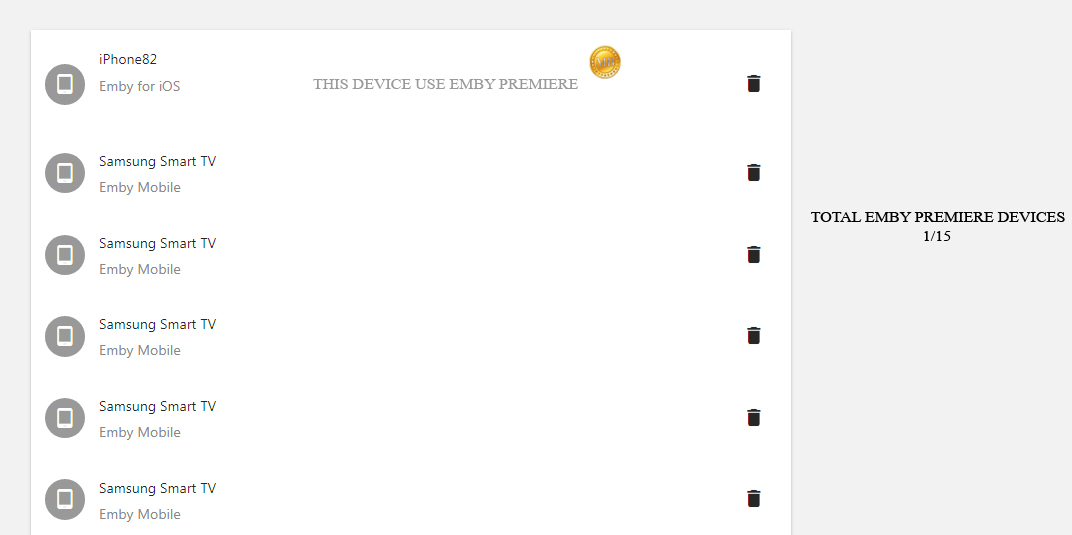
I have seen many people asking for the 15 devices limitation. Could it be possible to add a counter for understand wich device uses Emby Premiere? Something like this : Understand which device uses emby premiere and which no?
 1 point
 -
I'll rebuild it as the new library type. Thanks for noticing that! I would have been looking at the logs forever trying to figure that out.1 point
-
Because the two have completely different rendering engines.1 point
-
I'll check...1 point
-
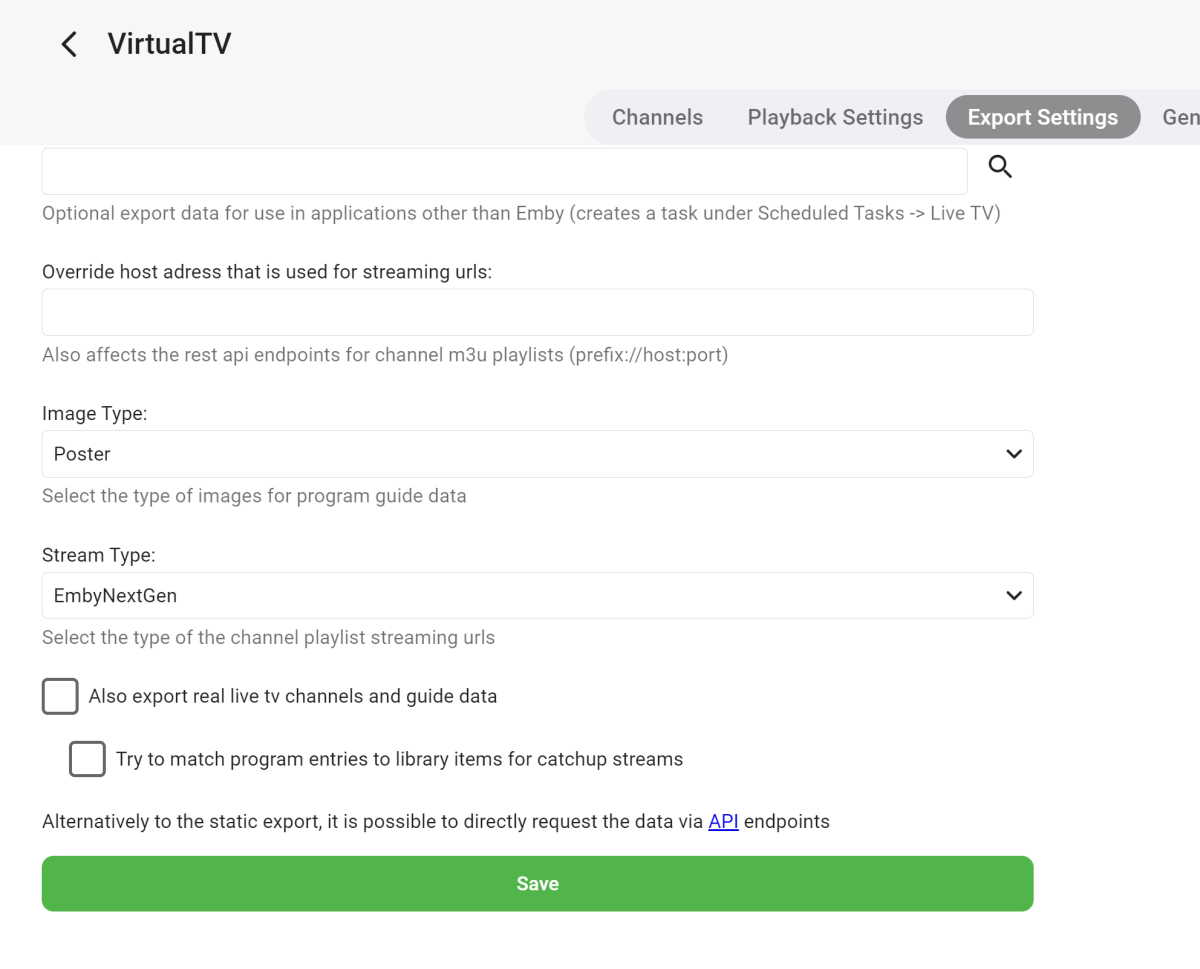
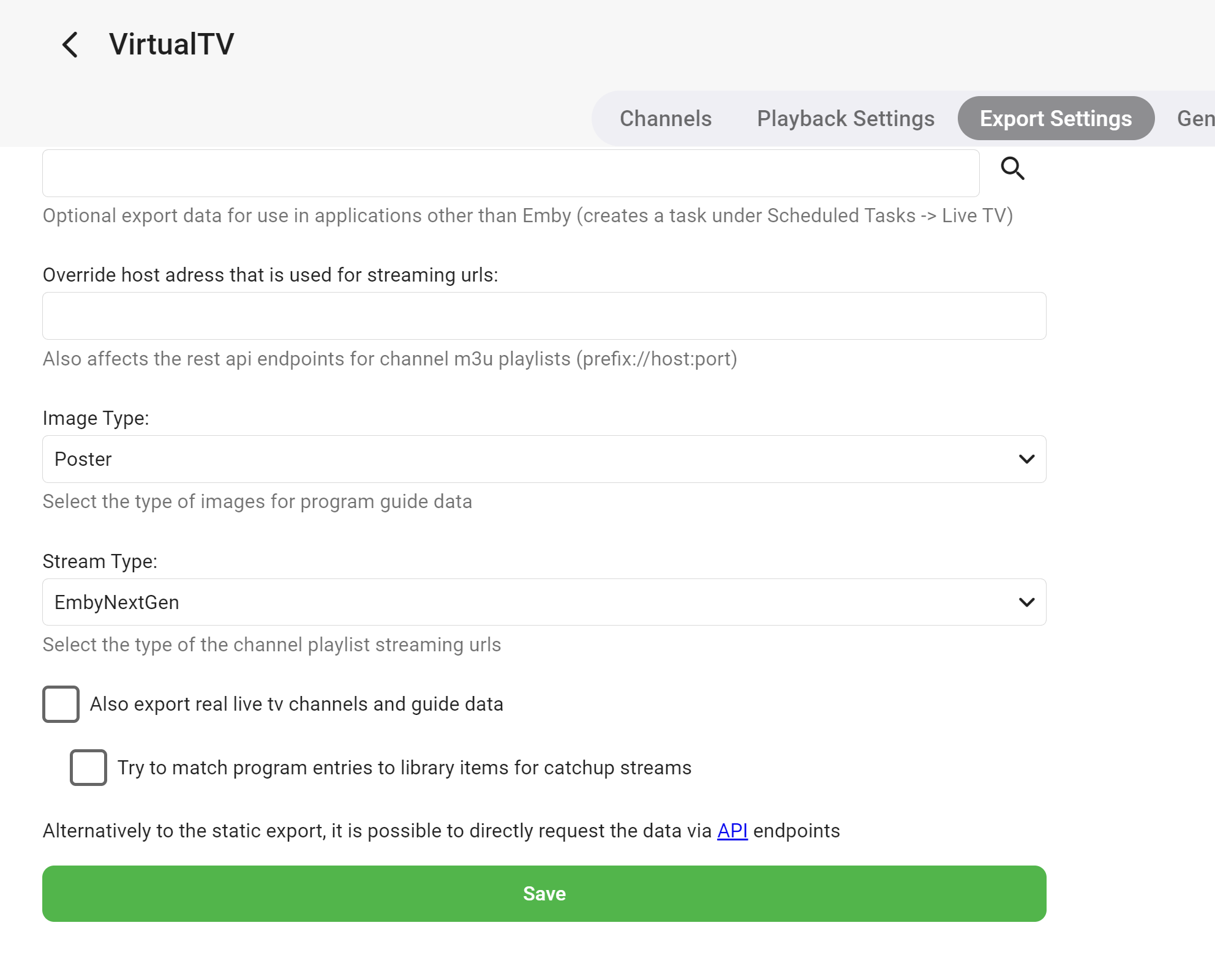
Plugin VirtuelTV
 1 point
 -
What happens if the encoded value for the slash, '%2F' is used?1 point
-
Small typo in 10.0.0.2 Also, thanks for the new setting which limits items in a node.
 1 point
 -
New PUBLIC TESTING version available 10.0.3: Delta changelog 10.0.2-> 10.0.3 fix SesaonId detection by PresentationUniqueKey -> compatibility with 4.9.X Emby server1 point
-
i found something weird with parentid recently also https://emby.media/community/index.php?/topic/126121-embycon-go-to-season/1 point
-
How are you determining this?1 point
-
PhotoAlbum browsing works for me now still using latest 9.x version. Thanks.1 point
-
How is that even a relevant question in this thread? How about we stick to the topic? This thread is becoming a kindergarten.1 point
-
Cheers my friend - that seems to be working ok. Sorry for the delay in replying, but the first time through the sync "something" went wrong, it appeared to be adding everything multiple times - following your advice on another post, I manually removed all the TVxx and MyVideosXXX db files (there were at least 4 historic versions of each!), and then did the sync all over again. Movies added (& played fine). Just adding Music and TV as we speak, but seems to be going ok. Rich1 point
-
New PUBLIC TESTING version available 10.0.2: Delta changelog 10.0.0-> 10.0.2 fix Emby server 4.9.X episode issue (SeasonId not reported) -> This is not the final fix, and still might cause issues! port 9.4.13/14 bugfixed to 10.X1 point
-
Not that I am aware of as they are all script based. Just like my server does not have a [data-index="2"] as it is 0 the same a TV content (on one server), but another server where it is 9 by itself. So it looks hit and miss trying data-index and not affect other libraries. But if you are lucky enough to actually target then specific to your setup [data-index="2"] .tabs-viewmenubar-slider {display: inline-flex} [data-index="2"] .tabs-viewmenubar-slider [data-index="6"] {order: 0} [data-index="2"] .tabs-viewmenubar-slider [data-index="2"] {order: 1} [data-index="2"] .tabs-viewmenubar-slider [data-index="1"] {order: 2} [data-index="2"] .tabs-viewmenubar-slider [data-index="7"] {order: 3} [data-index="2"] .tabs-viewmenubar-slider [data-index="5"] {order: 4} [data-index="2"] .tabs-viewmenubar-slider [data-index="8"] {order: 5} But as mentioned on this server since indexes overlap tv shows this

 1 point
 -
Ya, sorry I did figure this out. But not in a typical way. I setup a virtual server that strictly manages the certificates, and I copy them to the emby server every time they renew in the certbot post renew script.1 point
-
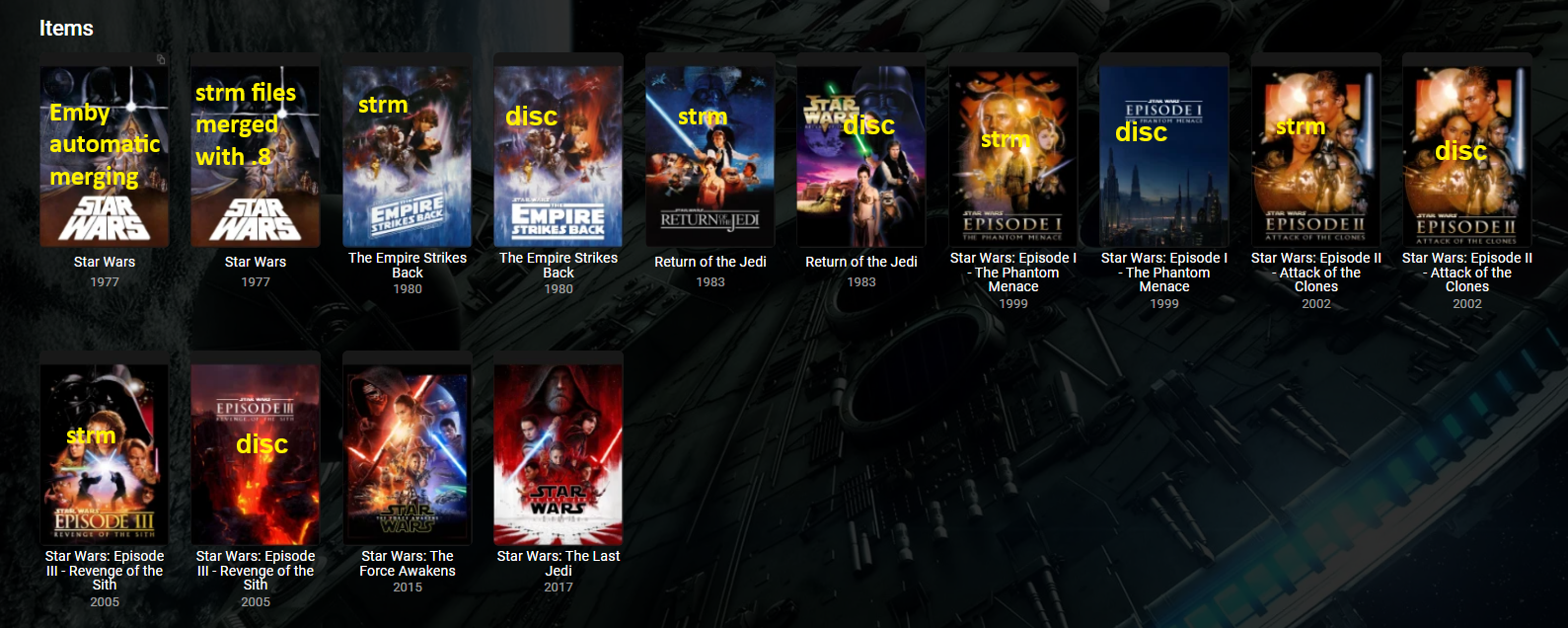
Did not do any retestings with Top Picks or New Releases plugins. In my tests v1.0.0.0 (4.6.0.22-betaServer.zip) appears to still work merging everything everywhere. 1.0.0.1 thru 5 will avoid strm @Hoptional1.0.0.8 doesn't appear to catch everything across libraries. Caught strm in different libraries and merged but skipped already merge versions by naming scheme. Did not merge strm and disc (stub files). So from an only Grouping plugin standpoint you will want 1.0.0.0 (4.6.0.22-betaServer.zip). But you cannot rely on log information. Only did some quick and basic testing. v1.0.0.0 v1.0.0.8
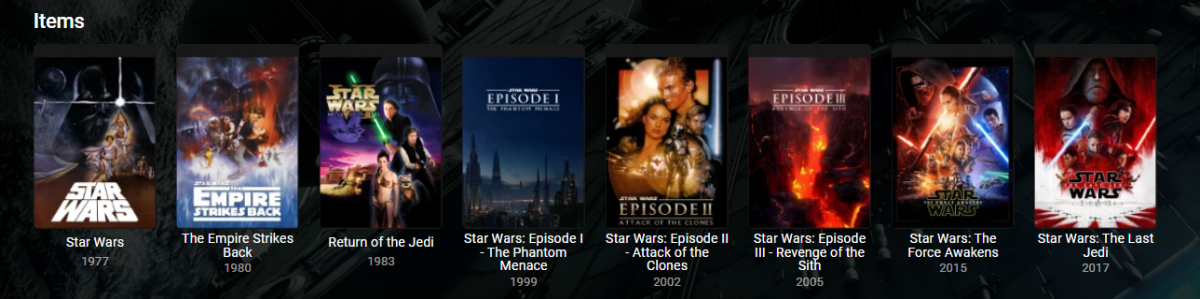
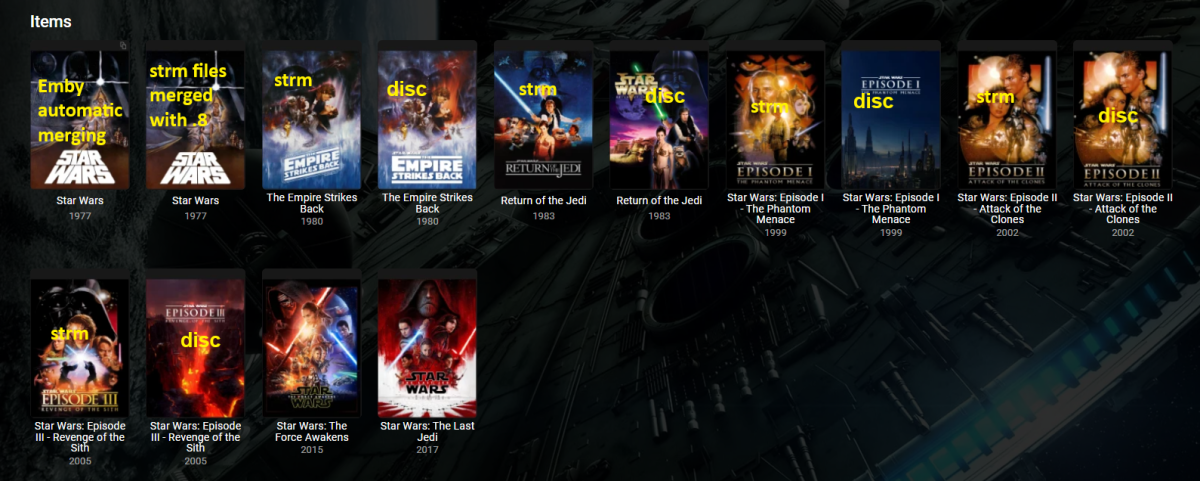 1 point
 -
Also dafür habe ich mir heute ein Script gebstelt, damit er sämtliche Daten in einen Unterordner verschiebt. Wenn du willst kann ich dir das zuschicken. Hast du es denn mittlewrweile hinbekommen, weil bei mir laufen die Backdrops auch nicht?1 point
-
These files originally didn't have the 1080p in the name and had the same problem. And besides, it does show up and work in Emby just fine, and groups with a single other movie. It's just when I group 3 of them it disappears.1 point
-
Thanks for the feedback. Maybe next forum build we will fix this, it been reported to Microsoft Swiftkey already.1 point
-
Yes item metadata has to updated to create collection. RTM on Collection library really doesn't do much anymore as collections come from item metadata.1 point
-
My latests conversion took nearly 3.5 hrs. It was a 2-hour show. Final size was 4GB. I have a NUC 10 Core i7 with 64GB Memory. CPU above 90% the entire time. I feel like you're in the right range for time.1 point
-
Me three! Thanks for the quick turnaround!1 point
-
thats probably the bit I am missing Who asked him, I don't see any references to that in this thread. just because someone does not understand the finer points of file entropy and compression does not make them dumb or stupid.1 point
-
Bumping. This would absolutely increase my Emby usage and would be fantastic. I have thousands of comics, manga, and books and this would be amazing to have. I noticed books in the Emby list when uploading today. Is something being worked on?1 point
-
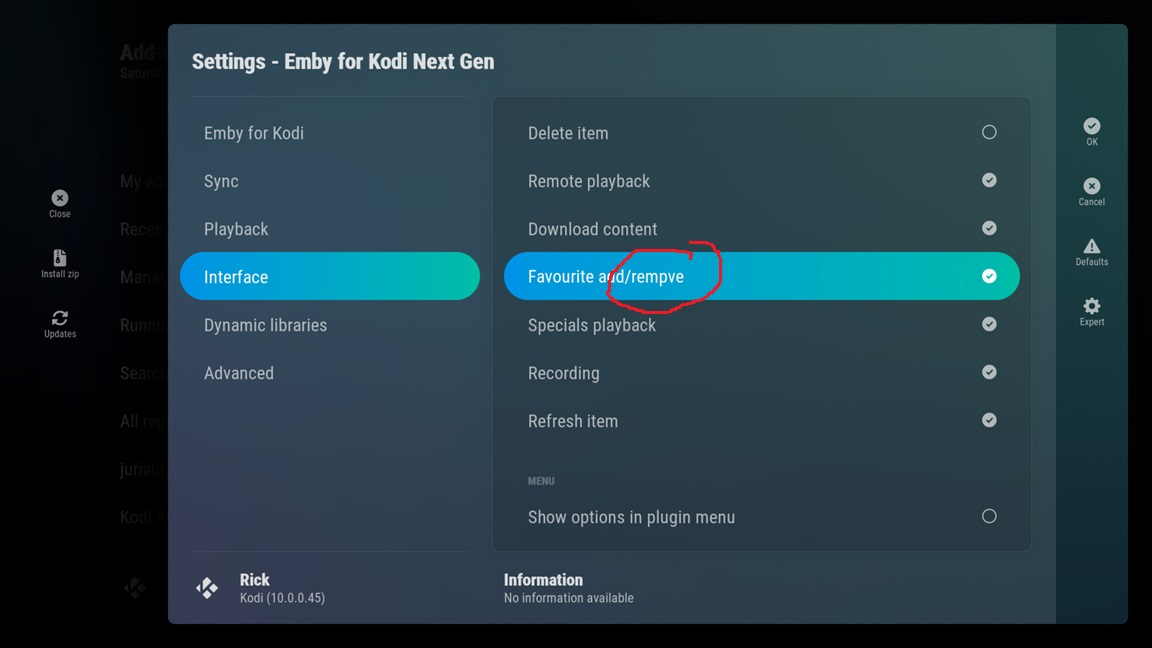
Me too. Thanks for sorting. Now I need to unsync and then delete all my emby favourites from each of my Kodi clients now. No idea why that was on by default?1 point
-
It works (for me) : Synolgy DS 220+ using Emby Server 4.8.1.0 with Windows and Firetv Addon 9.4.14 .(plugin.video.emby-next-gen-9.4.14) ... Thanks! Great work!1 point
-
I do, yea. Testing now, this issue isn't present when I switch to the native Samsung keyboard.1 point
-
New STABLE version available 9.4.14: Delta changelog 9.4.13-> 9.4.14 fix stream sync issue1 point
-
Can you provide one of these videos for testing? Thanks !1 point
-
We're moving in the direction of the standard app. This is what's getting all of the new features. But until we fully transition I would say whichever you prefer.1 point
-
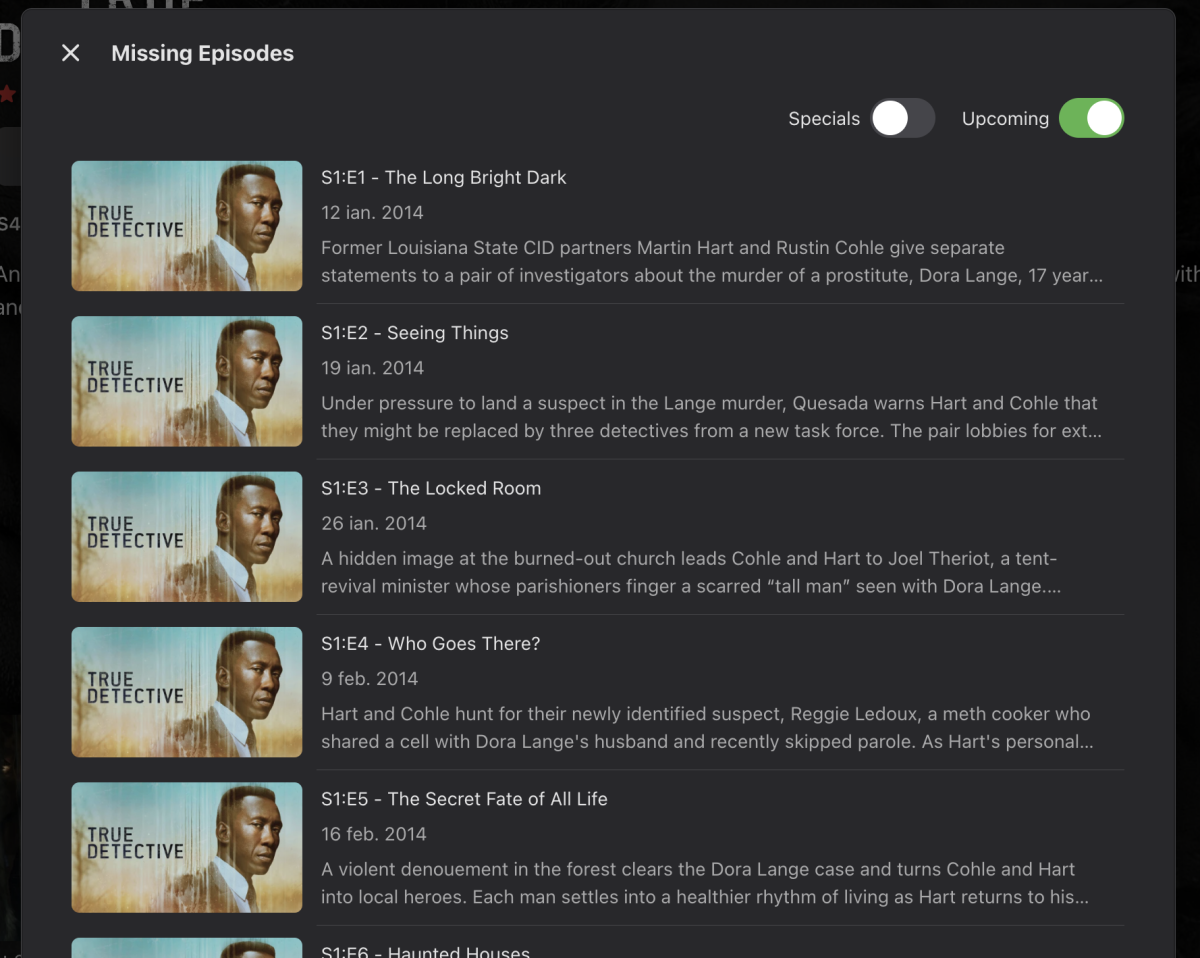
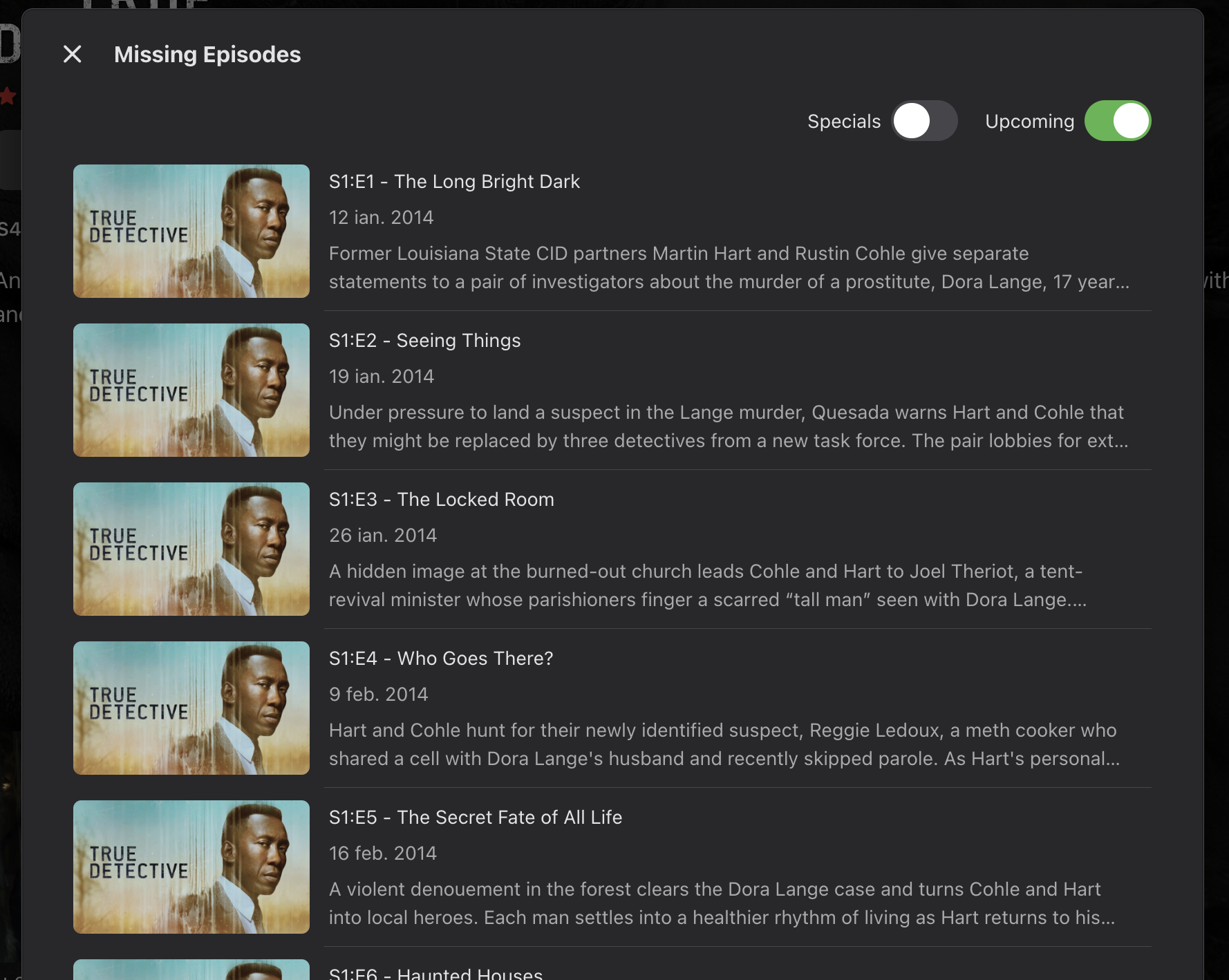
We need the missing and upcoming episodes old features back The new ones are terrible1 point
-
I have the exact same issue. I have an older LG OLED55B7A Software Version 06.10.30 - which is the latest. - the TV does not find anything newer I have unfortunately updated my Emby to 1.0..41. Running Version 4.8.1.0 on my PC. When launching the app, it shows the emby loading screen for 2 seconds, then it shows a black screen with the emby logo and that is it. It remains stuck in there. not matter how long I wait. Have deleted the app, installed it again; one time it worked after reinstall - had to enter my local server address and password and it worked until I turned off the TV next day did not want to start again. reinstalled the app, however nothing. pulled the plug on the TV for 20s, re-powered it, nothing. Is there a way to get back the old version? - which worked well, until the pesky update notification came up. As a side note: the EMBY app is 33.5Mb the install space on my TV is 34.2 MB - where I have deleted every app that I could. nothing else to delete. Also, on my software version there is no clear cache menu. Please let me know if there is a solution - can I have the older version to install with an USB stick?1 point
-
Update: Hey all, just thought I would put out a little update, there was quite a major change to the way v4.8 Emby frontend handles loading scripts and the like, so after much frustration (and help from @Luke) I can proudly say that I have the backend and frontend working with Emby 4.8. I have noticed one or two small issues I still need to address and would like to do some more testing to make sure all is well, don’t wanna break everyone’s stuff. I’ll drop a new version in the coming days if all goes well.1 point
-
v 1.0.1.36 Thanks to @kaledi- Handbrake appears to write some extra HDR10 metadata into the mediainfo formats that the Plugin was not picking up :- HDR10 plus - SMPTE ST 2086 / SMPTE ST 2094 App 4 Dolby Vision and HDR10 plus - Dolby Vision / SMPTE ST 2086 / SMPTE ST 2094 App 4 Dolby Vision and HDR10 - Dolby Vision / SMPTE ST 2086 / SMPTE ST 2086 These have both now been added. -- Usual rules apply, copy your current DLL as a backup, replace with the attached. Any corrections will only take place on new files, or you can re-process files if you wish. Refresh metadata afterwards. If you are using the catalogue version - then this version has lots of extras - so ensure you go into the Plugin config to confirm the options - and TEST. Emby.MediaInfo.dll1 point
-
Can a option to set the theme volume for series/movies in 10% increments similar to the the ATV app be added to emby for android. Theme volumes are loud and distracting when just casually browsing the library.1 point
-
So having the old behavior as an option is not even being considered? No one wants to go through countless menus to see something that should be shown in the episodes/seasons list. There is a reason it was done this way before, I assume. I am just not sure who asked for it to be removed...1 point
-
I am also very unhappy with this new solution of showing missing episodes. Missing or unaired episodes should be displayed by default.1 point
-
Quoting issues aside, can we please get confirmation that the much better implementation will be implemented again, as it was before? Thanks1 point
-
Also another bad User Experience call is that you have to go an extra mile and toggle the Upcoming Episodes in order to see them. Wow, I think who planned these, didn't think clearly that this is a bad bad design! So disappointed!
 1 point
 -
@LukeOh wow, I just noticed today that the Upcoming and Missing episodes were removed from from within the episodes lists. I think every user liked that feature. I would like to have it back. The current context menu is simply a bad decision! I prefer the visual version rather than going through a lot of steps to see the contextual menu. Please roll this back with the next update.1 point
-
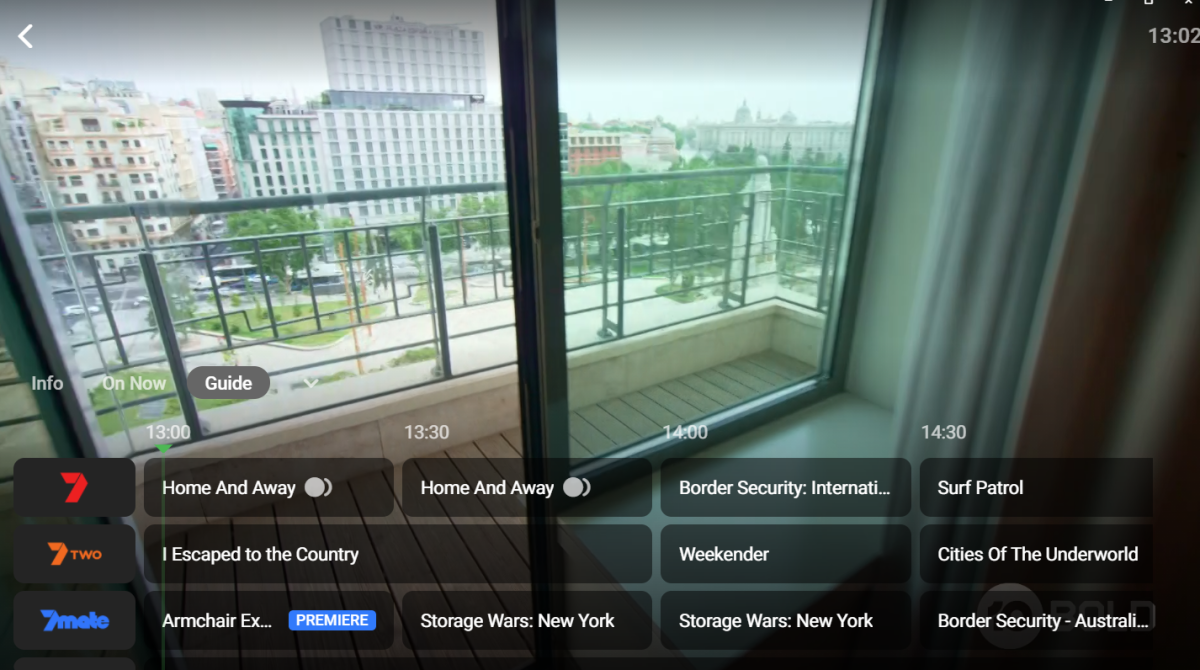
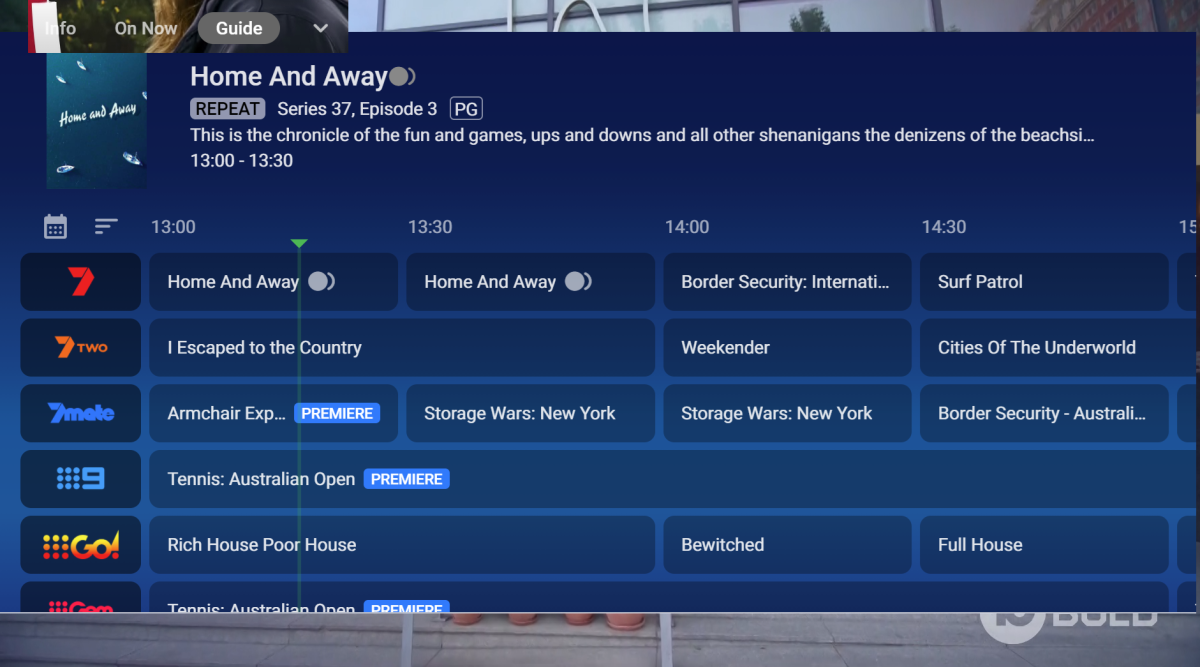
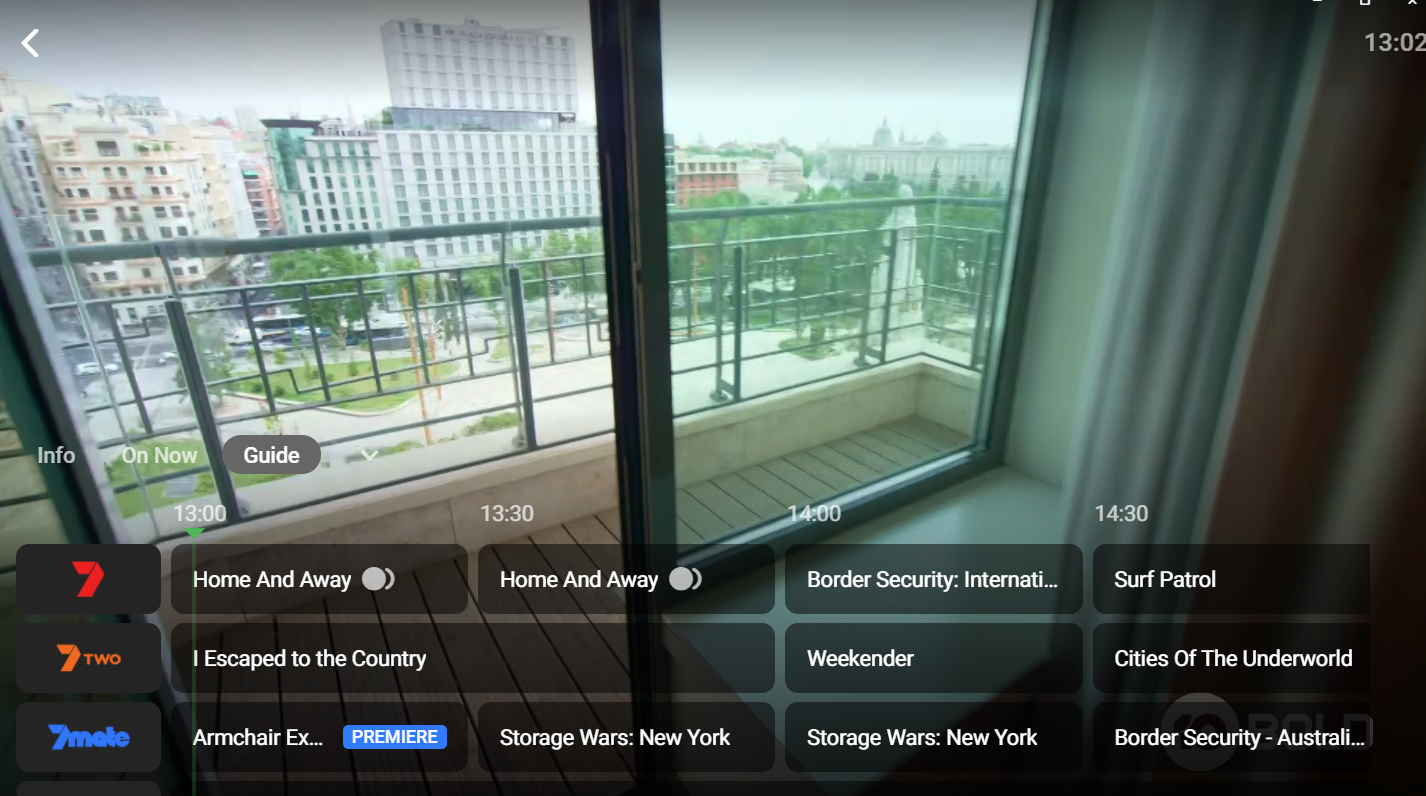
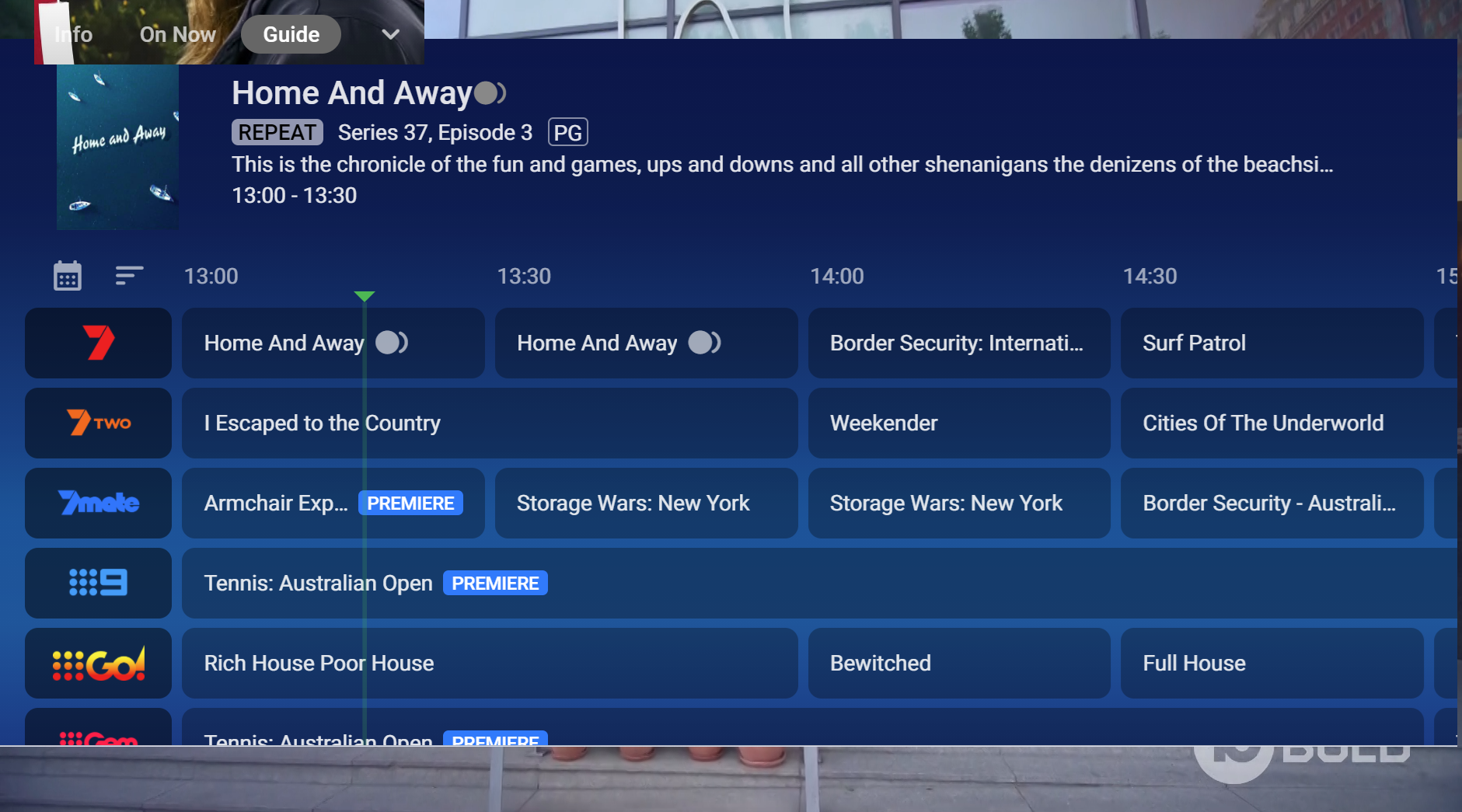
Currently when you press the guide button I only get a mini guide is it possible to get a full guide to be displayed. I did a poor ms paint job on picture 2. Thank you
 1 point
 -
Oh, no. Please don't do it like this. Forcing everything into 1 folder is not a good way to go about it.1 point
-
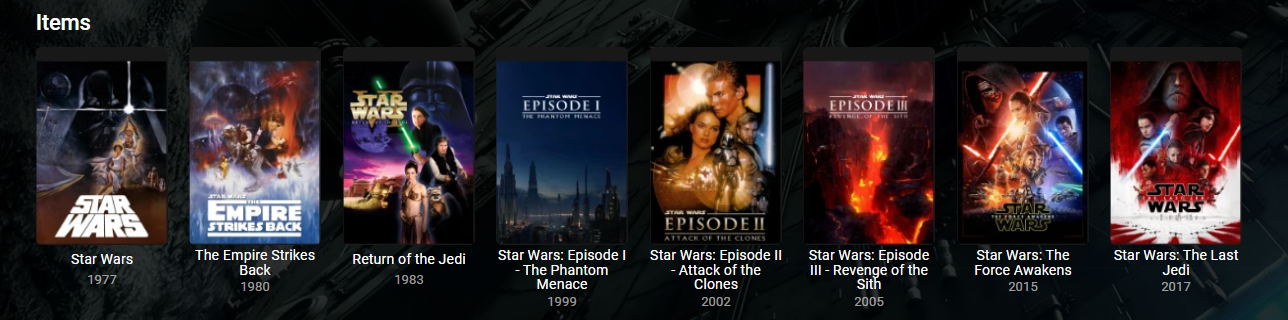
I'm going to add my support for this feature as well. While Extras may be able to go into Specials for most series, cracks start to show with a series like Doctor Who (1963). This series has multiple DVD releases per season each with a handful of features, and each with a multitude of Extras relating specifically to those episodes. One four-episode story may have ten or more extras, with sometimes close to ten stories in a season. It just becomes completely unmanageable. This is compounded with a DVD release like the TV Movie - a special which is listed as S00E60 on the TV database. As it is already a special, there is no way to associate the extras with the episode in Emby. The solution seems obvious to me. Have each episode in its own folder that acts like a Movie folder: Doctor Who (1963)\Season 00\Doctor Who (1963) S00E60\Doctor Who (1963) S00E60.mkv Doctor Who (1963)\Season 00\Doctor Who (1963) S00E60\Extras\Paul McGann Interview.mkv Now on the episodes information page, the extras will be displayed just as they would be in movies. Additionally, you need to be able to be able to add extras to Seasons: Doctor Who (1963)\Season 01\Extras\Theme Music Video.mkv These could be displayed at the bottom of the season. Something like the mockup attached.
.thumb.png.d6b8bc6ce8e3a6d910fd04ba5b5a5a25.png) 1 point
1 point













.thumb.png.3c0bf1781c34012ed9a1e25ab0c3c1df.png)

















.png.f2500dbaa32d2b8415f7be138d6bfadd.png)