Leaderboard




Popular Content
Showing content with the highest reputation on 02/01/24 in Posts
-
4.8 stable packages are starting to go up.6 points
-
and that is why i wont use plex3 points
-
Any chance we could get rid of the 'delete' option when we click on the three dots on a file in a playlist? I can't see any situation where a user would ever want to delete a file from their system using an Emby playlist. However I can see situations where someone wants to remove a file from the playlist and instinctively clicks 'delete' rather than 'remove from playlist' which is hidden down the bottom of the option menu. And the confirmation box doesn't help because if you're on automatic pilot and think you're just removing a file from a playlist then you will just click through. Yes, I have done this. Only once but it was a massive pain in arse when it happened. Again, I can't imagine any possible situation where someone would want to delete a file from their system and would choose to do it via an Emby playlist. If I'm missing something then I would love to be corrected. There is far more potential for calamity with that option than there is any actual utility. Thanks for listening.3 points
-
I'd rather not engage in your bad faith argument, thanks. I'm not the biggest fan of how Emby handles device limits either, but businesses do have reasons outside of just "moar money", so I am approaching the topic with an open mind. If you're not happy with the software and experience you've been provided with, there are alternatives available that may be better suited to your use case. No one is forcing you to stay here.3 points
-
Thank you and your team for all the hard work that went into this. Excited to experience 4.8!2 points
-
Because Exoplayer uses the audio track as the main timing "heartbeat" of playback. So, if the video isn't properly in sync with it, it could cause problems. Other players may, instead, use the video timecode as the main driver and, in those, you may get discrepancies in the audio instead (and these may or may not be perceptible).2 points
-
Well... This is what I ended up doing to disable sleep mode on my Fire TV box... From the Fire TV: Enabled Developer Mode on the Fire TV Settings -> My Fire TV -> About Clicked on "Fire TV" 7 times or until it told me I was a Developer. Found the IP address of my Fire TV box Within the same About menu, go to Network. Should show your IP to the right. From a PC/Linux System with adb tool set installed: Connect to the Fire TV via adb... Execute: adb connect ip_address:5555 I think at this point the Fire TV prompted me if it was OK to connect via my system. Get to the Fire TV shell... Execute: adb shell At this point you should be in the shell of the Fire TV. If wanted... Record the original timeout settings (Probably 1200000) Execute: settings get secure sleep_timeout Set the timeout settings to 0 to disable, or the timeout you want in milliseconds. Execute: settings put secure sleep_timeout 0 Logout from the Fire TV. Execute: exit Disconnect adb from the Fire TV... Execute: adb disconnect See... https://www.howtogeek.com/813766/fire-tv-developer-options/ https://www.reddit.com/r/fireTV/comments/4jc22o/nonroot_prevent_sleep_on_fireos5/2 points
-
It is really cool that Emby has the ability to support multiple versions of the same movie. It would be nice to have a setting on the client side to allow the user to set which version should be selected by default. This could be as simple a user-entered string, or it could be a list of detected strings to choose from. It could allow multiple entries and it would choose them in the order entered. On the Kodi side, it would also be nice to get the "Choose the Best Version for Me" option that the Emby app has.1 point
-
It occurred to me the other day that Emby's Movie and TV libraries treat watched/unwatched indicators in opposite ways. In the TV library, posters display a badge with the number of unwatched episodes on each series poster. No indicator means watched. In the Movie library, posters display a badge with a green checkmark when the movie has been watched. No indicator means unwatched. To summarize: TV: Indicator = UNWATCHED Movie: Indicator = WATCHED It would be great if these libraries could display watched/unwatched status indicators in a consistent manner. Personally I prefer the TV approach, where the indicator corresponds to an unwatched state, as it acts as a flag to draw your attention to something "new". So that would mean no green checkmark on watched movie posters, but instead something like a green star on unwatched movie posters. No change would be needed to the TV library behavior. Thoughts? Am I the only one whose OCD is upset by this?1 point
-
Hi all, So my MacBook only plays DV profile 5 (yay Thanks Apple, totally not a huge hassle). Which means that I have some profile 5 files, but (again thanks Apple) cannot stream them without it trigering transcoding. Not that big of an issue, i'll just open them locally. But now that I have the files anyway it would be cool if I could use them for my family. At the moment, when tonemapping begins for Profile 5, it will give the signature green and purple look. Jellyfin looks to have fixed that and I was hoping this could also come to Emby, especially snce your recent update mentioning Emby will now recognise and tag content as DV @Luke. No rush, it's not that big of a deal for me but maybe easy and nice to implement when you have the time! J1 point
-
Duh. It already does this - I forgot about that. Well, it doesn't show the duplicate recordings ...1 point
-
This just confirms my theory from above... ...fab is doing a conversion while it is ripping (not a 1 to 1 copy) MakeMKV uses no HW Acceleration or software transcoding, as it simply copies the BD-UHD stream to a MKV container, on my system it only uses ~30% of one thread while ripping. Once you get a MakeMKV rip completed let us know how it compares to the fab rip (size, direct play on emby?, ...). And I suggest holding off on the Arc for now.1 point
-
In other words, recording an episode that I already have is different than an episode that I don't already have - it is not shown as being recorded.1 point
-
Thanks for the response, ebr. So that's where you've got me confused then. If the verification isn't done between the client and Emby directly, that means the verification is occurring between server and Emby. So it should be possible for this to be tracked locally in the server without exposing an unauthenticated API. You wouldn't get any of the management features, like dropping off devices, but at least you would be able to see a running count of which devices are using premium features.1 point
-
hi , i didn't get there. So , i find a radical solution. I did a reset mode 3 on my synology nas ds420+. Copy back the data from my backup who take me a thirty hours.... And now , all is good....1 point
-
Artwork cache settings working again. Also, the advancedsettings and sources xml files look good. Thanks for everything QM.1 point
-
Let’s talk Dev to Dev here as you’re not pulling anything over my eyes and I do this for a living. So you set an alert on your side for those pirates and if they hit 75 devices, then ban the key (not saying 75 is the magic number). When I made the purchase it stated “Unlimited Lifetime”. So yeah to me I don’t have unlimited here. I have multiple devices in my own home (2 iPads, 4 iphones, 2 computers, 9 TVs, most in the mancave, so personally I have 17 devices. So because I want to share my server with family, the server Emby has nothing to do with, I’m allowed 8 members, well mom dad on both side, and my brothers and sisters, op I’m already over the limit because I want to use intro skip, that’s not a premium feature, get real. all someone has to do and I could if I want to save money and not over pay, is set up 2 docker containers, install Emby, pay for two keys and wallah, I’m up to 50 connections for no additional monthly rate. This isn’t rocket science, if people want to pirate it they can.1 point
-
1 point
-
Dutch, When you say it doesn't seem distorted, it depends which "fill" method you are using and on what screen. It seems like you are thinking it is just one button / feature change to make it happen. Filling the screen by cropping left and right is one method which keeps the correct image ratio, but you don't see left and right parts of the playback. Filling the screen by stretching up and down to cover the black bars. This stretches the playback image, so people will look taller and thinner. You do get to see the entire left and right portions of the playback, but they are also stretched. Zoom. Used to be available for many TV's. The picture just zooms in to fit the either widescreen or standard TV size and mostly, left and right are lost, but sometimes also top and bottom. Pan and Scan is done in post production and would not really be available to automatically push a button to make it happen on any screen. I mention it because often this is done to retail copies and people just don't realize it is what they are watching. Post production service makes a copy that fits into a screen size, usually only 4:3 (old TV), where the media is cropped left and right and every once in a while there is a smooth pan across the playback so an actor or event on the right or left can be seen. There is no distortion or stretching, but at all times part of the original media, left or right, cannot be seen. Where do you want the "Fiill" to work? These all have to be coded differently for each playback hardware: computer monitor, tablet, phone or TV can be a different format. What formats do you want to cover? I think the playback probably needs to be coded differently for the various playback options on .mp4, .mkv, transcoded? I just want to point out that creating a feature that does the "Fill", may need to consider all of this. If you want this feature, maybe mention, which option do you like, for what format on what hardware, or if you want all of them.1 point
-
New PUBLIC TESTING version available 9.4.3: Delta changelog 9.4.2 -> 9.4.3 fix boxset update issue fix favourites update fix artwork cache fix player issues1 point
-
Just as a note, on my LG OLED TV, I had to explicitly turn off Wifi in settings to disable it - I assumed by plugging in an Ethernet cable it would automatically disable it, but it doesn't. Also remember the connection will only be 100 Mbit/sec - so don't go hunting for 1000Mbit/sec, because the majority of high end TV's still only use 100Mbit for Ethernet .. The best thing I ever did, was abandon my LG TV to actually play media on the device itself - brilliant picture, but as a media playback device it's poor (unless it's now been updated, it couldn't even play Dolby Vision using MKV containers..) - I just purchase an Nvidia Shield Pro (connected at 1000Mbit/sec) and have not looked back .. although I did miss the magic remote .. that was pretty cool.1 point
-
Yes, look's like this request will hit at least 10 years without implementation1 point
-
It's been hinted that it may be released this week, but personally speaking, I've seen enough minor issues circulating in the testing area that I could see them letting this latest beta version stew for a bit longer. Hopefully I'm wrong and it's solid enough to wrap it up though.1 point
-
The solution is the plugin is only in Emby 4.8.x's catalogue, it's not in 4.7.x's catalogue, which is what I'm running. It needs to be manually copied over. I hope this helps others1 point
-
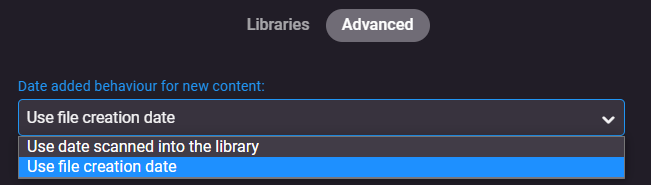
Oh wow- yes that’s probably it! I’m shocked “use file creation date” is the default. Thank you!1 point
-
What do you have set under 'Library' > 'Advanced' tab My first guess is it using the 'creation' date of the file you just imported.
 1 point
 -
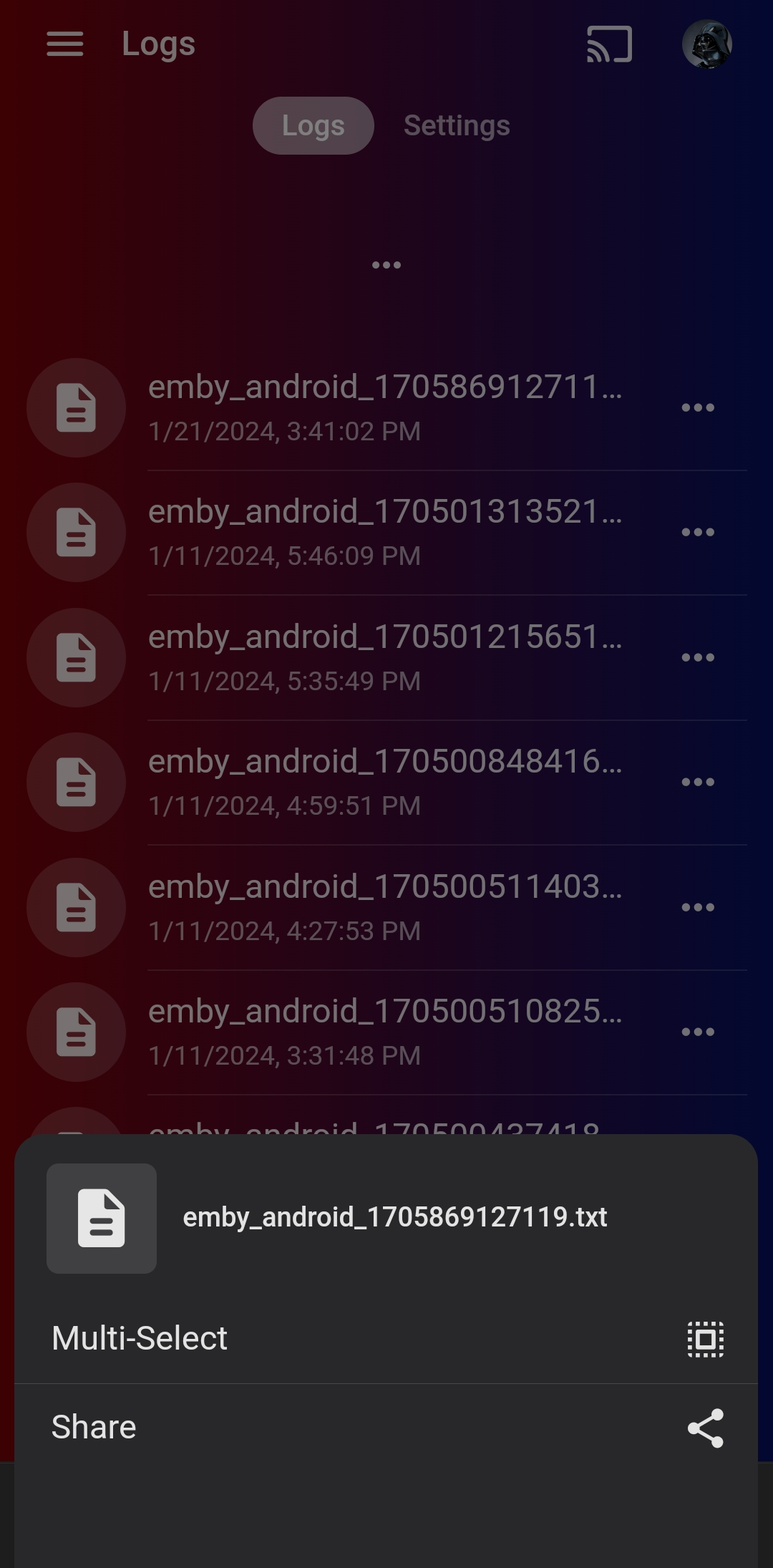
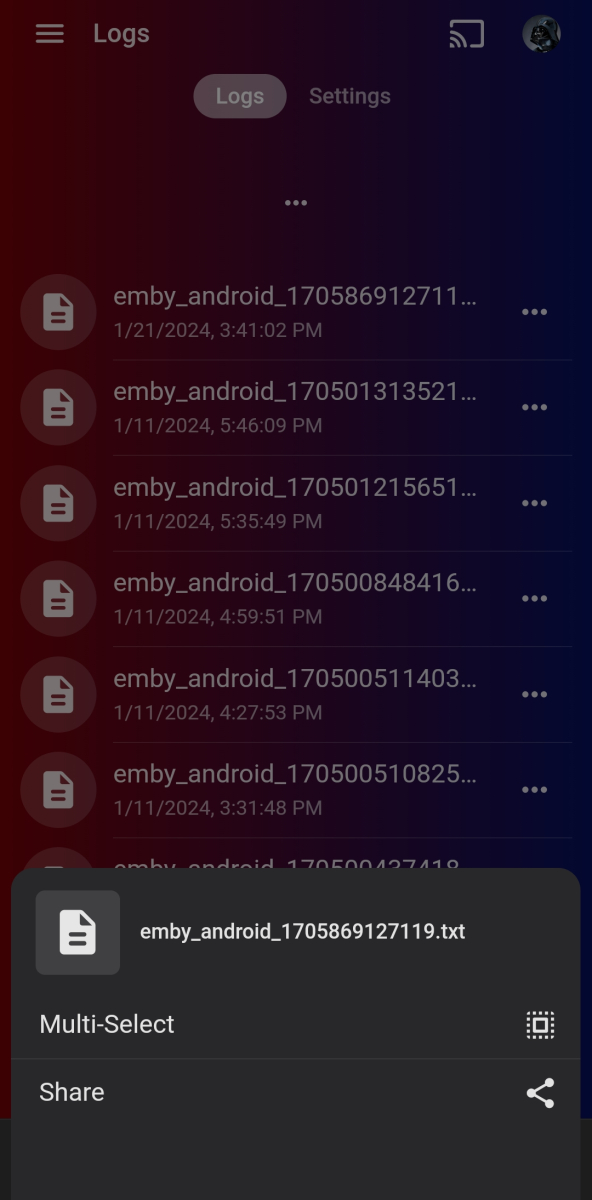
Doh, sorry about that. In the emby mobile app, i click on the 3 dots on the right of the log file. Then clicked "share" and selected Gmail. Next, I just emailed it to myself. Finally, I used my computer to put it into a text file.
 1 point
 -
Ok here are the logs https://paste.kodi.tv/badobudinu The strange thing now is that I have 3 different versions to choose from, instead of 2!!! All I did yesterday was split the movie versions to watch it, and after I marked on Emby server has unwatched and group back together the versions! Something is weird! I may have to reset the database and start over in the next plugin version! I'll wait until you check it out before going to upgrade with 9.4.21 point
-
Yes you can go through the expense of building a new server with an new Intel processor, or spend $90 USD on an ARC A310 or $140 on and ARC A380 and continue to use your old server as it is. You would just need to update your preferences in Emby to use your new hardware.1 point
-
I had this exact requirement. I used bulky to tag all the 4k films "4k" and then used access control on the users to block the "4k" tags. Worked perfectly1 point
-
Hi, no you can't.1 point
-
We have no reason to do that. Thanks for taking the time! I don't work for Emby, I'm just trying to help as well So yes, it may well be a 'Shield/Exo/Emby App/hevc profile' combo problem indeed if other hardware plays it just fine. I'll try the Android (non TV) App on the Shield Pro myself later - should have tried that when I tested first time ..1 point
-
Feel free to boo me out of the room but I was curious so I tried the sample. Shield TV Pro 2019 Emby Android TV - stuttery Plex - plays fine Amazon Fire Stick 4K Max 2023 Emby Android TV - plays fine Plex - plays fine All were direct play, my AVR showed full passthrough audio.1 point
-
ok - so it is a reasonable known fact that Exoplayer is far less tolerant of corrupt frames than say VLC, but the fact your setup plays the demo files without issue - suggest to me there is nothing wrong with your setup, nor emby (in playing non-corrupt files that is ..). If you have a repeatable section that always drops frames, then maybe extract just that section (5-10 seconds worth) and post here or via pm (use mkvtoolnix etc). It's possible that in doing so, you fix the issue (as it will re-write the frames) but if that's the case, then a remux on the full file may fix it anyway.1 point
-
I just published and update for the plugin. There are two main things Did a rewrite on the UI side to bring it up to code with the plugin standards. @Lukesaid this should fix issues people are seeing in the beta builds. If not, as always, I'll fix them when the stable version is released. I added least watched shows. Same deal as most watched shows. This should help people that want to remove a series for space. it is a BREAKING CHANGE! You will need to run the scheduled task before the statistics page will load correctly. I'm sure there will be some bugs/issues with such a big change. Please report them here with a copy of your debug enabled log. Thanks.1 point
-
Ok.. NOW it updates the BOT's STATUS message to show the now playing item, such as Artist - Title (Year), and the Images for Audio And Music Videos are also served along with their info. So now it handles Episodes, Movies, Music, MusicVideos, so far. Not perfect, expect some bugs, but.. it's something!1 point
-
Still needs more work, but It seems good enough for Episodes, Movies, Music and MusicVideos. I have not made sure it will never have an error or work with every single condition as I only put a couple days into telling GPT to keep fixing errors and change things, but eventually I got this far. Anyone is encouraged to branch it or suggest edits etc.1 point
-
This is by NO means 100% or how I would choose to do it exactly, BUT until someone takes an interest other than me it works for me. There are a couple things that would need to be changed such as the local network path to music images for example, and setting the OS ENV for keys etc. BUT anyone is welcome to improve or use it if they desire. I hope someone finds it at least helpful from an example standpoint of how to get started. Discord NOW Playing BOT, posting to a thread in a "newmovies" channel. Adjust or edit as needed. Enjoy. NOWPLAYING Discord Bot NOWPLAYING is a Discord bot designed to display real-time now playing information from an Emby server in a designated Discord channel. It allows users to see the details of the media currently being played on the Emby server, enhancing the community's media sharing and viewing experience. Features Real-time updates of media playback from Emby server. Displays detailed information including titles, artists, albums, and images. Supports various media types including movies, episodes, audio, and music videos. Configurable to monitor specific user activities and ignore others. Automated messages for "Nothing Playing" scenarios. https://github.com/Tolerable/NOWPLAYING1 point
-
Thanks, and yes, it makes sense of course. I've created a new item to track your request: https://github.com/EmbySupport/Emby.WMC.UI/issues/42 (this is being worked on in intervals, so don't wonder when it's quiet for a while, but there will be a wave of updates soon)1 point
-
Hi, currently there is an issue filed with mpv that if it is configured for passthrough but the passthrough fails, then playback will just fail to start altogether rather than having the audio fallback to in-app decoding.1 point
-
This information is not on your server. Premiere devices are not tracked on your server or by server. They are tracked by key on our admin server. Creating an API to access detailed information is a possible attack vector since your server has no way of authenticating with ours at this time (we don't require you to create an account with us). We continue to investigate ways to provide some of this information safely and securely but, in all honesty, it isn't our top priority because the vast majority of our users using the product as intended have absolutely no issue with the device limits.1 point
-
HI, we're looking into this. Thanks.1 point
-
You can mirror directly to the Roku through the supported Miracast protocol. Follow the URL below. https://support.roku.com/article/208754928 This allows you to use your phones native functionality to stream to your Roku. Using this method you would launch Emby on your phone. Find an item to play. Just before you attempt to play that item you would want to link to the Roku for second screen display. Then just play on your phone and the content is streamed onto your Roku. This may or may not be acceptable but it does work this way for anything you can view on your phone, not just Emby. It isn't a perfect experience but it might work for you.1 point
-
Wow, it has been 8 years and this basic feature has not been implemented yet?! This is as basic as having to select the audio stream. Please implement this. You already have all the elements you need (selecting video dialog) like when there are 2 files. If you say that it doesn't work on certain systems, then do it for the ones that work like android TV.1 point
-
This is primarily a bug fix release. Here are the changes: Web app compatibility updates for iOS 17 Compatibility updates for FreeBSD, TrueNAS and Arch Linux Improve playback of transcoded video in the Emby web app View the full article1 point
-
C:\Users\USERNAME\AppData\Roaming\mpv\ If you go in this folder, create a file named mpv.conf and add this line: keepaspect=no then it should automatically stretch for all content, you can also create instead a file named input.conf and assign a key to aspect ratio switching if you prefer that, more info in mpv docs.1 point
-
Good day, I will explain and clear the confusing and misunderstanding about the group "Member". 1 - When you register at Emby Community support forum, you place at that group, from 0 to 25 posts you are "Member", when over 25 posts you will move to the group "Members". We have other groups as well, but our subject here the "Member" group with 0 post. 2 - Why sending "Force Password Reset" for that group and ONLY with zero post: We notice for the past month that some groups of spammers posting from these accounts, as we all know, many using same email/username/password in multi sites, and if one of these sites get breached and info get published on the net, any spammers can use that. either to spam any community or worst, attacking the members here with any posts they made, these kind of spammers do not care if they get banned or not. Any community faced that, normal will ask their members to force change their password, in OUR case here, the "Member" group with ONLY zero post. 3 - Why now start to deleting accounts for "Member" group with ONLY zero post from year 2013 to 2017: We notice from many replies when we did the force password reset, that many do not know if they ever had accounts here, In this deleting steps, we want to make sure that whom register here are the real user, not someone else using their info. After many confusing, I hope this thread clear the matters. Thanks all. My best1 point
-
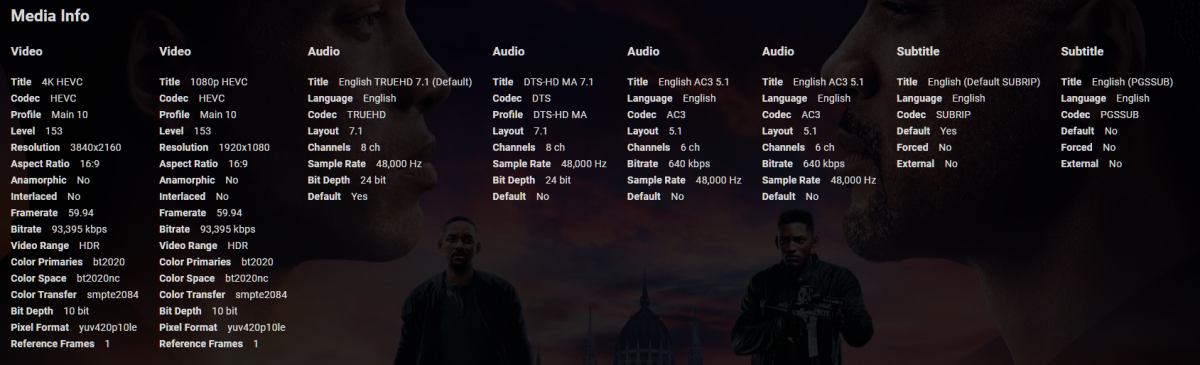
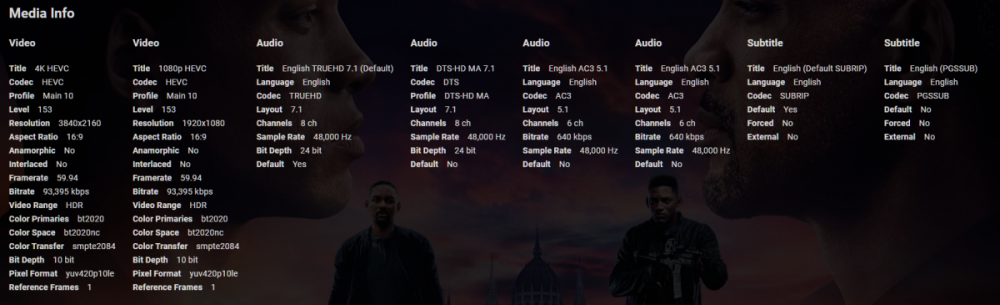
For "multiple versions", it would be great to have both the 4K / 1080p versions of the same film in a single MKV so that the audio tracks / subs can be shared and not wasted space.1 point
-
Dealing with multiple versions of a movie brought up an idea. All versions share the same audio/subtitle-tracks, so why not allowing an mkv to have multiple video-streams and give an option to select the desired one? In my example I'd be interested in putting a 4k and 3D-version together into one file, but it could also be used to add multiple encodes for streaming. Define a naming-scheme for those streams and we are set, maybe even use such name-tags for some semi-smart pre-selection? Such an secondary videostream could also be interesting for an nextgen scrubbing-implementation, like including an very low-bitrate/low-res-version for that purpose...1 point
-
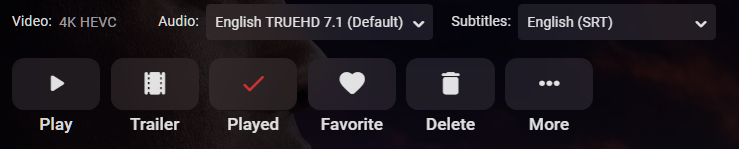
It would be great to have the video stream selectable - same as is audio now. It appears to be getting more common to embed alternative streams (such as 1080p) alongside a UHD stream particularly within MKV's containers. This feature would allow us to select a 'best stream' for a given device, an example recently being my Samsung TV not handling 60fps which was the default stream in the MKV. A 1080p was available also but could not be selected, so my server had to transcode a large UHD high-framerate source file - pretty chunky cpu work which it struggled with and was not necessary.
 1 point