Leaderboard




Popular Content
Showing content with the highest reputation on 01/29/24 in Posts
-
Even if we called it 5.0, it would not negate licenses.5 points
-
Hi, I'm not sure what the issue is, but we'll be releasing Emby Server 4.8 this week barring unforeseen circumstances, so I would suggest reevaluating once you have that. If it's still an issue after that you could see if the problem occurs with a new artist (and thus, new albums).5 points
-
Mmm salty. Need more fries. Don't take everything so seriously m8, life's too short to be upset over a software update. It'll come out when it's ready, until then; patience. You'll survive.3 points
-
Yes. Emby does serve us... Kind of like the aliens in "To Serve Man."2 points
-
fyi, A Boxset sync issue was reported when Emby server stable version is used. I'll review the issue.2 points
-
I think you should trademark the ‘Soon’ TM joke2 points
-
People here really seem to forget software updates are not a part of emby premier. You're not paying for continued development, you're paying for the product as-is. Your payments do support development, but they do not entitle you to it. Luke and the rest of the emby team could walk away yesterday if they chose to. They have no obligation to provide you or anyone else with new versions. I certainly agree a quicker release cycle would be nice to have, and hopefully they will improve that; but at the end of the day, it's their project to do what they like with. If you don't like it, there's other options out there.2 points
-
It's hilarious you think @rbjtechand myself have no idea what we are talking about, when here you are spewing lies. DV is proprietary, and you need to pay a license fee to have it on your TV's. Samsung, which is the creator of HDR10+, does NOT support DV in their TV's. https://www.techradar.com/news/dolby-vision-on-samsung-tvs-why-isnt-it-supported Again, educate yourself on what profiles there are, and what these profile playback limitations are. There is so much ignorance in this thread with people thinking that their ignorance makes them right, it makes those of us who know what we are talking about want to reach through the screen and slap some sense into you. Not all DV is the same, period. It's like having a technical discussion with a bunch of toddlers. None of you have even done basic research and it's at the point where I know I will be adding more people to my ignore list because your willfull ignorance is so frustrating.2 points
-
@pünktchen @Luke Yes, please!2 points
-
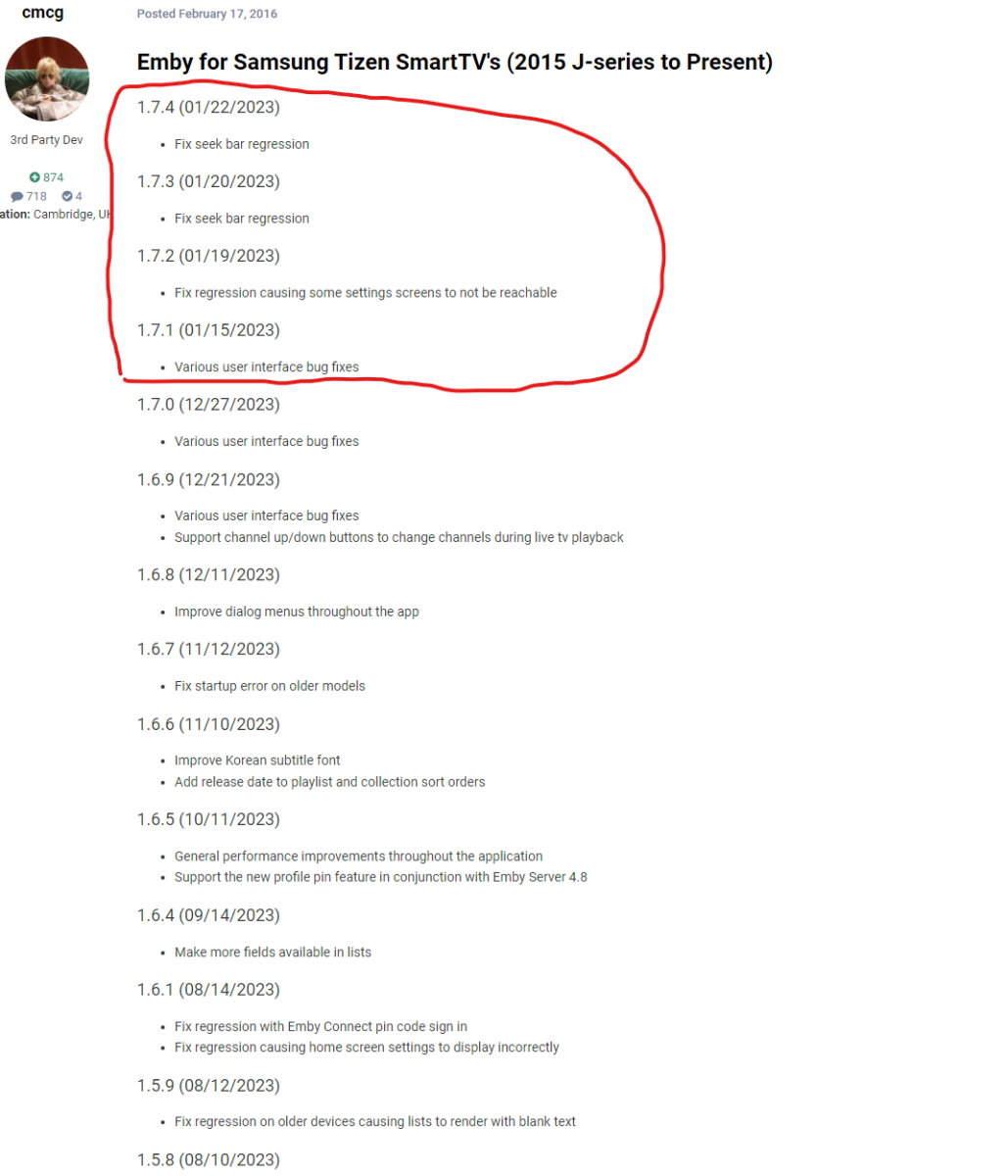
just noticed this. should be 2024?
 2 points
 -
Psst! Hey everyone, in a different thread, I think Luke just said 4.8 might actually drop this week! I hope I didn't jinx things...2 points
-
@LukeThe new way that you've developed for playing library items from VirtualTV as a live tv source is really great, but it's missing some features: The playback should auto advance to the next program in every available Emby app. There should be a way to start the current program from its live position instead of from the beginning. Ideally, the decision whether the program playback starts from the live position or from the beginning should not be a "static" channel setting in the plugin. Instead also the program itself should behave like a normal library item. That means that the program info dialog that we get from the EPG before playback and also the context menu should display a "Resume" and "Play From Beginning" button. Where "Resume" would start the program/library item from the live position and "Play From Beginning" from the start of course.1 point
-
I've been looking at some info about high resolution audio support on Android and all I've seen is complaints about poor support by the Android driver in this regard, where the driver resamples everything to 48Khz instead of playing the audio in its real resolution even on phones with DACs that support up to 192Khz. In a previous release of Emby for Android mobile I saw the release notes saying the app was supporting high res on phones that support it, but given the above situation I wonder what the Emby app actually supports in this regard. One suggestion could be adding the real output the app is giving in the "Stats for nerds" option inside the cog icon in the now playing screen.1 point
-
Doing so will remove your ability to install any app! From the release notes: The Apps installation function is removed from the Apps section on the System page (also referred to as Overview page) of the Admin Page.1 point
-
Sure, the code below is what I am using. I'm just running it on an apache webserver with mod-php. Note that this works specifically for my use case, has limited error checking and is not 'production ready' in any way. <?php //get channels by tag $tags=file_get_contents("https://127.0.0.1:9981/playlist/tags?profile=pass"); $lines = explode("\n", $tags); $ouputM3u=""; foreach ($lines as $line) { // Check if it's a channel line (starts with '#EXTINF') if (strpos($line, '#EXTINF') === 0) { $name = str_replace(',','',substr($line, strpos($line, ',') )); } else { if(strlen($line)>1) { $channelTag=file_get_contents($line); } $channelTags=explode("\n",$channelTag); foreach ($channelTags as $channel) { // Check if it's a channel line (starts with '#EXTINF') if (strpos($channel, '#EXTINF') === 0) { $currTags = substr($channel, 0, strpos($channel, ',') + 1); $channelInfo = substr($channel, strpos($channel, ',') + 1); // Add the group-title tag before the channel name $channel = str_replace(',','',$currTags) . ' group-title="'.$name.'",' . $channelInfo; } $outputM3u .= trim(str_replace("#EXTM3U","",$channel)). "\n"; } } } $outputM3u = preg_replace('/^[ \t]*[\r\n]+/m', '', $outputM3u); echo "#EXTM3U\n".$outputM3u;1 point
-
TVHeadend won't output tags in an m3u. The explanation I found was that since multiple tags can be assigned to a channel in TVHeadend, how would it determine which tag to use for a channel when outputting the m3u? Kodi gets tags from the TVHeadend addon with HTSP, this seems to be where it's handled in the source: https://github.com/kodi-pvr/pvr.hts/blob/f336890562972b5a5d0a1cf6b363ff10262fcbd5/src/Tvheadend.cpp#L227C1-L227C8 In another thread, @Lukelinked to here for the TVHeadend plugin for Emby: https://github.com/MediaBrowser/Tvheadend/blob/master/TVHeadEnd/DataHelper/ChannelDataHelper.cs#L65 Ideally this is a request for someone to add this feature, but I'm willing to put time into it if someone could help me. One issue I anticipate is that Emby probably expects one tag per channel, but Kodi probably doesn't mind having a single channel in multiple groups. I haven't tested multiple tags yet but I have tested Kodi with single tags per channel and that works well. Just as having channel numbers in TVH was previously a requirement until an update, I wouldn't mind if this required me to have only one tag per channel to avoid dealing with multiple tags.1 point
-
If I try and select audio or subtitle languages then I can scroll to the bottom of the first screen (whatever the one below assamese is - it is only half displayed so only the very top of the ‘A’ is visible), but it won’t scroll so I can get no further! the app is 1.8.2 the appletv is on 17.3.1 point
-
Maybe, maybe not. You can certainly factor the development cycle into your decision to start/continue subscribing to emby premier. However; your subscription does not obligate the emby team to provide you with new software releases. Especially not on any particular schedule. Motivate? Sure, obviously they'd like to keep their customers relatively happy; but they're not obligated to. Again: it's their software/company/product; they can do with it what they like. Like anything else in life; decisions have consequences. Their choices could drive off customers, or entice new ones; but those are still their decisions to make. 4.8 will be released when the Emby team is ready to release it and not a moment before. Constantly pestering them for a release date won't speed up development. Nor will acting like you're entitled to their work and demanding prompt releases.1 point
-
Hi all. Just want to leave feedback about the issue with pt-PT language and probably other variants. With the 4.8.0.76 Beta and OpenSubtitles plugin 1.0.51.0 all seems to work well. Thanks @Luke1 point
-
Would you mind sharing this? There doesn't seem to be an option in TVHeadend to include the tags in m3u. Kodi gets the tags with HTSP though, so the TVHeadend plugin would be able to handle this if the code were there. I found this feature addition giving the option to sort the tags manually: https://tvheadend.org/issues/2560 I would totally do the work on the TVHeadend plugin for Emby but the code is Greek to me.1 point
-
None of the subscription options include additional terms entitling you to the creation/release of new software versions.1 point
-
I see1 point
-
Correct, as nomenclatures for video resolutions are generally using vertical resolutions, i.e.: Nope.1 point
-
I found the issue, I'll fix it in next version.1 point
-
if it were a free open-source project than you would absolutely be right. But. This is a paid program which really takes the SoonTM to the extreme. Glad to see it should come this week but I hope that from this point forward updates are made a bit quicker.1 point
-
Unsubscribed to this thread - simply not gonna waste any more time on people that don't want to help themselves.1 point
-
Good Morning to those who end up here. I have good news as this can be closed out. The real test was seeing if anything new would be added to the "Collections" after I did all of this. Well over the weekend I just let the server sit, and this morning when I checked, I have 100 or so collections now, so it is now automatically grouping them together. So if you have any issues with Linux, create the folder collections inside of your movie library, run a metadata refresh and let it sit, mine took three days.1 point
-
Perhaps a language issue - but please read the posts above - the IP is being blocked for a time peroid, the notification follows.1 point
-
Thank you.1 point
-
Ah, thank you Luke and Lambtalk, now I understand the problem.1 point
-
I have some feedback on this: - The cablecard recordings were being impacted by an aggressive SATA power saving setting in my motherboard BIOS. I had enabled this setting thinking it wouldn't impact my recordings since they are made to an NVMe drive (using PCIe protocol not SATA). Once I disabled this power saving setting, these recordings started completing again. - The WinTV recordings just needed a software update from Hauppauge.1 point
-
@adrianlive @Zander3768 Both Playlist playback modes do only work in a LAN environment for Rokus. It's a limitation of the Roku devices, not the Emby app or plugin!1 point
-
Emby 4.8 does log AUTH errors so you can fail2ban repeated attempts 2024-01-28 22:32:55.599 Warn Server: AUTH-ERROR: 174.218.82.xxx - Invalid username or password entered.1 point
-
UPDATE: I think I figured it out. I edited my epg link to add the ?duration, as otherwise it only pulls in a few hours. Now it looks like this: http://channelsdvrIP:8089/devices/ANY/guide/xmltv?duration=1209600 PS. I wonder if the person below may be having the same issue, when I do a scan it takes less than a minute and I don't see it go over 15% before it shows as complete.1 point
-
Just for completeness sake and to let others know (if someone finds this post), I tried the solution: Movies/0-9/27 Dresses (2008) - [tmdbid-6557]/27 Dresses (2008).mkv and Emby was able to add it to my library, identify the movie and get the metadata. Thanks again.1 point
-
It is supported. Just not really recommended.1 point
-
I believe this is in 4.8.1 point
-
Not sure I understand question... Not sure why mb doesn't recognize the sts error and resolve on its own Monitor app I made works from outside of mb program. Looks at logs, then it does edit the schedule that mb uses. But my app don't tell mb anything else. Mostly because emby don't have a cmd line interface because it is closed source. Did this answer ?1 point
-
Yep, that's crap. Not sure why this happened to your sources, but I'll fix it.1 point
-
While I'm on a roll. E4K seems to be adding more and more "kodi.emby.media" sources to music section of sources.xml all the time. I think I count 54 of them and they're all the same. There's also a bunch of spaces added, but that isn't too much of a problem. I can remove them all but the first, but they keep coming back. BTW: I don't have my muisc added to E4k. I prefer the way Kodi deals with music boxsets and uses the disc title tag to identify each disk within a boxset. The source lines though cause the Kodi source list to be very long in the gui when I have to re-add music after a db reset. <source> <name>kodi.emby.media</name> <path pathversion="1">http://kodi.emby.media</path> <allowsharing>false</allowsharing> </source> sources.xml1 point
-
I just installed on win 10 and I love it, is there a way to disable the popup click audio when you navigate the WMC1 point
-
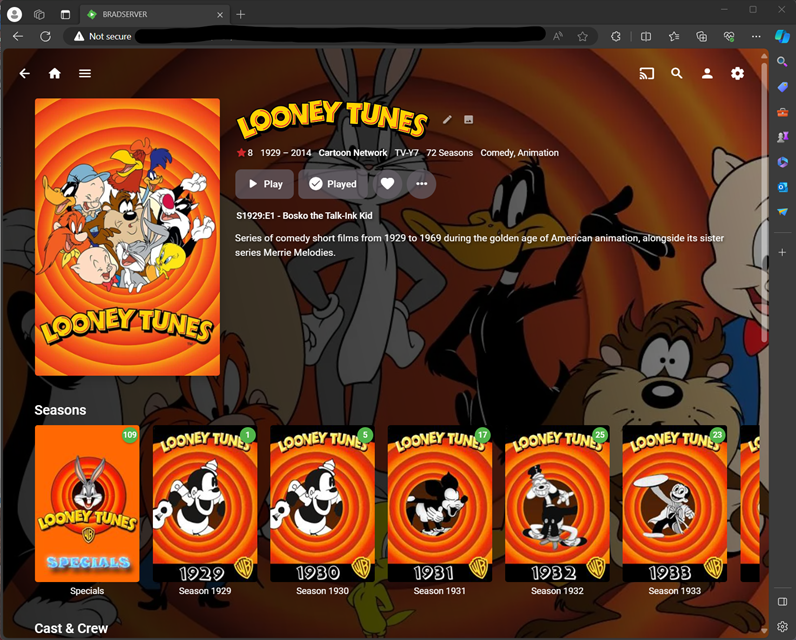
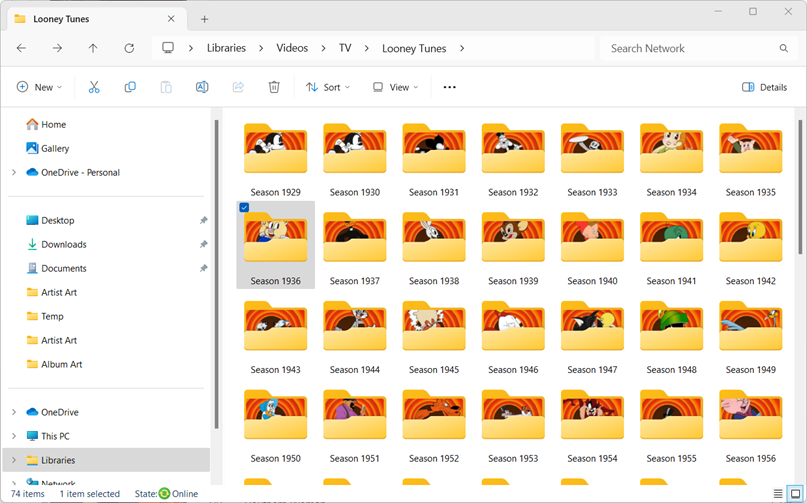
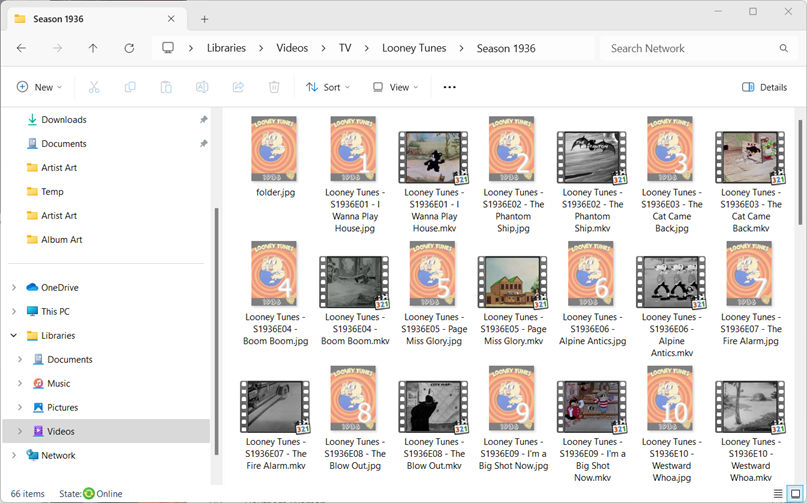
Tagging the Looney Tunes episodes as Looney Tunes - S[Year]E[Episode Number] - [Episode Name] is the route I went a few years back and it works great! I must admit it is a lot of tedium though. Worth the effort however! TVDB was the resource I used to determine which year/episode each cartoon from the blu-rays/DVDs went.
 1 point
 -
The Forum admins should be able to help you with that... I'm really missing this plugin in the beta server... more to the point, my wife misses it...1 point
-
Hello @twitchstickThanks for the kind words. Myself and @pünktchenhave reported to @Lukethe problem with starting at the current time rather than the beginning. The TV platform was designed and written by Luke. He has agreed to enhance it. So hopefully we will have a solution to this problem soon. Vic1 point
-
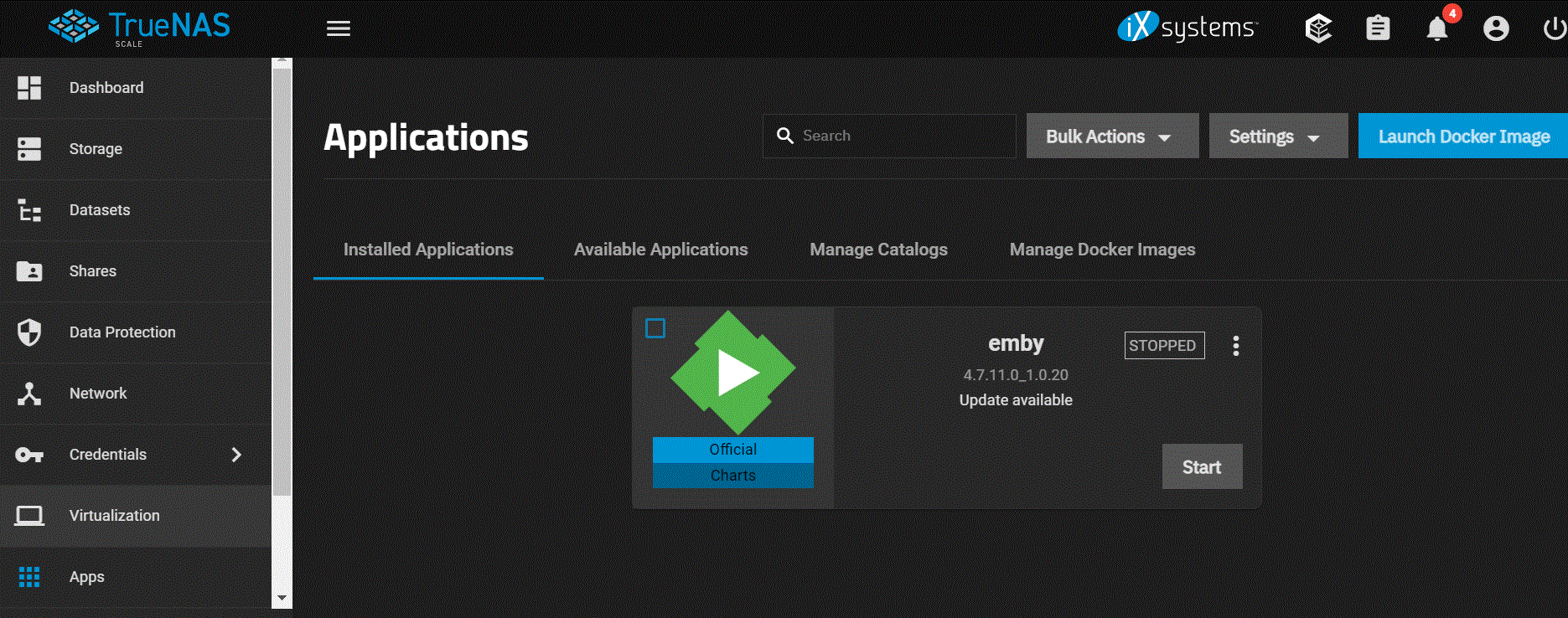
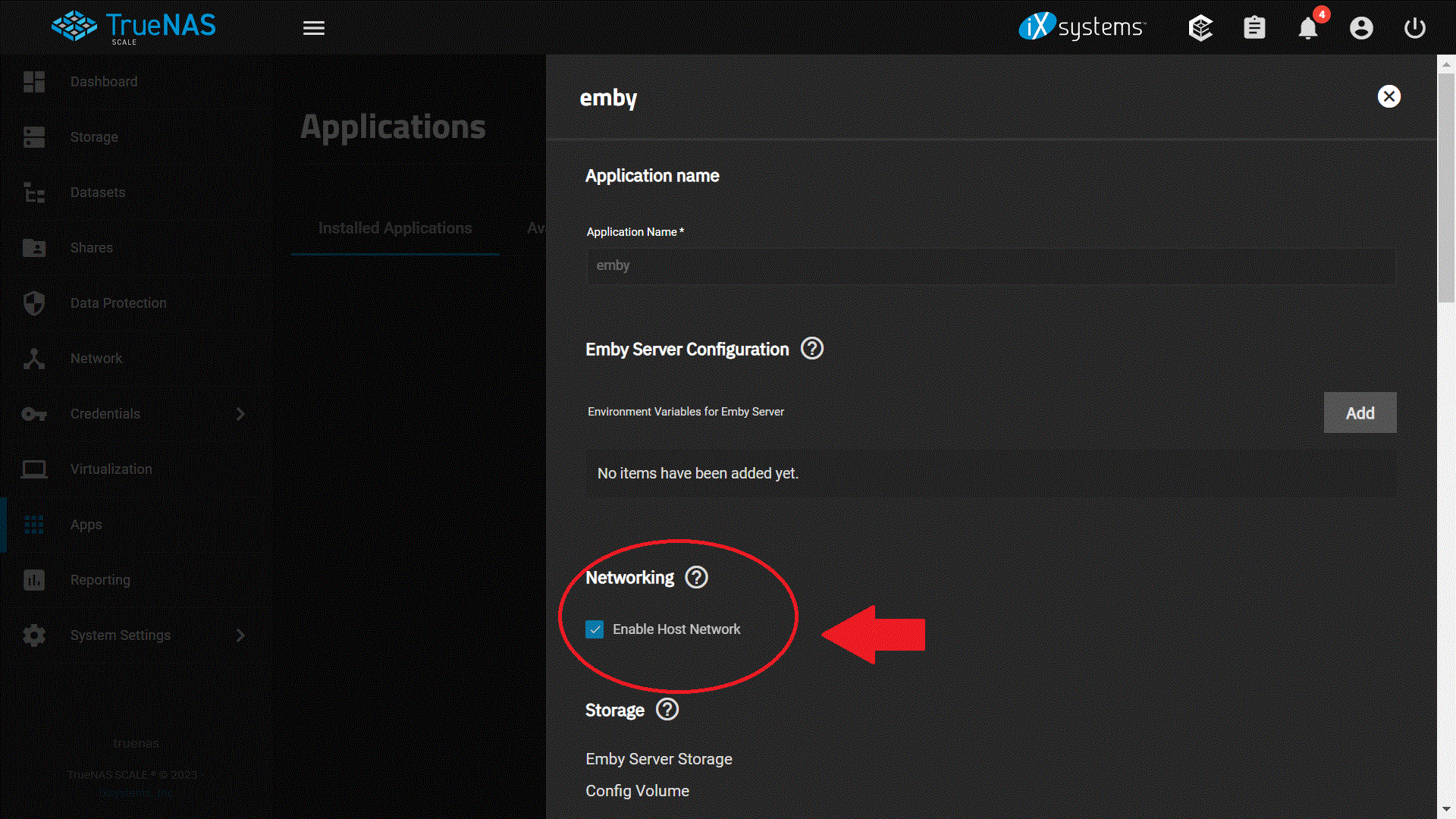
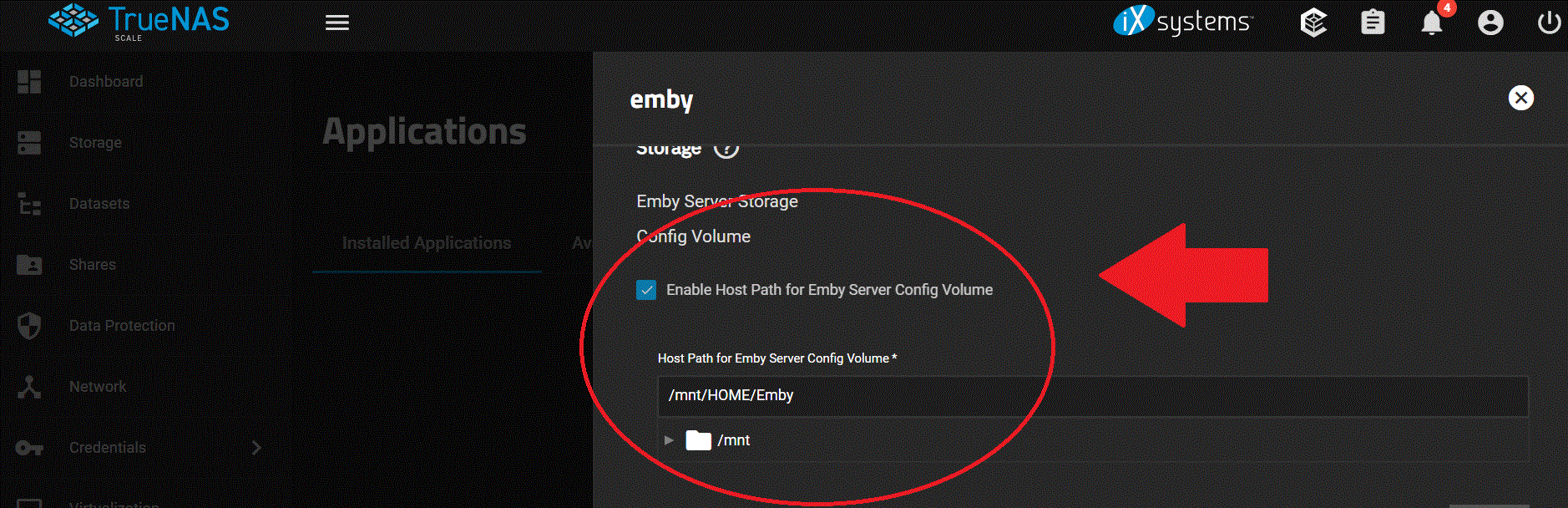
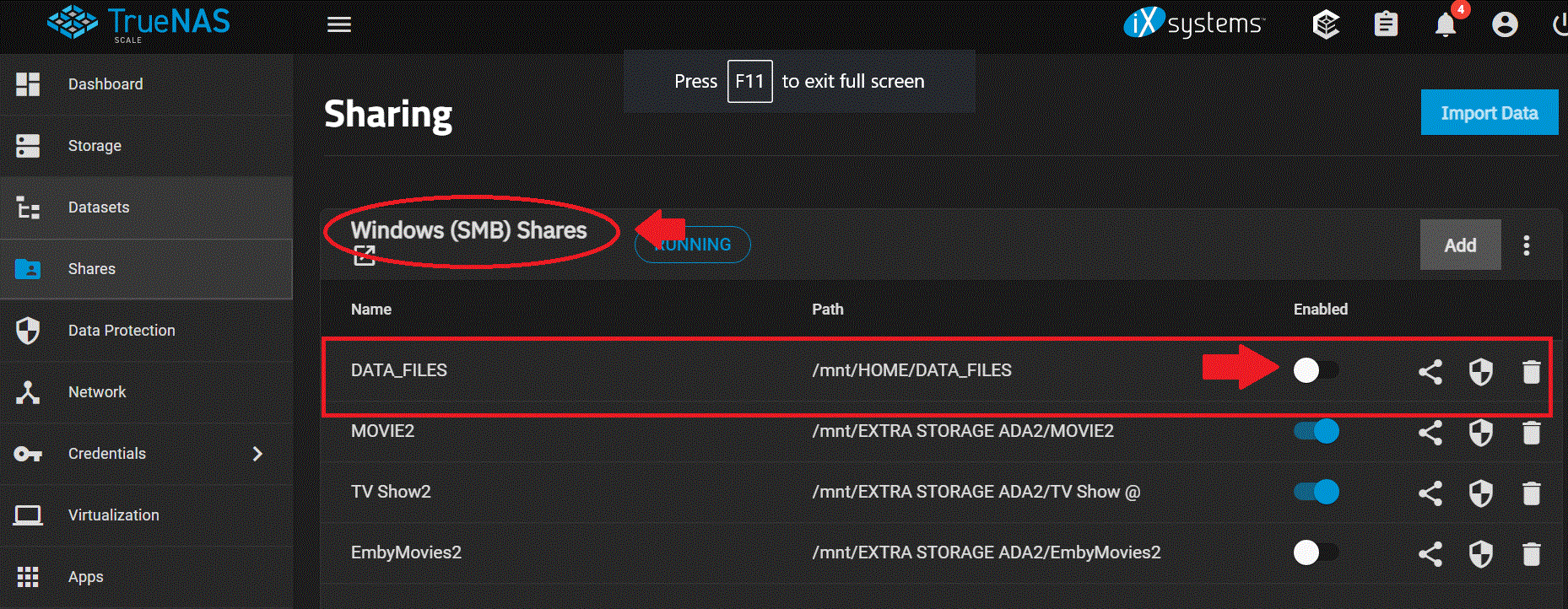
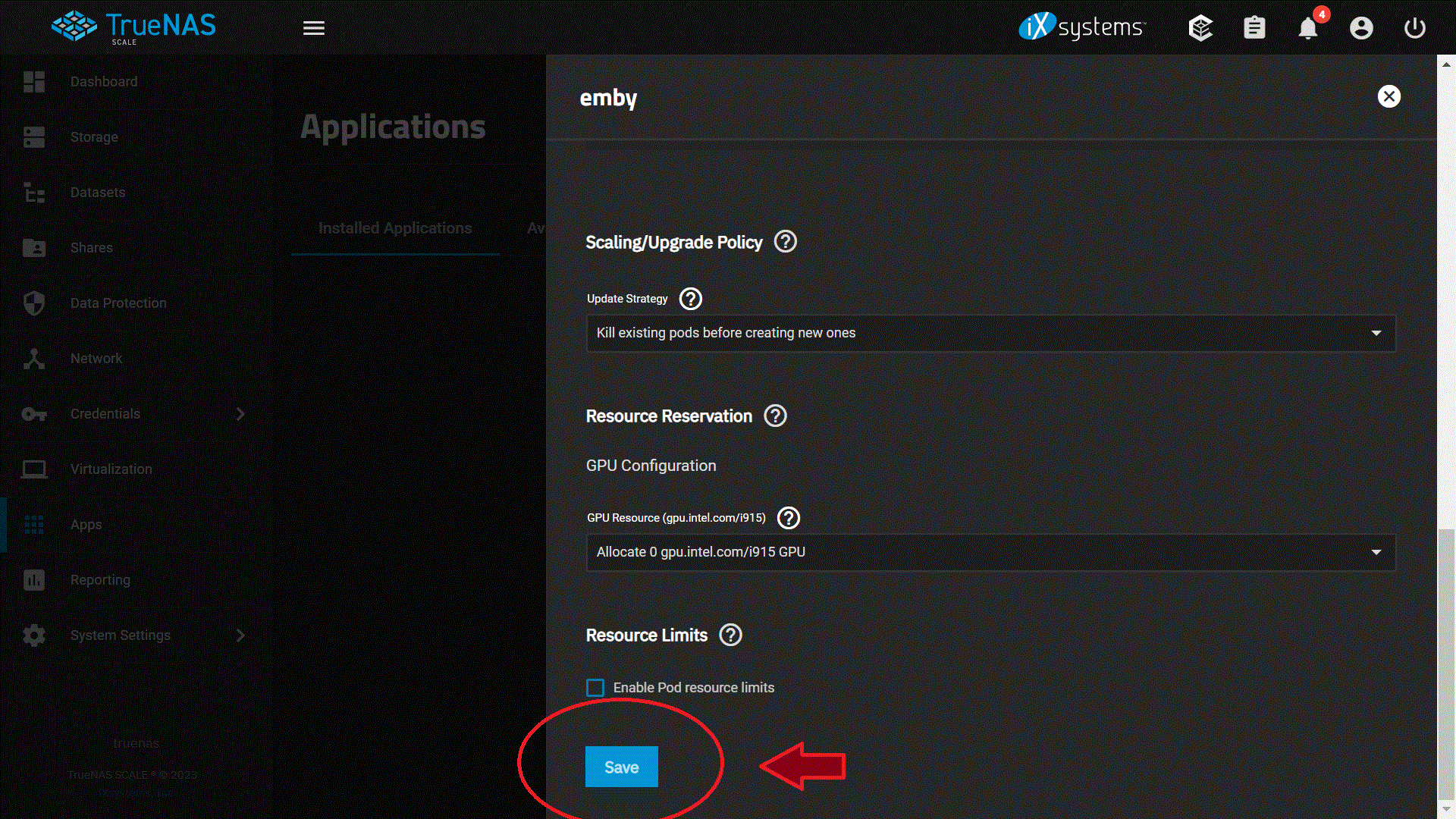
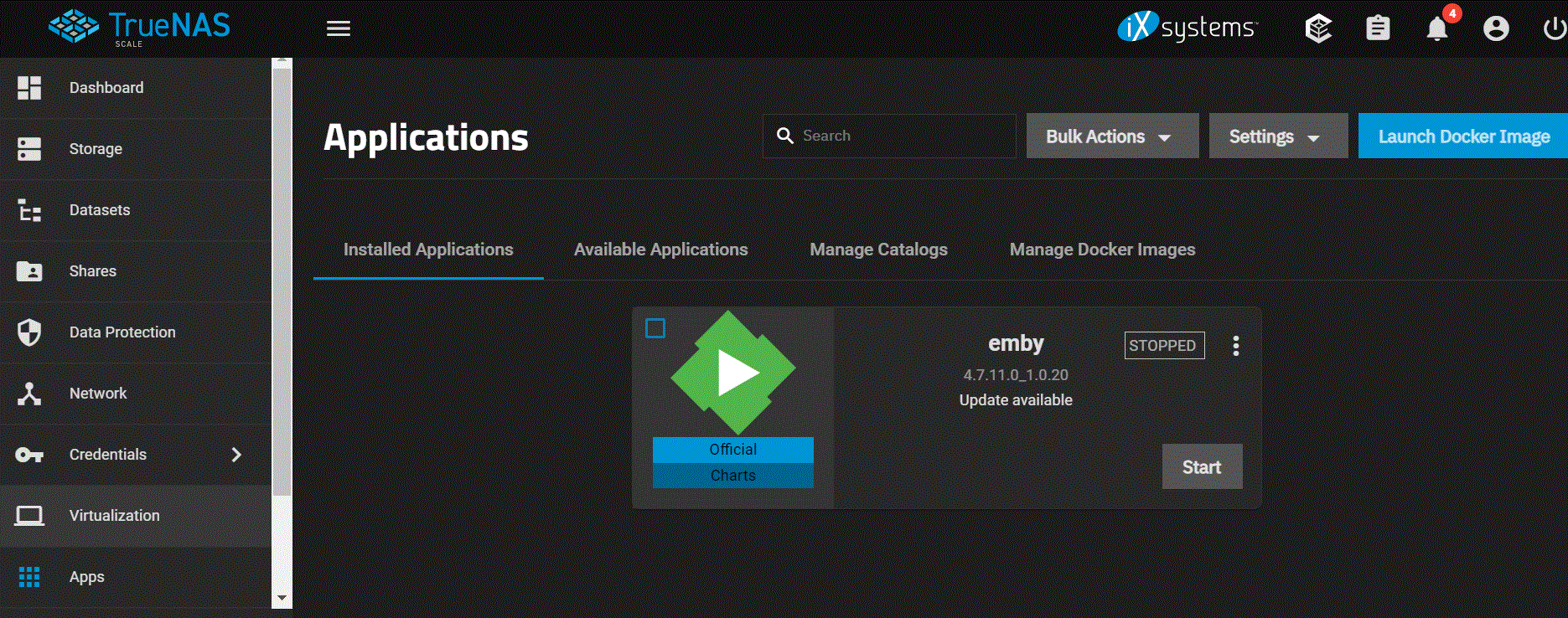
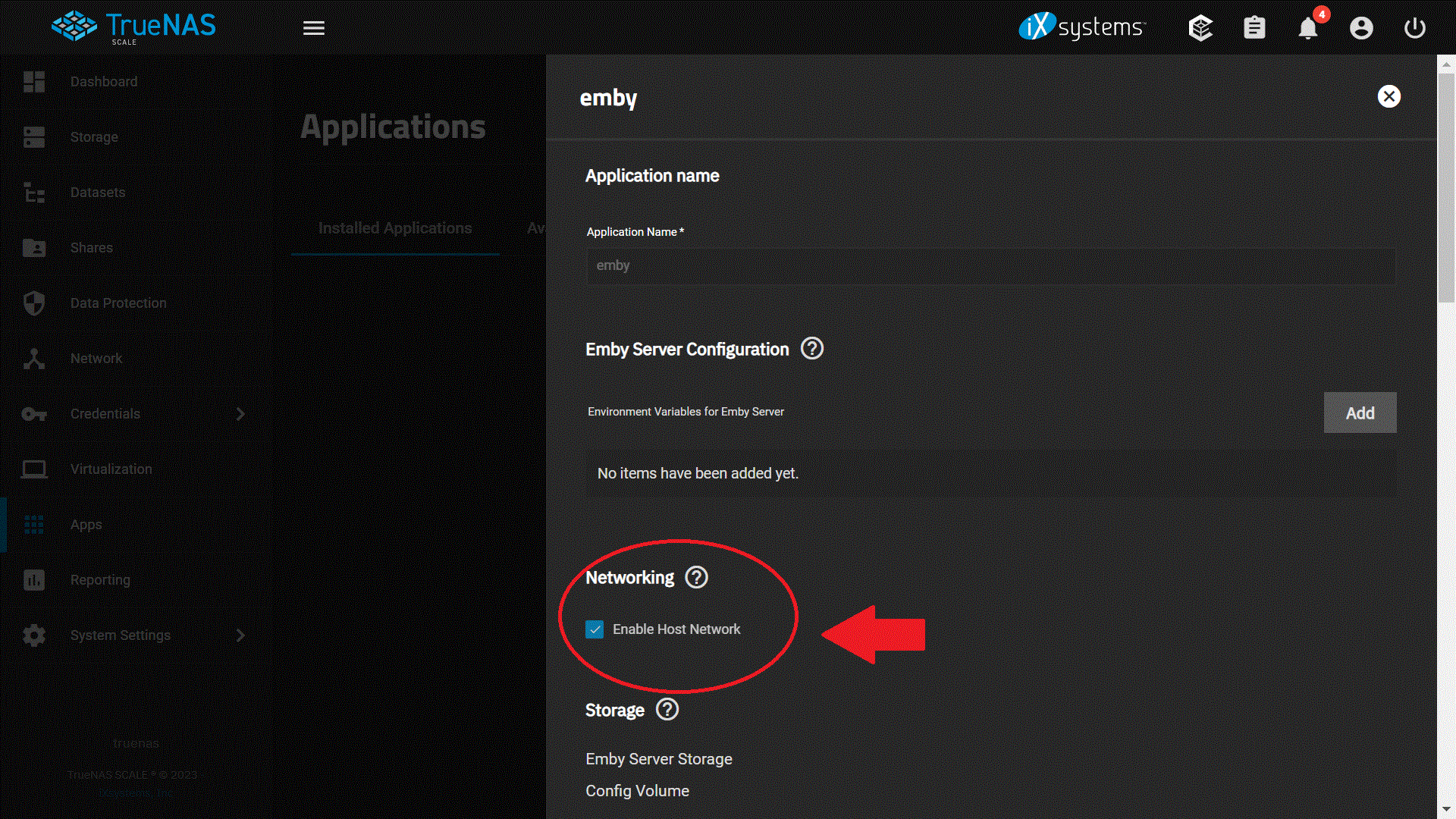
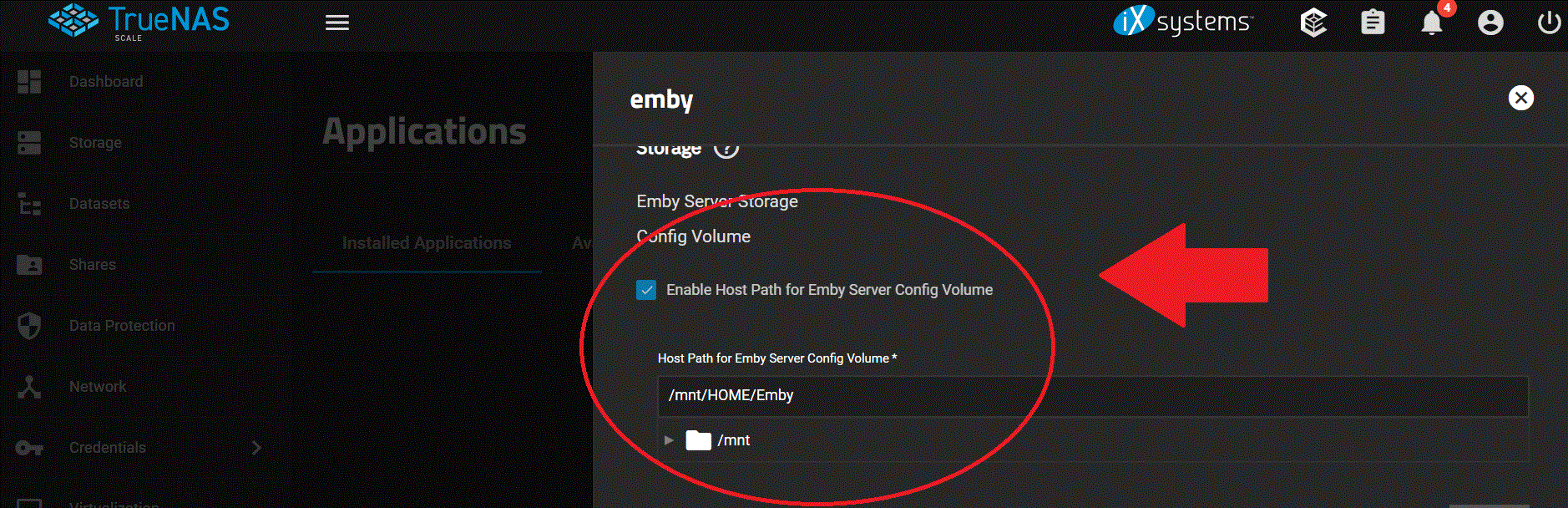
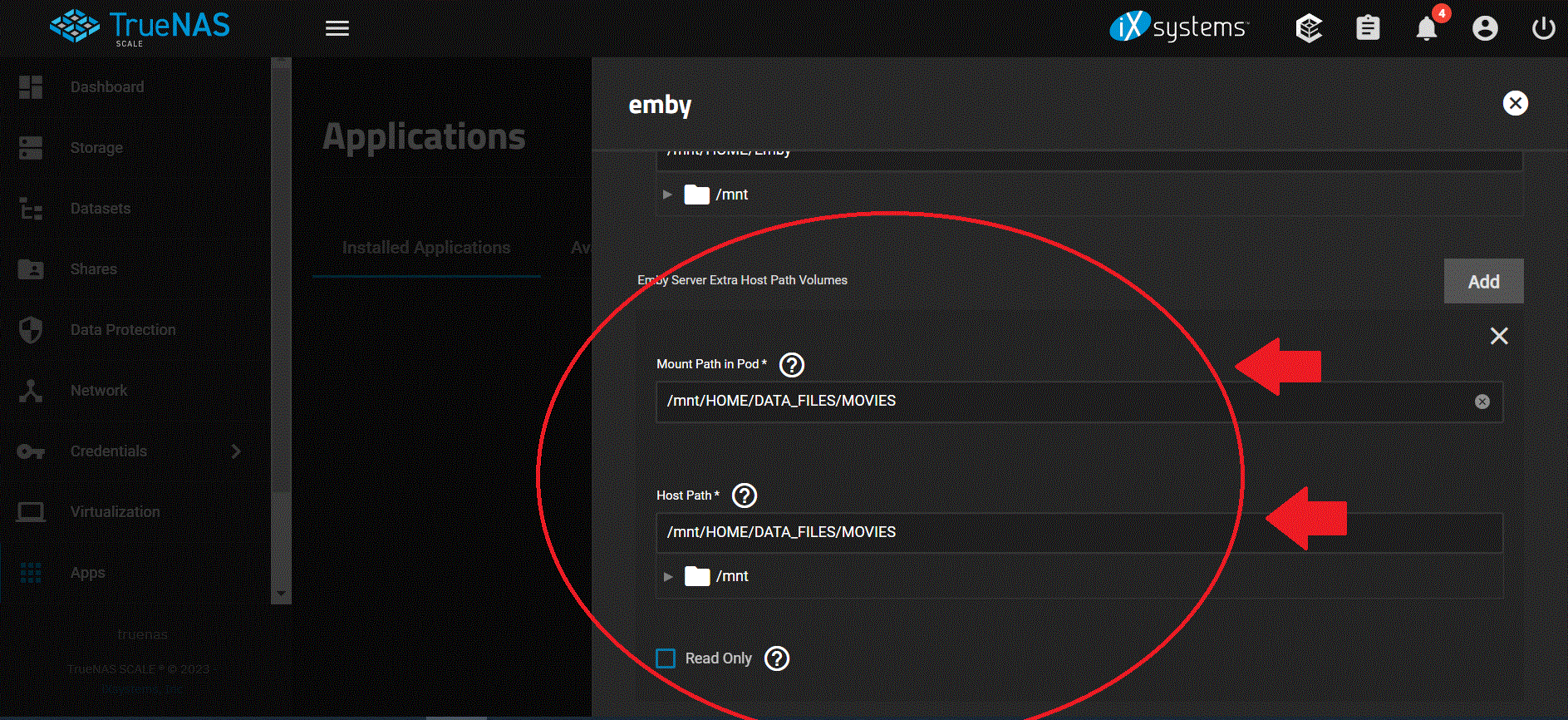
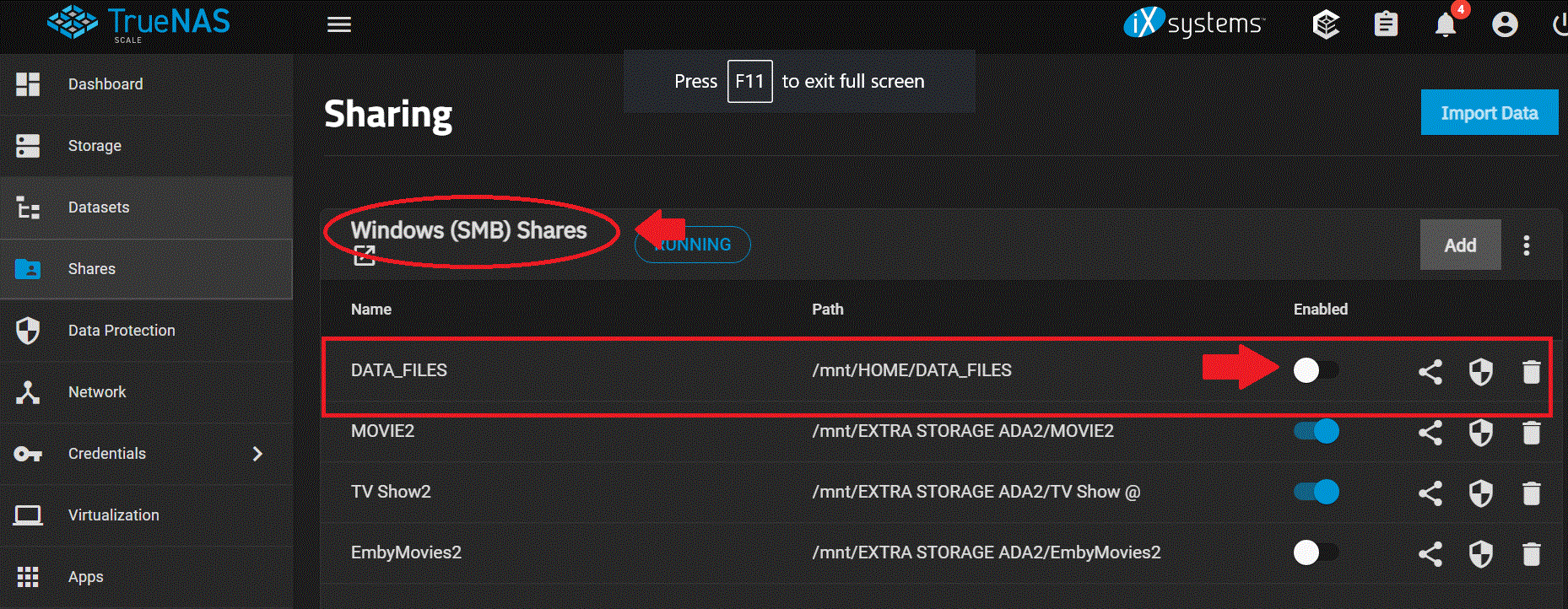
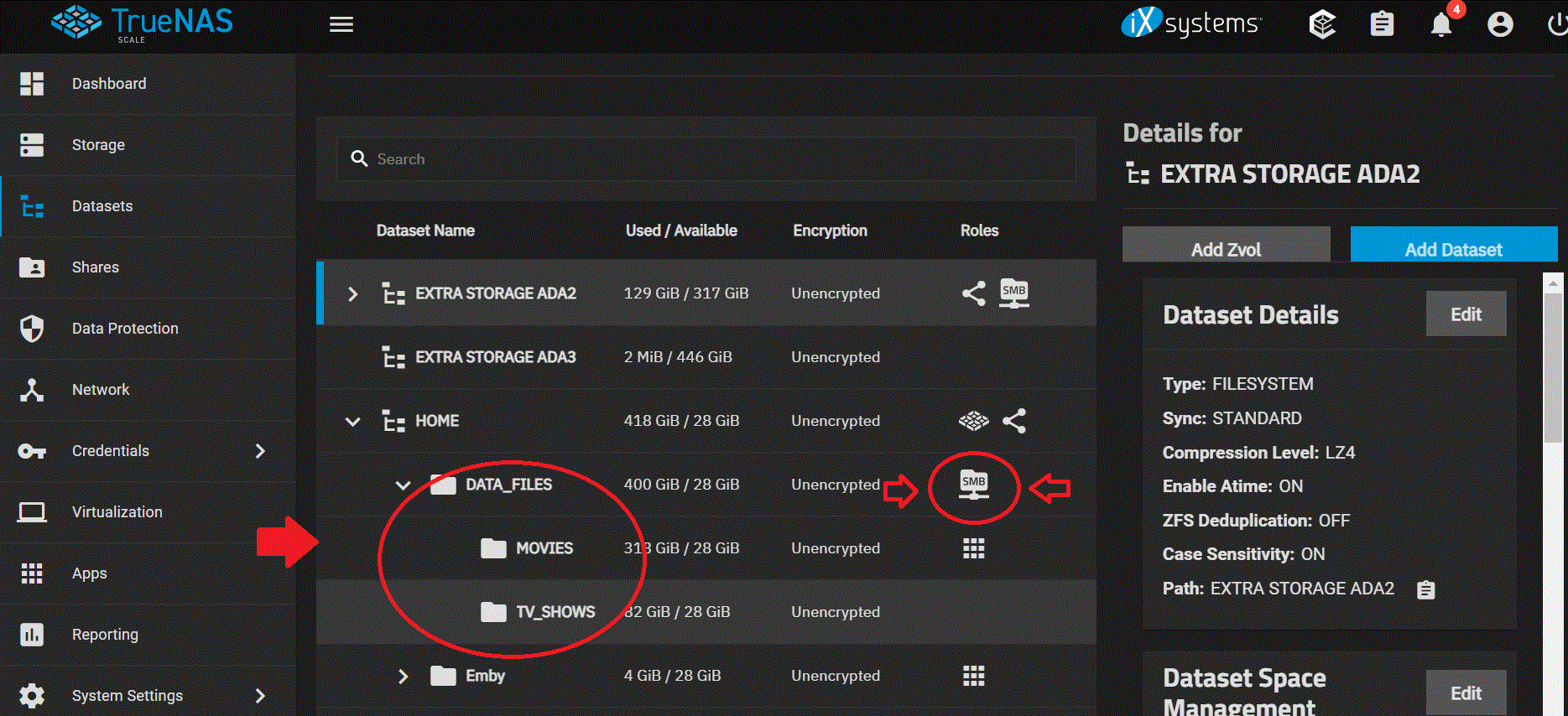
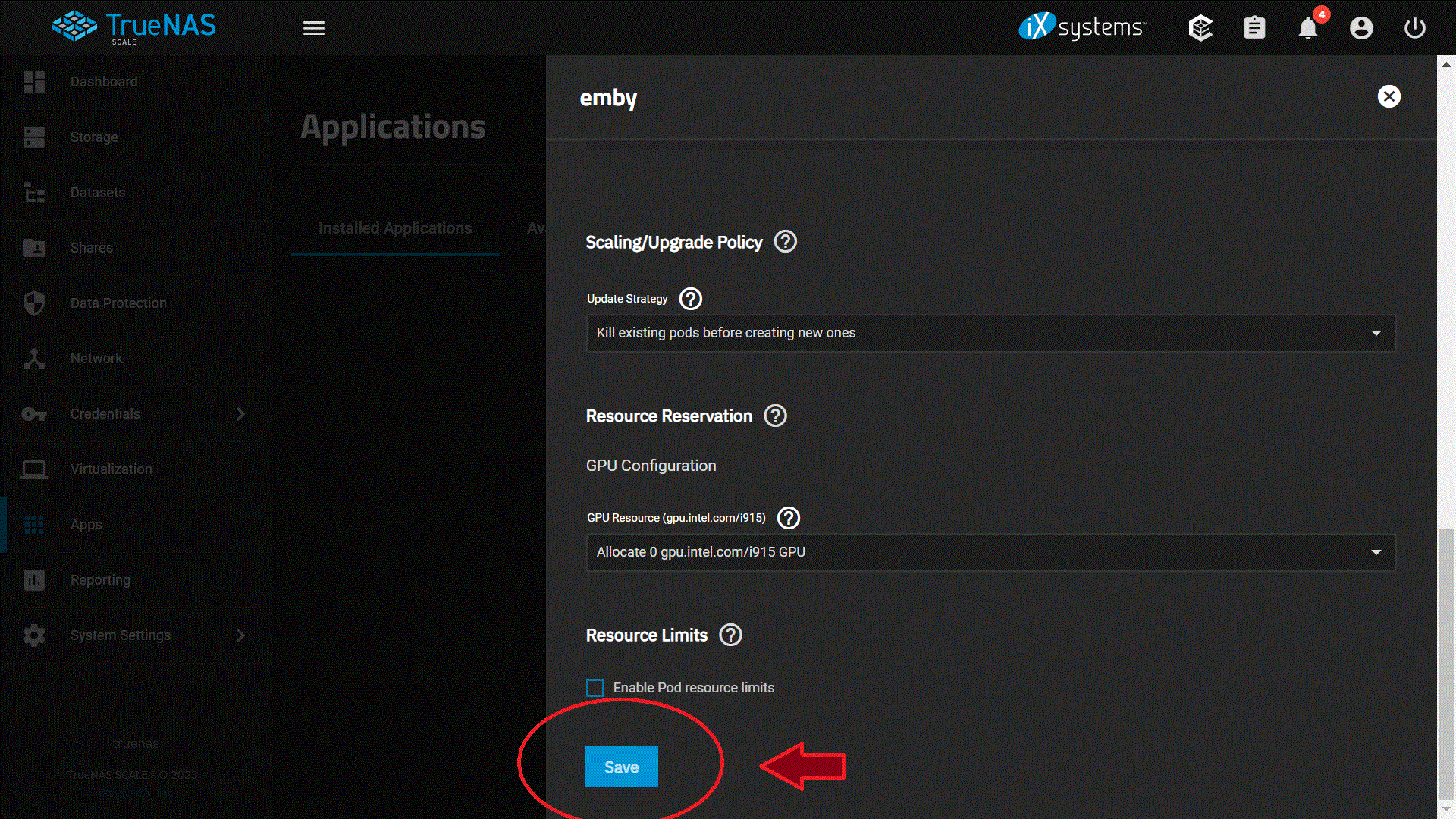
So here is what I did so far so I can get my Movies and Tv shows to come back, I hope this helps out other people but so far this works for me but I have not added my users yet or config everything else in Emby just yet but I made some head way on this issue for me. I took some screenshot of my setting so I hoping this help out someone but I still wanted to config. permission and ACL on Truenas Scale. 1. I had Emby running on Truenas Core with no issue for years until I upgraded my system to Truenas Scale, my mistake was adding the host path that I shared with SMB to Emby from Truenas Core. It looks like Truenas Scale does not like this on Emby so I had to turn off SMB and then added it to Emby host path in order for this work again on Emby, so lets start by adding Emby software to Truenas Scale: Which you see I already installed it but don't have it running at this time so I can config the rest of the stuff. 2. I login into Emby by the 3 dots just in case people don't know and bring up the config window for Emby. and started setting up Emby by enable host Network 3. The next step I did was was setup the path for Emby Config Volume which I already did before I loaded Emby onto Truenas Scale, so I pointed and enable the host path for Emby server config volume on my truenas scale to /mnt/HOME/Emby 4. I then setup the Emby Server Extra Host Path Volumes and here is where I ran into trouble !! The "Mount Path in Pod" is what you are going to see when you add the fold to Emby when you have it running but the most important part is this: "HOST PATH" this is where your Movies or Tv shows are at in SMB or where ever you had it before ! BUT before you do this !!! PLEASE MAKE SURE YOU HAVE SMB SHARES OFF !! OR TURN IT OFF !! BEFORE YOU ADD THIS PATH ONTO EMBY !! SO TURN IT OFF !!! 5. Just in case you dont' know where to turn it OFF, I will show you, its under SHARES and just disenable it so you can added this to the host path, SO TURN IT OFF BEFORE YOU ADDED THIS TO EMBY ! this should be STEP 1 but I am doing this on the FLY right now! again TURN IT OFF !!! 6. Here are some of the Paths I have on Turenas Scale and these are just examples of my setup and again i am trying to setup ownership and permission on my end but will do this on another day, but these are just examples! 7. Once you turn it off we can continue on with the setup on Emby and we are going to SAVE the setting on Emby. The rest of the information I left the same and have not change anything yet. 8. I am going to mess around with the setting to give permission and ACL and added addition information on the "Environment Variables for Emby Server" at a later time but this got my movies and TV show showing up on Emby again so I made some head way on this and happy for now!! I will give it some more time later on this week and setup my user on Emby ! but I hope this help out someone and gets them started on seeing there movies and show again.
 1 point
 -
+1 for listing all available trailers under extras (any ETA?) Furthermore: What about being able to choose between all available trailers if the trailer button is clicked? (only if two or more trailers are available).1 point
-
Nope. Trailers are trailers, not extras. Extras are special extras for a movie, normally found on a DVD/BLURAY, but a trailers is 99.9% released before a movie is in the cinema, so how can it be an extra. Add an option to have trailers as an extra, then people can decide.1 point
-
We could put them on a separate line for Trailers, but then of course that just means more vertical scrolling.1 point
-
This community is here to help you. Here are some guidelines on what information you should supply when reporting issues. Make sure to check out our Knowledge Base for more useful information. Reporting Emby Issues Please create a topic in the community. Describe the problem in your own words, including what you're trying to accomplish, and where you're getting stuck. Please mention some specific examples. In your description, be very specific about the steps you took and what happened with the system. Describe it like you are talking to a blind person - because you are. We cannot see what you did or what happened so be as specific as possible. If you saw error messages, please tell us what they were. If the problem is difficult to explain, please include screenshots that demonstrate the issue. Please attach the server log from the time frame the activity occurred. See the section below titled Emby Server Logs. Please supply the full and complete log file in txt format. Please don't zip or compress, and avoid attempting to extract relevant sections. Everything is relevant to us. If a server transcoding log (ffmpeg log) was also generated during playback (in the server logs folder), please attach that as well. If you are using the Roku or Android TV specific app, please also follow the instructions below to send a log from the app. Emby Server Logs Logs can be accessed directly within the server's web interface by navigating to Logs under Emby Server sidebar section. If you're having difficulty using the web interface, log files can be found in the logs subfolder of the Emby Server Data Folder . Note: Be aware that these log files would not be sanitized if obtained directly from the logs folder and should not be uploaded in the forums. If there is an error downloading the logs through the Emby Web interface for Settings / Logs, please enable debug logging, repeat the attempt to download the logs and report the problem in the forum indicating the logs download issue. The raw logs can then be forwarded to a member of the Emby Team when requested. Emby for Android TV/Fire TV and Emby for Roku Logs These apps have the option to send an app log to us electronically. You enter the settings page and turn on the "Debug Options". Now there will be a new tile on your home page settings row (or menu option on the user menu at the top) labelled "Send Log". Reproduce your problem and then use this button to send the log. Then add the following information to your report in the forum: Exactly what you were doing and what happened. Include the name of whatever you played if it is a playback problem The time you sent the log (in Eastern Time please - UTC -5) The name of the Emby user on the local server that was logged in at the time How to Post Log Files You can simply drag a file onto your post to attach it. Alternatively, you can upload your log file to Paste2 or a DropBox account and then post the link in your topic. Please avoid linking us to log files that require us to sign into a website. If the problem is occurring in the Emby Web app, please remove any custom CSS you may have created and see if the issue remains after that.1 point