Leaderboard




Popular Content
Showing content with the highest reputation on 01/19/24 in Posts
-
The issue was fixed with beta .72, well done @Luke3 points
-
Boss runs locally, not online. If you have concerns sniff internet traffic and you'll see none of your data is being sent to them. Also IMO if your provider hasn't changed their content in 2 years I'd call that a deficiency, not something to be happy about. But you do you ::)2 points
-
I just updated my 4.7 Windows Server 2022 install to the current beta to help out with this. Upgrade installed without any issues- worked exactly as a normal upgrade works when using the setup.exe installer. I have it running as a Windows service and also have a HDHomeRun 4k tuner for local channels. So far no issues that I can see. But I haven't done much testing other than checking to make sure local broadcasts are working (both ATSC1 and ATSC3) as well as recordings. My setup is a pretty standard setup- no plugins or anything like that. BTW, in regards to ATSC3 channels- that's working exactly the same as it did with 4.7. Pretty much not at all. Takes forever to tune to the channel and, more often than not, it just errors out.2 points
-
Hi, This has been talked about a lot on the Apple TV forums, but there is no formal request for it. So I do it here, please add support for MKV HEVC HDR playback using Apple TV (without tone mapping). I don't care what technique you use. Either adding HLS fPM4 support to the server or improving the MPV player. I anticipate that I am not satisfied with you saying that Apple TV does not support that, since most players on the market support it. Thanks1 point
-
Hey Everyone, My journey from Plex to Emby has been pretty smooth with the exception of setting up SSL encryption. There are lots of great posts on this forum and elsewhere on how to do this, and I consider myself pretty computer literate. But I'll be honest, this was a bit overwhelming for me as I have no experience at all in hosting web servers, DNS, or encryption certificates. After many hours, I've got it all working, so I thought I'd share what I've learned. I'm going to try to write this for the newbie, so don't be offended if it seems like I'm explaining lots of simple stuff. That's really what I needed a week ago, so maybe it'll help someone else in my shoes. Also, this is for Windows, although most of it applies to any OS. There's lots of text, but it's really very easy. Let me also say, I understand that a reverse proxy gives you lots of benefits and flexibility for securing your server. But that was a step too far for me. If you want a reverse proxy this post is not for you, but there are many posts in this forum to help you. If you want to access your Emby server from outside your home network you will want to require secure connection mode for all remote connections (see "Network" tab in Emby server configuration). To do this you need an SSL certificate. To get an SSL certificate you must have your own registered domain name. Here's a step-by-step. Domain Name Registration A domain name is the readable text part of a web address. So emby.media, or google.com, or media.yourdomain.net. Most home users don't have one, but you need one to get an encryption certificate. While (Edit:)There are many options for purchasing a domain (godaddy.com being very popular), I chose to buy my domain from domains.google. It cost me $12/year, and this is the only cost to getting your Emby server working with encryption. Go to https://domains.google, pick a domain, pay your money, and you're ready to go. For the rest of this discussion let's say you registered the domain name yourdomain.net. Now you need to associate your new domain with your home IP address. Most home users get their IP address assigned to them by their internet provider and it is "dynamic," meaning it can change. So you need to be able to tell your domain provider what your address is and update it when it changes. This can be done automatically, and is called dynamic DNS (DDNS). (Edit:) Before obtaining a domain, ensure the provider supports Dynamic DNS. Google domains supports this easily, here is the help page explaining how to set it up. Fortunately, my ASUS router has this capability built in so it was easy, but it's easy even if your router doesn't (follow google's directions). (Edit:) In case you have a static IP (obtained from your ISP), DDNS support is not mandatory. That's it for domain name registration. Now yourdomain.net points to your home network IP address. SSL Certificate Now you need to get an SSL certificate. This has the encryption keys you need, and must be issued by a recognized certificate authority or it gets blocked by your browser. Lets Encrypt will give you a free SSL certificate but it has to be renewed every 90 days. This was the part I was most confused by, but it's actually really easy. The part to understand is that Lets Encrypt must have some way of proving you own your domain name before they can issue you a certificate. There are two options, 1) they give you a little text file to place on your web server in a certain location. I don't have a web server so this is a no-go. 2) They give you a text string to add to your DNS registration in what is called a "TXT Record." You do this with google domains, it's very easy. To get a certificate you need an ACME client program that knows how to talk to the lets encrypt server. They recommend certbot, but it doesn't work in windows. Dig enough and you'll find ZeroSSL, they have a nice downloadable program that does it all and is really easy. Download here. Make a directory on your computer (I used c:\ZeroSSL). Put the le64 (or 32) exe in this directory. A single command will create your certificate. I think the easiest way to do this is create a text file in the same folder as the program, call it "get_cert.bat" and put the following three lines of text in the file. Edit the second line to have your actual domain name (instead of "yourdomain.net"), and to have your actual password for your PFX file (whatever you want it to be, just replace "yourpasswordhere" in the code below. @[member="Echo"] off le64 --key account.key --csr domain.csr --csr-key domain.key --crt certificate.csr --domains "yourdomain.net" --generate-missing --handle-as dns --export-pfx “yourpasswordhere” --live pause Save the text file as get_cert.BAT and then double click it to run. This runs the le64 program, creates the public/private key pair, asks lets encrypt to generate a certificate, saves that certificate, and converts it to a PFX file format that Emby requires. All in one command! When you run this, a command window will appear and you can see what it's doing. After a few seconds it'll pause and ask you to place the TXT record in your domain. It gives you a name and value, the name will be something like _acme-challenge.yourdomain.net, and the value will be a bunch of random letters and numbers. The program pauses here for you to put this into your domain. So now you just log in to your google domain again, go to "DNS" on the left menu, scroll all the way down and enter a "Custom Resource Record." The type is TXT, the name and value are what le64 gave you. Put them in, wait a few minutes for the change to take effect (took just a couple of minutes for me). Then go back to the command window where le64 is running and press enter to continue. It'll then verify your TXT record is there and issue your certificate. You'll find a file certificate.pfx in the le64 directory, that's it! Emby Setup Now log in to your Emby server setup. Go to "Network," in the field "External Domain" you put your domain name, so yourdomain.net or whatever you chose. For "Custom SSL certificate path," browse to the .pfx file that was created by the le64 program. In the "Certificate Password" field put whatever password you used in the .BAT file above when you created your certificate. Then for "Secure Connection Mode" I recommend you choose "Required for all remote connections." You also have to log in to your home router and forward port 8920 to the computer running your Emby server. I'm not going to give directions on how to do this, it depends on your router, but it's super easy. That's it. You need to restart your Emby Server, and then you're done! You can now access your server remotely and securely at https://yourdomain.net:8920. Certificate Renewal Now, I mentioned before that the Lets Encrypt certificates are only good for 90 days. So every 90 days you have to renew the certificate. Take that "get_cert.bat" file you made earlier and make a copy of it called renew_cert.bat. At the end of the second line, just add the text "--renew 20" (without the double quotes). When you are within 20 days of your expiration date run this file, it'll renew your certificate. I believe it'll ask you to place a new TXT record in your domain, so certificate renewal cannot be made fully automatic. You'll have to run it manually and add this TXT record into your google domain just like when you created the certificate in the first place. But it takes just a few minutes and then your certificate is renewed. You'll have to restart your Emby server for it to take. The file locations all stay the same, so you don't have to update anything in the Emby setup, just restart Emby. That's it! Well, I hope this helps someone. Sorry for the long post. I would have benefited from this level of detail a week ago, so maybe it'll be good for someone. If anyone sees something wrong here, feel free to correct me.1 point
-
Request that Emby server store Dolby Vision (including profile), Dolby Atmos, DTS:X, HDR10+ (smpte2094) and HLG for appropriate video in the db and use it for display in the media info and track selection sections of movie/episode details screen. This information once in the db can then also be used in numerous other areas like: Mediainfo Cover Art, Stats for Nerds, Distinguishing different DV profiles for hardware support and tone mapping Example Mediainfo app display of HDR10+ ffmpeg patch for HDR10+ https://patchwork.ffmpeg.org/patch/11491/ Related requested that may require DV profile information in order to prevent unneeded TM1 point
-
Looking through the Sevarr code, their ffmpeg.core library is looking for the string "HDR Dynamic Metadata SMPTE2094-40 (HDR10+)" in the sidedata which is straight out of ffmpeg. There is a separate ffprobe "GetFrameJson" command used to grab that, which ends up looking like this: ./ffprobe -i "/path to your movie.mkv" -print_format json -show_frames -v quiet -sexagesimal -read_intervals "%+#1" -select_streams v:0 When I run that on the DV/HDR10+ file you posted in that AFTV 4k max thread a while back, I get this: { "side_data_type": "HDR Dynamic Metadata SMPTE2094-40 (HDR10+)", "application version": 1, "num_windows": 1, "targeted_system_display_maximum_luminance": "500/1", "maxscl": "19740/100000", "maxscl": "19740/100000", "maxscl": "40981/100000", "average_maxrgb": "232/100000", "num_distribution_maxrgb_percentiles": 9, "distribution_maxrgb_percentage": 1, "distribution_maxrgb_percentile": "3/100000", "distribution_maxrgb_percentage": 5, "distribution_maxrgb_percentile": "9975/100000", "distribution_maxrgb_percentage": 10, "distribution_maxrgb_percentile": "97/100000", "distribution_maxrgb_percentage": 25, "distribution_maxrgb_percentile": "34/100000", "distribution_maxrgb_percentage": 50, "distribution_maxrgb_percentile": "87/100000", "distribution_maxrgb_percentage": 75, "distribution_maxrgb_percentile": "221/100000", "distribution_maxrgb_percentage": 90, "distribution_maxrgb_percentile": "539/100000", "distribution_maxrgb_percentage": 95, "distribution_maxrgb_percentile": "924/100000", "distribution_maxrgb_percentage": 99, "distribution_maxrgb_percentile": "10354/100000", "fraction_bright_pixels": "0/1000", "knee_point_x": "36/4095", "knee_point_y": "76/4095", "num_bezier_curve_anchors": 9, "bezier_curve_anchors": "188/1023", "bezier_curve_anchors": "410/1023", "bezier_curve_anchors": "609/1023", "bezier_curve_anchors": "784/1023", "bezier_curve_anchors": "821/1023", "bezier_curve_anchors": "850/1023", "bezier_curve_anchors": "880/1023", "bezier_curve_anchors": "911/1023", "bezier_curve_anchors": "937/1023" } There is also sidedata for ""Dolby Vision Metadata" so pretty easy to see this is a combo DV/HDR10+ file. I think this demonstrates it is very possible to detect HDR10+ straight out of ffmpeg.1 point
-
Hi. I over-simplified it but the bottom line is THEY have the cert on THEIR domain and they force you to have an account with them that knows about all your servers. We don't do that. We would basically have to to provide the same type of service.1 point
-
Hi. This is an area we'd like to make easier as well but it is different for us. Since we allow you to truly own your server and users doing this becomes much harder. The other guys can do this easily because they force you to go through them to get to your server. We are still looking for ways to make it easier though.1 point
-
V 1.7.1 Q8FN 2018 When I click on Settings ...Display nothing happens. I can get to all other settings. Also, I'm having weird issues with the back button when navigating the app now. Sometimes it takes a couple clicks for it to respond. Always went back smoothly in previous versions. I put new batteries in just to make sure, but that wasn't it.1 point
-
Thanks, Display settings are now available and the Return button from settings is working again like it's supposed to.1 point
-
It's possible for the future. Thanks.1 point
-
@LukeIt's the same for me on Android. I have to wait for it to time out on the initial connection and then it wakes the server! I don't get it, why it's implemented in this way. Why don't just send an WOL packet BEFORE trying to connect? Please fix this! Thx1 point
-
Adding an admin control for that server side would be appreciated!1 point
-
In the past, I only deleteed the advancedsettings and source.xml if it's invalid, but Kodi 21 had a bug which caused ALL xmls be invalid. I think it's fixed in later Kodi versions, so I might can go back to the previous approach.1 point
-
@MikeB111Just wanted to thank you for this post. I had been putting it off too long and got it working, though with squarespace since they took over from Google. As a bonus, I got to use the information at work for something semiconductor certificate related - I was able to say 'Oh, kinda like how SSL CSAs work?' and get an enthusiastic 'Yes exactly!' lol1 point
-
My advancedsettings got wiped out also, but wasn't sure if it was E4K or installing the nightly since I did them back-to-back. Every setting except the network and pathsubstitution sections were deleted (which I think relate to E4K). This may only happen when I reset the db, not sure. I just recover mine from backup though. It doesn't look like my sources.xml got wiped out though. advancedsettings.xml <splash>false</splash> <!-- Set to false if you wish to disable the startup splash image. Defaults to true. --> <sorttokens> <token>The</token> <token>A</token> <token>An</token> <token seperators="'">T</token> </sorttokens> <network> <disablehttp2>true</disablehttp2> <curlclienttimeout>2</curlclienttimeout> </network> <pathsubstitution> <substitute> <from>/emby_addon_mode/</from> <to>http://127.0.0.1:57342/|redirect-limit=1000</to> </substitute> </pathsubstitution> <!-- This setting is only relevant for Passthrough in the context of resyncing, e.g.; when there is no resampling possible. This value decides after which amount of discontinuity in milliseconds VideoPlayer will ErrorAdjust the Clock. On platforms like Android where the sink delay is just a non exact interpolation, a too small value might cause rare image stutter. The maximum value is 100 ms. A higher value makes no sense cause of A/V issues. This is a last-resort workaround as the root-cause cannot be mitigated 100% [Available from Kodi v20] --> <audio> <maxpassthroughoffsyncduration>96</maxpassthroughoffsyncduration> </audio>1 point
-
There isn't one, although a server option to ignore quality with respect to transcoding decisions is always possible.1 point
-
(I hit my character limit in the title...) I see the app displays a "Play from beginning" when connected to the beta server, vs just "play" for stable. However, in testing the other day (at the time) with 4.8.0.69 the behavior of selecting "play from beginning" played from the current point in a recording and is clearly not as intended (and wrecked my experience of the current NFL score; boo!). Anyhow, just wanted to report. With the stable server the "Play" selection works as expected from the beginning of the recording (however skipping restarts the playback, however as expected with direct play of the file).1 point
-
HI, thanks for reporting. We'll take a look.1 point
-
Thanks. Should be resolved in 1.7.2.1 point
-
One more Info, nightly version was tested with Kodi's database MyVideo129.db (which should be the latest one). Any other version might not work! They changed it couple of times.1 point
-
Oh okay, so it just doesn't work on LG Emby App, thanks1 point
-
Yes of course! I assume this problem will be fixed soon, but I think other problems with the application will not be fixed in the long term. Although I prefer to use the native Emby app, I think I will have no choice but to use Infuse for a long time.1 point
-
Yes, it was my last resort. I'm going to try this over several days1 point
-
Yeah. Of course if this can be fixed on official Emby apple TV release soon, it will be greater.1 point
-
+1, would be nice if you guys attend to the Apple eco system after the 4.8 release storm is getting down, especially the Apple TV. So that all the functions are on par with all the other clients.1 point
-
Thanks for the feedback! Yes, in this case, I am not interested in data stored for each user about when they last played the item. But a more global variable that indicates when anyone last accessed the item itself. The trigger that reveals when that data is written is less important to me concerning whether they played, opened, finished, etc. To my awareness. No data stored in Emby today clearly (and easily) indicates this. Although, I am always happy to be wrong :).1 point
-
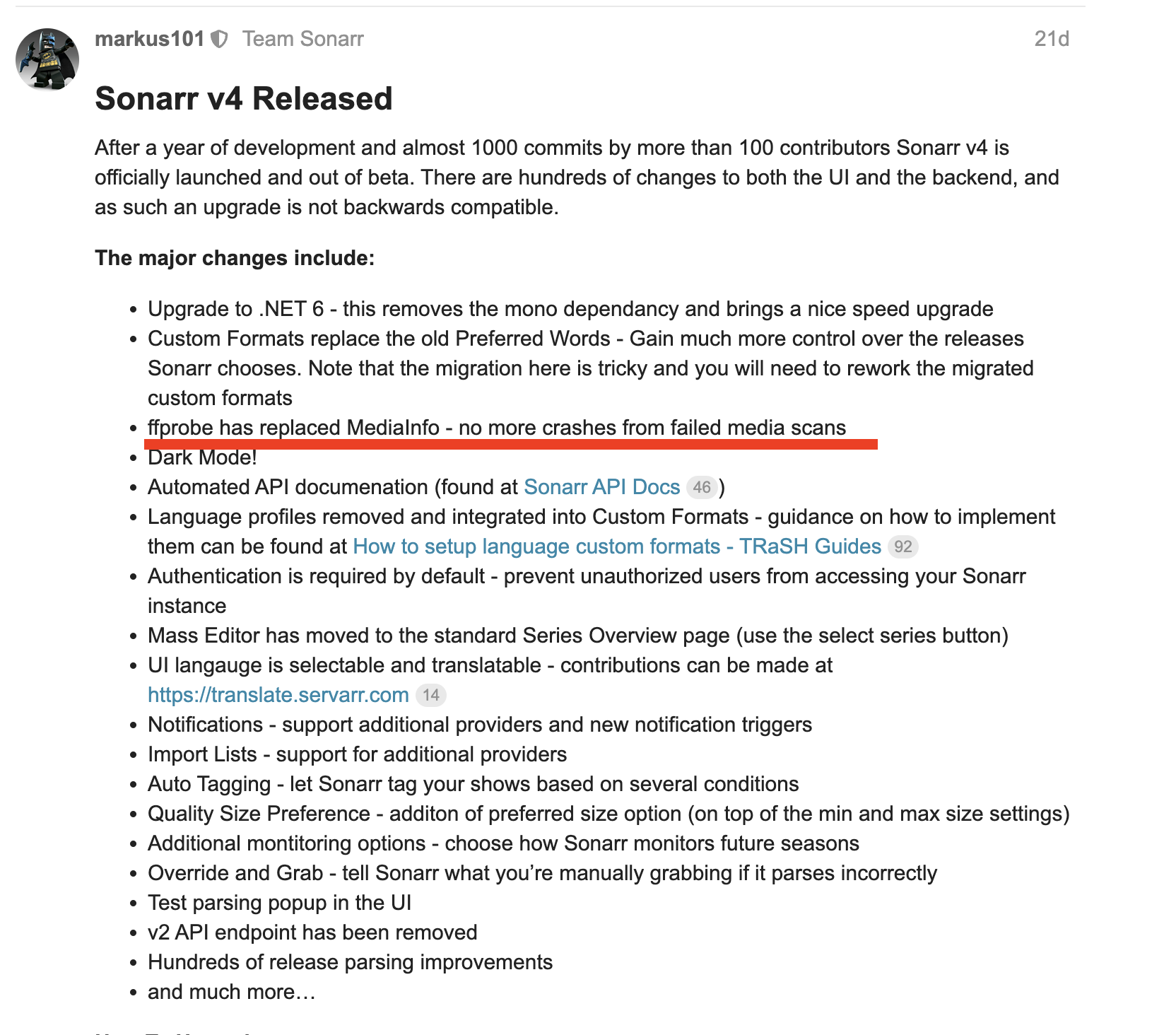
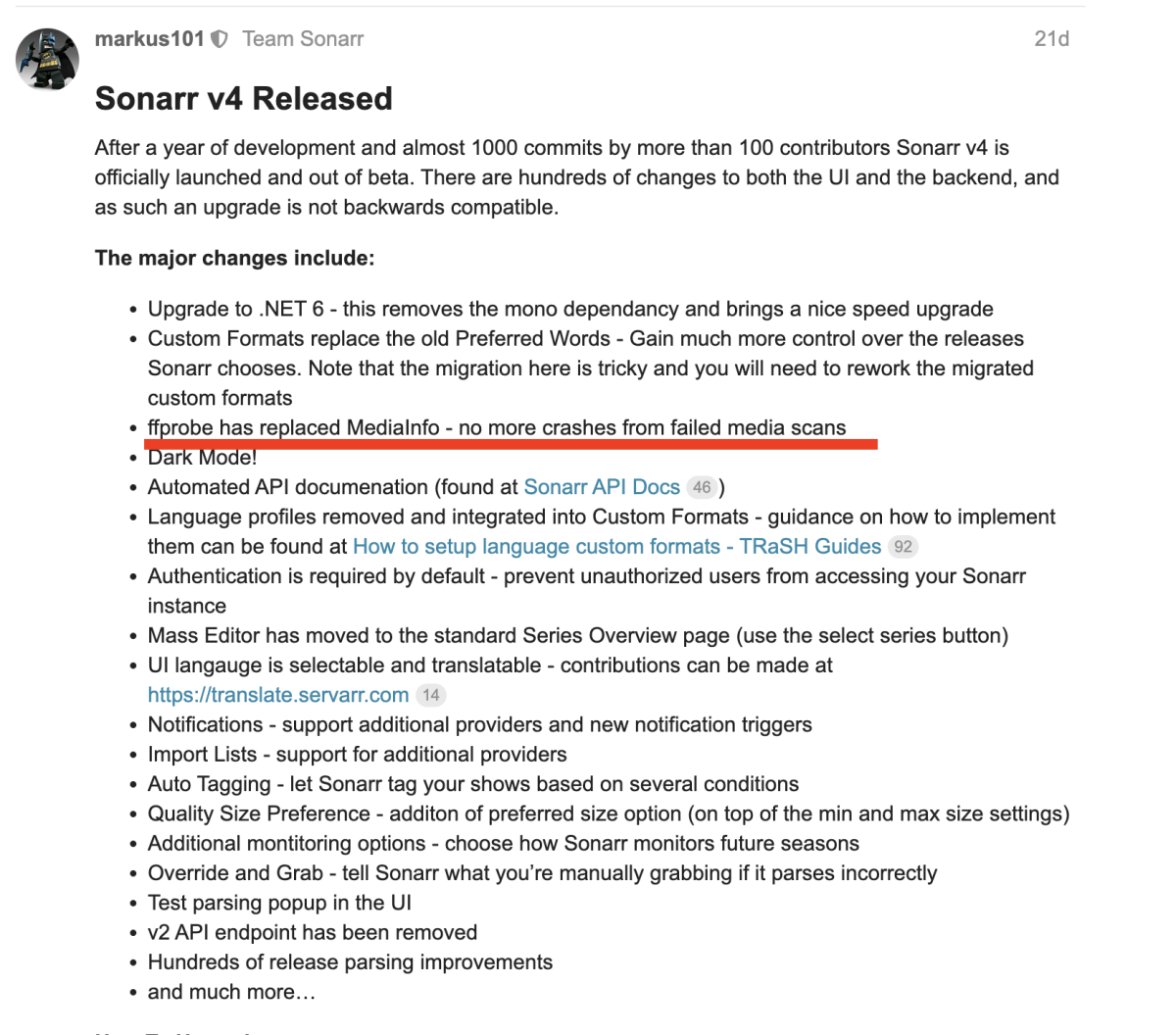
That's Radarr. I specifically linked to Sonarr which previously used media info but no longer does. The code I linked to in Sonarr is purely ffprobe based, using the core Sevarr ffmpeg code. The custom code I mentioned is the algorithm around probing as it takes multiple calls and some inference from the results.
 1 point
 -
I do believe this is still an outstanding feature.1 point
-
@TeamB I don't think it's the Shield - it's more likely the Android itself. A friend of mine also doesn't use EmbyCon on his FireTV Cube because it causes problems there. I'm going to install a second version of Kodi so I can test it in parallel.1 point
-
1 point
-
If you're talking about HDR then the upcoming new Xbox app may work for you. From what I understand Microsoft recently released software opening up HDR support to apps like Emby and Luke said they are getting closer to releasing the new app.1 point
-
I believe there is a FR to allow the user to choose the transcoded audio codec and bitrate, but as far as I know that hasn't been implemented. Would like EAC3 myself. The devs, or someone else will need to answer that last one. Never seen that before myself.1 point
-
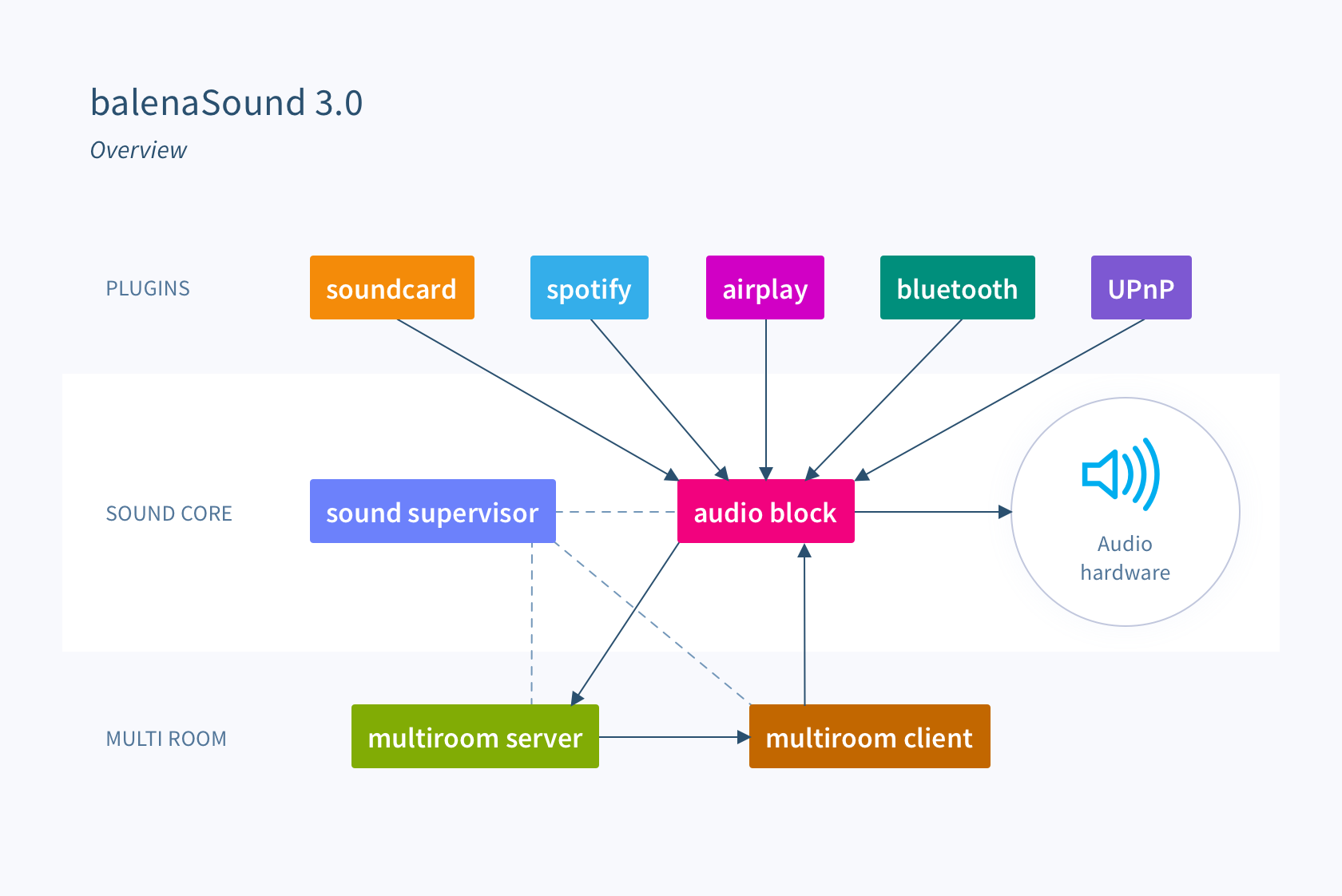
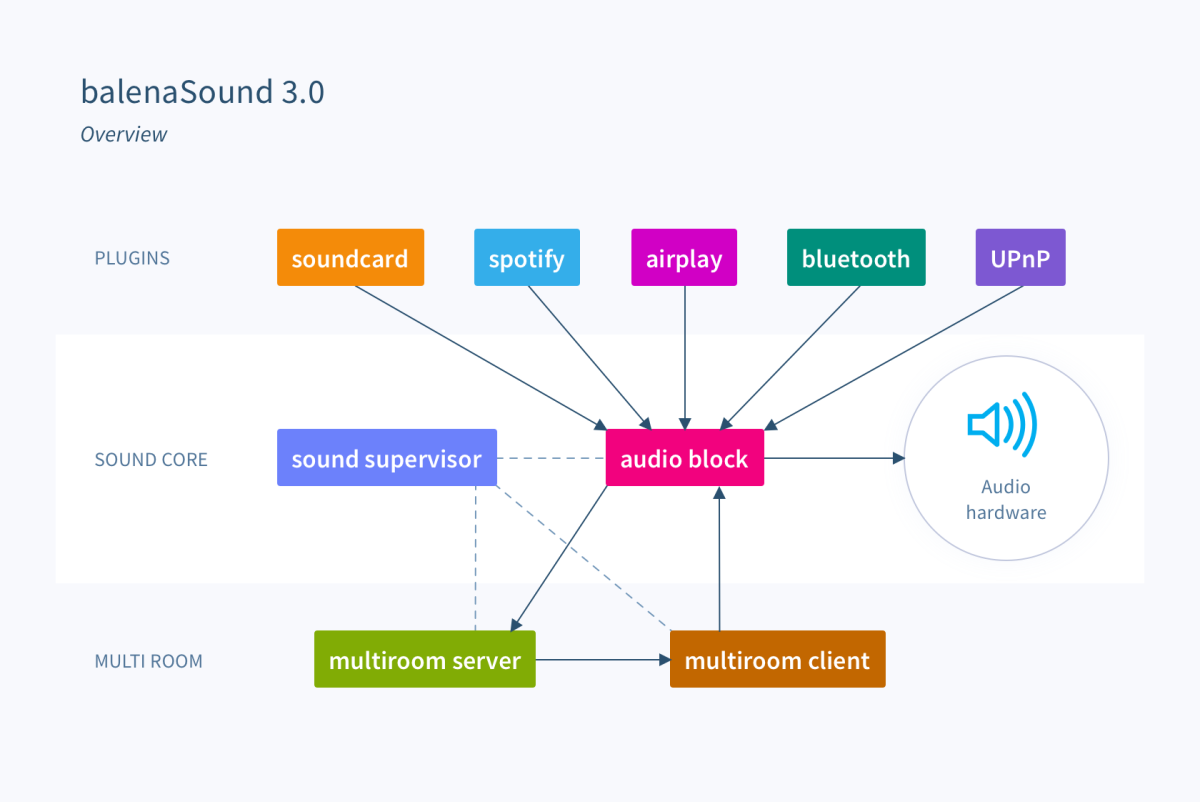
@yaksplat& @Luke I have an interesting thing to share in regards to the original post, that being the interoperability of balenaSound and Emby. Note the mention of UPnP as a plug-in / sound source here in their architecture block diagram: UPnP supported in balenaSound is experimental / WIP, which I was able to confirm first hand once I refactored my two balenaSound audio-devices. But it did work, somewhat. I WAS able to use the emby web client (can't cast to UPnP from emby theater) to cast to the UPnP client on my balena-sound master device, which in-turn was routed to the audio-block, which in-turn was routed to the muti-room server, which then used snapcast to playback synchronized music on all my device nodes. Again, with Emby as the Music Source! It is not installed by default. One can't use their nice "One Click" installation. Rather one has to use the advanced (legacy) installation approach thru a balena-cli environment in a Linux shell to deploy their balena-sound project after adding the UPnP config block to the docker yaml file. The problems I found were: 1. The multicast server docker container kept restarting causing music play to drop out for a few seconds, until it didn't. Couldn't tell what was behind that or why it was inconsistent. 2. The Emby "Now Playing" only showed the playback position bar, sans any position info, and a play button which was ineffective. But the whole page was 'dead', with no feedback. And on the balenaSound side if you inspect the logs you'll find mention of a gmrender error that it could not determine the music source duration. Implying the worst case that if one were to start emby playback to upnp of your whole huge music library, I don't know how one could stop it. lol I don't know if this is a balena side issue or emby side one But I strongly suspect it is a balena side one as if I use the emby web client's UPnP to Play to my Marantz receiver, I get a well rendered emby now playing page as well as the same on the Marantz side. With full music playback control. 3. Fidelity seemed to be lacking. It sounded crunchy / jittery / not smooth. Implying to me it wasn't bit-perfect, the bitstream was being 'stepped on', and streaming & re-streaming was lossy. But... the folks a balena keep evolving the balena-sound project. I do see bugs getting fixed. So keep your eye on this space. I'll post an update here if I see things evolve positively in the realm of UPnP support, and emby's casting to it. p.s. Even better than that would be an official emby client as a music source in that block diagram. Someone is working on a RoonBridge integration. And another one I forget. Would be ideal if UPnP didn't need to be used and there was a direct integration of emby to balena-sound. Surprised too, there isn't a Chromecast sound source; that would have worked.
 1 point
 -
I had changed the Audio Output setting to Convert Unsupported Audio to Dolby Digital. Which it was doing, but was also triggering a video transcode. I was trying to figure out how to get one without the other. (That part I believe you resolved for me, per my response below. Thanks!) My player version is 2.0.98g and I don't see an update available. I also do not have the allow TrueHD Pass-thru option, only the DTS and DTS-HD options. Assuming this is because it can tell that I don't have TrueHD support, but it somehow wasn't trying to transcode it automatically. It would Direct Play, and as you pointed out, because that is not actually supported it was getting dumped to PCM 2.0 which is what was being sent to my AVR. However, I was not aware of the per user server settings, which I think is moving things closer. I changed the ATV player Audio Output setting back to Convert Unsupported Audio to Dolby Digital, and I disabled the Allow video transcoding option in the server settings for my user. Lo and behold, I now have reliable Direct Streaming. However, it seems the audio is being transcoded to AC3 and not EAC3. Is this a possibility with Emby? Desired result is that I am trying to retain any dynamic object information that may be in the original stream. I also noticed a discrepancy reported with the video stream. Even though it says Direct Play for the video stream, the video resolution has been reduced. According to the ATV Player Stats for Nerds Playback Info, it is playing at 2592x1080 instead of the full 3840x1600 that it should be. (If I Direct Play then it reports the correct full resolution). How is this possible if it is supposedly Direct Playing the video stream?1 point
-
I came here to report the same issue. I'm running Fedora 39 with KDE Plasma 5.27.10 on Wayland. Kernel version is 6.6.11. I use the Flatpak version of Emby Theater, but I also tried the rpm version and it has the exact same behaviour.1 point
-
An addendum to my post: A Plex advantage: Several years ago, Plex added an SSL cert to the system so the users wouldn't have to. I'm not well versed in this area, and I've been having some difficulty getting SSL set up on my server so I can access it remotely.1 point
-
Replied back to you and hopefully will set it up in the morning. I don't mind testing, especially it could help others as well.1 point
-
HI, yes we plan to add subtitle display options in future updates. Thanks for the feedback.1 point
-
For additional reference, the following is fine across the entire series and doesn't show a version for each episode. Marvels.Agents.Of.SHIELD/season.2/Marvels.Agents.Of.Shield.S02E01.1080p.mkv Other ideas with episodes that have release groups in them are also no producing the issue. Call.The.Midwife/season.13/Call.The.Midwife.S13E02.1080p.HEVC.x265-MeGusta.mkv And again for reference the follow is still exhibiting the issue when I rename the season folder back to `season.#`. Using `s2` like it is in the example below fixes the issue. There appears to be no easily recognizable pattern for the issue to hit. Maybe it's something in the TVDB entries? For.All.Mankind/s2/For.All.Mankind.S02E08.720p.HEVC.x265-MeGusta.mkv Looking at the mkv headers, all 3 files have the complete name field populated, but only agents of shield has the movie name field populated. Not sure if those are the right field names or if they're tags or what, that's just what `mediainfo` labels them as. I figured it might be something, but it looks like it's a total red herring.1 point
-
I've had lifetime memberships with Plex and Emby for several years, but Plex was my first, and I've spent only a little time with Emby until recently. Emby didn't quite measure up to Plex in the areas that are useful to me. But Plex recently did something that I felt was unethical and disrespectful toward users' privacy. It was kind of a 'last straw' for me, so I've been spending more time with Emby, and finding that Emby has made big improvements since the last time I paid attention. I won't say that I have irrevocably left Plex behind, but Emby has 'caught up' enough, at least in the features that are important to me, that I feel I haven't lost much by switching. I recently thought about putting together a "Plex vs. Emby" comparison list. It isn't much yet, but Emby's advantages vs. Plex include support for the Composer tag in music, and support for multiple artists in music tracks, and for showing albums that an artist appears on, where they aren't the primary artist (Various Artist albums, for example). Emby's server management options are better than Plex's, and playback controls for music and movies are much better. Outside of the product features, I'm finding that the folks at Emby have been much more responsive in their forums than Plex folk. I have yet to see a post ignored, and have had one or two feature requests implemented surprisingly quickly. Emby's deficiencies in relation to Plex include filtering/smart playlists, and the ability to display map locations for GPS-tagged photos. I'm sure I can expand on the above, but that's what comes to mind immediately. Aside from Plex, obviously, I very briefly played with Kodi and Jellyfin, but didn't have the energy/motivation to go very far with them. My server is on Linux MInt. For playback, I use an nVidia Shield for probably 98% of all activity. I have used the Plex app for Android Mobile for photos only. I haven't yet moved that over to the Emby app. But I have no use for it on my phone for anything other than photos. I use Plex (and now Emby) primarily for listening to music, and viewing my photography. I have only a handful of movies (around 30), and a couple of TV shows. I have yet to figure out how to access my Emby server content from outside my home network (to share photos/music with family), but once I get that working, I'll be one step closer to not needing Plex.1 point
-
Works flawlessly - just add a note to install an updater on the pc that is your Emby server device to update the address on the DDNS should your address change. I had an issue where the ISP's data centre had a fire and their backup was to cut everyone over to a parallel system, with all new addressing. All that happened was my wife was disconnected from work for a few minutes. Everything else reconnected without touching a thing, including Emby users. Same thing when they switched back to the primary system.....1 point
-
and you repeat that process everytime the iptv provider updates the channel list (daily)? this is absolutely not the way to do it. @bruoruse iptvboss. its far quicker and easier than this convoluted manual process AND allows for updates to the provider m3u. you can still use the emby epg data if you want to tediously match the channels in emby, but i personally have a subscription for epg elsewhere and have it all handled in iptvboss.1 point
-
Thanks - I'm going to take a look - I'm no dev, but I'm just playing with the api and curl commands and got a barebones 'sync' play working - as you say, the hard part is getting people subscribed to the watch party, as currently my mock up just adds every session haha ...1 point
-
Simplest solution would be: shutdown Emby, delete the VirtualTV.xml file from plugins\configurations, restart Emby. Look at the program details. It should be there already. The epg grid view is the responsibility of the Emby devs.1 point
-
@HolyGigi @wolfram84 @darkassassin07 @ChrisJ60 Here is a 4.7 compatible version of the updated open subtitles plugin. Can you try this out? Thanks ! OpenSubtitles.zip1 point
-
1 point