Leaderboard




Popular Content
Showing content with the highest reputation on 01/09/24 in Posts
-
I recently found a need to look up additional information on a director. I was hoping to look at the director's profile and see not only the movies I had in my collection but also a list of other movies that they have directed. This would be displayed below the library's current movies. ex: My movies: Movie 1, Movie 2 Other movies by this person: Movie 3, Movie4 ================ This could help one expand their library and to discover a missing gem.2 points
-
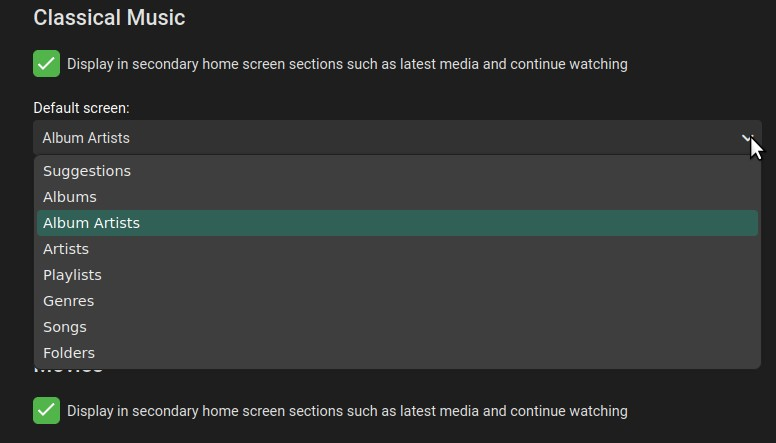
In Settings > Home Screen, please add "Composers" to the options for Default Screen in Music libraries. I think this option would be popular among classical music enthusiasts.
 2 points
 -
Be nice to have a means to view actor information when watching a movie/TV show.2 points
-
The current GUI was designed to test the fundamental components necessary to build a GUI suitable for most people. With the core components tested, I can now move to a simpler GUI based around rules. I have started work on this project and hope to have something to show in a few days. Vic2 points
-
@TZTZoroand @kjhedgesI took your good advice and installed an Emby beta server. I have tested the plugin and everything works OK now. Remember that RED buttons have not yet been implemented. I added a filter and fixed the searching for movies and TV Series. Give it a try. Vic2 points
-
This is coming in Emby Server 4.8:2 points
-
Why?? I do not understand this conversation at all. Emby is/was a Media Management Solution first. If people want a pure offline capability w/o internet then they can always turn to Kodi with MySQL centralized db for watch status sync. I have been a long-time Emby Lifetime user, and I exclusively use Kodi as my front end on my shield devices in my local LAN. Remotely, I use the Emby App which obviously requires an internet connection at the server level at the house with transcoding on my GPU. Why bother using Emby if you always want to be in the local LAN with no internet? Strange to blame Emby when other solutions are available at NO COST to do what you want. All metadata / images / eye-candy requires the internet anyway even if you are offline and ripped your own blurays. You need to get images from "somewhere". I smell a rat somewhere, there is no good faith in this conversation when there are other mature solutions available for your needs. Heck Kodi, with centralized mysql has become so easy nowadays, why are you are bothering with EMBY then? Yes, i go back to the WMC with MediaBroswer days. Emby was designed to be Media Management and EyeCandy first. The playback app came much later.2 points
-
I'd really like to have 2 Factor Authentication added to the login screen. It's just this (optional) extra layer of security to help secure the server (which, especially if people use camera uploads) contains pretty private data. There are for every type of programming language quite a few libraries available, so implementation on a server shouldn't be too hard to realise1 point
-
Hi all! I'm extremely excited to announce that I just started working with the awesome folks here at Emby to help grow the brand and Emby name. Before anything else, thank you to @ebrand @Lukefor letting me join the team and trusting me to promote Emby as the best media server available to people. As I start this journey, I'm asking for everyone's help with answering a few questions that will identify some things that will help start this process. What brought you to Emby? Did you leave Plex or Jellyfin or was Emby your first media server? What about Emby do you like or dislike? Have you tried the alternatives out there and if so what is your feedback compared to Emby? What OS are you running your server on? What clients do you use on a daily basis? Any other general comments about Emby and your experience are always welcomed. Thank you for taking the time to help me with this. It is feedback from the users of Emby that will jumpstart this growth for us. I appreciate all of you and if you have any questions or suggestions about how we can best market, please feel free to reach out to me right away.1 point
-
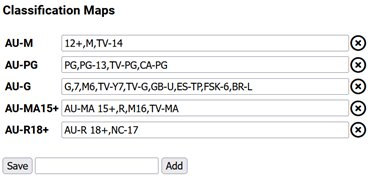
New plugin to map classification ratings to allow clean up of classifications where there are mixed region classifications. This can help reduce the clutter. You will need to set up your mappings, something like this: The report on the settings page will help with your mappings showing you what you currently have in your library. The idea is add all your local classification ratings and then add all the ones you want to map to them. In the example above a ratting of M will get changed to AU-M and the PG will be changed to AU-PG. You can have multiple (comma seperated) items that will get updated to the target, in the above example G,7,M6,TV-Y7,TV-G,GB-U,ES-TP,FSK-6 and BR-L will get mapped to AU-MA. You need to run the Task for the items will be updated. The task is in the schedule tasks list. Install: The plugin is in the plugin catalogue under the Metadata area. More info in this thread: https://emby.media/community/index.php?/topic/97697-plug-in-request-parental-guidance-cleaner/ Classifications: https://en.wikipedia.org/wiki/Television_content_rating_system Source: https://github.com/faush01/ClassificationMapper
 1 point
 -
In connection with this - https://emby.media/community/index.php?/topic/79229-43022-screensaver-options/ It would be nice if the Photo library screensaver can be restricted to only use a certain folder, so that you can just, say, show images of your trip to Kazakhstan, without them being intermingled with images of your broken motorcycle sprocket / widget.1 point
-
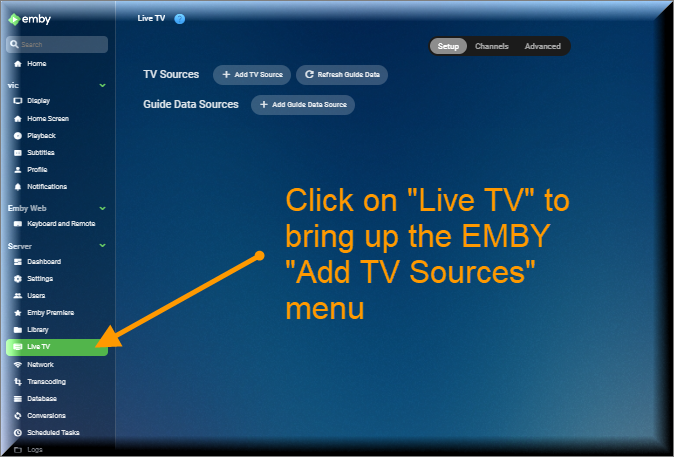
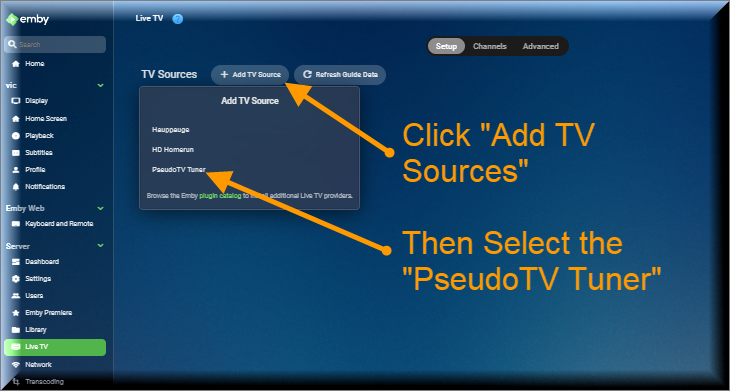
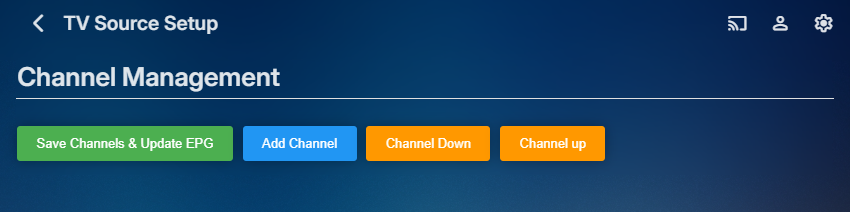
The Pseudo TV plugin is composed of two parts. The first part is based on a TV Tuner Platform created by @Luke. He called the plugin "VirtualTvExample." The second part is a Javascript program that provides a simple GUI for creating and adding channels to the TV Tuner. The code for both parts is attached below. I created the javascript code and several C# additions to the tuner. @TZTZorocomposed the CSS code. PseudoTV is open source and free for everyone to use. PseudoTv is tested on Chrome and Edge. Other browsers may work. I just don't know. To install PseudoTV, copy the plugin dll below to the EMBY plugin directory and RESTART EMBY. Follow the instructions below to bring up PseudoTV. Next add the TV Source for PseudoTV. If you have an Old PseudoTV Tuner installed, you must delete the old tuner before installing a new one. Select the PseudoTV Tuner to bring up the Channel Management menu. Use this menu to Add channels to the Emby EPG (Electronic Programming Guide). Click the Add Channel button to add a new channel. The two videos below, explain basic channel building. Querry-1.m4v The next video is also about channel building, but instead of using an Emby query, media is selected directly from the Emby libraries. File-1.m4v The remaining videos introduce the PseudoTV tool. The first is called the Library Explorer. With it you can navigate across your Emby libraries and view their contents. Libraryexplorer-1.m4v This video explains the Metadata Editor. Metadataeditor-1.m4v Another useful tool is the Playlist Editor. Playlisteditor1-1.m4v The description of the Playlist Editor is continued below. Playlisteditor2-1.m4v The latest plugin (dll) and the source code (zip file) are attached below: PseudoTV.dll PseudoTV.zip
 1 point
 -
KODI implemented a feature many years ago where it takes any URL passed to it (via plugin or STRM) that has a | in it and treats anything after the | as headers that should be passed along with the request For example: http://domain/path/video.mp4|authorization:userid=49384 KODI, when it makes the request would pass: GET http://domain/path/video.mp4|authorization authorization: userid=49384 Likewise would be true for cookies, etc. Is it possible to implement the same with Emby, someway?1 point
-
While Emby already has recommendations built in based on previously watched items I find they are not all that helpful. They seem to be based on genre only, for example, because you watched a comedy here are other comedies in your library. I do like how the also directed by/appear in recommendations work though. What would be great is if Emby could incorporate Trakt's recommendations as they are much more sophisticated. Trakt's recommendations are not only based off of what you have previously watched but also what your Trakt friends and other Trakt users have watched. It takes user ratings and trending/popular media into account. Ideally Emby would include full Trakt integration allowing users to rate media after watching, view lists and recommendations, and view upcoming media all from within Emby but for now I think recommendations would be a nice addition. Trakt has the potential to give Emby that community feel and allow users to discover new media, find something to watch, and recommend media to other users. http://docs.trakt.apiary.io/#reference/recommendations1 point
-
hi, if they're all watching different channels then usually this will be three connections. if they are watching the same channel, then sometimes emby server will share one connection for all three. It just depends on the input format. When that's not possible, then they'll each have a separate connection.1 point
-
How would this help? You only need to have the extract (prob) happen once for an item and you can stop and start the scheudle task as many times as you want, it will eventually finish all your items. Just let it run, once it is finished the next run will just process new items.1 point
-
Again, thanks Luke. And... Just wanted to say: I finally solved it. I am beyond happy! I did a search, using SMB. It found my NAS. I logged in without any problems, but I couldn't see the folders on my NAS. Solution: In sources - I added the NAS by entering it's IP and pwd/username. Once I did that: everything worked perfect. Thanks for the inputs1 point
-
Created an account now on .com and it works, it also inherited the VIP status from .org since I used the same login information. Thx for the .dll1 point
-
I have television with AC3 audio. The streams wont start on chrome. I need transcode audio to AAC.1 point
-
channel wasn't helping me but in playback settings I had to set hide to no. what the hell that was not even a possibility last time I checked. now skip is there. MANY THANKS!! if you can explain how to move the sub offset box away from the subs so I can use it... that would be also absolutely great!!1 point
-
Very cool... I downloaded to just have a look at the interface, it definitely replicates the WMC interface look and feel well. I'm assuming it doesn't use the MCML language that the original WMC used to define pages/navigation/etc... and this is probably some sort of javascript which replicates the look and feel.1 point
-
Didn’t know there was a tv naming guide, sorry so after reading it I think the problem is solved, as you Said the subject is naming. I modified my Sonarr naming settings to « normalise title ». seems to work now, ty Luke !1 point
-
@LukeIs there anything I can do to help add to the virtualTVExample code so that clicked content in the EPG will start at the current time, rather than at the beginning, and when content stops playing, the next item in the list will play? I don't know if this is a big job or a little one, or if my meager C# skills could do the work with a little coaching. You have already taught me so much. I am a willing student. Luke, I do appreciate all that you have done. If I am out of line, keep in mind that I don't have visibility into the development of Emby and therefore don't really know what I am asking. Vic1 point
-
I have an idea, but I've to check something....1 point
-
How are we going to "wrap things up" without releasing new versions to test?1 point
-
Hi, there's already an open request for this or something functionally equivalent. Please join in and contribute to the existing discussion at:1 point
-
@kjhedgesYes that is true. @Luke has not yet added the code to start at the current time, rather than at the beginning. He said He would add the code when more people get interested in this code. Vic1 point
-
Hi, there's already an open request for this or something functionally equivalent. Please join in and contribute to the existing discussion at:1 point
-
@Lukealle 10 Teile, aber nachdem ich eine Datenbank aktualisierung direkt unter filme gemacht habe ging alles. Also jetzt habe ich meine Sammlungen.1 point
-
@LukeI also meant to ask if it is now a requirement to be an OpenSubtitles VIP member to download subtitles? Just curious as I wasn't one before but I'm not sure if Emby has any special arrangement with OpenSubtitles in this regard.1 point
-
Given that everything is nearly twice the price lately, not everyone can afford to just "consider a new NAS", so it is a matter of trying to make things work with existing equipment.1 point
-
Hi, the start shouldn't be there if it's already started, so that needs adjustment. Changing it during the recording hasn't been implemented yet.1 point
-
Hi, yes we'll take a look at it. Thanks for reporting.1 point
-
Hi, yes we can add this. Thanks.1 point
-
OK well we can have the home button take you back to the first tab.1 point
-
I'm constantly adding to my music collection, usually in large batches. I really like the "Latest 'xxxx'" view on the main Emby page as it allows me to easily access the newest albums, but sometimes I cannot see all of the albums I've added. That said, I was wondering if it could be an option that when clicking on "Latest 'xxxx'" if instead of just going directly to the library, it could show albums sorted by date (most to least recent)? I may be in the minority, but when I click on the link, my expectation is that Emby is going to show me a list of albums in date order—effectively, expanding on what it is showing on the home page.1 point
-
You probably set it on the Roku way back then and just need to do it again now.1 point
-
I updated to 4.8.0.67 earlier tonight. And I'm happy to report that, for me, this issue is has been resolved. Hopefully it is the same for others. Thanks Team Emby!!!1 point
-
I have no experience with strm files, unfortunately. But if emby handles them as normal library items, it should work. I suggest you just try it, but create a backup first, just in case.1 point
-
Subtitle position in the web app will be in Emby Server 4.8. Many of our apps have already gotten support for this.1 point
-
Hi, thanks for the reply. Yes it appears to be the TV as a latter Samsung TV model doesn't have an issue. Cheers1 point
-
What brought you to Emby? Did you leave Plex or Jellyfin or was Emby your first media server? I used Emby back when it was MBServer or whatever it was called back then and used it some with Windows Media Center. Back then I was very new to the whole media server bit. I don't even recall how I came across it. Back then I had even tried MediaPortal and NextPVR but those were mainly only for TV viewing and Emby had the other aspects of accessing my own media that I liked better. I have used Plex and there are some things I like about it, but Emby ticks more of the boxes for what I am looking for out of a media server. I haven't been able to find any media server that ticks all of the boxes for me. I installed Jellyfin once just to see what all the fuss was about. Ugh, hated it. That lasted about a day. What about Emby do you like or dislike? Likes: I like the intro skip function and metadata management aspects. I find them easy to use. I like the fact that for me the server has pretty much always just worked. I haven't had any major issues on it's performance. Dislikes: I really, really, really dislike this response to feature requests, "It's a good idea for the future." Meanwhile, 4 years later... - I always assume that this means this will never happen and as such I have quite making any feature requests because I feel like the devs have already decided what they want to do and if that view fits with some feature request by accident it will get implemented. I dislike what I consider to be an avoidance of just telling us "we are not going to do that anytime soon. Not a bad idea, but don't expect it for a really long time and probably not ever. Have you tried the alternatives out there and if so what is your feedback compared to Emby? I have, like I said above, used Plex. One of the main things I liked about it is the native ability to run a commercial scanner and skip those commercials. I am currently using Channels DVR software mostly because of how they have implemented commercial skipping. You can even edit the commercials after it has scanned a recording for them. It's a simple little GUI that gives you the still images at the beginning and end of each cut point and you can modify it manually. As any of us that use ffmpeg to scan commercials knows, it's not an exact method. This application lets you fix that pretty easily. What OS are you running your server on? What clients do you use on a daily basis? My server is on a Windows 11 computer that also holds all of my HDDs (about 40 tb) with all my movies and TV Shows. My daily clients are Apple TV and iOS. Any other general comments about Emby and your experience are always welcomed. My general usage of Emby as it exists is quite satisfying. I do understand they can't get in all of the users wishes as we all have some pretty different ideas of what we'd like implemented. I currently only have Emby and Channels DVR on my media computer. I uninstalled Plex about 3 months ago.1 point
-
1 point
-
Thank you for taking the time to respond here. I'm glad you saw the post on Reddit as well. We're getting a lot of traction over there but it'd be great to get some here as well. Your feedback on both the likes and dislikes was extremely well thought out and really well expressed. I know the Emby team is always looking to improve the core product so feedback is always welcomed. Our hope is to grow the brand and we can't do that without the knowledge of what drives our users.1 point
-
OK, so that rules that out.1 point
-
As previously advised above - this has nothing to do with Emby or any software based player. (Plex and JF will not play dual layer as DV either) - this is an industry limitation - MakeMKV (or other available tools as this is the same method used for MP4's) simply recognises the dual layers (literally 2 video tracks) and merge them into a single layer/track - so s/w based players can then play them without issues. Once converted - Emby has zero issues playing back DV - and has done so sucessfully for years - initially with TS as that was the first container to have DV, followed soon after by MP4's and finally MKV (which wasn't as mainstream as it is today).1 point
-
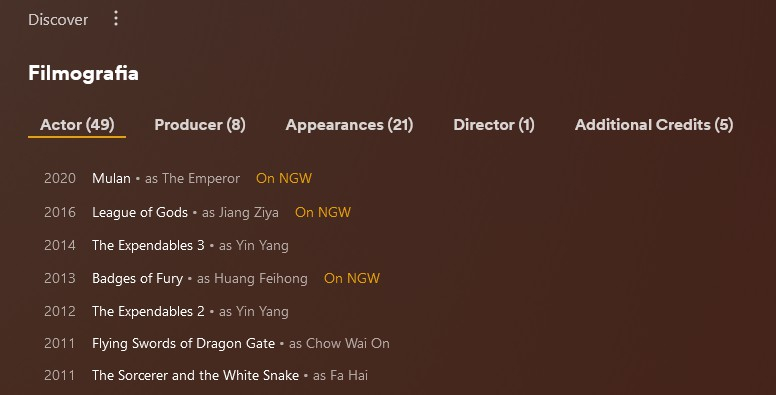
Added my agreement in the 1st post. I would love to see this pull additional information for all movies for a given actor/director, not just what is in my library.1 point
-
Yes, it's a nice feature ! Will be perfect with a link near title to show the corrispective url to IMDB too for example to quick open it and\or a checkbox to put them in a sot of Watchlist Wannabe to keep track of what missing on a collection. Chooo
 1 point
 -
This can be closed and awesome work thanks Luke!1 point
-
The Very Dark theme was been removed during the last round of Betas. Just use the DARK one instead. https://emby.media/community/index.php?/topic/60028-v34117-very-dark-themes-missing1 point