Leaderboard




Popular Content
Showing content with the highest reputation on 01/03/24 in Posts
-
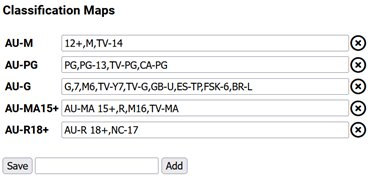
New plugin to map classification ratings to allow clean up of classifications where there are mixed region classifications. This can help reduce the clutter. You will need to set up your mappings, something like this: The report on the settings page will help with your mappings showing you what you currently have in your library. The idea is add all your local classification ratings and then add all the ones you want to map to them. In the example above a ratting of M will get changed to AU-M and the PG will be changed to AU-PG. You can have multiple (comma seperated) items that will get updated to the target, in the above example G,7,M6,TV-Y7,TV-G,GB-U,ES-TP,FSK-6 and BR-L will get mapped to AU-MA. You need to run the Task for the items will be updated. The task is in the schedule tasks list. Install: The plugin is in the plugin catalogue under the Metadata area. More info in this thread: https://emby.media/community/index.php?/topic/97697-plug-in-request-parental-guidance-cleaner/ Classifications: https://en.wikipedia.org/wiki/Television_content_rating_system Source: https://github.com/faush01/ClassificationMapper
 2 points
 -
New thread dedicated to the plugin https://emby.media/community/index.php?/topic/124550-classification-mapper/ The plugin is also in the Catalogue now under the Metadata area2 points
-
ok, I will add some checks to stop users from doing that. Its not a big deal but problem is it will do an update and so a save for each match and because it will always match because it is setting the same value over and over it will always do a force update and save causing more work than is needed. These are the things we can find with more testing2 points
-
ProviderIDs. You can't currently, Emby doesn't discern between different cuts for tracking purposes, it's all one and the same item as far it is concerned.2 points
-
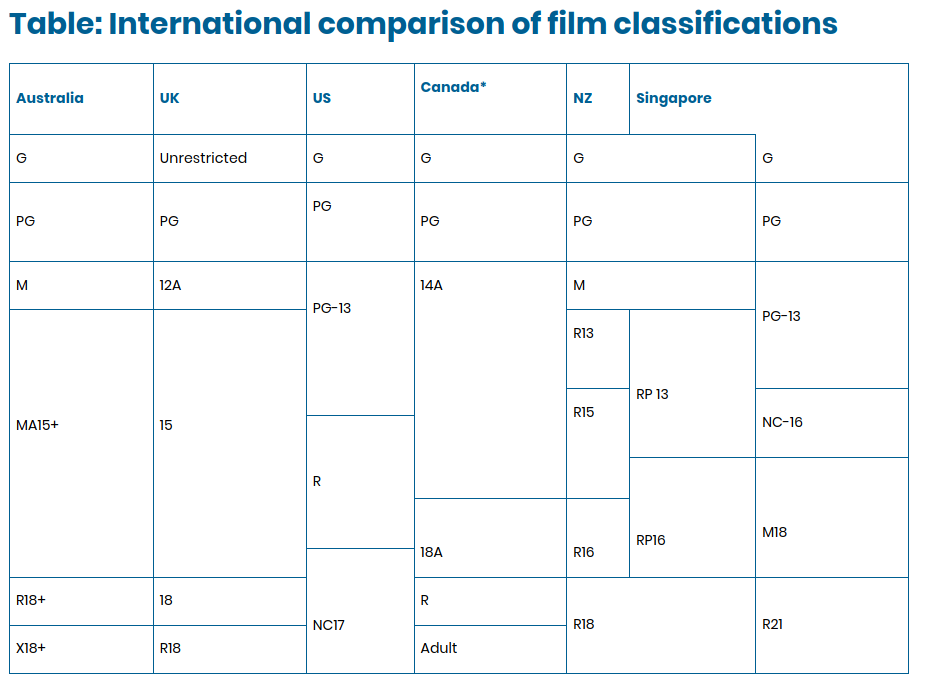
If your like me and get confused with the different rating classifications of different countries this could help a bit... There are still a lot that overlap each other and are open to interpretation and it's not complete as far as countries go. I know I have made a lot of mistakes here (PG-13 --> AU-PG for example). Only a lib refresh will fix most of them, some day.. Image taken from: https://www.alrc.gov.au/publication/classification-content-regulation-and-convergent-media-alrc-report-118/appendix-3-international-comparison-of-classification-and-content-regulation/table-international-comparison-of-film-classifications/
 2 points
 -
if you are changing the name change the GUID as well1 point
-
Ok, I'll try to remove the plugin AdminBuddy, and do a test. Thanks again1 point
-
Thank you Luke - I thought it was part of the Emby software as I had used it for that long - after you mentioned to check the plugin's I found it to be part of the "playback reporting" plugin. Appreciate the help. Andy1 point
-
Yea it might make sense.1 point
-
This was going to be a problem report but I have solved it but I though i would post about it, just in case. My Roku had been running for a little over 2 weeks continuously and "some" videos started playing with dim images of the bif file started showing all the time while the show was playing. They otherwise worked fine and i could progress through them just fine using the bif files. The vids also had just a little "graininess" that was not there with properly behaving files and, once the problem was fixed the "graininess" also went away on the files that were giving problems earlier. All other apps worked fine and the ones the have preview files like bifs (may actually be bifs but the apps don't say) worked fine and did not show the preview images except when needed and "most" Emby videos, with bif files or without, worked fine. It is only the oldest videos that had the issue and not all of them. It is possible that at least some of those had bif files that were generated by an external program called "BifFileCreator" but the were also other videos the created at about the same time and using "BifFileCreator" that always worked fine. I restarted the Emby server (Version 4.8.0.65 beta) a few times and no change. This only happened on some shows that were all ripped a long time ago and have been in my system for many years without change. I was about to restart the server and capture the logs but I realized it had been quite a while since my Roku Ultra was rebooted and I decided to try the first, but without much hope. To my surprise the Roku restart fixed the problem. So I have no screen shots or logs showing the problem. I decided to report here even though the reboot fixed the problem mainly because others might encounter it and just in case it might set off some "alarm" for the developers. I have no idea why it showed up and also why it only effected some shows. At least, now that i know about it and about the simple fix I will not be too bothered if it happens again. My Roku is model # 4640X software ver 12.5.0 - Build 4178-29 and I have no SD card installed. (I am including the info about the SD card simply because, quite a while ago, there were apps misbehaving only if an SD card was installed. BTW: My other Roku did not ever have this problem but it is rarely used for TV shows. I hope this was just a one time glitch and it is never seen again.1 point
-
Or configure the browser to allow it over http. All of the browsers are getting more strict about this now.1 point
-
Well, I figured out that Chrome was my issue. Even though I was entering http and not https, it wasn't allowing me to add my server. I was able to get access by using MS Edge. I never had issues using Chrome & Plex, so it didn't occur to me. Is the only way for me to access my server using Chrome to setup SSL or be on my LAN?1 point
-
Ok that seems to be working. Just one is not and I think it's an issue with that specific file. Thanks for the assist1 point
-
I'm sorry for you, but i'm glad it's not my plugin then. Also my previous assumption about querying the whole library seems to be wrong. It's a particular query against the user that is extremely slow: IsVisible(User) @LukeI will create a proper bug report later. This just to inform you already about the real problem.1 point
-
I had to update the DSM. I hadn't updated it in a while. Once I did that, the conflicted IP addresses seem to resolve itself. I can access remotely now. Thanks.1 point
-
If you're referring to the editor, that's something we plan to improve in future updates. Thanks.1 point
-
Depends. If the fields are also locked, then the values should be preserved. But most likely they aren’t. When you edit directly in Emby, it not only edits the value but applies the field lock as well. Given that, the best way to preserve your values is to enable the option but don’t refresh metadata.1 point
-
Hi, Emby has no such feature. If you’re referring to the smart playlists plugin or a feature provided by another plugin then I would post this on the topic for the plugin so that the developer will see it.1 point
-
Thanks so much for the reply. I am able to connect using both of those methods.1 point
-
I have just uninstalled the plugin and am letting the refresh run without any providers. I'll report back if that makes a difference...1 point
-
I tried the backup and restore, and ran into an issue where it looked like I was going to have to re-enroll all remote users (unless I missed something). I then tried the copy the program data method, and it worked flawlessly, including taking on the new name of the new server.1 point
-
Yes i found it Luke, thank you.1 point
-
Thanks @softworkzI will give it a try today. I am changing the code right now to make it much better. This is all a learning exercise for me, and I am greatly enjoying it. I lived in Germany for several years working in the IBM research lab near Stuttgart. I enjoyed my time there. I studied German in school. When I did my Ph.D. work, a second language was a requirement, so I chose German. When I went to Germany many years later it was a complete restart on the language. Unfortunately, I have great difficulty with languages because I have very poor hearing. But I had a fun time trying and the Germans around me were very tolerant. I enjoyed my stay and made many friends. You live in a great country. Vic1 point
-
Select mode "No subtitles" (or potentially "Smart", depending on your preference).1 point
-
AFAIK any day now, first or second week of January.1 point
-
2017 and 2023 models We can do this, but it would need to be added to the core app first, then we can implement it with Tizen1 point
-
Has to be something to do with the new tabs system, still investigating.1 point
-
Agreed and this is something originally discussed with the core team when the Core introskip decided to use 'hidden' chapter markers. There is nothing to stop there being different types of markers - not only for Intro Start, Intro Stop, Credit Start, Credit Stop - but also some more advanced markers such as Mute Start, Mute Stop and even Recap Start, Recap Stop etc for those that want to skip recaps - if manually edited (Previously on ..) etc. Unfortunately, there is still a lot missing from the Core Introskip installation vs the Plugin - such as editing, yes there are some Plugins that fill the gaps - but as the core framework 'could' easily add this more advanced functionality - it's a shame it has never been implemented. Personally, I still use the Plugin with the hidden markers being written by the Plugin - thus using the Core 'skip' functionality, but the more advanced detection/editing capabilities of the Plugin. Sure - this makes sense - the Introskip Plugin writes the hidden markers as well (if that option is ticked) and thus I use the Core client to do the skipping. Next episode skip has not yet been implemented however - so if you want it to skip to next episode on Credit Start, then you still need to use the Plugin. I guess if the muting markers were ever implemented (in the core) then your Plugins could simply write them and let the client do all the work - and this remote Roku (or any client) issue would be resolved ?1 point
-
1 point
-
Cool... I think I know what this bug is, and I'm pretty sure it is going to fix itself in eight days. ... Perhaps this should be fixed so it doesn't happen every new year.1 point
-
I always use this naming for movies. folder : Robin Hood Prince of Thieves (1991) {TmdbId-8367} Movie : Robin Hood Prince of Thieves (1991) {TmdbId-8367}.mkv Adding {Tmdbid-xxxx} to your folder and movie file, will help Emby identify the right movie.1 point
-
"Correct" in this context means it is in your above list of target classification. If you add a AU-M with no mappings then it will stop showing up unless you have the "Include items with correct classifications" Perhaps "correct" is not the correct work here This is just to show you any item that does not have a classification map yet, i.e. somethign new popped up that might need a new mapping1 point
-
writing a php application to grab the m3u from TVH, parse it, add the tags and then spit it back out seems to have done the trick. Tags are now added to Emby. Guessing if TVH ever adds support for the group-title attribute it will work nativly. Thanks for all the support guys.1 point
-
Emby tracks watch status by third party metadata ID, so unfortunately, it doesn't recognize different cuts of movies or understand the potential different run times, as you've noticed, unless each cut has its own entry with your configured primary metadata provider. This also means you get multiple entries in your continue watching row while any one of the movie entries is being watched. The alternative is to combine your cuts into one item using the multi version functionality. This solves the continue watching duplication, but you can't control which version Emby will default to playing, and Emby won't 'remember' which version you were watching if you stop and resume. It will also potentially still get resume points confused when the versions have different lengths. There's currently no 'perfect' way to handle multiple cuts of the same movie, but there are feature requests to improve it. I prefer the multi version approach. Others like separate items. Some use separate items but group them into collections so they appear as one movie in their grid/list views1 point
-
Update, looks like it may not be supported by TVHeadend at this time: https://tvheadend.org/issues/4459 - unfortunate, I'll see if I can write some middlewear to ad the tags manually before Emby sees the m3u1 point
-
Hi, yes, for future library items that are scanned in. Please see the help text at the top of the library options dialog to learn how to apply settings changes to existing items. Hi, yes, they'll get read and updated with changes from Emby Server. Custom tags written by other software that Emby doesn't use will be preserved though.1 point
-
Hi, yes this idea has come up before and is possible for future updates. Thanks.1 point
-
Thank you very much Luke ! Plugin imported via /.config/emby-server/plugins/, "ZAP" option appeared, however the option could not be validated/saved. Pop up window responds with "Settings saved" , but if i open the Plugin "EDIT" option, it is still unchecked. Sadly the result with streaming is still the same1 point
-
You are the best. Thx man, that worked1 point
-
Yes it does, it works the same as the web client and most other ET based clients.1 point
-
Or would it at all be feasible to compile and build the Emby app for the ATV3 arm processor and make it installable via SSH ? That would be awesome!1 point
-
It's one of those things that once explained can be defended, but in common usage, if someone asked what version of Kingdom of Heaven you wanted to watch, they would be asking about Director's, Theatrical, or Roadshow cuts, not 4k or 6 megabit.1 point
-
If I were rebuilding today - I'd wait for the intel 14 series lower end (non-K) - and get AV1 encode as part of the deal (essentialy an intel ARC GPU on the chip) - yes emby won't currently use it, but nice to have the capability for other tasks. If intel sold the quick sync (ASIC) portion of the ARC on a discreet PCI-e card for a reasonable amount (say half that of the A380 for example), the thing would sell like hot cakes and be a trancoding monster .. I guess they want you to buy into the CPU or ARC architecture instead ... Still not sure why people even contemplate the Nvidia cards for transcoding tbh - you are buying a still very expensive power hungry card with huge 3D capability - and then using a fraction of that capability for media transcoding ...1 point
-
New PUBLIC TESTING version available 9.2.1: Delta changelog 9.2.0 -> 9.2.1 add additional image fallbacks for landscape fix minor sync issue for BoxSet updates fix smb pathes (native mode) autoupdate Kodi settings for addon mode (myvideos.extractflags=disabled, myvideos.extractthumb=disabled, myvideos.usetags=disabled, musicfiles.findremotethumbs=disabled, musicfiles.usetags=disabled, myvideos.extractchapterthumbs=enabled (if path subsitution is enabled, otherwise myvideos.extractchapterthumbs=false) fix picture load issue fix realtime (library) update issue for edge case Comment: Native mode users accessing content via network shares (smb) must trigger a full database reset or even better a factory reset1 point
-
That is part of what I meant yeah. When android choses to unload the app from memory, it shouldn't leave the player notification stranded in the tray. Battery optimization is the main reason it choses to unload apps, so you can delay android from unloading it significantly with the above setting change, but it will still happen. Usually if you have other memory hungry apps in use and/or leave emby in the background for a long time. I'm more concerned about it happening while actively using the app (manually disconnecting from an active client), but both problems should be addressed.1 point
-
accessing the emby web api from within the plugin environment was not trivial last time i looked and i havent found a way yet...the plugin environment's objects and methods sometimes were not equivalent to the simplicity of the web api but thats probably a testament to my lack of ability. I do need to get back into plugin learning but its going to be a few months before i have spare time...perhaps someone else can convert it?1 point
-
You can't really prevent this from happening (WAN IP change) unless you have the option of static IPs from your ISP. The workaround is to use a dynamic DNS (DDNS) service to register your WAN IP and update when it changes. Then you use a domain name instead of IP address to access your server remotely. Many consumer routers have a built-in DDNS client, some may support a list of providers. It's the easiest way but you can also use a DDNS service of your choice and an updater tool that can run on different platforms. There are many free DDNS providers but check the details first because some require periodic verification, like account login every 30 days, etc. DNS-o-Matic is a site/service where you can consolidate and manage IP updates to many other services from one place using a single DDNS client.1 point
-
I'm glad to see this plugin has been updated and working now. I personally moved on and created a simple python script that uses webhook from emby and API calls to merge movies. Let me know if anyone is interested.1 point
-
It's not Voldemort you can say Jellyfin1 point
-
Having the same problem. Checked the permissions on the media folder under control pannel > shared folder (highlight the selected folder where your media is located) hit edit>permissions (in the picklist select "system internal user") THAT is where I found the emby server user. Checkmark the Read/Write permission under emby and hit save. Go back to the emby app and presto! I can select the file paths now. That worked for me. Hope that helps.1 point