Leaderboard




Popular Content
Showing content with the highest reputation on 01/01/24 in Posts
-
by all means jump in, it is a wide spread problem and I feel would effect a bunch of users. It is a hard nut to crack, well not technically, some text manipulation at import time and boom done correct, well not so much, with all the different sources and classification system out there it is next to impossible to play whac-a-mole with this and I understand why the emby team dont want to just "fix" it in the official metadata plugins. also it is not just a matter of blindly mapping stuff in the official plugin or core as actually mapping a US PG to a AU PG is not actually correct and may be wrong in some cases. anyway I will put together a classification mapping plugin that user can use to "fix" their classifications and we can see how well it works.3 points
-
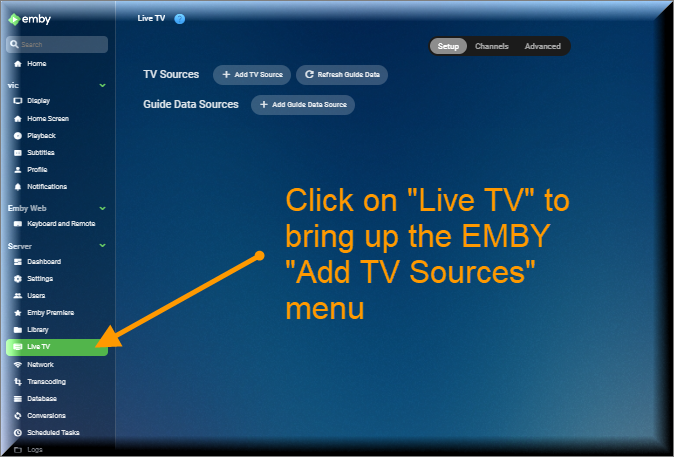
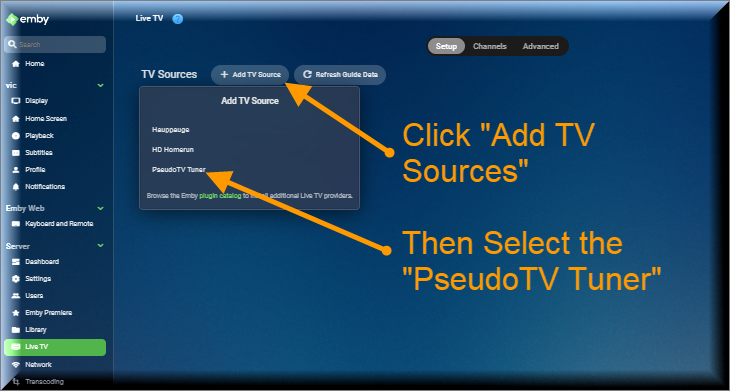
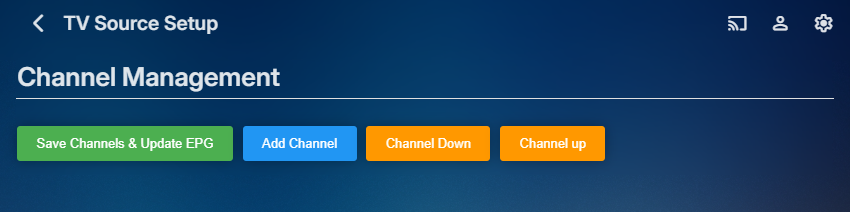
The Pseudo TV plugin is composed of two parts. The first part is based on a TV Tuner Platform created by @Luke. He called the plugin "VirtualTvExample." The second part is a Javascript program that provides a simple GUI for creating and adding channels to the TV Tuner. The code for both parts is attached below. I created the javascript code and several C# additions to the tuner. @TZTZorocomposed the CSS code. PseudoTV is open source and free for everyone to use. PseudoTv is tested on Chrome and Edge. Other browsers may work. I just don't know. To install PseudoTV, copy the plugin dll below to the EMBY plugin directory and RESTART EMBY. Follow the instructions below to bring up PseudoTV. Next add the TV Source for PseudoTV. If you have an Old PseudoTV Tuner installed, you must delete the old tuner before installing a new one. Select the PseudoTV Tuner to bring up the Channel Management menu. Use this menu to Add channels to the Emby EPG (Electronic Programming Guide). Click the Add Channel button to add a new channel. The two videos below, explain basic channel building. Querry-1.m4v The next video is also about channel building, but instead of using an Emby query, media is selected directly from the Emby libraries. File-1.m4v The remaining videos introduce the PseudoTV tool. The first is called the Library Explorer. With it you can navigate across your Emby libraries and view their contents. Libraryexplorer-1.m4v This video explains the Metadata Editor. Metadataeditor-1.m4v Another useful tool is the Playlist Editor. Playlisteditor1-1.m4v The description of the Playlist Editor is continued below. Playlisteditor2-1.m4v The latest plugin (dll) and the source code (zip file) are attached below: PseudoTV.dll PseudoTV.zip
 2 points
 -
If i'm not mistaken, for Intel CPU's 12th Gen and above, I believe you need to be running Emby Server 4.8 Beta in order to get working HW transcoding with your iGPU As per @jaycedkquestion, which version of Emby are you running?2 points
-
Well it's a little surprising that they'd do it new years, given that this will force some developers to scramble. If you need immediate relief then you'll need to run the 4.8 beta server and see here: Or you can wait. We'll get a 4.7 compatible plugin update out soon and put an announcement out about it.2 points
-
I noticed that this has only been posted privately before, so here's it for completeness: New Video Playback Features Instant Skip There's no delay when using skip-forward/back buttons. The jump happens instantly Frame Stepping Mode When playback is paused, you can use the skip-forward/back buttons to step forward/backward frame-by-frame Slow Motion and Fast-Forward Playback When playback is paused, use the FFWD/REW buttons to playback in slow-motion or up to 10x speed Trick-Play Mode While playback is running use the FFWD/REW buttons to initiate tick-play mode (4 speed levels): Then new playhead moves forward or backward across the screen (while showing thumbnails, if available) to quickly reach any position. Hit PLAY to continue playing at the current position. Seekbar Annotations & Marker-Stepping in Trickplay mode 238129571-371c6c83-cf7d-42ab-85f2-b8fc2efb8963.mp42 points
-
Id like to request the ability to have a library or collection volume leveled both so there arent wild swings in volume between different videos as well as smoothing out the volume changes within a single video. I have quite a few movies/epps that are really quiet compared to the rest of the content and would like to fix this. Most of my users have requested this of me at some point or another.1 point
-
As suggested by @ebr I have split my original request to allow better monitoring of interest and progress. The original request is here https://emby.media/c...brary-overhaul/ If you are interested please like the post. I always wanted to have this feature! This is something that was offered by Flickr. It would use the coordinates where the picture was taken stored in the EXIF and display the picture in the world map. I think that this was a bit specific in the past because we needed to have a GPS module tied to the camera but now every smartphone does this out of the box (without even asking your permission). Here is an example from Flickr where each point is a picture that you can display when clicking on the point:1 point
-
Is it possible to add seperate folders when uploading images from mobile the app creates camera roll, but then adds all the other folders like whatsapp, messenger, screenshots, etc, etc under the same location so they are all mixed up. In Plex before they discontinued the feature it was able to do that, so would love a similar feature within Emby1 point
-
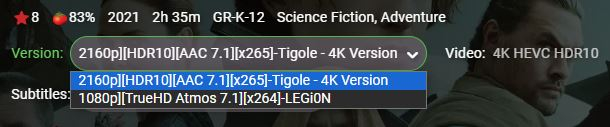
Hello again ! Hope you're doing great. I have a suggestion that might be useful to some of us, or at least make the general look a tiny bit more "organized". [ for those that don't use this ] When a film has multiple versions, the way it works currently, as far as I understand, is that both the files have the same name (also same as the parent folder) with a different "ending". For example: Folder: The Movie (2023) Files: The Movie (2023) - 1080p Version.mkv The Movie (2023) - 4K Version.mkv So using this structure, Emby would show each version as: "1080p Version" and "4K Version" accordingly in the UI selector. [ the problem with the current mechanism ] Some of us, keep out films using this folder structure, but the file naming is different. It's something like: Movie Title (year) - {imdbid} [resolution] [audio format] [encoding]-releaseGroup For example, for the film "Dune" the actual file naming is: Dune (2021) {imdb-tt1160419} [Bluray-1080p][TrueHD Atmos 7.1][x264]-LEGi0N.mkv The 4K version though, is named: Dune (2021) {imdb-tt1160419} [Bluray-2160p][HDR10][TrueHD Atmos 7.1][x265]-Tigole - 4K Version Since both file names start with the Film's name, its year and imdbid, they are the same up to that point. Everything beyond that, is different, always depending on the specific file. So, for my case the UI shows the two versions as such: // SideNote // As a bonus, I don't even keep those two files in the same folder. I have seperate folders for FullHD and 4K files. The subfolders are named exactly the same though, so Emby figures that out and it works great. [ what I'd suggest ] The thing I would suggest, and definitely like, is for us to be able to somehow set a Custom Name for each version, IF NEEDED. I know I can do that by keeping the filenames up to the version, exactly the same, but that defeats the purpose of naming them according to what they are. I don't know HOW would that be possible or how it should be implemented. Maybe in the nfo file ? Maybe using a custom TAG in the filename? Such as: {embyver-4K Version} (same as the imdb tag). That would be up to the devs. What I do know is, that this would be a nice quality of life update that's not breaking anything. PS. The current Version naming system, could obviously co-exist, and if NO CUSTOM NAME IS SUPPLIED, then revert to default naming. I'm suggesting a NEW feature. Not the replacement of a current one. Thank you. Have a nice day buds.
 1 point
 -
I know that new releases channel plugin is not in the catalog. But if there are any issues regarding it, post here and we'll try to get it fixed. Latest version Emby.NewReleases_v1.0.0.5.zip1 point
-
I just received an email from Open subtitles. Wondering what this means for Emby? I''m not a VIP member so apparently the API will stop working for me on Jan 1, didn't know if anyone else knew about this or has planned for it in regards to emby integration. Thanks1 point
-
What OS? Intel CPUs/iGPUs are the way to go, the newer the better. It's hard to justify a discrete GPU with what Intel QuickSync can bring to the table. If using Windows then the latest gens should be fine but if using Linux then be aware that kernel support lags a little behind and Emby support is further behind - maybe by a gen or two on stable releases.1 point
-
It’s only available after authentication.1 point
-
Figured it out...I was deploying the wrong image. I'm running my PI on the lite 32bit image, not 64. I wrongly assumed that the emby/embyserver pull would automatically pull the right image. I then wrongly tried to pull the 64bit image which gave the same error. When I was pulling the lscr.io/linuxserver/emby:latest image, it was pulling the correct image.1 point
-
Just note that streaming video or other large media files via cloudflares CDN (proxy) is prohibited unless that media is also hosted on a cloudflare service. https://blog.cloudflare.com/updated-tos/ https://www.cloudflare.com/service-specific-terms-application-services/#content-delivery-network-terms You'll likely get throttled at somepoint. I was and just switched to using their DNS only.1 point
-
this post that @Lukegave you earlier shows all of the suggested cloudflare settings while still using caching for images and stuff... its one of the main reasons to even use Cloudflare is the caching of images, cover art etc.. particularly the two rules you need to create.1 point
-
I've recently migrated my Emby server from an old Win10Pro to a new Win11Pro system. Emby Connect worked fine with the old server. But now I receive an "Unable to reach server. We're unable to connect to the selected server right now. Please ensure it is running and try again." If I click on the three dots on the server-name/IP in Emby Connect, then click on View Server Info, I can connect to my server outside my home network by using the Remote (WAN) Address shown. Anyone know how I can clear up this error?1 point
-
HI, yes, in the feature requests section.1 point
-
Hi. Themes are not available in Roku yet. We will fix the tag sorting - thanks for reporting. Finally, not remembering filters is by design at this time as we find many people forget they set them and then think something is broken.1 point
-
That's fine... the drive has enough space1 point
-
Luke, Thanks for the reply and your answer was actually what I expected. I've done a little network programming and don't recall ever specifying the protocol to use, but thought maybe there was a optional parm to do so. Would seem a silly thing for a program to do, though. Your suggestion of disabling IPv6 (I did it on the Linux server rather than the router) worked perfectly. At least on a few quick tests, and reviews of the logs, it looks much better. Headsmack to myself for not thinking of it. At some future time, I may try to determine how Linux decides which protocol to use. I remain baffled as to why a URL request from my browser used IPv4, while the same URL from Emby was sent using IPv6, and why it did not fall back to IPv4 when v6 timed out. Concerns for another day. Thanks for all of your suggestions and help. Happy New Year!1 point
-
More or less, yes. Every library item (not the real file) from the paths you've selected is examined for data in every single condition. In the new plugin there's an extra debug logging of the channel rules for a selected channel. But that will probably explode your log file. I will look into adding some time measurement.1 point
-
https://support.symfonium.app/t/how-can-i-pay-for-symfonium-without-google-play/12901 point
-
Hmm that's annoying. Means they haven't completely converted all movies as first thought.
 1 point
 -
Correct, it's purpose is keeping track of deleted content. Emby server's native API has no functionality for queries like. "Deleted content since"... That's where the plugin jumps in.1 point
-
HI, yes this will be in the upcoming 4.8 server release. Thanks.1 point
-
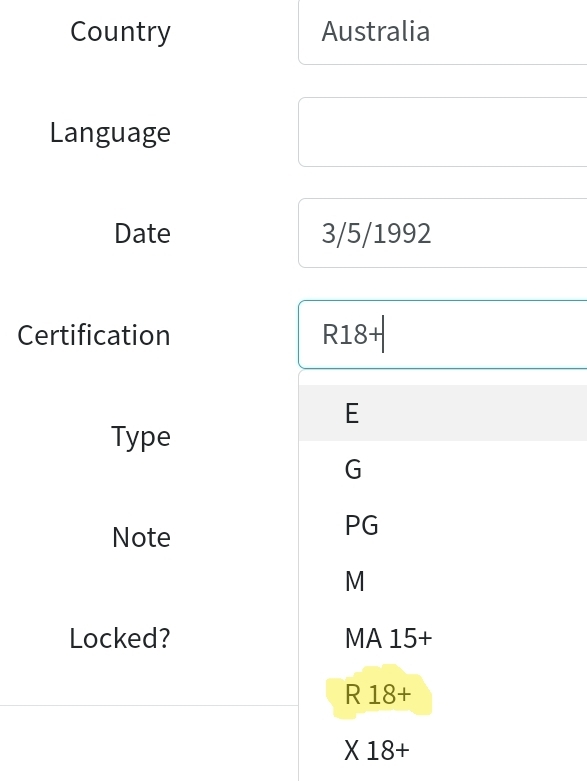
AU-MA15+ 82 AU-MA 15+ 27 AU-R18+ 4 AU-R 18+ 4 yeah this is a pain, a few ways to "fix" it, just remove all spaces from ALL ratings, having a mapping...something else. at least these are the "same" rating just seperated by the space. And then there are siutations like this, from what I can see TMDB does not have a rating for AU so it alls back to the US one and that is ok but then it does not add the AU- to the front as it is not an actual AU ratting and thus I end up with split rattings PG 20 and AU-PG 1851 point
-
Just another ping for this please1 point
-
1 point
-
That worked perfectly. Thanks!1 point
-
Have you tried the beta of 4.8? There have been many improvements in this area. Alternatively, if you follow Emby's naming guidelines you will find that it does as well as Plex does with Plex's guidelines... Paul1 point
-
We'll update the Roku app to match the web app. Thanks.1 point
-
Happy New Year to All, and wish you good Emby entertainment for 2024! Thanks at QuickMic for that1 point
-
That seems to have solved it! thanks1 point
-
I miss this feature as well. I've been holding off on upgrading to 4.8 because I like to be able to add a video to a playlist while I'm watching. Can we not just put that in the Gear menu? Or a right-click menu? Or even under the info tab would be fine. In 4.8, I have to exit from the video first, add it to the playlist, then resume watching the video.1 point
-
@pir8radio http2 is being depreciated on listen line. change this ## Start of actual server blocks server { listen [::]:443 ssl http2; ## Listens on port 443 IPv6 with http2 and ssl enabled listen 443 ssl http2; ## Listens on port 443 IPv4 with http2 and ssl enabled proxy_buffering off; ## Sends data as fast as it can not buffering large chunks. to this server { listen [::]:443 ssl; ## Listens on port 443 IPv6 ssl enabled listen 443 ssl; ## Listens on port 443 IPv4 ssl enabled http2 on; ## Enables HTTP2 proxy_buffering off; ## Sends data as fast as it can not buffering large chunks.1 point
-
Hi there, what version of the server are you running? Have you compared your file naming to our TV Naming Guide? TV Naming1 point
-
We're close though, so stay tuned.1 point
-
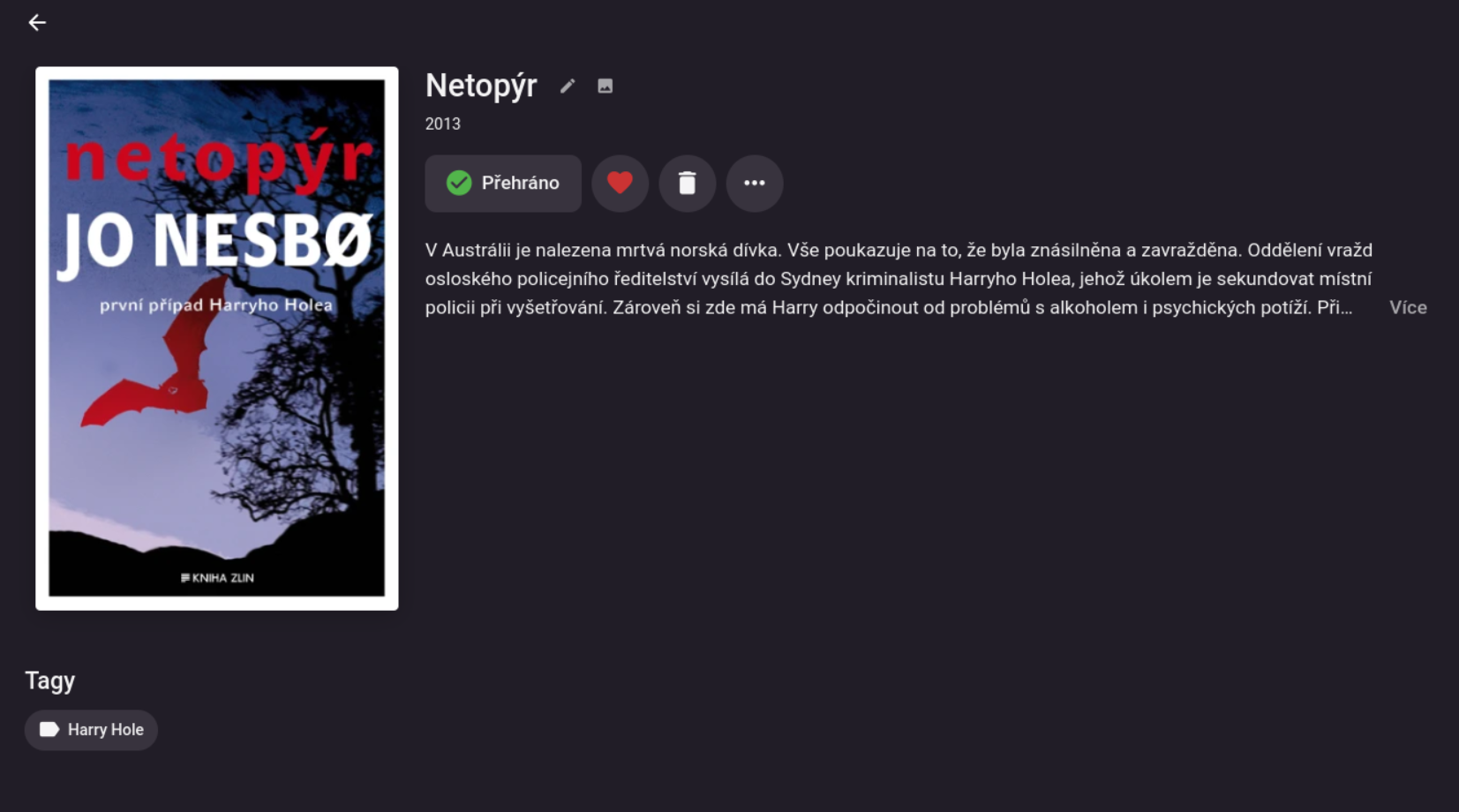
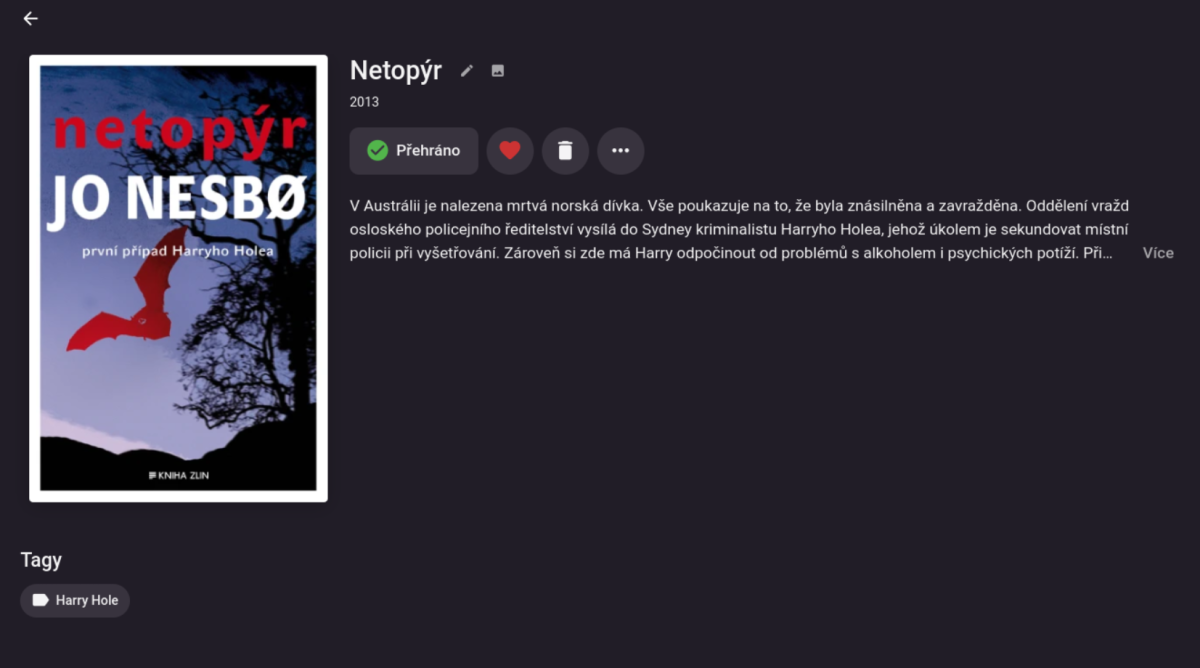
Hi all, I spent some time with fighting against .NET and Windows (I am a Java guy :) and created a prototype of Emby plugin for EPUB books. It provides really just a basic functionality - the advantage of EPUB is that it typically contains all the metadata (title, author, cover, description, year, etc.) so no need to connect remotely anywhere (yes, this part could be possibly improved, but very likely not by me :). So, what it does exactly: it updates Emby metadata on library item addition it does the same also when one likes/unlikes the given book (to be able to manually trigger metadata refresh; this could be possibly removed, I have used this a lot during my testing) instead of collections, it adds tags to the books (see the last image); this is to avoid mixing movie collections with the book ones, I did not like that, it seems to me that collections are more movie friendly... this also requires proper naming of the EPUB files - personally, I am using form of "<series><index>.<title>.epub" - this way, all the files are always properly sorted, even in my ordinary file manager (I use file name sorting also in my e-book reader, too). So, the same sorting is applied also in Emby. (That is all, so no reading or so; I have an e-book reader so I use it, of course.) However, there are some possibly problematic parts, like - I am using an EPUB library, which is free to use, but I was not able to "bundle" it correctly into my plugin (so I simply copied its sources into my project - ugly, but works, but I may be violating its license, I don't know; any hints how to do it properly are welcome, thanks). Also, the code is very ugly (using VS and Windows is more a fight for me, as I wrote :) so it is not published anywhere. BTW, it should not be difficult to add support for e.g. MOBI books there (I guess they are similar to EPUBs, no? I mean, they could contain all the book metadata too, no?), although it would mean some more code cleanup and refactoring, but nothing complicated I believe. Would anyone be interested in this plugin? If so, I could try to prepare a public GitHub repo, but it would take me some time to prepare it (the reasons are explained above). This is how it looks like on my Emby instance:

 1 point
 -
Hey @Luke Is this still on the roadmap? Would be nice to have the option to add to favs while watching / shuffling through video content and also would steer towards a more unified user-experience. Thanks!1 point
-
Then lets hope the changes made to the Beta implement a sensible scanning mode for brand new 'out of the box' installs - as currently the perception it gives to the end users is 'it's slow' and they would be correct in the observation. Rather than process each item in series (metadata, thumbs, intro's etc), imo emby needs to batch the functions and do them one at a time - still in series, but in priority order. ie do all metadata, then do all thumbs, then do all intro's. That way, the libraries become 'populated/usable' much more quickly - and you'll get less issues with reports of it being 'slow' - when it really isn't.1 point
-
Hey thanks for the quick reply. I am referencing the webapp. Yes that is the current feature. It used to be save the singular clip to a playlist or collection of your choice, now it adds the entire que which if you are on shuffle can be hundreds of videos.1 point
-
This works fine when not shuffling. The playback UI is different when shuffling, in both Safari and Chrome on Mac and Windows. I get only the following controls at the bottom (left and right). Unfortunately I can't even find a way to switch back to normal play mode in the middle of a shuffle; the only way I can find to favorite something is to try to remember the file name and then go search for it to get the normal playback UI or info pane. This is undesirable, since it ends the shuffle, which is the whole point of randomly browsing.

 1 point